How to Migrate from 
Vtiger to OroCRM 
http://www.data2crm.com/migration
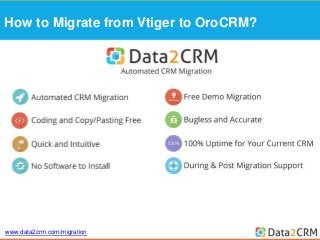
How to Migrate from Vtiger to OroCRM? 
www.data2crm.com/migration
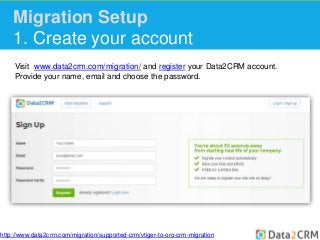
Migration Setup 
1. Create your account 
Visit www.data2crm.com/migration/ and register your Data2CRM account. 
Provide your name, email and choose the password. 
http://www.data2crm.com/migration/supported-crm/vtiger-to-oro-crm-migration
Migration Setup 
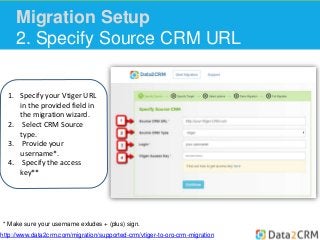
2. Specify Source CRM URL 
1. Specify your Vtiger URL 
in the provided field in 
the migration wizard. 
2. Select CRM Source 
type. 
3. Provide your 
username*. 
4. Specify the access 
key** 
* Make sure your username exludes + (plus) sign. 
http://www.data2crm.com/migration/supported-crm/vtiger-to-oro-crm-migration
Migration Setup 
2. Specify Source CRM URL 
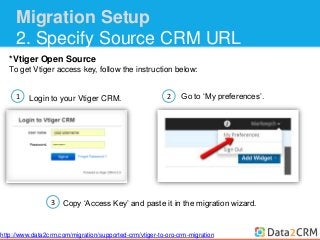
*Vtiger Open Source 
To get Vtiger access key, follow the instruction below: 
1 
Login to your Vtiger CRM. 
2 Go to ‘My preferences’. 
Copy ‘Access Key’ and paste it in the migration wizard. 
3 
http://www.data2crm.com/migration/supported-crm/vtiger-to-oro-crm-migration
Migration Setup 
2. Specify Source CRM URL 
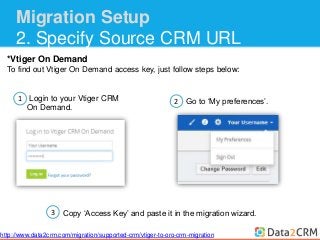
*Vtiger On Demand 
To find out Vtiger On Demand access key, just follow steps below: 
1 
Login to your Vtiger CRM 
On Demand. 
2 Go to ‘My preferences’. 
Copy ‘Access Key’ and paste it in the migration wizard. 
3 
http://www.data2crm.com/migration/supported-crm/vtiger-to-oro-crm-migration
Migration Setup 
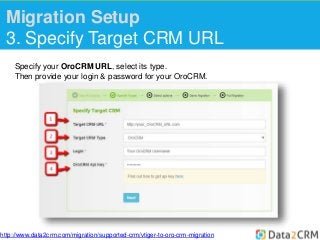
3. Specify Target CRM URL 
Specify your OroCRM URL, select its type. 
Then provide your login & password for your OroCRM. 
http://www.data2crm.com/migration/supported-crm/vtiger-to-oro-crm-migration
Migration Setup 
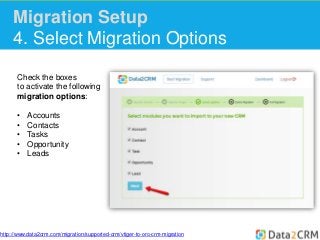
4. Select Migration Options 
Check the boxes 
to activate the following 
migration options: 
• Accounts 
• Contacts 
• Tasks 
• Opportunity 
• Leads 
http://www.data2crm.com/migration/supported-crm/vtiger-to-oro-crm-migration
Migration Setup 
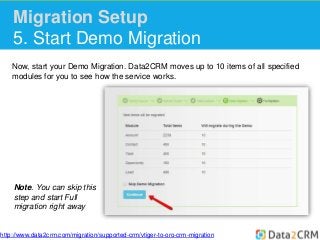
5. Start Demo Migration 
Now, start your Demo Migration. Data2CRM moves up to 10 items of all specified 
modules for you to see how the service works. 
Note. You can skip this 
step and start Full 
migration right away 
http://www.data2crm.com/migration/supported-crm/vtiger-to-oro-crm-migration
Migration Setup 
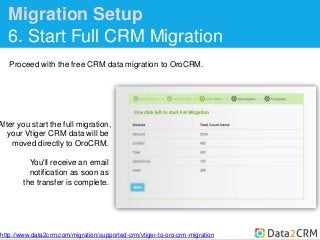
6. Start Full CRM Migration 
Proceed with the free CRM data migration to OroCRM. 
After you start the full migration, 
your Vtiger CRM data will be 
moved directly to OroCRM. 
You'll receive an email 
notification as soon as 
the transfer is complete. 
http://www.data2crm.com/migration/supported-crm/vtiger-to-oro-crm-migration
Migration Setup 
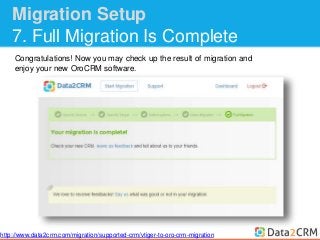
7. Full Migration Is Complete 
Congratulations! Now you may check up the result of migration and 
enjoy your new OroCRM software. 
http://www.data2crm.com/migration/supported-crm/vtiger-to-oro-crm-migration
www.data2crm.com/migration

How to Migrate Vtiger to OroCRM with Data2CRM

  • 1.
    How to Migratefrom Vtiger to OroCRM http://www.data2crm.com/migration
  • 2.
    How to Migratefrom Vtiger to OroCRM? www.data2crm.com/migration
  • 3.
    Migration Setup 1.Create your account Visit www.data2crm.com/migration/ and register your Data2CRM account. Provide your name, email and choose the password. http://www.data2crm.com/migration/supported-crm/vtiger-to-oro-crm-migration
  • 4.
    Migration Setup 2.Specify Source CRM URL 1. Specify your Vtiger URL in the provided field in the migration wizard. 2. Select CRM Source type. 3. Provide your username*. 4. Specify the access key** * Make sure your username exludes + (plus) sign. http://www.data2crm.com/migration/supported-crm/vtiger-to-oro-crm-migration
  • 5.
    Migration Setup 2.Specify Source CRM URL *Vtiger Open Source To get Vtiger access key, follow the instruction below: 1 Login to your Vtiger CRM. 2 Go to ‘My preferences’. Copy ‘Access Key’ and paste it in the migration wizard. 3 http://www.data2crm.com/migration/supported-crm/vtiger-to-oro-crm-migration
  • 6.
    Migration Setup 2.Specify Source CRM URL *Vtiger On Demand To find out Vtiger On Demand access key, just follow steps below: 1 Login to your Vtiger CRM On Demand. 2 Go to ‘My preferences’. Copy ‘Access Key’ and paste it in the migration wizard. 3 http://www.data2crm.com/migration/supported-crm/vtiger-to-oro-crm-migration
  • 7.
    Migration Setup 3.Specify Target CRM URL Specify your OroCRM URL, select its type. Then provide your login & password for your OroCRM. http://www.data2crm.com/migration/supported-crm/vtiger-to-oro-crm-migration
  • 8.
    Migration Setup 4.Select Migration Options Check the boxes to activate the following migration options: • Accounts • Contacts • Tasks • Opportunity • Leads http://www.data2crm.com/migration/supported-crm/vtiger-to-oro-crm-migration
  • 9.
    Migration Setup 5.Start Demo Migration Now, start your Demo Migration. Data2CRM moves up to 10 items of all specified modules for you to see how the service works. Note. You can skip this step and start Full migration right away http://www.data2crm.com/migration/supported-crm/vtiger-to-oro-crm-migration
  • 10.
    Migration Setup 6.Start Full CRM Migration Proceed with the free CRM data migration to OroCRM. After you start the full migration, your Vtiger CRM data will be moved directly to OroCRM. You'll receive an email notification as soon as the transfer is complete. http://www.data2crm.com/migration/supported-crm/vtiger-to-oro-crm-migration
  • 11.
    Migration Setup 7.Full Migration Is Complete Congratulations! Now you may check up the result of migration and enjoy your new OroCRM software. http://www.data2crm.com/migration/supported-crm/vtiger-to-oro-crm-migration
  • 12.