#wpewebinar
Vasken Hauri, 10up
Chris Wiegman, WP Engine
How to optimize search for your
WordPress eCommerce Store
Better user experience, higher conversions and
higher sales
#wpewebinar
What You’ll Learn
● How to configure your analytics for your type of business
● How to look at your analytics data to create custom search results
● How to tailor your search experience for your users (and beat the
competition!)
● Why site performance matters and how your search experience can
contribute to it
● Q&A
#wpewebinar
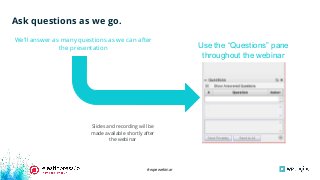
Ask questions as we go.
We’ll answer as many questions as we can after
the presentation
Slides and recording will be
made available shortly after
the webinar
Use the “Questions” pane
throughout the webinar
#wpewebinar
VP, Platforms and Systems
10up
Vasken Hauri
● Product manager for ElasticPress.io
● Lives on a farm outside Yosemite
● Taught Latin and sailing (not
simultaneously)
Senior Software Engineer
WP Engine
Chris Wiegman
● Helped build ElasticPress while at
10up
● Former airline captain
● Former trumpet player
#wpewebinar
How to set up your analytics
properly
#wpewebinar
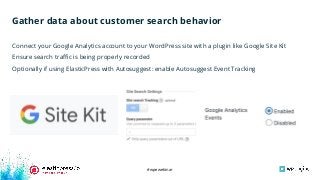
Gather data about customer search behavior
Connect your Google Analytics account to your WordPress site with a plugin like Google Site Kit
Ensure search traffic is being properly recorded
Optionally if using ElasticPress with Autosuggest: enable Autosuggest Event Tracking
#wpewebinar
How to look at your analytics
data to create custom search
results
#wpewebinar
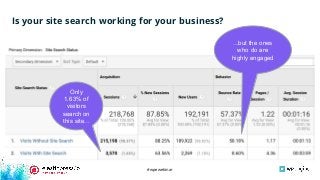
Is your site search working for your business?
Only
1.63% of
visitors
search on
this site...
...but the ones
who do are
highly engaged
#wpewebinar
Poll: What % of your site
traffic utilizes search?
#wpewebinar
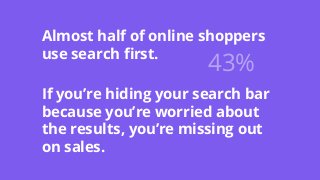
Almost half of online shoppers
use search first.
If you’re hiding your search bar
because you’re worried about
the results, you’re missing out
on sales.
43%
#wpewebinar
Target search intelligently
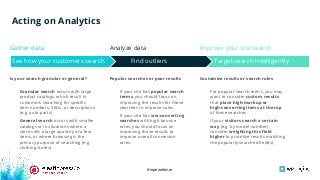
Acting on Analytics
Find outliers
Granular search occurs with large
product catalogs, which result in
customers searching for specific
item numbers, SKUs, or descriptions
(e.g. auto parts).
General search occurs with smaller
catalogs or in situations where a
store sells a large quantity of a few
items, or where browsing is the
primary purpose of searching (e.g.
clothing stores).
Gather data
Is your search granular or general?
If your site has popular search
terms, you should focus on
improving the results for these
searches to improve sales.
If your site has low-converting
searches with high bounce
rates, you should focus on
improving those results to
improve overall conversion
rates.
For popular search terms, you may
want to consider custom results
that place high-markup or
high-converting items at the top
of these searches.
If your visitors search a certain
way (e.g. by model number),
consider weighting this field
higher to prioritize results matching
the popularly-searched field(s).
Analyze data Improve your site search
See how your customers search
Popular searches or poor results Customize results or search rules
#wpewebinar
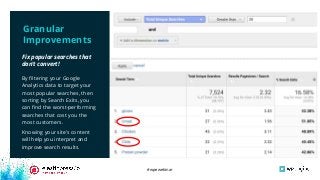
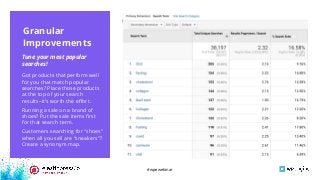
By filtering your Google
Analytics data to target your
most popular searches, then
sorting by Search Exits, you
can find the worst-performing
searches that cost you the
most customers.
Knowing your site’s content
will help you interpret and
improve search results.
Fix popular searches that
don’t convert!
Granular
Improvements
#wpewebinar
Got products that perform well
for you that match popular
searches? Place those products
at the top of your search
results--it’s worth the effort.
Running a sale on a brand of
shoes? Put the sale items first
for that search term.
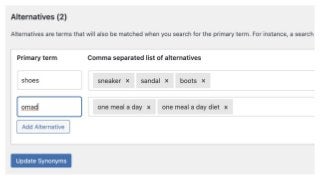
Customers searching for “shoes”
when all you sell are “sneakers”?
Create a synonym map.
Tune your most popular
searches!
Granular Improvements
Granular
Improvements
#wpewebinar
#wpewebinar
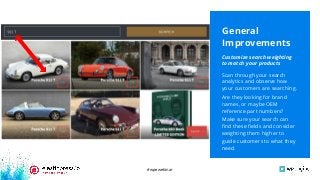
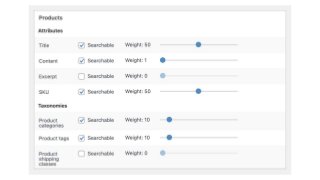
Scan through your search
analytics and observe how
your customers are searching.
Are they looking for brand
names, or maybe OEM
reference part numbers?
Make sure your search can
find these fields and consider
weighting them higher to
guide customers to what they
need.
Customize search weighting
to match your products
General
Improvements
#wpewebinar
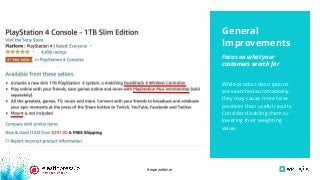
While product descriptions
are searched automatically,
they may cause more false
positives than useful results.
Consider disabling them or
lowering their weighting
value.
Focus on what your
customers search for
General
Improvements
#wpewebinar
#wpewebinar
Why site performance matters
and how your search
experience can contribute to it
#wpewebinar
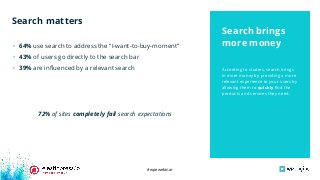
According to studies, search brings
in more money by providing a more
relevant experience to your users by
allowing them to quickly find the
products and services they need.
• 64% use search to address the “I-want-to-buy-moment”
• 43% of users go directly to the search bar
• 39% are influenced by a relevant search
72% of sites completely fail search expectations
Search brings
more money
Search matters
#wpewebinar
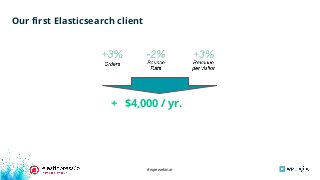
Our first Elasticsearch client
+ $4,000 / yr.
#wpewebinar
Search improves conversions because
shoppers find what they’re looking for faster
#wpewebinar
According to a study by Google, up
to 53% of users will leave a site that
takes longer than 3 seconds to load.
Slow sites lose shoppers
● Search works because it allows customers to find what
they’re looking for as quickly as possible
● Your site must still be fast enough to allow users to be
able to search
● None of it matters if the user can’t complete the checkout
process quickly
Search is part
of performance
The fastest stores will win the race
#wpewebinar
Other factors of WooCommerce site performance
● Search is only one part of WooCommerce site performance
○ Theme selection
○ Plugin selection
○ Store and other content
○ Cart Fragments
○ Order table size
#wpewebinar
Site performance starts the moment
you look for a theme for your site.
A well optimized theme, like
Storefront, will reduce the load on
your host resulting in a much faster
site.
Bloated themes slow sites
Theme
Selection
Choosing your theme matters
#wpewebinar
Themes are not the future of WordPress
#wpewebinar
Two dozen large, well-coded plugins
may perform better than a single,
tiny poorly-coded plugin.
In all cases, less features almost
always means better performance.
Quality over quantity
● Plugins provide functionality
● Plugins provide block libraries which can make up for a
bad theme
○ Plugins are the future of themes
● Well-rated plugins by established authors are always a
safe bet
● More plugins may !== more features
● More features !== more customers
Plugin choice
matters
Choosing the right plugins
#wpewebinar
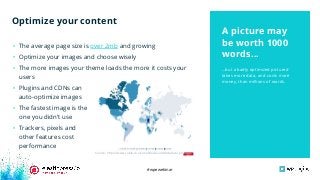
...but a badly optimized pictured
takes more data, and costs more
money, than millions of words.
• The average page size is over 2mb and growing
• Optimize your images and choose wisely
• The more images your theme loads the more it costs your
users
• Plugins and CDNs can
auto-optimize images
• The fastest image is the
one you didn’t use
• Trackers, pixels and
other features cost
performance
A picture may
be worth 1000
words...
Optimize your content
Source: https://www.cable.co.uk/mobiles/worldwide-data-pricing/
#wpewebinar
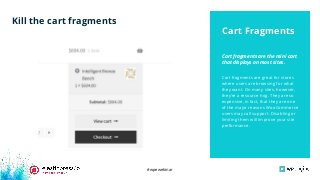
Cart fragments are great for stores
where users are browsing for what
they want. On many sites, however,
they’re a resource hog. They are so
expensive, in fact, that they are one
of the major reasons WooCommerce
users may call support. Disabling or
limiting them will improve your site
performance.
Cart fragments are the mini cart
that displays on most sites.
Cart Fragments
Kill the cart fragments
#wpewebinar
Don’t hoard order data
● Large amounts of order data cost processing time
● Removing obsolete order data is best
● Elasticsearch can index order data
● Most stores export order data to their accounting software
● Once an order is no longer actionable to a user, it may no longer need to be saved
#wpewebinar
Slides and recording will be made available shortly after the webinar
QUESTIONS AND ANSWERS
#wpewebinar
Disable Cart Fragments plugin by Optimocha
Resources.
Site Kit by Google
Set up Site Search
Configuring ElasticPress Autosuggest
Storefront theme
WP Engine Ecommerce plans
#wpewebinar
Next Up.
Register Now:
http://wpeng.in/
scale-agency
Wednesday, April 14
11:00 a.m. CDT,
12:00 p.m. EDT,
9:00 a.m. PDT,
16:00 UTC/GMT
#wpewebinar
HELP US IMPROVE
#wpewebinar
Thank You

How to optimize search for your WordPress eCommerce store

  • 1.
    #wpewebinar Vasken Hauri, 10up ChrisWiegman, WP Engine How to optimize search for your WordPress eCommerce Store Better user experience, higher conversions and higher sales
  • 2.
    #wpewebinar What You’ll Learn ●How to configure your analytics for your type of business ● How to look at your analytics data to create custom search results ● How to tailor your search experience for your users (and beat the competition!) ● Why site performance matters and how your search experience can contribute to it ● Q&A
  • 3.
    #wpewebinar Ask questions aswe go. We’ll answer as many questions as we can after the presentation Slides and recording will be made available shortly after the webinar Use the “Questions” pane throughout the webinar
  • 4.
    #wpewebinar VP, Platforms andSystems 10up Vasken Hauri ● Product manager for ElasticPress.io ● Lives on a farm outside Yosemite ● Taught Latin and sailing (not simultaneously) Senior Software Engineer WP Engine Chris Wiegman ● Helped build ElasticPress while at 10up ● Former airline captain ● Former trumpet player
  • 5.
    #wpewebinar How to setup your analytics properly
  • 6.
    #wpewebinar Gather data aboutcustomer search behavior Connect your Google Analytics account to your WordPress site with a plugin like Google Site Kit Ensure search traffic is being properly recorded Optionally if using ElasticPress with Autosuggest: enable Autosuggest Event Tracking
  • 7.
    #wpewebinar How to lookat your analytics data to create custom search results
  • 8.
    #wpewebinar Is your sitesearch working for your business? Only 1.63% of visitors search on this site... ...but the ones who do are highly engaged
  • 9.
    #wpewebinar Poll: What %of your site traffic utilizes search?
  • 10.
    #wpewebinar Almost half ofonline shoppers use search first. If you’re hiding your search bar because you’re worried about the results, you’re missing out on sales. 43%
  • 11.
    #wpewebinar Target search intelligently Actingon Analytics Find outliers Granular search occurs with large product catalogs, which result in customers searching for specific item numbers, SKUs, or descriptions (e.g. auto parts). General search occurs with smaller catalogs or in situations where a store sells a large quantity of a few items, or where browsing is the primary purpose of searching (e.g. clothing stores). Gather data Is your search granular or general? If your site has popular search terms, you should focus on improving the results for these searches to improve sales. If your site has low-converting searches with high bounce rates, you should focus on improving those results to improve overall conversion rates. For popular search terms, you may want to consider custom results that place high-markup or high-converting items at the top of these searches. If your visitors search a certain way (e.g. by model number), consider weighting this field higher to prioritize results matching the popularly-searched field(s). Analyze data Improve your site search See how your customers search Popular searches or poor results Customize results or search rules
  • 12.
    #wpewebinar By filtering yourGoogle Analytics data to target your most popular searches, then sorting by Search Exits, you can find the worst-performing searches that cost you the most customers. Knowing your site’s content will help you interpret and improve search results. Fix popular searches that don’t convert! Granular Improvements
  • 13.
    #wpewebinar Got products thatperform well for you that match popular searches? Place those products at the top of your search results--it’s worth the effort. Running a sale on a brand of shoes? Put the sale items first for that search term. Customers searching for “shoes” when all you sell are “sneakers”? Create a synonym map. Tune your most popular searches! Granular Improvements Granular Improvements
  • 14.
  • 15.
    #wpewebinar Scan through yoursearch analytics and observe how your customers are searching. Are they looking for brand names, or maybe OEM reference part numbers? Make sure your search can find these fields and consider weighting them higher to guide customers to what they need. Customize search weighting to match your products General Improvements
  • 16.
    #wpewebinar While product descriptions aresearched automatically, they may cause more false positives than useful results. Consider disabling them or lowering their weighting value. Focus on what your customers search for General Improvements
  • 17.
  • 18.
    #wpewebinar Why site performancematters and how your search experience can contribute to it
  • 19.
    #wpewebinar According to studies,search brings in more money by providing a more relevant experience to your users by allowing them to quickly find the products and services they need. • 64% use search to address the “I-want-to-buy-moment” • 43% of users go directly to the search bar • 39% are influenced by a relevant search 72% of sites completely fail search expectations Search brings more money Search matters
  • 20.
  • 21.
    #wpewebinar Search improves conversionsbecause shoppers find what they’re looking for faster
  • 22.
    #wpewebinar According to astudy by Google, up to 53% of users will leave a site that takes longer than 3 seconds to load. Slow sites lose shoppers ● Search works because it allows customers to find what they’re looking for as quickly as possible ● Your site must still be fast enough to allow users to be able to search ● None of it matters if the user can’t complete the checkout process quickly Search is part of performance The fastest stores will win the race
  • 23.
    #wpewebinar Other factors ofWooCommerce site performance ● Search is only one part of WooCommerce site performance ○ Theme selection ○ Plugin selection ○ Store and other content ○ Cart Fragments ○ Order table size
  • 24.
    #wpewebinar Site performance startsthe moment you look for a theme for your site. A well optimized theme, like Storefront, will reduce the load on your host resulting in a much faster site. Bloated themes slow sites Theme Selection Choosing your theme matters
  • 25.
    #wpewebinar Themes are notthe future of WordPress
  • 26.
    #wpewebinar Two dozen large,well-coded plugins may perform better than a single, tiny poorly-coded plugin. In all cases, less features almost always means better performance. Quality over quantity ● Plugins provide functionality ● Plugins provide block libraries which can make up for a bad theme ○ Plugins are the future of themes ● Well-rated plugins by established authors are always a safe bet ● More plugins may !== more features ● More features !== more customers Plugin choice matters Choosing the right plugins
  • 27.
    #wpewebinar ...but a badlyoptimized pictured takes more data, and costs more money, than millions of words. • The average page size is over 2mb and growing • Optimize your images and choose wisely • The more images your theme loads the more it costs your users • Plugins and CDNs can auto-optimize images • The fastest image is the one you didn’t use • Trackers, pixels and other features cost performance A picture may be worth 1000 words... Optimize your content Source: https://www.cable.co.uk/mobiles/worldwide-data-pricing/
  • 28.
    #wpewebinar Cart fragments aregreat for stores where users are browsing for what they want. On many sites, however, they’re a resource hog. They are so expensive, in fact, that they are one of the major reasons WooCommerce users may call support. Disabling or limiting them will improve your site performance. Cart fragments are the mini cart that displays on most sites. Cart Fragments Kill the cart fragments
  • 29.
    #wpewebinar Don’t hoard orderdata ● Large amounts of order data cost processing time ● Removing obsolete order data is best ● Elasticsearch can index order data ● Most stores export order data to their accounting software ● Once an order is no longer actionable to a user, it may no longer need to be saved
  • 30.
    #wpewebinar Slides and recordingwill be made available shortly after the webinar QUESTIONS AND ANSWERS
  • 31.
    #wpewebinar Disable Cart Fragmentsplugin by Optimocha Resources. Site Kit by Google Set up Site Search Configuring ElasticPress Autosuggest Storefront theme WP Engine Ecommerce plans
  • 32.
    #wpewebinar Next Up. Register Now: http://wpeng.in/ scale-agency Wednesday,April 14 11:00 a.m. CDT, 12:00 p.m. EDT, 9:00 a.m. PDT, 16:00 UTC/GMT
  • 33.
  • 34.