








Instagram Video
Content Template to Skyrocket Growth
WRITE DOWN:
1. Naturally Motivates: What naturally
motivates and inspires them?
2. Energizes: What energizes and
encourages them?
3. Excites: What gets them excited, talking,
and sharing with others?
4. Desire: What do they deeply desire to
know, do, and learn?
5. Story: How does your brand story
resonate and remain relevant?
STEP 1: Know Your Instagram Audience Needs
The questions in this
exercise will help you
to identify:
● Your unique expertise
● Your core differentiators
● Your specific solution
● The content topics you’ll share
STEP 2: Perform an Instagram Video Brainstorm
What qualifies you as an expert
within your industry? List 3-5.
What one thing do you do
better than anyone else?
What are the 3 biggest
problems your company solves?
What proof do you have
that you’re the best?
3-part video
content plan:
1. Determine the goal of your
Instagram video content
2. Discover what type of video
content you’ll share
3. A simple way to plan a
massive amount of content
STEP 3: Design Your Instagram Video Content Plan
What do you want to
achieve?
● Awareness?
● Traffic?
● Sales?
● All of the above?
STEP 3: Design Your Instagram Video Content Plan
What are the top 5 topics
you are known for?
For example, if you’re a
fitness expert, you might focus on:
● Nutrition
● Health
● Workouts
● Weight Loss
● Apparel
STEP 3: Design Your Instagram Video Content Plan
Those Topics Become Your Video Content!
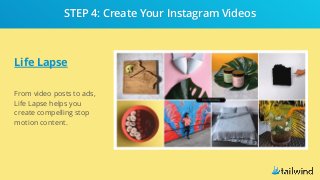
Life Lapse
From video posts to ads,
Life Lapse helps you
create compelling stop
motion content.
STEP 4: Create Your Instagram Videos
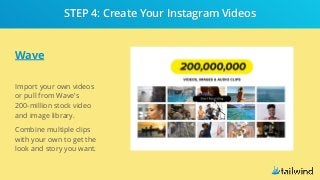
Wave
Import your own videos
or pull from Wave’s
200-million stock video
and image library.
Combine multiple clips
with your own to get the
look and story you want.
STEP 4: Create Your Instagram Videos
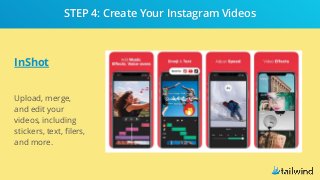
InShot
Upload, merge,
and edit your
videos, including
stickers, text, filers,
and more.
STEP 4: Create Your Instagram Videos
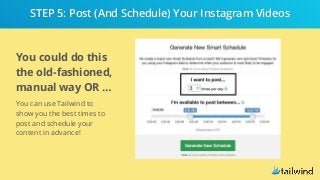
You could do this
the old-fashioned,
manual way OR …
You can use Tailwind to
show you the best times to
post and schedule your
content in advance!
STEP 5: Post (And Schedule) Your Instagram Videos
Sign Up for Your FREE Trial
Ready to
create, post,
and schedule
videos to
Instagram?

How to Create an Instagram Video Content Strategy

  • 1.
  • 2.
    WRITE DOWN: 1. NaturallyMotivates: What naturally motivates and inspires them? 2. Energizes: What energizes and encourages them? 3. Excites: What gets them excited, talking, and sharing with others? 4. Desire: What do they deeply desire to know, do, and learn? 5. Story: How does your brand story resonate and remain relevant? STEP 1: Know Your Instagram Audience Needs
  • 3.
    The questions inthis exercise will help you to identify: ● Your unique expertise ● Your core differentiators ● Your specific solution ● The content topics you’ll share STEP 2: Perform an Instagram Video Brainstorm
  • 4.
    What qualifies youas an expert within your industry? List 3-5.
  • 5.
    What one thingdo you do better than anyone else?
  • 6.
    What are the3 biggest problems your company solves?
  • 7.
    What proof doyou have that you’re the best?
  • 8.
    3-part video content plan: 1.Determine the goal of your Instagram video content 2. Discover what type of video content you’ll share 3. A simple way to plan a massive amount of content STEP 3: Design Your Instagram Video Content Plan
  • 9.
    What do youwant to achieve? ● Awareness? ● Traffic? ● Sales? ● All of the above? STEP 3: Design Your Instagram Video Content Plan
  • 10.
    What are thetop 5 topics you are known for? For example, if you’re a fitness expert, you might focus on: ● Nutrition ● Health ● Workouts ● Weight Loss ● Apparel STEP 3: Design Your Instagram Video Content Plan
  • 11.
    Those Topics BecomeYour Video Content!
  • 12.
    Life Lapse From videoposts to ads, Life Lapse helps you create compelling stop motion content. STEP 4: Create Your Instagram Videos
  • 13.
    Wave Import your ownvideos or pull from Wave’s 200-million stock video and image library. Combine multiple clips with your own to get the look and story you want. STEP 4: Create Your Instagram Videos
  • 14.
    InShot Upload, merge, and edityour videos, including stickers, text, filers, and more. STEP 4: Create Your Instagram Videos
  • 15.
    You could dothis the old-fashioned, manual way OR … You can use Tailwind to show you the best times to post and schedule your content in advance! STEP 5: Post (And Schedule) Your Instagram Videos
  • 16.
    Sign Up forYour FREE Trial Ready to create, post, and schedule videos to Instagram?