ReactAJAVASCRIPTLIBRARYFORBUILDINGUSERINTERFACES
강의 순서
1회차
개발 환경 구성 – SublimeText3, Node.js 설치 (필요시)
HTML, JS 기초
React 소개
Node.js 간단한 실습
2회차
React 튜토리얼
React 예제 작성
HeXA - 기초부2 ReactJS Tutorial
오늘 할 것들!
리액트 썰기
props, state
React Component Specification
React Component Lifecycle
예제(유배지) 만들기
HeXA - 기초부2 ReactJS Tutorial
코드를 받아오자(업뎃함)
• GIT이 있건 없건!!
https://github.com/kimxogus/React-web-tutorial 들어갑니다.
HeXA - 기초부2 ReactJS Tutorial
코드를 받아오자(업뎃함)
• GIT이 있건 없건!!
https://github.com/kimxogus/React-web-tutorial 들어갑니다.
Star를 누릅니다. (프리미엄 A/S 서비스)
HeXA - 기초부2 ReactJS Tutorial
코드를 받아오자(업뎃함)
• GIT이 있건 없건!!
https://github.com/kimxogus/React-web-tutorial 들어갑니다.
Star를 누릅니다. (프리미엄 A/S 서비스)
Fork를 누릅니다. (다운로드가 빨라집니다. 똑같은 것 같다면 기분탓)
HeXA - 기초부2 ReactJS Tutorial
코드를 받아오자(업뎃함)
• GIT이 있건 없건!!
https://github.com/kimxogus/React-web-tutorial 들어갑니다.
Star를 누릅니다. (프리미엄 A/S 서비스)
Fork를 누릅니다. (다운로드가 빨라집니다. 똑같은 것 같다면 기분탓)
Download ZIP을 클릭하여 zip파일을 다운
압축 풀기!
HeXA - 기초부2 ReactJS Tutorial
props & state
props state
상위 요소에게서 상속
(기본값은 자신이 정할 수 있다.)
스스로 가지고 있는 값, 상태
값이 바뀌면 Component가 업데이트 된다.
(자세한건 Lifecycle 참고)
하위요소로 값을 전달할 수 있다.
(props 형태로 전달)
HeXA - 기초부2 ReactJS Tutorial
React Component Specification
displayName : Component 이름(JSX를 쓴다면 신경X)
mixins : Addon
statics : Static 값 또는 함수
getDefaultProps : props의 기본값
propTypes : props의 타입 정의
getInitialState : state 기본값 정의
render : 렌더링 함수 (필수!)
HeXA - 기초부2 ReactJS Tutorial
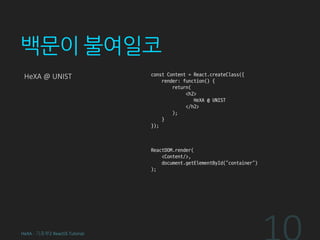
백문이 불여일코
HeXA @ UNIST const Content = React.createClass({
render: function() {
return(
<h2>
HeXA @ UNIST
</h2>
);
}
});
ReactDOM.render(
<Content/>,
document.getElementById(“container”)
);
HeXA - 기초부2 ReactJS Tutorial
백문이 불여일코
HeXA @ UNIST const Content = React.createClass({
render: function() {
return(
<h2>
{this.props.name} @ {this.props.school}
</h2>
);
}
});
ReactDOM.render(
<Content name=“HeXA” school=“UNIST”/>,
document.getElementById(“container”)
);
HeXA - 기초부2 ReactJS Tutorial
백문이 불여일코
HeXA @ UNIST const Content = React.createClass({
getDefaultProps: function() {
return {
name: “HeXA”,
school: “UNIST”
};
},
render: function() {
return (
<h2>
{this.props.name} @ {this.props.school}
</h2>
);
}
});
ReactDOM.render(
<Content/>,
document.getElementById(“container”)
);
HeXA - 기초부2 ReactJS Tutorial
백문이 불여일코
HeXA @ UNIST const Content = React.createClass({
getDefaultProps: function() {
return {
name: “HeXA”,
school: “UNIST”
};
},
propTypes: {
name: React.PropTypes.string,
school: React.PropTypes.string
},
render: function() {
return(
<h2>
{this.props.name} @ {this.props.school}
</h2>
);
}
});
HeXA - 기초부2 ReactJS Tutorial
백문이 불여일코
HeXA @ UNIST
0
const Content = React.createClass({
...
getInitialState: function() {
return {
clicks: 0
};
},
render: function() {
return(
<div>
<h2>
{this.props.name} @ {this.props.school}
</h2>
<h4>{this.state.clicks}</h4>
</div>
);
}
});
HeXA - 기초부2 ReactJS Tutorial
백문이 불여일코
HeXA @ UNIST
0
const Content = React.createClass({
...
getInitialState: function() {
return {
clicks: 0
};
},
render: function() {
return(
<div>
<h2>
{this.props.name} @ {this.props.school}
</h2>
<h4>{this.state.clicks}</h4>
<button type=“button” onClick={this.onClick}>
Increase Number
</button>
</div>
);
},
onClick: function() {
this.setState({clicks: this.state.clicks + 1});
}
});
HeXA - 기초부2 ReactJS Tutorial
Increase Number
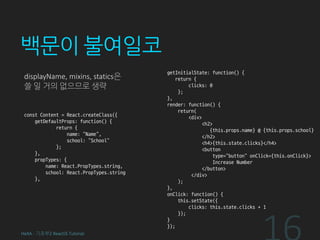
백문이 불여일코
displayName, mixins, statics은
쓸 일 거의 없으므로 생략
const Content = React.createClass({
getDefaultProps: function() {
return {
name: “Name”,
school: “School”
};
},
propTypes: {
name: React.PropTypes.string,
school: React.PropTypes.string
},
getInitialState: function() {
return {
clicks: 0
};
},
render: function() {
return(
<div>
<h2>
{this.props.name} @ {this.props.school}
</h2>
<h4>{this.state.clicks}</h4>
<button
type=“button” onClick={this.onClick}>
Increase Number
</button>
</div>
);
},
onClick: function() {
this.setState({
clicks: this.state.clicks + 1
});
}
});
HeXA - 기초부2 ReactJS Tutorial
React Lifecycle
• Mounting
componentWillMount
componentDidMount
• Updating
componentWillReceiveProps
shouldComponentUpdate
componentWillUpdate
componentDidUpdate
• Unmounting
componentWillUnmount
HeXA - 기초부2 ReactJS Tutorial
React Lifecycle
• Mounting
componentWillMount : 컴포넌트 생성 전
componentDidMount : 컴포넌트 생성 후
• Updating
componentWillReceiveProps : 새로운 props 받기 전
shouldComponentUpdate : 컴포넌트 업데이트 여부
componentWillUpdate : 컴포넌트 업데이트 전
componentDidUpdate : 컴포넌트 업데이트 후
• Unmounting
componentWillUnmount : 컴포넌트 소멸 전
HeXA - 기초부2 ReactJS Tutorial
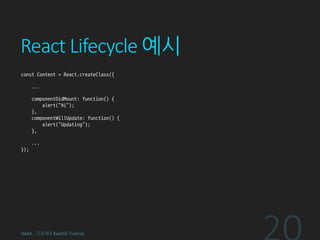
React Lifecycle 예시
const Content = React.createClass({
...
componentDidMount: function() {
alert(“Hi”);
},
...
});
HeXA - 기초부2 ReactJS Tutorial
React Lifecycle 예시
const Content = React.createClass({
...
componentDidMount: function() {
alert(“Hi”);
},
componentWillUpdate: function() {
alert(“Updating”);
},
...
});
HeXA - 기초부2 ReactJS Tutorial
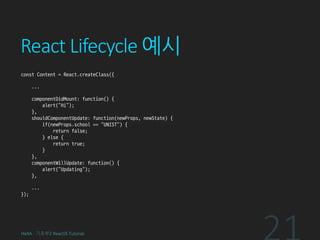
React Lifecycle 예시
const Content = React.createClass({
...
componentDidMount: function() {
alert(“Hi”);
},
shouldComponentUpdate: function(newProps, newState) {
if(newProps.school == "UNIST") {
return false;
} else {
return true;
}
},
componentWillUpdate: function() {
alert(“Updating”);
},
...
});
HeXA - 기초부2 ReactJS Tutorial
React 컴파일
• Babel: 적용된 preset에 맞게 문법 변환을 해준다.
• Webpack: 문법 변환 뿐 아니라 라이브러리까지 통합된
하나의 js파일로 만들어주며(bundle) 설정을 통한 Uglify(minify),
Common chunk 등의 optimization도 지원
• Browserify: Webpack같은 js 번들 라이브러리
HeXA - 기초부2 ReactJS Tutorial
준비작업
NPM (Node Package Manager) 를 이용해
라이브러리 다운로드 받기
: npm install
babel, webpack 다운받기(Global Toolkit)
: npm install –g babel-cli webpack
HeXA - 기초부2 ReactJS Tutorial
Babel 컴파일
babel --presets react js/src/babel --out-dir js/out
: --presets react > React 프리셋 적용
: js/src/babel > js/src/babel에 있는 js파일을 컴파일
: --out-dir js/out > 컴파일된 js파일을 js/out로 보냄
--watch 추가하면 파일이 변경될 때 마다 자동으로 컴파일!
package.json의 scripts에 미리 선언 되어있다.
npm run-script babel 입력하면 실행가능
HeXA - 기초부2 ReactJS Tutorial
Babel 컴파일
Code [ src/Content.js ]
const Content = React.createClass({
...
});
ReactDOM.render(
...
);
Usage [React compiled by Babel]
<script src=“react.js”>
<script src=“react-dom.js”>
<script src=“out/Content.js”>
HeXA - 기초부2 ReactJS Tutorial
Webpack 컴파일
webpack.config.js 파일에 설정 후 webpack 커맨드 실행
webpack --progress --colors
: --progress > progress를 터미널에 출력
: --colors > 출력 결과에 색을 입혀 이쁘게 출력
--watch 추가하면 파일 변경시 자동 컴파일
마찬가지로 package.json scripts에 추가되어있음
npm run-script webpack
HeXA - 기초부2 ReactJS Tutorial
Webpack 컴파일
Code [ src/Content.js ]
const React = require(‘react’);
const ReactDOM = require(‘react-dom’);
const Content = React.createClass({
...
});
ReactDOM.render(
...
);
Usage [React compiled by Webpack]
<script src=“out/Content.js”>
HeXA - 기초부2 ReactJS Tutorial
배울건 다 배웠다.
코-딩하자
유배지를 웹으로 구현하자
카테고리 선택
카테고리에 해당하는 배달업소 로드
이름, 전화번호, 위치 보여주기!
js/src/UBaeZi 를 보고 따라해봅시다!
HeXA - 기초부2 ReactJS Tutorial
유니스트 배달 지존
모바일 어플. 만들 수 있습니다.
const React = require(‘react’);
: 웹
const React = require(‘react-native’);
: 어플
HeXA - 기초부2 ReactJS Tutorial
수고하셨습니다
김태현
kgyoo8232@gmail.com
HeXA - 기초부2 ReactJS Tutorial

React 튜토리얼 2차시

  • 1.
  • 2.
    강의 순서 1회차 개발 환경구성 – SublimeText3, Node.js 설치 (필요시) HTML, JS 기초 React 소개 Node.js 간단한 실습 2회차 React 튜토리얼 React 예제 작성 HeXA - 기초부2 ReactJS Tutorial
  • 3.
    오늘 할 것들! 리액트썰기 props, state React Component Specification React Component Lifecycle 예제(유배지) 만들기 HeXA - 기초부2 ReactJS Tutorial
  • 4.
    코드를 받아오자(업뎃함) • GIT이있건 없건!! https://github.com/kimxogus/React-web-tutorial 들어갑니다. HeXA - 기초부2 ReactJS Tutorial
  • 5.
    코드를 받아오자(업뎃함) • GIT이있건 없건!! https://github.com/kimxogus/React-web-tutorial 들어갑니다. Star를 누릅니다. (프리미엄 A/S 서비스) HeXA - 기초부2 ReactJS Tutorial
  • 6.
    코드를 받아오자(업뎃함) • GIT이있건 없건!! https://github.com/kimxogus/React-web-tutorial 들어갑니다. Star를 누릅니다. (프리미엄 A/S 서비스) Fork를 누릅니다. (다운로드가 빨라집니다. 똑같은 것 같다면 기분탓) HeXA - 기초부2 ReactJS Tutorial
  • 7.
    코드를 받아오자(업뎃함) • GIT이있건 없건!! https://github.com/kimxogus/React-web-tutorial 들어갑니다. Star를 누릅니다. (프리미엄 A/S 서비스) Fork를 누릅니다. (다운로드가 빨라집니다. 똑같은 것 같다면 기분탓) Download ZIP을 클릭하여 zip파일을 다운 압축 풀기! HeXA - 기초부2 ReactJS Tutorial
  • 8.
    props & state propsstate 상위 요소에게서 상속 (기본값은 자신이 정할 수 있다.) 스스로 가지고 있는 값, 상태 값이 바뀌면 Component가 업데이트 된다. (자세한건 Lifecycle 참고) 하위요소로 값을 전달할 수 있다. (props 형태로 전달) HeXA - 기초부2 ReactJS Tutorial
  • 9.
    React Component Specification displayName: Component 이름(JSX를 쓴다면 신경X) mixins : Addon statics : Static 값 또는 함수 getDefaultProps : props의 기본값 propTypes : props의 타입 정의 getInitialState : state 기본값 정의 render : 렌더링 함수 (필수!) HeXA - 기초부2 ReactJS Tutorial
  • 10.
    백문이 불여일코 HeXA @UNIST const Content = React.createClass({ render: function() { return( <h2> HeXA @ UNIST </h2> ); } }); ReactDOM.render( <Content/>, document.getElementById(“container”) ); HeXA - 기초부2 ReactJS Tutorial
  • 11.
    백문이 불여일코 HeXA @UNIST const Content = React.createClass({ render: function() { return( <h2> {this.props.name} @ {this.props.school} </h2> ); } }); ReactDOM.render( <Content name=“HeXA” school=“UNIST”/>, document.getElementById(“container”) ); HeXA - 기초부2 ReactJS Tutorial
  • 12.
    백문이 불여일코 HeXA @UNIST const Content = React.createClass({ getDefaultProps: function() { return { name: “HeXA”, school: “UNIST” }; }, render: function() { return ( <h2> {this.props.name} @ {this.props.school} </h2> ); } }); ReactDOM.render( <Content/>, document.getElementById(“container”) ); HeXA - 기초부2 ReactJS Tutorial
  • 13.
    백문이 불여일코 HeXA @UNIST const Content = React.createClass({ getDefaultProps: function() { return { name: “HeXA”, school: “UNIST” }; }, propTypes: { name: React.PropTypes.string, school: React.PropTypes.string }, render: function() { return( <h2> {this.props.name} @ {this.props.school} </h2> ); } }); HeXA - 기초부2 ReactJS Tutorial
  • 14.
    백문이 불여일코 HeXA @UNIST 0 const Content = React.createClass({ ... getInitialState: function() { return { clicks: 0 }; }, render: function() { return( <div> <h2> {this.props.name} @ {this.props.school} </h2> <h4>{this.state.clicks}</h4> </div> ); } }); HeXA - 기초부2 ReactJS Tutorial
  • 15.
    백문이 불여일코 HeXA @UNIST 0 const Content = React.createClass({ ... getInitialState: function() { return { clicks: 0 }; }, render: function() { return( <div> <h2> {this.props.name} @ {this.props.school} </h2> <h4>{this.state.clicks}</h4> <button type=“button” onClick={this.onClick}> Increase Number </button> </div> ); }, onClick: function() { this.setState({clicks: this.state.clicks + 1}); } }); HeXA - 기초부2 ReactJS Tutorial Increase Number
  • 16.
    백문이 불여일코 displayName, mixins,statics은 쓸 일 거의 없으므로 생략 const Content = React.createClass({ getDefaultProps: function() { return { name: “Name”, school: “School” }; }, propTypes: { name: React.PropTypes.string, school: React.PropTypes.string }, getInitialState: function() { return { clicks: 0 }; }, render: function() { return( <div> <h2> {this.props.name} @ {this.props.school} </h2> <h4>{this.state.clicks}</h4> <button type=“button” onClick={this.onClick}> Increase Number </button> </div> ); }, onClick: function() { this.setState({ clicks: this.state.clicks + 1 }); } }); HeXA - 기초부2 ReactJS Tutorial
  • 17.
    React Lifecycle • Mounting componentWillMount componentDidMount •Updating componentWillReceiveProps shouldComponentUpdate componentWillUpdate componentDidUpdate • Unmounting componentWillUnmount HeXA - 기초부2 ReactJS Tutorial
  • 18.
    React Lifecycle • Mounting componentWillMount: 컴포넌트 생성 전 componentDidMount : 컴포넌트 생성 후 • Updating componentWillReceiveProps : 새로운 props 받기 전 shouldComponentUpdate : 컴포넌트 업데이트 여부 componentWillUpdate : 컴포넌트 업데이트 전 componentDidUpdate : 컴포넌트 업데이트 후 • Unmounting componentWillUnmount : 컴포넌트 소멸 전 HeXA - 기초부2 ReactJS Tutorial
  • 19.
    React Lifecycle 예시 constContent = React.createClass({ ... componentDidMount: function() { alert(“Hi”); }, ... }); HeXA - 기초부2 ReactJS Tutorial
  • 20.
    React Lifecycle 예시 constContent = React.createClass({ ... componentDidMount: function() { alert(“Hi”); }, componentWillUpdate: function() { alert(“Updating”); }, ... }); HeXA - 기초부2 ReactJS Tutorial
  • 21.
    React Lifecycle 예시 constContent = React.createClass({ ... componentDidMount: function() { alert(“Hi”); }, shouldComponentUpdate: function(newProps, newState) { if(newProps.school == "UNIST") { return false; } else { return true; } }, componentWillUpdate: function() { alert(“Updating”); }, ... }); HeXA - 기초부2 ReactJS Tutorial
  • 22.
    React 컴파일 • Babel:적용된 preset에 맞게 문법 변환을 해준다. • Webpack: 문법 변환 뿐 아니라 라이브러리까지 통합된 하나의 js파일로 만들어주며(bundle) 설정을 통한 Uglify(minify), Common chunk 등의 optimization도 지원 • Browserify: Webpack같은 js 번들 라이브러리 HeXA - 기초부2 ReactJS Tutorial
  • 23.
    준비작업 NPM (Node PackageManager) 를 이용해 라이브러리 다운로드 받기 : npm install babel, webpack 다운받기(Global Toolkit) : npm install –g babel-cli webpack HeXA - 기초부2 ReactJS Tutorial
  • 24.
    Babel 컴파일 babel --presetsreact js/src/babel --out-dir js/out : --presets react > React 프리셋 적용 : js/src/babel > js/src/babel에 있는 js파일을 컴파일 : --out-dir js/out > 컴파일된 js파일을 js/out로 보냄 --watch 추가하면 파일이 변경될 때 마다 자동으로 컴파일! package.json의 scripts에 미리 선언 되어있다. npm run-script babel 입력하면 실행가능 HeXA - 기초부2 ReactJS Tutorial
  • 25.
    Babel 컴파일 Code [src/Content.js ] const Content = React.createClass({ ... }); ReactDOM.render( ... ); Usage [React compiled by Babel] <script src=“react.js”> <script src=“react-dom.js”> <script src=“out/Content.js”> HeXA - 기초부2 ReactJS Tutorial
  • 26.
    Webpack 컴파일 webpack.config.js 파일에설정 후 webpack 커맨드 실행 webpack --progress --colors : --progress > progress를 터미널에 출력 : --colors > 출력 결과에 색을 입혀 이쁘게 출력 --watch 추가하면 파일 변경시 자동 컴파일 마찬가지로 package.json scripts에 추가되어있음 npm run-script webpack HeXA - 기초부2 ReactJS Tutorial
  • 27.
    Webpack 컴파일 Code [src/Content.js ] const React = require(‘react’); const ReactDOM = require(‘react-dom’); const Content = React.createClass({ ... }); ReactDOM.render( ... ); Usage [React compiled by Webpack] <script src=“out/Content.js”> HeXA - 기초부2 ReactJS Tutorial
  • 28.
  • 29.
    유배지를 웹으로 구현하자 카테고리선택 카테고리에 해당하는 배달업소 로드 이름, 전화번호, 위치 보여주기! js/src/UBaeZi 를 보고 따라해봅시다! HeXA - 기초부2 ReactJS Tutorial 유니스트 배달 지존
  • 30.
    모바일 어플. 만들수 있습니다. const React = require(‘react’); : 웹 const React = require(‘react-native’); : 어플 HeXA - 기초부2 ReactJS Tutorial

  • 31.