ReactJS 실무 활용 이야기
INDEX
‣ REACTJS를 선택하게된 계
기
‣ PROJECT 구성
‣ COMPONENT 개발
‣ REDUX
‣ TEST CODE
‣ FE FRAMEWORK
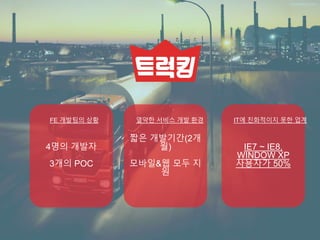
4명의 개발자
3개의 POC
FE 개발팀의 상황
짧은 개발기간(2개
월)
모바일&웹 모두 지
원
열악한 서비스 개발 환경
IE7 ~ IE8,
WINDOW XP
사용자가 50%
IT에 친화적이지 못한 업계
IE7,8 사용자가
저렇게 많은데..
최신
FRAMEWORK를
사용해도 될까?
FE 개발자로서
시대에 뒤떨어질
것 같은데?
못먹어도 고?
지원군 NODE-WEBKIT 등장
‣ web application을 desktop application으로 만들어주는
라이브러리
‣ chromium기반의 패키징 application
‣ .exe, .app 으로 모두 생성 가능
IE10 미만의 브라우저를 사용하는 사용자들에게 window application을 제공
ReactJS를 선택하게된 이유
Component 기반 framework
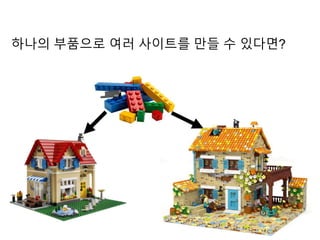
하나의 부품으로 여러 사이트를 만들 수 있다면?
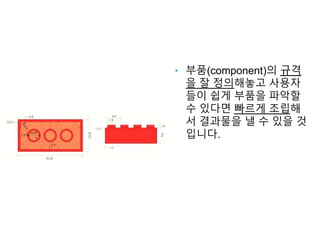
‣ 부품(component)의 규격
을 잘 정의해놓고 사용자
들이 쉽게 부품을 파악할
수 있다면 빠르게 조립해
서 결과물을 낼 수 있을 것
입니다.
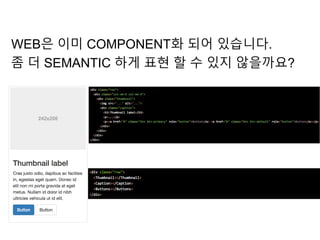
WEB은 이미 COMPONENT화 되어 있습니다.
좀 더 SEMANTIC 하게 표현 할 수 있지 않을까요?
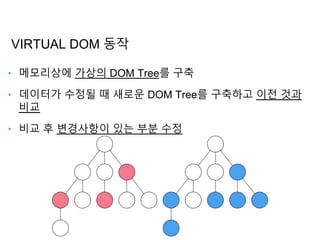
Virtual DOM
‣ 메모리상에 가상의 DOM Tree를 구축
‣ 데이터가 수정될 때 새로운 DOM Tree를 구축하고 이전 것과
비교
‣ 비교 후 변경사항이 있는 부분 수정
VIRTUAL DOM 동작
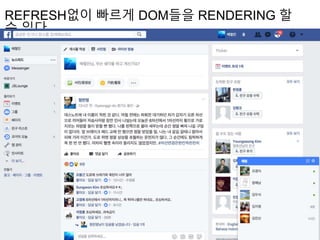
REFRESH없이 빠르게 DOM들을 RENDERING 할
수 있다.
ServerSide Rendering
프로젝트 환경과 맞지 않아 사용하지 않았습니다.
우리 프로젝트에는 REACTJS가 적
Component 기준으로 작업을 분배, 4명이 3개의 POC를 함께 담
화물의 상태를 실시간으로 Tracking 하는데 Virtual DOM 이 필
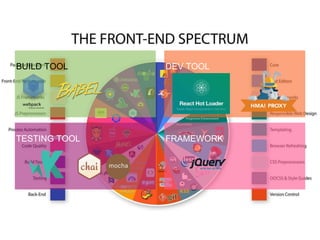
PROJECT 구성
BUILD TOOL
TESTING TOOL
DEV TOOL
FRAMEWORK
COMPONENT 개발
import {React, PropTypes} from ‘react’;
export default class ListComponent extends React.Component { //React.Component 상속
constructor(props) {
super(props); // [필수] 부모 생성자 호출 시 props를 파라미터로 전달
this.state = {}; //[필수] component 내의 state 값들은 반드시 constructor 내에서 초기화
this.testMethod = this.testMethod.bind(this); //[필수] 사용자가 생성한 method들은 binding처리
}
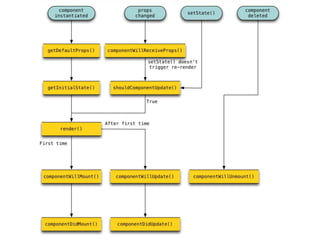
componentWillMount() {} //component의 lifecycle에 의한 callback method
componentWillReceiveProps(nextProps) {} //component의 lifecycle에 의한 callback method
testMethod() {}
render() {
return (<div class=“wrapper”> </div>); //반드시 하나의 element만 return 가능
return (<div class=“first”> </div><div class=“second”></div>);
}
};
PROPS? ST
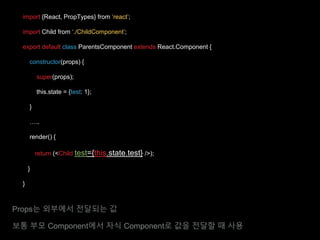
import {React, PropTypes} from ‘react’;
import Child from ‘./ChildComponent’;
export default class ParentsComponent extends React.Component {
constructor(props) {
super(props);
this.state = {test: 1};
}
…..
render() {
return (<Child test={this.state.test} />);
}
}
Props는 외부에서 전달되는 값
보통 부모 Component에서 자식 Component로 값을 전달할 때 사용
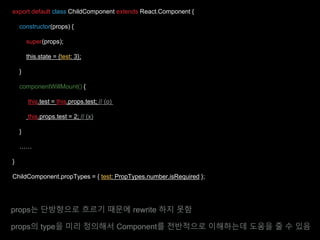
export default class ChildComponent extends React.Component {
constructor(props) {
super(props);
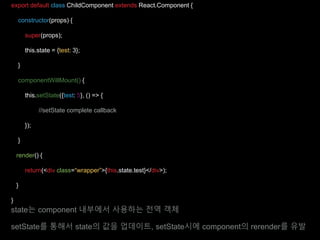
this.state = {test: 3};
}
componentWillMount() {
this.test = this.props.test; // (o)
this.props.test = 2; // (x)
}
……
}
ChildComponent.propTypes = { test: PropTypes.number.isRequired };
props는 단방향으로 흐르기 때문에 rewrite 하지 못함
props의 type을 미리 정의해서 Component를 전반적으로 이해하는데 도움을 줄 수 있음
export default class ChildComponent extends React.Component {
constructor(props) {
super(props);
this.state = {test: 3};
}
componentWillMount() {
this.setState({test: 5}, () => {
//setState complete callback
});
}
render() {
return(<div class=“wrapper”>{this.state.test}</div>);
}
}
state는 component 내부에서 사용하는 전역 객체
setState를 통해서 state의 값을 업데이트, setState시에 component의 rerender를 유발
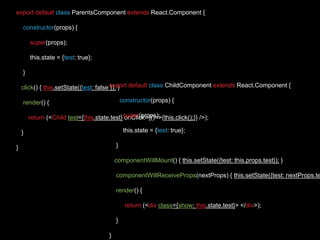
export default class ParentsComponent extends React.Component {
constructor(props) {
super(props);
this.state = {test: true};
}
click() { this.setState({test: false }); }
render() {
return (<Child test={this.state.test} onClick={()=>{this.click();}} />);
}
}
export default class ChildComponent extends React.Component {
constructor(props) {
super(props);
this.state = {test: true};
}
componentWillMount() { this.setState({test: this.props.test}); }
componentWillReceiveProps(nextProps) { this.setState({test: nextProps.te
render() {
return (<div class={show: this.state.test}> </div>);
}
}
COMPONENT
….
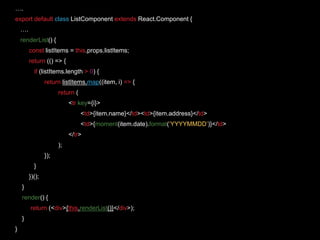
export default class ListComponent extends React.Component {
….
renderList() {
const listItems = this.props.listItems;
return (() => {
if (listItems.length > 0) {
return listItems.map((item, i) => {
return (
<tr key={i}>
<td>{item.name}</td><td>{item.address}</td>
<td>{moment(item.date).format(‘YYYYMMDD’)}</td>
</tr>
);
});
}
})();
}
render() {
return (<div>{this.renderList()}</div>);
}
}
REDUX를 활용한 개
발
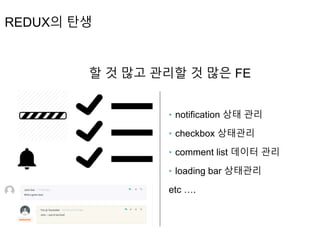
REDUX의 탄생
할 것 많고 관리할 것 많은 FE
‣ notification 상태 관리
‣ checkbox 상태관리
‣ comment list 데이터 관리
‣ loading bar 상태관리
etc ….
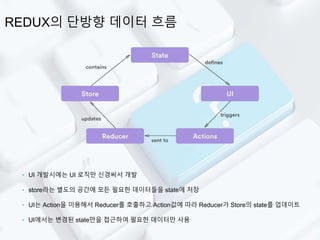
REDUX의 단방향 데이터 흐름
‣ UI 개발시에는 UI 로직만 신경써서 개발
‣ store라는 별도의 공간에 모든 필요한 데이터들을 state에 저장
‣ UI는 Action을 이용해서 Reducer를 호출하고 Action값에 따라 Reducer가 Store의 state를 업데이트
‣ UI에서는 변경된 state만을 접근하여 필요한 데이터만 사용
트럭킹 프로젝트를 하면서
서버로부터 받아오는 데이터들을 Redux를 활용해서 관리하기로 협의
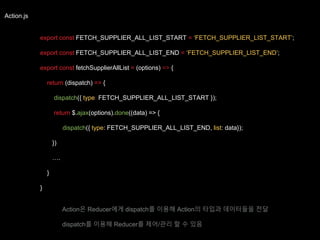
Action.js
export const FETCH_SUPPLIER_ALL_LIST_START = ‘FETCH_SUPPLIER_LIST_START’;
export const FETCH_SUPPLIER_ALL_LIST_END = ‘FETCH_SUPPLIER_LIST_END’;
export const fetchSupplierAllList = (options) => {
return (dispatch) => {
dispatch({ type: FETCH_SUPPLIER_ALL_LIST_START });
return $.ajax(options).done((data) => {
dispatch({ type: FETCH_SUPPLIER_ALL_LIST_END, list: data});
})
….
}
}
Action은 Reducer에게 dispatch를 이용해 Action의 타입과 데이터들을 전달
dispatch를 이용해 Reducer를 제어/관리 할 수 있음
Reducer.js
import * as SA from ‘./Action’;
export const INITIAL_STATE = {
allList: []
};
export default function supplierReducer (state = INITIAL_STATE, action) {
switch (action.type) {
case SA.FETCH_SUPPLIER_ALL_LIST_END:
return Object.assign({}, state, {
allList: action.list
});
default:
return state;
}
};
reducer는 action으로부터 전달받은 type, data를 이용해서 state를 업데이트 시켜줌
이 때, 초기값을 변경시키지 않기위해 Object.assign 등을 활용해주면 좋음
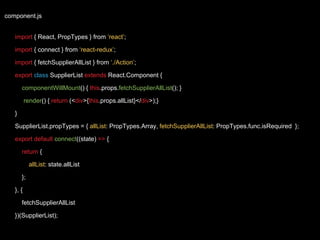
component.js
import { React, PropTypes } from ‘react’;
import { connect } from ‘react-redux’;
import { fetchSupplierAllList } from ‘./Action’;
export class SupplierList extends React.Component {
componentWillMount() { this.props.fetchSupplierAllList(); }
render() { return (<div>{this.props.allList}</div>);}
}
SupplierList.propTypes = { allList: PropTypes.Array, fetchSupplierAllList: PropTypes.func.isRequired };
export default connect((state) => {
return {
allList: state.allList
};
}, {
fetchSupplierAllList
})(SupplierList);
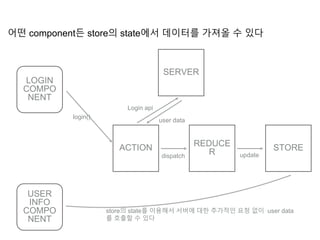
어떤 component든 store의 state에서 데이터를 가져올 수 있다
USER
INFO
COMPO
NENT
login()
LOGIN
COMPO
NENT
ACTION REDUCE
R STORE
SERVER
Login api
user data
dispatch update
store의 state를 이용해서 서버에 대한 추가적인 요청 없이 user data
를 호출할 수 있다
TEST CODE
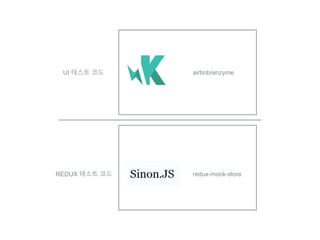
UI 테스트 코드
REDUX 테스트 코드
airbnb/enzyme
redux-mock-store
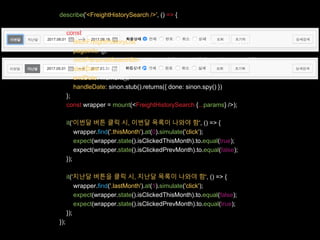
describe('<FreightHistorySearch />', () => {
const params = {
fetchFreightHistoryList: sinon.stub().returns({ done: sinon.spy() }),
pageInfo: {},
clickPersonalSearchBtn: sinon.stub().returns({ done: sinon.spy() }),
startDate: moment().date(1),
endDate: moment(),
handleDate: sinon.stub().returns({ done: sinon.spy() })
};
const wrapper = mount(<FreightHistorySearch {...params} />);
it('이번달 버튼 클릭 시, 이번달 목록이 나와야 함', () => {
wrapper.find('.thisMonth').at(0).simulate('click');
expect(wrapper.state().isClickedThisMonth).to.equal(true);
expect(wrapper.state().isClickedPrevMonth).to.equal(false);
});
it('지난달 버튼을 클릭 시, 지난달 목록이 나와야 함', () => {
wrapper.find('.lastMonth').at(1).simulate('click');
expect(wrapper.state().isClickedThisMonth).to.equal(false);
expect(wrapper.state().isClickedPrevMonth).to.equal(true);
});
});
export const FETCH_SUPPLIER_ALL_LIST_START = ‘FETCH_SUPPLIER_LIST_START’;
export const FETCH_SUPPLIER_ALL_LIST_END = ‘FETCH_SUPPLIER_LIST_END’;
export const fetchSupplierAllList = (options) => {
return (dispatch) => {
dispatch({ type: FETCH_SUPPLIER_ALL_LIST_START });
return $.ajax(options).done((data) => {
dispatch({ type: FETCH_SUPPLIER_ALL_LIST_END, list: data});
})
….
}
}
import * as SA from 'js/domain/supplier/supplierAction';
const middlewares = [thunk];
const mockStore = configureMockStore(middlewares);
describe('Supplier thunks', () => {
it('fetchSupplierAllList()이 정상적으로 끝나면 FETCH_SUPPLIER_ALL_LIST_END 액션이 호출되어야 함', (done
const expectedActions = [
{
type: SA.FETCH_SUPPLIER_ALL_LIST_START
}, {
type: SA.FETCH_SUPPLIER_ALL_LIST_END,
list: []
}
];
const server = sinon.fakeServer.create();
server.respondWith("GET", "/ext/agency/freight/shippers", [200, {"Content-Type": "application/json"}, '[]']);
const store = mockStore({});
store.dispatch(SA.fetchSupplierAllList())
.then(() => {
expect(store.getActions()).to.eql(expectedActions);
done();
});
server.respond();
server.restore();
});
});
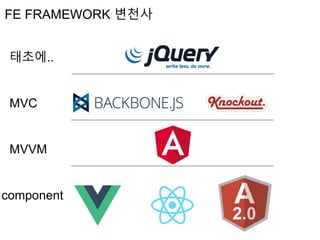
FE FRAMEWORK
태초에..
MVC
MVVM
component
FE FRAMEWORK 변천사
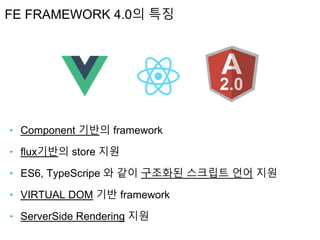
‣ Component 기반의 framework
‣ flux기반의 store 지원
‣ ES6, TypeScripe 와 같이 구조화된 스크립트 언어 지원
‣ VIRTUAL DOM 기반 framework
‣ ServerSide Rendering 지원
FE FRAMEWORK 4.0의 특징
React 실무활용 이야기
React 실무활용 이야기
React 실무활용 이야기
React 실무활용 이야기

React 실무활용 이야기

  • 1.
  • 2.
    INDEX ‣ REACTJS를 선택하게된계 기 ‣ PROJECT 구성 ‣ COMPONENT 개발 ‣ REDUX ‣ TEST CODE ‣ FE FRAMEWORK
  • 3.
    4명의 개발자 3개의 POC FE개발팀의 상황 짧은 개발기간(2개 월) 모바일&웹 모두 지 원 열악한 서비스 개발 환경 IE7 ~ IE8, WINDOW XP 사용자가 50% IT에 친화적이지 못한 업계
  • 5.
    IE7,8 사용자가 저렇게 많은데.. 최신 FRAMEWORK를 사용해도될까? FE 개발자로서 시대에 뒤떨어질 것 같은데? 못먹어도 고?
  • 6.
    지원군 NODE-WEBKIT 등장 ‣web application을 desktop application으로 만들어주는 라이브러리 ‣ chromium기반의 패키징 application ‣ .exe, .app 으로 모두 생성 가능 IE10 미만의 브라우저를 사용하는 사용자들에게 window application을 제공
  • 9.
  • 10.
  • 11.
    하나의 부품으로 여러사이트를 만들 수 있다면?
  • 12.
    ‣ 부품(component)의 규격 을잘 정의해놓고 사용자 들이 쉽게 부품을 파악할 수 있다면 빠르게 조립해 서 결과물을 낼 수 있을 것 입니다.
  • 13.
    WEB은 이미 COMPONENT화되어 있습니다. 좀 더 SEMANTIC 하게 표현 할 수 있지 않을까요?
  • 14.
  • 15.
    ‣ 메모리상에 가상의DOM Tree를 구축 ‣ 데이터가 수정될 때 새로운 DOM Tree를 구축하고 이전 것과 비교 ‣ 비교 후 변경사항이 있는 부분 수정 VIRTUAL DOM 동작
  • 16.
    REFRESH없이 빠르게 DOM들을RENDERING 할 수 있다.
  • 17.
  • 18.
    프로젝트 환경과 맞지않아 사용하지 않았습니다.
  • 19.
    우리 프로젝트에는 REACTJS가적 Component 기준으로 작업을 분배, 4명이 3개의 POC를 함께 담 화물의 상태를 실시간으로 Tracking 하는데 Virtual DOM 이 필
  • 20.
  • 21.
  • 22.
  • 23.
    import {React, PropTypes}from ‘react’; export default class ListComponent extends React.Component { //React.Component 상속 constructor(props) { super(props); // [필수] 부모 생성자 호출 시 props를 파라미터로 전달 this.state = {}; //[필수] component 내의 state 값들은 반드시 constructor 내에서 초기화 this.testMethod = this.testMethod.bind(this); //[필수] 사용자가 생성한 method들은 binding처리 } componentWillMount() {} //component의 lifecycle에 의한 callback method componentWillReceiveProps(nextProps) {} //component의 lifecycle에 의한 callback method testMethod() {} render() { return (<div class=“wrapper”> </div>); //반드시 하나의 element만 return 가능 return (<div class=“first”> </div><div class=“second”></div>); } };
  • 24.
  • 25.
    import {React, PropTypes}from ‘react’; import Child from ‘./ChildComponent’; export default class ParentsComponent extends React.Component { constructor(props) { super(props); this.state = {test: 1}; } ….. render() { return (<Child test={this.state.test} />); } } Props는 외부에서 전달되는 값 보통 부모 Component에서 자식 Component로 값을 전달할 때 사용
  • 26.
    export default classChildComponent extends React.Component { constructor(props) { super(props); this.state = {test: 3}; } componentWillMount() { this.test = this.props.test; // (o) this.props.test = 2; // (x) } …… } ChildComponent.propTypes = { test: PropTypes.number.isRequired }; props는 단방향으로 흐르기 때문에 rewrite 하지 못함 props의 type을 미리 정의해서 Component를 전반적으로 이해하는데 도움을 줄 수 있음
  • 27.
    export default classChildComponent extends React.Component { constructor(props) { super(props); this.state = {test: 3}; } componentWillMount() { this.setState({test: 5}, () => { //setState complete callback }); } render() { return(<div class=“wrapper”>{this.state.test}</div>); } } state는 component 내부에서 사용하는 전역 객체 setState를 통해서 state의 값을 업데이트, setState시에 component의 rerender를 유발
  • 28.
    export default classParentsComponent extends React.Component { constructor(props) { super(props); this.state = {test: true}; } click() { this.setState({test: false }); } render() { return (<Child test={this.state.test} onClick={()=>{this.click();}} />); } } export default class ChildComponent extends React.Component { constructor(props) { super(props); this.state = {test: true}; } componentWillMount() { this.setState({test: this.props.test}); } componentWillReceiveProps(nextProps) { this.setState({test: nextProps.te render() { return (<div class={show: this.state.test}> </div>); } }
  • 30.
  • 31.
    …. export default classListComponent extends React.Component { …. renderList() { const listItems = this.props.listItems; return (() => { if (listItems.length > 0) { return listItems.map((item, i) => { return ( <tr key={i}> <td>{item.name}</td><td>{item.address}</td> <td>{moment(item.date).format(‘YYYYMMDD’)}</td> </tr> ); }); } })(); } render() { return (<div>{this.renderList()}</div>); } }
  • 32.
  • 33.
    REDUX의 탄생 할 것많고 관리할 것 많은 FE ‣ notification 상태 관리 ‣ checkbox 상태관리 ‣ comment list 데이터 관리 ‣ loading bar 상태관리 etc ….
  • 34.
    REDUX의 단방향 데이터흐름 ‣ UI 개발시에는 UI 로직만 신경써서 개발 ‣ store라는 별도의 공간에 모든 필요한 데이터들을 state에 저장 ‣ UI는 Action을 이용해서 Reducer를 호출하고 Action값에 따라 Reducer가 Store의 state를 업데이트 ‣ UI에서는 변경된 state만을 접근하여 필요한 데이터만 사용
  • 35.
    트럭킹 프로젝트를 하면서 서버로부터받아오는 데이터들을 Redux를 활용해서 관리하기로 협의
  • 36.
    Action.js export const FETCH_SUPPLIER_ALL_LIST_START= ‘FETCH_SUPPLIER_LIST_START’; export const FETCH_SUPPLIER_ALL_LIST_END = ‘FETCH_SUPPLIER_LIST_END’; export const fetchSupplierAllList = (options) => { return (dispatch) => { dispatch({ type: FETCH_SUPPLIER_ALL_LIST_START }); return $.ajax(options).done((data) => { dispatch({ type: FETCH_SUPPLIER_ALL_LIST_END, list: data}); }) …. } } Action은 Reducer에게 dispatch를 이용해 Action의 타입과 데이터들을 전달 dispatch를 이용해 Reducer를 제어/관리 할 수 있음
  • 37.
    Reducer.js import * asSA from ‘./Action’; export const INITIAL_STATE = { allList: [] }; export default function supplierReducer (state = INITIAL_STATE, action) { switch (action.type) { case SA.FETCH_SUPPLIER_ALL_LIST_END: return Object.assign({}, state, { allList: action.list }); default: return state; } }; reducer는 action으로부터 전달받은 type, data를 이용해서 state를 업데이트 시켜줌 이 때, 초기값을 변경시키지 않기위해 Object.assign 등을 활용해주면 좋음
  • 38.
    component.js import { React,PropTypes } from ‘react’; import { connect } from ‘react-redux’; import { fetchSupplierAllList } from ‘./Action’; export class SupplierList extends React.Component { componentWillMount() { this.props.fetchSupplierAllList(); } render() { return (<div>{this.props.allList}</div>);} } SupplierList.propTypes = { allList: PropTypes.Array, fetchSupplierAllList: PropTypes.func.isRequired }; export default connect((state) => { return { allList: state.allList }; }, { fetchSupplierAllList })(SupplierList);
  • 39.
    어떤 component든 store의state에서 데이터를 가져올 수 있다 USER INFO COMPO NENT login() LOGIN COMPO NENT ACTION REDUCE R STORE SERVER Login api user data dispatch update store의 state를 이용해서 서버에 대한 추가적인 요청 없이 user data 를 호출할 수 있다
  • 40.
  • 41.
    UI 테스트 코드 REDUX테스트 코드 airbnb/enzyme redux-mock-store
  • 42.
    describe('<FreightHistorySearch />', ()=> { const params = { fetchFreightHistoryList: sinon.stub().returns({ done: sinon.spy() }), pageInfo: {}, clickPersonalSearchBtn: sinon.stub().returns({ done: sinon.spy() }), startDate: moment().date(1), endDate: moment(), handleDate: sinon.stub().returns({ done: sinon.spy() }) }; const wrapper = mount(<FreightHistorySearch {...params} />); it('이번달 버튼 클릭 시, 이번달 목록이 나와야 함', () => { wrapper.find('.thisMonth').at(0).simulate('click'); expect(wrapper.state().isClickedThisMonth).to.equal(true); expect(wrapper.state().isClickedPrevMonth).to.equal(false); }); it('지난달 버튼을 클릭 시, 지난달 목록이 나와야 함', () => { wrapper.find('.lastMonth').at(1).simulate('click'); expect(wrapper.state().isClickedThisMonth).to.equal(false); expect(wrapper.state().isClickedPrevMonth).to.equal(true); }); });
  • 43.
    export const FETCH_SUPPLIER_ALL_LIST_START= ‘FETCH_SUPPLIER_LIST_START’; export const FETCH_SUPPLIER_ALL_LIST_END = ‘FETCH_SUPPLIER_LIST_END’; export const fetchSupplierAllList = (options) => { return (dispatch) => { dispatch({ type: FETCH_SUPPLIER_ALL_LIST_START }); return $.ajax(options).done((data) => { dispatch({ type: FETCH_SUPPLIER_ALL_LIST_END, list: data}); }) …. } } import * as SA from 'js/domain/supplier/supplierAction'; const middlewares = [thunk]; const mockStore = configureMockStore(middlewares); describe('Supplier thunks', () => { it('fetchSupplierAllList()이 정상적으로 끝나면 FETCH_SUPPLIER_ALL_LIST_END 액션이 호출되어야 함', (done const expectedActions = [ { type: SA.FETCH_SUPPLIER_ALL_LIST_START }, { type: SA.FETCH_SUPPLIER_ALL_LIST_END, list: [] } ]; const server = sinon.fakeServer.create(); server.respondWith("GET", "/ext/agency/freight/shippers", [200, {"Content-Type": "application/json"}, '[]']); const store = mockStore({}); store.dispatch(SA.fetchSupplierAllList()) .then(() => { expect(store.getActions()).to.eql(expectedActions); done(); }); server.respond(); server.restore(); }); });
  • 44.
  • 45.
  • 46.
    ‣ Component 기반의framework ‣ flux기반의 store 지원 ‣ ES6, TypeScripe 와 같이 구조화된 스크립트 언어 지원 ‣ VIRTUAL DOM 기반 framework ‣ ServerSide Rendering 지원 FE FRAMEWORK 4.0의 특징