© 2006-2014 SoftProdigy. All rights reserved.
Reproduction of this publication in any form without prior written permission is forbidden.
MagChat – Installable Chat Module for Magento
Author: SoftProdigy
SoftProdigy
E 206 Industrial Area
Phase 8 B Mohali 160055 (Punjab)
India
+91.172.5211400
http://softprodigy.com/store
2014
© 2006-2014 SoftProdigy. All rights reserved.
Reproduction of this publication in any form without prior written permission is forbidden.
1
Contents
Understanding............................................................................................................................2
Features ...........................................................................................................................................2
Steps to be taken ...........................................................................................................................2
How to add operators....................................................................................................................5
© 2006-2014 SoftProdigy. All rights reserved.
Reproduction of this publication in any form without prior written permission is forbidden.
2
Understanding
This document explains the information about MagChat extension. Almost every company
wants to give good service to their customers and this extension provide live chat feature to the
website holders to provide instant service to the customers.
This extension gives you the functionality to do that with ease. Explained below are the
processes to do it.
Features
 Better user interaction and interface.
 In case no operator is available for chat at a given time, the visitor can contact through
email.
 Compatible with all browsers.
 The extension works on mobile devices as well.
Steps to be taken
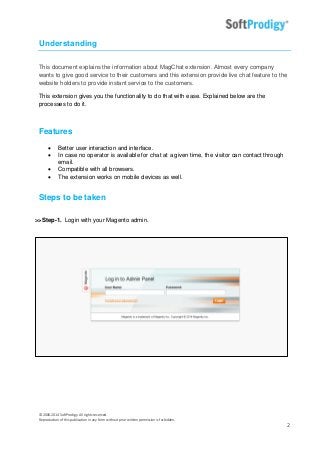
>>Step-1. Login with your Magento admin.
© 2006-2014 SoftProdigy. All rights reserved.
Reproduction of this publication in any form without prior written permission is forbidden.
3
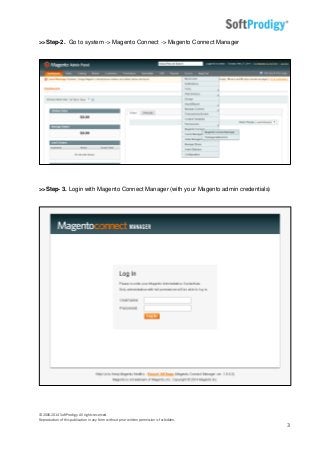
>>Step-2. Go to system -> Magento Connect -> Magento Connect Manager
>>Step- 3. Login with Magento Connect Manager (with your Magento admin credentials)
© 2006-2014 SoftProdigy. All rights reserved.
Reproduction of this publication in any form without prior written permission is forbidden.
4
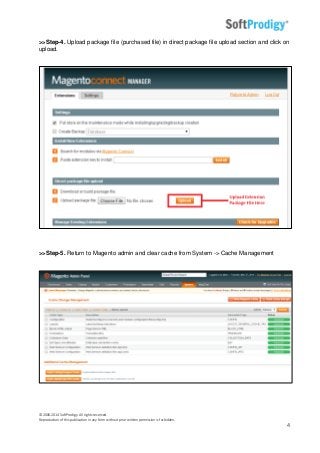
>>Step-4. Upload package file (purchased file) in direct package file upload section and click on
upload.
>>Step-5. Return to Magento admin and clear cache from System -> Cache Management
© 2006-2014 SoftProdigy. All rights reserved.
Reproduction of this publication in any form without prior written permission is forbidden.
5
>>Step-6. Logout from Magento admin and re-login.
>>Step-7. Go to the magchat/php/config/config.php file and fill the database detail in this.
>>Step-8. magchat/php/config/app.settings.php file should be writable.
How to add operators
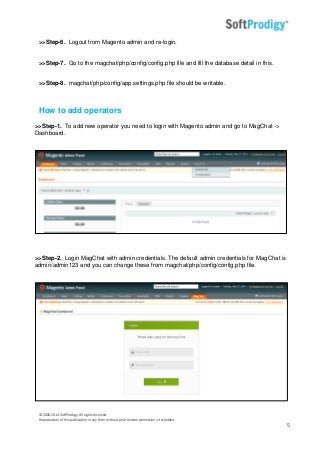
>>Step-1. To add new operator you need to login with Magento admin and go to MagChat ->
Dashboard.
>>Step-2. Login MagChat with admin credentials. The default admin credentials for MagChat is
admin/admin123 and you can change these from magchat/php/config/config.php file.
© 2006-2014 SoftProdigy. All rights reserved.
Reproduction of this publication in any form without prior written permission is forbidden.
6
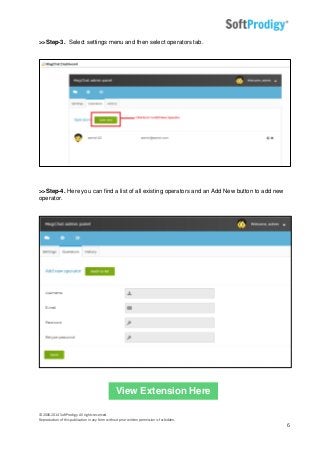
>>Step-3. Select settings menu and then select operators tab.
>>Step-4. Here you can find a list of all existing operators and an Add New button to add new
operator.
View Extension Here
© 2006-2014 SoftProdigy. All rights reserved.
Reproduction of this publication in any form without prior written permission is forbidden.
7
- End of Document -

MagChat - Installable Chat module for Magento

  • 1.
    © 2006-2014 SoftProdigy.All rights reserved. Reproduction of this publication in any form without prior written permission is forbidden. MagChat – Installable Chat Module for Magento Author: SoftProdigy SoftProdigy E 206 Industrial Area Phase 8 B Mohali 160055 (Punjab) India +91.172.5211400 http://softprodigy.com/store 2014
  • 2.
    © 2006-2014 SoftProdigy.All rights reserved. Reproduction of this publication in any form without prior written permission is forbidden. 1 Contents Understanding............................................................................................................................2 Features ...........................................................................................................................................2 Steps to be taken ...........................................................................................................................2 How to add operators....................................................................................................................5
  • 3.
    © 2006-2014 SoftProdigy.All rights reserved. Reproduction of this publication in any form without prior written permission is forbidden. 2 Understanding This document explains the information about MagChat extension. Almost every company wants to give good service to their customers and this extension provide live chat feature to the website holders to provide instant service to the customers. This extension gives you the functionality to do that with ease. Explained below are the processes to do it. Features  Better user interaction and interface.  In case no operator is available for chat at a given time, the visitor can contact through email.  Compatible with all browsers.  The extension works on mobile devices as well. Steps to be taken >>Step-1. Login with your Magento admin.
  • 4.
    © 2006-2014 SoftProdigy.All rights reserved. Reproduction of this publication in any form without prior written permission is forbidden. 3 >>Step-2. Go to system -> Magento Connect -> Magento Connect Manager >>Step- 3. Login with Magento Connect Manager (with your Magento admin credentials)
  • 5.
    © 2006-2014 SoftProdigy.All rights reserved. Reproduction of this publication in any form without prior written permission is forbidden. 4 >>Step-4. Upload package file (purchased file) in direct package file upload section and click on upload. >>Step-5. Return to Magento admin and clear cache from System -> Cache Management
  • 6.
    © 2006-2014 SoftProdigy.All rights reserved. Reproduction of this publication in any form without prior written permission is forbidden. 5 >>Step-6. Logout from Magento admin and re-login. >>Step-7. Go to the magchat/php/config/config.php file and fill the database detail in this. >>Step-8. magchat/php/config/app.settings.php file should be writable. How to add operators >>Step-1. To add new operator you need to login with Magento admin and go to MagChat -> Dashboard. >>Step-2. Login MagChat with admin credentials. The default admin credentials for MagChat is admin/admin123 and you can change these from magchat/php/config/config.php file.
  • 7.
    © 2006-2014 SoftProdigy.All rights reserved. Reproduction of this publication in any form without prior written permission is forbidden. 6 >>Step-3. Select settings menu and then select operators tab. >>Step-4. Here you can find a list of all existing operators and an Add New button to add new operator. View Extension Here
  • 8.
    © 2006-2014 SoftProdigy.All rights reserved. Reproduction of this publication in any form without prior written permission is forbidden. 7 - End of Document -