© 2006-2014SoftProdigy. All rights reserved.
Reproduction of this publication in any form without prior written permission is forbidden.
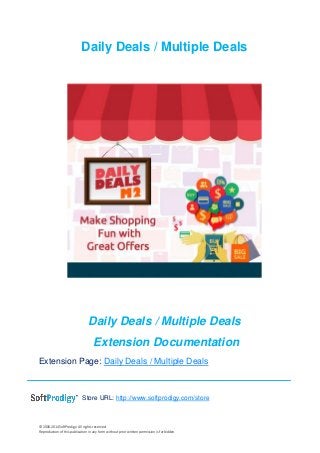
Daily Deals / Multiple Deals
Extension Documentation
Extension Page: Daily Deals / Multiple Deals
Store URL: http://www.softprodigy.com/store
© 2006-2014SoftProdigy. All rights reserved.
Reproduction of this publication in any form without prior written permission is forbidden.
1
Support: http://www.softprodigy.com/store/support/
Contents
Understanding............................................................................................................................2
Features ...........................................................................................................................................2
Steps to be taken ...........................................................................................................................4
Frontend Demo Screenshots ....................................................................................................13
Understanding
Customers love to buy, make it a better deal for them with attractive offers on different
products. This extension allows the Magento2 store owner to create day-to-day deals
for one or more products on their website easily and quickly. With an eye-catching
countdown, this extension integrates your store with a limited deal feature to motivate
your customers to buy more. Customers will be able to see current, past and future
deals in three tabs.
Features
• Enables flash sale
• Creates flash sales and list of products into sales
• Capable of managing product quantity
• Adds banner and thumbnail for flash sale
• Manages quick sale start and end time. Auto deactivator is enabled after the end
time.
• Adds maximum number of flash sales as per requirement
• Empowers email for sale alert
• Appends deal URL into website
© 2006-2014SoftProdigy. All rights reserved.
Reproduction of this publication in any form without prior written permission is forbidden.
2
• Equips flash sale banner to home page or other CMS block or page
• Supports multiple deals
• Displays featured and expiring deal
• Allows to halt or shut countdown, deal quantity on category and product pages
• Uploads own sale label
• Exhibits deal information
• Makes deal reviewing smooth by building three tabs, current deals, upcoming deals,
and Expiring deals on the listing page.
• Automatic activation of deals
• Sets deal price and quantity
• Features the main deal
• Owns flexible countdown timer
• Enables discount percentage for every deal
• Offers cross-browser compatibility
System Requirements
IonCube PHP Encoder (8.3) should be installed on your server.
© 2006-2014SoftProdigy. All rights reserved.
Reproduction of this publication in any form without prior written permission is forbidden.
3
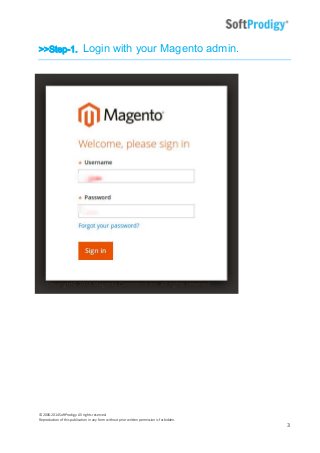
>>Step-1. Login with your Magento admin.
© 2006-2014SoftProdigy. All rights reserved.
Reproduction of this publication in any form without prior written permission is forbidden.
4
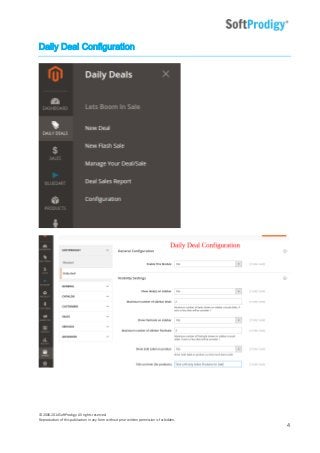
Daily Deal Configuration
© 2006-2014SoftProdigy. All rights reserved.
Reproduction of this publication in any form without prior written permission is forbidden.
5
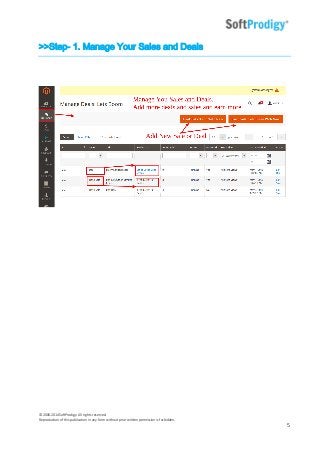
>>Step- 1. Manage Your Sales and Deals
© 2006-2014SoftProdigy. All rights reserved.
Reproduction of this publication in any form without prior written permission is forbidden.
6
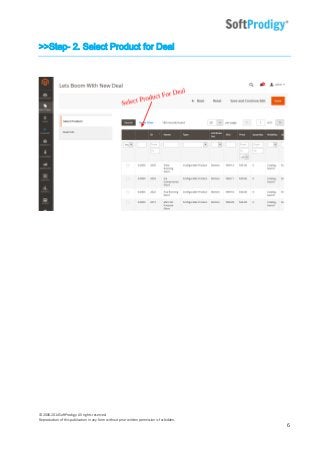
>>Step- 2. Select Product for Deal
© 2006-2014SoftProdigy. All rights reserved.
Reproduction of this publication in any form without prior written permission is forbidden.
7
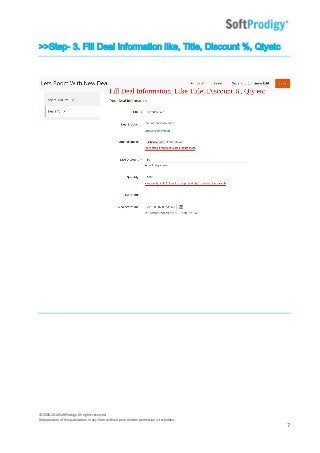
>>Step- 3. Fill Deal Information like, Title, Discount %, Qtyetc
© 2006-2014SoftProdigy. All rights reserved.
Reproduction of this publication in any form without prior written permission is forbidden.
8
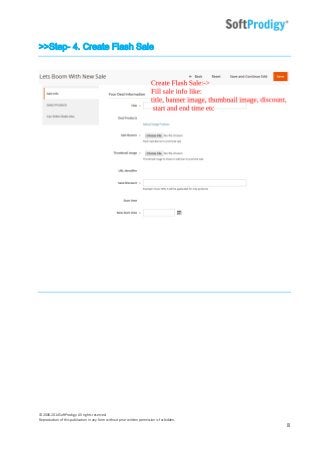
>>Step- 4. Create Flash Sale
© 2006-2014SoftProdigy. All rights reserved.
Reproduction of this publication in any form without prior written permission is forbidden.
9
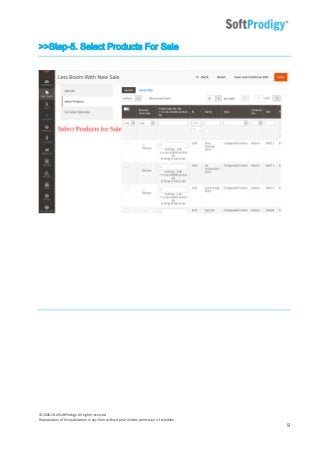
>>Step-5. Select Products For Sale
© 2006-2014SoftProdigy. All rights reserved.
Reproduction of this publication in any form without prior written permission is forbidden.
10
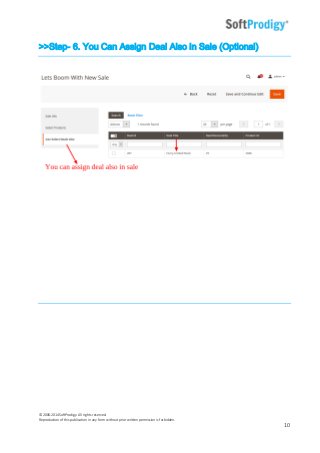
>>Step- 6. You Can Assign Deal Also in Sale (Optional)
© 2006-2014SoftProdigy. All rights reserved.
Reproduction of this publication in any form without prior written permission is forbidden.
11
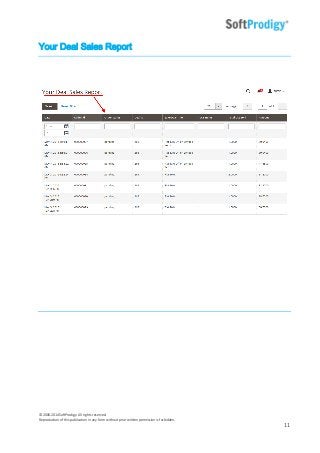
Your Deal Sales Report
© 2006-2014SoftProdigy. All rights reserved.
Reproduction of this publication in any form without prior written permission is forbidden.
12
Frontend Steps
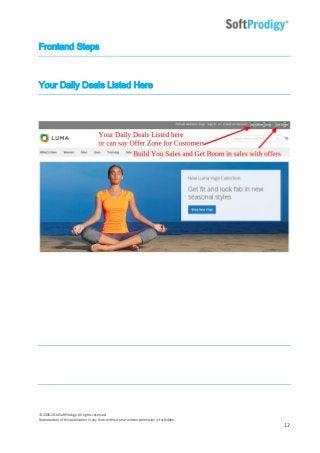
Your Daily Deals Listed Here
© 2006-2014SoftProdigy. All rights reserved.
Reproduction of this publication in any form without prior written permission is forbidden.
13
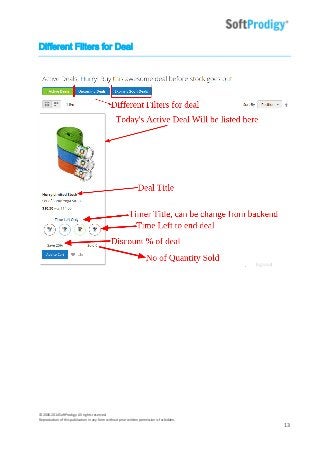
Different Filters for Deal
© 2006-2014SoftProdigy. All rights reserved.
Reproduction of this publication in any form without prior written permission is forbidden.
14
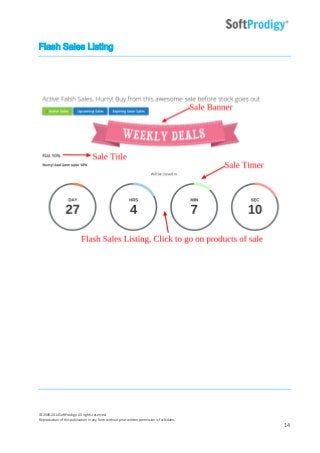
Flash Sales Listing
© 2006-2014SoftProdigy. All rights reserved.
Reproduction of this publication in any form without prior written permission is forbidden.
15
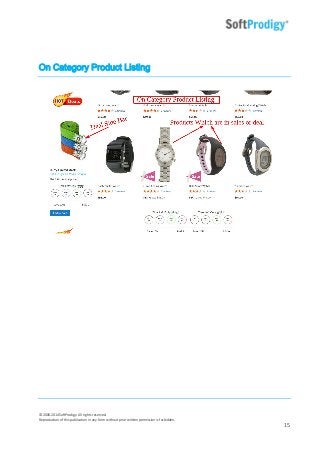
On Category Product Listing
© 2006-2014SoftProdigy. All rights reserved.
Reproduction of this publication in any form without prior written permission is forbidden.
16
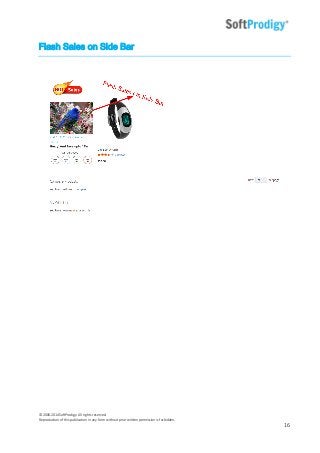
Flash Sales on Side Bar
© 2006-2014SoftProdigy. All rights reserved.
Reproduction of this publication in any form without prior written permission is forbidden.
17
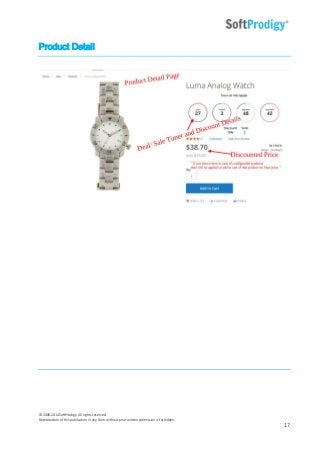
Product Detail
© 2006-2014SoftProdigy. All rights reserved.
Reproduction of this publication in any form without prior written permission is forbidden.
18
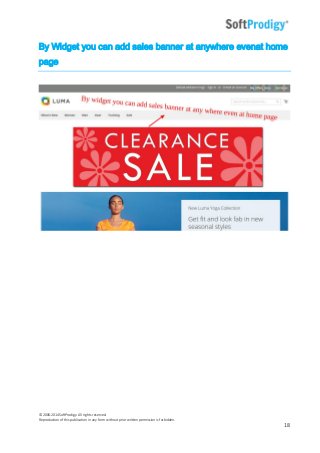
By Widget you can add sales banner at anywhere evenat home
page
© 2006-2014SoftProdigy. All rights reserved.
Reproduction of this publication in any form without prior written permission is forbidden.
19
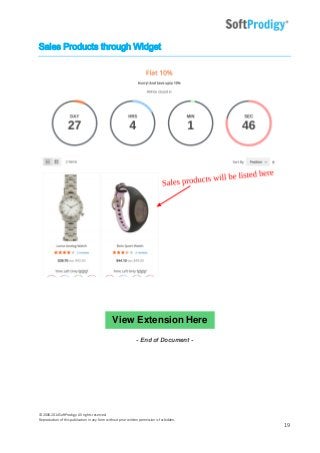
Sales Products through Widget
- End of Document -
View Extension Here

Daily Deals | Multiple Deals Installation Steps

  • 1.
    © 2006-2014SoftProdigy. Allrights reserved. Reproduction of this publication in any form without prior written permission is forbidden. Daily Deals / Multiple Deals Daily Deals / Multiple Deals Extension Documentation Extension Page: Daily Deals / Multiple Deals Store URL: http://www.softprodigy.com/store
  • 2.
    © 2006-2014SoftProdigy. Allrights reserved. Reproduction of this publication in any form without prior written permission is forbidden. 1 Support: http://www.softprodigy.com/store/support/ Contents Understanding............................................................................................................................2 Features ...........................................................................................................................................2 Steps to be taken ...........................................................................................................................4 Frontend Demo Screenshots ....................................................................................................13 Understanding Customers love to buy, make it a better deal for them with attractive offers on different products. This extension allows the Magento2 store owner to create day-to-day deals for one or more products on their website easily and quickly. With an eye-catching countdown, this extension integrates your store with a limited deal feature to motivate your customers to buy more. Customers will be able to see current, past and future deals in three tabs. Features • Enables flash sale • Creates flash sales and list of products into sales • Capable of managing product quantity • Adds banner and thumbnail for flash sale • Manages quick sale start and end time. Auto deactivator is enabled after the end time. • Adds maximum number of flash sales as per requirement • Empowers email for sale alert • Appends deal URL into website
  • 3.
    © 2006-2014SoftProdigy. Allrights reserved. Reproduction of this publication in any form without prior written permission is forbidden. 2 • Equips flash sale banner to home page or other CMS block or page • Supports multiple deals • Displays featured and expiring deal • Allows to halt or shut countdown, deal quantity on category and product pages • Uploads own sale label • Exhibits deal information • Makes deal reviewing smooth by building three tabs, current deals, upcoming deals, and Expiring deals on the listing page. • Automatic activation of deals • Sets deal price and quantity • Features the main deal • Owns flexible countdown timer • Enables discount percentage for every deal • Offers cross-browser compatibility System Requirements IonCube PHP Encoder (8.3) should be installed on your server.
  • 4.
    © 2006-2014SoftProdigy. Allrights reserved. Reproduction of this publication in any form without prior written permission is forbidden. 3 >>Step-1. Login with your Magento admin.
  • 5.
    © 2006-2014SoftProdigy. Allrights reserved. Reproduction of this publication in any form without prior written permission is forbidden. 4 Daily Deal Configuration
  • 6.
    © 2006-2014SoftProdigy. Allrights reserved. Reproduction of this publication in any form without prior written permission is forbidden. 5 >>Step- 1. Manage Your Sales and Deals
  • 7.
    © 2006-2014SoftProdigy. Allrights reserved. Reproduction of this publication in any form without prior written permission is forbidden. 6 >>Step- 2. Select Product for Deal
  • 8.
    © 2006-2014SoftProdigy. Allrights reserved. Reproduction of this publication in any form without prior written permission is forbidden. 7 >>Step- 3. Fill Deal Information like, Title, Discount %, Qtyetc
  • 9.
    © 2006-2014SoftProdigy. Allrights reserved. Reproduction of this publication in any form without prior written permission is forbidden. 8 >>Step- 4. Create Flash Sale
  • 10.
    © 2006-2014SoftProdigy. Allrights reserved. Reproduction of this publication in any form without prior written permission is forbidden. 9 >>Step-5. Select Products For Sale
  • 11.
    © 2006-2014SoftProdigy. Allrights reserved. Reproduction of this publication in any form without prior written permission is forbidden. 10 >>Step- 6. You Can Assign Deal Also in Sale (Optional)
  • 12.
    © 2006-2014SoftProdigy. Allrights reserved. Reproduction of this publication in any form without prior written permission is forbidden. 11 Your Deal Sales Report
  • 13.
    © 2006-2014SoftProdigy. Allrights reserved. Reproduction of this publication in any form without prior written permission is forbidden. 12 Frontend Steps Your Daily Deals Listed Here
  • 14.
    © 2006-2014SoftProdigy. Allrights reserved. Reproduction of this publication in any form without prior written permission is forbidden. 13 Different Filters for Deal
  • 15.
    © 2006-2014SoftProdigy. Allrights reserved. Reproduction of this publication in any form without prior written permission is forbidden. 14 Flash Sales Listing
  • 16.
    © 2006-2014SoftProdigy. Allrights reserved. Reproduction of this publication in any form without prior written permission is forbidden. 15 On Category Product Listing
  • 17.
    © 2006-2014SoftProdigy. Allrights reserved. Reproduction of this publication in any form without prior written permission is forbidden. 16 Flash Sales on Side Bar
  • 18.
    © 2006-2014SoftProdigy. Allrights reserved. Reproduction of this publication in any form without prior written permission is forbidden. 17 Product Detail
  • 19.
    © 2006-2014SoftProdigy. Allrights reserved. Reproduction of this publication in any form without prior written permission is forbidden. 18 By Widget you can add sales banner at anywhere evenat home page
  • 20.
    © 2006-2014SoftProdigy. Allrights reserved. Reproduction of this publication in any form without prior written permission is forbidden. 19 Sales Products through Widget - End of Document - View Extension Here