Zone-Based Policy Firewall Piotr Matusiak, CCIE #19860 (c) 2009 MicronicsTraining.com
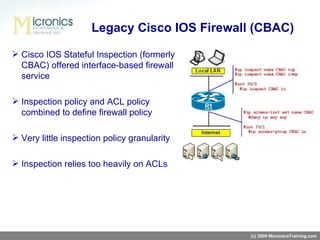
Cisco IOS Stateful Inspection (formerly CBAC) offered interface-based firewall service Inspection policy and ACL policy combined to define firewall policy Very little inspection policy granularity Inspection relies too heavily on ACLs Legacy Cisco IOS Firewall (CBAC) (c) 2009 MicronicsTraining.com
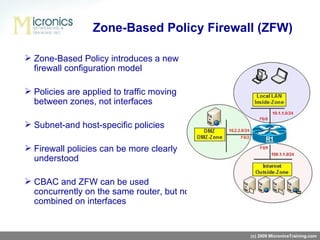
Zone-Based Policy introduces a new firewall configuration model Policies are applied to traffic moving between zones, not interfaces Subnet-and host-specific policies Firewall policies can be more clearly understood CBAC and ZFW can be used concurrently on the same router, but not combined on interfaces Zone-Based Policy Firewall (ZFW) (c) 2009 MicronicsTraining.com
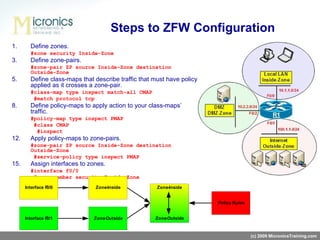
Define zones. #zone security Inside-Zone Define zone-pairs. #zone-pair ZP source Inside-Zone destination Outside-Zone Define class-maps that describe traffic that must have policy applied as it crosses a zone-pair. #class-map type inspect match-all CMAP   #match protocol tcp Define policy-maps to apply action to your class-maps’ traffic. #policy-map type inspect PMAP   #class CMAP   #inspect Apply policy-maps to zone-pairs. #zone-pair ZP source Inside-Zone destination Outside-Zone   #service-policy type inspect PMAP Assign interfaces to zones. #interface f0/0   #zone-member security Inside-Zone Steps to  ZFW  Configuration (c) 2009 MicronicsTraining.com
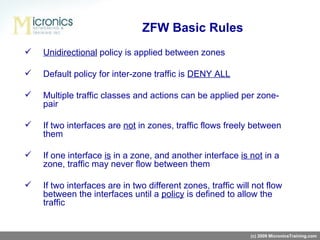
Unidirectional  policy is applied between zones Default policy for inter-zone traffic is  DENY ALL Multiple traffic classes and actions can be applied per zone-pair If two interfaces are  not  in zones, traffic flows freely between them If one interface  is  in a zone, and another interface  is not  in a zone, traffic may never flow between them If two interfaces are in two different zones, traffic will not flow between the interfaces until a  policy  is defined to allow the traffic ZFW Basic Rules (c) 2009 MicronicsTraining.com
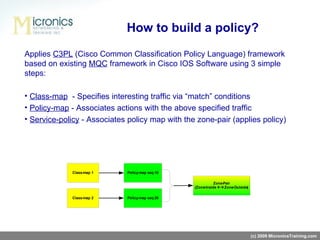
Applies  C3PL  (Cisco Common Classification Policy Language)  framework  b a sed  on existing  MQC  framework in Cisco IOS Software  using 3 simple steps: Class-map   -  Specifies interesting traffic via “match”   conditions Policy-map  -  Associates actions with the above specified traffic Service-policy  - Associates policy map with the zone-pair (applies policy) How to build a policy? (c) 2009 MicronicsTraining.com
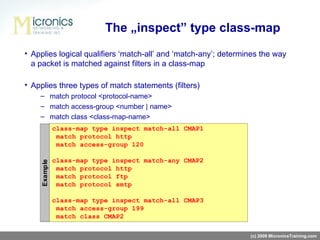
Applies logical qualifiers ‘match-all’   and ‘match-any’; determines the way a packet is matched against filters in a class-map Applies three types of match statements (filters) match protocol <protocol-name> match access-group <number | name> match class <class-map-name> The „inspect” type class-map (c) 2009 MicronicsTraining.com
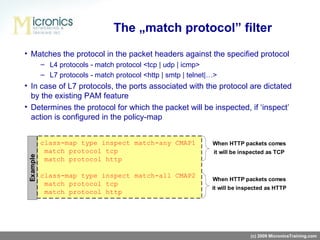
Matches the protocol in the packet headers against the specified protocol L4 protocols -   match protocol <tcp   |   udp   |   icmp> L7 protocols -   match protocol <http   |   smtp   |   telnet|…> In case of L7 protocols, the ports associated with the protocol are dictated by the existing PAM feature Determines the protocol for which the packet will be inspected, if ‘inspect’   action is configured in the policy-map The „match protocol” filter (c) 2009 MicronicsTraining.com
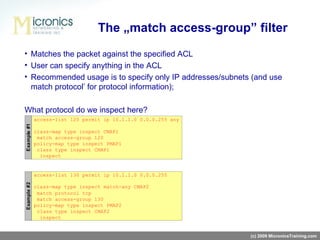
Matches the packet against the specified ACL User can specify anything in the ACL Recommended usage is to specify only IP addresses/subnets (and use   match protocol’   for protocol information); What protocol do we inspect here?   The „match access-group” filter (c) 2009 MicronicsTraining.com
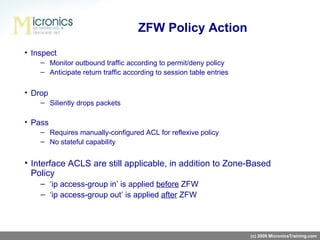
Inspect Monitor outbound traffic according to permit/deny policy Anticipate return traffic according to session table entries Drop Siliently drops packets Pass Requires manually-configured ACL for reflexive policy No stateful capability Interface ACLS are still applicable, in addition to Zone-Based Policy ‘ ip access-group in ’  is applied  before  ZFW ‘ ip access-group out ’  is applied  after  ZFW ZFW Policy Action (c) 2009 MicronicsTraining.com
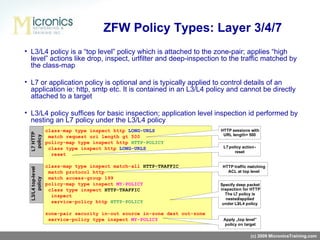
L3/L4 policy is a “top level”   policy which is attached to the zone-pair;  applies  “high level”   actions like drop, inspect, urlfilter and deep-inspection  to the traffic matched by the class-map L7 or application policy is optional and is typically applied to   control details of an application ie: http, smtp etc. It is contained in an L3/L4 policy and cannot be directly attached to a target L3/L4 policy suffices for basic inspection; application level inspection  id performed by nesting  an L7 policy  under  the L3/L4 policy ZFW Policy Types: Layer 3/4/7 (c) 2009 MicronicsTraining.com
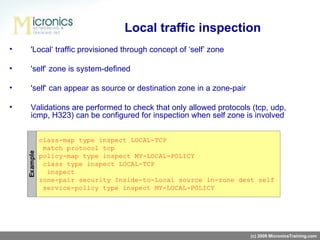
Local traffic inspection 'Local‘   traffic provisioned through concept of ‘self’   zone 'self‘   zone is system-defined 'self‘   can appear as source or destination zone in a zone-pair Validations are performed to check that only allowed protocols (tcp, udp, icmp, H323) can be configured for inspection when self zone is involved (c) 2009 MicronicsTraining.com
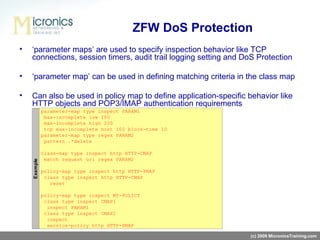
ZFW DoS Protection ‘ parameter maps’ are used to specify inspection behavior like TCP connections, session timers, audit trail logging setting and DoS Protection ‘ parameter map’ can be used in defining matching criteria in the class map Can also be used in policy map to define application-specific behavior like HTTP objects and POP3/IMAP authentication requirements (c) 2009 MicronicsTraining.com
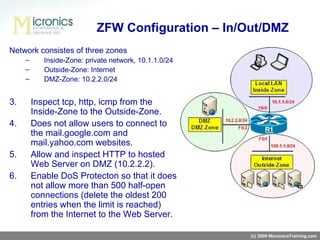
Network consistes of three zones Inside-Zone: private network, 10.1.1.0/24 Outside-Zone: Internet DMZ-Zone: 10.2.2.0/24 Inspect tcp, http, icmp from  the Inside-Zone to the Outside-Zone . Does not allow users to connect to the mail.google.com and mail.yahoo.com websites. Allow and inspect HTTP to hosted  Web Server  on DMZ  (10.2.2.2). Enable DoS Protecton so that it does not allow more than 500 half-open connections (delete the oldest 200 entries when the limit is reached) from the Internet to the Web Server.  ZFW Configuration – In/Out/DMZ (c) 2009 MicronicsTraining.com
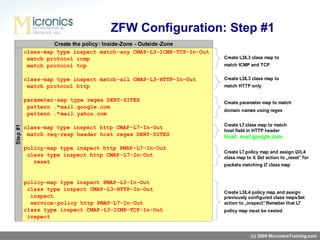
ZFW Configuration: Step #1 (c) 2009 MicronicsTraining.com
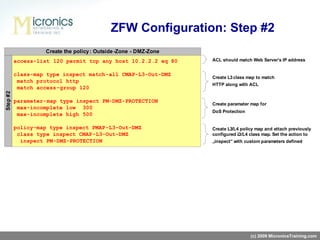
ZFW Configuration: Step #2 (c) 2009 MicronicsTraining.com
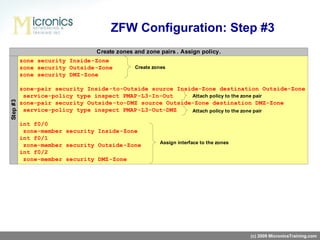
ZFW Configuration: Step #3 (c) 2009 MicronicsTraining.com
ZFW Verification (c) 2009 MicronicsTraining.com show policy-map type inspect zone-pair show policy-map type inspect http show zone security show zone-pair security
(c) 2009 MicronicsTraining.com Thank you! www.MicronicsTraining.com  [email_address]

Zone Based Policy Firewall

  • 1.
    Zone-Based Policy FirewallPiotr Matusiak, CCIE #19860 (c) 2009 MicronicsTraining.com
  • 2.
    Cisco IOS StatefulInspection (formerly CBAC) offered interface-based firewall service Inspection policy and ACL policy combined to define firewall policy Very little inspection policy granularity Inspection relies too heavily on ACLs Legacy Cisco IOS Firewall (CBAC) (c) 2009 MicronicsTraining.com
  • 3.
    Zone-Based Policy introducesa new firewall configuration model Policies are applied to traffic moving between zones, not interfaces Subnet-and host-specific policies Firewall policies can be more clearly understood CBAC and ZFW can be used concurrently on the same router, but not combined on interfaces Zone-Based Policy Firewall (ZFW) (c) 2009 MicronicsTraining.com
  • 4.
    Define zones. #zonesecurity Inside-Zone Define zone-pairs. #zone-pair ZP source Inside-Zone destination Outside-Zone Define class-maps that describe traffic that must have policy applied as it crosses a zone-pair. #class-map type inspect match-all CMAP #match protocol tcp Define policy-maps to apply action to your class-maps’ traffic. #policy-map type inspect PMAP #class CMAP #inspect Apply policy-maps to zone-pairs. #zone-pair ZP source Inside-Zone destination Outside-Zone #service-policy type inspect PMAP Assign interfaces to zones. #interface f0/0 #zone-member security Inside-Zone Steps to ZFW Configuration (c) 2009 MicronicsTraining.com
  • 5.
    Unidirectional policyis applied between zones Default policy for inter-zone traffic is DENY ALL Multiple traffic classes and actions can be applied per zone-pair If two interfaces are not in zones, traffic flows freely between them If one interface is in a zone, and another interface is not in a zone, traffic may never flow between them If two interfaces are in two different zones, traffic will not flow between the interfaces until a policy is defined to allow the traffic ZFW Basic Rules (c) 2009 MicronicsTraining.com
  • 6.
    Applies C3PL (Cisco Common Classification Policy Language) framework b a sed on existing MQC framework in Cisco IOS Software using 3 simple steps: Class-map - Specifies interesting traffic via “match” conditions Policy-map - Associates actions with the above specified traffic Service-policy - Associates policy map with the zone-pair (applies policy) How to build a policy? (c) 2009 MicronicsTraining.com
  • 7.
    Applies logical qualifiers‘match-all’ and ‘match-any’; determines the way a packet is matched against filters in a class-map Applies three types of match statements (filters) match protocol <protocol-name> match access-group <number | name> match class <class-map-name> The „inspect” type class-map (c) 2009 MicronicsTraining.com
  • 8.
    Matches the protocolin the packet headers against the specified protocol L4 protocols - match protocol <tcp | udp | icmp> L7 protocols - match protocol <http | smtp | telnet|…> In case of L7 protocols, the ports associated with the protocol are dictated by the existing PAM feature Determines the protocol for which the packet will be inspected, if ‘inspect’ action is configured in the policy-map The „match protocol” filter (c) 2009 MicronicsTraining.com
  • 9.
    Matches the packetagainst the specified ACL User can specify anything in the ACL Recommended usage is to specify only IP addresses/subnets (and use match protocol’ for protocol information); What protocol do we inspect here? The „match access-group” filter (c) 2009 MicronicsTraining.com
  • 10.
    Inspect Monitor outboundtraffic according to permit/deny policy Anticipate return traffic according to session table entries Drop Siliently drops packets Pass Requires manually-configured ACL for reflexive policy No stateful capability Interface ACLS are still applicable, in addition to Zone-Based Policy ‘ ip access-group in ’ is applied before ZFW ‘ ip access-group out ’ is applied after ZFW ZFW Policy Action (c) 2009 MicronicsTraining.com
  • 11.
    L3/L4 policy isa “top level” policy which is attached to the zone-pair; applies “high level” actions like drop, inspect, urlfilter and deep-inspection to the traffic matched by the class-map L7 or application policy is optional and is typically applied to control details of an application ie: http, smtp etc. It is contained in an L3/L4 policy and cannot be directly attached to a target L3/L4 policy suffices for basic inspection; application level inspection id performed by nesting an L7 policy under the L3/L4 policy ZFW Policy Types: Layer 3/4/7 (c) 2009 MicronicsTraining.com
  • 12.
    Local traffic inspection'Local‘ traffic provisioned through concept of ‘self’ zone 'self‘ zone is system-defined 'self‘ can appear as source or destination zone in a zone-pair Validations are performed to check that only allowed protocols (tcp, udp, icmp, H323) can be configured for inspection when self zone is involved (c) 2009 MicronicsTraining.com
  • 13.
    ZFW DoS Protection‘ parameter maps’ are used to specify inspection behavior like TCP connections, session timers, audit trail logging setting and DoS Protection ‘ parameter map’ can be used in defining matching criteria in the class map Can also be used in policy map to define application-specific behavior like HTTP objects and POP3/IMAP authentication requirements (c) 2009 MicronicsTraining.com
  • 14.
    Network consistes ofthree zones Inside-Zone: private network, 10.1.1.0/24 Outside-Zone: Internet DMZ-Zone: 10.2.2.0/24 Inspect tcp, http, icmp from the Inside-Zone to the Outside-Zone . Does not allow users to connect to the mail.google.com and mail.yahoo.com websites. Allow and inspect HTTP to hosted Web Server on DMZ (10.2.2.2). Enable DoS Protecton so that it does not allow more than 500 half-open connections (delete the oldest 200 entries when the limit is reached) from the Internet to the Web Server. ZFW Configuration – In/Out/DMZ (c) 2009 MicronicsTraining.com
  • 15.
    ZFW Configuration: Step#1 (c) 2009 MicronicsTraining.com
  • 16.
    ZFW Configuration: Step#2 (c) 2009 MicronicsTraining.com
  • 17.
    ZFW Configuration: Step#3 (c) 2009 MicronicsTraining.com
  • 18.
    ZFW Verification (c)2009 MicronicsTraining.com show policy-map type inspect zone-pair show policy-map type inspect http show zone security show zone-pair security
  • 19.
    (c) 2009 MicronicsTraining.comThank you! www.MicronicsTraining.com [email_address]

Editor's Notes

  • #2 Hello and welcome to Zone-based Policy Firewall video on demand session. My name is Piotr Matusiak and I work for Micronics Training as a Technical Instructor. During a next couple of minutes I will be talking about Cisco’s new IOS firewall feature which is a part of CCIE Security lab exam as well as CCIE Routing &amp; Switching lab exam. I hope CCIE candidates for both tracks will find this session useful in their studies. OK, let’s start then and see what’s new Cisco has to offer….
  • #3 As you might already know a previous version of IOS firewall was called Class-based Access Control (CBAC in short) and was offered interface-based firewall service only. What does it mean “interface-based”? It means that traffic entering or leaving a particular interface is inspected for service conformance; if traffic matches requirements, the return traffic is allowed back through the firewall. See the figure, the i nspection policy is attached to the f0/0 interface and ACL is attached to the returning interface which is f0/1 interface. In this example, only TCP and ICMP packets will be inspected and hence only that traffic is permitted. The CBAC inspection was sufficient for a small network with edge router with only two interfaces. However, multiple inspection policies and ACLs on several interfaces in a router make it difficult to correlate the policies that will be applied to traffic between multiple interfaces. As CBAC relies too heavily on ACLs it is not very flexible and has limited inspection granularity. In addition to that, all traffic through a given interface was subjected to the same inspection. This was enough to start thinking about a new IOS firewall solution which gives more flexibility and can meet today’s users expectations.
  • #4 And here we go! A Zone-Based Policy Firewall has been developed which uses completely different firewall configuration model. Instead relying on interfaces and ACLs it brings a term of ZONE. What is a zone? A zone defines a boundary where traffic is subjected to policy restrictions. As we can see on the figure, there are 3 zones defined based on different network subnets. Inside-Zone consists internal network; Outside-Zone defines the Internet and DMZ-Zone consists a public Web server which is available from the Internet. To make migration off of CBAC easier, we can configure ZFW and CBAC concurrently on the same router but not on the same interface.
  • #5 Let see the steps to configure ZFW. First of all we need to configure zones. This is accomplished in router’s global config mode by using command of “zone security &lt;zone name&gt;”. We need to configure one, two, three zones in our example. Inside-zone for internal network, Outside-Zone for the Internet, and DMZ-Zone for DMZ. After creating the Zones, we need to configure something called a zone-pair, which is a pair of two zones where one zone is a source and second zone is a destination. Be careful because order of zones in the zone-pair is important and will dictate router the packet flow direction which will be subjected to inspection. For example, if we want to inspect traffic from the Inside to the Outside the Inside must be source zone and the Outside must be a destination. However, for traffic originated on the outside zone, the Outside-Zone must be a source zone. Firewall policies are unidirectional and this must be considered at the beginning of zones creation. Next three points is a policy creation process. More on this in a minute. The last step is making router interfaces members of an appropriate zone. This should be done as a very last step because if we could assign interface to the zone before creating policy – all traffic will be denied by default. So it is much better to first create zones and policy and then assign the policy to the zone-pair and assign interface to the zone. This will effectively enable ZFW on the router.
  • #6 OK, we know the steps of ZFW configuration, now it is time to learn some basic rules. As I said on previous slide, a policy applied between zones is Unidirectional. The ZFW is a stateful firewall which means all returning traffic will be allowed automatically on the returning interface. There is no need for ACL. However, if we want to allow traffic to flow in opposite direction we will need a new zone-pair to be created and a new policy attached to it. The default policy for traffic between zones is DENY ALL. Once we create zones and zone-pair, the traffic stops going thru the router. This is because there is no policy attached to the zone-pair and no policy equals deny all. Only traffic explicitly allowed can be passed thru the router. Also, remember to attach zones to the appropriate interface at the very last step. Do not assign interface to the zone before configuring policy because it will effecively drop a legitimate traffic because traffic will never go between two interfaces where one of them is not in the zone. The same is true if two interfaces are in two different zone but there is no policy attached to that zone-pair. The traffic is blocked in this case.
  • #7 OK, we know now that we need to create zones, configure a zone-pair and attach policy to it in order to pass traffic thru the firewall. Now it’s time to see how to build effective and flexible policy. Aaa Policy building process uses 3 simple steps which are based on Modular Qos CLI framework (MQC in short). Here, it is called C3PL which basically uses “type inspect” components to build the policy. Nothing more!!! First step is to configure a “class-map” to specify interesting traffic. This is not regular class map but “inspection type” class map. We configure it using a command of “class-map type inspect match-all or match –any plus class-name. Second step is to associate an action to the previously “classified” traffic. How to do that? Exactly in the same way as it was in MQC – using policy map, again “type inspect”. And finally, Third step is to apply policy map to the zone-pair. How to do that? Again, nothing new – using „ service - policy type inspect” command. On the next couple of slides I will describing those 3 components in a greater detail. So be vigilant!
  • #8 OK, here’s the steps for class-map configuration. As you already know there are two different logical qualifiers available: match-all (which is a default) and match-any. This is so simple, watch out: Match-all – introduces AND logic; traffic must match ALL filters; exit on first NON-match; Match-any – introduces OR logic; traffic must match at least one filter; exit on first match We can match traffic using three types of match statements: match protocol &lt;protocol-name&gt; - it determines which service match the class-map, and how the traffic will be inspected. This is so important because if the policy-map applies the inspect action; the traffic will be expected to behave as the specified service if the traffic matches the protocol filter in the class-map match access-group &lt;number | name&gt; - matches using an access-list. And the last option is match class &lt;class-map-name&gt; - which nesting other class-map and allows defining of more flexible matching criteria. There are 3 different examples of matching filters. The first one matches protocol http and access list 120. Both matches must be true in order to subject the traffic to inspection. In second example one of protocols must be matched to subject it to the inspection. And in the third example all HTTP or FTP or SMTP traffic matched by ACL will be subjected to the inspection.
  • #9 Let’s take a closer look at match protocol filter. What does it do and how it works? Basically speaking it matches the protocol in the packet headers against the specified protocol. - For Layer 4 protocols - match protocol &lt;tcp | udp | icmp&gt; - For Layer 7 protocols - match protocol &lt;http | smtp | telnet|…&gt; In case of L7 protocols, the ports associated with the protocol are dictated by the existing Port-to-Application-Mapping (PAM) database entry. For example, ‘match protocol http’ will match packets bound for port 8080 (in addition to port 80) if the router has ‘ip port-map http port 8080’ configured. In the following example there are two class-maps configured. Both has the same matching filters but differs in matching qualifiers. The first example has “match-any” and the second example has “match-all”. See how it changes the policy behavior when the same HTTP packet comes to the router. In the first case the packet will be inspected as Layer 4 packet (no application-specific inspection taking place) because of “first match”. In the second case as both matching filters must be checked, the same HTTP packet will be treated as HTTP and will be subjected to application-specific checks.
  • #10 OK, next option to use is ACL matching. User can specify anything in the ACL; everything is honored (meaning IP addresses/subnets, ports, dscp, IP precedence etc.); However, recommended usage is to specify only IP addresses/subnets (and use additional filter of ‘match protocol’ for protocol information); So, a typical usage is in conjunction with ‘match protocol’ in a match-all class-map Seems easy? Have a look at the following examples. What protocol do we inspect in example 1 ? As there is no port specified in the ACL it is hard to determine protocol. The same problem router must be able to resolve. This is a special case because of insufficient information and therefore the router needs to guessing on the protocol. In such case PAM database is useful. So in that case inspection will be performed for the L7 protocol based on PAM mappings; if no PAM mapping is found, relevant L4 inspection is performed; For example port 80 – http inspection, port 69 – tftp inspection, port 1234 - TCP inspection What about example 2 then? Again, no port specified in the ACL, however there is a filter specified in the class-map f or TCP connections. Hence, we get TCP inspection. Reason – first-match semantics of match-any class-map. OK OK but what if a UDP packet comes to the router, huh? For UDP packets, we again have insufficient information on protocol; so, this is equivalent to the match access-group special case; result – L7 inspection as dictated by PAM, or L4 if there is no PAM mapping for the UDP port in the packet.
  • #11 OK, so far so good. We have matched our interesting traffic. Now it’s time to perform some actions on that traffic. And again, we have 3 options under policy-map type inspect: We can: Inspect packet – which basically speaking opens a hole for returning traffic. However it is stateful inspection, so that more information about packet are used like for example sequence numbers, ports, messages, methods, etc. We can also: Drop packet – which is self-explanatory And finally we can: Pass traffic. This action does not have any stateful capability, so that it won’t open any dynamic holes for returning traffic. Is it useful, someone could ask? Yes it is – for example in the policy for traffic destined or originated from the router. Will talk about this in a few minutes. If a stateful firewall is not enough for us we can still add additional control using ACL s . However it is worth noticing that inbound ACL is applied before ZFW and outbound ACL is applied after ZFW . This needs to be considered during ACL design. For example, what is a value in the outbound ACL blocking FTP if ZFW policy does not allow that traffic?
  • #12 Cool, I hope things are getting more interesting now.... We have two class and policy types available: L3/L4 policy and L7 policy. And here a real fun starts. L7 class/policy-maps are protocol specific; the options appearing under them depend on the protocol and the capabilities of the existing application inspection module As the inspection engines of individual protocols are enhanced, more options will be added by Cisco to the corresponding L7 class/policy-maps to provision the new functionality As of now, L7 policies can be configured for the following protocols: HTTP, SMTP, POP3, IMAP , IM (AOL, ICQ, MSN, YAHOO), P2P (eDonkey, FastTrack, Gnutella, kazaa2), Voice traffic (SIP, H323), and Sun RPC . The L7 policy-map is attached to the top-level policy using the “service-policy &lt; protocol-name &lt;policy-name&gt;” command The class in the top-level policy for which an L7 policy-map is configured MUST have a “match protocol” filter. This protocol and the L7 policy-map protocol must be the same. If only ‘match access-group’ filters are present in the class-map, L7 policy cannot be configured for that class OK, you need to remeber two things from this slide: First: you can only apply L3/L4 policy map to the zone-pair, not L7. L7 policy-maps are applied under L3/L4 policy-maps only. Second: L3/L4 class map must be configured with „match protocol” statement in order to apply L7 policy map to that traffic.
  • #13 There is also a special ZONE called SELF zone. This zones represent a router itself and every interface is a member of that zone by default. This zone is useful when we want to control traffic destined to the router or originated from the router. Then we just put a SELF zone ina zone-pair as a source (if we want to control traffic originated from the router) or as a destination (if we want to control traffic destined to the router). Unfortunately there are some caveats in this solution. First, we can only inspect TCP, UDP, ICMP and H323 packets and second, we can’t use ZFW policing when SELF zone is involved. In this example we match and inspect TCP traffic destined to the router. Instead of inspection we can also Pass traffic without any inspection using „pass” instead of „inspect”. Of course we can use Drop as well.
  • #14 OK, now we go thru really useful bunch of commands. The „parameter maps” are used to specify inspection behavior and prevent Denial-of-Service attacks. Also, the parameter-map can be used to define matching criteria in the class map in more flexible way – using regex. There is a couple of parameter map types but only three of them are really useful in ZFW. The „inspect” type where we configure some anti-DOS stuff and logging, the „regex” type for configuring regex expressions finally used in the class map and „urlfpolicy” which is useful in URL Filtering. As we can see in the example, there is a parameter-map named PARAM1 which defines some anti-DOS parameters. This parameter map is attached to the „inspect” command under L3/L4 policy map. The second parameter-map defines regex expression which matches all strings with „delete” keyword and then it is used in the L7 class map to match this string in the HTTP URL. This kind of parameter-map cannot be directly attached to the policy-map – there must be a L7 class map and L7 policy map configured first and then it can be assigned under L3/L4 policy map using „service-policy” command.
  • #15 OK, thats enough theory. Let’s do something useful with our knowledge about ZFW. A real world scenario is a best example to work on. See the figure. We have a typical small-business Internet edge connection. We have internal users who are spending their worktime on surfing the Internet. We have Internet connection and some web servers there. And finally we have DMZ where our corporate Web Server is located serving content to the internet users via HTTP. Let’s configure the following policy on our ZFW: First, allow our internal users connecting to their favorit web sites using HTTP. We will also want other TCP-based traffic to go out. And finally ICMP traffic for troubleshooting. As our corporate policy does not allow using of external mailboxes, we will block our users from accessing „mail.google.com” and „mail.yahoo.com”. Our Web server needs to be accessibe from the Internet, so that we need to configure HTTP inspection for that as well. And finally, as we are security experts we want to protect our Web Server from DOS attacks by limiting half-open connections from the internet to 500. We should delete the oldest 200 connections when this limit is reached. OK, let’s do that in a professional way!!!
  • #16 Step ONE is to configure our policy. We will be using small blocks and then those blocks will be puting together to build up our policy. OK, we will be inspecting TCP, ICMP and HTTP traffic originated from our internal network. So, we need some L3 class map to match that traffic. And here is the catch! Watch out. We cannot match all three protocols in the one class-map. Why? Because we will be performing Deep Packet Inspection at Layer 7 of HTTP protocol to disallow our users from reaching some webmail servers. So, we are configuring two clas-maps one for matching TCP and ICMP and second for matching HTTP only. Next small block is a Deppe packet inspection policy for HTTP traffic. As we need to block some websites a regex matching domain names string will be useful. How to configure that regex? Using parameter-map type rexec of course. And again, be careful here. As you can see in the example, there is a dot and asterisk before the domain name of the webmail servers. Why do we do that? This two characters mean „whatever is before the string” – which basically matches domain name with any charactes which can be included before that name. This is because IOS FW matches HTTP header fields as a string containing two regex-s: one is a regex for HTTP header field and second is a regex configured by the user. In HTTP protocol specification there is a space between header field name and header field value and this needs to be addressed by the user when configuring parameter-map. You can see an example of the string which needs to be matched by the „match header host” command marked green. OK, as we know already, L7 class-map cannot be assigned to L3 policy-map, so we need to configure L7 policy-map first and specify „reset” as an action for matched packets. This will effectively keep users from accessing thse two websites. OK, finally, L3 policy map is configured, L3 class-map for HTTP is attached to it and the inspection enabled. In addition to that, we wanted to perform Deep packet inspection for HTTP L7, so we attach L7 policy map here using service-policy command. ICMP and TCP traffic is using another L3 class map so we are attaching it separaetly inder the same L3 policy map. Remeber that this L3 policy map will be attached as a policy under a zone-pair.
  • #17 OK, time to create a policy for our Web Server. This policy will be applied to the traffic from the Internet destined to the Web Server. First, we create an ACL specifying our Web Server as a destination. That ACL is applied under L3 class-map along with matching HTTP protocol. Be careful here as there are two match statements which must be met at the same time, so we need a „match-all” class-map here. Then we need to protect our Web Server againt DOS attacks so we need to configure a p arameter -map allowing maximum of 500 half-open connections. Th is p arameter -map will be attached under L3 policy-map just by adding parameter-map name after “inspect” action.
  • #18 OK, we have our two policies ready. Now it’s time to configure Zones, zone-pairs and attach our policies to them. In our example three zones are required. Inside-Zone for internal network, Outside-Zone for the Internet and DMZ zone for DMZ subnet where our Web Server is located. Then create zone-pairs: one for traffic between Inside network (nad Inside-Zone) and the Internet (which is Outside-Zone) And second between the Internet (which is Outside-Zone) and DMZ network (which is DMZ-ZONE). We should attach our policies to the zone-pairs. Again, remeber that only L3 policy map can be assigned as a policy to the zone-pair. OK, not it’s time to mess up by enabling ZFW. This should be a very last step and it is nothing more than assigning physical interfaces to the appropriate zones. And, that’s it! Our ZFW is up and running.
  • #19 After successful implementation we should check if everything is OK and our configuration works the way we wanted. There are a couple of show commands available. Most powerful command for checking almost all things is :sow policy-map type inspect zone-pair”. We can specify a zone-pair name to narrow the command output. Anyway, this command displays the policy and counters for our inspected traffic. If we configured Deep packet inspection, an useful command would be „show policy-map type inspect &lt;protocol-name&gt;” where L7 policy for specified protocol is displayed. To see our zones and policies attached to the zone-pairs use :show zone security” and „show zone-pair security” commands.
  • #20 OK, this is it! The end. I would like to thank you for virewing this video on demand session and I hope it was informative and useful in your studies. This session was an excerpt from our CCIE Security bootcamp and do not cover every aspect of ZFW technology. During a CCIE Security bootcamp we will be cover ZFW technology in grater detail to help our students master that subject and use this technology in a real world scenarios. For more information about our offer please go to WWW.MicronicsTraining.com or simply send your inqueries to sales@micronicstraining.com. Thanks again for your time and good luck on CCIE exam.