How to transfer
designs on Zazzle
Products
by MissRhoadie
"Transferring designs"
is a great new tool that
has been recently
added to Zazzle. 
Take this flamingo nursery
pillow for instance.
You want to purchase this
pillow, but you wish it came
with a matching clock.
With "Transfer this design" you can create
a matching clock.
First you go to the page where you see the
product.
Scroll down until you see "Transfer This
Design"
Click "Transfer this design"
You will be taken to the following screen
There are three ways to choose a product
to transfer the design onto.
You can scroll down the results and
choose one
You can go to "department" or "price" on
the left hand side and choose a category
Or you can type in a specific item in the
search engine box
Let's use the third option and type in
"Clock"
Choose a clock
Volia!  You have successfully transferred
the design
However, the fun does not stop there
Let's say you want to delete some
information and further customize the
clock
Just click the customize button 
You are taken to the "customize this design"
screen
Here you can change background colors
Add filters to graphics
Add or delete items.
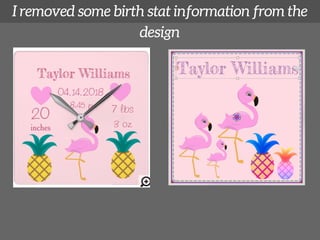
This is how I redesigned the clock
I removed some birth stat information from the
design
I then duplicated the flamingos with the copy
and paste button and resized them
I then moved the pineapples to the right and
resized them and added filters
Finally I enlarged baby's name and changed the
color
The changes you can make are endless
Begin by clicking here today!

Zazzle Tutorial: Transfer this design