ZABBIX
www.zabbix.com
Zabbix Agent Simulator
To developing the extensions, to testing them, to verify the
configuration, to teaching, to demo and to the glory of Zabbix !
Installation and use of the Zabbix Agent Simulator
ZABBIX
www.zabbix.comInstallation and use of the Zabbix Agent Simulator
Preface
Credits.
I wish to thank the authors of the software called
SNMPSIM.
http://snmpsim.sourceforge.net/
The ones who shows me the way. Also, the authors of
the Zabbix monitoring platform. Without you, this
software wouldn't exists at all
http://www.zabbix.com
Thanks you for all your help and encouragement
ZABBIX
www.zabbix.comInstallation and use of the Zabbix Agent Simulator
Preface
What is the Zabbix Agent Simulator. Well, as the name probably suggesting, it is a
piece if software which simulating the Zabbix Agent. Your first question probably will be:
“Why on Earth you wanna do this ?” There are simple answer on this question and an
answer with “multiple choices of answers”. I will start with simple one:
Zabbix Agent Simulator intended to be used instead regular Zabbix passive Agent in the
situations, where use of the real Zabbix Agent is not practical or simply not desirable.
“Non-practical” means, that the use of the
regular Zabbix Agent which is coming with
Zabbix will not bring desirable results. For
example: when you are developing your
Triggers and Actions, you test host rarely
having the thresholds that you are
programming. Many times, I saw how
Zabbix Administrators deployed
configurations, which were not fully tested.
What is “non-practical” ? What is “not desirable” ?
“Non desirable” means that you are
following the design and development
solution which is flawed in one or
several ways and continue to use this
development method will bring you
into a troubles later on. For example:
many times, I saw when people were
tried to test there configurations on live
installations. Indeed, this is a very bad
practice and it must be avoided at all
cost.
ZABBIX
www.zabbix.comInstallation and use of the Zabbix Agent Simulator
Preface
So, what is the “long answer” on what is the Zabbix Agent Simulator and the scope of use
for this software tool
Configurations and monitoring architecture testing.
Zabbix Agent Simulator can generate you the values for the metrics
exactly to your specifications and scenarios. You can simulate any
conditions on your host or Agent monitored application, without bothering
the production environment and you can perform full test of your Zabbix
configuration behavior in all possible situations.
Post-mortem analysis.
If your production configuration doesn't work, you can take the values
and “re-play” them on your development and test Zabbix installations.
This will permit you to see what is wrong with your production
configuration and how to fix that.
ZABBIX
www.zabbix.comInstallation and use of the Zabbix Agent Simulator
Preface
So, what is the “long answer” on what is the Zabbix Agent Simulator and the scope of use
for this software tool
Zabbix architecture and capabilities demonstration.
Use during training and in other forms of the lab and educational
environment. Safe simulation of the catastrophic failures of your
infrastructure for educational and training purposes. I say: “let them play
with this simulator, not with the real things”.
Safe simulation of the massive infrastructure on your virtual hosts for
your development and test “sandboxes”
ZABBIX
www.zabbix.comInstallation and use of the Zabbix Agent Simulator
Preface
And any other situations similar and not similar to those.
ZABBIX
www.zabbix.comInstallation and use of the Zabbix Agent Simulator
Preface
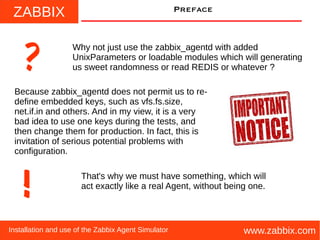
Why not just use the zabbix_agentd with added
UnixParameters or loadable modules which will generating
us sweet randomness or read REDIS or whatever ??
Because zabbix_agentd does not permit us to re-
define embedded keys, such as vfs.fs.size,
net.if.in and others. And in my view, it is a very
bad idea to use one keys during the tests, and
then change them for production. In fact, this is
invitation of serious potential problems with
configuration.
!
That's why we must have something, which will
act exactly like a real Agent, without being one.
ZABBIX
www.zabbix.comInstallation and use of the Zabbix Agent Simulator
installation
You will be needed a REDIS Server if you
want to run ZAS Agent. You can make ZAS
running without REDIS, but for the sanity
and for the future, where ZAS will be even
more closely tied with REDIS, I say, this is a
mandatory requirement. I will not be covering
on how to obtain and install REDIS server,
since this topic is outside of the scope of our
discussion.
ZABBIX
www.zabbix.comInstallation and use of the Zabbix Agent Simulator
installation
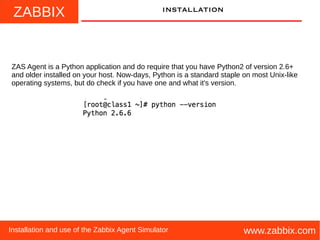
ZAS Agent is a Python application and do require that you have Python2 of version 2.6+
and older installed on your host. Now-days, Python is a standard staple on most Unix-like
operating systems, but do check if you have one and what it's version.
ZABBIX
www.zabbix.comInstallation and use of the Zabbix Agent Simulator
installation
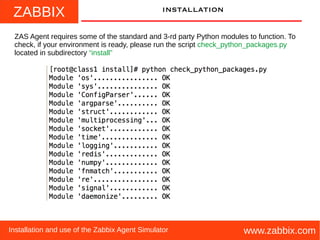
ZAS Agent requires some of the standard and 3-rd party Python modules to function. To
check, if your environment is ready, please run the script check_python_packages.py
located in subdirectory “install”
ZABBIX
www.zabbix.comInstallation and use of the Zabbix Agent Simulator
installation
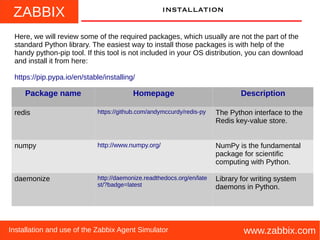
Here, we will review some of the required packages, which usually are not the part of the
standard Python library. The easiest way to install those packages is with help of the
handy python-pip tool. If this tool is not included in your OS distribution, you can download
and install it from here:
https://pip.pypa.io/en/stable/installing/
Package name Homepage Description
redis https://github.com/andymccurdy/redis-py The Python interface to the
Redis key-value store.
numpy http://www.numpy.org/ NumPy is the fundamental
package for scientific
computing with Python.
daemonize http://daemonize.readthedocs.org/en/late
st/?badge=latest
Library for writing system
daemons in Python.
ZABBIX
www.zabbix.comInstallation and use of the Zabbix Agent Simulator
installation
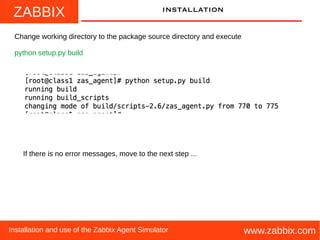
Change working directory to the package source directory and execute
python setup.py build
If there is no error messages, move to the next step ...
ZABBIX
www.zabbix.comInstallation and use of the Zabbix Agent Simulator
installation
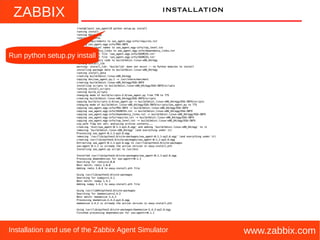
Run python setup.py install
ZABBIX
www.zabbix.comInstallation and use of the Zabbix Agent Simulator
installation
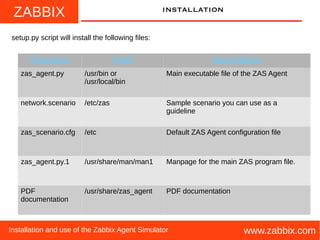
setup.py script will install the following files:
Filename Path Description
zas_agent.py /usr/bin or
/usr/local/bin
Main executable file of the ZAS Agent
network.scenario /etc/zas Sample scenario you can use as a
guideline
zas_scenario.cfg /etc Default ZAS Agent configuration file
zas_agent.py.1 /usr/share/man/man1 Manpage for the main ZAS program file.
PDF
documentation
/usr/share/zas_agent PDF documentation
ZABBIX
www.zabbix.comInstallation and use of the Zabbix Agent Simulator
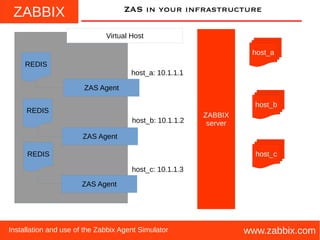
ZAS in your infrastructure
Virtual Host
REDIS
REDIS
REDIS
ZAS Agent
ZAS Agent
ZAS Agent
host_a: 10.1.1.1
host_c: 10.1.1.3
host_b: 10.1.1.2
ZABBIX
server
host_a
host_c
host_b
ZABBIX
www.zabbix.comInstallation and use of the Zabbix Agent Simulator
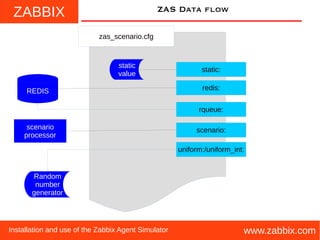
ZAS data flow
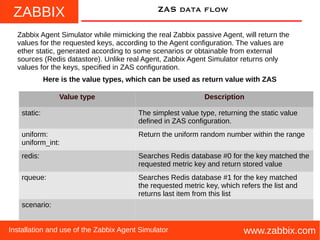
Zabbix Agent Simulator while mimicking the real Zabbix passive Agent, will return the
values for the requested keys, according to the Agent configuration. The values are
ether static, generated according to some scenarios or obtainable from external
sources (Redis datastore). Unlike real Agent, Zabbix Agent Simulator returns only
values for the keys, specified in ZAS configuration.
Value type Description
static: The simplest value type, returning the static value
defined in ZAS configuration.
uniform:
uniform_int:
Return the uniform random number within the range
redis: Searches Redis database #0 for the key matched the
requested metric key and return stored value
rqueue: Searches Redis database #1 for the key matched
the requested metric key, which refers the list and
returns last item from this list
scenario:
Here is the value types, which can be used as return value with ZAS
ZABBIX
www.zabbix.comInstallation and use of the Zabbix Agent Simulator
ZAS Data flow
zas_scenario.cfg
static:
scenario:
rqueue:
redis:
static
value
Random
number
generator
REDIS
scenario
processor
uniform:/uniform_int:
ZABBIX
www.zabbix.comInstallation and use of the Zabbix Agent Simulator
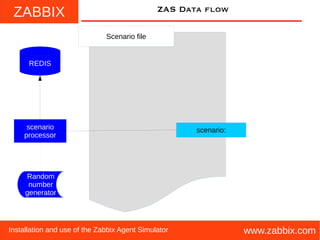
ZAS Data flow
Scenario file
scenario:
REDIS
scenario
processor
Random
number
generator
ZABBIX
www.zabbix.comInstallation and use of the Zabbix Agent Simulator
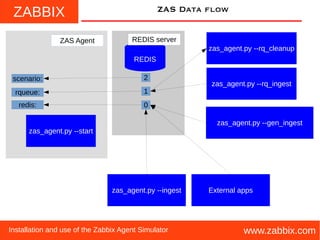
ZAS Data flow
REDIS
zas_agent.py --start
0
2
1
redis:
REDIS server
rqueue:
scenario:
ZAS Agent
zas_agent.py --ingest External apps
zas_agent.py --rq_ingest
zas_agent.py --gen_ingest
zas_agent.py --rq_cleanup
ZABBIX
www.zabbix.comInstallation and use of the Zabbix Agent Simulator
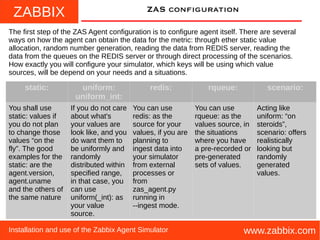
ZAS configuration
The first step of the ZAS Agent configuration is to configure agent itself. There are several
ways on how the agent can obtain the data for the metric: through ether static value
allocation, random number generation, reading the data from REDIS server, reading the
data from the queues on the REDIS server or through direct processing of the scenarios.
How exactly you will configure your simulator, which keys will be using which value
sources, will be depend on your needs and a situations.
static: uniform:
uniform_int:
redis: rqueue: scenario:
You shall use
static: values if
you do not plan
to change those
values “on the
fly”. The good
examples for the
static: are the
agent.version,
agent.uname
and the others of
the same nature
If you do not care
about what's
your values are
look like, and you
do want them to
be uniformly and
randomly
distributed within
specified range,
in that case, you
can use
uniform(_int): as
your value
source.
You can use
redis: as the
source for your
values, if you are
planning to
ingest data into
your simulator
from external
processes or
from
zas_agent.py
running in
--ingest mode.
You can use
rqueue: as the
values source, in
the situations
where you have
a pre-recorded or
pre-generated
sets of values.
Acting like
uniform: “on
steroids”,
scenario: offers
realistically
looking but
randomly
generated
values.
ZABBIX
www.zabbix.comInstallation and use of the Zabbix Agent Simulator
ZAS configuration
The main configuration file for the ZAS Agent do have a name zas_scenario.cfg and default
location of this file is /etc . You can override defaults by passing –scenario option to the
zas_agent.py.
The format of the file is familiar to anyone,
who ever saw .ini configuration files. If you
are Python developer, this is the format which
is handled by the ConfigParser module.
This configuration file consist of the sections
and a keys and a values, defined in those
sections. Some key-value pairs do have a
meaning only for the certain value sources.
Each section name may be exact match to
the name of the Zabbix metric. Also, section
name might be free-form description string.
The most important key within the section is
value= . This key defines how ZAS Agent
obtains the values for the specific key.
This is the comments.
If you have “#” or “;”
in the beginning of the line
the reminder of the line
will be treated as such.
This key instructs ZAS
how to obtain a values
for the key
This is the section
and inside []
you are defining it's name
ZABBIX
www.zabbix.comInstallation and use of the Zabbix Agent Simulator
ZAS configuration
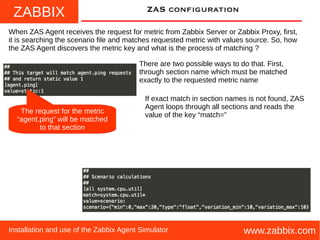
When ZAS Agent receives the request for metric from Zabbix Server or Zabbix Proxy, first,
it is searching the scenario file and matches requested metric with values source. So, how
the ZAS Agent discovers the metric key and what is the process of matching ?
There are two possible ways to do that. First,
through section name which must be matched
exactly to the requested metric name
The request for the metric
“agent.ping” will be matched
to that section
If exact match in section names is not found, ZAS
Agent loops through all sections and reads the
value of the key “match=”
ZABBIX
www.zabbix.comInstallation and use of the Zabbix Agent Simulator
ZAS configuration
If exact match in section names is not found, ZAS Agent loops through all sections and
reads the value of the key “match=” and using this value as regular expression tested
against this metric. If requested metric key matches this regular expression, then this
section will be used for further processing of the values for this key. There are two types
of matching performed during each test. First, Unix shell like matches and then POSIX
regexp matches. If you are the Python developer, first, I am using Python module
fnmatch, then re. Of course, during those checks, the section names do not poses the
special meanings, like in the first pass and you can use free-form descriptive strings as a
section names.
This is shell-like regular expression
and it will match to all system.cpu.util[…]
metrics requests
This is regexp regular expression
and it will match to all vfs.fs.size[...,free]
metrics requests
ZABBIX
www.zabbix.comInstallation and use of the Zabbix Agent Simulator
ZAS configuration
Please note, ZAS Agent is not full-blown
Zabbix Agent and you shall not use it as
replacement for such. ZAS Agent will
respond only with values for the keys to
which match is found in the scenario file.
If you will try to request the key, for which
match is not found, ZAS Agent will simply
close the connection.
ZABBIX
www.zabbix.comInstallation and use of the Zabbix Agent Simulator
ZAS configuration
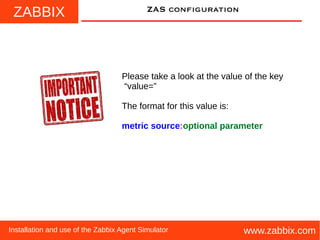
Please take a look at the value of the key
“value=”
The format for this value is:
metric source:optional parameter
ZABBIX
www.zabbix.comInstallation and use of the Zabbix Agent Simulator
ZAS configuration
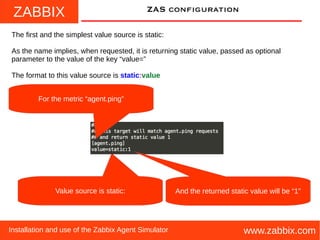
The first and the simplest value source is static:
As the name implies, when requested, it is returning static value, passed as optional
parameter to the value of the key “value=”
The format to this value source is static:value
Value source is static:
For the metric “agent.ping”
And the returned static value will be “1”
ZABBIX
www.zabbix.comInstallation and use of the Zabbix Agent Simulator
ZAS configuration
The next pair of the sources uses internal mechanism of generating simple uniform
random numbers within specified range.
The name of those sources are uniform: and uniform_int:. The difference between them,
that the uniform: returns float and uniform_int: returns integer. The parameter to the value
source is comma delimited two numbers. First is lower end of the range and second is
higher end of the range, whithin which we will generate a uniform random number.
The format to this value source is:
uniform:low end,high end or uniform_int:low end,high end
For the all requests of
application.connections
Generate float uniform random
number in a range between 1 and 100
For the all requests of vfs.fs.size[…,pfree]
Generate integer uniform random
number in a range between 1 and 100
ZABBIX
www.zabbix.comInstallation and use of the Zabbix Agent Simulator
ZAS configuration
The first “external source” (means the source which requires component other than ZAS
Agent) is redis:
The idea behind this value source is very simple: ZAS Agent will connect to REDIS server
DB=0 and request the value of the key matched with requested metric. If value is found, it
will be returned. If not, connection will be closed. REDIS server IP address or FQDN and
the port can be passed through command-line options –redis_host and --redis_port
The format to this value source is: redis:
In this example, for all metric requests
vfs.fs.size[…,free] the values
will be requested from the REDIS server
ZABBIX
www.zabbix.comInstallation and use of the Zabbix Agent Simulator
ZAS configuration
Another “external source” is rqueue:
The difference between redis: and rqueue: in in how the values are stored in the REDIS
server. For the redis:, the single value is stored and readed. For rqueue:, values are
stored and requested from the queue. If queue is empty, ZAS Agent closes the
connection. If you familiar with REDIS, redis: uses SET/GET and rqueue: uses
LPUSH/LINDEX/RPOP. In order to separate rqueue: from redis:, REDIS uses DB=1 for
rqueue:. REDIS server IP address or FQDN and the port can be passed through
command-line options –redis_host and --redis_port
The format to this value source is: rqueue:
In this example, for all metric requests
vfs.fs.size[…,used] the values
will be requested from the REDIS server queues
ZABBIX
www.zabbix.comInstallation and use of the Zabbix Agent Simulator
ZAS configuration
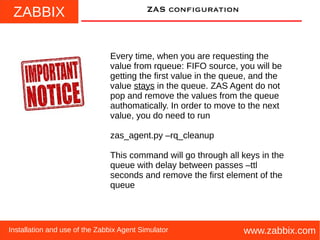
Every time, when you are requesting the
value from rqueue: FIFO source, you will be
getting the first value in the queue, and the
value stays in the queue. ZAS Agent do not
pop and remove the values from the queue
authomatically. In order to move to the next
value, you do need to run
zas_agent.py –rq_cleanup
This command will go through all keys in the
queue with delay between passes –ttl
seconds and remove the first element of the
queue
ZABBIX
www.zabbix.comInstallation and use of the Zabbix Agent Simulator
ZAS configuration
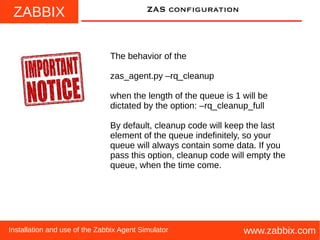
The behavior of the
zas_agent.py –rq_cleanup
when the length of the queue is 1 will be
dictated by the option: –rq_cleanup_full
By default, cleanup code will keep the last
element of the queue indefinitely, so your
queue will always contain some data. If you
pass this option, cleanup code will empty the
queue, when the time come.
ZABBIX
www.zabbix.comInstallation and use of the Zabbix Agent Simulator
ZAS configuration
The last (but not least) value source is scenario:
The scenario: value source is random generator “on steroids”. Unlike “uniform:”, scenario:
generates next value taking previous value into account. The previous value is stored on
REDIS server DB=2. The scenario itself is JSON dictionary, where the keys and the
values defines how the next value will be generated.
The format to this value source is: scenario:{scenario}
In this example, for all metric requests
system.cpu.util[…] the values
will be generated according specified scenario
ZABBIX
www.zabbix.comInstallation and use of the Zabbix Agent Simulator
ZAS configuration
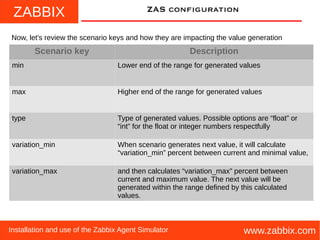
Now, let's review the scenario keys and how they are impacting the value generation
Scenario key Description
min Lower end of the range for generated values
max Higher end of the range for generated values
type Type of generated values. Possible options are “float” or
“int” for the float or integer numbers respectfully
variation_min When scenario generates next value, it will calculate
“variation_min” percent between current and minimal value,
variation_max and then calculates “variation_max” percent between
current and maximum value. The next value will be
generated within the range defined by this calculated
values.
ZABBIX
www.zabbix.comInstallation and use of the Zabbix Agent Simulator
ZAS configuration
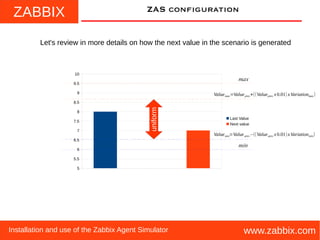
Let's review in more details on how the next value in the scenario is generated
5
5.5
6
6.5
7
7.5
8
8.5
9
9.5
10
Last Value
Next value
max
min
Valuemin=Valueprev−((Valueprev x 0.01)x Variationmin)
Valuemax=Valueprev+((Valueprev x 0.01) x Variationmax )
uniform
ZABBIX
www.zabbix.comInstallation and use of the Zabbix Agent Simulator
ZAS configuration
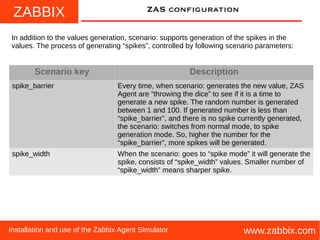
In addition to the values generation, scenario: supports generation of the spikes in the
values. The process of generating “spikes”, controlled by following scenario parameters:
Scenario key Description
spike_barrier Every time, when scenario: generates the new value, ZAS
Agent are “throwing the dice” to see if it is a time to
generate a new spike. The random number is generated
between 1 and 100. If generated number is less than
“spike_barrier”, and there is no spike currently generated,
the scenario: switches from normal mode, to spike
generation mode. So, higher the number for the
“spike_barrier”, more spikes will be generated.
spike_width When the scenario: goes to “spike mode” it will generate the
spike, consists of “spike_width” values. Smaller number of
“spike_width” means sharper spike.
ZABBIX
www.zabbix.comInstallation and use of the Zabbix Agent Simulator
ZAS configuration
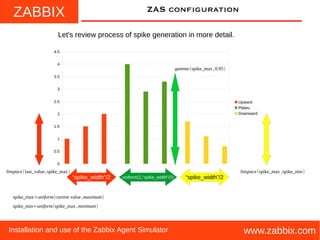
Let's review process of spike generation in more detail.
0
0.5
1
1.5
2
2.5
3
3.5
4
4.5
Upward
Plateu
Downward
“spike_width”/2 “spike_width”/2uniform(1,“spike_width”/2)
linspace(last_value,spike_max) linspace(spike_max ,spike_min)
gamma(spike_max,0.95)
spike_min=uniform(spike_max ,minimum)
spike_max=uniform(current value ,maximum)
ZABBIX
www.zabbix.comInstallation and use of the Zabbix Agent Simulator
FEEDING simulator
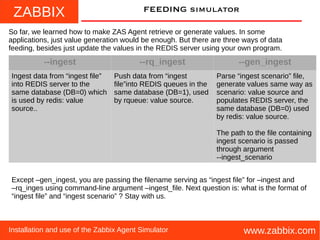
So far, we learned how to make ZAS Agent retrieve or generate values. In some
applications, just value generation would be enough. But there are three ways of data
feeding, besides just update the values in the REDIS server using your own program.
--ingest --rq_ingest --gen_ingest
Ingest data from “ingest file”
into REDIS server to the
same database (DB=0) which
is used by redis: value
source..
Push data from “ingest
file”into REDIS queues in the
same database (DB=1), used
by rqueue: value source.
Parse “ingest scenario” file,
generate values same way as
scenario: value source and
populates REDIS server, the
same database (DB=0) used
by redis: value source.
The path to the file containing
ingest scenario is passed
through argument
--ingest_scenario
Except –gen_ingest, you are passing the filename serving as “ingest file” for –ingest and
–rq_inges using command-line argument –ingest_file. Next question is: what is the format of
“ingest file” and “ingest scenario” ? Stay with us.
ZABBIX
www.zabbix.comInstallation and use of the Zabbix Agent Simulator
ZAS configuration
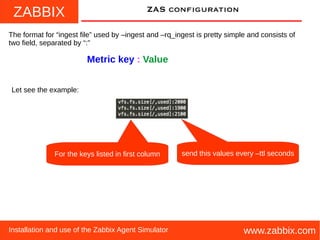
The format for “ingest file” used by –ingest and –rq_ingest is pretty simple and consists of
two field, separated by “:”
Metric key : Value
Let see the example:
For the keys listed in first column send this values every –ttl seconds
ZABBIX
www.zabbix.comInstallation and use of the Zabbix Agent Simulator
ZAS configuration
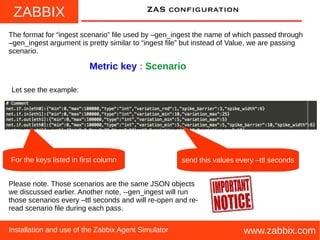
The format for “ingest scenario” file used by –gen_ingest the name of which passed through
–gen_ingest argument is pretty similar to “ingest file” but instead of Value, we are passing
scenario.
Metric key : Scenario
Let see the example:
For the keys listed in first column
Please note. Those scenarios are the same JSON objects
we discussed earlier. Another note, --gen_ingest will run
those scenarios every –ttl seconds and will re-open and re-
read scenario file during each pass.
send this values every –ttl seconds
ZABBIX
www.zabbix.comInstallation and use of the Zabbix Agent Simulator
TODO
There are plans for the future development for the ZAS Agent. It shall be more modular,
more extendable. The current scenarios and data generation processing are not perfect. I
may incorporate the CLIPS for a more intelligent behavior. Making ZAS to mimic an
active agent also would be nice thing to do. If you have any suggestions or you wan to
contact an author with any related question, please feel free to do so. If you feel like
participating in development of the ZAS Agent, your help will be always appretiated by
community.
vladimir.ulogov@zabbix.com
ZABBIX
www.zabbix.comInstallation and use of the Zabbix Agent Simulator
FINI
This is it. Now you know enough, so you can fill your test Zabbix with sweet random data
and custom scenarios. Please make note, the first official release is 0.1.1 and it is very
alpha code. But working code it is. The code is freely available under GPLv2 license and
you will receive your copy of this license when you check this code out of the GitHub.
And here is, the not so secret location of the
ZAS Agent source code.
https://github.com/vulogov/zas_agent

zas-agent-0.1.1

  • 1.
    ZABBIX www.zabbix.com Zabbix Agent Simulator Todeveloping the extensions, to testing them, to verify the configuration, to teaching, to demo and to the glory of Zabbix ! Installation and use of the Zabbix Agent Simulator
  • 2.
    ZABBIX www.zabbix.comInstallation and useof the Zabbix Agent Simulator Preface Credits. I wish to thank the authors of the software called SNMPSIM. http://snmpsim.sourceforge.net/ The ones who shows me the way. Also, the authors of the Zabbix monitoring platform. Without you, this software wouldn't exists at all http://www.zabbix.com Thanks you for all your help and encouragement
  • 3.
    ZABBIX www.zabbix.comInstallation and useof the Zabbix Agent Simulator Preface What is the Zabbix Agent Simulator. Well, as the name probably suggesting, it is a piece if software which simulating the Zabbix Agent. Your first question probably will be: “Why on Earth you wanna do this ?” There are simple answer on this question and an answer with “multiple choices of answers”. I will start with simple one: Zabbix Agent Simulator intended to be used instead regular Zabbix passive Agent in the situations, where use of the real Zabbix Agent is not practical or simply not desirable. “Non-practical” means, that the use of the regular Zabbix Agent which is coming with Zabbix will not bring desirable results. For example: when you are developing your Triggers and Actions, you test host rarely having the thresholds that you are programming. Many times, I saw how Zabbix Administrators deployed configurations, which were not fully tested. What is “non-practical” ? What is “not desirable” ? “Non desirable” means that you are following the design and development solution which is flawed in one or several ways and continue to use this development method will bring you into a troubles later on. For example: many times, I saw when people were tried to test there configurations on live installations. Indeed, this is a very bad practice and it must be avoided at all cost.
  • 4.
    ZABBIX www.zabbix.comInstallation and useof the Zabbix Agent Simulator Preface So, what is the “long answer” on what is the Zabbix Agent Simulator and the scope of use for this software tool Configurations and monitoring architecture testing. Zabbix Agent Simulator can generate you the values for the metrics exactly to your specifications and scenarios. You can simulate any conditions on your host or Agent monitored application, without bothering the production environment and you can perform full test of your Zabbix configuration behavior in all possible situations. Post-mortem analysis. If your production configuration doesn't work, you can take the values and “re-play” them on your development and test Zabbix installations. This will permit you to see what is wrong with your production configuration and how to fix that.
  • 5.
    ZABBIX www.zabbix.comInstallation and useof the Zabbix Agent Simulator Preface So, what is the “long answer” on what is the Zabbix Agent Simulator and the scope of use for this software tool Zabbix architecture and capabilities demonstration. Use during training and in other forms of the lab and educational environment. Safe simulation of the catastrophic failures of your infrastructure for educational and training purposes. I say: “let them play with this simulator, not with the real things”. Safe simulation of the massive infrastructure on your virtual hosts for your development and test “sandboxes”
  • 6.
    ZABBIX www.zabbix.comInstallation and useof the Zabbix Agent Simulator Preface And any other situations similar and not similar to those.
  • 7.
    ZABBIX www.zabbix.comInstallation and useof the Zabbix Agent Simulator Preface Why not just use the zabbix_agentd with added UnixParameters or loadable modules which will generating us sweet randomness or read REDIS or whatever ?? Because zabbix_agentd does not permit us to re- define embedded keys, such as vfs.fs.size, net.if.in and others. And in my view, it is a very bad idea to use one keys during the tests, and then change them for production. In fact, this is invitation of serious potential problems with configuration. ! That's why we must have something, which will act exactly like a real Agent, without being one.
  • 8.
    ZABBIX www.zabbix.comInstallation and useof the Zabbix Agent Simulator installation You will be needed a REDIS Server if you want to run ZAS Agent. You can make ZAS running without REDIS, but for the sanity and for the future, where ZAS will be even more closely tied with REDIS, I say, this is a mandatory requirement. I will not be covering on how to obtain and install REDIS server, since this topic is outside of the scope of our discussion.
  • 9.
    ZABBIX www.zabbix.comInstallation and useof the Zabbix Agent Simulator installation ZAS Agent is a Python application and do require that you have Python2 of version 2.6+ and older installed on your host. Now-days, Python is a standard staple on most Unix-like operating systems, but do check if you have one and what it's version.
  • 10.
    ZABBIX www.zabbix.comInstallation and useof the Zabbix Agent Simulator installation ZAS Agent requires some of the standard and 3-rd party Python modules to function. To check, if your environment is ready, please run the script check_python_packages.py located in subdirectory “install”
  • 11.
    ZABBIX www.zabbix.comInstallation and useof the Zabbix Agent Simulator installation Here, we will review some of the required packages, which usually are not the part of the standard Python library. The easiest way to install those packages is with help of the handy python-pip tool. If this tool is not included in your OS distribution, you can download and install it from here: https://pip.pypa.io/en/stable/installing/ Package name Homepage Description redis https://github.com/andymccurdy/redis-py The Python interface to the Redis key-value store. numpy http://www.numpy.org/ NumPy is the fundamental package for scientific computing with Python. daemonize http://daemonize.readthedocs.org/en/late st/?badge=latest Library for writing system daemons in Python.
  • 12.
    ZABBIX www.zabbix.comInstallation and useof the Zabbix Agent Simulator installation Change working directory to the package source directory and execute python setup.py build If there is no error messages, move to the next step ...
  • 13.
    ZABBIX www.zabbix.comInstallation and useof the Zabbix Agent Simulator installation Run python setup.py install
  • 14.
    ZABBIX www.zabbix.comInstallation and useof the Zabbix Agent Simulator installation setup.py script will install the following files: Filename Path Description zas_agent.py /usr/bin or /usr/local/bin Main executable file of the ZAS Agent network.scenario /etc/zas Sample scenario you can use as a guideline zas_scenario.cfg /etc Default ZAS Agent configuration file zas_agent.py.1 /usr/share/man/man1 Manpage for the main ZAS program file. PDF documentation /usr/share/zas_agent PDF documentation
  • 15.
    ZABBIX www.zabbix.comInstallation and useof the Zabbix Agent Simulator ZAS in your infrastructure Virtual Host REDIS REDIS REDIS ZAS Agent ZAS Agent ZAS Agent host_a: 10.1.1.1 host_c: 10.1.1.3 host_b: 10.1.1.2 ZABBIX server host_a host_c host_b
  • 16.
    ZABBIX www.zabbix.comInstallation and useof the Zabbix Agent Simulator ZAS data flow Zabbix Agent Simulator while mimicking the real Zabbix passive Agent, will return the values for the requested keys, according to the Agent configuration. The values are ether static, generated according to some scenarios or obtainable from external sources (Redis datastore). Unlike real Agent, Zabbix Agent Simulator returns only values for the keys, specified in ZAS configuration. Value type Description static: The simplest value type, returning the static value defined in ZAS configuration. uniform: uniform_int: Return the uniform random number within the range redis: Searches Redis database #0 for the key matched the requested metric key and return stored value rqueue: Searches Redis database #1 for the key matched the requested metric key, which refers the list and returns last item from this list scenario: Here is the value types, which can be used as return value with ZAS
  • 17.
    ZABBIX www.zabbix.comInstallation and useof the Zabbix Agent Simulator ZAS Data flow zas_scenario.cfg static: scenario: rqueue: redis: static value Random number generator REDIS scenario processor uniform:/uniform_int:
  • 18.
    ZABBIX www.zabbix.comInstallation and useof the Zabbix Agent Simulator ZAS Data flow Scenario file scenario: REDIS scenario processor Random number generator
  • 19.
    ZABBIX www.zabbix.comInstallation and useof the Zabbix Agent Simulator ZAS Data flow REDIS zas_agent.py --start 0 2 1 redis: REDIS server rqueue: scenario: ZAS Agent zas_agent.py --ingest External apps zas_agent.py --rq_ingest zas_agent.py --gen_ingest zas_agent.py --rq_cleanup
  • 20.
    ZABBIX www.zabbix.comInstallation and useof the Zabbix Agent Simulator ZAS configuration The first step of the ZAS Agent configuration is to configure agent itself. There are several ways on how the agent can obtain the data for the metric: through ether static value allocation, random number generation, reading the data from REDIS server, reading the data from the queues on the REDIS server or through direct processing of the scenarios. How exactly you will configure your simulator, which keys will be using which value sources, will be depend on your needs and a situations. static: uniform: uniform_int: redis: rqueue: scenario: You shall use static: values if you do not plan to change those values “on the fly”. The good examples for the static: are the agent.version, agent.uname and the others of the same nature If you do not care about what's your values are look like, and you do want them to be uniformly and randomly distributed within specified range, in that case, you can use uniform(_int): as your value source. You can use redis: as the source for your values, if you are planning to ingest data into your simulator from external processes or from zas_agent.py running in --ingest mode. You can use rqueue: as the values source, in the situations where you have a pre-recorded or pre-generated sets of values. Acting like uniform: “on steroids”, scenario: offers realistically looking but randomly generated values.
  • 21.
    ZABBIX www.zabbix.comInstallation and useof the Zabbix Agent Simulator ZAS configuration The main configuration file for the ZAS Agent do have a name zas_scenario.cfg and default location of this file is /etc . You can override defaults by passing –scenario option to the zas_agent.py. The format of the file is familiar to anyone, who ever saw .ini configuration files. If you are Python developer, this is the format which is handled by the ConfigParser module. This configuration file consist of the sections and a keys and a values, defined in those sections. Some key-value pairs do have a meaning only for the certain value sources. Each section name may be exact match to the name of the Zabbix metric. Also, section name might be free-form description string. The most important key within the section is value= . This key defines how ZAS Agent obtains the values for the specific key. This is the comments. If you have “#” or “;” in the beginning of the line the reminder of the line will be treated as such. This key instructs ZAS how to obtain a values for the key This is the section and inside [] you are defining it's name
  • 22.
    ZABBIX www.zabbix.comInstallation and useof the Zabbix Agent Simulator ZAS configuration When ZAS Agent receives the request for metric from Zabbix Server or Zabbix Proxy, first, it is searching the scenario file and matches requested metric with values source. So, how the ZAS Agent discovers the metric key and what is the process of matching ? There are two possible ways to do that. First, through section name which must be matched exactly to the requested metric name The request for the metric “agent.ping” will be matched to that section If exact match in section names is not found, ZAS Agent loops through all sections and reads the value of the key “match=”
  • 23.
    ZABBIX www.zabbix.comInstallation and useof the Zabbix Agent Simulator ZAS configuration If exact match in section names is not found, ZAS Agent loops through all sections and reads the value of the key “match=” and using this value as regular expression tested against this metric. If requested metric key matches this regular expression, then this section will be used for further processing of the values for this key. There are two types of matching performed during each test. First, Unix shell like matches and then POSIX regexp matches. If you are the Python developer, first, I am using Python module fnmatch, then re. Of course, during those checks, the section names do not poses the special meanings, like in the first pass and you can use free-form descriptive strings as a section names. This is shell-like regular expression and it will match to all system.cpu.util[…] metrics requests This is regexp regular expression and it will match to all vfs.fs.size[...,free] metrics requests
  • 24.
    ZABBIX www.zabbix.comInstallation and useof the Zabbix Agent Simulator ZAS configuration Please note, ZAS Agent is not full-blown Zabbix Agent and you shall not use it as replacement for such. ZAS Agent will respond only with values for the keys to which match is found in the scenario file. If you will try to request the key, for which match is not found, ZAS Agent will simply close the connection.
  • 25.
    ZABBIX www.zabbix.comInstallation and useof the Zabbix Agent Simulator ZAS configuration Please take a look at the value of the key “value=” The format for this value is: metric source:optional parameter
  • 26.
    ZABBIX www.zabbix.comInstallation and useof the Zabbix Agent Simulator ZAS configuration The first and the simplest value source is static: As the name implies, when requested, it is returning static value, passed as optional parameter to the value of the key “value=” The format to this value source is static:value Value source is static: For the metric “agent.ping” And the returned static value will be “1”
  • 27.
    ZABBIX www.zabbix.comInstallation and useof the Zabbix Agent Simulator ZAS configuration The next pair of the sources uses internal mechanism of generating simple uniform random numbers within specified range. The name of those sources are uniform: and uniform_int:. The difference between them, that the uniform: returns float and uniform_int: returns integer. The parameter to the value source is comma delimited two numbers. First is lower end of the range and second is higher end of the range, whithin which we will generate a uniform random number. The format to this value source is: uniform:low end,high end or uniform_int:low end,high end For the all requests of application.connections Generate float uniform random number in a range between 1 and 100 For the all requests of vfs.fs.size[…,pfree] Generate integer uniform random number in a range between 1 and 100
  • 28.
    ZABBIX www.zabbix.comInstallation and useof the Zabbix Agent Simulator ZAS configuration The first “external source” (means the source which requires component other than ZAS Agent) is redis: The idea behind this value source is very simple: ZAS Agent will connect to REDIS server DB=0 and request the value of the key matched with requested metric. If value is found, it will be returned. If not, connection will be closed. REDIS server IP address or FQDN and the port can be passed through command-line options –redis_host and --redis_port The format to this value source is: redis: In this example, for all metric requests vfs.fs.size[…,free] the values will be requested from the REDIS server
  • 29.
    ZABBIX www.zabbix.comInstallation and useof the Zabbix Agent Simulator ZAS configuration Another “external source” is rqueue: The difference between redis: and rqueue: in in how the values are stored in the REDIS server. For the redis:, the single value is stored and readed. For rqueue:, values are stored and requested from the queue. If queue is empty, ZAS Agent closes the connection. If you familiar with REDIS, redis: uses SET/GET and rqueue: uses LPUSH/LINDEX/RPOP. In order to separate rqueue: from redis:, REDIS uses DB=1 for rqueue:. REDIS server IP address or FQDN and the port can be passed through command-line options –redis_host and --redis_port The format to this value source is: rqueue: In this example, for all metric requests vfs.fs.size[…,used] the values will be requested from the REDIS server queues
  • 30.
    ZABBIX www.zabbix.comInstallation and useof the Zabbix Agent Simulator ZAS configuration Every time, when you are requesting the value from rqueue: FIFO source, you will be getting the first value in the queue, and the value stays in the queue. ZAS Agent do not pop and remove the values from the queue authomatically. In order to move to the next value, you do need to run zas_agent.py –rq_cleanup This command will go through all keys in the queue with delay between passes –ttl seconds and remove the first element of the queue
  • 31.
    ZABBIX www.zabbix.comInstallation and useof the Zabbix Agent Simulator ZAS configuration The behavior of the zas_agent.py –rq_cleanup when the length of the queue is 1 will be dictated by the option: –rq_cleanup_full By default, cleanup code will keep the last element of the queue indefinitely, so your queue will always contain some data. If you pass this option, cleanup code will empty the queue, when the time come.
  • 32.
    ZABBIX www.zabbix.comInstallation and useof the Zabbix Agent Simulator ZAS configuration The last (but not least) value source is scenario: The scenario: value source is random generator “on steroids”. Unlike “uniform:”, scenario: generates next value taking previous value into account. The previous value is stored on REDIS server DB=2. The scenario itself is JSON dictionary, where the keys and the values defines how the next value will be generated. The format to this value source is: scenario:{scenario} In this example, for all metric requests system.cpu.util[…] the values will be generated according specified scenario
  • 33.
    ZABBIX www.zabbix.comInstallation and useof the Zabbix Agent Simulator ZAS configuration Now, let's review the scenario keys and how they are impacting the value generation Scenario key Description min Lower end of the range for generated values max Higher end of the range for generated values type Type of generated values. Possible options are “float” or “int” for the float or integer numbers respectfully variation_min When scenario generates next value, it will calculate “variation_min” percent between current and minimal value, variation_max and then calculates “variation_max” percent between current and maximum value. The next value will be generated within the range defined by this calculated values.
  • 34.
    ZABBIX www.zabbix.comInstallation and useof the Zabbix Agent Simulator ZAS configuration Let's review in more details on how the next value in the scenario is generated 5 5.5 6 6.5 7 7.5 8 8.5 9 9.5 10 Last Value Next value max min Valuemin=Valueprev−((Valueprev x 0.01)x Variationmin) Valuemax=Valueprev+((Valueprev x 0.01) x Variationmax ) uniform
  • 35.
    ZABBIX www.zabbix.comInstallation and useof the Zabbix Agent Simulator ZAS configuration In addition to the values generation, scenario: supports generation of the spikes in the values. The process of generating “spikes”, controlled by following scenario parameters: Scenario key Description spike_barrier Every time, when scenario: generates the new value, ZAS Agent are “throwing the dice” to see if it is a time to generate a new spike. The random number is generated between 1 and 100. If generated number is less than “spike_barrier”, and there is no spike currently generated, the scenario: switches from normal mode, to spike generation mode. So, higher the number for the “spike_barrier”, more spikes will be generated. spike_width When the scenario: goes to “spike mode” it will generate the spike, consists of “spike_width” values. Smaller number of “spike_width” means sharper spike.
  • 36.
    ZABBIX www.zabbix.comInstallation and useof the Zabbix Agent Simulator ZAS configuration Let's review process of spike generation in more detail. 0 0.5 1 1.5 2 2.5 3 3.5 4 4.5 Upward Plateu Downward “spike_width”/2 “spike_width”/2uniform(1,“spike_width”/2) linspace(last_value,spike_max) linspace(spike_max ,spike_min) gamma(spike_max,0.95) spike_min=uniform(spike_max ,minimum) spike_max=uniform(current value ,maximum)
  • 37.
    ZABBIX www.zabbix.comInstallation and useof the Zabbix Agent Simulator FEEDING simulator So far, we learned how to make ZAS Agent retrieve or generate values. In some applications, just value generation would be enough. But there are three ways of data feeding, besides just update the values in the REDIS server using your own program. --ingest --rq_ingest --gen_ingest Ingest data from “ingest file” into REDIS server to the same database (DB=0) which is used by redis: value source.. Push data from “ingest file”into REDIS queues in the same database (DB=1), used by rqueue: value source. Parse “ingest scenario” file, generate values same way as scenario: value source and populates REDIS server, the same database (DB=0) used by redis: value source. The path to the file containing ingest scenario is passed through argument --ingest_scenario Except –gen_ingest, you are passing the filename serving as “ingest file” for –ingest and –rq_inges using command-line argument –ingest_file. Next question is: what is the format of “ingest file” and “ingest scenario” ? Stay with us.
  • 38.
    ZABBIX www.zabbix.comInstallation and useof the Zabbix Agent Simulator ZAS configuration The format for “ingest file” used by –ingest and –rq_ingest is pretty simple and consists of two field, separated by “:” Metric key : Value Let see the example: For the keys listed in first column send this values every –ttl seconds
  • 39.
    ZABBIX www.zabbix.comInstallation and useof the Zabbix Agent Simulator ZAS configuration The format for “ingest scenario” file used by –gen_ingest the name of which passed through –gen_ingest argument is pretty similar to “ingest file” but instead of Value, we are passing scenario. Metric key : Scenario Let see the example: For the keys listed in first column Please note. Those scenarios are the same JSON objects we discussed earlier. Another note, --gen_ingest will run those scenarios every –ttl seconds and will re-open and re- read scenario file during each pass. send this values every –ttl seconds
  • 40.
    ZABBIX www.zabbix.comInstallation and useof the Zabbix Agent Simulator TODO There are plans for the future development for the ZAS Agent. It shall be more modular, more extendable. The current scenarios and data generation processing are not perfect. I may incorporate the CLIPS for a more intelligent behavior. Making ZAS to mimic an active agent also would be nice thing to do. If you have any suggestions or you wan to contact an author with any related question, please feel free to do so. If you feel like participating in development of the ZAS Agent, your help will be always appretiated by community. vladimir.ulogov@zabbix.com
  • 41.
    ZABBIX www.zabbix.comInstallation and useof the Zabbix Agent Simulator FINI This is it. Now you know enough, so you can fill your test Zabbix with sweet random data and custom scenarios. Please make note, the first official release is 0.1.1 and it is very alpha code. But working code it is. The code is freely available under GPLv2 license and you will receive your copy of this license when you check this code out of the GitHub. And here is, the not so secret location of the ZAS Agent source code. https://github.com/vulogov/zas_agent