You Either Surf or You Fight: Integrating Library Services With Google WaveSean HannanSheridan LibrariesJohns Hopkins University
Google Wavehttp://wave.google.comCollaborative platform
Why Library Services there?You can’t always force users to come to youGo where they are
Wave AppsTwo types GadgetsLike existing iGoogle gadgetsRobotsReal-time interactionLet’s go for the real-time interaction
Already on Wave?Invite uncle-milty@appspot.com to a conversation
Creating a Wave RobotLibraries for Java and PythonDeployment using Google AppEngine
App Enginehttp://appengine.google.comGoogle’s cloud-computing platformFree for up to 1.3 million requests per day
Set up the ApplicationCreate an application at appengine.google.comSet up an application identifier <app>.appspot.com
App Engine SDKDownload the App Engine SDK from http://code.google.com/appengine/downloads.htmlStart the App Engine Launcher and create a new application
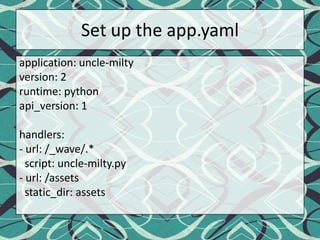
Set up the app.yamlapplication: uncle-miltyversion: 2runtime: pythonapi_version: 1handlers:- url: /_wave/.*  script: uncle-milty.py- url: /assetsstatic_dir: assets
Wave Robot APIDownload the files from svn:svn checkout http://wave-robot-python-client.googlecode.com/svn/trunk/src/waveapi waveapiDrop it in the application directory
Wave ConceptsWaveletThe conversation taking place within Google WaveBlipEvery message as part of the waveletHierarchical Each of these have unique identifiers that can be used to programmatically address them
Project OverviewA simple chat botSearches the library catalog for results
Code it up!Available on github: http://github.com/MrDys/uncle-milty
External LibrariesExternal libraries are a-okayJust drop it in the project directoryGoing to use BeautifulSoup to scrape the OPAC
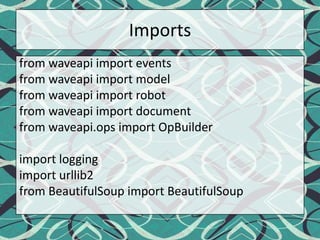
Importsfrom waveapi import eventsfrom waveapi import modelfrom waveapi import robotfrom waveapi import documentfrom waveapi.ops import OpBuilderimport loggingimport urllib2from BeautifulSoup import BeautifulSoup
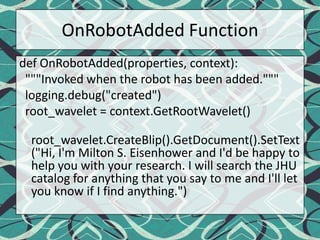
OnRobotAdded Functiondef OnRobotAdded(properties, context):  """Invoked when the robot has been added."""logging.debug("created")root_wavelet = context.GetRootWavelet()root_wavelet.CreateBlip().GetDocument().SetText("Hi, I'm Milton S. Eisenhower and I'd be happy to help you with your research. I will search the JHU catalog for anything that you say to me and I'll let you know if I find anything.")
OnBlip Submitted Functiondef OnBlipSubmitted(properties, context):  blip = context.GetBlipById(properties['blipId'])  page = urllib2.urlopen("https://catalog.library.jhu.edu/ipac20/ipac.jsp?menu=search&aspect=subtab22&npp=5&ipp=20&spp=20&profile=general&ri=&index=ALTITLE&term=" + blip.GetDocument().GetText() + "&x=0&y=0&aspect=subtab22")
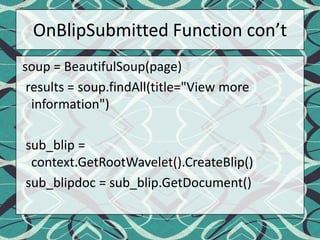
OnBlipSubmitted Function con’t soup = BeautifulSoup(page)  results = soup.findAll(title="View more information")sub_blip = context.GetRootWavelet().CreateBlip()sub_blipdoc = sub_blip.GetDocument()
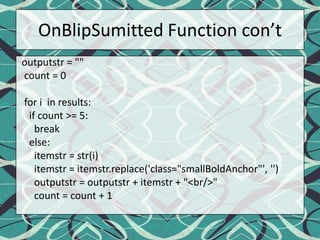
OnBlipSumitted Function con’toutputstr = ""  count = 0  for i  in results:    if count >= 5:      break    else:itemstr = str(i)itemstr = itemstr.replace('class="smallBoldAnchor"', '')outputstr = outputstr + itemstr + "<br/>"      count = count + 1
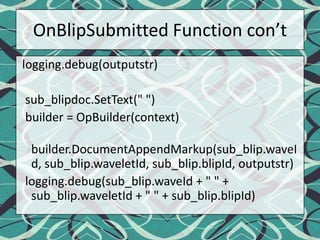
OnBlipSubmitted Function con’tlogging.debug(outputstr)sub_blipdoc.SetText(" ")  builder = OpBuilder(context)builder.DocumentAppendMarkup(sub_blip.waveId, sub_blip.waveletId, sub_blip.blipId, outputstr)logging.debug(sub_blip.waveId + " " + sub_blip.waveletId + " " + sub_blip.blipId)
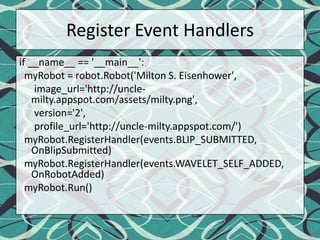
Register Event Handlersif __name__ == '__main__':myRobot = robot.Robot('Milton S. Eisenhower', image_url='http://uncle-milty.appspot.com/assets/milty.png',      version='2',profile_url='http://uncle-milty.appspot.com/')myRobot.RegisterHandler(events.BLIP_SUBMITTED, OnBlipSubmitted)myRobot.RegisterHandler(events.WAVELET_SELF_ADDED, OnRobotAdded)myRobot.Run()
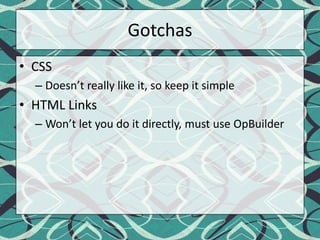
GotchasCSSDoesn’t really like it, so keep it simpleHTML LinksWon’t let you do it directly, must use OpBuilder
DeploymentJust hit ‘Deploy’ in the App Engine Launcher
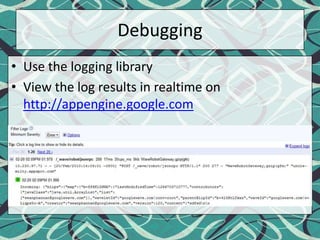
DebuggingUse the logging libraryView the log results in realtime on http://appengine.google.com
What next?Could be improved in a lot of waysMore services integratedCreate a menu-like system to select options
Q&AQuestions?

You Either Surf Or You Fight

  • 1.
    You Either Surfor You Fight: Integrating Library Services With Google WaveSean HannanSheridan LibrariesJohns Hopkins University
  • 2.
  • 3.
    Why Library Servicesthere?You can’t always force users to come to youGo where they are
  • 4.
    Wave AppsTwo typesGadgetsLike existing iGoogle gadgetsRobotsReal-time interactionLet’s go for the real-time interaction
  • 5.
    Already on Wave?Inviteuncle-milty@appspot.com to a conversation
  • 6.
    Creating a WaveRobotLibraries for Java and PythonDeployment using Google AppEngine
  • 7.
    App Enginehttp://appengine.google.comGoogle’s cloud-computingplatformFree for up to 1.3 million requests per day
  • 8.
    Set up theApplicationCreate an application at appengine.google.comSet up an application identifier <app>.appspot.com
  • 9.
    App Engine SDKDownloadthe App Engine SDK from http://code.google.com/appengine/downloads.htmlStart the App Engine Launcher and create a new application
  • 10.
    Set up theapp.yamlapplication: uncle-miltyversion: 2runtime: pythonapi_version: 1handlers:- url: /_wave/.* script: uncle-milty.py- url: /assetsstatic_dir: assets
  • 11.
    Wave Robot APIDownloadthe files from svn:svn checkout http://wave-robot-python-client.googlecode.com/svn/trunk/src/waveapi waveapiDrop it in the application directory
  • 12.
    Wave ConceptsWaveletThe conversationtaking place within Google WaveBlipEvery message as part of the waveletHierarchical Each of these have unique identifiers that can be used to programmatically address them
  • 13.
    Project OverviewA simplechat botSearches the library catalog for results
  • 14.
    Code it up!Availableon github: http://github.com/MrDys/uncle-milty
  • 15.
    External LibrariesExternal librariesare a-okayJust drop it in the project directoryGoing to use BeautifulSoup to scrape the OPAC
  • 16.
    Importsfrom waveapi importeventsfrom waveapi import modelfrom waveapi import robotfrom waveapi import documentfrom waveapi.ops import OpBuilderimport loggingimport urllib2from BeautifulSoup import BeautifulSoup
  • 17.
    OnRobotAdded Functiondef OnRobotAdded(properties,context): """Invoked when the robot has been added."""logging.debug("created")root_wavelet = context.GetRootWavelet()root_wavelet.CreateBlip().GetDocument().SetText("Hi, I'm Milton S. Eisenhower and I'd be happy to help you with your research. I will search the JHU catalog for anything that you say to me and I'll let you know if I find anything.")
  • 18.
    OnBlip Submitted FunctiondefOnBlipSubmitted(properties, context): blip = context.GetBlipById(properties['blipId']) page = urllib2.urlopen("https://catalog.library.jhu.edu/ipac20/ipac.jsp?menu=search&aspect=subtab22&npp=5&ipp=20&spp=20&profile=general&ri=&index=ALTITLE&term=" + blip.GetDocument().GetText() + "&x=0&y=0&aspect=subtab22")
  • 19.
    OnBlipSubmitted Function con’tsoup = BeautifulSoup(page) results = soup.findAll(title="View more information")sub_blip = context.GetRootWavelet().CreateBlip()sub_blipdoc = sub_blip.GetDocument()
  • 20.
    OnBlipSumitted Function con’toutputstr= "" count = 0 for i in results: if count >= 5: break else:itemstr = str(i)itemstr = itemstr.replace('class="smallBoldAnchor"', '')outputstr = outputstr + itemstr + "<br/>" count = count + 1
  • 21.
    OnBlipSubmitted Function con’tlogging.debug(outputstr)sub_blipdoc.SetText("") builder = OpBuilder(context)builder.DocumentAppendMarkup(sub_blip.waveId, sub_blip.waveletId, sub_blip.blipId, outputstr)logging.debug(sub_blip.waveId + " " + sub_blip.waveletId + " " + sub_blip.blipId)
  • 22.
    Register Event Handlersif__name__ == '__main__':myRobot = robot.Robot('Milton S. Eisenhower', image_url='http://uncle-milty.appspot.com/assets/milty.png', version='2',profile_url='http://uncle-milty.appspot.com/')myRobot.RegisterHandler(events.BLIP_SUBMITTED, OnBlipSubmitted)myRobot.RegisterHandler(events.WAVELET_SELF_ADDED, OnRobotAdded)myRobot.Run()
  • 23.
    GotchasCSSDoesn’t really likeit, so keep it simpleHTML LinksWon’t let you do it directly, must use OpBuilder
  • 24.
    DeploymentJust hit ‘Deploy’in the App Engine Launcher
  • 25.
    DebuggingUse the logginglibraryView the log results in realtime on http://appengine.google.com
  • 26.
    What next?Could beimproved in a lot of waysMore services integratedCreate a menu-like system to select options
  • 27.