By
Syed Shabeer
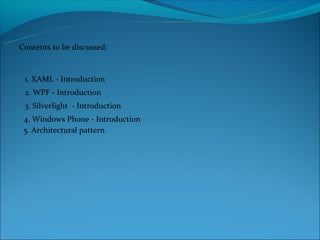
Contents to be discussed:


 1. XAML - Introduction
 2. WPF - Introduction
 3. Silverlight - Introduction
 4. Windows Phone - Introduction
 5. Architectural pattern
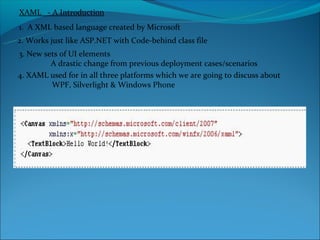
XAML - A Introduction
1. A XML based language created by Microsoft
2. Works just like ASP.NET with Code-behind class file
3. New sets of UI elements
         A drastic change from previous deployment cases/scenarios
4. XAML used for in all three platforms which we are going to discuss about
         WPF, Silverlight & Windows Phone
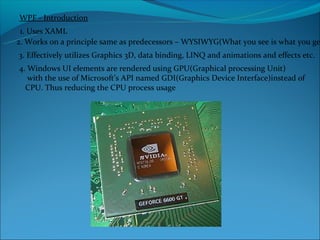
WPF - Introduction
 1. Uses XAML
2. Works on a principle same as predecessors – WYSIWYG(What you see is what you ge
3. Effectively utilizes Graphics 3D, data binding, LINQ and animations and effects etc.
4. Windows UI elements are rendered using GPU(Graphical processing Unit)
   with the use of Microsoft’s API named GDI(Graphics Device Interface)instead of
  CPU. Thus reducing the CPU process usage
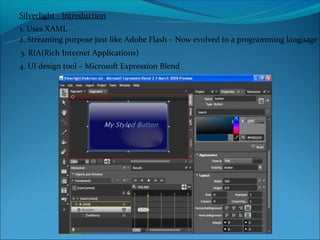
Silverlight - Introduction
1. Uses XAML
2. Streaming purpose just like Adobe Flash – Now evolved to a programming language
3. RIA(Rich Internet Applications)
4. UI design tool – Microsoft Expression Blend
Windows Phone - Introduction
1. Uses Silverlight
2. Output is of .XAP extension
3. Successor of Window Mobile Platform – Not compatible
4. Tool – Microsoft Visual Studio for Windows Phone
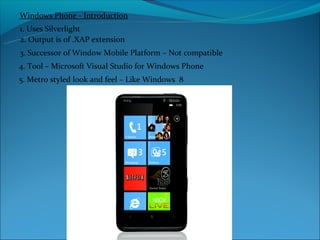
5. Metro styled look and feel – Like Windows 8
Architectural Pattern
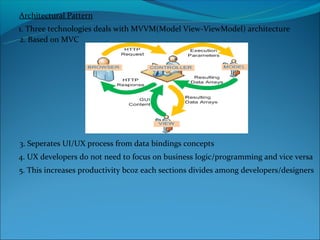
1. Three technologies deals with MVVM(Model View-ViewModel) architecture
2. Based on MVC


3. Seperates UI/UX process from data bindings concepts
4. UX developers do not need to focus on business logic/programming and vice versa
5. This increases productivity bcoz each sections divides among developers/designers
Architectural Pattern - continuation


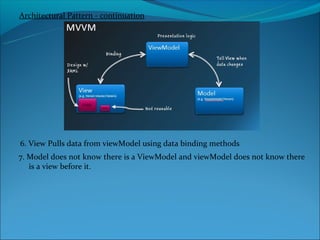
6. View Pulls data from viewModel using data binding methods
7. Model does not know there is a ViewModel and viewModel does not know there
   is a view before it.
THANK YOU

Xaml

  • 1.
  • 2.
    Contents to bediscussed: 1. XAML - Introduction 2. WPF - Introduction 3. Silverlight - Introduction 4. Windows Phone - Introduction 5. Architectural pattern
  • 3.
    XAML - AIntroduction 1. A XML based language created by Microsoft 2. Works just like ASP.NET with Code-behind class file 3. New sets of UI elements A drastic change from previous deployment cases/scenarios 4. XAML used for in all three platforms which we are going to discuss about WPF, Silverlight & Windows Phone
  • 4.
    WPF - Introduction 1. Uses XAML 2. Works on a principle same as predecessors – WYSIWYG(What you see is what you ge 3. Effectively utilizes Graphics 3D, data binding, LINQ and animations and effects etc. 4. Windows UI elements are rendered using GPU(Graphical processing Unit) with the use of Microsoft’s API named GDI(Graphics Device Interface)instead of CPU. Thus reducing the CPU process usage
  • 5.
    Silverlight - Introduction 1.Uses XAML 2. Streaming purpose just like Adobe Flash – Now evolved to a programming language 3. RIA(Rich Internet Applications) 4. UI design tool – Microsoft Expression Blend
  • 6.
    Windows Phone -Introduction 1. Uses Silverlight 2. Output is of .XAP extension 3. Successor of Window Mobile Platform – Not compatible 4. Tool – Microsoft Visual Studio for Windows Phone 5. Metro styled look and feel – Like Windows 8
  • 7.
    Architectural Pattern 1. Threetechnologies deals with MVVM(Model View-ViewModel) architecture 2. Based on MVC 3. Seperates UI/UX process from data bindings concepts 4. UX developers do not need to focus on business logic/programming and vice versa 5. This increases productivity bcoz each sections divides among developers/designers
  • 8.
    Architectural Pattern -continuation 6. View Pulls data from viewModel using data binding methods 7. Model does not know there is a ViewModel and viewModel does not know there is a view before it.
  • 9.