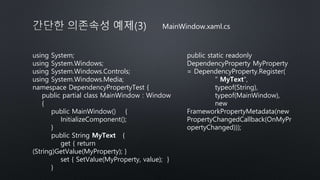
MainWindow.xaml.cs
using System;
using System.Windows;
usingSystem.Windows.Controls;
using System.Windows.Media;
namespace DependencyPropertyTest {
public partial class MainWindow : Window
{
public MainWindow() {
InitializeComponent();
}
public String MyText {
get { return
(String)GetValue(MyProperty); }
set { SetValue(MyProperty, value); }
}
public static readonly
DependencyProperty MyProperty
= DependencyProperty.Register(
" MyText",
typeof(String),
typeof(MainWindow),
new
FrameworkPropertyMetadata(new
PropertyChangedCallback(OnMyPr
opertyChanged)));
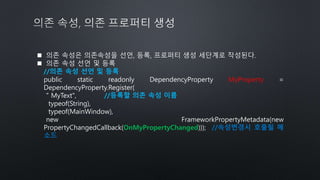
의존 속성은의존속성을 선언, 등록, 프로퍼티 생성 세단계로 작성된다.
의존 속성 선언 및 등록
//의존 속성 선언 및 등록
public static readonly DependencyProperty MyProperty =
DependencyProperty.Register(
" MyText", //등록할 의존 속성 이름
typeof(String),
typeof(MainWindow),
new FrameworkPropertyMetadata(new
PropertyChangedCallback(OnMyPropertyChanged))); //속성변경시 호출될 메
소드
9.
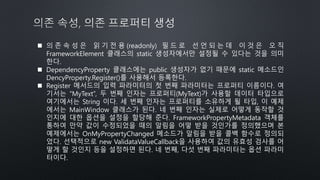
의 존속 성 은 읽 기 전 용 (readonly) 필 드 로 선 언 되 는 데 이 것 은 오 직
FrameworkElement 클래스의 static 생성자에서만 설정될 수 있다는 것을 의미
한다.
DependencyProperty 클래스에는 public 생성자가 없기 때문에 static 메소드인
DencyProperty.Register()를 사용해서 등록한다.
Register 메서드의 입력 파라미터의 첫 번째 파라미터는 프로퍼티 이름이다. 여
기서는 “MyText”, 두 번째 인자는 프로퍼티(MyText)가 사용할 데이터 타입으로
여기에서는 String 이다. 세 번째 인자는 프로퍼티를 소유하게 될 타입, 이 예제
에서는 MainWindow 클래스가 된다. 네 번째 인자는 실제로 어떻게 동작할 것
인지에 대한 옵션을 설정을 할당해 준다. FrameworkPropertyMetadata 객체를
통하여 만약 값이 수정되었을 때의 알림을 어떻 받을 것인가를 정의했으며 본
예제에서는 OnMyPropertyChanged 메소드가 알림을 받을 콜백 함수로 정의되
었다. 선택적으로 new ValidataValueCallback을 사용하여 값의 유효성 검사를 어
떻게 할 것인지 등을 설정하면 된다. 네 번째, 다섯 번째 파라미터는 옵션 파라미
터이다.
10.
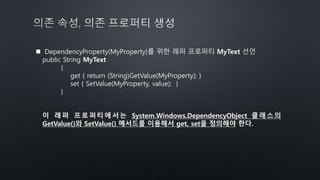
DependencyProperty(MyProperty)를 위한래퍼 프로퍼티 MyText 선언
public String MyText
{
get { return (String)GetValue(MyProperty); }
set { SetValue(MyProperty, value); }
}
이 래퍼 프로퍼티에서는 System.Windows.DependencyObject 클래스의
GetValue()와 SetValue() 메서드를 이용해서 get, set을 정의해야 한다.
11.
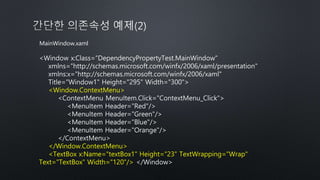
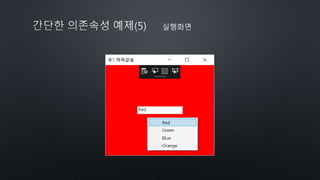
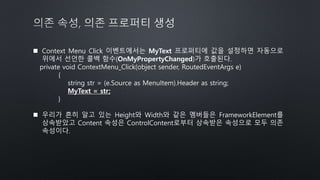
Context MenuClick 이벤트에서는 MyText 프로퍼티에 값을 설정하면 자동으로
위에서 선언한 콜백 함수(OnMyPropertyChanged)가 호출된다.
private void ContextMenu_Click(object sender, RoutedEventArgs e)
{
string str = (e.Source as MenuItem).Header as string;
MyText = str;
}
우리가 흔히 알고 있는 Height와 Width와 같은 멤버들은 FrameworkElement를
상속받았고 Content 속성은 ControlContent로부터 상속받은 속성으로 모두 의존
속성이다.







![[Td 2015]틱틱대도 써야 하는 windows 10 앱 개발, c# tips & tricks(송기수)](https://cdn.slidesharecdn.com/ss_thumbnails/td2015windows10ctipstricks-151104053021-lva1-app6892-thumbnail.jpg?width=640&height=640&fit=bounds)


![[IT교육/IT학원]Develope를 위한 IT실무교육](https://cdn.slidesharecdn.com/ss_thumbnails/random-180126054238-thumbnail.jpg?width=640&height=640&fit=bounds)
![[아이오닉학원]아이오닉 하이브리드 앱 개발 과정(아이오닉2로 동적 모바일 앱 만들기)](https://cdn.slidesharecdn.com/ss_thumbnails/2-180116062601-thumbnail.jpg?width=640&height=640&fit=bounds)
![[뷰제이에스학원]뷰제이에스(Vue.js) 프로그래밍 입문(프로그레시브 자바스크립트 프레임워크)](https://cdn.slidesharecdn.com/ss_thumbnails/vue-180116043929-thumbnail.jpg?width=640&height=640&fit=bounds)
![[씨샵학원/씨샵교육]C#, 윈폼, 네트워크, ado.net 실무프로젝트 과정](https://cdn.slidesharecdn.com/ss_thumbnails/cado-180116013552-thumbnail.jpg?width=640&height=640&fit=bounds)
![[정보처리기사자격증학원]정보처리기사 취득 양성과정(국비무료 자격증과정)](https://cdn.slidesharecdn.com/ss_thumbnails/random-180116010303-thumbnail.jpg?width=640&height=640&fit=bounds)
![[wpf학원,wpf교육]닷넷, c#기반 wpf 프로그래밍 인터페이스구현 재직자 향상과정](https://cdn.slidesharecdn.com/ss_thumbnails/11-180102064615-thumbnail.jpg?width=640&height=640&fit=bounds)

![[자마린교육/자마린실습]자바,스프링프레임워크(스프링부트) RESTful 웹서비스 구현 실습,자마린에서 스프링 웹서비스를 호출하고 응답 JS...](https://cdn.slidesharecdn.com/ss_thumbnails/restfuljson-171119094451-thumbnail.jpg?width=640&height=640&fit=bounds)
![[구로자마린학원/자마린강좌/자마린교육]3. xamarin.ios 3.3.5 추가적인 사항](https://cdn.slidesharecdn.com/ss_thumbnails/3-171109005415-thumbnail.jpg?width=640&height=640&fit=bounds)


![자바, 웹 기초와 스프링 프레임워크 & 마이바티스 재직자 향상과정(자바학원/자바교육/자바기업출강]](https://cdn.slidesharecdn.com/ss_thumbnails/01-171017011030-thumbnail.jpg?width=640&height=640&fit=bounds)

![3. 안드로이드 애플리케이션 구성요소 3.2인텐트 part01(안드로이드학원/안드로이드교육/안드로이드강좌/안드로이드기업출강]](https://cdn.slidesharecdn.com/ss_thumbnails/3-171010074659-thumbnail.jpg?width=640&height=640&fit=bounds)

