Спикер:
Котельницкий Евгений
v 1.0
Спикер:
Котельницкий Евгений
👍
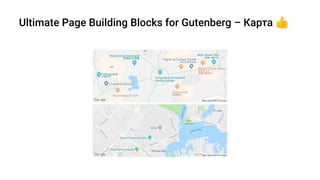
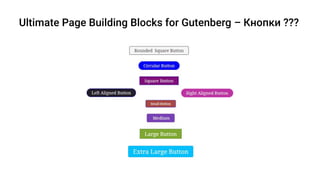
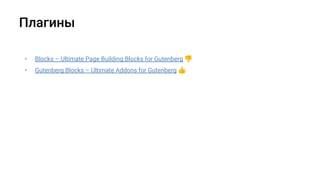
• Blocks – Ultimate Page Building Blocks for Gutenberg 👎
• Gutenberg Blocks – Ultimate Addons for Gutenberg 👍
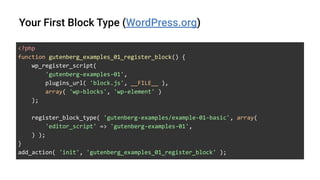
<?php
function gutenberg_examples_01_register_block() {
wp_register_script(
'gutenberg-examples-01',
plugins_url( 'block.js', __FILE__ ),
array( 'wp-blocks', 'wp-element' )
);
register_block_type( 'gutenberg-examples/example-01-basic', array(
'editor_script' => 'gutenberg-examples-01',
) );
}
add_action( 'init', 'gutenberg_examples_01_register_block' );
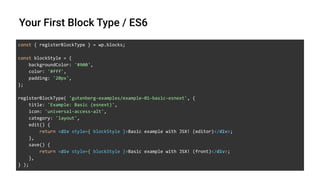
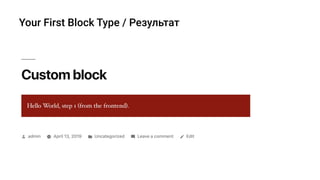
const { registerBlockType } = wp.blocks;
const blockStyle = {
backgroundColor: '#900',
color: '#fff',
padding: '20px',
};
registerBlockType( 'gutenberg-examples/example-01-basic-esnext', {
title: 'Example: Basic (esnext)',
icon: 'universal-access-alt',
category: 'layout',
edit() {
return <div style={ blockStyle }>Basic example with JSX! (editor)</div>;
},
save() {
return <div style={ blockStyle }>Basic example with JSX! (front)</div>;
},
} );
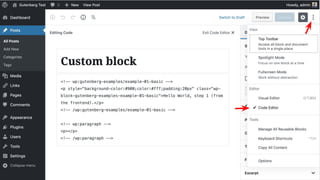
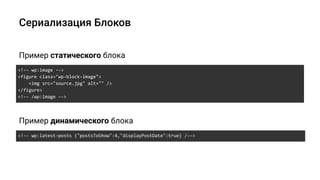
<!-- wp:image -->
<figure class="wp-block-image">
<img src="source.jpg" alt="" />
</figure>
<!-- /wp:image -->
Пример статического блока
<!-- wp:latest-posts {"postsToShow":4,"displayPostDate":true} /-->
Пример динамического блока
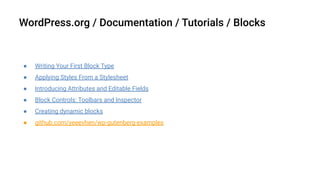
● Writing Your First Block Type
● Applying Styles From a Stylesheet
● Introducing Attributes and Editable Fields
● Block Controls: Toolbars and Inspector
● Creating dynamic blocks
● github.com/yeeevhen/wp-gutenberg-examples
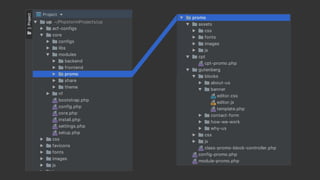
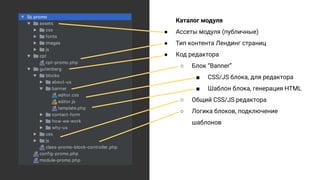
Каталог модуля
● Ассеты модуля (публичные)
● Тип контента Лендинг страниц
● Код редактора
○ Блок “Banner”
■ CSS/JS блока, для редактора
■ Шаблон блока, генерация HTML
○ Общий CSS/JS редактора
○ Логика блоков, подключение
шаблонов
● Say Hello to the New Editor
● The Language of Gutenberg
● Frequently Asked Questions
● Generate Blocks with WP-CLI
● GitHub project
По-настоящему ВИЗУАЛЬНОЕ построение лендинг-страниц на WP Gutenberg!

По-настоящему ВИЗУАЛЬНОЕ построение лендинг-страниц на WP Gutenberg!

  • 1.
  • 2.
  • 7.
  • 14.
    • Blocks –Ultimate Page Building Blocks for Gutenberg 👎 • Gutenberg Blocks – Ultimate Addons for Gutenberg 👍
  • 16.
    <?php function gutenberg_examples_01_register_block() { wp_register_script( 'gutenberg-examples-01', plugins_url('block.js', __FILE__ ), array( 'wp-blocks', 'wp-element' ) ); register_block_type( 'gutenberg-examples/example-01-basic', array( 'editor_script' => 'gutenberg-examples-01', ) ); } add_action( 'init', 'gutenberg_examples_01_register_block' );
  • 17.
    const { registerBlockType} = wp.blocks; const blockStyle = { backgroundColor: '#900', color: '#fff', padding: '20px', }; registerBlockType( 'gutenberg-examples/example-01-basic-esnext', { title: 'Example: Basic (esnext)', icon: 'universal-access-alt', category: 'layout', edit() { return <div style={ blockStyle }>Basic example with JSX! (editor)</div>; }, save() { return <div style={ blockStyle }>Basic example with JSX! (front)</div>; }, } );
  • 22.
    <!-- wp:image --> <figureclass="wp-block-image"> <img src="source.jpg" alt="" /> </figure> <!-- /wp:image --> Пример статического блока <!-- wp:latest-posts {"postsToShow":4,"displayPostDate":true} /--> Пример динамического блока
  • 23.
    ● Writing YourFirst Block Type ● Applying Styles From a Stylesheet ● Introducing Attributes and Editable Fields ● Block Controls: Toolbars and Inspector ● Creating dynamic blocks ● github.com/yeeevhen/wp-gutenberg-examples
  • 28.
    Каталог модуля ● Ассетымодуля (публичные) ● Тип контента Лендинг страниц ● Код редактора ○ Блок “Banner” ■ CSS/JS блока, для редактора ■ Шаблон блока, генерация HTML ○ Общий CSS/JS редактора ○ Логика блоков, подключение шаблонов
  • 29.
    ● Say Helloto the New Editor ● The Language of Gutenberg ● Frequently Asked Questions ● Generate Blocks with WP-CLI ● GitHub project