Names :
RomalYorish
Muhammad Saber Sidiq
Ahmad Taeb Baryali
Outline:-
Why we use excel in python
Excel Documents
Installing the openpyxl Module
Reading(opening) excel documents
Getting Sheets from the Workbook
Getting Cells from the Sheets
Why We Use Excel in Python ?
Excel is a popular and powerful spreadsheet
application for Windows.The openpyxl module
allows your Python programs to read and
modify Excel spreadsheet files.
 For example, you might have the boring task of
copying certain data from one spreadsheet and
pasting it into another one.
Or you might have to go through thousands of
rows and pick out just a handful of them to make
small edits based on some criteria.
Excel Documents
An Excel spreadsheet document is called a
workbook.
A single workbook is saved in a file with
the .xlsx extension.
Each workbook can contain multiple sheets
(also called worksheets).
The sheet the user is currently viewing (or
last viewed before closing Excel) is called the
active sheet.
Installing the Openpyxl Module
Python does not come with OpenPyXL, so you’ll
have to install it.
Follow the instructions for installing tow-party
modules in Appendix
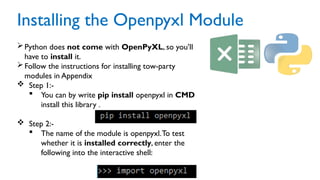
 Step 1:-
 You can by write pip install openpyxl in CMD
install this library .
 Step 2:-
 The name of the module is openpyxl.To test
whether it is installed correctly, enter the
following into the interactive shell:
Opening Excel Documents
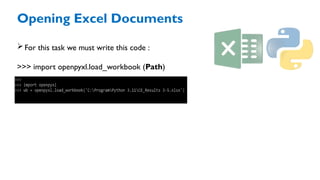
For this task we must write this code :
>>> import openpyxl.load_workbook (Path)
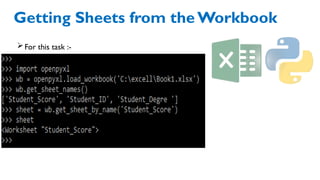
Getting Sheets from the Workbook
For this task :-
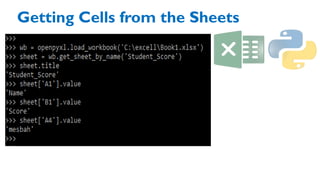
Getting Cells from the Sheets
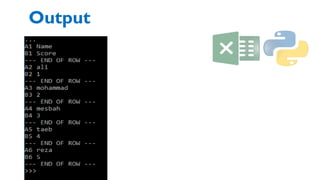
Getting Rows and Columns from the Sheets
Output
For more Question ?

Working with Excel Spreadsheets in python .pptx

  • 1.
    Names : RomalYorish Muhammad SaberSidiq Ahmad Taeb Baryali
  • 2.
    Outline:- Why we useexcel in python Excel Documents Installing the openpyxl Module Reading(opening) excel documents Getting Sheets from the Workbook Getting Cells from the Sheets
  • 3.
    Why We UseExcel in Python ? Excel is a popular and powerful spreadsheet application for Windows.The openpyxl module allows your Python programs to read and modify Excel spreadsheet files.  For example, you might have the boring task of copying certain data from one spreadsheet and pasting it into another one. Or you might have to go through thousands of rows and pick out just a handful of them to make small edits based on some criteria.
  • 4.
    Excel Documents An Excelspreadsheet document is called a workbook. A single workbook is saved in a file with the .xlsx extension. Each workbook can contain multiple sheets (also called worksheets). The sheet the user is currently viewing (or last viewed before closing Excel) is called the active sheet.
  • 5.
    Installing the OpenpyxlModule Python does not come with OpenPyXL, so you’ll have to install it. Follow the instructions for installing tow-party modules in Appendix  Step 1:-  You can by write pip install openpyxl in CMD install this library .  Step 2:-  The name of the module is openpyxl.To test whether it is installed correctly, enter the following into the interactive shell:
  • 6.
    Opening Excel Documents Forthis task we must write this code : >>> import openpyxl.load_workbook (Path)
  • 7.
    Getting Sheets fromthe Workbook For this task :-
  • 8.
  • 9.
    Getting Rows andColumns from the Sheets
  • 10.
  • 13.