Workflow in SharePoint
2013
Workflow allow you to automate your business processes
MJ Ferdous
SharePoint Architect | Trainer | Speaker Organized by:
SharePoint Experts Community
Sponsored by: Microsoft
Agenda
• SharePoint Workflow
• A Real Example of Workflow
• SP Designer VS Visual Studio
• SharePoint Designer 2013
• Develop Workflow using SharePoint Designer
• Demo: Developing SharePoint Designer 2013 Workflow
• Create Workflow using Visual Studio 2012
SharePoint Workflow
• Workflows in SharePoint 2013 allow you to model and automate
your business processes.
• These business processes can be as simple as a document approval
process with a single approver
• as complex as customer-facing product catalog using web service calls
and database support
• as formidable as virtually any structured business process, full of
conditions, loops, user inputs, tasks, and custom actions.
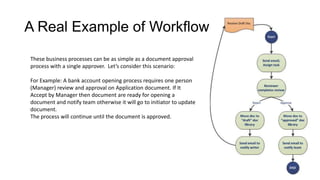
A Real Example of Workflow
These business processes can be as simple as a document approval
process with a single approver. Let’s consider this scenario:
For Example: A bank account opening process requires one person
(Manager) review and approval on Application document. If It
Accept by Manager then document are ready for opening a
document and notify team otherwise it will go to initiator to update
document.
The process will continue until the document is approved.
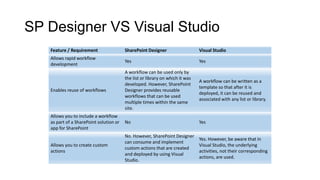
SP Designer VS Visual Studio
Feature / Requirement SharePoint Designer Visual Studio
Allows rapid workflow
development
Yes Yes
Enables reuse of workflows
A workflow can be used only by
the list or library on which it was
developed. However, SharePoint
Designer provides reusable
workflows that can be used
multiple times within the same
site.
A workflow can be written as a
template so that after it is
deployed, it can be reused and
associated with any list or library.
Allows you to include a workflow
as part of a SharePoint solution or
app for SharePoint
No Yes
Allows you to create custom
actions
No. However, SharePoint Designer
can consume and implement
custom actions that are created
and deployed by using Visual
Studio.
Yes. However, be aware that in
Visual Studio, the underlying
activities, not their corresponding
actions, are used.
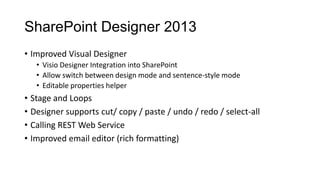
SharePoint Designer 2013
• Improved Visual Designer
• Visio Designer Integration into SharePoint
• Allow switch between design mode and sentence-style mode
• Editable properties helper
• Stage and Loops
• Designer supports cut/ copy / paste / undo / redo / select-all
• Calling REST Web Service
• Improved email editor (rich formatting)
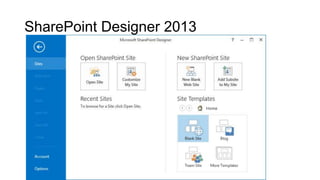
SharePoint Designer 2013
Demo
Create Workflow using Visual Studio
2012
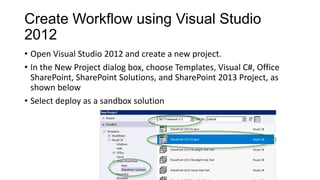
• Open Visual Studio 2012 and create a new project.
• In the New Project dialog box, choose Templates, Visual C#, Office
SharePoint, SharePoint Solutions, and SharePoint 2013 Project, as
shown below
• Select deploy as a sandbox solution
Create Workflow using Visual Studio
2012
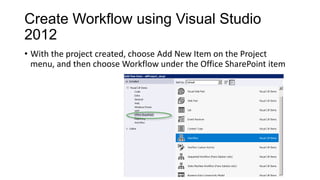
• With the project created, choose Add New Item on the Project
menu, and then choose Workflow under the Office SharePoint item
Create Workflow using Visual Studio
2012
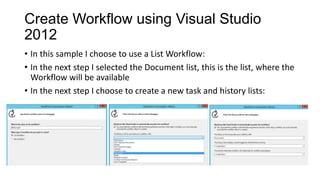
• In this sample I choose to use a List Workflow:
• In the next step I selected the Document list, this is the list, where the
Workflow will be available
• In the next step I choose to create a new task and history lists:
Create Workflow using Visual Studio
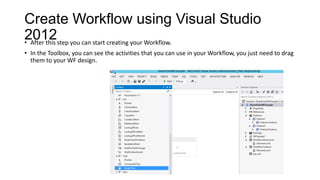
2012• After this step you can start creating your Workflow.
• In the Toolbox, you can see the activities that you can use in your Workflow, you just need to drag
them to your WF design.
Create Workflow using Visual Studio
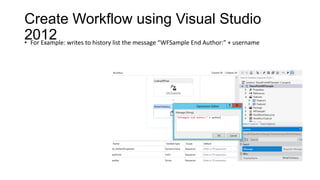
2012• For Example: writes to history list the message “WFSample End Author:” + username
References
• SharePoint 2013 Books - A comprehensive list –
• http://social.technet.microsoft.com/wiki/contents/articles/14579.sharepoint-2013-
books-a-comprehensive-list.aspx
• Best Example of SharePoint 2013 public-facing sites
• http://www.topsharepoint.com/sharepoint-2013-websites
• Training Videos
• http://technet.microsoft.com/en-US/sharepoint/fp123606
Contact me
email: ferdouscs@gmail.com
Cell: +880 1715015093
Thank You

Workflow in SharePoint 2013

  • 1.
    Workflow in SharePoint 2013 Workflowallow you to automate your business processes MJ Ferdous SharePoint Architect | Trainer | Speaker Organized by: SharePoint Experts Community Sponsored by: Microsoft
  • 2.
    Agenda • SharePoint Workflow •A Real Example of Workflow • SP Designer VS Visual Studio • SharePoint Designer 2013 • Develop Workflow using SharePoint Designer • Demo: Developing SharePoint Designer 2013 Workflow • Create Workflow using Visual Studio 2012
  • 3.
    SharePoint Workflow • Workflowsin SharePoint 2013 allow you to model and automate your business processes. • These business processes can be as simple as a document approval process with a single approver • as complex as customer-facing product catalog using web service calls and database support • as formidable as virtually any structured business process, full of conditions, loops, user inputs, tasks, and custom actions.
  • 4.
    A Real Exampleof Workflow These business processes can be as simple as a document approval process with a single approver. Let’s consider this scenario: For Example: A bank account opening process requires one person (Manager) review and approval on Application document. If It Accept by Manager then document are ready for opening a document and notify team otherwise it will go to initiator to update document. The process will continue until the document is approved.
  • 5.
    SP Designer VSVisual Studio Feature / Requirement SharePoint Designer Visual Studio Allows rapid workflow development Yes Yes Enables reuse of workflows A workflow can be used only by the list or library on which it was developed. However, SharePoint Designer provides reusable workflows that can be used multiple times within the same site. A workflow can be written as a template so that after it is deployed, it can be reused and associated with any list or library. Allows you to include a workflow as part of a SharePoint solution or app for SharePoint No Yes Allows you to create custom actions No. However, SharePoint Designer can consume and implement custom actions that are created and deployed by using Visual Studio. Yes. However, be aware that in Visual Studio, the underlying activities, not their corresponding actions, are used.
  • 6.
    SharePoint Designer 2013 •Improved Visual Designer • Visio Designer Integration into SharePoint • Allow switch between design mode and sentence-style mode • Editable properties helper • Stage and Loops • Designer supports cut/ copy / paste / undo / redo / select-all • Calling REST Web Service • Improved email editor (rich formatting)
  • 7.
  • 8.
  • 9.
    Create Workflow usingVisual Studio 2012 • Open Visual Studio 2012 and create a new project. • In the New Project dialog box, choose Templates, Visual C#, Office SharePoint, SharePoint Solutions, and SharePoint 2013 Project, as shown below • Select deploy as a sandbox solution
  • 10.
    Create Workflow usingVisual Studio 2012 • With the project created, choose Add New Item on the Project menu, and then choose Workflow under the Office SharePoint item
  • 11.
    Create Workflow usingVisual Studio 2012 • In this sample I choose to use a List Workflow: • In the next step I selected the Document list, this is the list, where the Workflow will be available • In the next step I choose to create a new task and history lists:
  • 12.
    Create Workflow usingVisual Studio 2012• After this step you can start creating your Workflow. • In the Toolbox, you can see the activities that you can use in your Workflow, you just need to drag them to your WF design.
  • 13.
    Create Workflow usingVisual Studio 2012• For Example: writes to history list the message “WFSample End Author:” + username
  • 14.
    References • SharePoint 2013Books - A comprehensive list – • http://social.technet.microsoft.com/wiki/contents/articles/14579.sharepoint-2013- books-a-comprehensive-list.aspx • Best Example of SharePoint 2013 public-facing sites • http://www.topsharepoint.com/sharepoint-2013-websites • Training Videos • http://technet.microsoft.com/en-US/sharepoint/fp123606
  • 15.