
SharePoint 2010 Workflows
Phil Wicklund
About Me…
• Working with SP since
  2004
• Started as a trainer for
  Mindsharp
• Now consulting
  through RBA in MN
• Blog: philwicklund.com
• Writing a 2010 book:
Agenda
•   Out of the box workflows
•   What’s new in SP 2010?
•   Tools used in building custom workflows
•   Types of Workflows
•   Office Visio workflow demo
•   SharePoint Designer workflow demo
•   Visual Studio workflow demo
Out of box workflows
•   Three State Workflow
•   Approval Workflow
•   Collect Feedback Workflow
•   Collect Signatures Workflow
•   Disposition Approval Workflow
•   Translation Management Workflow
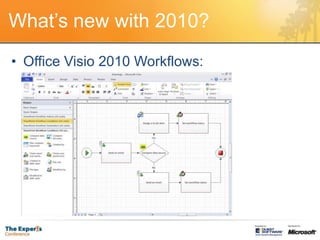
What’s new with 2010?
• Office Visio 2010 Workflows:
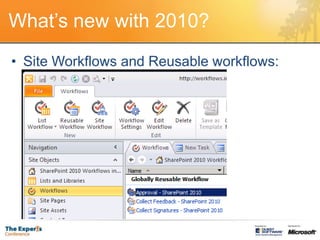
What’s new with 2010?
• Site Workflows and Reusable workflows:
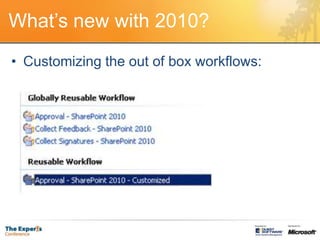
What’s new with 2010?
• Customizing the out of box workflows:
What’s new with 2010?
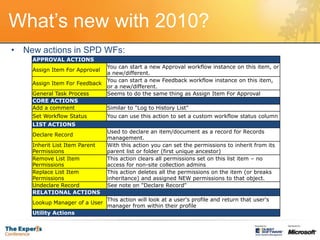
• New actions in SPD WFs:
    APPROVAL ACTIONS
                               You can start a new Approval workflow instance on this item, or
    Assign Item For Approval
                               a new/different.
                               You can start a new Feedback workflow instance on this item,
    Assign Item For Feedback
                               or a new/different.
    General Task Process       Seems to do the same thing as Assign Item For Approval
    CORE ACTIONS
    Add a comment              Similar to "Log to History List"
    Set Workflow Status        You can use this action to set a custom workflow status column
    LIST ACTIONS
                               Used to declare an item/document as a record for Records
    Declare Record
                               management.
    Inherit List Item Parent   With this action you can set the permissions to inherit from its
    Permissions                parent list or folder (first unique ancestor)
    Remove List Item           This action clears all permissions set on this list item – no
    Permissions                access for non-site collection admins
    Replace List Item          This action deletes all the permissions on the item (or breaks
    Permissions                inheritance) and assigned NEW permissions to that object.
    Undeclare Record           See note on "Declare Record"
    RELATIONAL ACTIONS
                               This action will look at a user's profile and return that user's
    Lookup Manager of a User
                               manager from within their profile
    Utility Actions
What’s new with 2010?
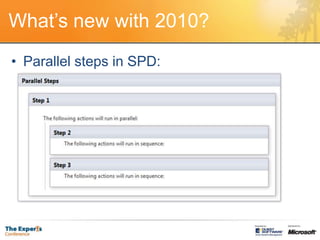
• Parallel steps in SPD:
What’s new with 2010?
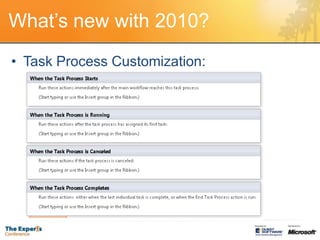
• Task Process Customization:
What’s new with 2010?
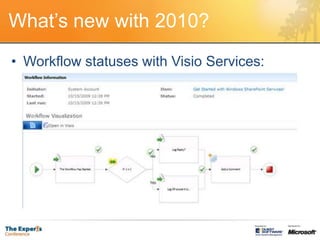
• Workflow statuses with Visio Services:
What’s new with 2010?
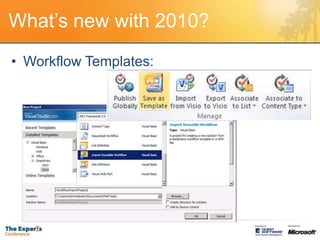
• Workflow Templates:
What’s new with 2010?
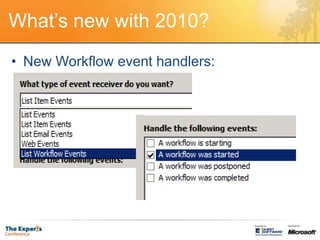
• New Workflow event handlers:
What’s new with 2010?
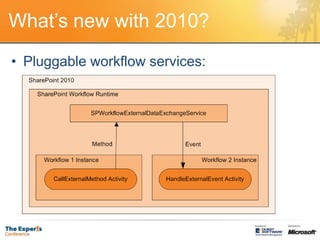
• Pluggable workflow services:
Tools used in Building
Custom Workflows
•   Office Visio 2010
•   SharePoint Designer
•   Visual Studio
•   Forms
    – Out of the box forms
    – ASP.NET
    – InfoPath
• Workflow Object Model
        SharePoint FREEWARE    SharePoint CONSULTING
        www.PhilWicklund.com   www.RBAconsulting.com
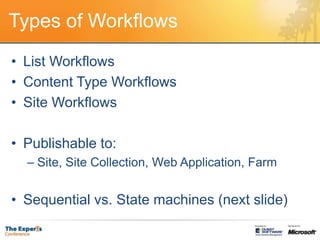
Types of Workflows
• List Workflows
• Content Type Workflows
• Site Workflows

• Publishable to:
  – Site, Site Collection, Web Application, Farm


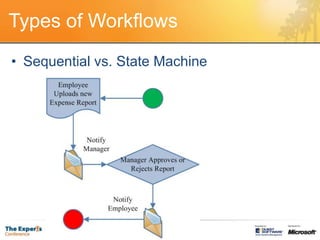
• Sequential vs. State machines (next slide)
Types of Workflows
• Sequential vs. State Machine
Types of Workflows
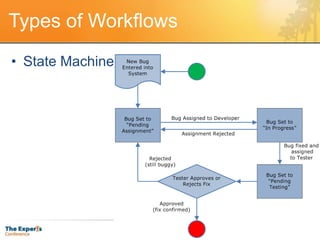
• State Machine:
Types of Workflows
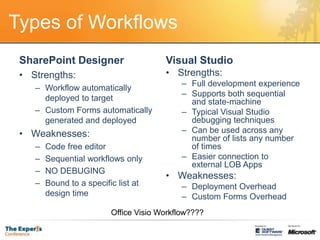
 SharePoint Designer                    Visual Studio
 • Strengths:                           • Strengths:
                                             – Full development experience
    – Workflow automatically
                                             – Supports both sequential
      deployed to target                       and state-machine
    – Custom Forms automatically             – Typical Visual Studio
      generated and deployed                   debugging techniques
 • Weaknesses:                               – Can be used across any
                                               number of lists any number
    –   Code free editor                       of times
    –   Sequential workflows only            – Easier connection to
                                               external LOB Apps
    –   NO DEBUGING
                                        • Weaknesses:
    –   Bound to a specific list at          – Deployment Overhead
        design time                          – Custom Forms Overhead
                          Office Visio Workflow????
Demo: Office Visio & SPD WFs
1.   New Visio workflow diagram (Expense Report System)
2.   Publish to SharePoint Designer
3.   Fill in details
4.   Publish to SharePoint
Demo: Visual Studio Workflows
1.   Demo Sequential workflow
2.   Discuss State machine workflow
Questions?

SharePoint 2010 Workflows

  • 1.
  • 2.
    About Me… • Workingwith SP since 2004 • Started as a trainer for Mindsharp • Now consulting through RBA in MN • Blog: philwicklund.com • Writing a 2010 book:
  • 3.
    Agenda • Out of the box workflows • What’s new in SP 2010? • Tools used in building custom workflows • Types of Workflows • Office Visio workflow demo • SharePoint Designer workflow demo • Visual Studio workflow demo
  • 4.
    Out of boxworkflows • Three State Workflow • Approval Workflow • Collect Feedback Workflow • Collect Signatures Workflow • Disposition Approval Workflow • Translation Management Workflow
  • 5.
    What’s new with2010? • Office Visio 2010 Workflows:
  • 6.
    What’s new with2010? • Site Workflows and Reusable workflows:
  • 7.
    What’s new with2010? • Customizing the out of box workflows:
  • 8.
    What’s new with2010? • New actions in SPD WFs: APPROVAL ACTIONS You can start a new Approval workflow instance on this item, or Assign Item For Approval a new/different. You can start a new Feedback workflow instance on this item, Assign Item For Feedback or a new/different. General Task Process Seems to do the same thing as Assign Item For Approval CORE ACTIONS Add a comment Similar to "Log to History List" Set Workflow Status You can use this action to set a custom workflow status column LIST ACTIONS Used to declare an item/document as a record for Records Declare Record management. Inherit List Item Parent With this action you can set the permissions to inherit from its Permissions parent list or folder (first unique ancestor) Remove List Item This action clears all permissions set on this list item – no Permissions access for non-site collection admins Replace List Item This action deletes all the permissions on the item (or breaks Permissions inheritance) and assigned NEW permissions to that object. Undeclare Record See note on "Declare Record" RELATIONAL ACTIONS This action will look at a user's profile and return that user's Lookup Manager of a User manager from within their profile Utility Actions
  • 9.
    What’s new with2010? • Parallel steps in SPD:
  • 10.
    What’s new with2010? • Task Process Customization:
  • 11.
    What’s new with2010? • Workflow statuses with Visio Services:
  • 12.
    What’s new with2010? • Workflow Templates:
  • 13.
    What’s new with2010? • New Workflow event handlers:
  • 14.
    What’s new with2010? • Pluggable workflow services:
  • 15.
    Tools used inBuilding Custom Workflows • Office Visio 2010 • SharePoint Designer • Visual Studio • Forms – Out of the box forms – ASP.NET – InfoPath • Workflow Object Model SharePoint FREEWARE SharePoint CONSULTING www.PhilWicklund.com www.RBAconsulting.com
  • 16.
    Types of Workflows •List Workflows • Content Type Workflows • Site Workflows • Publishable to: – Site, Site Collection, Web Application, Farm • Sequential vs. State machines (next slide)
  • 17.
    Types of Workflows •Sequential vs. State Machine
  • 18.
    Types of Workflows •State Machine:
  • 19.
    Types of Workflows SharePoint Designer Visual Studio • Strengths: • Strengths: – Full development experience – Workflow automatically – Supports both sequential deployed to target and state-machine – Custom Forms automatically – Typical Visual Studio generated and deployed debugging techniques • Weaknesses: – Can be used across any number of lists any number – Code free editor of times – Sequential workflows only – Easier connection to external LOB Apps – NO DEBUGING • Weaknesses: – Bound to a specific list at – Deployment Overhead design time – Custom Forms Overhead Office Visio Workflow????
  • 20.
    Demo: Office Visio& SPD WFs 1. New Visio workflow diagram (Expense Report System) 2. Publish to SharePoint Designer 3. Fill in details 4. Publish to SharePoint
  • 21.
    Demo: Visual StudioWorkflows 1. Demo Sequential workflow 2. Discuss State machine workflow
  • 22.