








http://lynt.cz
WordPress + performance
Vladimir Smitka
vladimir.smitka@lynt.cz
@smitka
Lynt services s.r.o.
9. 10. 2015 1
http://lynt.cz
Hidden advertisement
• We launched a new blog about
automatization in PPC few days ago
http://ppc-scripts.eu
9. 10. 2015 2
http://lynt.cz
How to speedup WP?
9. 10. 2015 3
Let someone else do it!
http://lynt.cz
Thank you for your
attention!
9. 10. 2015 4
http://lynt.cz
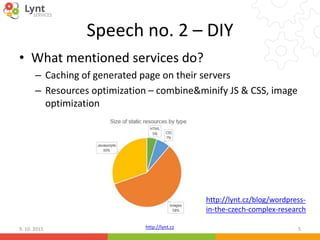
Speech no. 2 – DIY
• What mentioned services do?
– Caching of generated page on their servers
– Resources optimization – combine&minify JS & CSS, image
optimization
9. 10. 2015 5
http://lynt.cz/blog/wordpress-
in-the-czech-complex-research
http://lynt.cz
Image optimization
• Appropriate dimensions
• Check if thumbnails are really small
• Use appropriate formats
• „Web graphics“ – 8 bit PNG, SVG
• Photos – JPG (quality 75 is OK, 60 in
Photoshop)
• Videos – MP4, FLV, GIF!
9. 10. 2015 6
http://lynt.cz
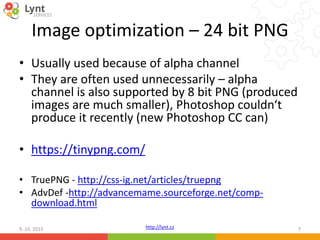
Image optimization – 24 bit PNG
• Usually used because of alpha channel
• They are often used unnecessarily – alpha
channel is also supported by 8 bit PNG (produced
images are much smaller), Photoshop couldn‘t
produce it recently (new Photoshop CC can)
• https://tinypng.com/
• TruePNG - http://css-ig.net/articles/truepng
• AdvDef -http://advancemame.sourceforge.net/comp-
download.html
9. 10. 2015 7
http://lynt.cz
Image optimization - plugins
• https://wordpress.org/plugins/ewww-image-
optimizer/ + https://ewww.io
• https://wordpress.org/plugins/shortpixel-
image-optimiser/ - 100 images/month for
free
• https://wordpress.org/plugins/kraken-image-
optimizer/ - subscription
9. 10. 2015 8
http://lynt.cz
CSS sprites & data URI
• What is the problem?
• HTTP headers are 0.5 - 1KB length in average (in case of
small images headers are bigger than useful data)
• Connection time to the server is negligible
• Our goal is to reduce number of requests to the server:
A) If you have more images you can merge them to one bigger
image (http://draeton.github.io/stitches/)
B) You can load particular small images with data URI:
<img src="data:image/png;base64,…data v
base64…">
9. 10. 2015 9
http://lynt.cz
JS & CSS optimization
• Goal – reduction of requests to server,
reduction of size (again)
• You can combine more CSS and JS files into
one + minify them
• https://wordpress.org/plugins/autoptimize/
• https://wordpress.org/plugins/bwp-minify/
9. 10. 2015 10
http://lynt.cz
Autoptimize
9. 10. 2015 11
http://lynt.cz
Page cache
• Saves processed page into static HTML file for
future load
• https://wordpress.org/plugins/wp-super-
cache/
• https://wordpress.org/plugins/w3-total-
cache/
9. 10. 2015 12
http://lynt.cz
WP Super Cache
9. 10. 2015 13
http://lynt.cz9. 10. 2015 14
Thank you for your attention!
http://lynt.cz
Speech no. 3 – the real one
9. 10. 2015 15
Problem diagnostics:
https://gtmetrix.com/
Application Resources
http://lynt.cz9. 10. 2015 16
http://lynt.cz
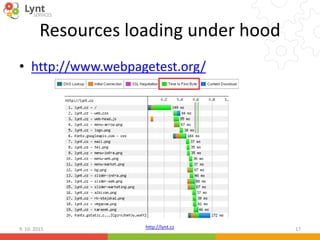
Resources loading under hood
• http://www.webpagetest.org/
9. 10. 2015 17
http://lynt.cz
Resources loading – common problems
• Expires headers (mod_expires) – ensure that
resources don‘t need to be downloaded again
(else browser will use heuristic analysis)
• GZIP compression (mod_deflate) – usually saves
about 30-70% size of text files
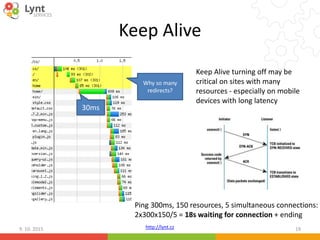
• Keep Alive – keeps connections open, there is no
need to establish connection again, it uses little
more RAM
9. 10. 2015 18
http://lynt.cz
Keep Alive
9. 10. 2015 19
30ms
Keep Alive turning off may be
critical on sites with many
resources - especially on mobile
devices with long latency
Ping 300ms, 150 resources, 5 simultaneous connections:
2x300x150/5 = 18s waiting for connection + ending
Why so many
redirects?
http://lynt.cz
HTTPS & SPDY & HTTP/2
9. 10. 2015 20
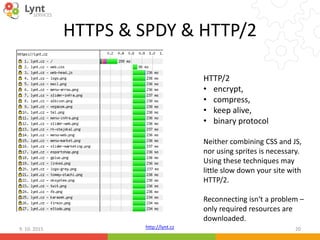
HTTP/2
• encrypt,
• compress,
• keep alive,
• binary protocol
Neither combining CSS and JS,
nor using sprites is necessary.
Using these techniques may
little slow down your site with
HTTP/2.
Reconnecting isn‘t a problem –
only required resources are
downloaded.
http://lynt.cz
What slows TTFB down
• MySQL queries
• Unusage of cache
• HTTP requests (e.g. update checks)
• More plugins = more requests
9. 10. 2015 21
http://lynt.cz
Effect of plugins
• Test on VPS from WEDOS (1 core, 4G RAM)
ab -n 1000 -c 4 http://domain
• Clean WP:
Requests per second: 15.93 [#/sec]
Time per request: 251.095 [ms]
• WP + SliderRevolution + CF7 + Yoast SEO
Requests per second: 4.61 [#/sec]
Time per request: 868.450 [ms]
• WP + SliderRevolution + CF7 + Yoast SEO + WPML + Jetpack
Requests per second: 2.94 [#/sec]
Time per request: 1360.454 [ms]
9. 10. 2015 22
Congrats, we were
able to degrade
performance more
than 5 times in few
minutes!
http://lynt.cz
Motivation: our webserver
• WP + some common plugins
Requests per second: 319.26 [#/sec]
Time per request: 12.529 [ms]
Ping 2,5 ms
9. 10. 2015 23
35 ms
Dirty caching tricks are used, of course. We will talk about it later.
http://lynt.cz
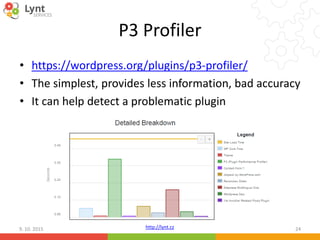
P3 Profiler
• https://wordpress.org/plugins/p3-profiler/
• The simplest, provides less information, bad accuracy
• It can help detect a problematic plugin
9. 10. 2015 24
http://lynt.cz
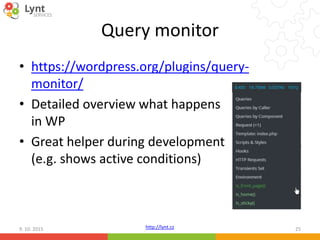
Query monitor
• https://wordpress.org/plugins/query-
monitor/
• Detailed overview what happens
in WP
• Great helper during development
(e.g. shows active conditions)
9. 10. 2015 25
http://lynt.cz
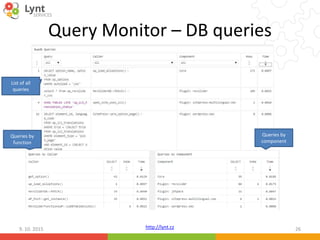
Query Monitor – DB queries
9. 10. 2015 26
List of all
queries
Queries by
function
Queries by
component
http://lynt.cz
Query Monitor – more info
9. 10. 2015 27
HTTP requests based on wp_remote_X function
curl, file_get_contents etc. are not captured [you can capture them by traffic analysis (tcpdump, wireshark)]
Some important constants are missing
e.g. SAVEQUERIES – another IO req.
Writes into file:
IO operations
Minified libraries
won‘t be used:
more data
HTTP requests
http://lynt.cz
Looking from the other side
• We have examined website from application
look
• Now it is time to look where apps are running
9. 10. 2015 28
http://lynt.cz
Server infrastructure
9. 10. 2015 29
3 parts – HTTP server, DB server a Storage
Each with different requirements…
DB
Storage
WEBLOADBALANCER
Cloud
× 2
http://lynt.cz
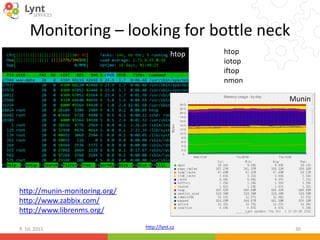
Monitoring – looking for bottle neck
9. 10. 2015 30
htop
Munin
http://munin-monitoring.org/
http://www.zabbix.com/
http://www.librenms.org/
htop
iotop
iftop
nmon
http://lynt.cz
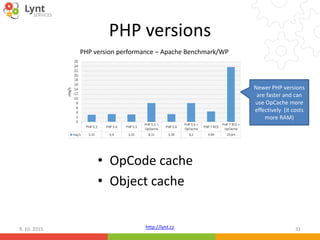
PHP versions
• OpCode cache
• Object cache
9. 10. 2015 31
Newer PHP versions
are faster and can
use OpCache more
effectively (it costs
more RAM)
PHP version performance – Apache Benchmark/WP
http://lynt.cz
OpCode cache
• PHP language is compiled to Bytecode during
every request
• OpCache saves result for future use, there is no
need of recompilation
• You need install it (PHP < 5.5)
• APC
• Xcache
• Zend OpCache (part of PHP 5.5)
9. 10. 2015 32
http://lynt.cz
Object Cache
• Usually part of OpCache module + standalone
• User can save data into it for future use
• You need to enable it and allocate storage
• You need to install object backend drop-in into WP
– APC
– Xcache
– APCu (for usage with Zend OpCache)
– Redis
– Memcached
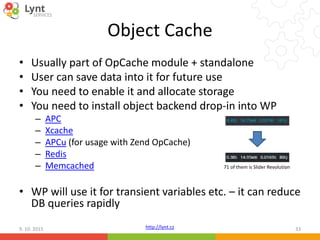
• WP will use it for transient variables etc. – it can reduce
DB queries rapidly
9. 10. 2015 33
71 of them is Slider Revolution
http://lynt.cz
Some points from Query Monitor
• You'll probably find that menu and some widgets
don‘t use cache
• http://afterburner.voceplatforms.com/back-
end.html#voce-widget-cache
• http://afterburner.voceplatforms.com/back-
end.html#voce-cached-nav
• There are many more tips and tools on this website
9. 10. 2015 34
http://lynt.cz
HTTP server
• Many options to run PHP
• Apache (prefork) + mod_php
• Apache (mpm event/worker) + PHP-FPM, FastCGI
• Nginx + PHP-FPM
9. 10. 2015 35
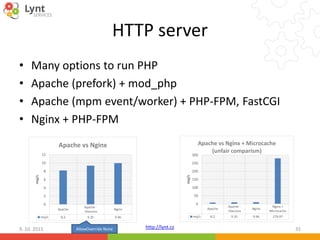
Apache
Apache -
.htaccess
Nginx
req/s 8.2 9.35 9.96
0
2
4
6
8
10
12
req/s
Apache vs Nginx
Apache
Apache -
.htaccess
Nginx
Nginx +
Microcache
req/s 8.2 9.35 9.96 279.97
0
50
100
150
200
250
300
req/s
Apache vs Nginx + Microcache
(unfair comparism)
AllowOverride None
http://lynt.cz
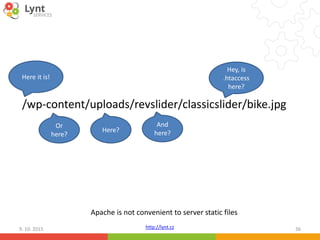
/wp-content/uploads/revslider/classicslider/bike.jpg
9. 10. 2015 36
Hey, is
.htaccess
here?
And
here?Here?
Or
here?
Here it is!
Apache is not convenient to server static files
http://lynt.cz
Back to our webserver
• We used microcache to achieve excellent results –
Nginx will remember result of request for a while
(seconds, minutes)
• This technic is useful in case of peak traffic – e.g after
new content release
• Microcache: Requests per second: 319.26 [#/sec]
• WP Supercache: Requests per second: 270.84 [#/sec]
• No caching *: Requests per second: 13.52 [#/sec]
* Test was performed with hundreds other requests on production environment
9. 10. 2015 37
http://lynt.cz
The last benchmark
• Test to the WEDOS VPS with more concurrency
ab -n 1000 -c 40 http://domain
• Requests per second: 1191.49 [#/sec] (mean)
• Time per request: 33.572 [ms] (mean)
• Time per request: 0.839 [ms] (mean, across all
concurrent requests)
Important note:
„Using cache isn‘t so easy, you need to resolver cache invalidation!“
9. 10. 2015 38
Very good
result with
cheap VPS
http://lynt.cz
The real tools
9. 10. 2015 39
http://lynt.cz
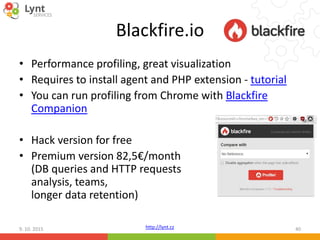
Blackfire.io
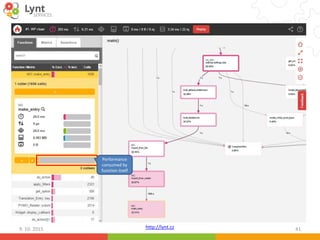
• Performance profiling, great visualization
• Requires to install agent and PHP extension - tutorial
• You can run profiling from Chrome with Blackfire
Companion
• Hack version for free
• Premium version 82,5€/month
(DB queries and HTTP requests
analysis, teams,
longer data retention)
9. 10. 2015 40
http://lynt.cz9. 10. 2015 41
Performance
consumed by
function itself
http://lynt.cz
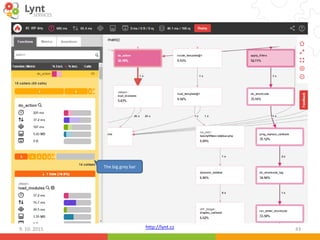
Localization takes more than 30%?
• WP uses slow PHP implemetation of GetText
• Solution:
• https://github.com/LyntServices/WP-lang-
cache (my very old hack to WP core, I have
more modifications to use ObjectCache)
• https://wordpress.org/plugins/mo-cache/
9. 10. 2015 42
http://lynt.cz9. 10. 2015 43
The big grey bar
http://lynt.cz
Why is do_action so slow?
9. 10. 2015 44
From PHP5.6 you can use optimized Argument Unpacking functionality:
…$the_['acceped_args']
Call_user_func_array function itself isn‘t problem – problem is hundreds and
thousands calls of this function (or any other function).
http://lynt.cz
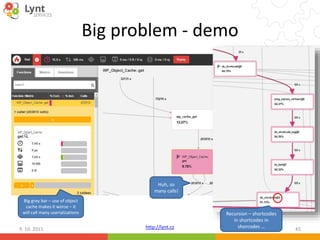
Big problem - demo
9. 10. 2015 45
Recursion – shortcodes
in shortcodes in
shorcodes …
Huh, so
many calls!
Big grey bar – use of object
cache makes it worse – it
will call many userializations
http://lynt.cz
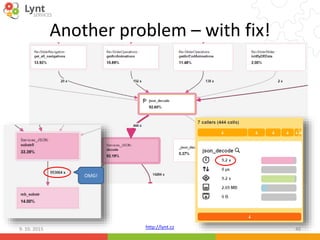
Another problem – with fix!
9. 10. 2015 46
OMG!
http://lynt.cz
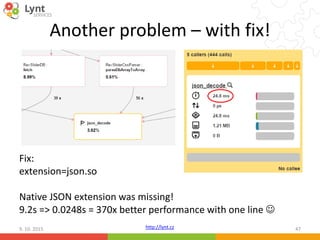
Another problem – with fix!
9. 10. 2015 47
Fix:
extension=json.so
Native JSON extension was missing!
9.2s => 0.0248s = 370x better performance with one line 
http://lynt.cz
Dead end of profiling
• When you profile WP in Blackfire you usually
stop in two cases:
1) do_action – common and heavy used WP
function (like apply_filters), you cannot track
cause and effect of particular call in Blackfire
2) Grey bar – performance is lost inside function –
code isn‘t visible
• Now debugging is come
9. 10. 2015 48
http://lynt.cz
Xdebug
• PHP extension: http://xdebug.org/
• Wizard helps you to download the correct
versions and what to insert into PHP config
according your phpinfo() output:
http://xdebug.org/wizard.php
• Great config setting explanation:
https://gist.github.com/IngmarBoddington/53
11858
9. 10. 2015 49
xdebug.remote_enable = 1
xdebug.profiler_enable_trigger = 1
xdebug.trace_format = 1
xdebug.trace_enable_trigger = 1
http://lynt.cz
Xdebug – what to do?
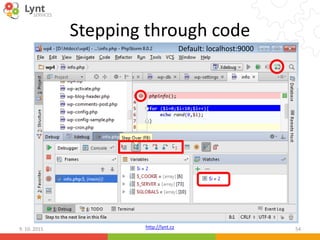
• Allows to go through code step by step from IDE
• Trace-log generation
• Code coverage analysis
• Profiling (more overhead than Blackfire)
xdebug.profiler_enable_trigger = 1
?XDEBUG_PROFILE
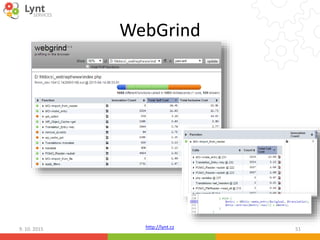
• You can use WebGrind for visualization:
https://github.com/jokkedk/webgrind
• Xdebug Helper – Chrome extension:
https://chrome.google.com/webstore/detail/xdebug-
helper/eadndfjplgieldjbigjakmdgkmoaaaoc
9. 10. 2015 50
http://lynt.cz
WebGrind
9. 10. 2015 51
http://lynt.cz
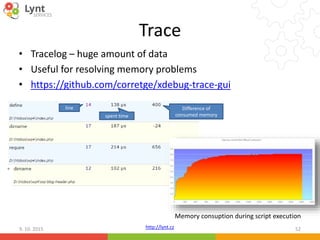
Trace
• Tracelog – huge amount of data
• Useful for resolving memory problems
• https://github.com/corretge/xdebug-trace-gui
9. 10. 2015 52
line
spent time
Difference of
consumed memory
Memory consuption during script execution
http://lynt.cz
Tracing part of code
9. 10. 2015 53
xdebug_start_trace('for.xt');
for ($i=0;$i<3;$i++){
echo rand(0,$i);
}
xdebug_stop_trace();
TRACE START [2015-10-01 11:49:49]
2 2 1 0.005554 223088
2 3 0 0.005621 223128 rand 0 D:htdocswp4info.php 7
2 3 1 0.005740 223128
2 4 0 0.005770 223128 rand 0 D:htdocswp4info.php 7
2 4 1 0.005879 223128
2 5 0 0.005908 223128 rand 0 D:htdocswp4info.php 7
2 5 1 0.006016 223128
2 6 0 0.006044 223096 xdebug_stop_trace 0 D:htdocswp4info.php 9
0.006130 223120
TRACE END [2015-10-01 11:49:49]
http://lynt.cz
Stepping through code
9. 10. 2015 54
Default: localhost:9000
http://lynt.cz
Père Fouras: Pensée du jour
9. 10. 2015 55
„This is the end of web developers era,
era of system adminstrators has begun.“
http://lynt.cz
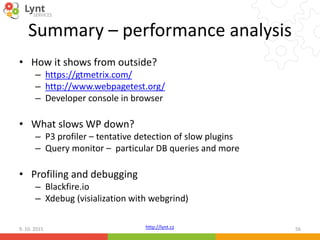
Summary – performance analysis
• How it shows from outside?
– https://gtmetrix.com/
– http://www.webpagetest.org/
– Developer console in browser
• What slows WP down?
– P3 profiler – tentative detection of slow plugins
– Query monitor – particular DB queries and more
• Profiling and debugging
– Blackfire.io
– Xdebug (visialization with webgrind)
9. 10. 2015 56
http://lynt.cz
This is the end, folks.
9. 10. 2015 57
Small gift: Blackfire.io Premium for a month:
DODWEDOS102015
valid until 19.10.2015
You can use this coupon during monthly subscription checkout
You can follow me on twitter @smitka and visit our blog http://lynt.cz/blog

WordPress performance tuning

  • 1.
    http://lynt.cz WordPress + performance VladimirSmitka vladimir.smitka@lynt.cz @smitka Lynt services s.r.o. 9. 10. 2015 1
  • 2.
    http://lynt.cz Hidden advertisement • Welaunched a new blog about automatization in PPC few days ago http://ppc-scripts.eu 9. 10. 2015 2
  • 3.
    http://lynt.cz How to speedupWP? 9. 10. 2015 3 Let someone else do it!
  • 4.
    http://lynt.cz Thank you foryour attention! 9. 10. 2015 4
  • 5.
    http://lynt.cz Speech no. 2– DIY • What mentioned services do? – Caching of generated page on their servers – Resources optimization – combine&minify JS & CSS, image optimization 9. 10. 2015 5 http://lynt.cz/blog/wordpress- in-the-czech-complex-research
  • 6.
    http://lynt.cz Image optimization • Appropriatedimensions • Check if thumbnails are really small • Use appropriate formats • „Web graphics“ – 8 bit PNG, SVG • Photos – JPG (quality 75 is OK, 60 in Photoshop) • Videos – MP4, FLV, GIF! 9. 10. 2015 6
  • 7.
    http://lynt.cz Image optimization –24 bit PNG • Usually used because of alpha channel • They are often used unnecessarily – alpha channel is also supported by 8 bit PNG (produced images are much smaller), Photoshop couldn‘t produce it recently (new Photoshop CC can) • https://tinypng.com/ • TruePNG - http://css-ig.net/articles/truepng • AdvDef -http://advancemame.sourceforge.net/comp- download.html 9. 10. 2015 7
  • 8.
    http://lynt.cz Image optimization -plugins • https://wordpress.org/plugins/ewww-image- optimizer/ + https://ewww.io • https://wordpress.org/plugins/shortpixel- image-optimiser/ - 100 images/month for free • https://wordpress.org/plugins/kraken-image- optimizer/ - subscription 9. 10. 2015 8
  • 9.
    http://lynt.cz CSS sprites &data URI • What is the problem? • HTTP headers are 0.5 - 1KB length in average (in case of small images headers are bigger than useful data) • Connection time to the server is negligible • Our goal is to reduce number of requests to the server: A) If you have more images you can merge them to one bigger image (http://draeton.github.io/stitches/) B) You can load particular small images with data URI: <img src="data:image/png;base64,…data v base64…"> 9. 10. 2015 9
  • 10.
    http://lynt.cz JS & CSSoptimization • Goal – reduction of requests to server, reduction of size (again) • You can combine more CSS and JS files into one + minify them • https://wordpress.org/plugins/autoptimize/ • https://wordpress.org/plugins/bwp-minify/ 9. 10. 2015 10
  • 11.
  • 12.
    http://lynt.cz Page cache • Savesprocessed page into static HTML file for future load • https://wordpress.org/plugins/wp-super- cache/ • https://wordpress.org/plugins/w3-total- cache/ 9. 10. 2015 12
  • 13.
  • 14.
    http://lynt.cz9. 10. 201514 Thank you for your attention!
  • 15.
    http://lynt.cz Speech no. 3– the real one 9. 10. 2015 15 Problem diagnostics: https://gtmetrix.com/ Application Resources
  • 16.
  • 17.
    http://lynt.cz Resources loading underhood • http://www.webpagetest.org/ 9. 10. 2015 17
  • 18.
    http://lynt.cz Resources loading –common problems • Expires headers (mod_expires) – ensure that resources don‘t need to be downloaded again (else browser will use heuristic analysis) • GZIP compression (mod_deflate) – usually saves about 30-70% size of text files • Keep Alive – keeps connections open, there is no need to establish connection again, it uses little more RAM 9. 10. 2015 18
  • 19.
    http://lynt.cz Keep Alive 9. 10.2015 19 30ms Keep Alive turning off may be critical on sites with many resources - especially on mobile devices with long latency Ping 300ms, 150 resources, 5 simultaneous connections: 2x300x150/5 = 18s waiting for connection + ending Why so many redirects?
  • 20.
    http://lynt.cz HTTPS & SPDY& HTTP/2 9. 10. 2015 20 HTTP/2 • encrypt, • compress, • keep alive, • binary protocol Neither combining CSS and JS, nor using sprites is necessary. Using these techniques may little slow down your site with HTTP/2. Reconnecting isn‘t a problem – only required resources are downloaded.
  • 21.
    http://lynt.cz What slows TTFBdown • MySQL queries • Unusage of cache • HTTP requests (e.g. update checks) • More plugins = more requests 9. 10. 2015 21
  • 22.
    http://lynt.cz Effect of plugins •Test on VPS from WEDOS (1 core, 4G RAM) ab -n 1000 -c 4 http://domain • Clean WP: Requests per second: 15.93 [#/sec] Time per request: 251.095 [ms] • WP + SliderRevolution + CF7 + Yoast SEO Requests per second: 4.61 [#/sec] Time per request: 868.450 [ms] • WP + SliderRevolution + CF7 + Yoast SEO + WPML + Jetpack Requests per second: 2.94 [#/sec] Time per request: 1360.454 [ms] 9. 10. 2015 22 Congrats, we were able to degrade performance more than 5 times in few minutes!
  • 23.
    http://lynt.cz Motivation: our webserver •WP + some common plugins Requests per second: 319.26 [#/sec] Time per request: 12.529 [ms] Ping 2,5 ms 9. 10. 2015 23 35 ms Dirty caching tricks are used, of course. We will talk about it later.
  • 24.
    http://lynt.cz P3 Profiler • https://wordpress.org/plugins/p3-profiler/ •The simplest, provides less information, bad accuracy • It can help detect a problematic plugin 9. 10. 2015 24
  • 25.
    http://lynt.cz Query monitor • https://wordpress.org/plugins/query- monitor/ •Detailed overview what happens in WP • Great helper during development (e.g. shows active conditions) 9. 10. 2015 25
  • 26.
    http://lynt.cz Query Monitor –DB queries 9. 10. 2015 26 List of all queries Queries by function Queries by component
  • 27.
    http://lynt.cz Query Monitor –more info 9. 10. 2015 27 HTTP requests based on wp_remote_X function curl, file_get_contents etc. are not captured [you can capture them by traffic analysis (tcpdump, wireshark)] Some important constants are missing e.g. SAVEQUERIES – another IO req. Writes into file: IO operations Minified libraries won‘t be used: more data HTTP requests
  • 28.
    http://lynt.cz Looking from theother side • We have examined website from application look • Now it is time to look where apps are running 9. 10. 2015 28
  • 29.
    http://lynt.cz Server infrastructure 9. 10.2015 29 3 parts – HTTP server, DB server a Storage Each with different requirements… DB Storage WEBLOADBALANCER Cloud × 2
  • 30.
    http://lynt.cz Monitoring – lookingfor bottle neck 9. 10. 2015 30 htop Munin http://munin-monitoring.org/ http://www.zabbix.com/ http://www.librenms.org/ htop iotop iftop nmon
  • 31.
    http://lynt.cz PHP versions • OpCodecache • Object cache 9. 10. 2015 31 Newer PHP versions are faster and can use OpCache more effectively (it costs more RAM) PHP version performance – Apache Benchmark/WP
  • 32.
    http://lynt.cz OpCode cache • PHPlanguage is compiled to Bytecode during every request • OpCache saves result for future use, there is no need of recompilation • You need install it (PHP < 5.5) • APC • Xcache • Zend OpCache (part of PHP 5.5) 9. 10. 2015 32
  • 33.
    http://lynt.cz Object Cache • Usuallypart of OpCache module + standalone • User can save data into it for future use • You need to enable it and allocate storage • You need to install object backend drop-in into WP – APC – Xcache – APCu (for usage with Zend OpCache) – Redis – Memcached • WP will use it for transient variables etc. – it can reduce DB queries rapidly 9. 10. 2015 33 71 of them is Slider Revolution
  • 34.
    http://lynt.cz Some points fromQuery Monitor • You'll probably find that menu and some widgets don‘t use cache • http://afterburner.voceplatforms.com/back- end.html#voce-widget-cache • http://afterburner.voceplatforms.com/back- end.html#voce-cached-nav • There are many more tips and tools on this website 9. 10. 2015 34
  • 35.
    http://lynt.cz HTTP server • Manyoptions to run PHP • Apache (prefork) + mod_php • Apache (mpm event/worker) + PHP-FPM, FastCGI • Nginx + PHP-FPM 9. 10. 2015 35 Apache Apache - .htaccess Nginx req/s 8.2 9.35 9.96 0 2 4 6 8 10 12 req/s Apache vs Nginx Apache Apache - .htaccess Nginx Nginx + Microcache req/s 8.2 9.35 9.96 279.97 0 50 100 150 200 250 300 req/s Apache vs Nginx + Microcache (unfair comparism) AllowOverride None
  • 36.
    http://lynt.cz /wp-content/uploads/revslider/classicslider/bike.jpg 9. 10. 201536 Hey, is .htaccess here? And here?Here? Or here? Here it is! Apache is not convenient to server static files
  • 37.
    http://lynt.cz Back to ourwebserver • We used microcache to achieve excellent results – Nginx will remember result of request for a while (seconds, minutes) • This technic is useful in case of peak traffic – e.g after new content release • Microcache: Requests per second: 319.26 [#/sec] • WP Supercache: Requests per second: 270.84 [#/sec] • No caching *: Requests per second: 13.52 [#/sec] * Test was performed with hundreds other requests on production environment 9. 10. 2015 37
  • 38.
    http://lynt.cz The last benchmark •Test to the WEDOS VPS with more concurrency ab -n 1000 -c 40 http://domain • Requests per second: 1191.49 [#/sec] (mean) • Time per request: 33.572 [ms] (mean) • Time per request: 0.839 [ms] (mean, across all concurrent requests) Important note: „Using cache isn‘t so easy, you need to resolver cache invalidation!“ 9. 10. 2015 38 Very good result with cheap VPS
  • 39.
  • 40.
    http://lynt.cz Blackfire.io • Performance profiling,great visualization • Requires to install agent and PHP extension - tutorial • You can run profiling from Chrome with Blackfire Companion • Hack version for free • Premium version 82,5€/month (DB queries and HTTP requests analysis, teams, longer data retention) 9. 10. 2015 40
  • 41.
    http://lynt.cz9. 10. 201541 Performance consumed by function itself
  • 42.
    http://lynt.cz Localization takes morethan 30%? • WP uses slow PHP implemetation of GetText • Solution: • https://github.com/LyntServices/WP-lang- cache (my very old hack to WP core, I have more modifications to use ObjectCache) • https://wordpress.org/plugins/mo-cache/ 9. 10. 2015 42
  • 43.
    http://lynt.cz9. 10. 201543 The big grey bar
  • 44.
    http://lynt.cz Why is do_actionso slow? 9. 10. 2015 44 From PHP5.6 you can use optimized Argument Unpacking functionality: …$the_['acceped_args'] Call_user_func_array function itself isn‘t problem – problem is hundreds and thousands calls of this function (or any other function).
  • 45.
    http://lynt.cz Big problem -demo 9. 10. 2015 45 Recursion – shortcodes in shortcodes in shorcodes … Huh, so many calls! Big grey bar – use of object cache makes it worse – it will call many userializations
  • 46.
    http://lynt.cz Another problem –with fix! 9. 10. 2015 46 OMG!
  • 47.
    http://lynt.cz Another problem –with fix! 9. 10. 2015 47 Fix: extension=json.so Native JSON extension was missing! 9.2s => 0.0248s = 370x better performance with one line 
  • 48.
    http://lynt.cz Dead end ofprofiling • When you profile WP in Blackfire you usually stop in two cases: 1) do_action – common and heavy used WP function (like apply_filters), you cannot track cause and effect of particular call in Blackfire 2) Grey bar – performance is lost inside function – code isn‘t visible • Now debugging is come 9. 10. 2015 48
  • 49.
    http://lynt.cz Xdebug • PHP extension:http://xdebug.org/ • Wizard helps you to download the correct versions and what to insert into PHP config according your phpinfo() output: http://xdebug.org/wizard.php • Great config setting explanation: https://gist.github.com/IngmarBoddington/53 11858 9. 10. 2015 49 xdebug.remote_enable = 1 xdebug.profiler_enable_trigger = 1 xdebug.trace_format = 1 xdebug.trace_enable_trigger = 1
  • 50.
    http://lynt.cz Xdebug – whatto do? • Allows to go through code step by step from IDE • Trace-log generation • Code coverage analysis • Profiling (more overhead than Blackfire) xdebug.profiler_enable_trigger = 1 ?XDEBUG_PROFILE • You can use WebGrind for visualization: https://github.com/jokkedk/webgrind • Xdebug Helper – Chrome extension: https://chrome.google.com/webstore/detail/xdebug- helper/eadndfjplgieldjbigjakmdgkmoaaaoc 9. 10. 2015 50
  • 51.
  • 52.
    http://lynt.cz Trace • Tracelog –huge amount of data • Useful for resolving memory problems • https://github.com/corretge/xdebug-trace-gui 9. 10. 2015 52 line spent time Difference of consumed memory Memory consuption during script execution
  • 53.
    http://lynt.cz Tracing part ofcode 9. 10. 2015 53 xdebug_start_trace('for.xt'); for ($i=0;$i<3;$i++){ echo rand(0,$i); } xdebug_stop_trace(); TRACE START [2015-10-01 11:49:49] 2 2 1 0.005554 223088 2 3 0 0.005621 223128 rand 0 D:htdocswp4info.php 7 2 3 1 0.005740 223128 2 4 0 0.005770 223128 rand 0 D:htdocswp4info.php 7 2 4 1 0.005879 223128 2 5 0 0.005908 223128 rand 0 D:htdocswp4info.php 7 2 5 1 0.006016 223128 2 6 0 0.006044 223096 xdebug_stop_trace 0 D:htdocswp4info.php 9 0.006130 223120 TRACE END [2015-10-01 11:49:49]
  • 54.
    http://lynt.cz Stepping through code 9.10. 2015 54 Default: localhost:9000
  • 55.
    http://lynt.cz Père Fouras: Penséedu jour 9. 10. 2015 55 „This is the end of web developers era, era of system adminstrators has begun.“
  • 56.
    http://lynt.cz Summary – performanceanalysis • How it shows from outside? – https://gtmetrix.com/ – http://www.webpagetest.org/ – Developer console in browser • What slows WP down? – P3 profiler – tentative detection of slow plugins – Query monitor – particular DB queries and more • Profiling and debugging – Blackfire.io – Xdebug (visialization with webgrind) 9. 10. 2015 56
  • 57.
    http://lynt.cz This is theend, folks. 9. 10. 2015 57 Small gift: Blackfire.io Premium for a month: DODWEDOS102015 valid until 19.10.2015 You can use this coupon during monthly subscription checkout You can follow me on twitter @smitka and visit our blog http://lynt.cz/blog

Editor's Notes

  • #6 Co způsobuje pomalost?
  • #8 Proč se používají 24 bit PNG?
  • #20 Pozor na koncová lomítka, proveďte jejich přesměrování na straně serveru, ne na straně CMS