© 2010
Website Performance
Suggestions beyondYSlow
Vivek Jain
8 Aug 2010
© 2010
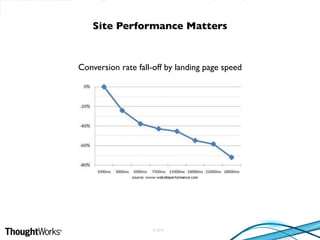
Conversion rate fall-off by landing page speed
Site Performance Matters
© 2010
• No fixed number

• Users will wait if it matters to them
– credit card processing
– items of personal interest (family photos)

• But otherwise they won’t
– news articles
– search engines
– most of the sites

• Keep reducing load time
– It’s a never ending exercise
Acceptable Page Load Time
© 2010
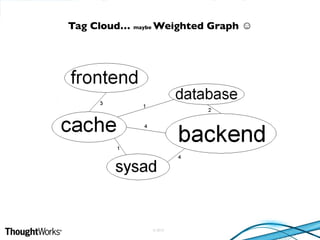
Tag Cloud… maybe Weighted Graph ☺
© 2010
• Frontend (Browser)
• Backend (Server)
– core/application
– system administration
– database
• Miscellaneous recommendations
– UncommonYahoo!Yslow
– Few Google Page Speed
– HTML 5
Structure of Topics
© 2010
• Most popular libs are widely hosted
• Browser might have it cached already
• Win-Win
– Saves bandwidth/$$$
– Page loads faster
• Try Google Libraries API: http://code.google.com/apis/libraries/
Don’t Host JavaScript Libraries
© 2010
• Once the page loads completely, browser is idle
• Fetch content for next page
• Fetch static content for next version of your site
– Customers usually find the new version slow initially
Utilize Browser’s Idle Time
© 2010
Separate Static from Dynamic
• Dynamic Pages have static sections
– Header/Footer
– Drop downs (cities, products etc.)
• Static sections can be cached by browser

• Effective only when rendering similar layout
• Techniques
– Ajax
– XSLT (XML+XSL)
– HTML in javascript as string


© 2010
• Presented @Velocity 2010 by Michael Kleber & Arvind Jain
– http://www.youtube.com/watch?v=3NVpFj64MQU
• Third Party code can block page rendering
• Analyze your page with and without the third party content
• Choose the one which has least impact
Don’t Let Third Parties Slow You Down
© 2010
• Useful if JavaScript execution can be delayed
• async attribute in HTML 5
– script executes asynchronously, as soon as it is available
• New Google Analytics tracking code uses async loading technique
– creates a script tag with inline JavaScript and appends it to the document
• Building JavaScript snippets to be added on other sites?
– http://friendlybit.com/js/lazy-loading-asyncronous-javascript/
Load JavaScript Asynchronously
© 2010
• Single app server
– local cache works fine
• Distributed app servers
– distributed cache for best hit ratio (memcached)
Choose Appropriate Cache
© 2010
• Few considerations:
– Frequency of change
– Traffic for the same content before change
• Cache in memory
– else on disk
• Clear cache when content is suppose to change
Cache HTML when possible
© 2010
• Process immediately only what is required for rendering
• Queue/delay other processing
• Gearman
– can be used for processing queues in background
Delayed Processing
© 2010
• Mostly used for images, style sheets and JavaScript
• Certain HTML might be cacheable for limited duration
– caching headers won’t help
– get them cached by the CDN
– first access from a region caches it for others
• CDN is configurable for your site
– does it honor your cache headers?
– does it cache all required files/folders?
– understand the configuration and use optimally
Use CDN Effectively
© 2010
• Useful if your site is not using a CDN
• Web Servers for static content
– lighttpd
– varnish
– Nginx
• Considerable improvement if page loads multiple images
Web Server for Static Content
© 2010
• Slow clients hold hog server resources
• Dynamically generated page is served to the reverse proxy
• Reverse proxy takes the burden of transferring slowly
Reverse Proxy for Spoon Feeding
© 2010
• Site catering to specific region
– choose local data center if possible
• Site for distributed audience
– check latency from multiple locations/ISPs
• Choose a Data Center which peers with all major ISPs
• Closest isn’t always the fastest
• Cheapest usually isn’t the best
Choose Data Center carefully
© 2010
• Database queries are expensive
– keep them minimal
• MySQL query cache is cleared on any insert/update
• Add caching layer before DB calls
– trap insert/update calls and update cache
Cache Database Query Results
© 2010
• Obvious but usually missed
• Set slow query time to 2 seconds
– reduce to 1 sec if no logs
• Basics
– use indexes
– normalization
– memory settings
Analyze Database Logs
© 2010
• Post-load components
– hidden content, images below the fold
• Split components across domains
– Not too many (DNS lookup penalty)
• Optimize images
– Try PNG
• Optimize CSS Sprites
– Arrange images horizontally (smaller file size)
– Combine similar colors
Uncommon Yslow recommendations
© 2010
• Specify image dimensions
– allows brower to render correctly even before downloading the image
• Minify HTML
• Use efficient CSS selectors
– selectors matching large number of elements slows execution
• Specify character set early
– allows browser to begin execution immediately
More from Google Page Speed
© 2010
• http://code.google.com/speed/articles/html5-performance.html
Using HTML 5 for performance improvements
© 2010
ThankYou!
Suggestions/feedback: vivek.jain@thoughtworks.com

WebsitePerformance

  • 1.
    © 2010 Website Performance SuggestionsbeyondYSlow Vivek Jain 8 Aug 2010
  • 2.
    © 2010 Conversion ratefall-off by landing page speed Site Performance Matters
  • 3.
    © 2010 • Nofixed number
 • Users will wait if it matters to them – credit card processing – items of personal interest (family photos)
 • But otherwise they won’t – news articles – search engines – most of the sites
 • Keep reducing load time – It’s a never ending exercise Acceptable Page Load Time
  • 4.
    © 2010 Tag Cloud…maybe Weighted Graph ☺
  • 5.
    © 2010 • Frontend(Browser) • Backend (Server) – core/application – system administration – database • Miscellaneous recommendations – UncommonYahoo!Yslow – Few Google Page Speed – HTML 5 Structure of Topics
  • 6.
    © 2010 • Mostpopular libs are widely hosted • Browser might have it cached already • Win-Win – Saves bandwidth/$$$ – Page loads faster • Try Google Libraries API: http://code.google.com/apis/libraries/ Don’t Host JavaScript Libraries
  • 7.
    © 2010 • Oncethe page loads completely, browser is idle • Fetch content for next page • Fetch static content for next version of your site – Customers usually find the new version slow initially Utilize Browser’s Idle Time
  • 8.
    © 2010 Separate Staticfrom Dynamic • Dynamic Pages have static sections – Header/Footer – Drop downs (cities, products etc.) • Static sections can be cached by browser
 • Effective only when rendering similar layout • Techniques – Ajax – XSLT (XML+XSL) – HTML in javascript as string
 

  • 9.
    © 2010 • Presented@Velocity 2010 by Michael Kleber & Arvind Jain – http://www.youtube.com/watch?v=3NVpFj64MQU • Third Party code can block page rendering • Analyze your page with and without the third party content • Choose the one which has least impact Don’t Let Third Parties Slow You Down
  • 10.
    © 2010 • Usefulif JavaScript execution can be delayed • async attribute in HTML 5 – script executes asynchronously, as soon as it is available • New Google Analytics tracking code uses async loading technique – creates a script tag with inline JavaScript and appends it to the document • Building JavaScript snippets to be added on other sites? – http://friendlybit.com/js/lazy-loading-asyncronous-javascript/ Load JavaScript Asynchronously
  • 11.
    © 2010 • Singleapp server – local cache works fine • Distributed app servers – distributed cache for best hit ratio (memcached) Choose Appropriate Cache
  • 12.
    © 2010 • Fewconsiderations: – Frequency of change – Traffic for the same content before change • Cache in memory – else on disk • Clear cache when content is suppose to change Cache HTML when possible
  • 13.
    © 2010 • Processimmediately only what is required for rendering • Queue/delay other processing • Gearman – can be used for processing queues in background Delayed Processing
  • 14.
    © 2010 • Mostlyused for images, style sheets and JavaScript • Certain HTML might be cacheable for limited duration – caching headers won’t help – get them cached by the CDN – first access from a region caches it for others • CDN is configurable for your site – does it honor your cache headers? – does it cache all required files/folders? – understand the configuration and use optimally Use CDN Effectively
  • 15.
    © 2010 • Usefulif your site is not using a CDN • Web Servers for static content – lighttpd – varnish – Nginx • Considerable improvement if page loads multiple images Web Server for Static Content
  • 16.
    © 2010 • Slowclients hold hog server resources • Dynamically generated page is served to the reverse proxy • Reverse proxy takes the burden of transferring slowly Reverse Proxy for Spoon Feeding
  • 17.
    © 2010 • Sitecatering to specific region – choose local data center if possible • Site for distributed audience – check latency from multiple locations/ISPs • Choose a Data Center which peers with all major ISPs • Closest isn’t always the fastest • Cheapest usually isn’t the best Choose Data Center carefully
  • 18.
    © 2010 • Databasequeries are expensive – keep them minimal • MySQL query cache is cleared on any insert/update • Add caching layer before DB calls – trap insert/update calls and update cache Cache Database Query Results
  • 19.
    © 2010 • Obviousbut usually missed • Set slow query time to 2 seconds – reduce to 1 sec if no logs • Basics – use indexes – normalization – memory settings Analyze Database Logs
  • 20.
    © 2010 • Post-loadcomponents – hidden content, images below the fold • Split components across domains – Not too many (DNS lookup penalty) • Optimize images – Try PNG • Optimize CSS Sprites – Arrange images horizontally (smaller file size) – Combine similar colors Uncommon Yslow recommendations
  • 21.
    © 2010 • Specifyimage dimensions – allows brower to render correctly even before downloading the image • Minify HTML • Use efficient CSS selectors – selectors matching large number of elements slows execution • Specify character set early – allows browser to begin execution immediately More from Google Page Speed
  • 22.
  • 23.