2
클라우드 도입에 앞서 많은 고객들은 다음과 같이 보안에 대한 이슈를 제기합니다
클라우드 보안 이슈
보안성보안성 프라이버시프라이버시
신뢰성신뢰성 Business PracticeBusiness Practice
서비스는 보안적으로 안전한가
?
ISO 27001 인증을 받았는가 ?
Jurisdiction? ( 관할 구역 )
HIPAA compliant?
데이터는 분리되어 운영되는가
?
데이터는 retention?
Service outage?
Performance SLA?
Incident response plan?
SAS Type II Report?
24*7 지원이 가능한가 ?
누군가가 나의 데이터에 접근할 수 있습니까 ? (Admin 권한 ? 직원들 ? IT 파트너 ? 일반인 ?)
데이터가 분리 및 격리를 어떻게 보장됩니까 ? ( 정체 ? 복구 ? 백업 ? HW 처리 ?)
서비스의 보안은 / ISO 27001 인증여부 / 프로세스 / SAS 70 II / 감사는 어떻습니까 ?
관할권 / 조사 지원 / 사건 발생 정도의 응답 계획 / 인지 및 통보는 어떻습니까 ?
규제준수 (HIPAA- 건강 보험 이동 , PCI- 보안표준위원회 , FISMA- 정보보호관리법 등 ) 는 이루
어집니까 ?
24 X 7 지원 체계를 갖추고 있습니까 ? SLA 의 퍼포먼스는 어떻습니까 ?
필수적인 보안 질의 사항
3.
3
클라우드로의 전환에 따라인프라의 보안이 플랫폼 , 애플리케이션 단으로 옮겨 갑
니다
클라우드에 따른 보안 변화
설명설명
기존의 전통적인 인프라 단계의 보안이 플랫폼과 애플리케이션의 단계로 이동합니다 .
방화벽과 Network Access Control Lists 는 가상 방화벽과 호스트 패킷 필터로 대체 됨
.
다수의 privileged 고객들은 시스템 통제 하의 고객 에이젼트로 전환 됨 .
플랫폼과 네트워크 레벨의 암호화는 제 기능을 하지만 개별 애플리케이션에 대한 암
호화에 대한 개발자의 관리 및 책임
Mental ShiftMental Shift New Operating ModelNew Operating Model
Hybri
d
Public Private
SaaSSaaS
PaaSPaaS
IaaSIaaS
Location Ownership ControlLocation Ownership Control
5
클라우드 도입은 조직내 IT 위협 요인에 변화를 가져오게 됩니다
클라우드 보안 위협
클라우드 도입으로 인한 위협클라우드 도입으로 인한 위협 위협 요소 완화에 대한 책임위협 요소 완화에 대한 책임
많은 위협 요인이 기존의 서버에 존재 함
다소의 부가적 위협 요인이 클라우드 컴퓨팅에 해당
Windows Azure 가 일정 부분의 위협을 통제하지만 ,
나머지는 고객에게 남겨지게 됨
기 존재 하는
위협 요인
XSS, code injection 공격
DNS 공격 , network flooding
증가하는
위협 요인
데이터 프라이버시
비밀 접근 (Privileged Access)
새롭게 발생하
는
위협 요인
New Privilege Escalation
Attacks (VM to host or VM to
VM)
Jailbreaking the VM boundary
Hyperjacking (rootkitting the
host or VM)
완화 되는 위협
요인
Patching is automated and
instances are moved to secure
systems
Cloud resiliency improves
failover across a service
6.
6
클라우드 도입은 조직내 IT 위협 요인에 변화를 가져오게 됩니다
클라우드 보안 위협
클라우드 도입으로 인한 위협클라우드 도입으로 인한 위협 위협 요소 완화에 대한 책임위협 요소 완화에 대한 책임
기 존재 하는
위협 요인
XSS, code injection 공격
DNS 공격 , network flooding
증가하는
위협 요인
데이터 프라이버시
비밀 접근 (Privileged Access)
새롭게 발생하
는
위협 요인
New Privilege Escalation
Attacks (VM to host or VM to
VM)
Jailbreaking the VM boundary
Hyperjacking (rootkitting the
host or VM)
완화 되는 위협
요인
Patching is automated and
instances are moved to secure
systems
Cloud resiliency improves
failover across a service
많은 위협 요인이 기존의 서버에 존재
나머지의 고객에게 남겨지는 부분이 존재
Windows Azure 가 일정 부분의 위
협을 통제하지만 ,
다소의 부가적 위협 요인이 클라우드에 해당
7.
7
다양한 유형의 위협에대해 Windows Azure 는 다음과 같은 방어 전략을 가집니다
Windows Azure 보안 전략
Tampering &
Disclosure
VM switch hardening
Certificate Services
Shared-Access Signatures
HTTPS
Sidechannel protections
Elevation of Privilege
Partial Trust Runtime
Hypervisor custom
sandboxing
Virtual Service Accounts
Denial of Service
Load-balanced
Infrastructure
Network bandwidth
throttling
Cisco Guard enabled on
Storage nodes
Configurable scale-out
Spoofing
VLANs
Top of Rack Switches
Custom packet filtering
Port Scanning/
Service Enumeration
Service Definition file,
Windows Firewall, VM
switch packet filtering
Windows Azure 가 갖춘 방어 전략
8.
8
Windows Azure 는6 단계의 보안 및 방어 전략을 제공합니다
Windows Azure 보안 전략
Layer 방어
데이터
Strong storage keys for access
control
SSL support for data transfers
between all parties
애플리케이션
Front-end .Net code running
under partial trust
Windows account with least
privileges
호스트
Stripped down version of
Windows Server 2008 OS
Host boundaries enforced by
external hypervisor
네트워크
Host firewall limiting traffic to VMs
VLANs and packet filters in
routers
물리적
World-class physical security
ISO 27001 and SAS 70 Type II
certifications for datacenter
processes
Windows Azure
6 Layers Security
Managed Code Access
Security: partial trust
Managed Code Access
Security: partial trust
Windows Account:
running with least privileges
Windows Account:
running with least privileges
Windows FW(VM):
Rule based on service model
Windows FW(VM):
Rule based on service model
Virtual Machine:
Fixed CPU, memory, disk
resources
Virtual Machine:
Fixed CPU, memory, disk
resources
Root Partition Packet
Filter:
Defense in depth against
VM ”jail breaking”
Root Partition Packet
Filter:
Defense in depth against
VM ”jail breaking”
Network ACLs:
Dedicated VLANS for tenant
nodes
Network ACLs:
Dedicated VLANS for tenant
nodes
9.
9
Windows Azure -VM 보안 전략
Hypervisor
Network / Disk
Hypervisor 를 통해 모든 고객들은 네트워크에
접속할 수 있고 , 디스크는 Root VM 에 의해
중재 , 조정 됨
1, 2, 4, or 8 CPUs; up to 14 GB or memory
Three disk drives:
C: (for temps; initially populated with config file)
D: (for OS code; initially as supplied by Windows Azure)
E: (for application code; 처음 고객 어드민에 의해 제공
된 )
네트워크는 같은 테넌트 내의 다른 VM 로 , NAT 를 통해
서는 인터넷으로 연결 될 수 있음
게스트 에이전트는 Root OS 로부터 들어오는 HTTP/RPC
연결을 받아들임
Windows 의 보안성과는 무관함
대신 , 네트워크 , 디스크 드라이버 , Hypervisor 의 보안성에 의
존적임
C:, D:, E: 는 실제 디스크는 아님 . Root OS 의 file system 내
에 존재하는 VHD 파일임
표면상에 대한 공격은 소수의 커맨드만 받아들이고 , 최소한의
하드웨어 디바이스만 지원함으로써 최소화 가능
테넌트에 의한 공격에 대한 대응
게스트 VM 에 제공되는 가상 환경
10.
10
Windows Azure 에대한 위협은 다음과 같이 유형화 될 수 있습니다
Windows Azure 보안 전략
위협 요소의 유형
Windows Azure
고객 테넌트고객 테넌트
고객
어드민
중앙
어드민
물리적인
서버 공격1
2 3
4
1 3 4 5 Windows Azure 에 대한 직접 공격
인프라에 대한 직접 공격은 모든 고객을 위험에 빠뜨릴 수 있음
Windows Azure 는 시설에 대한 허용되지 않은 접근을 안전하게 차단
함
Windows Azure 는 네트워크에 대한 공격으로부터 인터페이스를 보호
함
자신의 영역이 아닌 다른 고객의 영역을 침범한 고객 어드민
고객 어드민 혹은 Windows Azure 어드민을 가장한 공격
자신에게 할당된 VM 을 벗어난 고객
2 Windows Azure 어드민의 권한 남용
Windows Azure 어드민은 고객의 데이터에 불
법적으로 접근해 문제를 야기할 수 있음
접근이 부득이하게 필요 시 고객의 동의
를 구하는 절차가 수반 됨
하나의 어드민의 부정을 방지하기 위해
권한을 분리 함
불법적인 접근을 방지하기 위한 감사 실
시
6 Windows Azure 를 공격의 도구로 사용
Windows Azure 사용자에 의해 일어난 부정
행위에 대해 신고 / 항의를 수렴함
Port scan, 스팸과 같은 행위를 감지하기 위해
외부로의 접근을 모니터링 함
선의의 고객이 피해를 입은 경우 고객과 함께
문제를 해결하는 일에 착수 함
고의적으로 다른 사용자를 공격하는 경우 , 해
당 사용자를 강제 차단 함
유저
11.
11
Windows Azure 에대한 위협은 다음과 같이 유형화 될 수 있습니다
Windows Azure 보안 전략
위협 요소의 유형
Windows Azure
고객 테넌트고객 테넌트
Customer
Admin1 2 User
1 고객 어드민 권한의 남용
고객 어드민은 모든 고객 테넌트의 데이터에
접근이 가능하고 코드를 업데이트 할 수 있는
권한을 보유
고객이 소유한 암호 키를 통해 고객 어드민을
증명함
고객은 애플리케이션 구축 시 그들의 데이터
센터를 다루는 것만큼 신중을 기해야 함
2 고객 테넌트에 대한 직접 공격
테넌트는 물리적인 서버와도 같기 때문에 버
그가 발생할 경우 네트워크 장애를 초래할 수
있어 사전 차단
증상이 발견 될 경우 , 고객의 책임하에 알림
및 요청으로 문제 해결 지원
12.
12
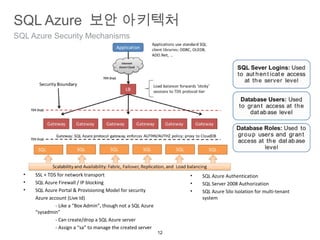
SQL Azure SecurityMechanisms
SQL Azure 보안 아키텍처
• SSL + TDS for network transport
• SQL Azure Firewall / IP blocking
• SQL Azure Portal & Provisioning Model for security
Azure account (Live Id)
- Like a “Box Admin”, though not a SQL Azure
“sysadmin”
- Can create/drop a SQL Azure server
- Assign a “sa” to manage the created server
• SQL Azure Authentication
• SQL Server 2008 Authorization
• SQL Azure Silo Isolation for multi-tenant
system
13.
13
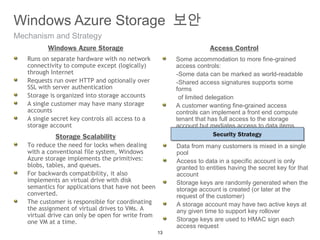
Mechanism and Strategy
WindowsAzure Storage 보안
Runs on separate hardware with no network
connectivity to compute except (logically)
through Internet
Requests run over HTTP and optionally over
SSL with server authentication
Storage is organized into storage accounts
A single customer may have many storage
accounts
A single secret key controls all access to a
storage account
Windows Azure Storage
Some accommodation to more fine-grained
access controls:
-Some data can be marked as world-readable
-Shared access signatures supports some
forms
of limited delegation
A customer wanting fine-grained access
controls can implement a front end compute
tenant that has full access to the storage
account but mediates access to data items
Access Control
To reduce the need for locks when dealing
with a conventional file system, Windows
Azure storage implements the primitives:
blobs, tables, and queues.
For backwards compatibility, it also
implements an virtual drive with disk
semantics for applications that have not been
converted.
The customer is responsible for coordinating
the assignment of virtual drives to VMs. A
virtual drive can only be open for write from
one VM at a time.
Storage Scalability Security StrategySecurity Strategy
Data from many customers is mixed in a single
pool
Access to data in a specific account is only
granted to entities having the secret key for that
account
Storage keys are randomly generated when the
storage account is created (or later at the
request of the customer)
A storage account may have two active keys at
any given time to support key rollover
Storage keys are used to HMAC sign each
access request
14.
14
Mechanism and component
WindowsAzure Virtual Network
Windows Azure Connect (CTP)
•Protect sensitive data behind a
firewall, while allowing secure
access to cloud applications
•Manage data access permissions
for systems, users, roles, and
groups
•Create "hybrid" and "composite"
applications that present
corporate, cloud and ephemeral
data to any device
•Managed via the Windows Azure
Portal
Windows Azure Virtual Network is a range of networking functionality to
enable and extend Windows Azure applications and services. The first
Windows Azure Virtual Network feature is Windows Azure Connect.
15.
15
Concept
Windows Azure VirtualNetwork
Secure network connectivity
between on-premises and cloud
Supports standard IP protocols
Enables hybrid apps access to on-
premises servers
Allows remote administration of
Windows Azure apps
Simple setup and management
Integrated with WA Service
Model
Web, Worker and VM Roles
supported
Enterprise
Windows Azure
16.
16
Example Use Case
WindowsAzure Virtual Network
Windows Azure enterprise apps that require connectivity to on-
premises SQL Server
Migrate apps without requiring changes or relocating on-premises
resources to be internet accessible
Windows Azure app domain-joined to on-premises AD
Control access to WA apps based on existing AD accounts and
groups
Remote administration and trouble-shooting of WA apps
Remote PowerShell to access WA role instances
17.
17
Closer Look
Windows AzureVirtual Network
Network policy managed through
Windows Azure portal
Granular control of connectivity
between WA roles and external
machines
Automatic setup of IPsec
Tunnel firewalls/NAT’s through
hosted SSL-based relay
Network policies enforced &
traffic secured via end-to-end
certificate-based IPSec
DNS name resolution based on
endpoint machine names
18.
18
A summary ofWindows Azure authentication mechanisms
Developer 를 위한 Azure 보안 개요
More granular illustration of Windows
Azure components and relationships
20
개발자를 위한 보안지침
Developer 를 위한 보안 pattern
Use claims-based identity
- Windows Identity Foundation
- Active Directory Federation Services 2.0
- Azure AppFabric Access Control Service
Input field constraint, sanitization and
validation
Use Microsoft Anti-Cross-Site-Scripting library
Best practice Namespace Configuration
Avoid using *servicename*.cloudapp.net
domain name - use a custom domain name
instead.
Don’t create code that requires users to place
cloudapp.net in the trusted sites list in their
web browser.
Never scope cookies or document.domain to
cloudapp.net. Instead, scope to the service
subdomain (such as contoso.cloudapp.net, for
example or, better, www.contoso.com).
Generate Shared Access Signatures with the
most restrictive set of ACLs possible that still
grant the access required by the trusted party.
Use the shortest lifetime possible.
Use HTTPS in the request URL so the token
cannot be snooped on the wire.
Remember that these tokens are only used for
temporary access to non-public blob storage –
as with passwords, it’s a bad idea to use the
same ones over and over.
Minimizing Risk Shared Access Signatures Handling Secret Information
Do not store private keys associated with
SSL/TLS certificates in Windows Azure Storage
Instead upload them through the Developer
Portal and access them via thumbprint
references in the Service Configuration
Developers should not write sensitive
information to any events stored in Windows
Azure Table Storage
21.
21
Create More SecureApplications
Developer 를 위한 보안 pattern
Isolate web roles and separate duties of individual roles in order to maximize the use of
Windows Azure Partial Trust
Use the “Gatekeeper” design pattern to separate role duties and isolate privileged access
Use multiple storage keys to restrict access to privileged information where the Gatekeeper
pattern does not apply





![[TD 2015] Microsoft Azure IaaS v2(최정현)](https://cdn.slidesharecdn.com/ss_thumbnails/td2015microsoftazureiaasv2-151116073922-lva1-app6892-thumbnail.jpg?width=640&height=640&fit=bounds)


![[Td 2015]windows 10 엔터프라이즈 시나리오 part II 보안 및 관리(권순만)](https://cdn.slidesharecdn.com/ss_thumbnails/td2015windows10partii-151104063832-lva1-app6891-thumbnail.jpg?width=640&height=640&fit=bounds)


![[2020 Ignite Seoul]Azure에서 사용할 수 있는 컨테이너/오케스트레이션 기술 살펴보기](https://cdn.slidesharecdn.com/ss_thumbnails/afun60-200123021847-thumbnail.jpg?width=640&height=640&fit=bounds)


