Copyright © 2018, Oracle and/or its affiliates. All rights reserved. |
Oracle Trace File Analyzer (TFA)
What’s New in 18.3.0
With Database Support Tools Bundle
Copyright © 2018, Oracle and/or its affiliates. All rights reserved. |
Safe Harbor Statement
The following is intended to outline our general product direction. It is intended for
information purposes only, and may not be incorporated into any contract. It is not a
commitment to deliver any material, code, or functionality, and should not be relied upon
in making purchasing decisions. The development, release, and timing of any features or
functionality described for Oracle’s products remains at the sole discretion of Oracle.
2
Copyright © 2018, Oracle and/or its affiliates. All rights reserved. | 3
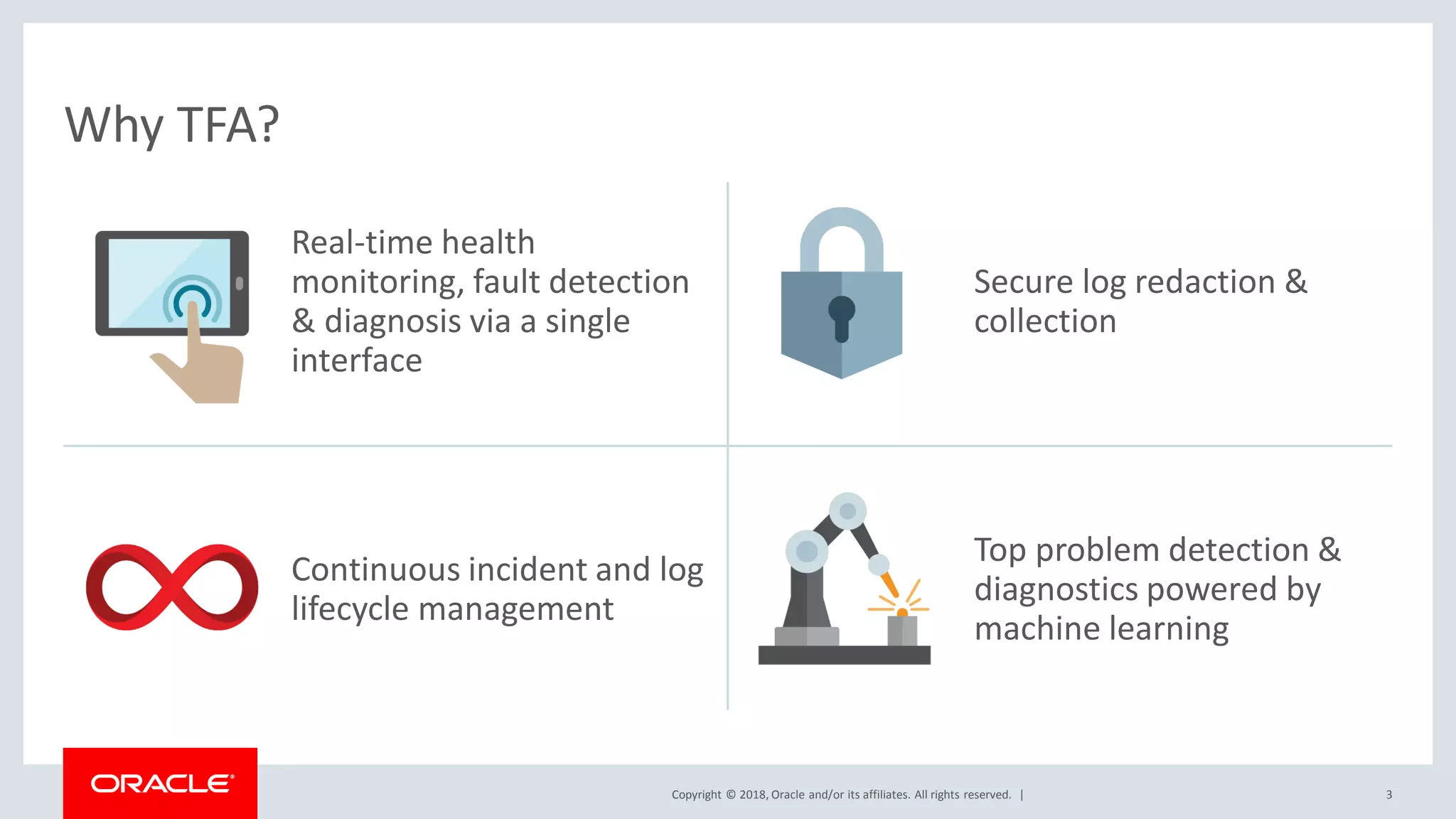
Real-time health
monitoring, fault detection
& diagnosis via a single
interface
Secure log redaction &
collection
Continuous incident and log
lifecycle management
Top problem detection &
diagnostics powered by
machine learning
Why TFA?
Copyright © 2018, Oracle and/or its affiliates. All rights reserved. | 4
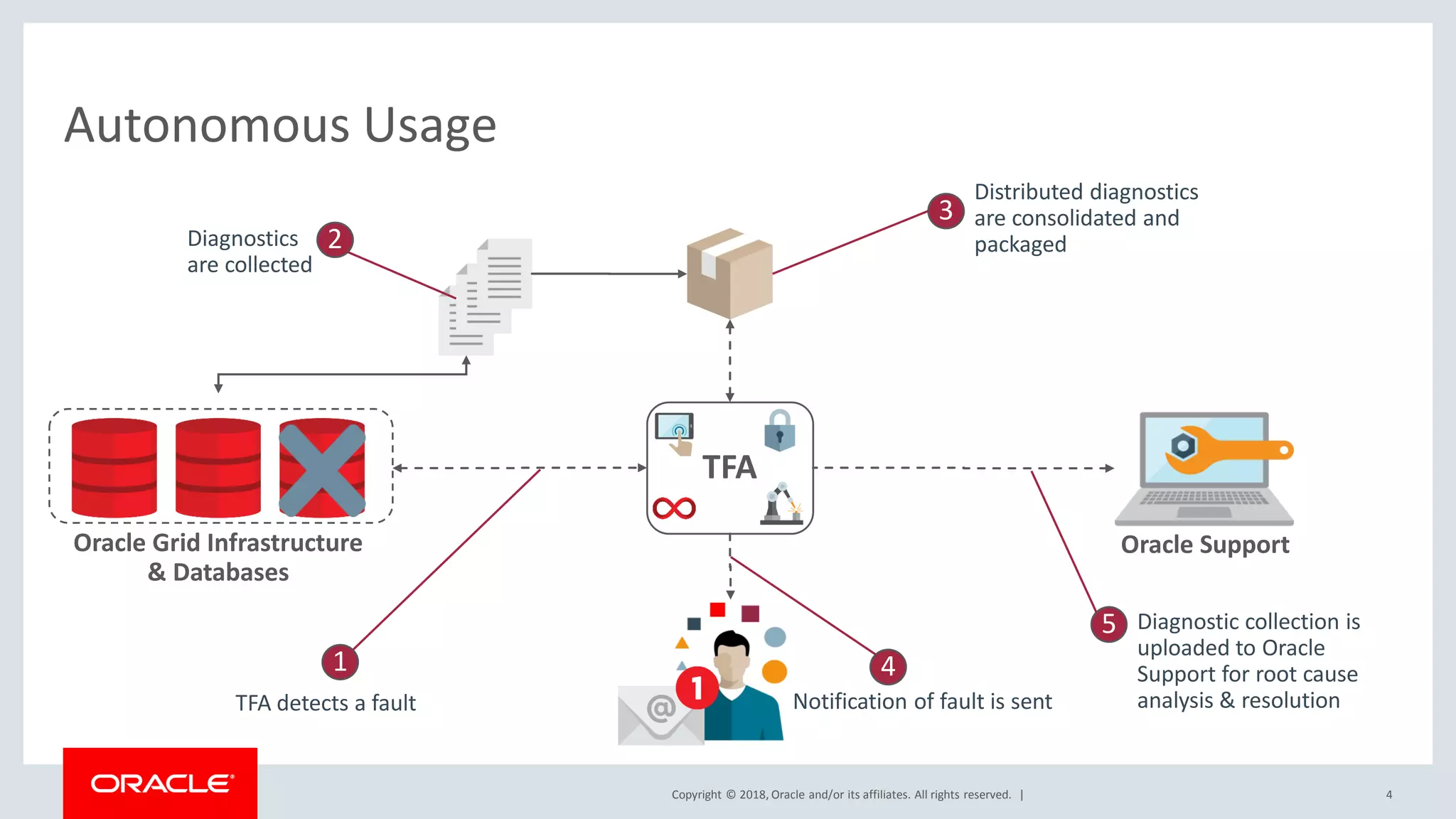
Autonomous Usage
Oracle Grid Infrastructure
& Databases
Oracle Support
TFA
1
TFA detects a fault
2Diagnostics
are collected
3
Distributed diagnostics
are consolidated and
packaged
4
Notification of fault is sent
5 Diagnostic collection is
uploaded to Oracle
Support for root cause
analysis & resolution
Copyright © 2018, Oracle and/or its affiliates. All rights reserved. | 5
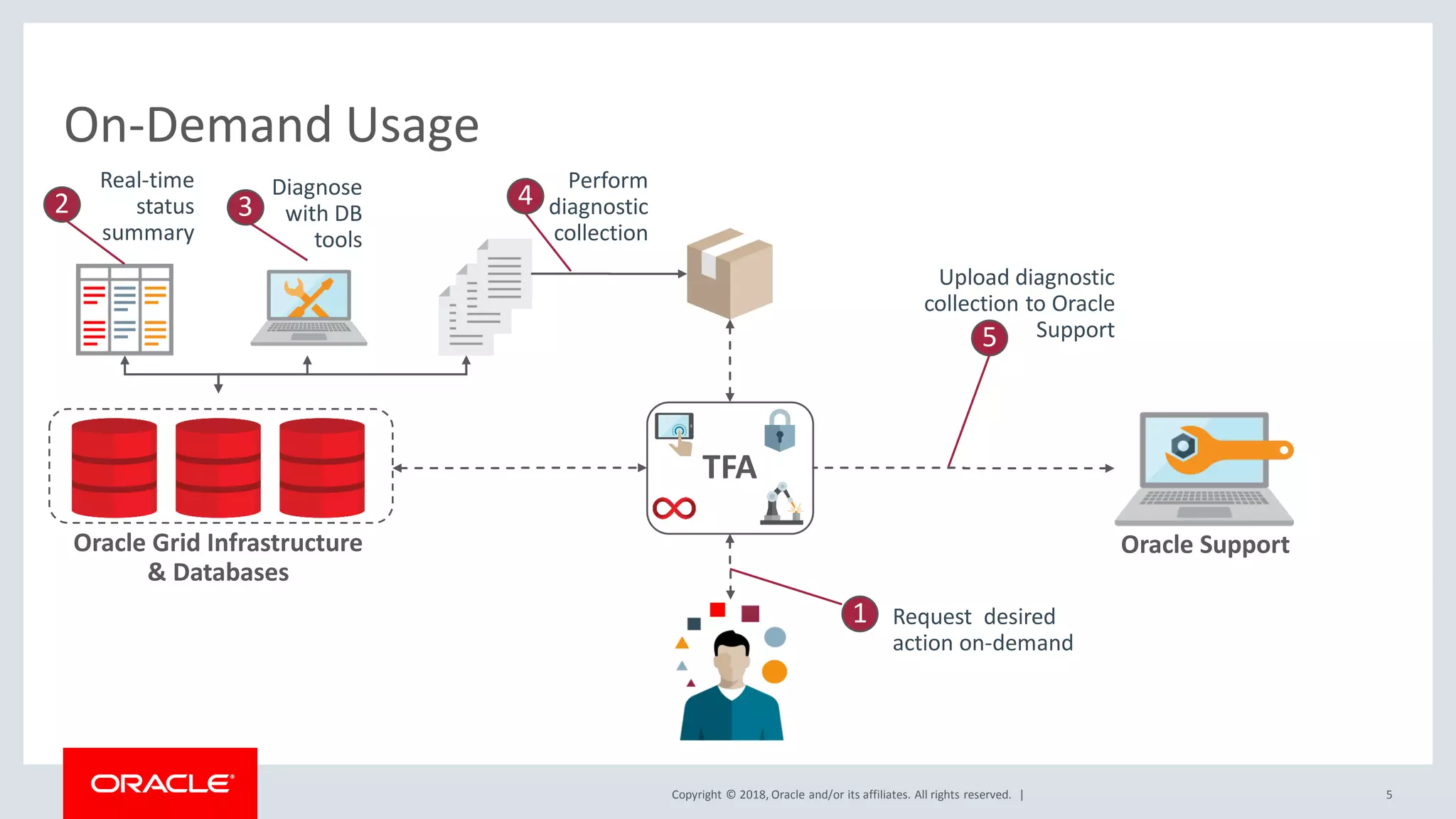
On-Demand Usage
Oracle Grid Infrastructure
& Databases
Oracle Support
TFA
5
Upload diagnostic
collection to Oracle
Support
2
Real-time
status
summary
3
Diagnose
with DB
tools
4
Perform
diagnostic
collection
1 Request desired
action on-demand
Copyright © 2018, Oracle and/or its affiliates. All rights reserved. |
Program Agenda
Automatic SRDCs
REST service extensions
REST service via Tomcat
New SRDCs
ORAchk automatic start from install
1
6
2
3
4
5
Copyright © 2018, Oracle and/or its affiliates. All rights reserved. |
Program Agenda
Automatic SRDCs
REST service extensions
REST service via Tomcat
New SRDCs
ORAchk automatic start from install
1
7
2
3
4
5
Copyright © 2018, Oracle and/or its affiliates. All rights reserved. |
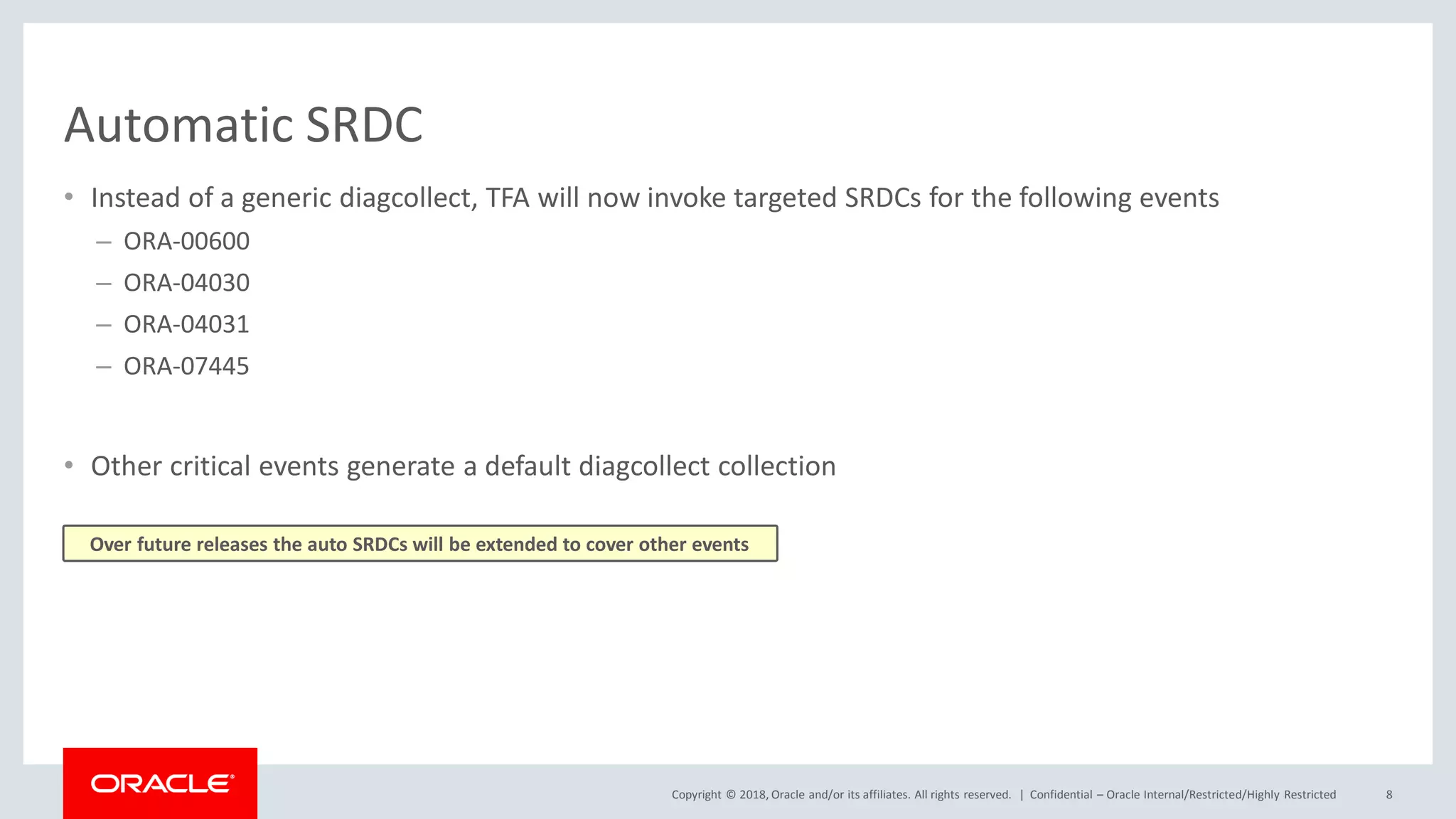
Automatic SRDC
• Instead of a generic diagcollect, TFA will now invoke targeted SRDCs for the following events
– ORA-00600
– ORA-04030
– ORA-04031
– ORA-07445
• Other critical events generate a default diagcollect collection
Confidential – Oracle Internal/Restricted/Highly Restricted 8
Over future releases the auto SRDCs will be extended to cover other events
Copyright © 2018, Oracle and/or its affiliates. All rights reserved. |
Program Agenda
Automatic SRDCs
REST service extensions
REST service via Tomcat
New SRDCs
ORAchk automatic start from install
1
9
2
3
4
5
Copyright © 2018, Oracle and/or its affiliates. All rights reserved. |
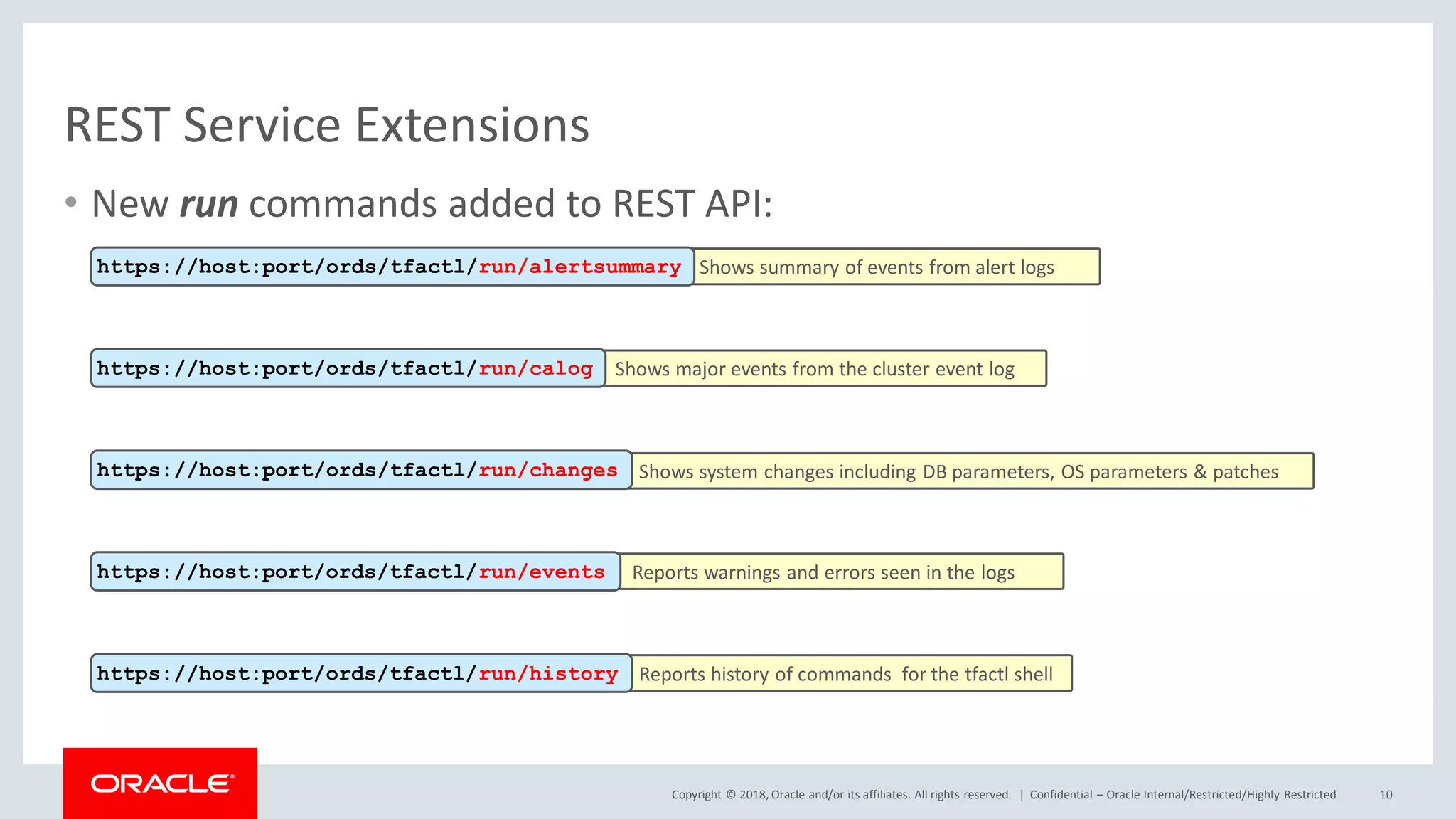
• New run commands added to REST API:
REST Service Extensions
Confidential – Oracle Internal/Restricted/Highly Restricted 10
Shows summary of events from alert logshttps://host:port/ords/tfactl/run/alertsummary
Shows major events from the cluster event loghttps://host:port/ords/tfactl/run/calog
Shows system changes including DB parameters, OS parameters & patcheshttps://host:port/ords/tfactl/run/changes
Reports warnings and errors seen in the logshttps://host:port/ords/tfactl/run/events
Reports history of commands for the tfactl shellhttps://host:port/ords/tfactl/run/history
Copyright © 2018, Oracle and/or its affiliates. All rights reserved. |
REST Service Extensions
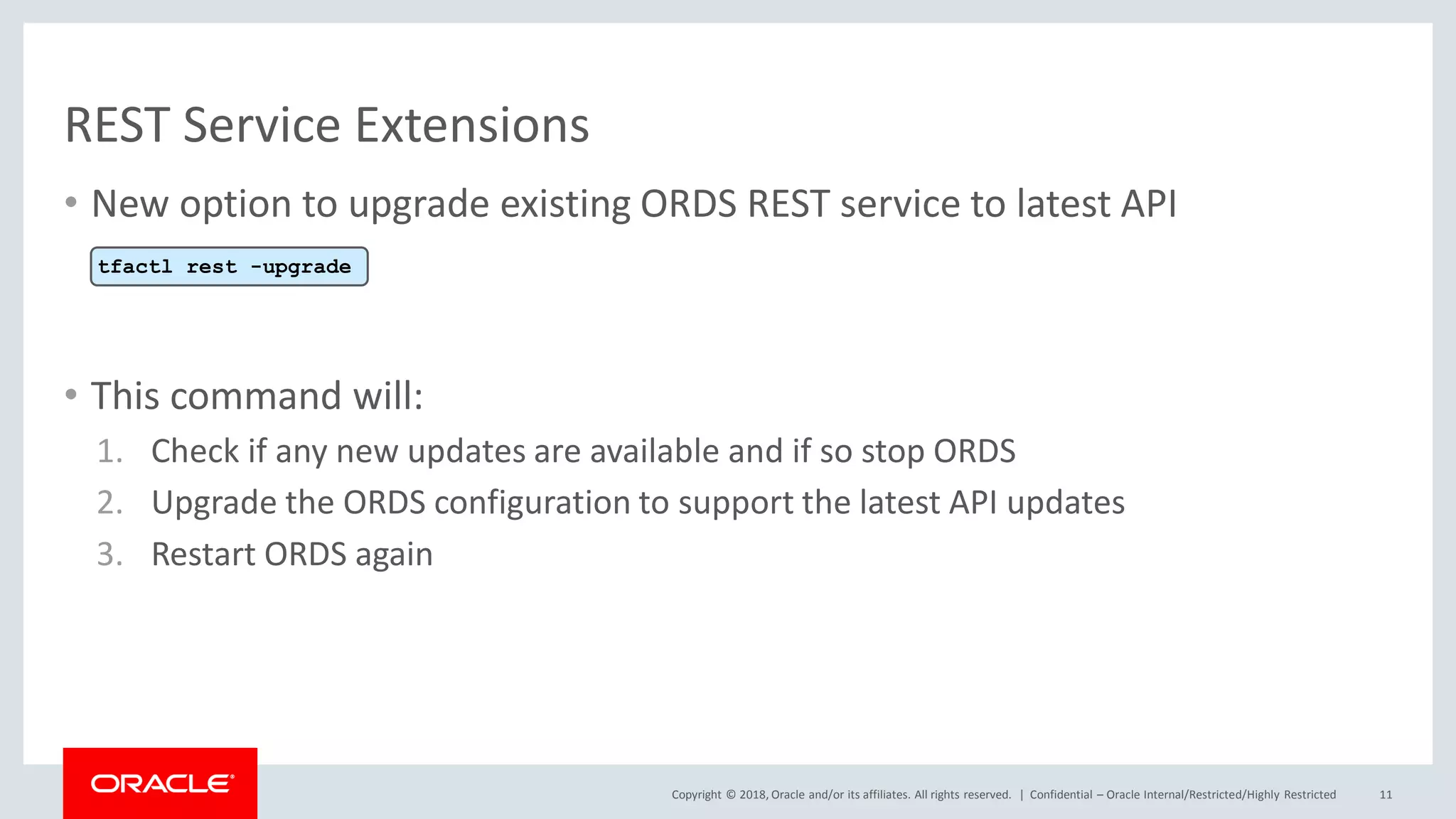
• New option to upgrade existing ORDS REST service to latest API
• This command will:
1. Check if any new updates are available and if so stop ORDS
2. Upgrade the ORDS configuration to support the latest API updates
3. Restart ORDS again
Confidential – Oracle Internal/Restricted/Highly Restricted 11
tfactl rest -upgrade
Copyright © 2018, Oracle and/or its affiliates. All rights reserved. |
Program Agenda
Automatic SRDCs
REST service extensions
REST service via Tomcat
New SRDCs
ORAchk automatic start from install
1
12
2
3
4
5
Copyright © 2018, Oracle and/or its affiliates. All rights reserved. |
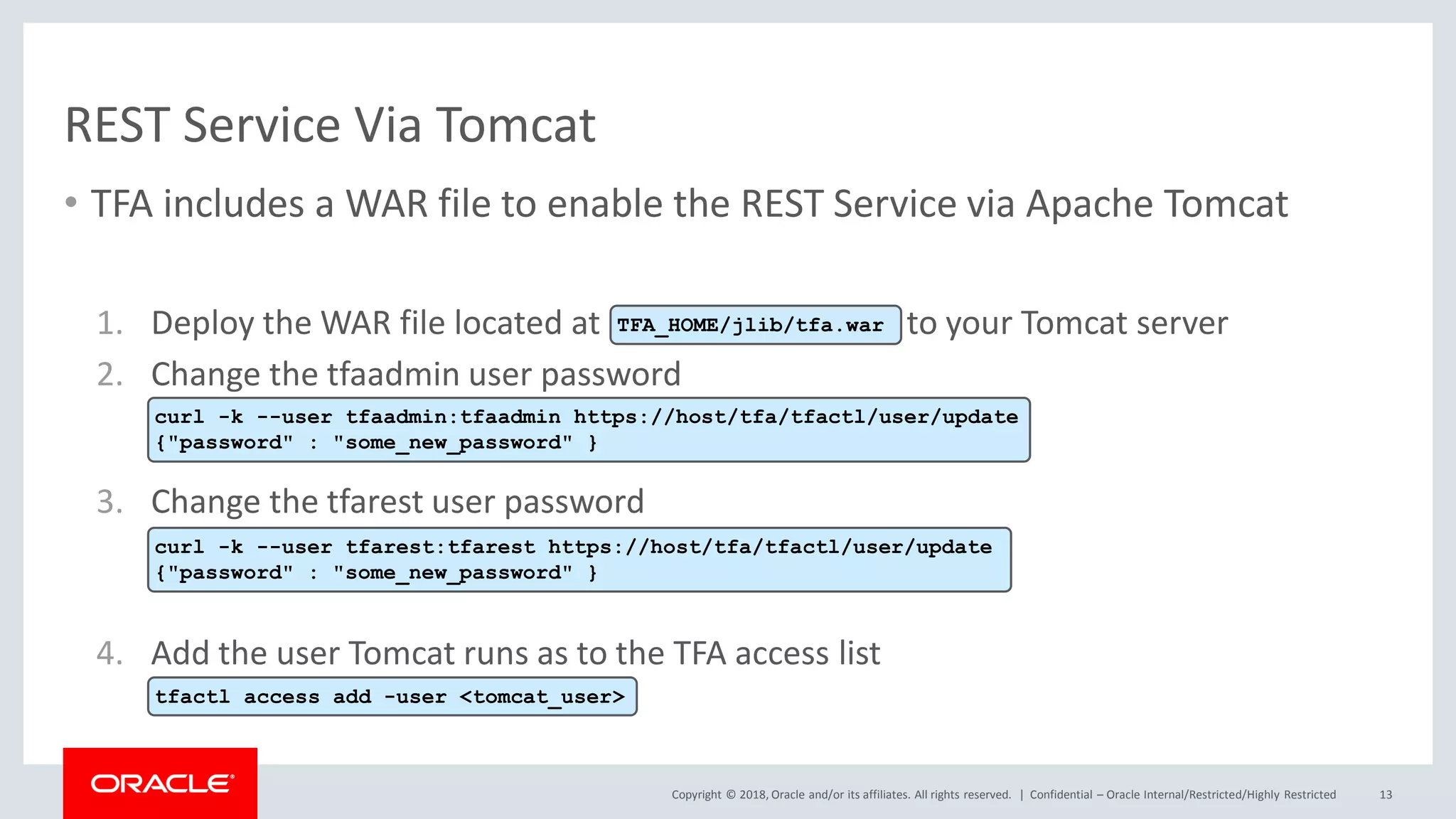
REST Service Via Tomcat
• TFA includes a WAR file to enable the REST Service via Apache Tomcat
1. Deploy the WAR file located at to your Tomcat server
2. Change the tfaadmin user password
3. Change the tfarest user password
4. Add the user Tomcat runs as to the TFA access list
Confidential – Oracle Internal/Restricted/Highly Restricted 13
TFA_HOME/jlib/tfa.war
curl -k --user tfaadmin:tfaadmin https://host/tfa/tfactl/user/update
{"password" : "some_new_password" }
curl -k --user tfarest:tfarest https://host/tfa/tfactl/user/update
{"password" : "some_new_password" }
tfactl access add -user <tomcat_user>
Copyright © 2018, Oracle and/or its affiliates. All rights reserved. |
Program Agenda
Automatic SRDCs
REST service extensions
REST service via Tomcat
New SRDCs
ORAchk automatic start from install
1
14
2
3
4
5
Copyright © 2018, Oracle and/or its affiliates. All rights reserved. |
New SRDCs
15
Type of Problem SRDC Name
DataPump import performance problems dbimpdpperf
SQL performance problems dbsqlperf
Transparent Data Encryption (TDE) problems dbtde
Enterprise Manager Agent performance problems emagentperf
Enterprise Manager crash problems emomscrash
Enterprise Manager java heap usage or performance problems emomsheap
Enterprise Manager OMS crash, restart or performance problems emomshungcpu
tfactl diagcollect –srdc <srdc_name> [-sr <SR#>]
Copyright © 2018, Oracle and/or its affiliates. All rights reserved. | 16
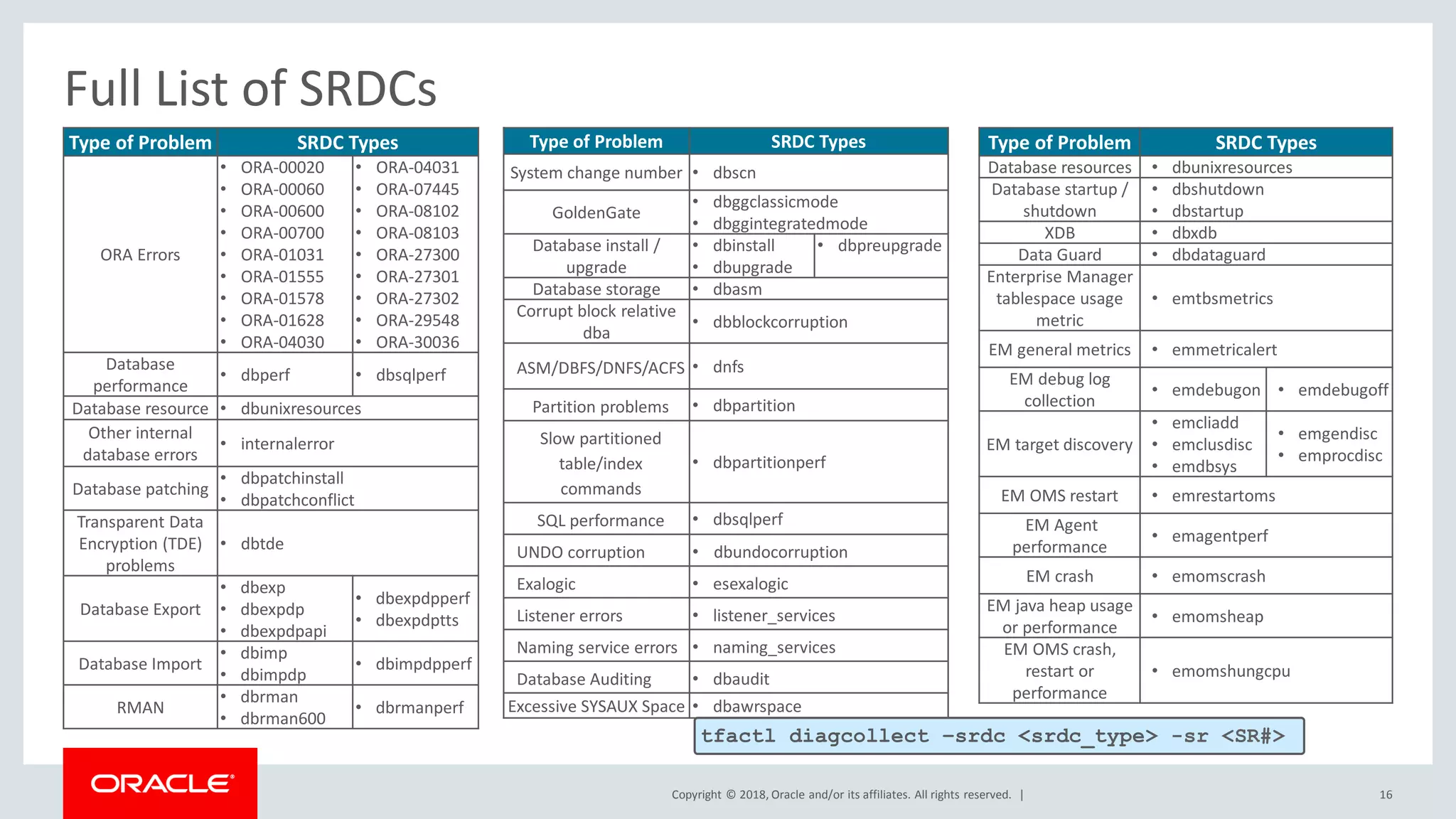
Full List of SRDCs
Type of Problem SRDC Types
ORA Errors
• ORA-00020
• ORA-00060
• ORA-00600
• ORA-00700
• ORA-01031
• ORA-01555
• ORA-01578
• ORA-01628
• ORA-04030
• ORA-04031
• ORA-07445
• ORA-08102
• ORA-08103
• ORA-27300
• ORA-27301
• ORA-27302
• ORA-29548
• ORA-30036
Database
performance
• dbperf • dbsqlperf
Database resource • dbunixresources
Other internal
database errors
• internalerror
Database patching
• dbpatchinstall
• dbpatchconflict
Transparent Data
Encryption (TDE)
problems
• dbtde
Database Export
• dbexp
• dbexpdp
• dbexpdpapi
• dbexpdpperf
• dbexpdptts
Database Import
• dbimp
• dbimpdp
• dbimpdpperf
RMAN
• dbrman
• dbrman600
• dbrmanperf
Type of Problem SRDC Types
System change number • dbscn
GoldenGate
• dbggclassicmode
• dbggintegratedmode
Database install /
upgrade
• dbinstall
• dbupgrade
• dbpreupgrade
Database storage • dbasm
Corrupt block relative
dba
• dbblockcorruption
ASM/DBFS/DNFS/ACFS • dnfs
Partition problems • dbpartition
Slow partitioned
table/index
commands
• dbpartitionperf
SQL performance • dbsqlperf
UNDO corruption • dbundocorruption
Exalogic • esexalogic
Listener errors • listener_services
Naming service errors • naming_services
Database Auditing • dbaudit
Excessive SYSAUX Space • dbawrspace
Type of Problem SRDC Types
Database resources • dbunixresources
Database startup /
shutdown
• dbshutdown
• dbstartup
XDB • dbxdb
Data Guard • dbdataguard
Enterprise Manager
tablespace usage
metric
• emtbsmetrics
EM general metrics • emmetricalert
EM debug log
collection
• emdebugon • emdebugoff
EM target discovery
• emcliadd
• emclusdisc
• emdbsys
• emgendisc
• emprocdisc
EM OMS restart • emrestartoms
EM Agent
performance
• emagentperf
EM crash • emomscrash
EM java heap usage
or performance
• emomsheap
EM OMS crash,
restart or
performance
• emomshungcpu
tfactl diagcollect –srdc <srdc_type> -sr <SR#>
Copyright © 2018, Oracle and/or its affiliates. All rights reserved. |
Program Agenda
Automatic SRDCs
REST service extensions
REST service via Tomcat
New SRDCs
ORAchk automatic start from install
1
17
2
3
4
5
Copyright © 2018, Oracle and/or its affiliates. All rights reserved. |
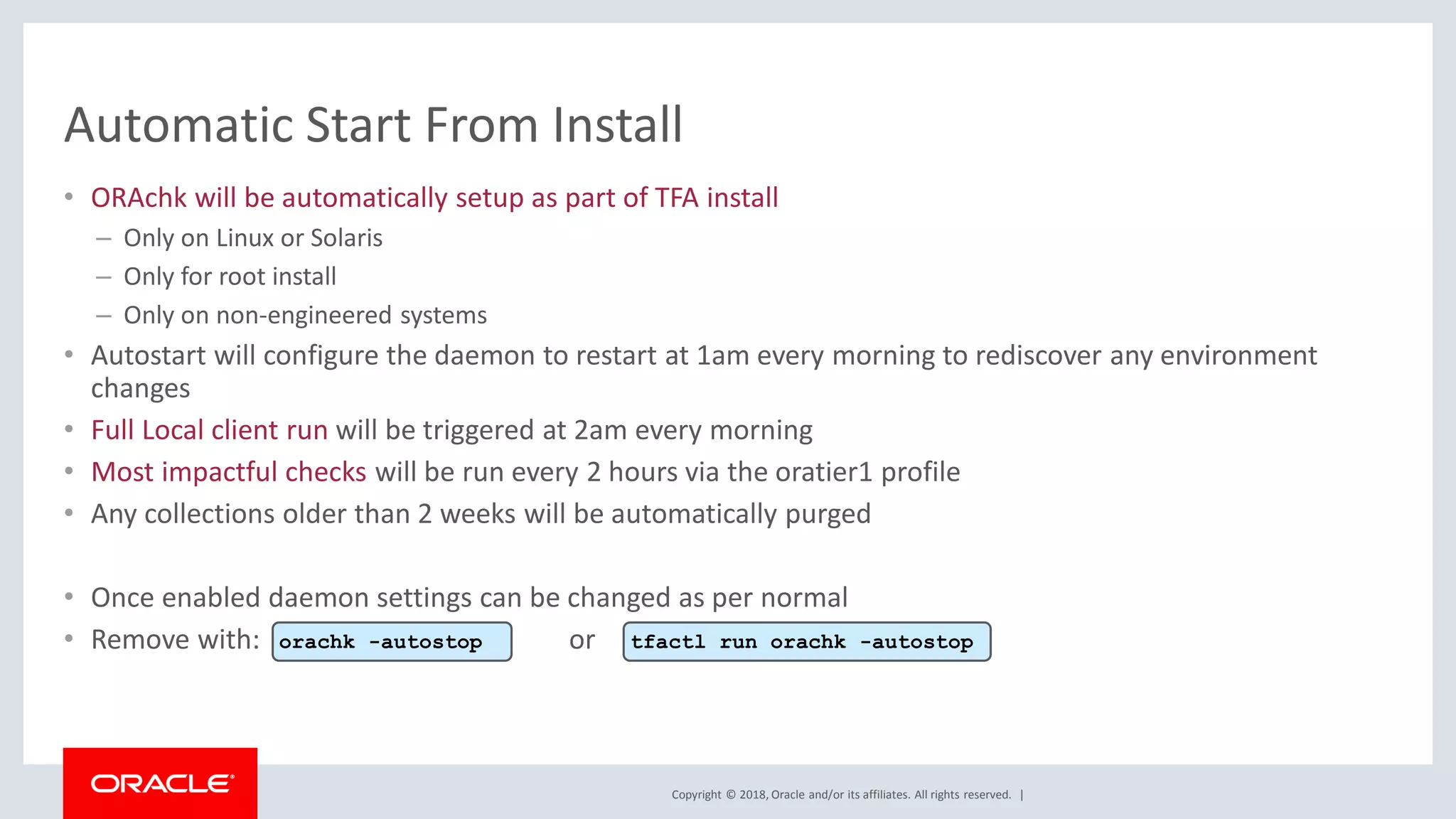
Automatic Start From Install
• ORAchk will be automatically setup as part of TFA install
– Only on Linux or Solaris
– Only for root install
– Only on non-engineered systems
• Autostart will configure the daemon to restart at 1am every morning to rediscover any environment
changes
• Full Local client run will be triggered at 2am every morning
• Most impactful checks will be run every 2 hours via the oratier1 profile
• Any collections older than 2 weeks will be automatically purged
• Once enabled daemon settings can be changed as per normal
• Remove with: ororachk -autostop tfactl run orachk -autostop
Copyright © 2018, Oracle and/or its affiliates. All rights reserved. |
For more info see
Document: 1513912.1
19
Copyright © 2018, Oracle and/or its affiliates. All rights reserved. | 20
Whats new in oracle trace file analyzer 18.3.0

Whats new in oracle trace file analyzer 18.3.0

  • 1.
    Copyright © 2018,Oracle and/or its affiliates. All rights reserved. | Oracle Trace File Analyzer (TFA) What’s New in 18.3.0 With Database Support Tools Bundle
  • 2.
    Copyright © 2018,Oracle and/or its affiliates. All rights reserved. | Safe Harbor Statement The following is intended to outline our general product direction. It is intended for information purposes only, and may not be incorporated into any contract. It is not a commitment to deliver any material, code, or functionality, and should not be relied upon in making purchasing decisions. The development, release, and timing of any features or functionality described for Oracle’s products remains at the sole discretion of Oracle. 2
  • 3.
    Copyright © 2018,Oracle and/or its affiliates. All rights reserved. | 3 Real-time health monitoring, fault detection & diagnosis via a single interface Secure log redaction & collection Continuous incident and log lifecycle management Top problem detection & diagnostics powered by machine learning Why TFA?
  • 4.
    Copyright © 2018,Oracle and/or its affiliates. All rights reserved. | 4 Autonomous Usage Oracle Grid Infrastructure & Databases Oracle Support TFA 1 TFA detects a fault 2Diagnostics are collected 3 Distributed diagnostics are consolidated and packaged 4 Notification of fault is sent 5 Diagnostic collection is uploaded to Oracle Support for root cause analysis & resolution
  • 5.
    Copyright © 2018,Oracle and/or its affiliates. All rights reserved. | 5 On-Demand Usage Oracle Grid Infrastructure & Databases Oracle Support TFA 5 Upload diagnostic collection to Oracle Support 2 Real-time status summary 3 Diagnose with DB tools 4 Perform diagnostic collection 1 Request desired action on-demand
  • 6.
    Copyright © 2018,Oracle and/or its affiliates. All rights reserved. | Program Agenda Automatic SRDCs REST service extensions REST service via Tomcat New SRDCs ORAchk automatic start from install 1 6 2 3 4 5
  • 7.
    Copyright © 2018,Oracle and/or its affiliates. All rights reserved. | Program Agenda Automatic SRDCs REST service extensions REST service via Tomcat New SRDCs ORAchk automatic start from install 1 7 2 3 4 5
  • 8.
    Copyright © 2018,Oracle and/or its affiliates. All rights reserved. | Automatic SRDC • Instead of a generic diagcollect, TFA will now invoke targeted SRDCs for the following events – ORA-00600 – ORA-04030 – ORA-04031 – ORA-07445 • Other critical events generate a default diagcollect collection Confidential – Oracle Internal/Restricted/Highly Restricted 8 Over future releases the auto SRDCs will be extended to cover other events
  • 9.
    Copyright © 2018,Oracle and/or its affiliates. All rights reserved. | Program Agenda Automatic SRDCs REST service extensions REST service via Tomcat New SRDCs ORAchk automatic start from install 1 9 2 3 4 5
  • 10.
    Copyright © 2018,Oracle and/or its affiliates. All rights reserved. | • New run commands added to REST API: REST Service Extensions Confidential – Oracle Internal/Restricted/Highly Restricted 10 Shows summary of events from alert logshttps://host:port/ords/tfactl/run/alertsummary Shows major events from the cluster event loghttps://host:port/ords/tfactl/run/calog Shows system changes including DB parameters, OS parameters & patcheshttps://host:port/ords/tfactl/run/changes Reports warnings and errors seen in the logshttps://host:port/ords/tfactl/run/events Reports history of commands for the tfactl shellhttps://host:port/ords/tfactl/run/history
  • 11.
    Copyright © 2018,Oracle and/or its affiliates. All rights reserved. | REST Service Extensions • New option to upgrade existing ORDS REST service to latest API • This command will: 1. Check if any new updates are available and if so stop ORDS 2. Upgrade the ORDS configuration to support the latest API updates 3. Restart ORDS again Confidential – Oracle Internal/Restricted/Highly Restricted 11 tfactl rest -upgrade
  • 12.
    Copyright © 2018,Oracle and/or its affiliates. All rights reserved. | Program Agenda Automatic SRDCs REST service extensions REST service via Tomcat New SRDCs ORAchk automatic start from install 1 12 2 3 4 5
  • 13.
    Copyright © 2018,Oracle and/or its affiliates. All rights reserved. | REST Service Via Tomcat • TFA includes a WAR file to enable the REST Service via Apache Tomcat 1. Deploy the WAR file located at to your Tomcat server 2. Change the tfaadmin user password 3. Change the tfarest user password 4. Add the user Tomcat runs as to the TFA access list Confidential – Oracle Internal/Restricted/Highly Restricted 13 TFA_HOME/jlib/tfa.war curl -k --user tfaadmin:tfaadmin https://host/tfa/tfactl/user/update {"password" : "some_new_password" } curl -k --user tfarest:tfarest https://host/tfa/tfactl/user/update {"password" : "some_new_password" } tfactl access add -user <tomcat_user>
  • 14.
    Copyright © 2018,Oracle and/or its affiliates. All rights reserved. | Program Agenda Automatic SRDCs REST service extensions REST service via Tomcat New SRDCs ORAchk automatic start from install 1 14 2 3 4 5
  • 15.
    Copyright © 2018,Oracle and/or its affiliates. All rights reserved. | New SRDCs 15 Type of Problem SRDC Name DataPump import performance problems dbimpdpperf SQL performance problems dbsqlperf Transparent Data Encryption (TDE) problems dbtde Enterprise Manager Agent performance problems emagentperf Enterprise Manager crash problems emomscrash Enterprise Manager java heap usage or performance problems emomsheap Enterprise Manager OMS crash, restart or performance problems emomshungcpu tfactl diagcollect –srdc <srdc_name> [-sr <SR#>]
  • 16.
    Copyright © 2018,Oracle and/or its affiliates. All rights reserved. | 16 Full List of SRDCs Type of Problem SRDC Types ORA Errors • ORA-00020 • ORA-00060 • ORA-00600 • ORA-00700 • ORA-01031 • ORA-01555 • ORA-01578 • ORA-01628 • ORA-04030 • ORA-04031 • ORA-07445 • ORA-08102 • ORA-08103 • ORA-27300 • ORA-27301 • ORA-27302 • ORA-29548 • ORA-30036 Database performance • dbperf • dbsqlperf Database resource • dbunixresources Other internal database errors • internalerror Database patching • dbpatchinstall • dbpatchconflict Transparent Data Encryption (TDE) problems • dbtde Database Export • dbexp • dbexpdp • dbexpdpapi • dbexpdpperf • dbexpdptts Database Import • dbimp • dbimpdp • dbimpdpperf RMAN • dbrman • dbrman600 • dbrmanperf Type of Problem SRDC Types System change number • dbscn GoldenGate • dbggclassicmode • dbggintegratedmode Database install / upgrade • dbinstall • dbupgrade • dbpreupgrade Database storage • dbasm Corrupt block relative dba • dbblockcorruption ASM/DBFS/DNFS/ACFS • dnfs Partition problems • dbpartition Slow partitioned table/index commands • dbpartitionperf SQL performance • dbsqlperf UNDO corruption • dbundocorruption Exalogic • esexalogic Listener errors • listener_services Naming service errors • naming_services Database Auditing • dbaudit Excessive SYSAUX Space • dbawrspace Type of Problem SRDC Types Database resources • dbunixresources Database startup / shutdown • dbshutdown • dbstartup XDB • dbxdb Data Guard • dbdataguard Enterprise Manager tablespace usage metric • emtbsmetrics EM general metrics • emmetricalert EM debug log collection • emdebugon • emdebugoff EM target discovery • emcliadd • emclusdisc • emdbsys • emgendisc • emprocdisc EM OMS restart • emrestartoms EM Agent performance • emagentperf EM crash • emomscrash EM java heap usage or performance • emomsheap EM OMS crash, restart or performance • emomshungcpu tfactl diagcollect –srdc <srdc_type> -sr <SR#>
  • 17.
    Copyright © 2018,Oracle and/or its affiliates. All rights reserved. | Program Agenda Automatic SRDCs REST service extensions REST service via Tomcat New SRDCs ORAchk automatic start from install 1 17 2 3 4 5
  • 18.
    Copyright © 2018,Oracle and/or its affiliates. All rights reserved. | Automatic Start From Install • ORAchk will be automatically setup as part of TFA install – Only on Linux or Solaris – Only for root install – Only on non-engineered systems • Autostart will configure the daemon to restart at 1am every morning to rediscover any environment changes • Full Local client run will be triggered at 2am every morning • Most impactful checks will be run every 2 hours via the oratier1 profile • Any collections older than 2 weeks will be automatically purged • Once enabled daemon settings can be changed as per normal • Remove with: ororachk -autostop tfactl run orachk -autostop
  • 19.
    Copyright © 2018,Oracle and/or its affiliates. All rights reserved. | For more info see Document: 1513912.1 19
  • 20.
    Copyright © 2018,Oracle and/or its affiliates. All rights reserved. | 20