Webscraping
with Asyncio
José Manuel Ortega
@jmortegac
Python conferences
https://speakerdeck.com/jmortega
Python conferences
http://jmortega.github.io/
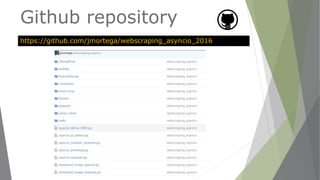
Github repository
https://github.com/jmortega/webscraping_asyncio_2016
Agenda
▶ Webscraping python tools
▶ Requests vs aiohttp
▶ Introduction to asyncio
▶ Async client/server
▶ Building a webcrawler with asyncio
▶ Alternatives to asyncio
Webscraping
Python tools
➢ Requests
➢ Beautiful Soup 4
➢ Pyquery
➢ Webscraping
➢ Scrapy
Python tools
➢ Mechanize
➢ Robobrowser
➢ Selenium
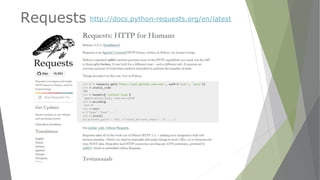
Requests http://docs.python-requests.org/en/latest
Web scraping with Python
1. Download webpage with HTTP
module(requests,urllib,aiohttp)
2. Parse the page with
BeautifulSoup/lxml
3. Select elements with Regular
expressions,XPath or css selectors
4. Store results in a database,csv,json
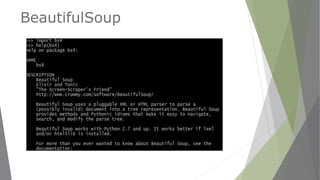
BeautifulSoup
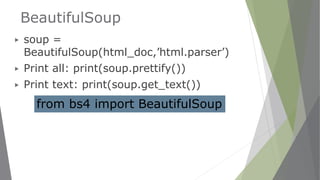
BeautifulSoup
▶ soup =
BeautifulSoup(html_doc,’html.parser’)
▶ Print all: print(soup.prettify())
▶ Print text: print(soup.get_text())
from bs4 import BeautifulSoup
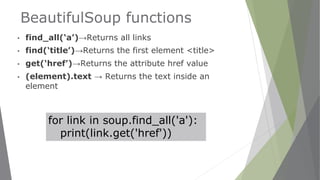
BeautifulSoup functions
▪ find_all(‘a’)→Returns all links
▪ find(‘title’)→Returns the first element <title>
▪ get(‘href’)→Returns the attribute href value
▪ (element).text → Returns the text inside an
element
for link in soup.find_all('a'):
print(link.get('href'))
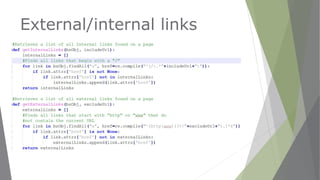
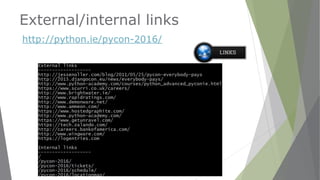
External/internal links
http://python.ie/pycon-2016/
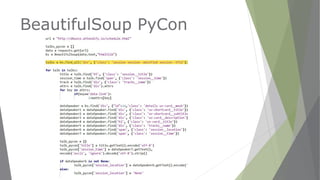
BeautifulSoup PyCon
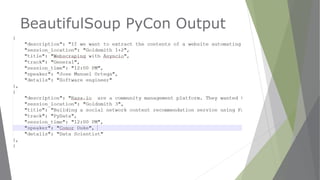
BeautifulSoup PyCon Output
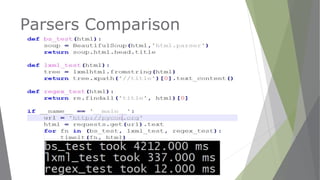
Parsers Comparison
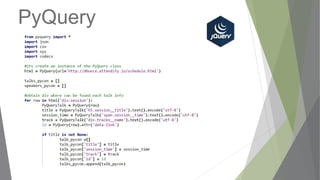
PyQuery
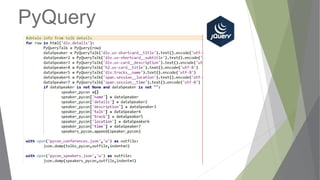
PyQuery
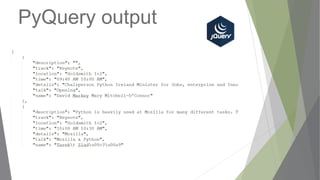
PyQuery output
Spiders /crawlers
▶ A Web crawler is an Internet bot that
systematically browses the World Wide Web,
typically for the purpose of Web indexing. A
Web crawler may also be called a Web
spider.
https://en.wikipedia.org/wiki/Web_crawler
Spiders /crawlers
scrapinghub.com
Scrapy
https://pypi.python.org/pypi/Scrapy/1.1.2
Scrapy
▶ Uses a mechanism based on XPath
expressions called Xpath
Selectors.
▶ Uses Parser LXML to find elements
▶ Twisted for asynchronous
operations
Scrapy advantages
▶ Faster than mechanize because it
uses twisted for asynchronous operations.
▶ Scrapy has better support for html
parsing.
▶ Scrapy has better support for unicode
characters, redirections, gzipped
responses, encodings.
▶ You can export the extracted data directly
to JSON,XML and CSV.
Export data
▶ scrapy crawl <spider_name>
▶ $ scrapy crawl <spider_name> -o items.json -t json
▶ $ scrapy crawl <spider_name> -o items.csv -t csv
▶ $ scrapy crawl <spider_name> -o items.xml -t xml
▶
Scrapy concurrency
The concurrency problem
▶ Different approaches:
▶ Multiple processes
▶ Threads
▶ Separate distributed machines
▶ Asynchronous programming(event
loop)
Requests problems
▶ Requests operations are blocking the
main thread
▶ It pauses until operation completed
▶ We need one thread for each request if
we want non-blocking operations
Threads problems
▶ Get Overhead
▶ Stack size
▶ Context changes
▶ Synchronization
Solution
▶NOT USE THREADS
▶USE ONE THREAD
▶+ EVENT LOOP
New concepts
▶ Event loop
▶ Async
▶ Await
▶ Futures
▶ Coroutines
▶ Tasks
▶ Executors
Event loop implementations
▶ Asyncio
▶ https://docs.python.org/3.4/library/asyncio.html
▶ Tornado web server
▶ http://www.tornadoweb.org/en/stable
▶ Twisted
▶ https://twistedmatrix.com
▶ Gevent
▶ http://www.gevent.org
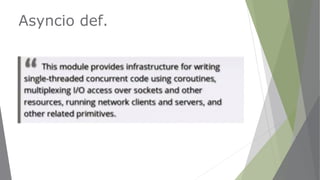
Asyncio def.
Asyncio
▶ Python >=3.3
▶ Event-loop framework
▶ I/O Asynchronous
▶ Non-blocking approach with sockets
▶ All requests in one thread
▶ Event-driven switching
▶ aio-http module for make requests
asynchronously
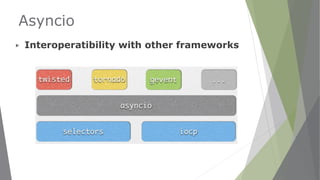
Asyncio
▶ Interoperatibility with other frameworks
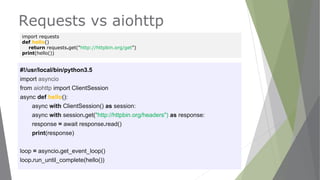
Requests vs aiohttp
#!/usr/local/bin/python3.5
import asyncio
from aiohttp import ClientSession
async def hello():
async with ClientSession() as session:
async with session.get("http://httpbin.org/headers") as response:
response = await response.read()
print(response)
loop = asyncio.get_event_loop()
loop.run_until_complete(hello())
import requests
def hello()
return requests.get("http://httpbin.org/get")
print(hello())
Event Loop
▶ An event loop allow us to write asynchronous
code using callbacks or coroutines.
▶ Event loop function like task switcher,just the way
operating systems switch between active tasks on the
CPU.
▶ The idea is that we have an event loop running until all
tasks scheduled are completed.
▶ Features and tasks are created through the event loop.
Event Loop
▶ An event loop is used to orchestrate the
execution of the coroutines.
▶ asyncio.get_event_loop()
▶ asyncio.run_until_complete(coroutines,futures)
▶ asyncio.run_forever()
▶ asyncio.stop()
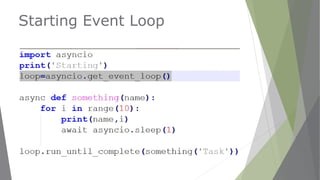
Starting Event Loop
Coroutines
▶ Coroutines are functions that allow for
multitasking without requiring multiple
threads or processes.
▶ Coroutines are like functions, but they can be
suspended or resumed at certain points in the
code.
▶ Coroutines allow write asynchronous code that
combines the efficiency of callbacks with the
classic good looks of multithreaded.
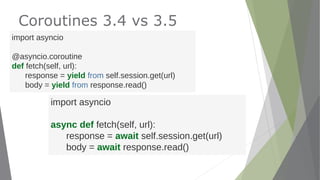
Coroutines 3.4 vs 3.5
import asyncio
@asyncio.coroutine
def fetch(self, url):
response = yield from self.session.get(url)
body = yield from response.read()
import asyncio
async def fetch(self, url):
response = await self.session.get(url)
body = await response.read()
Coroutines in event loop
#!/usr/local/bin/python3.5
import asyncio
import aiohttp
async def get_page(url):
response = await aiohttp.request('GET', url)
body = await response.read()
print(body)
loop = asyncio.get_event_loop()
loop.run_until_complete(asyncio.wait([get_page('http://python.org'),
get_page('http://pycon.org')]))
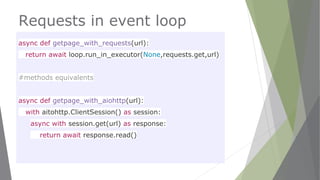
Requests in event loop
async def getpage_with_requests(url):
return await loop.run_in_executor(None,requests.get,url)
#methods equivalents
async def getpage_with_aiohttp(url):
with aitohttp.ClientSession() as session:
async with session.get(url) as response:
return await response.read()
Tasks
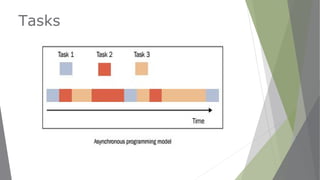
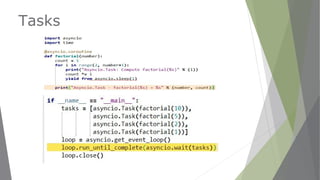
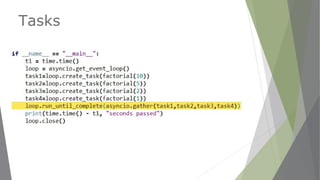
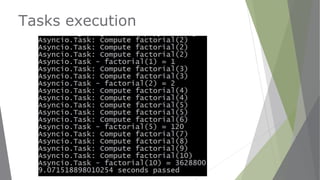
▶ The asyncio.Task class is a subclass of
asyncio.Future to encapsulate and manage
coroutines.
▶ Allow independently running tasks to run
concurrently with other tasks on the same event
loop.
▶ When a coroutine is wrapped in a task, it
connects the task to the event loop.
Tasks
Tasks
Tasks
Tasks execution
Futures
▶ To manage an object Future in Asyncio, we
must declare the following:
▶ import asyncio
▶ future = asyncio.Future()
▶ https://docs.python.org/3/library/asyncio
-task.html#future
▶ https://docs.python.org/3/library/concurr
ent.futures.html
Futures
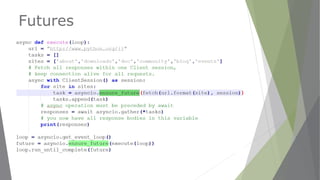
▶ The asyncio.Future class is essentially a
promise of a result.
▶ A Future will returns the results when they
are available, and once it receives results, it
will pass them along to all the registered
callbacks.
▶ Each future is a task to be executed in the
event loop
Futures
Semaphores
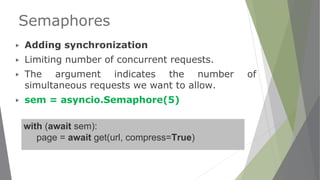
▶ Adding synchronization
▶ Limiting number of concurrent requests.
▶ The argument indicates the number of
simultaneous requests we want to allow.
▶ sem = asyncio.Semaphore(5)
with (await sem):
page = await get(url, compress=True)
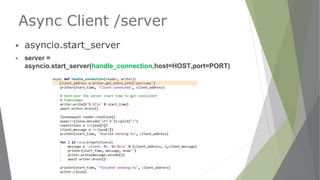
Async Client /server
▶ asyncio.start_server
▶ server =
asyncio.start_server(handle_connection,host=HOST,port=PORT)
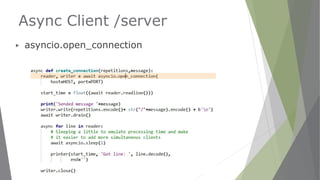
Async Client /server
▶ asyncio.open_connection
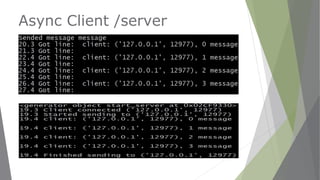
Async Client /server
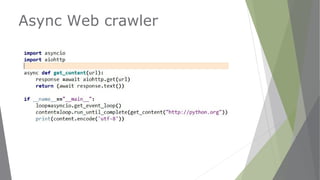
Async Web crawler
Async Web crawler
▶ Send asynchronous requests to all the links
on a web page and add the responses to a
queue to be processed as we go.
▶ Coroutines allow running independent tasks and
processing their results in 3 ways:
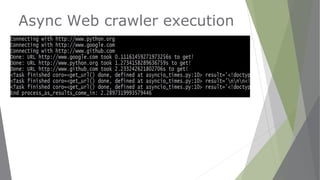
▶ Using asyncio.as_completed →by processing
the results as they come.
▶ Using asyncio.gather→ only once they have all
finished loading.
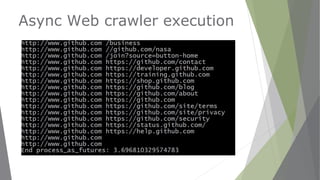
▶ Using asyncio.ensure_future
Async Web crawler
import asyncio
import random
@asyncio.coroutine
def get_url(url):
wait_time = random.randint(1, 4)
yield from asyncio.sleep(wait_time)
print('Done: URL {} took {}s to get!'.format(url, wait_time))
return url, wait_time
@asyncio.coroutine
def process_results_as_come_in():
coroutines = [get_url(url) for url in ['URL1', 'URL2', 'URL3']]
for coroutine in asyncio.as_completed(coroutines):
url, wait_time = yield from coroutine
print('Coroutine for {} is done'.format(url))
def main():
loop = asyncio.get_event_loop()
print(“Process results as they come in:")
loop.run_until_complete(process_results_as_come_in())
if __name__ == '__main__':
main()
asyncio.as_completed
Async Web crawler execution
Async Web crawler
import asyncio
import random
@asyncio.coroutine
def get_url(url):
wait_time = random.randint(1, 4)
yield from asyncio.sleep(wait_time)
print('Done: URL {} took {}s to get!'.format(url, wait_time))
return url, wait_time
@asyncio.coroutine
def process_once_everything_ready():
coroutines = [get_url(url) for url in ['URL1', 'URL2', 'URL3']]
results = yield from asyncio.gather(*coroutines)
print(results)
def main():
loop = asyncio.get_event_loop()
print(“Process results once they are all ready:")
loop.run_until_complete(process_once_everything_ready())
if __name__ == '__main__':
main()
asyncio.gather
asyncio.gather
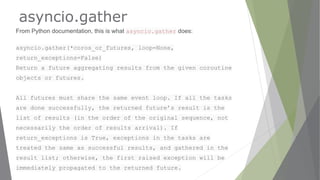
From Python documentation, this is what asyncio.gather does:
asyncio.gather(*coros_or_futures, loop=None,
return_exceptions=False)
Return a future aggregating results from the given coroutine
objects or futures.
All futures must share the same event loop. If all the tasks
are done successfully, the returned future’s result is the
list of results (in the order of the original sequence, not
necessarily the order of results arrival). If
return_exceptions is True, exceptions in the tasks are
treated the same as successful results, and gathered in the
result list; otherwise, the first raised exception will be
immediately propagated to the returned future.
Async Web crawler
import asyncio
import random
@asyncio.coroutine
def get_url(url):
wait_time = random.randint(1, 4)
yield from asyncio.sleep(wait_time)
print('Done: URL {} took {}s to get!'.format(url, wait_time))
return url, wait_time
@asyncio.coroutine
def process_ensure_future():
tasks= [asyncio.ensure_future(get_url(url) )for url in ['URL1',
'URL2', 'URL3']]
results = yield from asyncio.wait(tasks)
print(results)
def main():
loop = asyncio.get_event_loop()
print(“Process ensure future:")
loop.run_until_complete(process_ensure_future())
if __name__ == '__main__':
main()
asyncio.ensure_future
Async Web crawler execution
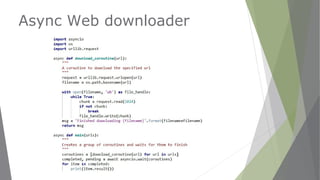
Async Web downloader
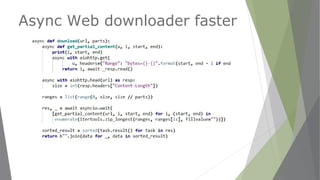
Async Web downloader faster
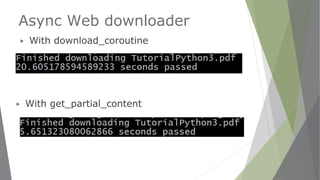
Async Web downloader
▶ With get_partial_content
▶ With download_coroutine
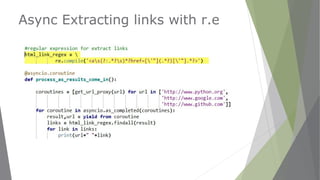
Async Extracting links with r.e
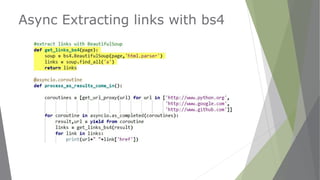
Async Extracting links with bs4
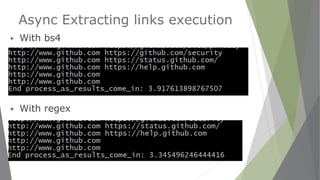
Async Extracting links execution
▶ With bs4
▶ With regex
Alternatives to asyncio
▶ ThreadPoolExecutor
▶ https://docs.python.org/3.5/library/concurrent.futures.html#concurrent.fut
ures.ThreadPoolExecutor
▶ ProcessPoolExecutor
▶ https://docs.python.org/3.5/library/concurrent.futures.html#concur
rent.futures.ProcessPoolExecutor
▶ Parallel python
▶ http://www.parallelpython.com
Parallel python
▶ SMP(symmetric multiprocessing)
architecture with multiple cores in the same
machine
▶ Distribute tasks in multiple machines
▶ Cluster
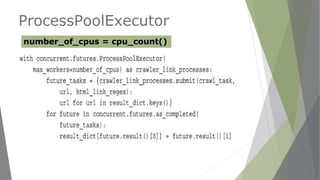
ProcessPoolExecutor
number_of_cpus = cpu_count()
References
▶ http://www.crummy.com/software/BeautifulSoup
▶ http://scrapy.org
▶ http://docs.webscraping.com
▶ https://github.com/KeepSafe/aiohttp
▶ http://aiohttp.readthedocs.io/en/stable/
▶ https://docs.python.org/3.4/library/asyncio.html
▶ https://github.com/REMitchell/python-scraping
Books
Books
Thank you!
@jmortegac
http://speakerdeck.com/jmortega
http://github.com/jmortega

Webscraping with asyncio

  • 1.
  • 2.
  • 3.
  • 4.
  • 5.
    Agenda ▶ Webscraping pythontools ▶ Requests vs aiohttp ▶ Introduction to asyncio ▶ Async client/server ▶ Building a webcrawler with asyncio ▶ Alternatives to asyncio
  • 6.
  • 7.
    Python tools ➢ Requests ➢Beautiful Soup 4 ➢ Pyquery ➢ Webscraping ➢ Scrapy
  • 8.
    Python tools ➢ Mechanize ➢Robobrowser ➢ Selenium
  • 9.
  • 10.
    Web scraping withPython 1. Download webpage with HTTP module(requests,urllib,aiohttp) 2. Parse the page with BeautifulSoup/lxml 3. Select elements with Regular expressions,XPath or css selectors 4. Store results in a database,csv,json
  • 11.
  • 12.
    BeautifulSoup ▶ soup = BeautifulSoup(html_doc,’html.parser’) ▶Print all: print(soup.prettify()) ▶ Print text: print(soup.get_text()) from bs4 import BeautifulSoup
  • 13.
    BeautifulSoup functions ▪ find_all(‘a’)→Returnsall links ▪ find(‘title’)→Returns the first element <title> ▪ get(‘href’)→Returns the attribute href value ▪ (element).text → Returns the text inside an element for link in soup.find_all('a'): print(link.get('href'))
  • 14.
  • 15.
  • 16.
  • 17.
  • 18.
  • 19.
  • 20.
  • 21.
  • 22.
    Spiders /crawlers ▶ AWeb crawler is an Internet bot that systematically browses the World Wide Web, typically for the purpose of Web indexing. A Web crawler may also be called a Web spider. https://en.wikipedia.org/wiki/Web_crawler
  • 23.
  • 24.
  • 25.
    Scrapy ▶ Uses amechanism based on XPath expressions called Xpath Selectors. ▶ Uses Parser LXML to find elements ▶ Twisted for asynchronous operations
  • 26.
    Scrapy advantages ▶ Fasterthan mechanize because it uses twisted for asynchronous operations. ▶ Scrapy has better support for html parsing. ▶ Scrapy has better support for unicode characters, redirections, gzipped responses, encodings. ▶ You can export the extracted data directly to JSON,XML and CSV.
  • 27.
    Export data ▶ scrapycrawl <spider_name> ▶ $ scrapy crawl <spider_name> -o items.json -t json ▶ $ scrapy crawl <spider_name> -o items.csv -t csv ▶ $ scrapy crawl <spider_name> -o items.xml -t xml ▶
  • 28.
  • 29.
    The concurrency problem ▶Different approaches: ▶ Multiple processes ▶ Threads ▶ Separate distributed machines ▶ Asynchronous programming(event loop)
  • 30.
    Requests problems ▶ Requestsoperations are blocking the main thread ▶ It pauses until operation completed ▶ We need one thread for each request if we want non-blocking operations
  • 31.
    Threads problems ▶ GetOverhead ▶ Stack size ▶ Context changes ▶ Synchronization
  • 32.
    Solution ▶NOT USE THREADS ▶USEONE THREAD ▶+ EVENT LOOP
  • 33.
    New concepts ▶ Eventloop ▶ Async ▶ Await ▶ Futures ▶ Coroutines ▶ Tasks ▶ Executors
  • 34.
    Event loop implementations ▶Asyncio ▶ https://docs.python.org/3.4/library/asyncio.html ▶ Tornado web server ▶ http://www.tornadoweb.org/en/stable ▶ Twisted ▶ https://twistedmatrix.com ▶ Gevent ▶ http://www.gevent.org
  • 35.
  • 36.
    Asyncio ▶ Python >=3.3 ▶Event-loop framework ▶ I/O Asynchronous ▶ Non-blocking approach with sockets ▶ All requests in one thread ▶ Event-driven switching ▶ aio-http module for make requests asynchronously
  • 37.
  • 38.
    Requests vs aiohttp #!/usr/local/bin/python3.5 importasyncio from aiohttp import ClientSession async def hello(): async with ClientSession() as session: async with session.get("http://httpbin.org/headers") as response: response = await response.read() print(response) loop = asyncio.get_event_loop() loop.run_until_complete(hello()) import requests def hello() return requests.get("http://httpbin.org/get") print(hello())
  • 39.
    Event Loop ▶ Anevent loop allow us to write asynchronous code using callbacks or coroutines. ▶ Event loop function like task switcher,just the way operating systems switch between active tasks on the CPU. ▶ The idea is that we have an event loop running until all tasks scheduled are completed. ▶ Features and tasks are created through the event loop.
  • 40.
    Event Loop ▶ Anevent loop is used to orchestrate the execution of the coroutines. ▶ asyncio.get_event_loop() ▶ asyncio.run_until_complete(coroutines,futures) ▶ asyncio.run_forever() ▶ asyncio.stop()
  • 41.
  • 42.
    Coroutines ▶ Coroutines arefunctions that allow for multitasking without requiring multiple threads or processes. ▶ Coroutines are like functions, but they can be suspended or resumed at certain points in the code. ▶ Coroutines allow write asynchronous code that combines the efficiency of callbacks with the classic good looks of multithreaded.
  • 43.
    Coroutines 3.4 vs3.5 import asyncio @asyncio.coroutine def fetch(self, url): response = yield from self.session.get(url) body = yield from response.read() import asyncio async def fetch(self, url): response = await self.session.get(url) body = await response.read()
  • 44.
    Coroutines in eventloop #!/usr/local/bin/python3.5 import asyncio import aiohttp async def get_page(url): response = await aiohttp.request('GET', url) body = await response.read() print(body) loop = asyncio.get_event_loop() loop.run_until_complete(asyncio.wait([get_page('http://python.org'), get_page('http://pycon.org')]))
  • 45.
    Requests in eventloop async def getpage_with_requests(url): return await loop.run_in_executor(None,requests.get,url) #methods equivalents async def getpage_with_aiohttp(url): with aitohttp.ClientSession() as session: async with session.get(url) as response: return await response.read()
  • 46.
    Tasks ▶ The asyncio.Taskclass is a subclass of asyncio.Future to encapsulate and manage coroutines. ▶ Allow independently running tasks to run concurrently with other tasks on the same event loop. ▶ When a coroutine is wrapped in a task, it connects the task to the event loop.
  • 47.
  • 48.
  • 49.
  • 50.
  • 51.
    Futures ▶ To managean object Future in Asyncio, we must declare the following: ▶ import asyncio ▶ future = asyncio.Future() ▶ https://docs.python.org/3/library/asyncio -task.html#future ▶ https://docs.python.org/3/library/concurr ent.futures.html
  • 52.
    Futures ▶ The asyncio.Futureclass is essentially a promise of a result. ▶ A Future will returns the results when they are available, and once it receives results, it will pass them along to all the registered callbacks. ▶ Each future is a task to be executed in the event loop
  • 53.
  • 54.
    Semaphores ▶ Adding synchronization ▶Limiting number of concurrent requests. ▶ The argument indicates the number of simultaneous requests we want to allow. ▶ sem = asyncio.Semaphore(5) with (await sem): page = await get(url, compress=True)
  • 55.
    Async Client /server ▶asyncio.start_server ▶ server = asyncio.start_server(handle_connection,host=HOST,port=PORT)
  • 56.
    Async Client /server ▶asyncio.open_connection
  • 57.
  • 58.
  • 59.
    Async Web crawler ▶Send asynchronous requests to all the links on a web page and add the responses to a queue to be processed as we go. ▶ Coroutines allow running independent tasks and processing their results in 3 ways: ▶ Using asyncio.as_completed →by processing the results as they come. ▶ Using asyncio.gather→ only once they have all finished loading. ▶ Using asyncio.ensure_future
  • 60.
    Async Web crawler importasyncio import random @asyncio.coroutine def get_url(url): wait_time = random.randint(1, 4) yield from asyncio.sleep(wait_time) print('Done: URL {} took {}s to get!'.format(url, wait_time)) return url, wait_time @asyncio.coroutine def process_results_as_come_in(): coroutines = [get_url(url) for url in ['URL1', 'URL2', 'URL3']] for coroutine in asyncio.as_completed(coroutines): url, wait_time = yield from coroutine print('Coroutine for {} is done'.format(url)) def main(): loop = asyncio.get_event_loop() print(“Process results as they come in:") loop.run_until_complete(process_results_as_come_in()) if __name__ == '__main__': main() asyncio.as_completed
  • 61.
  • 62.
    Async Web crawler importasyncio import random @asyncio.coroutine def get_url(url): wait_time = random.randint(1, 4) yield from asyncio.sleep(wait_time) print('Done: URL {} took {}s to get!'.format(url, wait_time)) return url, wait_time @asyncio.coroutine def process_once_everything_ready(): coroutines = [get_url(url) for url in ['URL1', 'URL2', 'URL3']] results = yield from asyncio.gather(*coroutines) print(results) def main(): loop = asyncio.get_event_loop() print(“Process results once they are all ready:") loop.run_until_complete(process_once_everything_ready()) if __name__ == '__main__': main() asyncio.gather
  • 63.
    asyncio.gather From Python documentation,this is what asyncio.gather does: asyncio.gather(*coros_or_futures, loop=None, return_exceptions=False) Return a future aggregating results from the given coroutine objects or futures. All futures must share the same event loop. If all the tasks are done successfully, the returned future’s result is the list of results (in the order of the original sequence, not necessarily the order of results arrival). If return_exceptions is True, exceptions in the tasks are treated the same as successful results, and gathered in the result list; otherwise, the first raised exception will be immediately propagated to the returned future.
  • 64.
    Async Web crawler importasyncio import random @asyncio.coroutine def get_url(url): wait_time = random.randint(1, 4) yield from asyncio.sleep(wait_time) print('Done: URL {} took {}s to get!'.format(url, wait_time)) return url, wait_time @asyncio.coroutine def process_ensure_future(): tasks= [asyncio.ensure_future(get_url(url) )for url in ['URL1', 'URL2', 'URL3']] results = yield from asyncio.wait(tasks) print(results) def main(): loop = asyncio.get_event_loop() print(“Process ensure future:") loop.run_until_complete(process_ensure_future()) if __name__ == '__main__': main() asyncio.ensure_future
  • 65.
  • 66.
  • 67.
  • 68.
    Async Web downloader ▶With get_partial_content ▶ With download_coroutine
  • 69.
  • 70.
  • 71.
    Async Extracting linksexecution ▶ With bs4 ▶ With regex
  • 72.
    Alternatives to asyncio ▶ThreadPoolExecutor ▶ https://docs.python.org/3.5/library/concurrent.futures.html#concurrent.fut ures.ThreadPoolExecutor ▶ ProcessPoolExecutor ▶ https://docs.python.org/3.5/library/concurrent.futures.html#concur rent.futures.ProcessPoolExecutor ▶ Parallel python ▶ http://www.parallelpython.com
  • 73.
    Parallel python ▶ SMP(symmetricmultiprocessing) architecture with multiple cores in the same machine ▶ Distribute tasks in multiple machines ▶ Cluster
  • 74.
  • 75.
    References ▶ http://www.crummy.com/software/BeautifulSoup ▶ http://scrapy.org ▶http://docs.webscraping.com ▶ https://github.com/KeepSafe/aiohttp ▶ http://aiohttp.readthedocs.io/en/stable/ ▶ https://docs.python.org/3.4/library/asyncio.html ▶ https://github.com/REMitchell/python-scraping
  • 76.
  • 77.
  • 78.