凌波微步
wagon +VS Code 的輕功哲學
2016/07/30
范聖佑	
  Shengyou	
  Fan
Laravel	
  台灣	
  台中社群⼩小聚	
  #2
范聖佑
@shengyou
http://shengyoufan.com
https://www.facebook.com/shengyoufan
得寬科技 研究員
Laravel 台灣 傳教士
Laravel 道場 作者
凌波微步:wagon	
  +	
  VS	
  Code	
  的輕功哲學
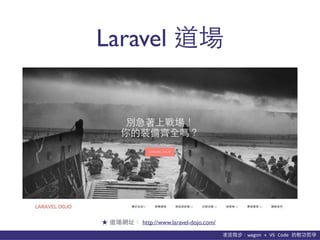
Laravel 道場
★ 道場網址: http://www.laravel-dojo.com/
• Laravel 道場 拿來做教育訓練的模擬機
• 整合 Cmder、UwAmp、git、Composer
等多項開放源始碼⼯工具於⼀一體
• 獨⽴立的環境變數、port 設定
• 免安裝、免設定、解壓縮即可使⽤用!
• 在會重開機⾃自動還原的環境下特別好⽤用!
⺫⽬目前正式發佈 v1.3.0 穩定版
http://www.laravel-dojo.com/opensource/wagon
wagon
https://youtu.be/O7ynMSd0Tlo
wagon 研發背後的⾎血淚史?
凌波微步:wagon	
  +	
  VS	
  Code	
  的輕功哲學
安裝步驟
• 請先下載/安裝Visual C++ 可轉散發套件
- 請下載 2012 及 2015 兩個版本的 x86 (32bits) 及
x64 (64bits) 兩版版本共計四個檔案並安裝
• 再到 Laravel 道場下載 wagon-release-{version}.zip
- 把 zip 檔解壓縮,並放到你喜歡的位置
★ PHP 5.6 需要Visual C++ 可轉散發套件 2012
★ PHP 7.0 需要Visual C++ 可轉散發套件 2015
★ 只要檔案路徑不要沒有⾮非英⽂文字元即可
凌波微步:wagon	
  +	
  VS	
  Code	
  的輕功哲學
使⽤用⽅方式
• 雙擊 wagon/cmder/Cmder.exe 輸⼊入指令
- 已移植 Unix 常⾒見指令 (ls, rm, vim, curl…等)
- 可以使⽤用 php-cli、Composer、git 等
• 雙擊 wagon/uwamp/UwAmp.exe 啟動 AMP 伺服器
- HTTP 為 8000 port
- 預設⾸首⾴頁在 wagon/uwamp/www/default
- MySQL 為 33060 port,帳密為 root/root
- adminer 可直接在 http://localhost:8000/mysql 使⽤用
★ Cmder 及 UwAmp 建個捷徑在桌⾯面上會更⽅方便喔!
凌波微步:wagon	
  +	
  VS	
  Code	
  的輕功哲學
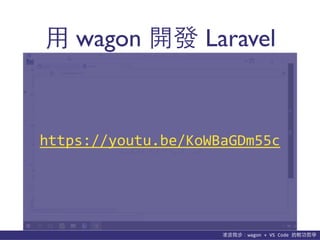
⽤用 wagon 開發 Laravel
https://youtu.be/KoWBaGDm55c
凌波微步:wagon	
  +	
  VS	
  Code	
  的輕功哲學
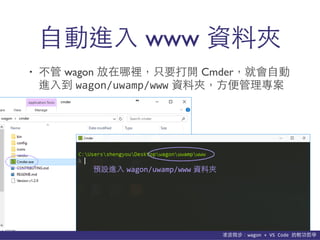
⾃自動進⼊入 www 資料夾
• 不管 wagon 放在哪裡,只要打開 Cmder,就會⾃自動
進⼊入到 wagon/uwamp/www 資料夾,⽅方便管理專案
預設進⼊入 wagon/uwamp/www 資料夾
凌波微步:wagon	
  +	
  VS	
  Code	
  的輕功哲學
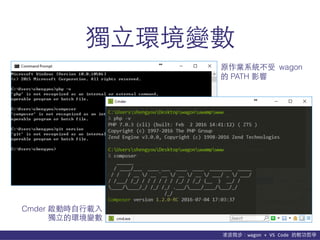
獨⽴立環境變數
Cmder 啟動時⾃自⾏行載⼊入
獨⽴立的環境變數
原作業系統不受 wagon
的 PATH 影響
凌波微步:wagon	
  +	
  VS	
  Code	
  的輕功哲學
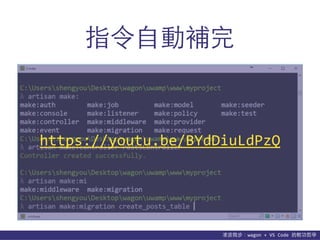
指令⾃自動補完
https://youtu.be/BYdDiuLdPzQ
凌波微步:wagon	
  +	
  VS	
  Code	
  的輕功哲學
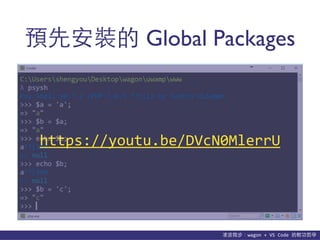
預先安裝的 Global Packages
https://youtu.be/DVcN0MlerrU
凌波微步:wagon	
  +	
  VS	
  Code	
  的輕功哲學
不⼩小⼼心玩壞了?
• 若有以下症頭:
- 把設定檔改掉後改不回來…
- wagon 檔案 Copy 來 Copy 去東⻄西掉了…
- 莫名的錯誤訊息、MySQL 再也開不起來…
• 請依以下指⽰示服⽤用:
- 把 wagon/uwamp/www 裡⾯面的專案備份起來
- 重新下載 wagon,解壓縮後重新覆蓋
- 把備份的專案再放回 wagon/uwamp/www 即可
凌波微步:wagon	
  +	
  VS	
  Code	
  的輕功哲學
多重安裝/解除安裝?
• 多重安裝
- 只要把 zip 檔解開就是⼀一份安裝
- 想放到哪裡就放到哪裡
- 想安裝幾份隨你⾼高興!
• 解除解裝
- 既然都免安裝了,解除安裝就是直接丟垃圾筒!
https://youtu.be/a025Go_wTgA
想看作者親⾃自完整⽰示範?
Laradebut #2
活動現場紀錄錄影
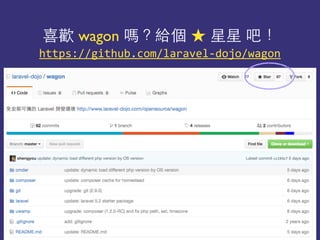
https://github.com/laravel-­‐dojo/wagon
喜歡 wagon 嗎?給個 ★ 星星 吧!
凌波微步:wagon	
  +	
  VS	
  Code	
  的輕功哲學
貼⼼心提醒
• 只⽀支援 Windows 64bits 作業系統
• 下載時請到 Laravel 道場下載,或是到 wagon 的
Github 下載 release 版
• 就是個訓練模擬機,不要⽤用在⾮非開發的⽤用途外
• 有發現任何 bugs 歡迎開 issue 或回報給作者!
(已測試 Windows 7, 8, 10 皆可,XP?謝謝再聯絡)
(拜託不要直接 clone 或 download master 的檔案)
(拜託請千萬不要裝在正式機上!)
(假如願意協助開發/維護也很歡迎喔 ^.< )
• 由 Microsoft 主導開發的編輯器
• 以 Electron 技術打造
• 內建語法提⽰示、版本控制及偵錯⼯工具
• 跨平台、免費、開放源始碼
• ⽀支援外掛系統,可擴充功能
⺫⽬目前正式發佈 v1.3.1 穩定版
https://code.visualstudio.com/
Visual Studio Code
凌波微步:wagon	
  +	
  VS	
  Code	
  的輕功哲學
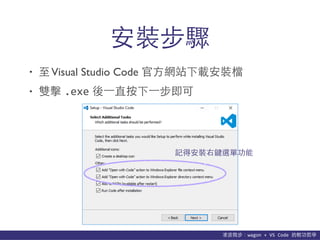
• ⾄至Visual Studio Code 官⽅方網站下載安裝檔
• 雙擊 .exe 後⼀一直按下⼀一步即可
安裝步驟
記得安裝右鍵選單功能
凌波微步:wagon	
  +	
  VS	
  Code	
  的輕功哲學
啟動⽅方式
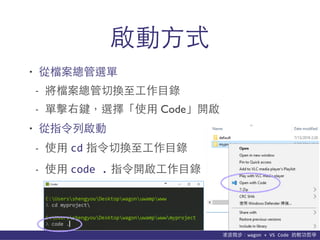
• 從檔案總管選單
- 將檔案總管切換⾄至⼯工作⺫⽬目錄
- 單擊右鍵,選擇「使⽤用 Code」開啟
• 從指令列啟動
- 使⽤用 cd 指令切換⾄至⼯工作⺫⽬目錄
- 使⽤用 code	
  . 指令開啟⼯工作⺫⽬目錄
凌波微步:wagon	
  +	
  VS	
  Code	
  的輕功哲學
⾃自動更新
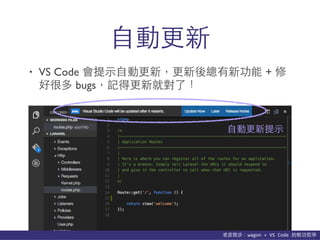
• VS Code 會提⽰示⾃自動更新,更新後總有新功能 + 修
好很多 bugs,記得更新就對了!
⾃自動更新提⽰示
凌波微步:wagon	
  +	
  VS	
  Code	
  的輕功哲學
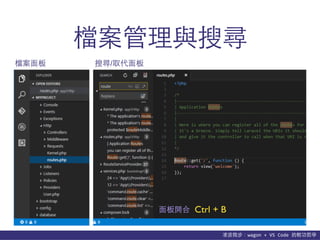
檔案管理與搜尋
檔案⾯面板 搜尋/取代⾯面板
⾯面板開合 Ctrl + B
凌波微步:wagon	
  +	
  VS	
  Code	
  的輕功哲學
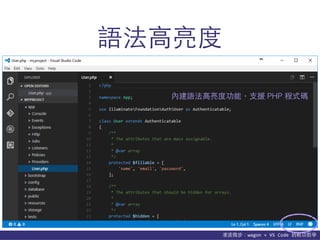
語法⾼高亮度
內建語法⾼高亮度功能,⽀支援 PHP 程式碼
凌波微步:wagon	
  +	
  VS	
  Code	
  的輕功哲學
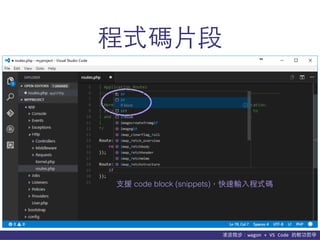
程式碼⽚片段
⽀支援 code block (snippets),快速輸⼊入程式碼
凌波微步:wagon	
  +	
  VS	
  Code	
  的輕功哲學
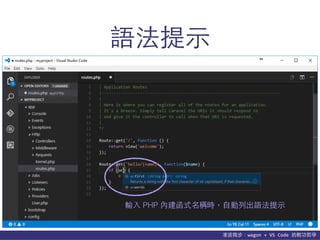
語法提⽰示
輸⼊入 PHP 內建函式名稱時,⾃自動列出語法提⽰示
凌波微步:wagon	
  +	
  VS	
  Code	
  的輕功哲學
必背快速鍵
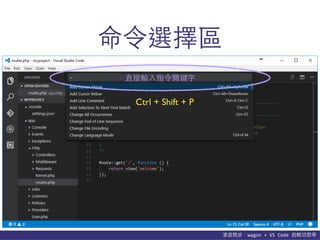
• 命令選擇區
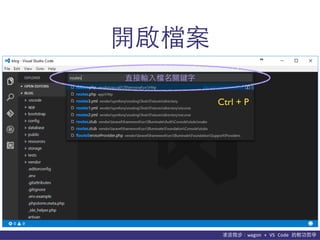
• 開啟檔案
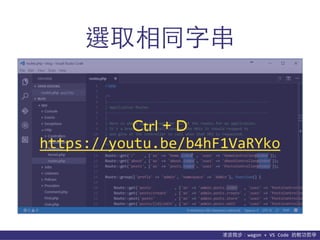
• 選擇相同字串
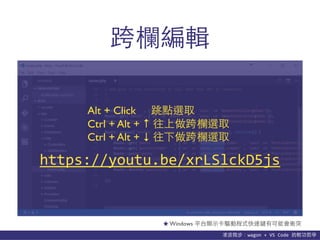
• 跨欄編輯
★ 先背這四個就可明顯提升⼯工作效率!
凌波微步:wagon	
  +	
  VS	
  Code	
  的輕功哲學
命令選擇區
直接輸⼊入指令關鍵字
Ctrl + Shift + P
凌波微步:wagon	
  +	
  VS	
  Code	
  的輕功哲學
開啟檔案
直接輸⼊入檔名關鍵字
Ctrl + P
凌波微步:wagon	
  +	
  VS	
  Code	
  的輕功哲學
選取相同字串
https://youtu.be/b4hF1VaRYko
Ctrl + D
凌波微步:wagon	
  +	
  VS	
  Code	
  的輕功哲學
跨欄編輯
★ Windows 平台顯⽰示卡驅動程式快速鍵有可能會衝突
Alt + Click 跳點選取
Ctrl + Alt + ↑ 往上做跨欄選取
Ctrl + Alt + ↓ 往下做跨欄選取
https://youtu.be/xrLSlckD5js
凌波微步:wagon	
  +	
  VS	
  Code	
  的輕功哲學
客製化VS Code
• 系統預設設定
- VS Code 出廠時的預設設定
• 使⽤用者設定
- 使⽤用者跨⼯工作區的客製化設定
• ⼯工作區設定
- 針對特定⼯工作區的客製化設定
- 會產⽣生⼀一個 .vscode 的資料夾在專案根⺫⽬目錄
凌波微步:wagon	
  +	
  VS	
  Code	
  的輕功哲學
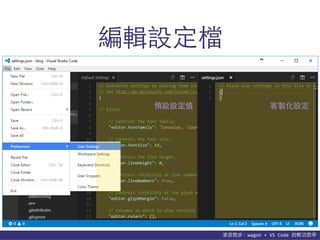
編輯設定檔
預設設定值 客製化設定
凌波微步:wagon	
  +	
  VS	
  Code	
  的輕功哲學
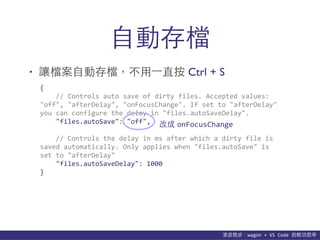
⾃自動存檔
• 讓檔案⾃自動存檔,不⽤用⼀一直按 Ctrl + S
{	


  //	
  Controls	
  auto	
  save	
  of	
  dirty	
  files.	
  Accepted	
  values:	
  	
  
"off",	
  "afterDelay",	
  "onFocusChange".	
  If	
  set	
  to	
  "afterDelay"	
  
you	
  can	
  configure	
  the	
  delay	
  in	
  "files.autoSaveDelay".	


  "files.autoSave":	
  "off",	


  //	
  Controls	
  the	
  delay	
  in	
  ms	
  after	
  which	
  a	
  dirty	
  file	
  is	
  
saved	
  automatically.	
  Only	
  applies	
  when	
  "files.autoSave"	
  is	
  
set	
  to	
  "afterDelay"	


  "files.autoSaveDelay":	
  1000	
  
}
改成 onFocusChange
凌波微步:wagon	
  +	
  VS	
  Code	
  的輕功哲學
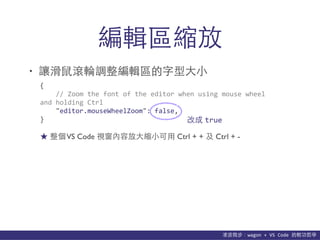
編輯區縮放
• 讓滑⿏鼠滾輪調整編輯區的字型⼤大⼩小
{	


  //	
  Zoom	
  the	
  font	
  of	
  the	
  editor	
  when	
  using	
  mouse	
  wheel	
  
and	
  holding	
  Ctrl	


  "editor.mouseWheelZoom":	
  false,	
  
} 改成 true
★ 整個VS Code 視窗內容放⼤大縮⼩小可⽤用 Ctrl + + 及 Ctrl + -
凌波微步:wagon	
  +	
  VS	
  Code	
  的輕功哲學
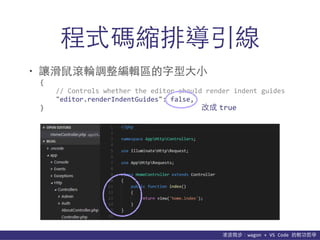
程式碼縮排導引線
• 讓滑⿏鼠滾輪調整編輯區的字型⼤大⼩小
{	


  //	
  Controls	
  whether	
  the	
  editor	
  should	
  render	
  indent	
  guides	


  "editor.renderIndentGuides":	
  false,	
  
} 改成 true
凌波微步:wagon	
  +	
  VS	
  Code	
  的輕功哲學
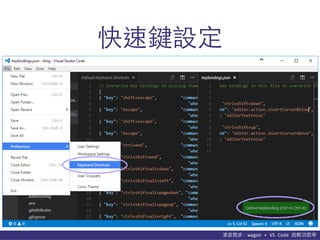
快速鍵設定
凌波微步:wagon	
  +	
  VS	
  Code	
  的輕功哲學
快速鍵對照表
• 官⽅方快速鍵完整對照⽂文件
- https://code.visualstudio.com/docs/customization/keybindings
★ 圖⽚片來源:http://hz.edushi.com/bang/info/4-109-n3038834.html
增強VS Code 功能
合體!
凌波微步:wagon	
  +	
  VS	
  Code	
  的輕功哲學
整合 wagon 及 Extensions
• 整合 wagon 的 git
• 整合 wagon 的 PHP
• 整合 wagon 的 Git Bash
• 安裝 PHP/Laravel 相關的 Extensions
+
VS Code git
凌波微步:wagon	
  +	
  VS	
  Code	
  的輕功哲學
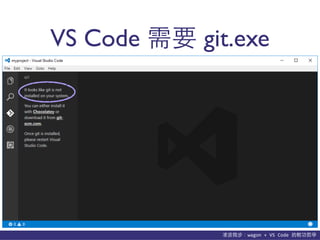
VS Code 需要 git.exe
凌波微步:wagon	
  +	
  VS	
  Code	
  的輕功哲學
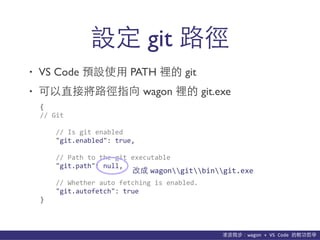
• VS Code 預設使⽤用 PATH 裡的 git
• 可以直接將路徑指向 wagon 裡的 git.exe
設定 git 路徑
{	
  
//	
  Git	


  //	
  Is	
  git	
  enabled	


  "git.enabled":	
  true,	


  //	
  Path	
  to	
  the	
  git	
  executable	


  "git.path":	
  null,	


  //	
  Whether	
  auto	
  fetching	
  is	
  enabled.	


  "git.autofetch":	
  true	
  
}
改成 wagongitbingit.exe
凌波微步:wagon	
  +	
  VS	
  Code	
  的輕功哲學
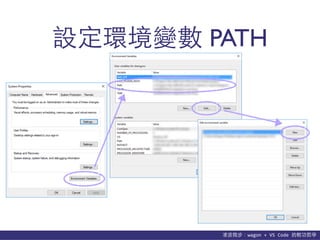
設定環境變數 PATH
凌波微步:wagon	
  +	
  VS	
  Code	
  的輕功哲學
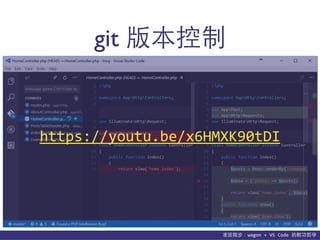
git 版本控制
https://youtu.be/x6HMXK90tDI
+
VS Code PHP
凌波微步:wagon	
  +	
  VS	
  Code	
  的輕功哲學
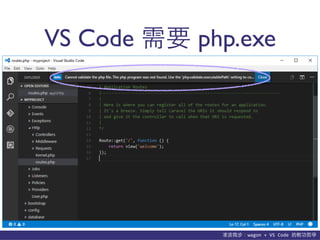
VS Code 需要 php.exe
凌波微步:wagon	
  +	
  VS	
  Code	
  的輕功哲學
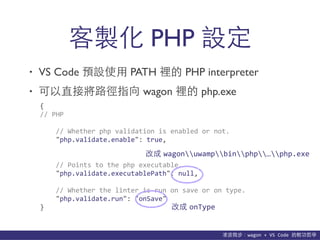
• VS Code 預設使⽤用 PATH 裡的 PHP interpreter
• 可以直接將路徑指向 wagon 裡的 php.exe
客製化 PHP 設定
{	
  
//	
  PHP	


  //	
  Whether	
  php	
  validation	
  is	
  enabled	
  or	
  not.	


  "php.validate.enable":	
  true,	


  //	
  Points	
  to	
  the	
  php	
  executable.	


  "php.validate.executablePath":	
  null,	


  //	
  Whether	
  the	
  linter	
  is	
  run	
  on	
  save	
  or	
  on	
  type.	


  "php.validate.run":	
  "onSave"	
  
}
改成 wagonuwampbinphp…php.exe
改成 onType
凌波微步:wagon	
  +	
  VS	
  Code	
  的輕功哲學
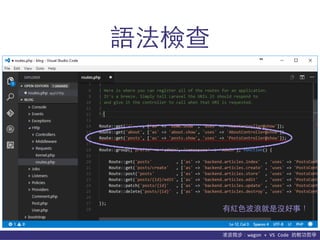
語法檢查
有紅⾊色波浪就是沒好事!
凌波微步:wagon	
  +	
  VS	
  Code	
  的輕功哲學
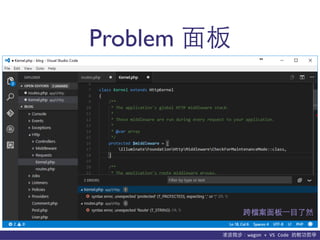
Problem ⾯面板
跨檔案⾯面板⼀一⺫⽬目了然
+
VS Code git bash
凌波微步:wagon	
  +	
  VS	
  Code	
  的輕功哲學
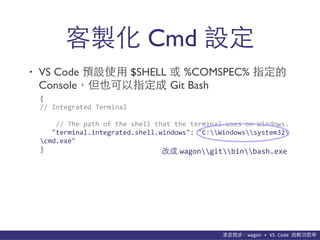
• VS Code 預設使⽤用 $SHELL 或 %COMSPEC% 指定的
Console,但也可以指定成 Git Bash
客製化 Cmd 設定
{	
  
//	
  Integrated	
  Terminal	


  //	
  The	
  path	
  of	
  the	
  shell	
  that	
  the	
  terminal	
  uses	
  on	
  Windows.	


  "terminal.integrated.shell.windows":	
  "C:Windowssystem32
cmd.exe"	
  
} 改成 wagongitbinbash.exe
凌波微步:wagon	
  +	
  VS	
  Code	
  的輕功哲學
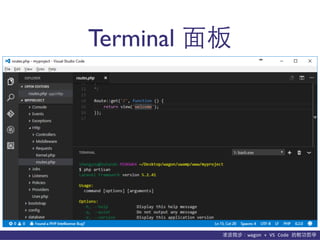
Terminal ⾯面板
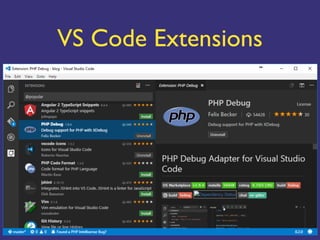
VS Code Extensions
凌波微步:wagon	
  +	
  VS	
  Code	
  的輕功哲學
外掛哪裡找?
★ 官⽅方網站: https://marketplace.visualstudio.com/VSCode
凌波微步:wagon	
  +	
  VS	
  Code	
  的輕功哲學
外掛程式
• 以開發 PHP/Laravel 為⺫⽬目標,可安裝以下外掛:
- EditorConfig forVS Code
- Composer
- Crane、PHP Symbols
- PHP Formatter
- PHP Debug
- Laravel Blade Snippets、Laravel 5 Snippets
凌波微步:wagon	
  +	
  VS	
  Code	
  的輕功哲學
EditorConfig forVS Code
;	
  .editorconfig	
  
root	
  =	
  true	
  
[*]	
  
charset	
  =	
  utf-­‐8	
  
indent_size	
  =	
  4	
  
indent_style	
  =	
  space	
  
end_of_line	
  =	
  lf	
  
insert_final_newline	
  =	
  true	
  
trim_trailing_whitespace	
  =	
  true	
  
[package.json]	
  
indent_size	
  =	
  2	
  
trim_trailing_whitespace	
  =	
  true	
  
[*.md]	
  
trim_trailing_whitespace	
  =	
  false
凌波微步:wagon	
  +	
  VS	
  Code	
  的輕功哲學
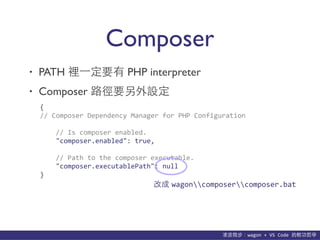
Composer
• PATH 裡⼀一定要有 PHP interpreter
• Composer 路徑要另外設定
{	
  
//	
  Composer	
  Dependency	
  Manager	
  for	
  PHP	
  Configuration	


  //	
  Is	
  composer	
  enabled.	


  "composer.enabled":	
  true,	


  //	
  Path	
  to	
  the	
  composer	
  executable.	


  "composer.executablePath":	
  null	
  
}
改成 wagoncomposercomposer.bat
凌波微步:wagon	
  +	
  VS	
  Code	
  的輕功哲學
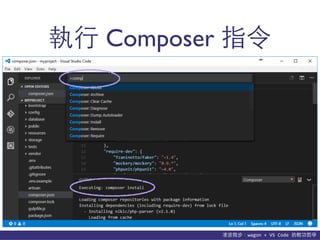
執⾏行 Composer 指令
凌波微步:wagon	
  +	
  VS	
  Code	
  的輕功哲學
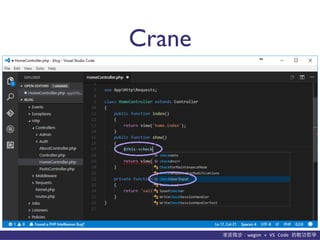
Crane
凌波微步:wagon	
  +	
  VS	
  Code	
  的輕功哲學
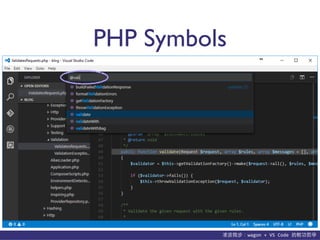
PHP Symbols
凌波微步:wagon	
  +	
  VS	
  Code	
  的輕功哲學
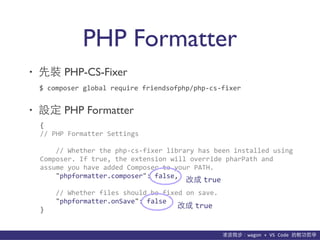
PHP Formatter
• 先裝 PHP-CS-Fixer
• 設定 PHP Formatter
$	
  composer	
  global	
  require	
  friendsofphp/php-­‐cs-­‐fixer
{	
  
//	
  PHP	
  Formatter	
  Settings	


  //	
  Whether	
  the	
  php-­‐cs-­‐fixer	
  library	
  has	
  been	
  installed	
  using	
  
Composer.	
  If	
  true,	
  the	
  extension	
  will	
  override	
  pharPath	
  and	
  
assume	
  you	
  have	
  added	
  Composer	
  to	
  your	
  PATH.	


  "phpformatter.composer":	
  false,	


  //	
  Whether	
  files	
  should	
  be	
  fixed	
  on	
  save.	


  "phpformatter.onSave":	
  false	
  
}
改成 true
改成 true
凌波微步:wagon	
  +	
  VS	
  Code	
  的輕功哲學
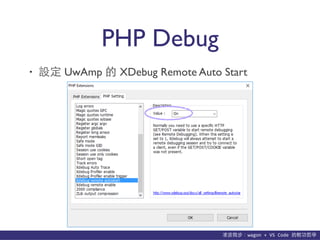
PHP Debug
• 設定 UwAmp 的 XDebug Remote Auto Start

凌波微步:wagon	
  +	
  VS	
  Code	
  的輕功哲學
PHP Debug
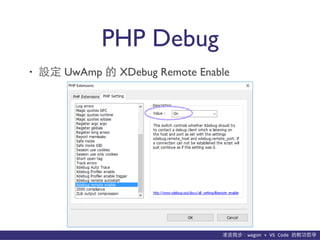
• 設定 UwAmp 的 XDebug Remote Enable
凌波微步:wagon	
  +	
  VS	
  Code	
  的輕功哲學
PHP Debug
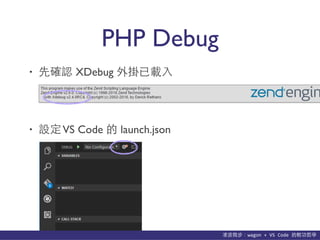
• 先確認 XDebug 外掛已載⼊入
• 設定VS Code 的 launch.json
凌波微步:wagon	
  +	
  VS	
  Code	
  的輕功哲學
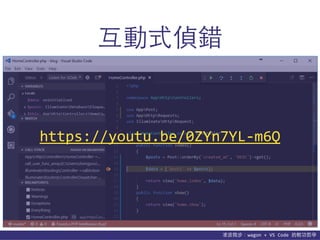
互動式偵錯
https://youtu.be/0ZYn7YL-­‐m6Q
凌波微步:wagon	
  +	
  VS	
  Code	
  的輕功哲學
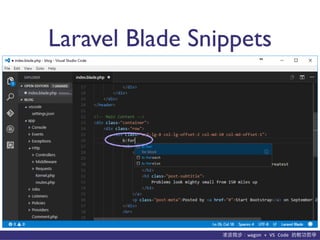
Laravel Blade Snippets
凌波微步:wagon	
  +	
  VS	
  Code	
  的輕功哲學
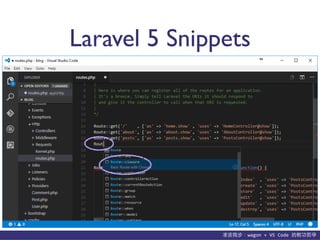
Laravel 5 Snippets
Q & A
謝謝聆聽.歡迎互動

凌波微步:wagon + VS Code 的輕功哲學

  • 1.
    凌波微步 wagon +VS Code的輕功哲學 2016/07/30 范聖佑  Shengyou  Fan Laravel  台灣  台中社群⼩小聚  #2
  • 2.
  • 3.
    凌波微步:wagon  +  VS  Code  的輕功哲學 Laravel 道場 ★ 道場網址: http://www.laravel-dojo.com/
  • 4.
    • Laravel 道場拿來做教育訓練的模擬機 • 整合 Cmder、UwAmp、git、Composer 等多項開放源始碼⼯工具於⼀一體 • 獨⽴立的環境變數、port 設定 • 免安裝、免設定、解壓縮即可使⽤用! • 在會重開機⾃自動還原的環境下特別好⽤用! ⺫⽬目前正式發佈 v1.3.0 穩定版 http://www.laravel-dojo.com/opensource/wagon wagon
  • 5.
  • 6.
    凌波微步:wagon  +  VS  Code  的輕功哲學 安裝步驟 • 請先下載/安裝Visual C++ 可轉散發套件 - 請下載 2012 及 2015 兩個版本的 x86 (32bits) 及 x64 (64bits) 兩版版本共計四個檔案並安裝 • 再到 Laravel 道場下載 wagon-release-{version}.zip - 把 zip 檔解壓縮,並放到你喜歡的位置 ★ PHP 5.6 需要Visual C++ 可轉散發套件 2012 ★ PHP 7.0 需要Visual C++ 可轉散發套件 2015 ★ 只要檔案路徑不要沒有⾮非英⽂文字元即可
  • 7.
    凌波微步:wagon  +  VS  Code  的輕功哲學 使⽤用⽅方式 • 雙擊 wagon/cmder/Cmder.exe 輸⼊入指令 - 已移植 Unix 常⾒見指令 (ls, rm, vim, curl…等) - 可以使⽤用 php-cli、Composer、git 等 • 雙擊 wagon/uwamp/UwAmp.exe 啟動 AMP 伺服器 - HTTP 為 8000 port - 預設⾸首⾴頁在 wagon/uwamp/www/default - MySQL 為 33060 port,帳密為 root/root - adminer 可直接在 http://localhost:8000/mysql 使⽤用 ★ Cmder 及 UwAmp 建個捷徑在桌⾯面上會更⽅方便喔!
  • 8.
    凌波微步:wagon  +  VS  Code  的輕功哲學 ⽤用 wagon 開發 Laravel https://youtu.be/KoWBaGDm55c
  • 9.
    凌波微步:wagon  +  VS  Code  的輕功哲學 ⾃自動進⼊入 www 資料夾 • 不管 wagon 放在哪裡,只要打開 Cmder,就會⾃自動 進⼊入到 wagon/uwamp/www 資料夾,⽅方便管理專案 預設進⼊入 wagon/uwamp/www 資料夾
  • 10.
    凌波微步:wagon  +  VS  Code  的輕功哲學 獨⽴立環境變數 Cmder 啟動時⾃自⾏行載⼊入 獨⽴立的環境變數 原作業系統不受 wagon 的 PATH 影響
  • 11.
    凌波微步:wagon  +  VS  Code  的輕功哲學 指令⾃自動補完 https://youtu.be/BYdDiuLdPzQ
  • 12.
    凌波微步:wagon  +  VS  Code  的輕功哲學 預先安裝的 Global Packages https://youtu.be/DVcN0MlerrU
  • 13.
    凌波微步:wagon  +  VS  Code  的輕功哲學 不⼩小⼼心玩壞了? • 若有以下症頭: - 把設定檔改掉後改不回來… - wagon 檔案 Copy 來 Copy 去東⻄西掉了… - 莫名的錯誤訊息、MySQL 再也開不起來… • 請依以下指⽰示服⽤用: - 把 wagon/uwamp/www 裡⾯面的專案備份起來 - 重新下載 wagon,解壓縮後重新覆蓋 - 把備份的專案再放回 wagon/uwamp/www 即可
  • 14.
    凌波微步:wagon  +  VS  Code  的輕功哲學 多重安裝/解除安裝? • 多重安裝 - 只要把 zip 檔解開就是⼀一份安裝 - 想放到哪裡就放到哪裡 - 想安裝幾份隨你⾼高興! • 解除解裝 - 既然都免安裝了,解除安裝就是直接丟垃圾筒!
  • 15.
  • 16.
  • 17.
    凌波微步:wagon  +  VS  Code  的輕功哲學 貼⼼心提醒 • 只⽀支援 Windows 64bits 作業系統 • 下載時請到 Laravel 道場下載,或是到 wagon 的 Github 下載 release 版 • 就是個訓練模擬機,不要⽤用在⾮非開發的⽤用途外 • 有發現任何 bugs 歡迎開 issue 或回報給作者! (已測試 Windows 7, 8, 10 皆可,XP?謝謝再聯絡) (拜託不要直接 clone 或 download master 的檔案) (拜託請千萬不要裝在正式機上!) (假如願意協助開發/維護也很歡迎喔 ^.< )
  • 18.
    • 由 Microsoft主導開發的編輯器 • 以 Electron 技術打造 • 內建語法提⽰示、版本控制及偵錯⼯工具 • 跨平台、免費、開放源始碼 • ⽀支援外掛系統,可擴充功能 ⺫⽬目前正式發佈 v1.3.1 穩定版 https://code.visualstudio.com/ Visual Studio Code
  • 19.
    凌波微步:wagon  +  VS  Code  的輕功哲學 • ⾄至Visual Studio Code 官⽅方網站下載安裝檔 • 雙擊 .exe 後⼀一直按下⼀一步即可 安裝步驟 記得安裝右鍵選單功能
  • 20.
    凌波微步:wagon  +  VS  Code  的輕功哲學 啟動⽅方式 • 從檔案總管選單 - 將檔案總管切換⾄至⼯工作⺫⽬目錄 - 單擊右鍵,選擇「使⽤用 Code」開啟 • 從指令列啟動 - 使⽤用 cd 指令切換⾄至⼯工作⺫⽬目錄 - 使⽤用 code  . 指令開啟⼯工作⺫⽬目錄
  • 21.
    凌波微步:wagon  +  VS  Code  的輕功哲學 ⾃自動更新 • VS Code 會提⽰示⾃自動更新,更新後總有新功能 + 修 好很多 bugs,記得更新就對了! ⾃自動更新提⽰示
  • 22.
    凌波微步:wagon  +  VS  Code  的輕功哲學 檔案管理與搜尋 檔案⾯面板 搜尋/取代⾯面板 ⾯面板開合 Ctrl + B
  • 23.
    凌波微步:wagon  +  VS  Code  的輕功哲學 語法⾼高亮度 內建語法⾼高亮度功能,⽀支援 PHP 程式碼
  • 24.
    凌波微步:wagon  +  VS  Code  的輕功哲學 程式碼⽚片段 ⽀支援 code block (snippets),快速輸⼊入程式碼
  • 25.
    凌波微步:wagon  +  VS  Code  的輕功哲學 語法提⽰示 輸⼊入 PHP 內建函式名稱時,⾃自動列出語法提⽰示
  • 26.
    凌波微步:wagon  +  VS  Code  的輕功哲學 必背快速鍵 • 命令選擇區 • 開啟檔案 • 選擇相同字串 • 跨欄編輯 ★ 先背這四個就可明顯提升⼯工作效率!
  • 27.
    凌波微步:wagon  +  VS  Code  的輕功哲學 命令選擇區 直接輸⼊入指令關鍵字 Ctrl + Shift + P
  • 28.
    凌波微步:wagon  +  VS  Code  的輕功哲學 開啟檔案 直接輸⼊入檔名關鍵字 Ctrl + P
  • 29.
    凌波微步:wagon  +  VS  Code  的輕功哲學 選取相同字串 https://youtu.be/b4hF1VaRYko Ctrl + D
  • 30.
    凌波微步:wagon  +  VS  Code  的輕功哲學 跨欄編輯 ★ Windows 平台顯⽰示卡驅動程式快速鍵有可能會衝突 Alt + Click 跳點選取 Ctrl + Alt + ↑ 往上做跨欄選取 Ctrl + Alt + ↓ 往下做跨欄選取 https://youtu.be/xrLSlckD5js
  • 31.
    凌波微步:wagon  +  VS  Code  的輕功哲學 客製化VS Code • 系統預設設定 - VS Code 出廠時的預設設定 • 使⽤用者設定 - 使⽤用者跨⼯工作區的客製化設定 • ⼯工作區設定 - 針對特定⼯工作區的客製化設定 - 會產⽣生⼀一個 .vscode 的資料夾在專案根⺫⽬目錄
  • 32.
    凌波微步:wagon  +  VS  Code  的輕功哲學 編輯設定檔 預設設定值 客製化設定
  • 33.
    凌波微步:wagon  +  VS  Code  的輕功哲學 ⾃自動存檔 • 讓檔案⾃自動存檔,不⽤用⼀一直按 Ctrl + S {          //  Controls  auto  save  of  dirty  files.  Accepted  values:     "off",  "afterDelay",  "onFocusChange".  If  set  to  "afterDelay"   you  can  configure  the  delay  in  "files.autoSaveDelay".          "files.autoSave":  "off",          //  Controls  the  delay  in  ms  after  which  a  dirty  file  is   saved  automatically.  Only  applies  when  "files.autoSave"  is   set  to  "afterDelay"          "files.autoSaveDelay":  1000   } 改成 onFocusChange
  • 34.
    凌波微步:wagon  +  VS  Code  的輕功哲學 編輯區縮放 • 讓滑⿏鼠滾輪調整編輯區的字型⼤大⼩小 {          //  Zoom  the  font  of  the  editor  when  using  mouse  wheel   and  holding  Ctrl          "editor.mouseWheelZoom":  false,   } 改成 true ★ 整個VS Code 視窗內容放⼤大縮⼩小可⽤用 Ctrl + + 及 Ctrl + -
  • 35.
    凌波微步:wagon  +  VS  Code  的輕功哲學 程式碼縮排導引線 • 讓滑⿏鼠滾輪調整編輯區的字型⼤大⼩小 {          //  Controls  whether  the  editor  should  render  indent  guides          "editor.renderIndentGuides":  false,   } 改成 true
  • 36.
    凌波微步:wagon  +  VS  Code  的輕功哲學 快速鍵設定
  • 37.
    凌波微步:wagon  +  VS  Code  的輕功哲學 快速鍵對照表 • 官⽅方快速鍵完整對照⽂文件 - https://code.visualstudio.com/docs/customization/keybindings
  • 38.
  • 39.
    凌波微步:wagon  +  VS  Code  的輕功哲學 整合 wagon 及 Extensions • 整合 wagon 的 git • 整合 wagon 的 PHP • 整合 wagon 的 Git Bash • 安裝 PHP/Laravel 相關的 Extensions
  • 40.
  • 41.
    凌波微步:wagon  +  VS  Code  的輕功哲學 VS Code 需要 git.exe
  • 42.
    凌波微步:wagon  +  VS  Code  的輕功哲學 • VS Code 預設使⽤用 PATH 裡的 git • 可以直接將路徑指向 wagon 裡的 git.exe 設定 git 路徑 {   //  Git          //  Is  git  enabled          "git.enabled":  true,          //  Path  to  the  git  executable          "git.path":  null,          //  Whether  auto  fetching  is  enabled.          "git.autofetch":  true   } 改成 wagongitbingit.exe
  • 43.
    凌波微步:wagon  +  VS  Code  的輕功哲學 設定環境變數 PATH
  • 44.
    凌波微步:wagon  +  VS  Code  的輕功哲學 git 版本控制 https://youtu.be/x6HMXK90tDI
  • 45.
  • 46.
    凌波微步:wagon  +  VS  Code  的輕功哲學 VS Code 需要 php.exe
  • 47.
    凌波微步:wagon  +  VS  Code  的輕功哲學 • VS Code 預設使⽤用 PATH 裡的 PHP interpreter • 可以直接將路徑指向 wagon 裡的 php.exe 客製化 PHP 設定 {   //  PHP          //  Whether  php  validation  is  enabled  or  not.          "php.validate.enable":  true,          //  Points  to  the  php  executable.          "php.validate.executablePath":  null,          //  Whether  the  linter  is  run  on  save  or  on  type.          "php.validate.run":  "onSave"   } 改成 wagonuwampbinphp…php.exe 改成 onType
  • 48.
    凌波微步:wagon  +  VS  Code  的輕功哲學 語法檢查 有紅⾊色波浪就是沒好事!
  • 49.
    凌波微步:wagon  +  VS  Code  的輕功哲學 Problem ⾯面板 跨檔案⾯面板⼀一⺫⽬目了然
  • 50.
  • 51.
    凌波微步:wagon  +  VS  Code  的輕功哲學 • VS Code 預設使⽤用 $SHELL 或 %COMSPEC% 指定的 Console,但也可以指定成 Git Bash 客製化 Cmd 設定 {   //  Integrated  Terminal          //  The  path  of  the  shell  that  the  terminal  uses  on  Windows.        "terminal.integrated.shell.windows":  "C:Windowssystem32 cmd.exe"   } 改成 wagongitbinbash.exe
  • 52.
    凌波微步:wagon  +  VS  Code  的輕功哲學 Terminal ⾯面板
  • 53.
  • 54.
    凌波微步:wagon  +  VS  Code  的輕功哲學 外掛哪裡找? ★ 官⽅方網站: https://marketplace.visualstudio.com/VSCode
  • 55.
    凌波微步:wagon  +  VS  Code  的輕功哲學 外掛程式 • 以開發 PHP/Laravel 為⺫⽬目標,可安裝以下外掛: - EditorConfig forVS Code - Composer - Crane、PHP Symbols - PHP Formatter - PHP Debug - Laravel Blade Snippets、Laravel 5 Snippets
  • 56.
    凌波微步:wagon  +  VS  Code  的輕功哲學 EditorConfig forVS Code ;  .editorconfig   root  =  true   [*]   charset  =  utf-­‐8   indent_size  =  4   indent_style  =  space   end_of_line  =  lf   insert_final_newline  =  true   trim_trailing_whitespace  =  true   [package.json]   indent_size  =  2   trim_trailing_whitespace  =  true   [*.md]   trim_trailing_whitespace  =  false
  • 57.
    凌波微步:wagon  +  VS  Code  的輕功哲學 Composer • PATH 裡⼀一定要有 PHP interpreter • Composer 路徑要另外設定 {   //  Composer  Dependency  Manager  for  PHP  Configuration          //  Is  composer  enabled.          "composer.enabled":  true,          //  Path  to  the  composer  executable.          "composer.executablePath":  null   } 改成 wagoncomposercomposer.bat
  • 58.
    凌波微步:wagon  +  VS  Code  的輕功哲學 執⾏行 Composer 指令
  • 59.
    凌波微步:wagon  +  VS  Code  的輕功哲學 Crane
  • 60.
    凌波微步:wagon  +  VS  Code  的輕功哲學 PHP Symbols
  • 61.
    凌波微步:wagon  +  VS  Code  的輕功哲學 PHP Formatter • 先裝 PHP-CS-Fixer • 設定 PHP Formatter $  composer  global  require  friendsofphp/php-­‐cs-­‐fixer {   //  PHP  Formatter  Settings          //  Whether  the  php-­‐cs-­‐fixer  library  has  been  installed  using   Composer.  If  true,  the  extension  will  override  pharPath  and   assume  you  have  added  Composer  to  your  PATH.          "phpformatter.composer":  false,          //  Whether  files  should  be  fixed  on  save.          "phpformatter.onSave":  false   } 改成 true 改成 true
  • 62.
    凌波微步:wagon  +  VS  Code  的輕功哲學 PHP Debug • 設定 UwAmp 的 XDebug Remote Auto Start

  • 63.
    凌波微步:wagon  +  VS  Code  的輕功哲學 PHP Debug • 設定 UwAmp 的 XDebug Remote Enable
  • 64.
    凌波微步:wagon  +  VS  Code  的輕功哲學 PHP Debug • 先確認 XDebug 外掛已載⼊入 • 設定VS Code 的 launch.json
  • 65.
    凌波微步:wagon  +  VS  Code  的輕功哲學 互動式偵錯 https://youtu.be/0ZYn7YL-­‐m6Q
  • 66.
    凌波微步:wagon  +  VS  Code  的輕功哲學 Laravel Blade Snippets
  • 67.
    凌波微步:wagon  +  VS  Code  的輕功哲學 Laravel 5 Snippets
  • 68.