Hi, how areyou? I'm Sern Hao from SernHao Tv, the topic I want to share with you is "About Controller in ASP.Net Core".
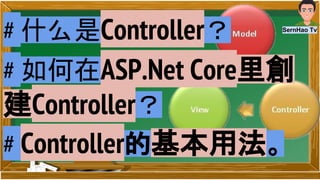
Here, I will explain in simple terms for you to explain a few on the ASP.Net Core about Controller in a few key points:
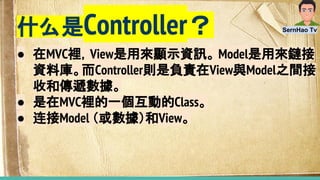
1) What is the Controller?
- is an interactive Class in the MVC.
- In MVC, View is used to display information. Model is used to link the database. The Controller is responsible for receiving and
transferring data between View and Model.
- Connect Model (or data) and View.
2) Controller's basic usage. (Demo)
- Controller handles Http-Post (route data) and Http-Get (query-string)
- Receives the user input from View and then responds with a specific response.
- Execute business rule and functions.
3) How to create a Controller in ASP.Net Core. (Demo)
- In the video, I will explain how the Controller was created, as well as some of the main functions.
- roughtly explain the life cycle of controller in the ASP.net Core.
- default template: "{controller=Home}/{action=Index}/{id?}") [“/[Controller]/[ActionName]/[Parameters]”]
- In Solution Explorer, right-click folder of “Controllers” > “Add” > “New Item...“ > select ”MVC Controller Class“
- “Index” is the default method that will be called on a “Controller”
Bonus:
1) ASP.Net Core is a. Net Framework, which uses .Net Framework 4.6. ASP.Net Core can also be regarded as C # and MVC 1-6 series is a
big step forward. Moveover, visual studio 2015 will use as development tool for create ASP.Net Core program.
2) In Visual Studio 2015, you can re-run your app by refresh the browser after changing and save the code without debuggin (Ctrl + F5)
again.
12.
Reference 参考:
1. VisualStudio Code Tutorial for Beginners - CodeGeek
https://www.youtube.com/watch?v=5WyJibE3ZK0
2. What is MVC? Model View Controller - HandsonERP
https://www.youtube.com/watch?v=qXRcVhWxuaU
3. Introduction to ASP.NET MVC Part 1/3: What is MVC and why should you use it? - Roger Harford
https://www.youtube.com/watch?v=YSHW9F2dtOY
4. Adding a controller - By Rick Anderson
https://docs.asp.net/en/latest/tutorials/first-mvc-app/adding-controller.html






![您好,我是SernHao Tv 的Sern Hao, 今天我想要跟您分享的是 "關於ASP.Net Core 里的 Controller"。
在這裡,我將深入淺出的為您解 說幾個關於ASP.Net Core 裡的 Controller 的幾個要點:
1)什麼是Controller?
- 是在MVC裡的一個互動的 Class。
- 在MVC裡,View是用來顯示資訊。 Model是用來鏈接資料庫。而 Controller則是負責在View與Model之間接收和傳遞數據。
- 連接Model (或數據)和View。
2) Controller的基本用法。 (demo)
- Controller 處理 Http-Post (route data) and Http-Get (query-string)
- 接收從View得到的用戶輸入的資料,然後給予特定的反應。
- 執行business rule和functions。
3) 如何在ASP.Net Core裡創建 Controller。 (demo)
- 在影片裡,我會講解有關 Controller如何被創建,以及一些主要的用途。
- 同時也會帶過Controller在ASP.net Core 裡的生命週期。
- 默認模板: "{controller=Home}/{action=Index}/{id?}") 【“/[Controller]/[ActionName]/[Parameters]”】
- 在 Solution Explorer里, 在“Controllers”的文件夹点击右键 > “Add” > “New Item...“ > 选择”MVC Controller Class“
- “Index”是在“Controller”上默認調用的方法,
附加的:
1) ASP.Net Core 是個.Net Framework,它使用.Net Framework 4.6. .Net Core 也可以算是C# 和MVC 1- 6 系列的一個很大的進步。而這裡的
ASP.Net Core 會使用的開發工具是 visual studio 2015。
2)在Visual Studio 2015中,您可以在更改程序並保存代碼後通過刷新瀏覽器以達到重新運行應用程序,而不用進行 debugging(Ctrl + F5)。
希望我的解说能帮到您。](https://image.slidesharecdn.com/vlog02-engsubcontrollerasp-161023135736/85/Vlog02-eng-sub-controller-asp-net-controller-what-is-controller-and-how-to-create-controller-in-asp-net-core-10-320.jpg)
![Hi, how are you? I'm Sern Hao from SernHao Tv, the topic I want to share with you is "About Controller in ASP.Net Core".
Here, I will explain in simple terms for you to explain a few on the ASP.Net Core about Controller in a few key points:
1) What is the Controller?
- is an interactive Class in the MVC.
- In MVC, View is used to display information. Model is used to link the database. The Controller is responsible for receiving and
transferring data between View and Model.
- Connect Model (or data) and View.
2) Controller's basic usage. (Demo)
- Controller handles Http-Post (route data) and Http-Get (query-string)
- Receives the user input from View and then responds with a specific response.
- Execute business rule and functions.
3) How to create a Controller in ASP.Net Core. (Demo)
- In the video, I will explain how the Controller was created, as well as some of the main functions.
- roughtly explain the life cycle of controller in the ASP.net Core.
- default template: "{controller=Home}/{action=Index}/{id?}") [“/[Controller]/[ActionName]/[Parameters]”]
- In Solution Explorer, right-click folder of “Controllers” > “Add” > “New Item...“ > select ”MVC Controller Class“
- “Index” is the default method that will be called on a “Controller”
Bonus:
1) ASP.Net Core is a. Net Framework, which uses .Net Framework 4.6. ASP.Net Core can also be regarded as C # and MVC 1-6 series is a
big step forward. Moveover, visual studio 2015 will use as development tool for create ASP.Net Core program.
2) In Visual Studio 2015, you can re-run your app by refresh the browser after changing and save the code without debuggin (Ctrl + F5)
again.](https://image.slidesharecdn.com/vlog02-engsubcontrollerasp-161023135736/85/Vlog02-eng-sub-controller-asp-net-controller-what-is-controller-and-how-to-create-controller-in-asp-net-core-11-320.jpg)