A
Presentation
On
Virtual Keyboard
Submit: Gowtham R
Regno: 2101201117
Guide:Sajith Kumar S
Presentation Overview
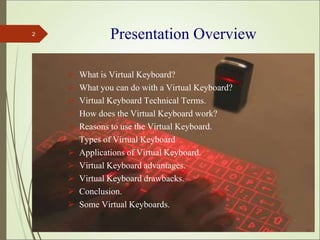
⮚ What is Virtual Keyboard?
⮚ What you can do with a Virtual Keyboard?
⮚ Virtual Keyboard Technical Terms.
⮚ How does the Virtual Keyboard work?
⮚ Reasons to use the Virtual Keyboard.
⮚ Types of Virtual Keyboard
⮚ Applications of Virtual Keyboard.
⮚ Virtual Keyboard advantages.
⮚ Virtual Keyboard drawbacks.
⮚ Conclusion.
⮚ Some Virtual Keyboards.
*
2
*
3
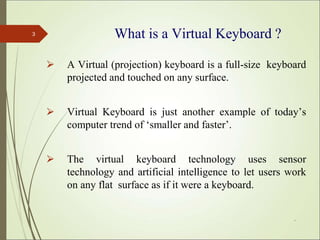
⮚ A Virtual (projection) keyboard is a full-size keyboard
projected and touched on any surface.
⮚ Virtual Keyboard is just another example of today’s
computer trend of ‘smaller and faster’.
⮚ The virtual keyboard technology uses sensor
technology and artificial intelligence to let users work
on any flat surface as if it were a keyboard.
What is a Virtual Keyboard ?
*
4
⮚ The Virtual Keyboard uses the infrared & laser technology to
project a full-size keyboard onto any flat surface. So you can use
it almost anywhere.
⮚ The Virtual Keyboard is not restricted to the ‘QWERTY’ touch-
typing paradigm ; adjustments can be done to the software to fit
other touch-typing paradigms as well, such as the ‘DVORAK’
keyboard.
What you can do with a Virtual Keyboard ?
Virtual Keyboard Technical Terms..
1. Sensor Module
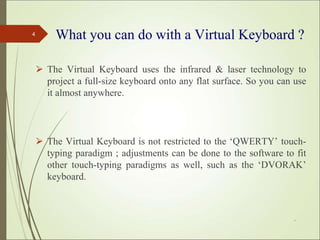
⮚ The Sensor Module serves as the eyes of the Electronic
Perception technology.
⮚ The Sensor Module operates by locating the user's fingers in 3-
D space and tracking the intended keystrokes.
*
5
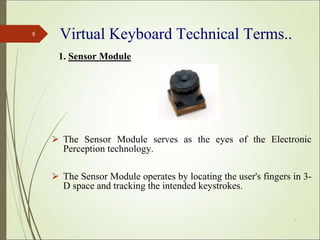
2. Infra Red Light Source
⮚ The Infrared Light Source emits a beam of infrared
light .
⮚ This light beam is designed to overlap the area on
which the keyboard pattern projector or printed image
resides.
⮚ This helps in recognizing the hand movements and the
pressing of keys .
*
6
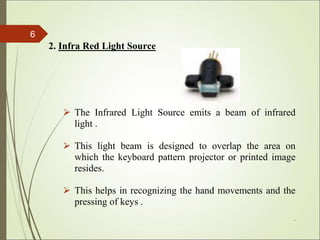
3. Pattern Projector
⮚ The Pattern Projector or optional printed image presents the
image of the keyboard of the system. This image can be
projected on any flat surface.
⮚ The projected image is that of a standard ‘QWERTY’ key-
board, with all the keys and control functions as in the
keyboard.
*
7
*
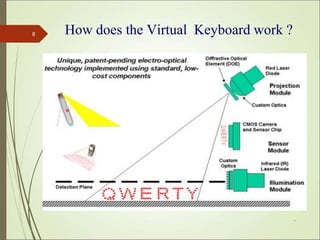
8 How does the Virtual Keyboard work ?
Step 1: Projection Module (Pattern Projector)
⮚ A template of the desired interface is projected onto the adjacent
interface surface.
⮚ The template is produced by illuminating a specially designed,
highly efficient holographic optical element with a red diode
laser.
Step 2: Micro Illumination (IR Light Source)
⮚ An infra-red plane of light is generated just above, and parallel
to, the interface surface.
⮚ This light is invisible to the user and hovers a few millimeters
above the surface.
*
9
How does the Virtual Keyboard work ?
(Contd..)
Step 3: Sensor Module
⮚ Reflected light from user interactions with the interface
surface is passed through an infra-red filter and imaged on to a
CMOS image sensor in the sensor module.
⮚ The sensor watches finger movements and translates them into
keystrokes in the device.
*
10
Types of Virtual Keyboard
⮚ There are different types of virtual keyboards,
manufactured by various companies which provide
different levels of functionalities .
⮚ The different types of virtual keyboards are:
▪ Developer VKB
▪ Canesta
▪ Sense board Technologies
▪ KITTY
▪ InFocus
*
11
*
12
⮚ It takes up less desk space than a conventional keyboard.
⮚ The typing does not require a lot of force. So easing the strain
on wrists and hands.
⮚ When connected to your handheld computer it is more
convenient to carry around than your laptop.
⮚ You can use it with your desktop, laptop, PDAs, Smart
phones or handheld computer .
⮚ No driver software necessary, it can be used as a plug and
play device.
Reasons to use the Virtual Keyboard
Applications of Virtual Keyboard
⮚ High-tech and Industrial sectors.
⮚ Used with Smart phones, PDAs, email, word
processing and spreadsheet tasks.
⮚ As computer/PDA input.
⮚ Gaming control.
⮚ TV remote control
*
13
Virtual Keyboard Advantages
⮚ It can be projected on any surface or you can type in the plain air .
⮚ It can be useful in places like operation theatres where low noise is
essential.
⮚ High battery life. The standard coin-sized lithium battery lasts
about eight months before needing to be replaced.
⮚ The Virtual Keyboard is not restricted to the ‘QWERTY’ touch-
typing paradigm, adjustments can be done to the software to fit
other touch-typing paradigms as well.
*
14
Virtual Keyboard Drawbacks
⮚ Virtual keyboard is hard to get used to. Since it involves
typing in thin air, it requires a little practice. Only people
who are good at typing can use a virtual keyboard
efficiently.
⮚ It is very costly ranging from 150 to 200 dollars. So not
everyone can buy this product.
⮚ The room in which the projected keyboard is used should not
be very bright so that the keyboard is properly visible.
*
15
Conclusion
⮚ Virtual Keyboard uses sensor technology and artificial
intelligence to let users work on any surface as if it were a
keyboard.
⮚ Projection key boards or virtual key boards claim to
provide the convenience of compactness with the
advantages of a full-blown QWERTY keyboard.
⮚ Virtual Keyboard is designed for anyone who become
frustrated with trying to put information into a handheld
but doesn't want to carry a notebook computer around.
Thus virtual keyboards will make typing easier,
faster, and almost a pleasure.
*
16
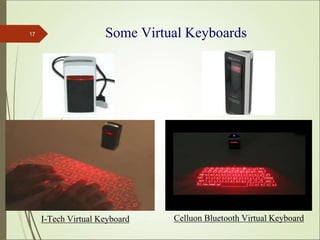
Some Virtual Keyboards
*
17
I-Tech Virtual Keyboard Celluon Bluetooth Virtual Keyboard
References
⮚ http://www.newscom.com/cgi-bin/prnh
⮚ www.canesta.com
⮚ www.procams.org
⮚ www.billbuxton.com/3state.html
⮚ www.smarttech.com
⮚ http://www.virtual-laserkeyboard.com/demo.asp
⮚ www.laser-keyboard.com
⮚ www.wikipedia.org
*
18
THANK YOU
*
19

Virtual-Keyboard.pptx

  • 1.
    A Presentation On Virtual Keyboard Submit: GowthamR Regno: 2101201117 Guide:Sajith Kumar S
  • 2.
    Presentation Overview ⮚ Whatis Virtual Keyboard? ⮚ What you can do with a Virtual Keyboard? ⮚ Virtual Keyboard Technical Terms. ⮚ How does the Virtual Keyboard work? ⮚ Reasons to use the Virtual Keyboard. ⮚ Types of Virtual Keyboard ⮚ Applications of Virtual Keyboard. ⮚ Virtual Keyboard advantages. ⮚ Virtual Keyboard drawbacks. ⮚ Conclusion. ⮚ Some Virtual Keyboards. * 2
  • 3.
    * 3 ⮚ A Virtual(projection) keyboard is a full-size keyboard projected and touched on any surface. ⮚ Virtual Keyboard is just another example of today’s computer trend of ‘smaller and faster’. ⮚ The virtual keyboard technology uses sensor technology and artificial intelligence to let users work on any flat surface as if it were a keyboard. What is a Virtual Keyboard ?
  • 4.
    * 4 ⮚ The VirtualKeyboard uses the infrared & laser technology to project a full-size keyboard onto any flat surface. So you can use it almost anywhere. ⮚ The Virtual Keyboard is not restricted to the ‘QWERTY’ touch- typing paradigm ; adjustments can be done to the software to fit other touch-typing paradigms as well, such as the ‘DVORAK’ keyboard. What you can do with a Virtual Keyboard ?
  • 5.
    Virtual Keyboard TechnicalTerms.. 1. Sensor Module ⮚ The Sensor Module serves as the eyes of the Electronic Perception technology. ⮚ The Sensor Module operates by locating the user's fingers in 3- D space and tracking the intended keystrokes. * 5
  • 6.
    2. Infra RedLight Source ⮚ The Infrared Light Source emits a beam of infrared light . ⮚ This light beam is designed to overlap the area on which the keyboard pattern projector or printed image resides. ⮚ This helps in recognizing the hand movements and the pressing of keys . * 6
  • 7.
    3. Pattern Projector ⮚The Pattern Projector or optional printed image presents the image of the keyboard of the system. This image can be projected on any flat surface. ⮚ The projected image is that of a standard ‘QWERTY’ key- board, with all the keys and control functions as in the keyboard. * 7
  • 8.
    * 8 How doesthe Virtual Keyboard work ?
  • 9.
    Step 1: ProjectionModule (Pattern Projector) ⮚ A template of the desired interface is projected onto the adjacent interface surface. ⮚ The template is produced by illuminating a specially designed, highly efficient holographic optical element with a red diode laser. Step 2: Micro Illumination (IR Light Source) ⮚ An infra-red plane of light is generated just above, and parallel to, the interface surface. ⮚ This light is invisible to the user and hovers a few millimeters above the surface. * 9 How does the Virtual Keyboard work ? (Contd..)
  • 10.
    Step 3: SensorModule ⮚ Reflected light from user interactions with the interface surface is passed through an infra-red filter and imaged on to a CMOS image sensor in the sensor module. ⮚ The sensor watches finger movements and translates them into keystrokes in the device. * 10
  • 11.
    Types of VirtualKeyboard ⮚ There are different types of virtual keyboards, manufactured by various companies which provide different levels of functionalities . ⮚ The different types of virtual keyboards are: ▪ Developer VKB ▪ Canesta ▪ Sense board Technologies ▪ KITTY ▪ InFocus * 11
  • 12.
    * 12 ⮚ It takesup less desk space than a conventional keyboard. ⮚ The typing does not require a lot of force. So easing the strain on wrists and hands. ⮚ When connected to your handheld computer it is more convenient to carry around than your laptop. ⮚ You can use it with your desktop, laptop, PDAs, Smart phones or handheld computer . ⮚ No driver software necessary, it can be used as a plug and play device. Reasons to use the Virtual Keyboard
  • 13.
    Applications of VirtualKeyboard ⮚ High-tech and Industrial sectors. ⮚ Used with Smart phones, PDAs, email, word processing and spreadsheet tasks. ⮚ As computer/PDA input. ⮚ Gaming control. ⮚ TV remote control * 13
  • 14.
    Virtual Keyboard Advantages ⮚It can be projected on any surface or you can type in the plain air . ⮚ It can be useful in places like operation theatres where low noise is essential. ⮚ High battery life. The standard coin-sized lithium battery lasts about eight months before needing to be replaced. ⮚ The Virtual Keyboard is not restricted to the ‘QWERTY’ touch- typing paradigm, adjustments can be done to the software to fit other touch-typing paradigms as well. * 14
  • 15.
    Virtual Keyboard Drawbacks ⮚Virtual keyboard is hard to get used to. Since it involves typing in thin air, it requires a little practice. Only people who are good at typing can use a virtual keyboard efficiently. ⮚ It is very costly ranging from 150 to 200 dollars. So not everyone can buy this product. ⮚ The room in which the projected keyboard is used should not be very bright so that the keyboard is properly visible. * 15
  • 16.
    Conclusion ⮚ Virtual Keyboarduses sensor technology and artificial intelligence to let users work on any surface as if it were a keyboard. ⮚ Projection key boards or virtual key boards claim to provide the convenience of compactness with the advantages of a full-blown QWERTY keyboard. ⮚ Virtual Keyboard is designed for anyone who become frustrated with trying to put information into a handheld but doesn't want to carry a notebook computer around. Thus virtual keyboards will make typing easier, faster, and almost a pleasure. * 16
  • 17.
    Some Virtual Keyboards * 17 I-TechVirtual Keyboard Celluon Bluetooth Virtual Keyboard
  • 18.
    References ⮚ http://www.newscom.com/cgi-bin/prnh ⮚ www.canesta.com ⮚www.procams.org ⮚ www.billbuxton.com/3state.html ⮚ www.smarttech.com ⮚ http://www.virtual-laserkeyboard.com/demo.asp ⮚ www.laser-keyboard.com ⮚ www.wikipedia.org * 18
  • 19.