System Dynamics
Private Cloud Academy
Aidan Finn
aidan.finn@systemdynamics.ie
Paul Hall
Paul.Hall@systemdynamics.ie
1/30/2015 2
System Dynamics - Overview
 Established 1968
 Acquired 1997 from UK parent by current
management
 Ireland’s largest indigenous IT Business
Solutions Company
 Winner of Deloitte Best Managed Companies
Awards 2009 and 2010
 Hyper-V and System Centre
 SharePoint
 ASP.NET, SQL, InfoPath
Private Cloud Academy
 One of four modules
• Module I: Hyper-V and Private Cloud Computing
• Module II: Managing Hyper-V (14 January 2011)
• Module III: Hyper-V and Data Protection Manager
(18 March 2011)
• Module IV: Windows Server 2008 R2 Service Pack 1
(20 May 2011)
 Very important that we learn from today so
please fill out your feedback forms.
 There is a prize !!
About Aidan Finn
 Infrastructure Team Lead at System Dynamics
 http://www.systemdynamics.ie
 Working in IT since 1996
 MCSE & MVP (Virtual Machine)
 Experienced with Windows Server/Desktop,
System Center, virtualisation, and IT
infrastructure.
 Blog: http://www.aidanfinn.com
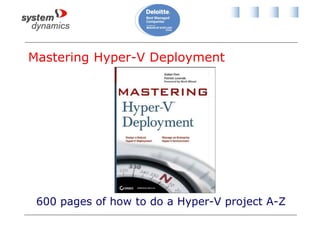
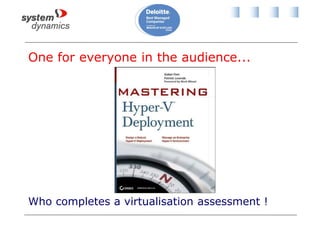
Mastering Hyper-V Deployment
600 pages of how to do a Hyper-V project A-Z
Also
 Mastering Windows Server 2008 R2 (Sybex,
2009) - 4 chapters
 Mastering Windows 7 Deployment (Sybex,
TBA) - 6 chapters
 10215A: Implementing and Managing
Microsoft Server 2008 R2 Virtualization –
Technical reviewer
Agenda
 What makes Hyper-V different? (Level 100)
 System Center Virtual Machine Manager 2008
R2 (Level 300)
 Microsoft’s private cloud (Level 300)
• System Center Virtual Machine Manager Self-
Service Portal 2.0
 The future? (Level 100)
What Makes Hyper-V Different?
Introducing Hyper-V
 Microsoft’s enterprise-ready hardware
virtualisation platform
 Features include:
• Clustering for fault tolerance
• Shared storage
• Live Migration
• Hardware integration for performance
• Superior security
• Dynamic Memory (Service Pack 1)
• RemoteFX (Service Pack 1)
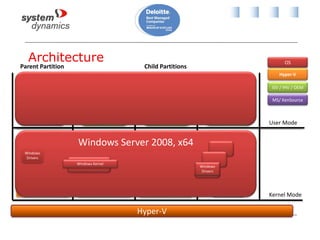
Architecture
Applications Applications Applications
Non-
Hypervisor
Aware OS
Windows Server
2008, 2003
Windows
Kernel VSC
VMBus Emulation VMBus
“Designed for Windows” Server Hardware
Windows Server
2008, x64
Windows
Kernel
Xen-Enabled Linux
Kernel
Linux
VSC
Hypercall
Adapter
Parent Partition Child Partitions
VMBus
Hyper-V
VSP
VM Service
WMI Provider
VM Worker
Processes
OS
ISV / IHV / OEM
Hyper-V
MS/ XenSource
User Mode
Kernel Mode
Windows Server 2008, x64
Windows Kernel
Windows
Drivers
Windows
Drivers
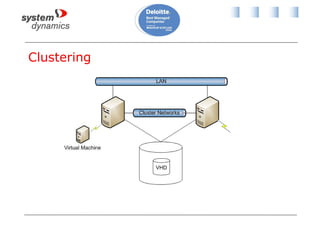
Clustering
VHD
Benefits of Hardware Virtualisation
 Lower costs:
• Licensing (even Microsoft!)
• Power
• Rack space
• Hardware support
• Capital expenditure
 Easier management:
• Rapid deployment of new machines
• Dealing with files, not hardware
 Greener computing
Etc, Etc, Etc
 That’s no different to the others?
• Citrix
• VMware
• RedHat
• Oracle
 Maybe … but they deal with the virtualisation
stack
 Hyper-V isn’t the endgame … it’s the start!
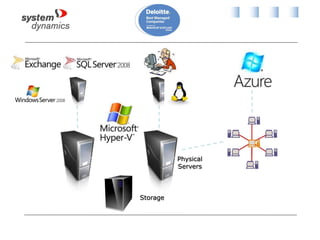
What Makes Hyper-V Different?
 Hyper-V is an enabler
 New, improved, easier, more efficient management:
• Backup
• Monitoring
• Helpdesk, change control, and process
• Workflow and process
• Deployment
• Management
 It allows us to change how we do IT infrastructure:
Microsoft System Centre
Backup and Recovery
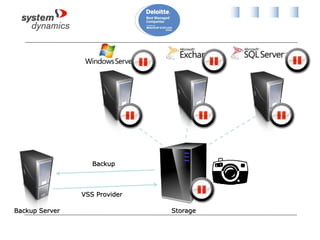
 Backup is just way too hard right now
 System Center Data Protection Manager 2010
 Backup virtual machines at the storage level
every night
 Backup business data every 15 minutes
 Secondary site replication
 “Bare metal recovery” of a VM is similar to
restoring a Word document
 Data consistencey: Volume Shadow Copy
Service
Storage Level Backup
Monitoring
 We need to monitor more than just the
virtualisation layer
 System Center Operations Manager 2007 R2
 Monitor the complete infrastructure:
• Network (3rd party now, see OpsMgr 2012)
• Servers and storage (OEM)
• Virtualisation (in cooperation with SCVMM/PRO)
• Operating System (MS: Windows and Linux)
• Services and applications (OEM and 3rd party)
• Azure
More Than The Usuals
 Data warehouse and reporting
 Client perspective monitoring
• Know about problems before the users do
 Distributed application monitoring
• ITIL/MOF view of a “service”
• Modeled based on components and
dependencies
 Service level agreement (SLA) monitoring
• Based on distributed applications
• Dashboard and reporting
Complete Vertical and Horizontal
Monitoring
Helpdesk, Change Control, and Process
 System Centre manages IT infrastructure
 Humans play a role in this process
 Need a system to unify human and machine in
the process
 System Center Service Manager 2010
• Helpdesk
• Configuration management database
• Define processes, control and track compliance
• Built in processes for ITIL
• Integrates with System Center family
Automated Workflow
 Many actions are repeated and follow scripts
 They require systems integration
 Microsoft System Center Opalis
• Automate best practices
• Allow the datacenter to respond to changing
requirements
• Integrates System Center, Active Directory, and
3rd party products
 For example: request new deployment in Service
Desk, and Opalis orchestrates the process
System Center Virtual Machine
Manager 2008 R2
Virtualisation Management
 You can manage all aspects of Hyper-V with built-in
tools:
• Hyper-V Manager
• Failover Clustering Manager
 System Center Virtual Machine Manager 2008 R2
provides a central point for managing many host
servers.
• Easier administration
• More automation
• P2V
• Cross hypervisor support & V2V
VMM Components
 VMM Server: The VMM service
• 1 server
• Cannot be clustered
 Library: Stores virtualisation assets
• A file share
• 1 default one of VMM server
• Place local to Hyper-V hosts
• Can be a clustered file share
• Should not be replicated, e.g. DFS-R
VMM Components Continued
 Database: A SQL Server/Express database
• Stores VMM data
• Also contains metadata for files in library
 Self-Service Portal: End user provisioning of
VMs
• An IIS website
 Admin Console: Includes PowerShell module
for VMM
 Agent: Installed on every managed host
VMM Architecture
 5-10 Hosts
• Single server: 2 GB RAM, 40 GB disk
 11-20 Hosts
• Single server: 4 GB RAM, 50 GB disk
 21-150 Hosts
• VMM server: 4 GB RAM, 150 GB disk
• Library server: ? GB disk
 >150 Hosts
• VMM server: 8GB RAM, 50 GB disk
• Library server: ? GB disk
• Database server: ? GB RAM, ? GB disk
VMM Scalability
 VMM can really scale
 Up to 400 hosts
 Up to 8,000 virtual machines
Supported Hosts
 Windows Server 2008 R2 Hyper-V
 Hyper-V Server 2008 R2
 Windows Server 2008 Hyper-V
 Windows Server 2003/R2 Virtual Server 2005
R2 SP1
 VMware vCenter 2.5 & VirtualCenter 2.0.1
• ESX Server 3.5
• ESX Server 3.0.2
• ESX 3i
 VMware vSphere 4.0 (VI3 features only)
Taking Control of Hosts
 Add host via wizard
• Will automatically deploy Virtual Server 2005 R2 SP1
to W2003 hosts if required
• Will enable Hyper-V role if required
• Will add a cluster if you select a cluster node
 VMware
• Add the vSphere management server
• Optionally import library contents*
• Add additional ESX hosts
Host Groups
 A way to organize managed hosts
 Used for:
• Configuring policy
• Delegating administrative access
 Group hosts based on:
• Delegated administration
• VM placement
• Common policies
 A cluster cannot span host groups
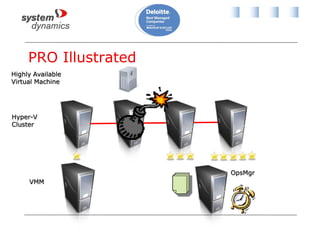
PRO
 Performance and Resource Optimization
 Integration with Operations Manager 2007 via
PRO management packs
• Built-in MS management packs
• OEM/partner management packs
• Self-authored
 OpsMgr detects fault/performance issue
 VMM uses Intelligent Placement
• Relocate VMs to most suitable host in the
Hyper-V cluster
PRO Illustrated
The Library
 The heart of VMM
 It will need plenty of disk
• Consider cheaper & bigger disk
 Store:
• Templates
• ISO
• VHD
• Offline VMs
• PowerShell scripts
• Hardware profiles
• Answer files
Constrained Delegation
 Required to allow VMs to directly mount library
ISO files
 Active Directory administration
• Open properties of each Hyper-V host computer
object
• Delegation tab -> Use Any Authentication
Protocol
• Add -> Enter library server name -> select CIFS
Templates
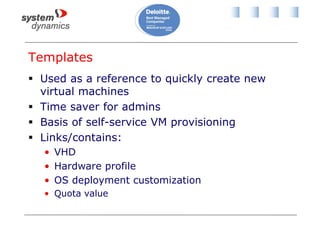
 Used as a reference to quickly create new
virtual machines
 Time saver for admins
 Basis of self-service VM provisioning
 Links/contains:
• VHD
• Hardware profile
• OS deployment customization
• Quota value
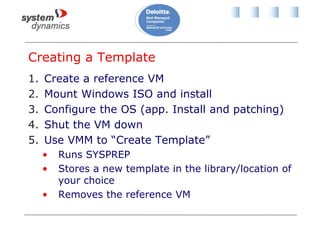
Creating a Template
1. Create a reference VM
2. Mount Windows ISO and install
3. Configure the OS (app. Install and patching)
4. Shut the VM down
5. Use VMM to “Create Template”
• Runs SYSPREP
• Stores a new template in the library/location of
your choice
• Removes the reference VM
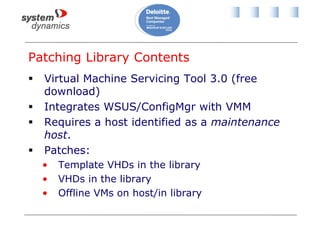
Patching Library Contents
 Virtual Machine Servicing Tool 3.0 (free
download)
 Integrates WSUS/ConfigMgr with VMM
 Requires a host identified as a maintenance
host.
 Patches:
• Template VHDs in the library
• VHDs in the library
• Offline VMs on host/in library
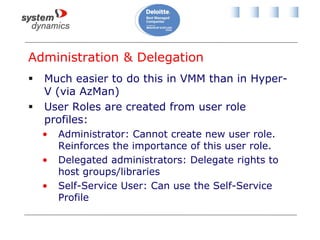
Administration & Delegation
 Much easier to do this in VMM than in Hyper-
V (via AzMan)
 User Roles are created from user role
profiles:
• Administrator: Cannot create new user role.
Reinforces the importance of this user role.
• Delegated administrators: Delegate rights to
host groups/libraries
• Self-Service User: Can use the Self-Service
Profile
Self-Service Portal
 “What is the delay in deploying my server?”
 Web interface that non-VMM administrators
can use to deploy their own VMs
• Aimed at branch IT, faculty IT, application
managers/developers/testers, etc
 Let end users deploy/manage their own VMs
 Remove IT from the process
• Manage the “compute cluster”
 End up with happier end users
Configuring Self-Service Portal Access
 Administrators configure:
• Library template quota value
• Self-service user role membership
• Template permissions
• Host group availability
• Task access
• Library access
• Quota to restrict VM sprawl
 Delegated users log in and deploy/manage
VMs for themselves
Problems with Self-Service Portal
 Doesn’t provision:
• Networking placement
• IP configurations
• SAN
• Load balancers
 Quota isn’t comparable to resource usage
 Isn’t extensible
 Does not provide cross-charging
 No dashboard for administrators/accountants
 But isn’t this starting to get closer to cloud
computing?
Private Cloud Computing
What is Cloud Computing?
 NIST (USA National Institute of Standards
and Technology) definition is commonly
referenced
 “Cloud computing is a model for enabling
convenient, on-demand network access to a
shared pool of configurable computing
resources”
Essential Characteristics
 On-demand self-service
 Broad network access
 Resource pooling
 Rapid elasticity
 Measured service
Types of Cloud Computing
 Software-as-a-Service (SaaS): Subscribe to a
multi-tenant application such as Office365,
Salesforce, etc
 Platform-as-a-Service (PaaS): a computing
environment that you can build an application
on. No OS access.
 Infrastructure-as-a-Service (IaaS)*: A
computing environment where we provision
virtual machines with OS access
Location, Location, Location
 Choose the most suitable location for applications
and data:
• Regulations, contracts, privacy, trust, capacity,
etc
 Public cloud: Multi-tenant environment on the
Internet such as Azure, AWS, etc
 Private cloud: Shared pool of resources, or compute
cluster, built in internal data centre and shared with
internal business units
 Cross-premises (hybrid) cloud: Infrastructure is a
mix of private cloud and public cloud
The Forecast is Cloudy!
 Cloud computing is here to stay
 IT infrastructure exists to provide applications
 We must optimise how we do that
 A private cloud
• Enables us to focus on infrastructure
management
• Allows the business to deploy IT when they
need it
• Centralise IT infrastructure and delegate access
Example
 A University
 Centralised IT infrastructure
• A compute cluster (Hyper-V/SAN/Networks)
• Systems management and virtualisation skills
 Faculties are consumers of IT services
• Faculty IT subscribe to compute cluster
resources
• Central IT charges faculty based on utilisation
 Costs are minimised
 Deployment is rapid and flexible
Microsoft’s Private Cloud
 System Center Virtual Machine Manager Self
Service Portal 2.0 *gasp for air here*
(SCVMM SSP 2.0)
 Free download
 Leverages:
• VMM 2008 R2
• PowerShell
• Library resources
Features of SSP 2.0
 Private cloud computing
 Cross-charging based on utlisation
 Extensible VM actions: PowerShell, VBS, CMD
 Configure network binding
• Static IP addresses or DHCP
 Delegated administration
 Provision SAN/Network load balancers
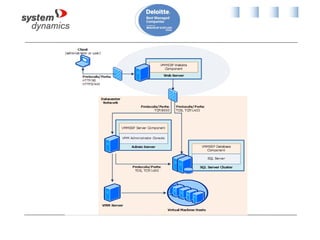
SSP 2 Architecture
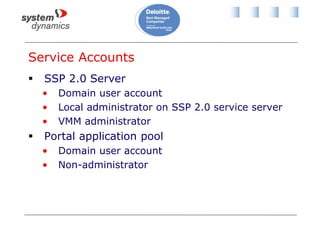
Service Accounts
 SSP 2.0 Server
• Domain user account
• Local administrator on SSP 2.0 service server
• VMM administrator
 Portal application pool
• Domain user account
• Non-administrator
Hardware Requirements
 Single server deployment
• 4 GB RAM, 50 GB disk
 Portal server
• 4 GB RAM, 2 GB disk
 SSP server
• 4 GB RAM, 2 GB disk
 Database server
• 4 GB RAM, 50 GB disk
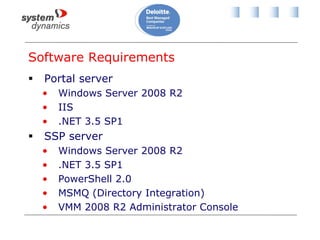
Software Requirements
 Portal server
• Windows Server 2008 R2
• IIS
• .NET 3.5 SP1
 SSP server
• Windows Server 2008 R2
• .NET 3.5 SP1
• PowerShell 2.0
• MSMQ (Directory Integration)
• VMM 2008 R2 Administrator Console
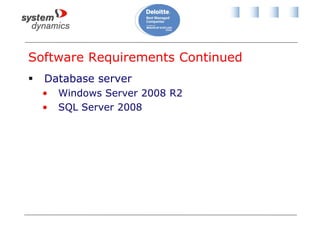
Software Requirements Continued
 Database server
• Windows Server 2008 R2
• SQL Server 2008
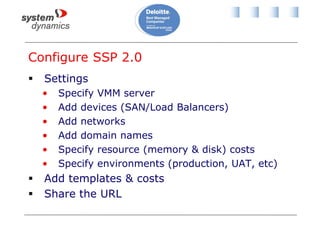
Configure SSP 2.0
 Settings
• Specify VMM server
• Add devices (SAN/Load Balancers)
• Add networks
• Add domain names
• Specify resource (memory & disk) costs
• Specify environments (production, UAT, etc)
 Add templates & costs
 Share the URL
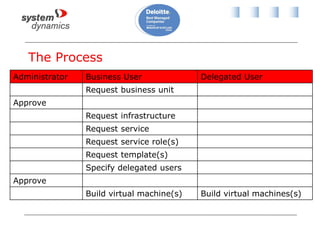
The Process
Administrator Business User Delegated User
Request business unit
Approve
Request infrastructure
Request service
Request service role(s)
Request template(s)
Specify delegated users
Approve
Build virtual machine(s) Build virtual machines(s)
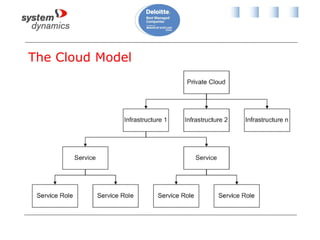
The Cloud Model
The Cloud Model Continued
 Private Cloud
• VMM, SSP 2.0, compute cluster
 Business unit
• Contains infrastructures
 Infrastructure:
• Specify total memory/disk
• Defines costs
• Contains services
• Defines templates
The Cloud Model Continued
 Service:
• Specify memory/disk
• An application architecture, e.g. N-Tier
• Defines all networks
• Host Group*
• Library*
• Custom costs*
 Service Role
• A network tier in the application architecture
User Roles
 DCITAdmin
• SSP 2.0 administrators
 BUITAdmin
• Business unit administrators
• Request infrastructures and services/roles
 AdvancedOperator
• Deploy/Create/Delete virtual machines, etc
 BusinessUser
• Deploy virtual machines, etc
 Custom defined roles
Dashboard
 A SharePoint website
 Deployment Reporting:
• Business units
• Infrastructure
• Service
• Service Roles
 Utilization Reporting
 Chargeback Reporting
Requirements
 SCVMM SSP 2.0
 SharePoint Service 3.0 SP2/SharePoint Server
2007 SP2
 SQL Server 2008
 .NET 3.5
 IE7/IE8
 Application pool user account:
• Non administrator domain user
Customising the SSP Dashboard
 Requires some SharePoint knowledge
• Choose data sets
• Bar graphs
• Pie charts
• Gauges
• Data grids
• Score cards
• Delegated access via SharePoint site
The Future
Azure VM Role
 Announced recently at PDC 2010
 IaaS cloud computing in Azure
 Deploy and virtual machines
 Can use other VM services
• SQL
• AppFabric
 Includes Server App-V
• Service virtualisation
• Allows zero downtime VM OS patching
Cross-Premises Cloud
 VPN connectivity between on-premises and
Azure
 At PDC 2009, Bob Muglia announced future
feature
• Migrate VMs from private Hyper-V cloud to
Azure
 Azure VM Role management site
• Looks very like VMM 2012 (vNext)
VMM 2012
 Successor to VMM 2008 R2
 RTM in H2 2011
 Adds Service Templates
• Define tiers of a server architecutre
• Specify elasticity, e.g. 2-5 web servers
• Specify networking
• Deploy Server App-V, MSDeploy, SQL Apps
VMM 2012 Continued
 Server App-V
• Virtualise services, e.g. SQL or IIS
• Patch VM templates
• Deployed VMs are swapped out
 Fabric management
• Build Hyper-V hosts/clusters
• Provision SAN and network
 Seems to include much of SSP 2.0 approach
 A private cloud infrastructure management
solution
Action
 Contact us for virtualisation assessment
• 1 free day of consulting for today’s attendees
(per organization)
• Help you determine the right strategy for you
• Complete the process and get one free copy of
Mastering Hyper-V Deployment
 Paul.Hall@systemdynamics.ie
 01 4830355
One for everyone in the audience...
Who completes a virtualisation assessment !
Private Cloud Academy
 One of four modules
• Module I: Hyper-V and Private Cloud Computing
• Module II: Managing Hyper-V (14 January 2011)
• Module III: Hyper-V and Data Protection Manager
(18 March 2011)
• Module IV: Windows Server 2008 R2 Service Pack 1
(20 May 2011)
 Very important that we learn from today so
please fill out your feedback forms.
 There is a prize !!
Did I Stay On Schedule?
Sales
•http://www.systemdynamics.ie
•Paul.Hall@systemdynamics.ie
Aidan Finn
•Aidan.Finn@systemdynamics.ie
•@joe_elway
•http://www.aidanfinn.com

Virtualisation Academy - Private Cloud

  • 1.
    System Dynamics Private CloudAcademy Aidan Finn aidan.finn@systemdynamics.ie Paul Hall Paul.Hall@systemdynamics.ie
  • 2.
    1/30/2015 2 System Dynamics- Overview  Established 1968  Acquired 1997 from UK parent by current management  Ireland’s largest indigenous IT Business Solutions Company  Winner of Deloitte Best Managed Companies Awards 2009 and 2010  Hyper-V and System Centre  SharePoint  ASP.NET, SQL, InfoPath
  • 3.
    Private Cloud Academy One of four modules • Module I: Hyper-V and Private Cloud Computing • Module II: Managing Hyper-V (14 January 2011) • Module III: Hyper-V and Data Protection Manager (18 March 2011) • Module IV: Windows Server 2008 R2 Service Pack 1 (20 May 2011)  Very important that we learn from today so please fill out your feedback forms.  There is a prize !!
  • 4.
    About Aidan Finn Infrastructure Team Lead at System Dynamics  http://www.systemdynamics.ie  Working in IT since 1996  MCSE & MVP (Virtual Machine)  Experienced with Windows Server/Desktop, System Center, virtualisation, and IT infrastructure.  Blog: http://www.aidanfinn.com
  • 5.
    Mastering Hyper-V Deployment 600pages of how to do a Hyper-V project A-Z
  • 6.
    Also  Mastering WindowsServer 2008 R2 (Sybex, 2009) - 4 chapters  Mastering Windows 7 Deployment (Sybex, TBA) - 6 chapters  10215A: Implementing and Managing Microsoft Server 2008 R2 Virtualization – Technical reviewer
  • 7.
    Agenda  What makesHyper-V different? (Level 100)  System Center Virtual Machine Manager 2008 R2 (Level 300)  Microsoft’s private cloud (Level 300) • System Center Virtual Machine Manager Self- Service Portal 2.0  The future? (Level 100)
  • 8.
  • 9.
    Introducing Hyper-V  Microsoft’senterprise-ready hardware virtualisation platform  Features include: • Clustering for fault tolerance • Shared storage • Live Migration • Hardware integration for performance • Superior security • Dynamic Memory (Service Pack 1) • RemoteFX (Service Pack 1)
  • 10.
    Architecture Applications Applications Applications Non- Hypervisor AwareOS Windows Server 2008, 2003 Windows Kernel VSC VMBus Emulation VMBus “Designed for Windows” Server Hardware Windows Server 2008, x64 Windows Kernel Xen-Enabled Linux Kernel Linux VSC Hypercall Adapter Parent Partition Child Partitions VMBus Hyper-V VSP VM Service WMI Provider VM Worker Processes OS ISV / IHV / OEM Hyper-V MS/ XenSource User Mode Kernel Mode Windows Server 2008, x64 Windows Kernel Windows Drivers Windows Drivers
  • 11.
  • 12.
    Benefits of HardwareVirtualisation  Lower costs: • Licensing (even Microsoft!) • Power • Rack space • Hardware support • Capital expenditure  Easier management: • Rapid deployment of new machines • Dealing with files, not hardware  Greener computing
  • 13.
    Etc, Etc, Etc That’s no different to the others? • Citrix • VMware • RedHat • Oracle  Maybe … but they deal with the virtualisation stack  Hyper-V isn’t the endgame … it’s the start!
  • 14.
    What Makes Hyper-VDifferent?  Hyper-V is an enabler  New, improved, easier, more efficient management: • Backup • Monitoring • Helpdesk, change control, and process • Workflow and process • Deployment • Management  It allows us to change how we do IT infrastructure: Microsoft System Centre
  • 15.
    Backup and Recovery Backup is just way too hard right now  System Center Data Protection Manager 2010  Backup virtual machines at the storage level every night  Backup business data every 15 minutes  Secondary site replication  “Bare metal recovery” of a VM is similar to restoring a Word document  Data consistencey: Volume Shadow Copy Service
  • 16.
  • 18.
    Monitoring  We needto monitor more than just the virtualisation layer  System Center Operations Manager 2007 R2  Monitor the complete infrastructure: • Network (3rd party now, see OpsMgr 2012) • Servers and storage (OEM) • Virtualisation (in cooperation with SCVMM/PRO) • Operating System (MS: Windows and Linux) • Services and applications (OEM and 3rd party) • Azure
  • 19.
    More Than TheUsuals  Data warehouse and reporting  Client perspective monitoring • Know about problems before the users do  Distributed application monitoring • ITIL/MOF view of a “service” • Modeled based on components and dependencies  Service level agreement (SLA) monitoring • Based on distributed applications • Dashboard and reporting
  • 20.
    Complete Vertical andHorizontal Monitoring
  • 22.
    Helpdesk, Change Control,and Process  System Centre manages IT infrastructure  Humans play a role in this process  Need a system to unify human and machine in the process  System Center Service Manager 2010 • Helpdesk • Configuration management database • Define processes, control and track compliance • Built in processes for ITIL • Integrates with System Center family
  • 23.
    Automated Workflow  Manyactions are repeated and follow scripts  They require systems integration  Microsoft System Center Opalis • Automate best practices • Allow the datacenter to respond to changing requirements • Integrates System Center, Active Directory, and 3rd party products  For example: request new deployment in Service Desk, and Opalis orchestrates the process
  • 24.
    System Center VirtualMachine Manager 2008 R2
  • 25.
    Virtualisation Management  Youcan manage all aspects of Hyper-V with built-in tools: • Hyper-V Manager • Failover Clustering Manager  System Center Virtual Machine Manager 2008 R2 provides a central point for managing many host servers. • Easier administration • More automation • P2V • Cross hypervisor support & V2V
  • 26.
    VMM Components  VMMServer: The VMM service • 1 server • Cannot be clustered  Library: Stores virtualisation assets • A file share • 1 default one of VMM server • Place local to Hyper-V hosts • Can be a clustered file share • Should not be replicated, e.g. DFS-R
  • 27.
    VMM Components Continued Database: A SQL Server/Express database • Stores VMM data • Also contains metadata for files in library  Self-Service Portal: End user provisioning of VMs • An IIS website  Admin Console: Includes PowerShell module for VMM  Agent: Installed on every managed host
  • 28.
    VMM Architecture  5-10Hosts • Single server: 2 GB RAM, 40 GB disk  11-20 Hosts • Single server: 4 GB RAM, 50 GB disk  21-150 Hosts • VMM server: 4 GB RAM, 150 GB disk • Library server: ? GB disk  >150 Hosts • VMM server: 8GB RAM, 50 GB disk • Library server: ? GB disk • Database server: ? GB RAM, ? GB disk
  • 29.
    VMM Scalability  VMMcan really scale  Up to 400 hosts  Up to 8,000 virtual machines
  • 30.
    Supported Hosts  WindowsServer 2008 R2 Hyper-V  Hyper-V Server 2008 R2  Windows Server 2008 Hyper-V  Windows Server 2003/R2 Virtual Server 2005 R2 SP1  VMware vCenter 2.5 & VirtualCenter 2.0.1 • ESX Server 3.5 • ESX Server 3.0.2 • ESX 3i  VMware vSphere 4.0 (VI3 features only)
  • 31.
    Taking Control ofHosts  Add host via wizard • Will automatically deploy Virtual Server 2005 R2 SP1 to W2003 hosts if required • Will enable Hyper-V role if required • Will add a cluster if you select a cluster node  VMware • Add the vSphere management server • Optionally import library contents* • Add additional ESX hosts
  • 32.
    Host Groups  Away to organize managed hosts  Used for: • Configuring policy • Delegating administrative access  Group hosts based on: • Delegated administration • VM placement • Common policies  A cluster cannot span host groups
  • 33.
    PRO  Performance andResource Optimization  Integration with Operations Manager 2007 via PRO management packs • Built-in MS management packs • OEM/partner management packs • Self-authored  OpsMgr detects fault/performance issue  VMM uses Intelligent Placement • Relocate VMs to most suitable host in the Hyper-V cluster
  • 34.
  • 35.
    The Library  Theheart of VMM  It will need plenty of disk • Consider cheaper & bigger disk  Store: • Templates • ISO • VHD • Offline VMs • PowerShell scripts • Hardware profiles • Answer files
  • 36.
    Constrained Delegation  Requiredto allow VMs to directly mount library ISO files  Active Directory administration • Open properties of each Hyper-V host computer object • Delegation tab -> Use Any Authentication Protocol • Add -> Enter library server name -> select CIFS
  • 37.
    Templates  Used asa reference to quickly create new virtual machines  Time saver for admins  Basis of self-service VM provisioning  Links/contains: • VHD • Hardware profile • OS deployment customization • Quota value
  • 38.
    Creating a Template 1.Create a reference VM 2. Mount Windows ISO and install 3. Configure the OS (app. Install and patching) 4. Shut the VM down 5. Use VMM to “Create Template” • Runs SYSPREP • Stores a new template in the library/location of your choice • Removes the reference VM
  • 39.
    Patching Library Contents Virtual Machine Servicing Tool 3.0 (free download)  Integrates WSUS/ConfigMgr with VMM  Requires a host identified as a maintenance host.  Patches: • Template VHDs in the library • VHDs in the library • Offline VMs on host/in library
  • 40.
    Administration & Delegation Much easier to do this in VMM than in Hyper- V (via AzMan)  User Roles are created from user role profiles: • Administrator: Cannot create new user role. Reinforces the importance of this user role. • Delegated administrators: Delegate rights to host groups/libraries • Self-Service User: Can use the Self-Service Profile
  • 41.
    Self-Service Portal  “Whatis the delay in deploying my server?”  Web interface that non-VMM administrators can use to deploy their own VMs • Aimed at branch IT, faculty IT, application managers/developers/testers, etc  Let end users deploy/manage their own VMs  Remove IT from the process • Manage the “compute cluster”  End up with happier end users
  • 42.
    Configuring Self-Service PortalAccess  Administrators configure: • Library template quota value • Self-service user role membership • Template permissions • Host group availability • Task access • Library access • Quota to restrict VM sprawl  Delegated users log in and deploy/manage VMs for themselves
  • 43.
    Problems with Self-ServicePortal  Doesn’t provision: • Networking placement • IP configurations • SAN • Load balancers  Quota isn’t comparable to resource usage  Isn’t extensible  Does not provide cross-charging  No dashboard for administrators/accountants  But isn’t this starting to get closer to cloud computing?
  • 44.
  • 45.
    What is CloudComputing?  NIST (USA National Institute of Standards and Technology) definition is commonly referenced  “Cloud computing is a model for enabling convenient, on-demand network access to a shared pool of configurable computing resources”
  • 46.
    Essential Characteristics  On-demandself-service  Broad network access  Resource pooling  Rapid elasticity  Measured service
  • 47.
    Types of CloudComputing  Software-as-a-Service (SaaS): Subscribe to a multi-tenant application such as Office365, Salesforce, etc  Platform-as-a-Service (PaaS): a computing environment that you can build an application on. No OS access.  Infrastructure-as-a-Service (IaaS)*: A computing environment where we provision virtual machines with OS access
  • 48.
    Location, Location, Location Choose the most suitable location for applications and data: • Regulations, contracts, privacy, trust, capacity, etc  Public cloud: Multi-tenant environment on the Internet such as Azure, AWS, etc  Private cloud: Shared pool of resources, or compute cluster, built in internal data centre and shared with internal business units  Cross-premises (hybrid) cloud: Infrastructure is a mix of private cloud and public cloud
  • 49.
    The Forecast isCloudy!  Cloud computing is here to stay  IT infrastructure exists to provide applications  We must optimise how we do that  A private cloud • Enables us to focus on infrastructure management • Allows the business to deploy IT when they need it • Centralise IT infrastructure and delegate access
  • 50.
    Example  A University Centralised IT infrastructure • A compute cluster (Hyper-V/SAN/Networks) • Systems management and virtualisation skills  Faculties are consumers of IT services • Faculty IT subscribe to compute cluster resources • Central IT charges faculty based on utilisation  Costs are minimised  Deployment is rapid and flexible
  • 51.
    Microsoft’s Private Cloud System Center Virtual Machine Manager Self Service Portal 2.0 *gasp for air here* (SCVMM SSP 2.0)  Free download  Leverages: • VMM 2008 R2 • PowerShell • Library resources
  • 52.
    Features of SSP2.0  Private cloud computing  Cross-charging based on utlisation  Extensible VM actions: PowerShell, VBS, CMD  Configure network binding • Static IP addresses or DHCP  Delegated administration  Provision SAN/Network load balancers
  • 53.
  • 55.
    Service Accounts  SSP2.0 Server • Domain user account • Local administrator on SSP 2.0 service server • VMM administrator  Portal application pool • Domain user account • Non-administrator
  • 56.
    Hardware Requirements  Singleserver deployment • 4 GB RAM, 50 GB disk  Portal server • 4 GB RAM, 2 GB disk  SSP server • 4 GB RAM, 2 GB disk  Database server • 4 GB RAM, 50 GB disk
  • 57.
    Software Requirements  Portalserver • Windows Server 2008 R2 • IIS • .NET 3.5 SP1  SSP server • Windows Server 2008 R2 • .NET 3.5 SP1 • PowerShell 2.0 • MSMQ (Directory Integration) • VMM 2008 R2 Administrator Console
  • 58.
    Software Requirements Continued Database server • Windows Server 2008 R2 • SQL Server 2008
  • 59.
    Configure SSP 2.0 Settings • Specify VMM server • Add devices (SAN/Load Balancers) • Add networks • Add domain names • Specify resource (memory & disk) costs • Specify environments (production, UAT, etc)  Add templates & costs  Share the URL
  • 60.
    The Process Administrator BusinessUser Delegated User Request business unit Approve Request infrastructure Request service Request service role(s) Request template(s) Specify delegated users Approve Build virtual machine(s) Build virtual machines(s)
  • 61.
  • 62.
    The Cloud ModelContinued  Private Cloud • VMM, SSP 2.0, compute cluster  Business unit • Contains infrastructures  Infrastructure: • Specify total memory/disk • Defines costs • Contains services • Defines templates
  • 63.
    The Cloud ModelContinued  Service: • Specify memory/disk • An application architecture, e.g. N-Tier • Defines all networks • Host Group* • Library* • Custom costs*  Service Role • A network tier in the application architecture
  • 64.
    User Roles  DCITAdmin •SSP 2.0 administrators  BUITAdmin • Business unit administrators • Request infrastructures and services/roles  AdvancedOperator • Deploy/Create/Delete virtual machines, etc  BusinessUser • Deploy virtual machines, etc  Custom defined roles
  • 65.
    Dashboard  A SharePointwebsite  Deployment Reporting: • Business units • Infrastructure • Service • Service Roles  Utilization Reporting  Chargeback Reporting
  • 66.
    Requirements  SCVMM SSP2.0  SharePoint Service 3.0 SP2/SharePoint Server 2007 SP2  SQL Server 2008  .NET 3.5  IE7/IE8  Application pool user account: • Non administrator domain user
  • 67.
    Customising the SSPDashboard  Requires some SharePoint knowledge • Choose data sets • Bar graphs • Pie charts • Gauges • Data grids • Score cards • Delegated access via SharePoint site
  • 68.
  • 69.
    Azure VM Role Announced recently at PDC 2010  IaaS cloud computing in Azure  Deploy and virtual machines  Can use other VM services • SQL • AppFabric  Includes Server App-V • Service virtualisation • Allows zero downtime VM OS patching
  • 70.
    Cross-Premises Cloud  VPNconnectivity between on-premises and Azure  At PDC 2009, Bob Muglia announced future feature • Migrate VMs from private Hyper-V cloud to Azure  Azure VM Role management site • Looks very like VMM 2012 (vNext)
  • 71.
    VMM 2012  Successorto VMM 2008 R2  RTM in H2 2011  Adds Service Templates • Define tiers of a server architecutre • Specify elasticity, e.g. 2-5 web servers • Specify networking • Deploy Server App-V, MSDeploy, SQL Apps
  • 72.
    VMM 2012 Continued Server App-V • Virtualise services, e.g. SQL or IIS • Patch VM templates • Deployed VMs are swapped out  Fabric management • Build Hyper-V hosts/clusters • Provision SAN and network  Seems to include much of SSP 2.0 approach  A private cloud infrastructure management solution
  • 73.
    Action  Contact usfor virtualisation assessment • 1 free day of consulting for today’s attendees (per organization) • Help you determine the right strategy for you • Complete the process and get one free copy of Mastering Hyper-V Deployment  Paul.Hall@systemdynamics.ie  01 4830355
  • 74.
    One for everyonein the audience... Who completes a virtualisation assessment !
  • 75.
    Private Cloud Academy One of four modules • Module I: Hyper-V and Private Cloud Computing • Module II: Managing Hyper-V (14 January 2011) • Module III: Hyper-V and Data Protection Manager (18 March 2011) • Module IV: Windows Server 2008 R2 Service Pack 1 (20 May 2011)  Very important that we learn from today so please fill out your feedback forms.  There is a prize !!
  • 76.
    Did I StayOn Schedule? Sales •http://www.systemdynamics.ie •Paul.Hall@systemdynamics.ie Aidan Finn •Aidan.Finn@systemdynamics.ie •@joe_elway •http://www.aidanfinn.com