VIRTUAL PRIVATE NETWORK
SIKANDAR E AZAJM=55
SANA UR REHMAN=39
SYED M. HASHIR RAZA ZAIDI=07
UMUT PAPATYA=31
DAVUT KARASU=30
WHAT IS VPN?
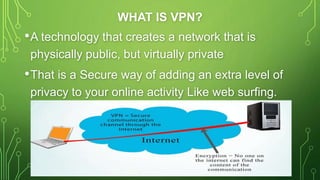
•A technology that creates a network that is
physically public, but virtually private
•That is a Secure way of adding an extra level of
privacy to your online activity Like web surfing.
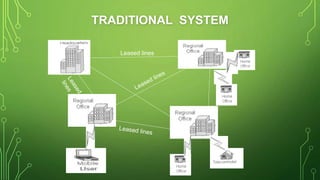
TRADITIONAL SYSTEM
Leased lines
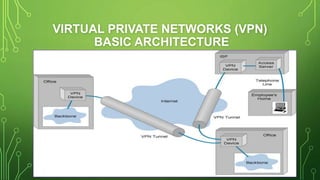
VIRTUAL PRIVATE NETWORKS (VPN)
BASIC ARCHITECTURE
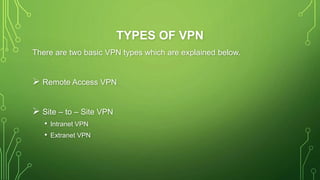
TYPES OF VPN
There are two basic VPN types which are explained below.
 Remote Access VPN
 Site – to – Site VPN
• Intranet VPN
• Extranet VPN
REMOTE ACCESS VPN
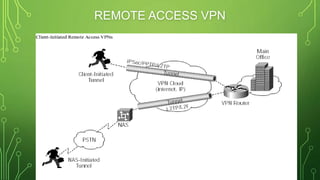
• A remote-access VPN allows individual users to establish secure
connections with a remote computer network.
• There are two components required in a remote-access VPN. The first
is a network access server(NAS).
• The other required component of remote-access VPNs is client
software
• Remote Access VPN is useful for business users as well as home
users.
• Home users, or private users of VPN, primarily use VPN services to
bypass regional(ISP) restrictions on the Internet and access blocked
websites. sensible Users of Internet security also use VPN services
REMOTE ACCESS VPN
SITE – TO – SITE VPN
• A Site-to-Site VPN is also called as Router-to-Router VPN and is
mostly used in the corporates.
• Companies, with offices in different geographical locations, use Site-
to-site VPN to connect the network of one office location to the
network at another office location.
• Basically, Site-to-site VPN create a virtual connection between the
networks at geographically offices and connect them through the
Internet and maintain a secure and private communication between
the networks.
INTRANET VPN
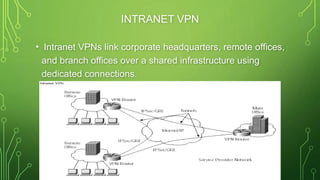
• Intranet VPNs link corporate headquarters, remote offices,
and branch offices over a shared infrastructure using
dedicated connections.
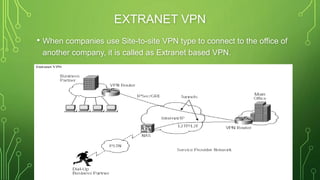
EXTRANET VPN
• When companies use Site-to-site VPN type to connect to the office of
another company, it is called as Extranet based VPN.
TYPES OF VPN PROTOCOLS
i. Internet Protocol Security or IPsec
ii. Layer 2 Tunneling Protocol (L2TP)
iii. Point – to – Point Tunneling Protocol (PPTP)
iv. Secure Sockets Layer (SSL) and Transport Layer Security (TLS)
v. Open VPN
INTERNET PROTOCOL SECURITY OR IPSEC
• Internet Protocol Security or IPsec is used to secure Internet communication
across an IP network.
• IPsec secures Internet Protocol communication by authenticating the
session and encrypts each data packet during the connection.
• IPsec can also be used with other security protocols to enhance the security
system
• IPsec exists at the network layer (Layer Three) of the OSI model. Ex in IP v4
optional
• Transport mode to protect data transfer between two different networks.
• Tunneling mode to encrypts the message in the data packet and the
tunneling mode encrypts the entire data packet
LAYER 2 TUNNELING PROTOCOL (L2TP)
• L2TP (Layer 2 Tunneling Protocol) it’s another tunneling protocol that
supports VPNs.
• Layer 2 Tunneling Protocol is a tunneling protocol that is usually
combined with another VPN security protocol like IPsec to create a
highly secure VPN connection.
• L2TP creates a tunnel between two L2TP connection points and IPsec
protocol encrypts the data and handles secure communication
between the tunnel
• L2TP was developed by Microsoft and Cisco as a combination
between PPTP and L2F(Layer 2 Forwarding).
POINT – TO – POINT TUNNELING PROTOCOL
(PPTP)
• PPTP or Point-to-Point Tunneling Protocol creates a tunnel
and encapsulates the data packet. It uses a Point-to-Point
Protocol (PPP) to encrypt the data between the connection.
• PPTP is one of the most widely used VPN protocol and has
been use in of Windows 95.
• develop by the Microsoft.
• compared to other methods, PPTP is faster
SSL AND TLS
• SSL (Secure Sockets Layer) and TLS (Transport Layer Security) create a
VPN connection where the web browser acts as the client and user access
is limited to specific applications in the whole network.
• SSL and TLS protocol is most commonly used by online shopping websites
and service providers.
• SSL connections have https in the beginning of the URL instead of http.
OPEN VPN
• Open VPN is an open source VPN that is useful for creating Point-to-
Point and Site-to-Site connections. It uses a custom security protocol
based on SSL and TLS protocol.
FIREWALL CONFIGURATION
• Firewall provides network security and business continuity .
• It prevents attacks, and secures your data communications with
multiple parallel Virtual Private Network (VPN) connections.
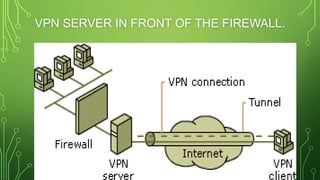
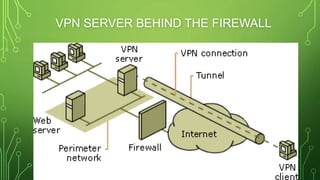
• There are two approaches to using a firewall with a VPN server:
VPN server in front of the firewall..
VPN server behind the firewall..
VPN SERVER IN FRONT OF THE FIREWALL.
VPN SERVER BEHIND THE FIREWALL
BENEFITS OF VPN
i. Access Blocked Websites & Avoid
Geographical Restrictions.
ii.Online Security & Privacy:
iii.Public Wi-Fi Security:
iv.Secure Connection to Remote Networks
v.Anonymous Browsing
ACCESS BLOCKED WEBSITES & AVOID
GEOGRAPHICAL RESTRICTIONS.
• VPN allows a user to access blocked websites and
circumvent geographical restrictions.
• Some countries keep restrictions on certain websites and
block these websites from being accessed by people living
in that country. This is called as Geo-blocking of the
websites. VPNs have a work around for this too and is more
popular for enabling users to access websites which are
otherwise blocked in their region or country
ONLINE SECURITY & PRIVACY:
•Our VPN uses high strength 256-bit encryption to
protect your data from spoofing eyes. Browse freely
from Wi-Fi hotspots with the comfort that you can’t
be tracked or monitored.
•It protects you from the prying(spoofing) eyes of
hackers and snoopers who want to capture your
passwords and personal information
PUBLIC WI-FI SECURITY:
• A VPN increases the security when connected to a public Wi-Fi
network.
• Public Wi-Fi networks like the ones you would find in a coffee shop or
in a hotel room are not as safe and secure as one might believe they
would be. Most public Wi-Fi networks are insecure and open since
they lack public Wi-Fi security encryption.
• It is easiest to hack or snoop into your connection when you are
connected through a public Wi-Fi network. If a user is connected on a
public Wi-Fi or an untrusted network (such as in a hotel, coffee shop,
other public places, etc.), the browsing activity of the user on non-
https websites could easily be snooped upon. Using Wireshark and
others
SECURE CONNECTION TO REMOTE
NETWORKS
• VPNs also allow users to connect to remote network securely.
• Most business use Virtual Private Network to allow their employees to
access their company’s private network securely while being
physically away from the company premises. The employees could be
traveling around the world and still connect to the secure private
network of their company to access files, applications, and other
resources on the office network.
ANONYMOUS(SECRET) BROWSING
• VPN service enables a user to browse through the Internet completely
anonymously(secret).
• A lot of people who are concerned about their security and privacy
prefer to browse the Internet anonymously. A VPN connection would
create a secure encrypted tunnel between a user’s computer or
mobile device to the VPN Server, enabling the user to carry out online
activities anonymously.
DISADVANTAGES OF VPN
• VPNs require detailed understanding of network security issues and
careful installation / configuration to ensure necessary protection on a
public network like the Internet.
• The reliability and performance of an Internet-based VPN is not
under an organization's direct control. Instead, the solution relies on
an ISP and their quality of service.
PRACTICAL EXAMPLE
• My Recommended website of VPN.
“WWW.VPNBOOK.COM”
1st of all open the vpnbook.com and select on PPTP Tab.
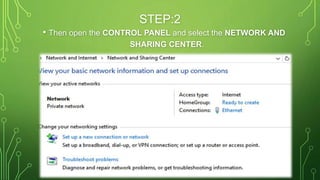
STEP:2
• Then open the CONTROL PANEL and select the NETWORK AND
SHARING CENTER.
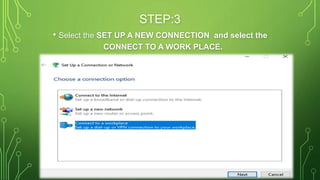
STEP:3
• Select the SET UP A NEW CONNECTION and select the
CONNECT TO A WORK PLACE.
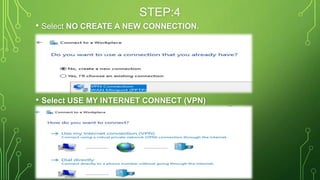
STEP:4
• Select NO CREATE A NEW CONNECTION.
• Select USE MY INTERNET CONNECT (VPN)
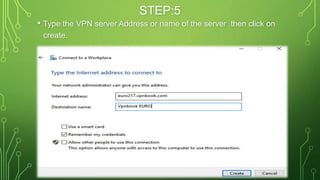
STEP:5
• Type the VPN server Address or name of the server then click on
create.
“EURO217.VPNBOOK.COM”
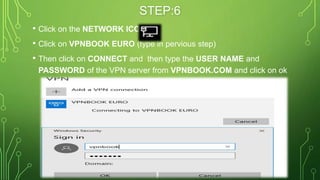
STEP:6
• Click on the NETWORK ICON
• Click on VPNBOOK EURO (type in pervious step)
• Then click on CONNECT and then type the USER NAME and
PASSWORD of the VPN server from VPNBOOK.COM and click on ok
QUESTIONS & COMMENTS ?
Virtual Private Network

Virtual Private Network

  • 1.
    VIRTUAL PRIVATE NETWORK SIKANDARE AZAJM=55 SANA UR REHMAN=39 SYED M. HASHIR RAZA ZAIDI=07 UMUT PAPATYA=31 DAVUT KARASU=30
  • 2.
    WHAT IS VPN? •Atechnology that creates a network that is physically public, but virtually private •That is a Secure way of adding an extra level of privacy to your online activity Like web surfing.
  • 3.
  • 4.
    VIRTUAL PRIVATE NETWORKS(VPN) BASIC ARCHITECTURE
  • 5.
    TYPES OF VPN Thereare two basic VPN types which are explained below.  Remote Access VPN  Site – to – Site VPN • Intranet VPN • Extranet VPN
  • 6.
    REMOTE ACCESS VPN •A remote-access VPN allows individual users to establish secure connections with a remote computer network. • There are two components required in a remote-access VPN. The first is a network access server(NAS). • The other required component of remote-access VPNs is client software • Remote Access VPN is useful for business users as well as home users. • Home users, or private users of VPN, primarily use VPN services to bypass regional(ISP) restrictions on the Internet and access blocked websites. sensible Users of Internet security also use VPN services
  • 7.
  • 8.
    SITE – TO– SITE VPN • A Site-to-Site VPN is also called as Router-to-Router VPN and is mostly used in the corporates. • Companies, with offices in different geographical locations, use Site- to-site VPN to connect the network of one office location to the network at another office location. • Basically, Site-to-site VPN create a virtual connection between the networks at geographically offices and connect them through the Internet and maintain a secure and private communication between the networks.
  • 9.
    INTRANET VPN • IntranetVPNs link corporate headquarters, remote offices, and branch offices over a shared infrastructure using dedicated connections.
  • 10.
    EXTRANET VPN • Whencompanies use Site-to-site VPN type to connect to the office of another company, it is called as Extranet based VPN.
  • 11.
    TYPES OF VPNPROTOCOLS i. Internet Protocol Security or IPsec ii. Layer 2 Tunneling Protocol (L2TP) iii. Point – to – Point Tunneling Protocol (PPTP) iv. Secure Sockets Layer (SSL) and Transport Layer Security (TLS) v. Open VPN
  • 12.
    INTERNET PROTOCOL SECURITYOR IPSEC • Internet Protocol Security or IPsec is used to secure Internet communication across an IP network. • IPsec secures Internet Protocol communication by authenticating the session and encrypts each data packet during the connection. • IPsec can also be used with other security protocols to enhance the security system • IPsec exists at the network layer (Layer Three) of the OSI model. Ex in IP v4 optional • Transport mode to protect data transfer between two different networks. • Tunneling mode to encrypts the message in the data packet and the tunneling mode encrypts the entire data packet
  • 13.
    LAYER 2 TUNNELINGPROTOCOL (L2TP) • L2TP (Layer 2 Tunneling Protocol) it’s another tunneling protocol that supports VPNs. • Layer 2 Tunneling Protocol is a tunneling protocol that is usually combined with another VPN security protocol like IPsec to create a highly secure VPN connection. • L2TP creates a tunnel between two L2TP connection points and IPsec protocol encrypts the data and handles secure communication between the tunnel • L2TP was developed by Microsoft and Cisco as a combination between PPTP and L2F(Layer 2 Forwarding).
  • 14.
    POINT – TO– POINT TUNNELING PROTOCOL (PPTP) • PPTP or Point-to-Point Tunneling Protocol creates a tunnel and encapsulates the data packet. It uses a Point-to-Point Protocol (PPP) to encrypt the data between the connection. • PPTP is one of the most widely used VPN protocol and has been use in of Windows 95. • develop by the Microsoft. • compared to other methods, PPTP is faster
  • 15.
    SSL AND TLS •SSL (Secure Sockets Layer) and TLS (Transport Layer Security) create a VPN connection where the web browser acts as the client and user access is limited to specific applications in the whole network. • SSL and TLS protocol is most commonly used by online shopping websites and service providers. • SSL connections have https in the beginning of the URL instead of http.
  • 16.
    OPEN VPN • OpenVPN is an open source VPN that is useful for creating Point-to- Point and Site-to-Site connections. It uses a custom security protocol based on SSL and TLS protocol.
  • 17.
    FIREWALL CONFIGURATION • Firewallprovides network security and business continuity . • It prevents attacks, and secures your data communications with multiple parallel Virtual Private Network (VPN) connections. • There are two approaches to using a firewall with a VPN server: VPN server in front of the firewall.. VPN server behind the firewall..
  • 18.
    VPN SERVER INFRONT OF THE FIREWALL.
  • 19.
    VPN SERVER BEHINDTHE FIREWALL
  • 20.
    BENEFITS OF VPN i.Access Blocked Websites & Avoid Geographical Restrictions. ii.Online Security & Privacy: iii.Public Wi-Fi Security: iv.Secure Connection to Remote Networks v.Anonymous Browsing
  • 21.
    ACCESS BLOCKED WEBSITES& AVOID GEOGRAPHICAL RESTRICTIONS. • VPN allows a user to access blocked websites and circumvent geographical restrictions. • Some countries keep restrictions on certain websites and block these websites from being accessed by people living in that country. This is called as Geo-blocking of the websites. VPNs have a work around for this too and is more popular for enabling users to access websites which are otherwise blocked in their region or country
  • 22.
    ONLINE SECURITY &PRIVACY: •Our VPN uses high strength 256-bit encryption to protect your data from spoofing eyes. Browse freely from Wi-Fi hotspots with the comfort that you can’t be tracked or monitored. •It protects you from the prying(spoofing) eyes of hackers and snoopers who want to capture your passwords and personal information
  • 23.
    PUBLIC WI-FI SECURITY: •A VPN increases the security when connected to a public Wi-Fi network. • Public Wi-Fi networks like the ones you would find in a coffee shop or in a hotel room are not as safe and secure as one might believe they would be. Most public Wi-Fi networks are insecure and open since they lack public Wi-Fi security encryption. • It is easiest to hack or snoop into your connection when you are connected through a public Wi-Fi network. If a user is connected on a public Wi-Fi or an untrusted network (such as in a hotel, coffee shop, other public places, etc.), the browsing activity of the user on non- https websites could easily be snooped upon. Using Wireshark and others
  • 24.
    SECURE CONNECTION TOREMOTE NETWORKS • VPNs also allow users to connect to remote network securely. • Most business use Virtual Private Network to allow their employees to access their company’s private network securely while being physically away from the company premises. The employees could be traveling around the world and still connect to the secure private network of their company to access files, applications, and other resources on the office network.
  • 25.
    ANONYMOUS(SECRET) BROWSING • VPNservice enables a user to browse through the Internet completely anonymously(secret). • A lot of people who are concerned about their security and privacy prefer to browse the Internet anonymously. A VPN connection would create a secure encrypted tunnel between a user’s computer or mobile device to the VPN Server, enabling the user to carry out online activities anonymously.
  • 26.
    DISADVANTAGES OF VPN •VPNs require detailed understanding of network security issues and careful installation / configuration to ensure necessary protection on a public network like the Internet. • The reliability and performance of an Internet-based VPN is not under an organization's direct control. Instead, the solution relies on an ISP and their quality of service.
  • 27.
    PRACTICAL EXAMPLE • MyRecommended website of VPN. “WWW.VPNBOOK.COM” 1st of all open the vpnbook.com and select on PPTP Tab.
  • 28.
    STEP:2 • Then openthe CONTROL PANEL and select the NETWORK AND SHARING CENTER.
  • 29.
    STEP:3 • Select theSET UP A NEW CONNECTION and select the CONNECT TO A WORK PLACE.
  • 30.
    STEP:4 • Select NOCREATE A NEW CONNECTION. • Select USE MY INTERNET CONNECT (VPN)
  • 31.
    STEP:5 • Type theVPN server Address or name of the server then click on create. “EURO217.VPNBOOK.COM”
  • 32.
    STEP:6 • Click onthe NETWORK ICON • Click on VPNBOOK EURO (type in pervious step) • Then click on CONNECT and then type the USER NAME and PASSWORD of the VPN server from VPNBOOK.COM and click on ok
  • 34.