Effective Text Editing
for Perl Developers
Ynon Perek
ynon@ynonperek.com
Agenda
What’s Wrong with my editor?
Can you fix it?
Should I Switch Editors?
! text editors slow you down
Keynote Template
Reasons to be angry
• A text editor always slows you down
• Some are worse than others
type less,
Keynote Template
more"
Some annoyances with “naive”
text editors
• Writing code
• Navigating in code
• Testing code
• Running code
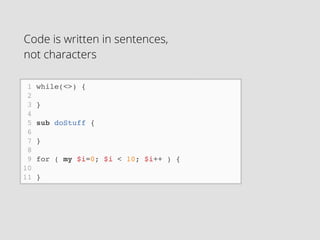
1 while(<>) {!
2 !
3 }!
4 !
5 sub doStuff {!
6 !
7 }!
8 !
9 for ( my $i=0; $i < 10; $i++ ) {!
10 !
11 }
Code is written in sentences, 

not characters
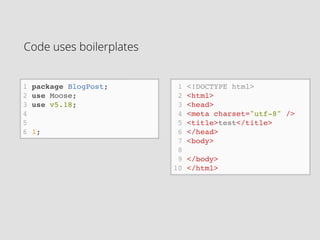
Code uses boilerplates
1 package BlogPost;!
2 use Moose;!
3 use v5.18;!
4 !
5 !
6 1;
1 <!DOCTYPE html>!
2 <html>!
3 <head>!
4 <meta charset="utf-8" />!
5 <title>test</title>!
6 </head>!
7 <body>!
8 !
9 </body>!
10 </html>
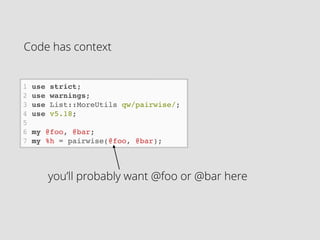
Code has context
1 use strict;!
2 use warnings;!
3 use List::MoreUtils qw/pairwise/;!
4 use v5.18;!
5 !
6 my @foo, @bar;!
7 my %h = pairwise(@foo, @bar);
you’ll probably want @foo or @bar here
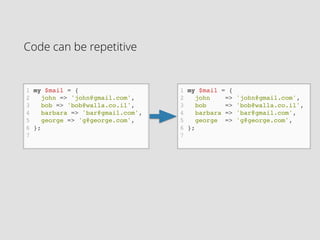
Code can be repetitive
1 my $mail = {!
2 john => 'john@gmail.com',!
3 bob => 'bob@walla.co.il',!
4 barbara => 'bar@gmail.com',!
5 george => 'g@george.com',!
6 };!
7 !
1 my $mail = {!
2 john => 'john@gmail.com',!
3 bob => 'bob@walla.co.il',!
4 barbara => 'bar@gmail.com',!
5 george => 'g@george.com',!
6 };!
7 !
The more you type…
• you’ll waste more time
• you’ll make more mistakes
• you’ll be less happy
A text editor can be a friend
• In writing:
• Code snippets
• File templates
• Context aware auto complete
• Verify syntax and find errors early
A text editor can be a friend
• While working on a project:
• File navigation
• Documentation
• Quickly find what you need
A text editor can be a friend
• While running and testing:
• Reminds you to run unit tests
• Helps you run complex flows
Agenda
What’s Wrong with my editor?
Can you fix it?
Should I Switch Editors?
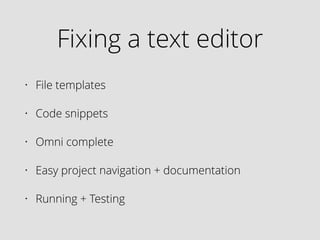
Fixing a text editor
• File templates
• Code snippets
• Omni complete
• Easy project navigation + documentation
• Running + testing
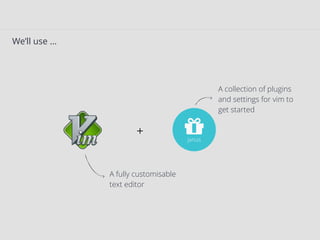
We’ll use …
#janus
A fully customisable
text editor
A collection of plugins
and settings for vim to
get started
+
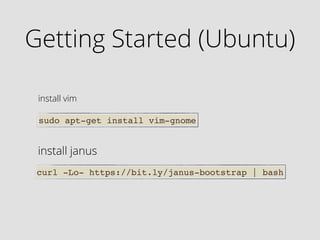
Getting Started (Ubuntu)
sudo apt-get install vim-gnome
Install vim
curl -Lo- https://bit.ly/janus-bootstrap | bash
Install janus
What We Got
• Line and column numbers
• Nicer colours and better defaults
What We Got
• Find in files - ack
• Fuzzy file finder
• Easy code comments
• Project drawer
• Tab completion
• Basic snippets
Now let’s get to work
Demos - Editing
• Adding new snippets with snipMate
• File templates with vim-template
• Align perl hashes
• Perl omni-complete
• Auto-close parens
Plugins Installed
• Viewdoc:

http://www.vim.org/scripts/script.php?
script_id=3893
• Vim template:

https://github.com/aperezdc/vim-template/
• Auto pairs:

https://github.com/ynonp/auto-pairs
Q & A
Thanks For Listening
• Ynon Perek
• http://ynonperek.com/
• ynon@ynonperek.com

Vimperl

  • 1.
    Effective Text Editing forPerl Developers Ynon Perek ynon@ynonperek.com
  • 2.
    Agenda What’s Wrong withmy editor? Can you fix it? Should I Switch Editors?
  • 3.
    ! text editorsslow you down Keynote Template
  • 4.
    Reasons to beangry • A text editor always slows you down • Some are worse than others
  • 5.
  • 6.
    Some annoyances with“naive” text editors • Writing code • Navigating in code • Testing code • Running code
  • 7.
    1 while(<>) {! 2! 3 }! 4 ! 5 sub doStuff {! 6 ! 7 }! 8 ! 9 for ( my $i=0; $i < 10; $i++ ) {! 10 ! 11 } Code is written in sentences, 
 not characters
  • 8.
    Code uses boilerplates 1package BlogPost;! 2 use Moose;! 3 use v5.18;! 4 ! 5 ! 6 1; 1 <!DOCTYPE html>! 2 <html>! 3 <head>! 4 <meta charset="utf-8" />! 5 <title>test</title>! 6 </head>! 7 <body>! 8 ! 9 </body>! 10 </html>
  • 9.
    Code has context 1use strict;! 2 use warnings;! 3 use List::MoreUtils qw/pairwise/;! 4 use v5.18;! 5 ! 6 my @foo, @bar;! 7 my %h = pairwise(@foo, @bar); you’ll probably want @foo or @bar here
  • 10.
    Code can berepetitive 1 my $mail = {! 2 john => 'john@gmail.com',! 3 bob => 'bob@walla.co.il',! 4 barbara => 'bar@gmail.com',! 5 george => 'g@george.com',! 6 };! 7 ! 1 my $mail = {! 2 john => 'john@gmail.com',! 3 bob => 'bob@walla.co.il',! 4 barbara => 'bar@gmail.com',! 5 george => 'g@george.com',! 6 };! 7 !
  • 11.
    The more youtype… • you’ll waste more time • you’ll make more mistakes • you’ll be less happy
  • 12.
    A text editorcan be a friend • In writing: • Code snippets • File templates • Context aware auto complete • Verify syntax and find errors early
  • 13.
    A text editorcan be a friend • While working on a project: • File navigation • Documentation • Quickly find what you need
  • 14.
    A text editorcan be a friend • While running and testing: • Reminds you to run unit tests • Helps you run complex flows
  • 15.
    Agenda What’s Wrong withmy editor? Can you fix it? Should I Switch Editors?
  • 16.
    Fixing a texteditor • File templates • Code snippets • Omni complete • Easy project navigation + documentation • Running + testing
  • 17.
    We’ll use … #janus Afully customisable text editor A collection of plugins and settings for vim to get started +
  • 18.
    Getting Started (Ubuntu) sudoapt-get install vim-gnome Install vim curl -Lo- https://bit.ly/janus-bootstrap | bash Install janus
  • 19.
    What We Got •Line and column numbers • Nicer colours and better defaults
  • 20.
    What We Got •Find in files - ack • Fuzzy file finder • Easy code comments • Project drawer • Tab completion • Basic snippets
  • 21.
  • 22.
    Demos - Editing •Adding new snippets with snipMate • File templates with vim-template • Align perl hashes • Perl omni-complete • Auto-close parens
  • 23.
    Plugins Installed • Viewdoc:
 http://www.vim.org/scripts/script.php? script_id=3893 •Vim template:
 https://github.com/aperezdc/vim-template/ • Auto pairs:
 https://github.com/ynonp/auto-pairs
  • 24.
  • 25.
    Thanks For Listening •Ynon Perek • http://ynonperek.com/ • ynon@ynonperek.com