View Button in Odoo 18
Contact Module
Enterprise
Enterprise
Introduction
As in every new version before, Odoo 18 also have some nice features
which revamp the brand new feel and thereby increases the easiness of
using it.
Of that, today we are going to discuss a new thing introduced in the base
Contact module, that is a ‘View’ button inside it.
Enterprise
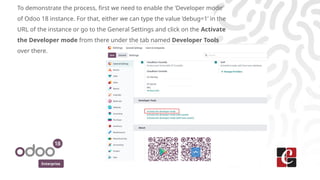
To demonstrate the process, first we need to enable the ‘Developer mode’
of Odoo 18 instance. For that, either we can type the value ‘debug=1’ in the
URL of the instance or go to the General Settings and click on the Activate
the Developer mode from there under the tab named Developer Tools
over there.
Enterprise
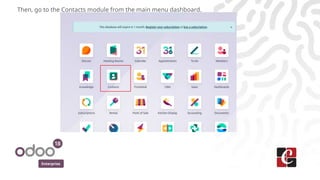
Then, go to the Contacts module from the main menu dashboard.
Enterprise
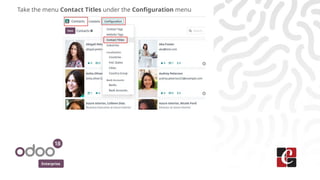
Take the menu Contact Titles under the Configuration menu
Enterprise
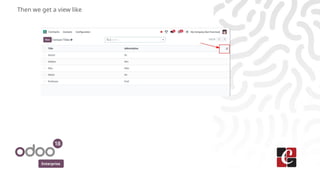
Then we get a view like
Enterprise
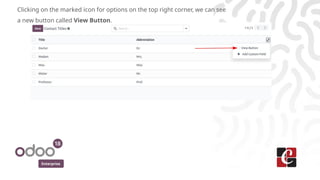
Clicking on the marked icon for options on the top right corner, we can see
a new button called View Button.
Enterprise
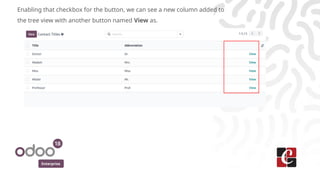
Enabling that checkbox for the button, we can see a new column added to
the tree view with another button named View as.
Enterprise
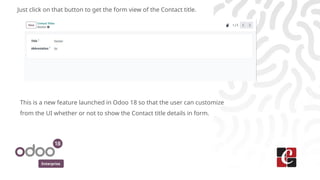
Just click on that button to get the form view of the Contact title.
This is a new feature launched in Odoo 18 so that the user can customize
from the UI whether or not to show the Contact title details in form.
For More Info.
Check our company website for related blogs
and Odoo book.
Check our YouTube channel for
functional and technical videos in Odoo.
Enterprise
www.cybrosys.com

View Button in Odoo 18 Contact Module - Odoo 18 Slides

  • 1.
    View Button inOdoo 18 Contact Module Enterprise
  • 2.
    Enterprise Introduction As in everynew version before, Odoo 18 also have some nice features which revamp the brand new feel and thereby increases the easiness of using it. Of that, today we are going to discuss a new thing introduced in the base Contact module, that is a ‘View’ button inside it.
  • 3.
    Enterprise To demonstrate theprocess, first we need to enable the ‘Developer mode’ of Odoo 18 instance. For that, either we can type the value ‘debug=1’ in the URL of the instance or go to the General Settings and click on the Activate the Developer mode from there under the tab named Developer Tools over there.
  • 4.
    Enterprise Then, go tothe Contacts module from the main menu dashboard.
  • 5.
    Enterprise Take the menuContact Titles under the Configuration menu
  • 6.
  • 7.
    Enterprise Clicking on themarked icon for options on the top right corner, we can see a new button called View Button.
  • 8.
    Enterprise Enabling that checkboxfor the button, we can see a new column added to the tree view with another button named View as.
  • 9.
    Enterprise Just click onthat button to get the form view of the Contact title. This is a new feature launched in Odoo 18 so that the user can customize from the UI whether or not to show the Contact title details in form.
  • 10.
    For More Info. Checkour company website for related blogs and Odoo book. Check our YouTube channel for functional and technical videos in Odoo. Enterprise www.cybrosys.com