Version Control with
Subversion

PLUG Linux Users Group
Senthil_OR@Dell.com
http://svnbook.red-bean.com/

1
Subversion
In the world of open-source software, the Concurrent Versions
System (CVS) was the tool of choice for version control for many
years.
Subversion is similar to CVS, but it avoids most of CVS
noticeable flaws.
The most common use for Subversion is to track changes to
source code. But Subversion can be used to manage changes to
any sort of information—images, music, databases,
documentation, and so on. To Subversion, all data is just data.

http://svnbook.red-bean.com/

2
What is Subversion?
Subversion is a free/open-source version
control system. Subversion manages files
and directories, and the changes made to
them, over time. This allows you to recover
older versions of your data, or examine the
history of how your data changed.
Fosters Collaboration.
Mistakes can be undone.
Is NOT a Software Configuration
Management system. Version control of any
data, perhaps your telephone bills. ?
http://svnbook.red-bean.com/

3
Subversion provides
Directory versioning.
True version history.
Atomic commits
Versioned metadata.
Choice of Network Layers.
Consistent Data Handling.
Efficient Branching and Tagging
Hackablity

http://svnbook.red-bean.com/

4
Fundamental Concepts
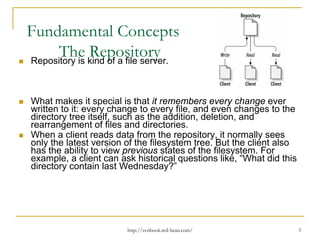
The kind of a file server.
Repository
Repository is
What makes it special is that it remembers every change ever
written to it: every change to every file, and even changes to the
directory tree itself, such as the addition, deletion, and
rearrangement of files and directories.
When a client reads data from the repository, it normally sees
only the latest version of the filesystem tree. But the client also
has the ability to view previous states of the filesystem. For
example, a client can ask historical questions like, “What did this
directory contain last Wednesday?”

http://svnbook.red-bean.com/

5
Fundamental Concepts:
Versioning Models
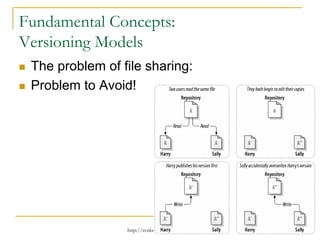
The problem of file sharing:
Problem to Avoid!

http://svnbook.red-bean.com/

6
Fundamental Concepts: Versioning Models:

The Lock-Modify-Unlock Solution
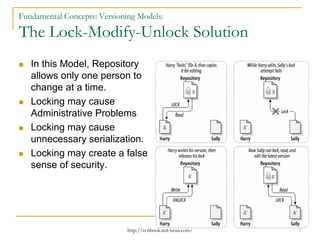
In this Model, Repository
allows only one person to
change at a time.
Locking may cause
Administrative Problems
Locking may cause
unnecessary serialization.
Locking may create a false
sense of security.

http://svnbook.red-bean.com/

7
Fundamental Concepts: Versioning Models:

The Copy-Modify-Merge Solution
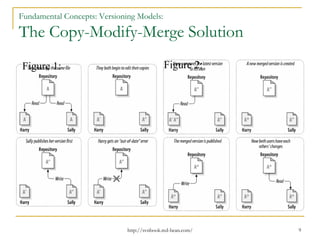
In this model, each user's client contacts the project
repository and creates a personal working copy—a
local reflection of the repository's files and
directories.
Users then work simultaneously and independently,
modifying their private copies. Finally, the private
copies are merged together into a new, final version.
The version control system often assists with the
merging, but ultimately a human being is
responsible for making it happen correctly.

http://svnbook.red-bean.com/

8
Fundamental Concepts: Versioning Models:

The Copy-Modify-Merge Solution
Figure 1:

Figure 2:

http://svnbook.red-bean.com/

9
Fundamental Concepts: Versioning Models:

The Copy-Modify-Merge Solution
What if changes do overlap? This situation is called a conflict,
and it's usually not much of a problem
When Harry asks his client to merge the latest repository
changes into his working copy, his copy of file A is somehow
flagged as being in a state of conflict: he'll be able to see both
sets of conflicting changes, and manually choose between them.
Note that software can't automatically resolve conflicts; only
humans are capable of understanding and making the necessary
intelligent choices. Once Harry has manually resolved the
overlapping changes—perhaps after a discussion with Sally—he
can safely save the merged file back to the repository.

http://svnbook.red-bean.com/

10
Fundamental Concepts: Versioning Models:

The Copy-Modify-Merge Solution
The copy-modify-merge model may sound a bit chaotic, but in
practice, it runs extremely smoothly.
Users can work in parallel, never waiting for one another
When they work on the same files, it turns out that most of their
concurrent changes don't overlap at all; conflicts are infrequent.
And the amount of time it takes to resolve conflicts is usually far
less than the time lost by a locking system.
In the end, it all comes down to one critical factor: user
communication. When users communicate poorly, both syntactic
and semantic conflicts increase. No system can force users to
communicate perfectly, and no system can detect semantic
conflicts

http://svnbook.red-bean.com/

11
Fundamental Concepts:

Subversion in Action.
Subversion Repository URLs.
svn checkout http://svn.example.com:9834/repos
svn checkout file:///path/to/repos

Working Copies.
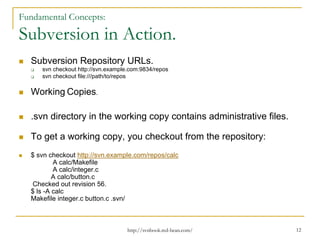
.svn directory in the working copy contains administrative files.
To get a working copy, you checkout from the repository:
$ svn checkout http://svn.example.com/repos/calc
A calc/Makefile
A calc/integer.c
A calc/button.c
Checked out revision 56.
$ ls -A calc
Makefile integer.c button.c .svn/

http://svnbook.red-bean.com/

12
Fundamental Concepts:

Subversion in Action
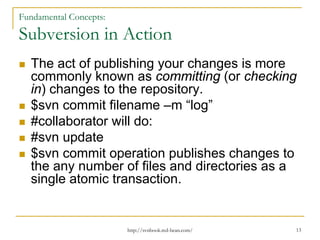
The act of publishing your changes is more
commonly known as committing (or checking
in) changes to the repository.
$svn commit filename –m “log”
#collaborator will do:
#svn update
$svn commit operation publishes changes to
the any number of files and directories as a
single atomic transaction.

http://svnbook.red-bean.com/

13
Fundamental Concepts:

Subversion in Action
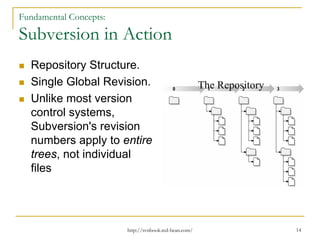
Repository Structure.
Single Global Revision.
Unlike most version
control systems,
Subversion's revision
numbers apply to entire
trees, not individual
files

http://svnbook.red-bean.com/

The Repository

14
Fundamental Concepts:

Subversion in Action
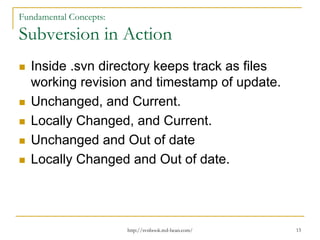
Inside .svn directory keeps track as files
working revision and timestamp of update.
Unchanged, and Current.
Locally Changed, and Current.
Unchanged and Out of date
Locally Changed and Out of date.

http://svnbook.red-bean.com/

15
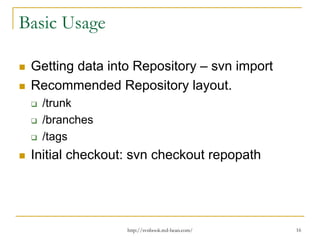
Basic Usage
Getting data into Repository – svn import
Recommended Repository layout.
/trunk
/branches
/tags

Initial checkout: svn checkout repopath

http://svnbook.red-bean.com/

16
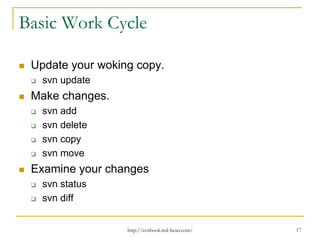
Basic Work Cycle
Update your woking copy.
svn update

Make changes.
svn add
svn delete
svn copy
svn move

Examine your changes
svn status
svn diff
http://svnbook.red-bean.com/

17
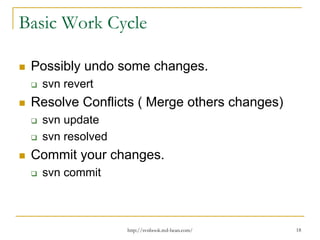
Basic Work Cycle
Possibly undo some changes.
svn revert

Resolve Conflicts ( Merge others changes)
svn update
svn resolved

Commit your changes.
svn commit

http://svnbook.red-bean.com/

18
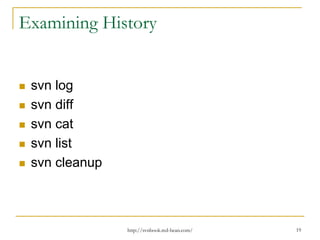
Examining History

svn log
svn diff
svn cat
svn list
svn cleanup

http://svnbook.red-bean.com/

19
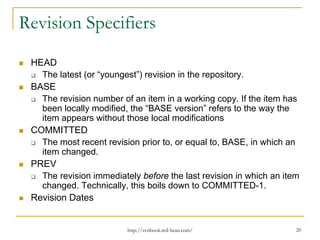
Revision Specifiers
HEAD
The latest (or “youngest”) revision in the repository.
BASE
The revision number of an item in a working copy. If the item has
been locally modified, the “BASE version” refers to the way the
item appears without those local modifications
COMMITTED
The most recent revision prior to, or equal to, BASE, in which an
item changed.
PREV
The revision immediately before the last revision in which an item
changed. Technically, this boils down to COMMITTED-1.
Revision Dates

http://svnbook.red-bean.com/

20
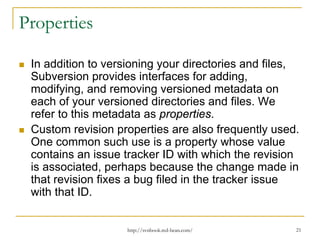
Properties
In addition to versioning your directories and files,
Subversion provides interfaces for adding,
modifying, and removing versioned metadata on
each of your versioned directories and files. We
refer to this metadata as properties.
Custom revision properties are also frequently used.
One common such use is a property whose value
contains an issue tracker ID with which the revision
is associated, perhaps because the change made in
that revision fixes a bug filed in the tracker issue
with that ID.

http://svnbook.red-bean.com/

21
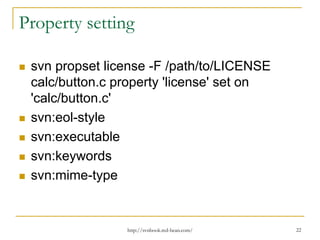
Property setting
svn propset license -F /path/to/LICENSE
calc/button.c property 'license' set on
'calc/button.c'
svn:eol-style
svn:executable
svn:keywords
svn:mime-type

http://svnbook.red-bean.com/

22
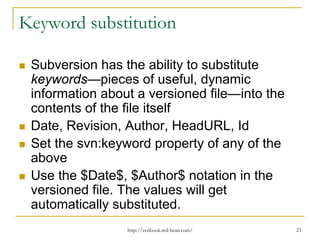
Keyword substitution
Subversion has the ability to substitute
keywords—pieces of useful, dynamic
information about a versioned file—into the
contents of the file itself
Date, Revision, Author, HeadURL, Id
Set the svn:keyword property of any of the
above
Use the $Date$, $Author$ notation in the
versioned file. The values will get
automatically substituted.
http://svnbook.red-bean.com/

23
Locking
Locking concept supported by svn.

http://svnbook.red-bean.com/

24
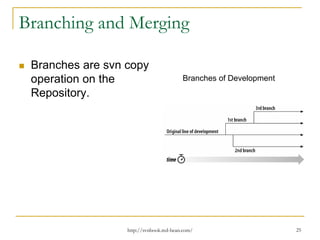
Branching and Merging
Branches are svn copy
operation on the
Repository.

Branches of Development

http://svnbook.red-bean.com/

25
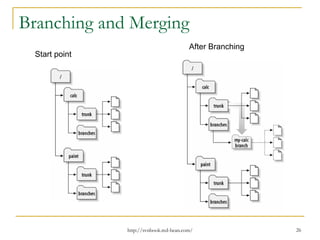
Branching and Merging
After Branching
Start point

http://svnbook.red-bean.com/

26
Best practises of merging
Tracking Changes Manually.
Previewing merges.
Noticing and ignoring ancestry
Merges and Moves
Creating a Tag, same as Branch

http://svnbook.red-bean.com/

27
SVN Server configuration
Svnserve Server
Svnserve over ssh
The Apache HTTP server

http://svnbook.red-bean.com/

28
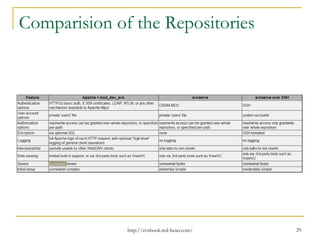
Comparision of the Repositories

http://svnbook.red-bean.com/

29
That’s all Folks
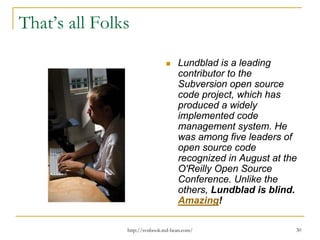
Lundblad is a leading
contributor to the
Subversion open source
code project, which has
produced a widely
implemented code
management system. He
was among five leaders of
open source code
recognized in August at the
O'Reilly Open Source
Conference. Unlike the
others, Lundblad is blind.
Amazing!
http://svnbook.red-bean.com/

30

Version control with Subversion

  • 1.
    Version Control with Subversion PLUGLinux Users Group Senthil_OR@Dell.com http://svnbook.red-bean.com/ 1
  • 2.
    Subversion In the worldof open-source software, the Concurrent Versions System (CVS) was the tool of choice for version control for many years. Subversion is similar to CVS, but it avoids most of CVS noticeable flaws. The most common use for Subversion is to track changes to source code. But Subversion can be used to manage changes to any sort of information—images, music, databases, documentation, and so on. To Subversion, all data is just data. http://svnbook.red-bean.com/ 2
  • 3.
    What is Subversion? Subversionis a free/open-source version control system. Subversion manages files and directories, and the changes made to them, over time. This allows you to recover older versions of your data, or examine the history of how your data changed. Fosters Collaboration. Mistakes can be undone. Is NOT a Software Configuration Management system. Version control of any data, perhaps your telephone bills. ? http://svnbook.red-bean.com/ 3
  • 4.
    Subversion provides Directory versioning. Trueversion history. Atomic commits Versioned metadata. Choice of Network Layers. Consistent Data Handling. Efficient Branching and Tagging Hackablity http://svnbook.red-bean.com/ 4
  • 5.
    Fundamental Concepts The kindof a file server. Repository Repository is What makes it special is that it remembers every change ever written to it: every change to every file, and even changes to the directory tree itself, such as the addition, deletion, and rearrangement of files and directories. When a client reads data from the repository, it normally sees only the latest version of the filesystem tree. But the client also has the ability to view previous states of the filesystem. For example, a client can ask historical questions like, “What did this directory contain last Wednesday?” http://svnbook.red-bean.com/ 5
  • 6.
    Fundamental Concepts: Versioning Models Theproblem of file sharing: Problem to Avoid! http://svnbook.red-bean.com/ 6
  • 7.
    Fundamental Concepts: VersioningModels: The Lock-Modify-Unlock Solution In this Model, Repository allows only one person to change at a time. Locking may cause Administrative Problems Locking may cause unnecessary serialization. Locking may create a false sense of security. http://svnbook.red-bean.com/ 7
  • 8.
    Fundamental Concepts: VersioningModels: The Copy-Modify-Merge Solution In this model, each user's client contacts the project repository and creates a personal working copy—a local reflection of the repository's files and directories. Users then work simultaneously and independently, modifying their private copies. Finally, the private copies are merged together into a new, final version. The version control system often assists with the merging, but ultimately a human being is responsible for making it happen correctly. http://svnbook.red-bean.com/ 8
  • 9.
    Fundamental Concepts: VersioningModels: The Copy-Modify-Merge Solution Figure 1: Figure 2: http://svnbook.red-bean.com/ 9
  • 10.
    Fundamental Concepts: VersioningModels: The Copy-Modify-Merge Solution What if changes do overlap? This situation is called a conflict, and it's usually not much of a problem When Harry asks his client to merge the latest repository changes into his working copy, his copy of file A is somehow flagged as being in a state of conflict: he'll be able to see both sets of conflicting changes, and manually choose between them. Note that software can't automatically resolve conflicts; only humans are capable of understanding and making the necessary intelligent choices. Once Harry has manually resolved the overlapping changes—perhaps after a discussion with Sally—he can safely save the merged file back to the repository. http://svnbook.red-bean.com/ 10
  • 11.
    Fundamental Concepts: VersioningModels: The Copy-Modify-Merge Solution The copy-modify-merge model may sound a bit chaotic, but in practice, it runs extremely smoothly. Users can work in parallel, never waiting for one another When they work on the same files, it turns out that most of their concurrent changes don't overlap at all; conflicts are infrequent. And the amount of time it takes to resolve conflicts is usually far less than the time lost by a locking system. In the end, it all comes down to one critical factor: user communication. When users communicate poorly, both syntactic and semantic conflicts increase. No system can force users to communicate perfectly, and no system can detect semantic conflicts http://svnbook.red-bean.com/ 11
  • 12.
    Fundamental Concepts: Subversion inAction. Subversion Repository URLs. svn checkout http://svn.example.com:9834/repos svn checkout file:///path/to/repos Working Copies. .svn directory in the working copy contains administrative files. To get a working copy, you checkout from the repository: $ svn checkout http://svn.example.com/repos/calc A calc/Makefile A calc/integer.c A calc/button.c Checked out revision 56. $ ls -A calc Makefile integer.c button.c .svn/ http://svnbook.red-bean.com/ 12
  • 13.
    Fundamental Concepts: Subversion inAction The act of publishing your changes is more commonly known as committing (or checking in) changes to the repository. $svn commit filename –m “log” #collaborator will do: #svn update $svn commit operation publishes changes to the any number of files and directories as a single atomic transaction. http://svnbook.red-bean.com/ 13
  • 14.
    Fundamental Concepts: Subversion inAction Repository Structure. Single Global Revision. Unlike most version control systems, Subversion's revision numbers apply to entire trees, not individual files http://svnbook.red-bean.com/ The Repository 14
  • 15.
    Fundamental Concepts: Subversion inAction Inside .svn directory keeps track as files working revision and timestamp of update. Unchanged, and Current. Locally Changed, and Current. Unchanged and Out of date Locally Changed and Out of date. http://svnbook.red-bean.com/ 15
  • 16.
    Basic Usage Getting datainto Repository – svn import Recommended Repository layout. /trunk /branches /tags Initial checkout: svn checkout repopath http://svnbook.red-bean.com/ 16
  • 17.
    Basic Work Cycle Updateyour woking copy. svn update Make changes. svn add svn delete svn copy svn move Examine your changes svn status svn diff http://svnbook.red-bean.com/ 17
  • 18.
    Basic Work Cycle Possiblyundo some changes. svn revert Resolve Conflicts ( Merge others changes) svn update svn resolved Commit your changes. svn commit http://svnbook.red-bean.com/ 18
  • 19.
    Examining History svn log svndiff svn cat svn list svn cleanup http://svnbook.red-bean.com/ 19
  • 20.
    Revision Specifiers HEAD The latest(or “youngest”) revision in the repository. BASE The revision number of an item in a working copy. If the item has been locally modified, the “BASE version” refers to the way the item appears without those local modifications COMMITTED The most recent revision prior to, or equal to, BASE, in which an item changed. PREV The revision immediately before the last revision in which an item changed. Technically, this boils down to COMMITTED-1. Revision Dates http://svnbook.red-bean.com/ 20
  • 21.
    Properties In addition toversioning your directories and files, Subversion provides interfaces for adding, modifying, and removing versioned metadata on each of your versioned directories and files. We refer to this metadata as properties. Custom revision properties are also frequently used. One common such use is a property whose value contains an issue tracker ID with which the revision is associated, perhaps because the change made in that revision fixes a bug filed in the tracker issue with that ID. http://svnbook.red-bean.com/ 21
  • 22.
    Property setting svn propsetlicense -F /path/to/LICENSE calc/button.c property 'license' set on 'calc/button.c' svn:eol-style svn:executable svn:keywords svn:mime-type http://svnbook.red-bean.com/ 22
  • 23.
    Keyword substitution Subversion hasthe ability to substitute keywords—pieces of useful, dynamic information about a versioned file—into the contents of the file itself Date, Revision, Author, HeadURL, Id Set the svn:keyword property of any of the above Use the $Date$, $Author$ notation in the versioned file. The values will get automatically substituted. http://svnbook.red-bean.com/ 23
  • 24.
    Locking Locking concept supportedby svn. http://svnbook.red-bean.com/ 24
  • 25.
    Branching and Merging Branchesare svn copy operation on the Repository. Branches of Development http://svnbook.red-bean.com/ 25
  • 26.
    Branching and Merging AfterBranching Start point http://svnbook.red-bean.com/ 26
  • 27.
    Best practises ofmerging Tracking Changes Manually. Previewing merges. Noticing and ignoring ancestry Merges and Moves Creating a Tag, same as Branch http://svnbook.red-bean.com/ 27
  • 28.
    SVN Server configuration SvnserveServer Svnserve over ssh The Apache HTTP server http://svnbook.red-bean.com/ 28
  • 29.
    Comparision of theRepositories http://svnbook.red-bean.com/ 29
  • 30.
    That’s all Folks Lundbladis a leading contributor to the Subversion open source code project, which has produced a widely implemented code management system. He was among five leaders of open source code recognized in August at the O'Reilly Open Source Conference. Unlike the others, Lundblad is blind. Amazing! http://svnbook.red-bean.com/ 30