Download free for 30 days
Sign in
Upload
Language (EN)
Support
Business
Mobile
Social Media
Marketing
Technology
Art & Photos
Career
Design
Education
Presentations & Public Speaking
Government & Nonprofit
Healthcare
Internet
Law
Leadership & Management
Automotive
Engineering
Software
Recruiting & HR
Retail
Sales
Services
Science
Small Business & Entrepreneurship
Food
Environment
Economy & Finance
Data & Analytics
Investor Relations
Sports
Spiritual
News & Politics
Travel
Self Improvement
Real Estate
Entertainment & Humor
Health & Medicine
Devices & Hardware
Lifestyle
Change Language
Language
English
Español
Português
Français
Deutsche
Cancel
Save
EN
Uploaded by
Yusuke Arai
6,862 views
iQONのVIew構成紹介
2013/9/12 Retty株式会社,株式会社VASILYのエンジニアで技術勉強会を行いました。
Read more
16
Save
Share
Embed
Embed presentation
Download
Downloaded 19 times
1
/ 21
2
/ 21
3
/ 21
4
/ 21
5
/ 21
6
/ 21
7
/ 21
8
/ 21
9
/ 21
10
/ 21
11
/ 21
12
/ 21
13
/ 21
14
/ 21
15
/ 21
16
/ 21
17
/ 21
18
/ 21
19
/ 21
20
/ 21
21
/ 21
More Related Content
PDF
Webクリエイターに告ぐ!? ツールに頼って余った時間で◯◯しよう! ~ 注目!制作現場で触っておきたいツール紹介~
by
Reimi Kuramochi Chiba
PDF
海外webポータルサイトの立ち上/開発/運用をするディレクターになって1年が経ちました
by
Reimi Kuramochi Chiba
PDF
もし福岡にコミュニティがなかったら ∼ とある福岡ITコミュニティの話
by
Garyuten
PDF
おしゃれCatalystに触ってみた
by
tomohiro morishita
PDF
Webディレクターの異業種転職への挑戦
by
Reimi Kuramochi Chiba
PDF
【社内LT】デザインガイドラインに準ずることについて
by
Reimi Kuramochi Chiba
PDF
エンジニアから飛んでくるマサカリを受け止める心得
by
Reimi Kuramochi Chiba
PDF
プランニングポーカーではじめる工数見積りと計画づくり
by
Reimi Kuramochi Chiba
Webクリエイターに告ぐ!? ツールに頼って余った時間で◯◯しよう! ~ 注目!制作現場で触っておきたいツール紹介~
by
Reimi Kuramochi Chiba
海外webポータルサイトの立ち上/開発/運用をするディレクターになって1年が経ちました
by
Reimi Kuramochi Chiba
もし福岡にコミュニティがなかったら ∼ とある福岡ITコミュニティの話
by
Garyuten
おしゃれCatalystに触ってみた
by
tomohiro morishita
Webディレクターの異業種転職への挑戦
by
Reimi Kuramochi Chiba
【社内LT】デザインガイドラインに準ずることについて
by
Reimi Kuramochi Chiba
エンジニアから飛んでくるマサカリを受け止める心得
by
Reimi Kuramochi Chiba
プランニングポーカーではじめる工数見積りと計画づくり
by
Reimi Kuramochi Chiba
Viewers also liked
PDF
StoryboardでUIを使いまわす
by
Masaki Fuke
PDF
iQONの開発手法 at iQONエンジニアセミナー
by
Imamura Masayuki
PDF
OpenCVを使ったiQONの画像処理の全容
by
Kazuki Matsumoto
PDF
iQON デザインリニューアルのポイント
by
Kwon Miae
PDF
iQONを支えるクローラーの裏側
by
Takehiro Shiozaki
PDF
トピックモデルを用いた 潜在ファッション嗜好の推定
by
Takashi Kaneda
PDF
開発者のためのiPhone⇔Androidアプリ移植のポイント
by
yoski
PDF
ニュースパスのクローラーアーキテクチャとマイクロサービス
by
mosa siru
PDF
マイクロにしすぎた結果がこれだよ!
by
mosa siru
PDF
iOS/Androidアプリエンジニアが理解すべき「Model」の振る舞い
by
Ken Morishita
StoryboardでUIを使いまわす
by
Masaki Fuke
iQONの開発手法 at iQONエンジニアセミナー
by
Imamura Masayuki
OpenCVを使ったiQONの画像処理の全容
by
Kazuki Matsumoto
iQON デザインリニューアルのポイント
by
Kwon Miae
iQONを支えるクローラーの裏側
by
Takehiro Shiozaki
トピックモデルを用いた 潜在ファッション嗜好の推定
by
Takashi Kaneda
開発者のためのiPhone⇔Androidアプリ移植のポイント
by
yoski
ニュースパスのクローラーアーキテクチャとマイクロサービス
by
mosa siru
マイクロにしすぎた結果がこれだよ!
by
mosa siru
iOS/Androidアプリエンジニアが理解すべき「Model」の振る舞い
by
Ken Morishita
iQONのVIew構成紹介
1.
iQONのView構成 2013/09/12 荒井勇輔 13年9月13日金曜日
2.
自己紹介 • 名前:荒井 勇輔
(あらい ゆうすけ) • Facebook:ararajp 13年9月13日金曜日
3.
本日の流れ • iQONのView事情 • View実装ポリシーとTips 13年9月13日金曜日
4.
iQONのView事情 13年9月13日金曜日
5.
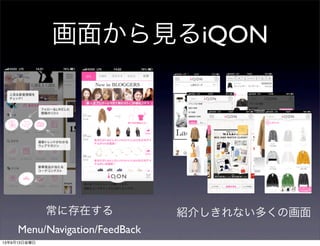
画面から見るiQON 常に存在する Menu/Navigation/FeedBack 紹介しきれない多くの画面 13年9月13日金曜日
6.
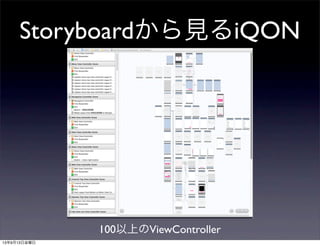
Storyboardから見るiQON 100以上のViewController 13年9月13日金曜日
7.
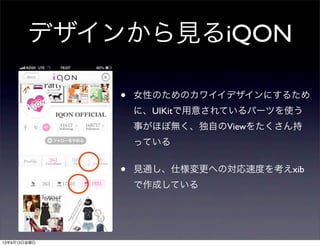
デザインから見るiQON • 女性のためのカワイイデザインにするため に、UIKitで用意されているパーツを使う 事がほぼ無く、独自のViewをたくさん持 っている • 見通し、仕様変更への対応速度を考えxib で作成している 13年9月13日金曜日
8.
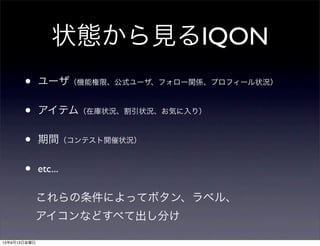
状態から見るIQON • ユーザ(機能権限、公式ユーザ、フォロー関係、プロフィール状況) • アイテム(在庫状況、割引状況、お気に入り) •
期間(コンテスト開催状況) • etc... これらの条件によってボタン、ラベル、 アイコンなどすべて出し分け 13年9月13日金曜日
9.
このような複雑な画面を効率良く作成 するためにVASILY iOSチームが実践して いるポリシー/Tipsを紹介します。 13年9月13日金曜日
10.
View実装ポリシーとTips 13年9月13日金曜日
11.
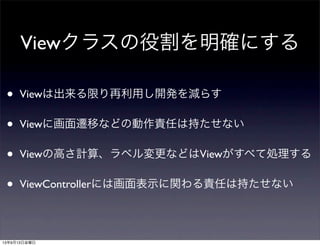
Viewクラスの役割を明確にする • Viewは出来る限り再利用し開発を減らす • Viewに画面遷移などの動作責任は持たせない •
Viewの高さ計算、ラベル変更などはViewがすべて処理する • ViewControllerには画面表示に関わる責任は持たせない 13年9月13日金曜日
12.
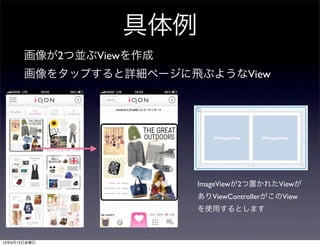
具体例 画像が2つ並ぶViewを作成 画像をタップすると詳細ページに飛ぶようなView ImageViewが2つ置かれたViewが ありViewControllerがこのView を使用するとします 13年9月13日金曜日
13.
for (int i
= 0; i < self.imageViews.count; i++) { Set *set = self.sets[i]; // コーディネートのオブジェクト UIImageView *imageView = self.imageViews[i]; imageView.imageURL = set.imageUrlMedium; imageView.tag = set.setId.intValue; // ここがダメ Viewに画像タップ時の画面遷移が記述されている [imageView setImageViewPressedBlock:^(int setId) { //UIImageViewの拡張 SetDetailViewController *vc = [VCFactory create:@"SetDetailViewController"]; [IQONAPPDELEGATE.navigationController pushViewController:vc animated:YES]; }]; } 悪い例 Viewのコード 画像タップ時の画面遷移が記述されていると、このViewの再 利用が著しく低下する もしかしたら他の画面では画像タップでポップアップが求め られるかもしれない 13年9月13日金曜日
14.
良い例 for (int i
= 0; i < self.imageViews.count; i++) { Set *set = self.sets[i]; // コーディネートのオブジェクト UIImageView *imageView = self.imageViews[i]; imageView.imageURL = set.imageUrlMedium; imageView.tag = set.setId.intValue; // ViewControllerで設定したActionを実行 if (self.imageViewPressedBlock) { imageView.imageViewPressedBlock = self.imageViewPressedBlock; } } View Controllerのコード Viewのコード setCell.imageViewPressedBlock =^(int setId) { SetDetailViewController *vc = [VCFactory create:@"SetDetailViewController"]; vc.filter.setId = @(setId); [vc updateDataController]; [IQONAPPDELEGATE.currentNavigationController pushViewController:vc animated:NO]; }; ViewにpublicなBlockのプロパティを持ち、ViewController側で動作を設定 13年9月13日金曜日
15.
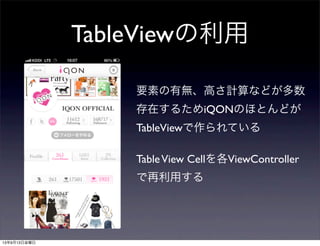
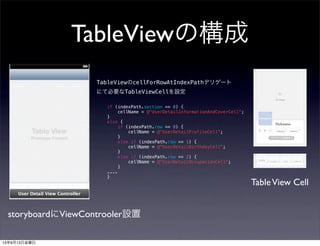
TableViewの利用 要素の有無、高さ計算などが多数 存在するためiQONのほとんどが TableViewで作られている TableView Cellを各ViewController で再利用する 13年9月13日金曜日
16.
TableViewの構成 storyboardにViewControoler設置 TableView Cell TableViewのcellForRowAtIndexPathデリゲート にて必要なTableViewCellを設定 if (indexPath.section
== 0) { cellName = @"UserDetailInformationAndCoverCell"; } else { if (indexPath.row == 0) { cellName = @"UserDetailProfileCell"; } else if (indexPath.row == 1) { cellName = @"UserDetailBirthdayCell"; } else if (indexPath.row == 2) { cellName = @"UserDetailOccupationCell"; } .... } 13年9月13日金曜日
17.
チームとして共通認識のメソッドを用意 することで可読性を高める 13年9月13日金曜日
18.
updateOutletsAll • ViewControllerに実装する • 画面更新をすべて請け負ったメソッド (TableViewのリロード、ボタンの更新etc) •
このメソッドを呼べば画面に必要な再描写がすべてされる - (void)updateOutletsAll { [self.tableView reloadData]; // TableViewのリロード [self updateOutletsOfLikeButton]; // LikeButtonの更新 … } 13年9月13日金曜日
19.
configureCell • cellの設定を行うメソッド • cellForRowAtIndexPathで必ず呼ばれる -
(UITableViewCell *)tableView:(UITableView *)tableView cellForRowAtIndexPath:(NSIndexPath *)indexPath { NSString *cellIdentifier = [self cellIdentifierForIndexPath:indexPath]; UITableViewCell *cell = [tableView dequeueReusableCellWithIdentifier:cellIdentifier forIndexPath:indexPath]; [self configureCell:cell atIndexPath:indexPath]; return cell; } - (void)configureCell:(UITableViewCell *)cell atIndexPath:(NSIndexPath *)indexPath { if ([cell isKindOfClass:ItemDetailCell.class]) { [self configureItemDetailCell:(ItemDetailCell *)cell atIndexPath:indexPath]; } else if ([cell isKindOfClass:ItemDetailRelatedItemsCell.class]) { [self configureItemDetailRelatedItemsCell:(ItemDetailRelatedItemsCell *)cell atIndexPath:indexPath]; } else if ([cell isKindOfClass:ItemDetailItemSetsCell.class]) { [self configureItemDetailItemSetsCell:(ItemDetailItemSetsCell *)cell atIndexPath:indexPath]; } } 13年9月13日金曜日
20.
layoutSubViews ViewクラスのLayoutSubViewsメソッドをオーバライドして、レイ アウト設定をおこなう。ViewController側では情報をセットし setNeedsLayoutを読んで適宜レイアウト調整を行う。 - (void)layoutSubviews { [super layoutSubviews]; //
画像の設定処理 // 画像を角丸にする処理 // Labelにテキストを設定する処理 // etc... } // データ更新処理など [hogeCell setNeedsLayout]; HogeCell HogeViewController 13年9月13日金曜日
21.
まとめ • Viewの再利用を可能な限り意識する • ボタンやフォントはルールを決め統一 •
ある程度のコーディング規約を設ける -ViewとControllerの役割 - 認識が統一されたメソッドの実装 - 画像命名規則 - Action命名規則 13年9月13日金曜日
Download




![for (int i = 0; i < self.imageViews.count; i++) {
Set *set = self.sets[i]; // コーディネートのオブジェクト
UIImageView *imageView = self.imageViews[i];
imageView.imageURL = set.imageUrlMedium;
imageView.tag = set.setId.intValue;
// ここがダメ Viewに画像タップ時の画面遷移が記述されている
[imageView setImageViewPressedBlock:^(int setId) { //UIImageViewの拡張
SetDetailViewController *vc = [VCFactory create:@"SetDetailViewController"];
[IQONAPPDELEGATE.navigationController pushViewController:vc animated:YES];
}];
}
悪い例
Viewのコード
画像タップ時の画面遷移が記述されていると、このViewの再
利用が著しく低下する
もしかしたら他の画面では画像タップでポップアップが求め
られるかもしれない
13年9月13日金曜日](https://image.slidesharecdn.com/vasilyretty-130912220719-phpapp02/85/iQON-VIew-13-320.jpg)
![良い例
for (int i = 0; i < self.imageViews.count; i++) {
Set *set = self.sets[i]; // コーディネートのオブジェクト
UIImageView *imageView = self.imageViews[i];
imageView.imageURL = set.imageUrlMedium;
imageView.tag = set.setId.intValue;
// ViewControllerで設定したActionを実行
if (self.imageViewPressedBlock) {
imageView.imageViewPressedBlock = self.imageViewPressedBlock;
}
}
View Controllerのコード
Viewのコード
setCell.imageViewPressedBlock =^(int setId) {
SetDetailViewController *vc = [VCFactory create:@"SetDetailViewController"];
vc.filter.setId = @(setId);
[vc updateDataController];
[IQONAPPDELEGATE.currentNavigationController pushViewController:vc animated:NO];
};
ViewにpublicなBlockのプロパティを持ち、ViewController側で動作を設定
13年9月13日金曜日](https://image.slidesharecdn.com/vasilyretty-130912220719-phpapp02/85/iQON-VIew-14-320.jpg)
![updateOutletsAll
• ViewControllerに実装する
• 画面更新をすべて請け負ったメソッド
(TableViewのリロード、ボタンの更新etc)
• このメソッドを呼べば画面に必要な再描写がすべてされる
- (void)updateOutletsAll
{
[self.tableView reloadData]; // TableViewのリロード
[self updateOutletsOfLikeButton]; // LikeButtonの更新
…
}
13年9月13日金曜日](https://image.slidesharecdn.com/vasilyretty-130912220719-phpapp02/85/iQON-VIew-18-320.jpg)
![configureCell
• cellの設定を行うメソッド
• cellForRowAtIndexPathで必ず呼ばれる
- (UITableViewCell *)tableView:(UITableView *)tableView cellForRowAtIndexPath:(NSIndexPath *)indexPath
{
NSString *cellIdentifier = [self cellIdentifierForIndexPath:indexPath];
UITableViewCell *cell = [tableView dequeueReusableCellWithIdentifier:cellIdentifier forIndexPath:indexPath];
[self configureCell:cell atIndexPath:indexPath];
return cell;
}
- (void)configureCell:(UITableViewCell *)cell atIndexPath:(NSIndexPath *)indexPath
{
if ([cell isKindOfClass:ItemDetailCell.class]) {
[self configureItemDetailCell:(ItemDetailCell *)cell atIndexPath:indexPath];
}
else if ([cell isKindOfClass:ItemDetailRelatedItemsCell.class]) {
[self configureItemDetailRelatedItemsCell:(ItemDetailRelatedItemsCell *)cell atIndexPath:indexPath];
}
else if ([cell isKindOfClass:ItemDetailItemSetsCell.class]) {
[self configureItemDetailItemSetsCell:(ItemDetailItemSetsCell *)cell atIndexPath:indexPath];
}
}
13年9月13日金曜日](https://image.slidesharecdn.com/vasilyretty-130912220719-phpapp02/85/iQON-VIew-19-320.jpg)
![layoutSubViews
ViewクラスのLayoutSubViewsメソッドをオーバライドして、レイ
アウト設定をおこなう。ViewController側では情報をセットし
setNeedsLayoutを読んで適宜レイアウト調整を行う。
- (void)layoutSubviews
{
[super layoutSubviews];
// 画像の設定処理
// 画像を角丸にする処理
// Labelにテキストを設定する処理
// etc...
}
// データ更新処理など
[hogeCell setNeedsLayout];
HogeCell
HogeViewController
13年9月13日金曜日](https://image.slidesharecdn.com/vasilyretty-130912220719-phpapp02/85/iQON-VIew-20-320.jpg)