Using Glow for the first time


                        Mrs Maclean
                       Markethill School
Finding the Glow login page
This can be accessed via the links on the school
blog or by simply searching for ‘glow login.’

https://secure.glowscotland.org.uk/login/login.htm
Things to remember:
• Passwords must contain lower case letters
• Passwords must have a non alpha numeric
  character( e.g # * or a space)
• Passwords must have 7 or more characters
• We suggest a name then # then the number 1
Each time you have to change your password in
future, you can just change the number.
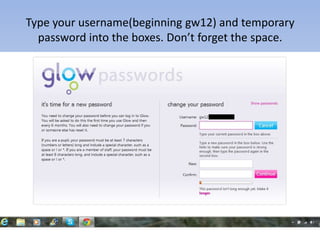
Type your username(beginning gw12) and temporary
  password into the boxes. Don’t forget the space.
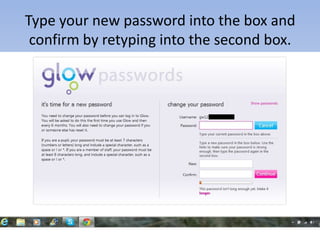
Type your new password into the box and
 confirm by retyping into the second box.
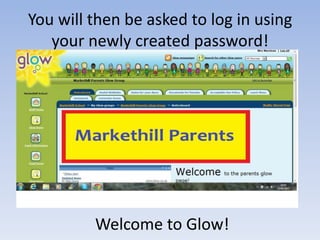
You will then be asked to log in using
   your newly created password!


         Welcome to Glow!
Any problems with passwords please email our
glow administrator :

AMhill356@markethill.aberdeenshire.sch.uk

Using glow for the first time

  • 1.
    Using Glow forthe first time Mrs Maclean Markethill School
  • 2.
    Finding the Glowlogin page This can be accessed via the links on the school blog or by simply searching for ‘glow login.’ https://secure.glowscotland.org.uk/login/login.htm
  • 3.
    Things to remember: •Passwords must contain lower case letters • Passwords must have a non alpha numeric character( e.g # * or a space) • Passwords must have 7 or more characters • We suggest a name then # then the number 1 Each time you have to change your password in future, you can just change the number.
  • 4.
    Type your username(beginninggw12) and temporary password into the boxes. Don’t forget the space.
  • 5.
    Type your newpassword into the box and confirm by retyping into the second box.
  • 6.
    You will thenbe asked to log in using your newly created password! Welcome to Glow!
  • 7.
    Any problems withpasswords please email our glow administrator : AMhill356@markethill.aberdeenshire.sch.uk