U.S. Coast Guard Social Media
Handbook
Responsible Use of Social Media
SOCIAL MEDIA PRINCIPLES 2
PROFESSIONAL BEHAVIOR 3
PERSONAL BEHAVIOR 6
PROTECTING YOUR PRIVACY ONLINE 5
MULTIMEDIA RELEASE DECISION TREE 7
WHAT IS SAPP? 4
Social Media Principles
While we have traditionally excelled at telling the U.S. Coast Guard
story – actively engaging the media, the public and the community – the
growth of social media presents the opportunity to take our storytelling
one step further. Being a trusted source of timely, engaging and
responsive online information helps continue to build public trust and
confidence.
While the Coast Guard views every member and employee as a
spokesperson for the service, it also holds them accountable for
communicating effectively and responsibly. This handbook provides
guiding principles for using social media tools both personally and
professionally to help personnel be responsible online and keep Coast
Guard men and women safe and secure.
While these principles are applicable across all online communication,
they are not all inclusive. You must exercise good judgment and
common sense, adhere to the Coast Guard core values and follow
established public affairs, security and legal policies. When in doubt,
consult with your chain of command or servicing public affairs office.
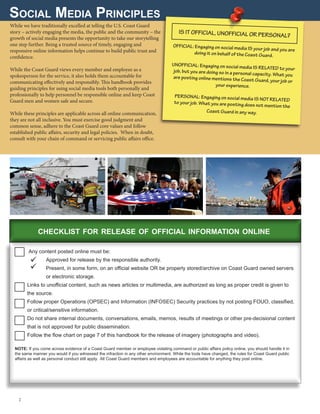
Any content posted online must be:
	 Approved for release by the responsible authority.
	Present, in some form, on an official website OR be properly stored/archive on Coast Guard owned servers
or electronic storage.
Links to unofficial content, such as news articles or multimedia, are authorized as long as proper credit is given to
the source.
Follow proper Operations (OPSEC) and Information (INFOSEC) Security practices by not posting FOUO, classified,
or critical/sensitive information.
Do not share internal documents, conversations, emails, memos, results of meetings or other pre-decisional content
that is not approved for public dissemination.
Follow the flow chart on page 7 of this handbook for the release of imagery (photographs and video).
IS IT OFFICIAL, UNOFFICIAL OR PERSONAL?
OFFICIAL: Engaging on social media IS your job and you are
doing it on behalf of the Coast Guard.
UNOFFICIAL: Engaging on social media IS RELATED to yourjob, but you are doing so in a personal capacity. What youare posting online mentions the Coast Guard, your job or
your experience.
PERSONAL: Engaging on social media IS NOT RELATEDto your job. What you are posting does not mention the
Coast Guard in any way.
2 
checklist for release of official information online
NOTE: If you come across evidence of a Coast Guard member or employee violating command or public affairs policy online, you should handle it in
the same manner you would if you witnessed the infraction in any other environment. While the tools have changed, the rules for Coast Guard public
affairs as well as personal conduct still apply. All Coast Guard members and employees are accountable for anything they post online.


Professional Behavior
The following guidelines are for members and employees who engage on social media
sites in their official duties. In other words, what you are posting online is on behalf of a
Coast Guard unit, command or other entity. When you are assigned as the public affairs
officer or the social media site manager, everything you do impacts public trust. You are a
direct representative of the Coast Guard and must embody the spirit and professionalism
of the service.
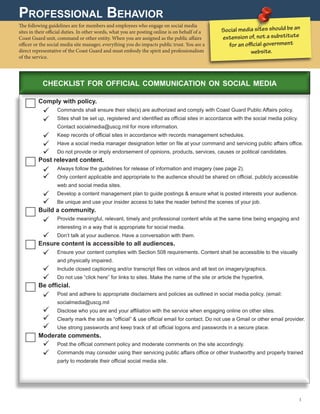
Comply with policy.
	 Commands shall ensure their site(s) are authorized and comply with Coast Guard Public Affairs policy.
	Sites shall be set up, registered and identified as official sites in accordance with the social media policy.
Contact socialmedia@uscg.mil for more information.
	 Keep records of official sites in accordance with records management schedules.
	 Have a social media manager designation letter on file at your command and servicing public affairs office.
	 Do not provide or imply endorsement of opinions, products, services, causes or political candidates.
Post relevant content.
	 Always follow the guidelines for release of information and imagery (see page 2).
	Only content applicable and appropriate to the audience should be shared on official, publicly accessible
web and social media sites.
	Develop a content management plan to guide postings  ensure what is posted interests your audience.
	 Be unique and use your insider access to take the reader behind the scenes of your job.
Build a community.
	Provide meaningful, relevant, timely and professional content while at the same time being engaging and
interesting in a way that is appropriate for social media.
	 Don’t talk at your audience. Have a conversation with them.
Ensure content is accessible to all audiences.
	Ensure your content complies with Section 508 requirements. Content shall be accessible to the visually
and physically impaired.
	 Include closed captioning and/or transcript files on videos and alt text on imagery/graphics.
	 Do not use “click here” for links to sites. Make the name of the site or article the hyperlink.
Be official.
	Post and adhere to appropriate disclaimers and policies as outlined in social media policy. (email:
socialmedia@uscg.mil
	 Disclose who you are and your affiliation with the service when engaging online on other sites.
	Clearly mark the site as “official”  use official email for contact. Do not use a Gmail or other email provider.
	 Use strong passwords and keep track of all official logons and passwords in a secure place.
Moderate comments.
	 Post the official comment policy and moderate comments on the site accordingly.
	Commands may consider using their servicing public affairs office or other trustworthy and properly trained
party to moderate their official social media site.
Social media sites should be an
extension of, not a substitute
for an official government
website.
3 
checklist for official communication on social media




















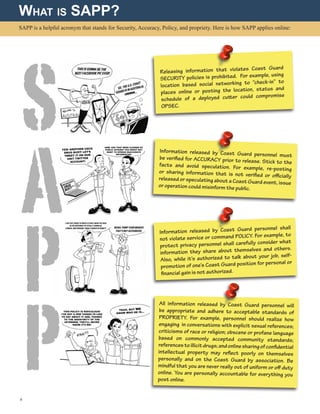
SAPP is a helpful acronym that stands for Security, Accuracy, Policy, and propriety. Here is how SAPP applies online:
What is SAPP?
Releasing information that violates Coast Guard
SECURITY policies is prohibited. For example, using
location based social networking to “check-in” to
places online or posting the location, status and
schedule of a deployed cutter could compromise
OPSEC.
Information released by Coast Guard personnel mustbe verified for ACCURACY prior to release. Stick to thefacts and avoid speculation. For example, re-postingor sharing information that is not verified or officiallyreleased or speculating about a Coast Guard event, issueor operation could misinform the public.
Information released by Coast Guard personnel shall
not violate service or command POLICY. For example, to
protect privacy personnel shall carefully consider what
information they share about themselves and others.
Also, while it’s authorized to talk about your job, self-
promotion of one’s Coast Guard position for personal or
financial gain is not authorized.
All information released by Coast Guard personnel will
be appropriate and adhere to acceptable standards of
PROPRIETY. For example, personnel should realize how
engaging in conversations with explicit sexual references;
criticisms of race or religion; obscene or profane language
based on commonly accepted community standards;
referencestoillicitdrugs;andonlinesharingofconfidential
intellectual property may reflect poorly on themselves
personally and on the Coast Guard by association. Be
mindful that you are never really out of uniform or off duty
online. You are personally accountable for everything you
post online.
4 
S
A
P
P
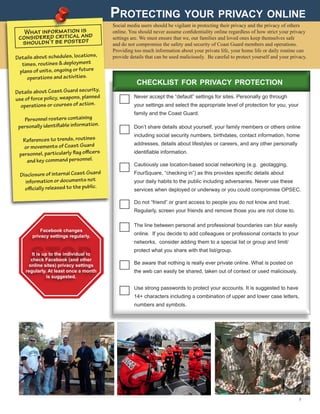
Protecting your privacy online
Social media users should be vigilant in protecting their privacy and the privacy of others
online. You should never assume confidentiality online regardless of how strict your privacy
settings are. We must ensure that we, our families and loved ones keep themselves safe
and do not compromise the safety and security of Coast Guard members and operations.
Providing too much information about your private life, your home life or daily routine can
provide details that can be used maliciously. Be careful to protect yourself and your privacy.
What information is
considered critical and
shouldn’t be posted?
Details about schedules, locations,
times, routines  deployment
plans of units, ongoing or future
operations and activities.
Details about Coast Guard security,
use of force policy, weapons, planned
operations or courses of action.
Personnel rosters containing
personally identifiable information.
References to trends, routines
or movements of Coast Guard
personnel, particularly flag officers
and key command personnel.
Disclosure of internal Coast Guard
information or documents not
officially released to the public.
STOP
5 
Never accept the “default” settings for sites. Personally go through
your settings and select the appropriate level of protection for you, your
family and the Coast Guard.
Don’t share details about yourself, your family members or others online
including social security numbers, birthdates, contact information, home
addresses, details about lifestyles or careers, and any other personally
identifiable information.
Cautiously use location-based social networking (e.g. geotagging, 	
FourSquare, “checking in”) as this provides specific details about
your daily habits to the public including adversaries. Never use these
services when deployed or underway or you could compromise OPSEC.
Do not “friend” or grant access to people you do not know and trust.
Regularly, screen your friends and remove those you are not close to.
The line between personal and professional boundaries can blur easily
online. If you decide to add colleagues or professional contacts to your
networks, consider adding them to a special list or group and limit/
protect what you share with that list/group.
Be aware that nothing is really ever private online. What is posted on
the web can easily be shared, taken out of context or used maliciously.
Use strong passwords to protect your accounts. It is suggested to have
14+ characters including a combination of upper and lower case letters,
numbers and symbols.
checklist for privacy protection
Facebook changes
privacy settings regularly.
It is up to the individual to
check Facebook (and other
online sites) privacy settings
regularly. At least once a month
is suggested.
6 
STOP
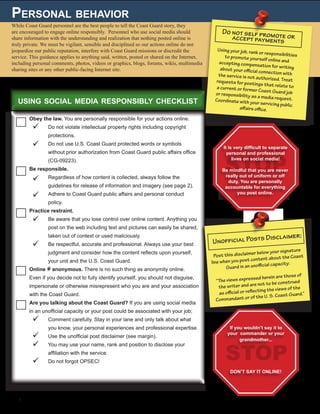
Personal behavior
While Coast Guard personnel are the best people to tell the Coast Guard story, they
are encouraged to engage online responsibly. Personnel who use social media should
share information with the understanding and realization that nothing posted online is
truly private. We must be vigilant, sensible and disciplined so our actions online do not
jeopardize our public reputation, interfere with Coast Guard missions or discredit the
service. This guidance applies to anything said, written, posted or shared on the Internet,
including personal comments, photos, videos or graphics, blogs, forums, wikis, multimedia
sharing sites or any other public-facing Internet site.
Obey the law. You are personally responsible for your actions online.
	Do not violate intellectual property rights including copyright
protections.
	Do not use U.S. Coast Guard protected words or symbols
without prior authorization from Coast Guard public affairs office
(CG-09223).
Be responsible.
	Regardless of how content is collected, always follow the
guidelines for release of information and imagery (see page 2).
	Adhere to Coast Guard public affairs and personal conduct
policy.
Practice restraint.
	Be aware that you lose control over online content. Anything you
post on the web including text and pictures can easily be shared,
taken out of context or used maliciously.
	Be respectful, accurate and professional. Always use your best
judgment and consider how the content reflects upon yourself,
your unit and the U.S. Coast Guard.
Online = anonymous. There is no such thing as anonymity online.
Even if you decide not to fully identify yourself, you should not disguise,
impersonate or otherwise misrepresent who you are and your association
with the Coast Guard.
Are you talking about the Coast Guard? If you are using social media
in an unofficial capacity or your post could be associated with your job;
	Comment carefully. Stay in your lane and only talk about what
you know, your personal experiences and professional expertise.
	 Use the unofficial post disclaimer (see margin).
	You may use your name, rank and position to disclose your
affiliation with the service.
	 Do not forgot OPSEC!
Do not self promote oraccept payments
Using your job, rank or responsibilitiesto promote yourself online andaccepting compensation for writingabout your official connection withthe service is not authorized. Treatrequests for postings that relate toa current or former Coast Guard jobor responsibility as a media request.Coordinate with your servicing public
affairs office.
It is very difficult to separate
personal and professional
lives on social media!
Unofficial Posts Disclaimer:
using social media responsibly checklist
Be mindful that you are never
really out of uniform or off
duty. You are personally
accountable for everything
you post online.
Post this disclaimer below your signature
line when you post content about the Coast
Guard in an unofficial capacity:
“The views expressed herein are those of
the writer and are not to be construed
as official or reflecting the views of the
Commandant or of the U. S. Coast Guard.”
STOP
If you wouldn’t say it to
your commander or your
grandmother...










/
DON’T SAY IT ONLINE!
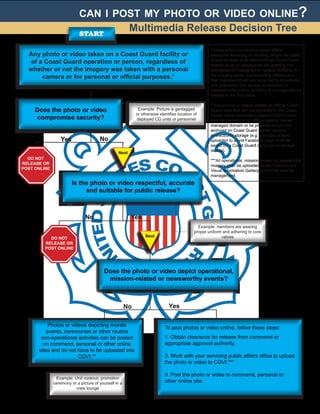
can i post my photo or video online?
Any photo or video taken on a Coast Guard facility or
of a Coast Guard operation or person, regardless of
whether or not the imagery was taken with a personal
camera or for personal or official purposes.*
Does the photo or video
compromise security?
Is the photo or video respectful, accurate
and suitable for public release?
Does the photo or video depict operational,
mission-related or newsworthy events?
Photos or videos depicting morale
events, ceremonies or other routine
non-operational activities can be posted
on command, personal or other online
sites and do not have to be uploaded into
CGVI.**
To post photos or video online, follow these steps:
1. Obtain clearance for release from command or
appropriate approval authority.
2. Work with your servicing public affairs office to upload
the photo or video to CGVI.***
3. Post the photo or video to command, personal or
other online site.
*Designated command or public affairs
personnel escorting or allowing people on Coast
Guard facilities or to attend official Coast Guard
events, tours or ceremonies are granting the
photographer/videographer release authority for
the imagery taken. Commanding officers and
their representatives are expected to proactively
and judiciously limit access to sensitive or
classified information so that it is not captured on
camera in the first place.
**Any photos or videos posted on official Coast
Guard sites that are not uploaded to the Coast
Guard Visual Information Gallery (CGVI) must
also be present on an official agency owned/
managed domain or be properly stored and
archived on Coast Guard owned servers
or electronic storage (e.g. a morale picture
uploaded to a unit Facebook page must be
saved on a Coast Guard computer or storage
device).
***All operational, mission-related or newsworthy
imagery shall be uploaded to the Coast Guard
Visual Information Gallery (CGVI) for records
management.
DO NOT
RELEASE OR
POST ONLINE
Yes
YesNo
No
Next
No Yes
Example: Picture is geotagged
or otherwise identifies location of
deployed CG units or personnel
Example: members are wearing
proper uniform and adhering to core
values
Example: Unit cookout, promotion
ceremony or a picture of yourself in a
crew lounge
DO NOT
RELEASE OR
POST ONLINE
Next
7 
start
Multimedia Release Decision Tree
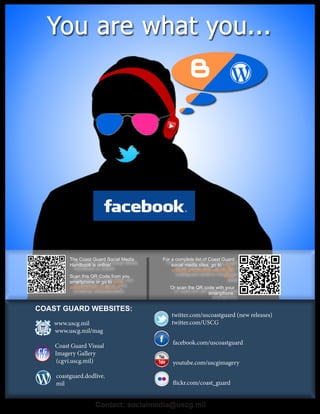
www.uscg.mil
www.uscg.mil/mag
Coast Guard Visual
Imagery Gallery
(cgvi.uscg.mil)
coastguard.dodlive.
mil
twitter.com/uscoastguard (new releases)
twitter.com/USCG
facebook.com/uscoastguard
youtube.com/uscgimagery
flickr.com/coast_guard
COAST GUARD WEBSITES:
Contact: socialmedia@uscg.mil
The Coast Guard Social Media
Handbook is online!
Scan this QR Code from you
smartphone or go to www.
dvidshub.net/publication.
For a complete list of Coast Guard
social media sites, go to http://
coastguard.dodlive.mil/official-
sites/
Or scan the QR code with your
smartphone.

U.S. Coast Guard Social Media Handbook

  • 1.
    U.S. Coast GuardSocial Media Handbook Responsible Use of Social Media SOCIAL MEDIA PRINCIPLES 2 PROFESSIONAL BEHAVIOR 3 PERSONAL BEHAVIOR 6 PROTECTING YOUR PRIVACY ONLINE 5 MULTIMEDIA RELEASE DECISION TREE 7 WHAT IS SAPP? 4
  • 2.
    Social Media Principles Whilewe have traditionally excelled at telling the U.S. Coast Guard story – actively engaging the media, the public and the community – the growth of social media presents the opportunity to take our storytelling one step further. Being a trusted source of timely, engaging and responsive online information helps continue to build public trust and confidence. While the Coast Guard views every member and employee as a spokesperson for the service, it also holds them accountable for communicating effectively and responsibly. This handbook provides guiding principles for using social media tools both personally and professionally to help personnel be responsible online and keep Coast Guard men and women safe and secure. While these principles are applicable across all online communication, they are not all inclusive. You must exercise good judgment and common sense, adhere to the Coast Guard core values and follow established public affairs, security and legal policies. When in doubt, consult with your chain of command or servicing public affairs office. Any content posted online must be: Approved for release by the responsible authority. Present, in some form, on an official website OR be properly stored/archive on Coast Guard owned servers or electronic storage. Links to unofficial content, such as news articles or multimedia, are authorized as long as proper credit is given to the source. Follow proper Operations (OPSEC) and Information (INFOSEC) Security practices by not posting FOUO, classified, or critical/sensitive information. Do not share internal documents, conversations, emails, memos, results of meetings or other pre-decisional content that is not approved for public dissemination. Follow the flow chart on page 7 of this handbook for the release of imagery (photographs and video). IS IT OFFICIAL, UNOFFICIAL OR PERSONAL? OFFICIAL: Engaging on social media IS your job and you are doing it on behalf of the Coast Guard. UNOFFICIAL: Engaging on social media IS RELATED to yourjob, but you are doing so in a personal capacity. What youare posting online mentions the Coast Guard, your job or your experience. PERSONAL: Engaging on social media IS NOT RELATEDto your job. What you are posting does not mention the Coast Guard in any way. 2  checklist for release of official information online NOTE: If you come across evidence of a Coast Guard member or employee violating command or public affairs policy online, you should handle it in the same manner you would if you witnessed the infraction in any other environment. While the tools have changed, the rules for Coast Guard public affairs as well as personal conduct still apply. All Coast Guard members and employees are accountable for anything they post online.  
  • 3.
    Professional Behavior The followingguidelines are for members and employees who engage on social media sites in their official duties. In other words, what you are posting online is on behalf of a Coast Guard unit, command or other entity. When you are assigned as the public affairs officer or the social media site manager, everything you do impacts public trust. You are a direct representative of the Coast Guard and must embody the spirit and professionalism of the service. Comply with policy. Commands shall ensure their site(s) are authorized and comply with Coast Guard Public Affairs policy. Sites shall be set up, registered and identified as official sites in accordance with the social media policy. Contact socialmedia@uscg.mil for more information. Keep records of official sites in accordance with records management schedules. Have a social media manager designation letter on file at your command and servicing public affairs office. Do not provide or imply endorsement of opinions, products, services, causes or political candidates. Post relevant content. Always follow the guidelines for release of information and imagery (see page 2). Only content applicable and appropriate to the audience should be shared on official, publicly accessible web and social media sites. Develop a content management plan to guide postings ensure what is posted interests your audience. Be unique and use your insider access to take the reader behind the scenes of your job. Build a community. Provide meaningful, relevant, timely and professional content while at the same time being engaging and interesting in a way that is appropriate for social media. Don’t talk at your audience. Have a conversation with them. Ensure content is accessible to all audiences. Ensure your content complies with Section 508 requirements. Content shall be accessible to the visually and physically impaired. Include closed captioning and/or transcript files on videos and alt text on imagery/graphics. Do not use “click here” for links to sites. Make the name of the site or article the hyperlink. Be official. Post and adhere to appropriate disclaimers and policies as outlined in social media policy. (email: socialmedia@uscg.mil Disclose who you are and your affiliation with the service when engaging online on other sites. Clearly mark the site as “official” use official email for contact. Do not use a Gmail or other email provider. Use strong passwords and keep track of all official logons and passwords in a secure place. Moderate comments. Post the official comment policy and moderate comments on the site accordingly. Commands may consider using their servicing public affairs office or other trustworthy and properly trained party to moderate their official social media site. Social media sites should be an extension of, not a substitute for an official government website. 3  checklist for official communication on social media                    
  • 4.
    SAPP is ahelpful acronym that stands for Security, Accuracy, Policy, and propriety. Here is how SAPP applies online: What is SAPP? Releasing information that violates Coast Guard SECURITY policies is prohibited. For example, using location based social networking to “check-in” to places online or posting the location, status and schedule of a deployed cutter could compromise OPSEC. Information released by Coast Guard personnel mustbe verified for ACCURACY prior to release. Stick to thefacts and avoid speculation. For example, re-postingor sharing information that is not verified or officiallyreleased or speculating about a Coast Guard event, issueor operation could misinform the public. Information released by Coast Guard personnel shall not violate service or command POLICY. For example, to protect privacy personnel shall carefully consider what information they share about themselves and others. Also, while it’s authorized to talk about your job, self- promotion of one’s Coast Guard position for personal or financial gain is not authorized. All information released by Coast Guard personnel will be appropriate and adhere to acceptable standards of PROPRIETY. For example, personnel should realize how engaging in conversations with explicit sexual references; criticisms of race or religion; obscene or profane language based on commonly accepted community standards; referencestoillicitdrugs;andonlinesharingofconfidential intellectual property may reflect poorly on themselves personally and on the Coast Guard by association. Be mindful that you are never really out of uniform or off duty online. You are personally accountable for everything you post online. 4  S A P P
  • 5.
    Protecting your privacyonline Social media users should be vigilant in protecting their privacy and the privacy of others online. You should never assume confidentiality online regardless of how strict your privacy settings are. We must ensure that we, our families and loved ones keep themselves safe and do not compromise the safety and security of Coast Guard members and operations. Providing too much information about your private life, your home life or daily routine can provide details that can be used maliciously. Be careful to protect yourself and your privacy. What information is considered critical and shouldn’t be posted? Details about schedules, locations, times, routines deployment plans of units, ongoing or future operations and activities. Details about Coast Guard security, use of force policy, weapons, planned operations or courses of action. Personnel rosters containing personally identifiable information. References to trends, routines or movements of Coast Guard personnel, particularly flag officers and key command personnel. Disclosure of internal Coast Guard information or documents not officially released to the public. STOP 5  Never accept the “default” settings for sites. Personally go through your settings and select the appropriate level of protection for you, your family and the Coast Guard. Don’t share details about yourself, your family members or others online including social security numbers, birthdates, contact information, home addresses, details about lifestyles or careers, and any other personally identifiable information. Cautiously use location-based social networking (e.g. geotagging, FourSquare, “checking in”) as this provides specific details about your daily habits to the public including adversaries. Never use these services when deployed or underway or you could compromise OPSEC. Do not “friend” or grant access to people you do not know and trust. Regularly, screen your friends and remove those you are not close to. The line between personal and professional boundaries can blur easily online. If you decide to add colleagues or professional contacts to your networks, consider adding them to a special list or group and limit/ protect what you share with that list/group. Be aware that nothing is really ever private online. What is posted on the web can easily be shared, taken out of context or used maliciously. Use strong passwords to protect your accounts. It is suggested to have 14+ characters including a combination of upper and lower case letters, numbers and symbols. checklist for privacy protection Facebook changes privacy settings regularly. It is up to the individual to check Facebook (and other online sites) privacy settings regularly. At least once a month is suggested.
  • 6.
    6  STOP Personal behavior While CoastGuard personnel are the best people to tell the Coast Guard story, they are encouraged to engage online responsibly. Personnel who use social media should share information with the understanding and realization that nothing posted online is truly private. We must be vigilant, sensible and disciplined so our actions online do not jeopardize our public reputation, interfere with Coast Guard missions or discredit the service. This guidance applies to anything said, written, posted or shared on the Internet, including personal comments, photos, videos or graphics, blogs, forums, wikis, multimedia sharing sites or any other public-facing Internet site. Obey the law. You are personally responsible for your actions online. Do not violate intellectual property rights including copyright protections. Do not use U.S. Coast Guard protected words or symbols without prior authorization from Coast Guard public affairs office (CG-09223). Be responsible. Regardless of how content is collected, always follow the guidelines for release of information and imagery (see page 2). Adhere to Coast Guard public affairs and personal conduct policy. Practice restraint. Be aware that you lose control over online content. Anything you post on the web including text and pictures can easily be shared, taken out of context or used maliciously. Be respectful, accurate and professional. Always use your best judgment and consider how the content reflects upon yourself, your unit and the U.S. Coast Guard. Online = anonymous. There is no such thing as anonymity online. Even if you decide not to fully identify yourself, you should not disguise, impersonate or otherwise misrepresent who you are and your association with the Coast Guard. Are you talking about the Coast Guard? If you are using social media in an unofficial capacity or your post could be associated with your job; Comment carefully. Stay in your lane and only talk about what you know, your personal experiences and professional expertise. Use the unofficial post disclaimer (see margin). You may use your name, rank and position to disclose your affiliation with the service. Do not forgot OPSEC! Do not self promote oraccept payments Using your job, rank or responsibilitiesto promote yourself online andaccepting compensation for writingabout your official connection withthe service is not authorized. Treatrequests for postings that relate toa current or former Coast Guard jobor responsibility as a media request.Coordinate with your servicing public affairs office. It is very difficult to separate personal and professional lives on social media! Unofficial Posts Disclaimer: using social media responsibly checklist Be mindful that you are never really out of uniform or off duty. You are personally accountable for everything you post online. Post this disclaimer below your signature line when you post content about the Coast Guard in an unofficial capacity: “The views expressed herein are those of the writer and are not to be construed as official or reflecting the views of the Commandant or of the U. S. Coast Guard.” STOP If you wouldn’t say it to your commander or your grandmother...           / DON’T SAY IT ONLINE!
  • 7.
    can i postmy photo or video online? Any photo or video taken on a Coast Guard facility or of a Coast Guard operation or person, regardless of whether or not the imagery was taken with a personal camera or for personal or official purposes.* Does the photo or video compromise security? Is the photo or video respectful, accurate and suitable for public release? Does the photo or video depict operational, mission-related or newsworthy events? Photos or videos depicting morale events, ceremonies or other routine non-operational activities can be posted on command, personal or other online sites and do not have to be uploaded into CGVI.** To post photos or video online, follow these steps: 1. Obtain clearance for release from command or appropriate approval authority. 2. Work with your servicing public affairs office to upload the photo or video to CGVI.*** 3. Post the photo or video to command, personal or other online site. *Designated command or public affairs personnel escorting or allowing people on Coast Guard facilities or to attend official Coast Guard events, tours or ceremonies are granting the photographer/videographer release authority for the imagery taken. Commanding officers and their representatives are expected to proactively and judiciously limit access to sensitive or classified information so that it is not captured on camera in the first place. **Any photos or videos posted on official Coast Guard sites that are not uploaded to the Coast Guard Visual Information Gallery (CGVI) must also be present on an official agency owned/ managed domain or be properly stored and archived on Coast Guard owned servers or electronic storage (e.g. a morale picture uploaded to a unit Facebook page must be saved on a Coast Guard computer or storage device). ***All operational, mission-related or newsworthy imagery shall be uploaded to the Coast Guard Visual Information Gallery (CGVI) for records management. DO NOT RELEASE OR POST ONLINE Yes YesNo No Next No Yes Example: Picture is geotagged or otherwise identifies location of deployed CG units or personnel Example: members are wearing proper uniform and adhering to core values Example: Unit cookout, promotion ceremony or a picture of yourself in a crew lounge DO NOT RELEASE OR POST ONLINE Next 7  start Multimedia Release Decision Tree
  • 8.
    www.uscg.mil www.uscg.mil/mag Coast Guard Visual ImageryGallery (cgvi.uscg.mil) coastguard.dodlive. mil twitter.com/uscoastguard (new releases) twitter.com/USCG facebook.com/uscoastguard youtube.com/uscgimagery flickr.com/coast_guard COAST GUARD WEBSITES: Contact: socialmedia@uscg.mil The Coast Guard Social Media Handbook is online! Scan this QR Code from you smartphone or go to www. dvidshub.net/publication. For a complete list of Coast Guard social media sites, go to http:// coastguard.dodlive.mil/official- sites/ Or scan the QR code with your smartphone.