GE3151 – PROBLEM SOLVING AND
PYTHON PROGRAMMING
G.PRAVEENA
ASP/CSE
UNIT II DATA, EXPRESSIONS, STATEMENTS
Python interpreter and interactive mode; values
and types: int, float, boolean, string, and list;
variables, expressions, statements, tuple
assignment, precedence of operators,
comments; Illustrative programs: exchange the
values of two variables, circulate the values of n
variables, distance between two points.
INTRODUCTION TO PYTHON:
Python is a general-purpose interpreted,
interactive, object-oriented, and high-
level programming language.
It was created by Guido van Rossum during
1985- 1990.
Python got its name from “Monty Python’s
flying circus”. Python was released in the
year 2000.
v Python is interpreted: Python is
processed at runtime by the interpreter.
You do not need to compile your program
before executing it.
v Python is Interactive: You can actually sit
at a Python prompt and interact with the
interpreter directly to write your programs.
Python is Object-Oriented: Python supports
Object-Oriented style or technique of
programming that encapsulates code within
objects.
v Python is a Beginner's Language: Python
is a great language for the beginner- level
programmers and supports the development
of a wide range of applications.
Python Features:
v Easy-to-learn: Python is clearly defined and easily
readable. The structure of the program is very simple. It uses
few keywords.
v Easy-to-maintain: Python's source code is fairly easy-to-
maintain.
v Portable: Python can run on a wide variety of
hardware platforms and has the same interface on all
platforms.
v Interpreted: Python is processed at runtime by the
interpreter. So, there is no need to compile a program before
executing it. You can simply run the program.
Extensible: Programmers can embed python within their
C,C++,Java script ,ActiveX, etc.
v Free and Open Source: Anyone can freely distribute it,
read the source code, and edit it.
v High Level Language: When writing programs,
programmers concentrate on solutions of the current
problem, no need to worry about the low level details.
v Scalable: Python provides a better structure and support
for large programs than shell scripting.
Applications
v Bit Torrent file sharing
v Google search engine, Youtube
v Intel, Cisco, HP, IBM
v i–Robot
v NASA
v Facebook, Drop box
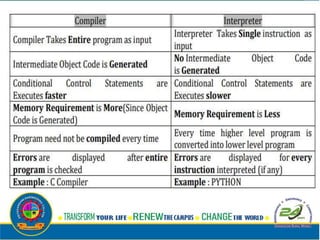
Python interpreter:
Interpreter: To execute a program in a high-
level language by translating it one line at a
time.
Compiler: To translate a program written in a
high-level language into a low-level language
all at once, in preparation for later execution.
MODES OF PYTHON INTERPRETER:
Python Interpreter is a program that reads
and executes Python code. It uses 2 modes of
Execution.
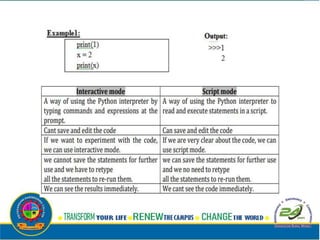
1. Interactive mode
2. Script mode
1. Interactive mode:
v Interactive Mode, as the name suggests, allows us to
interact with OS.
v When we type Python statement, interpreter displays
the result(s) immediately.
Advantages:
v Python, in interactive mode, is good enough to learn,
experiment or explore.
v Working in interactive mode is convenient for beginners
and for testing small pieces of code.
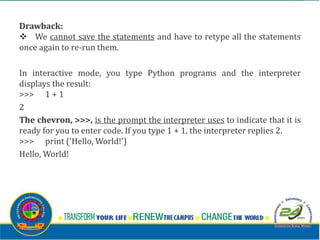
Drawback:
v We cannot save the statements and have to retype all the statements
once again to re-run them.
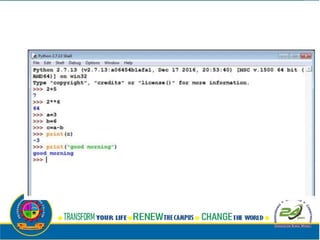
In interactive mode, you type Python programs and the interpreter
displays the result:
>>> 1 + 1
2
The chevron, >>>, is the prompt the interpreter uses to indicate that it is
ready for you to enter code. If you type 1 + 1, the interpreter replies 2.
>>> print ('Hello, World!')
Hello, World!
2. Script mode:
v In script mode, we type python program in
a file and then use interpreter to execute the
content of the file.
v Scripts can be saved to disk for future
use. Python scripts have the extension .py,
meaning that the filename ends with .py
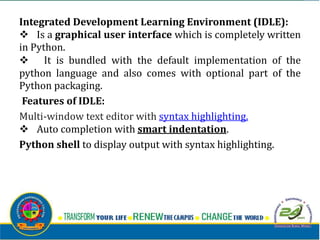
Integrated Development Learning Environment (IDLE):
v Is a graphical user interface which is completely written
in Python.
v It is bundled with the default implementation of the
python language and also comes with optional part of the
Python packaging.
Features of IDLE:
Multi-window text editor with syntax highlighting.
v Auto completion with smart indentation.
Python shell to display output with syntax highlighting.
VALUES AND DATA TYPES
Value:
Value can be any letter ,number or string.
Eg, Values are 2, 42.0, and 'Hello, World!'.
(These values belong to different datatypes.)
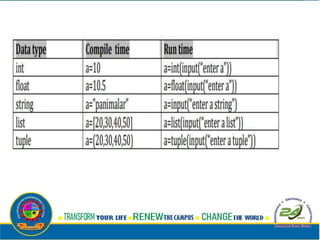
Data type:
• Every value in Python has a data type.
• It is a set of values, and the allowable
operations on those values.
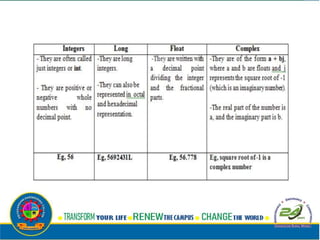
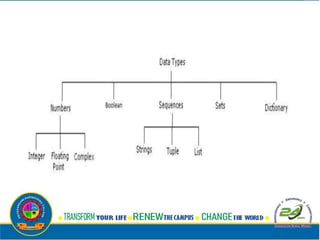
Numbers:
Number data type stores Numerical Values.
This data type is immutable [i.e. values/items
cannot be changed].
Python supports integers, floating point
numbers and complex numbers. They are
defined as,
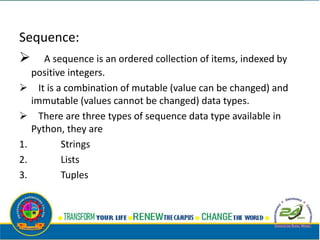
Sequence:
 A sequence is an ordered collection of items, indexed by
positive integers.
 It is a combination of mutable (value can be changed) and
immutable (values cannot be changed) data types.
 There are three types of sequence data type available in
Python, they are
1. Strings
2. Lists
3. Tuples
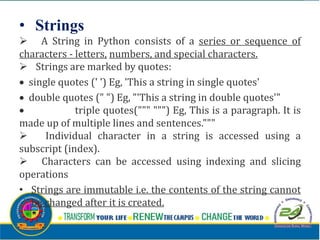
• Strings
 A String in Python consists of a series or sequence of
characters - letters, numbers, and special characters.
 Strings are marked by quotes:
 single quotes (' ') Eg, 'This a string in single quotes'
 double quotes (" ") Eg, "'This a string in double quotes'"
 triple quotes(""" """) Eg, This is a paragraph. It is
made up of multiple lines and sentences."""
 Individual character in a string is accessed using a
subscript (index).
 Characters can be accessed using indexing and slicing
operations
• Strings are immutable i.e. the contents of the string cannot
be changed after it is created.
Indexing:
Positive indexing helps in accessing the string from the beginning
· Negative subscript helps in accessing the string from the
end.
· Subscript 0 or –ve n(where n is length of the string)
displays the first element.
Example: A[0] or A[-5] will display “H”
· Subscript 1 or –ve (n-1) displays the second element.
Example: A[1] or A[-4] will display “E”
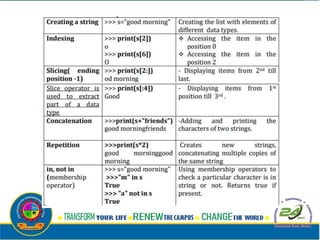
Operations on string:
i. Indexing
ii. Slicing
iii. Concatenation
iv. Repetitions
v. Member ship
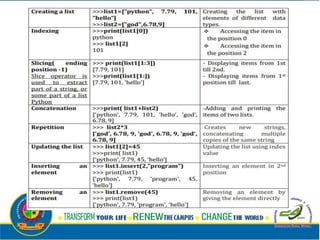
2. Lists
v List is an ordered sequence of items. Values
in the list are called elements / items.
v It can be written as a list of comma-
separated items (values)
between square brackets[ ].
v Items in the lists can be of different data
types.
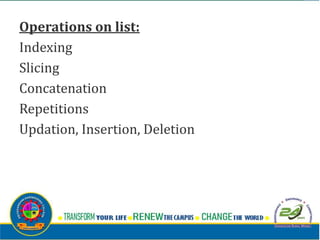
Operations on list:
Indexing
Slicing
Concatenation
Repetitions
Updation, Insertion, Deletion
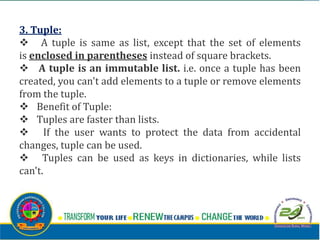
3. Tuple:
v A tuple is same as list, except that the set of elements
is enclosed in parentheses instead of square brackets.
v A tuple is an immutable list. i.e. once a tuple has been
created, you can't add elements to a tuple or remove elements
from the tuple.
v Benefit of Tuple:
v Tuples are faster than lists.
v If the user wants to protect the data from accidental
changes, tuple can be used.
v Tuples can be used as keys in dictionaries, while lists
can't.
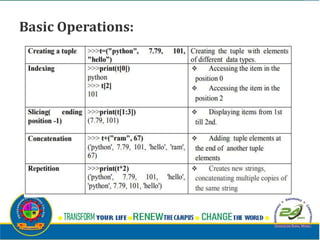
Basic Operations:
Altering the tuple data type leads to
error. Following error occurs when user tries
to do.
>>> t[0]="a"
Trace back (most recent call last):
File "<stdin>", line 1, in <module>
Type Error: 'tuple' object does not support
item assignment
Mapping
-This data type is unordered and mutable.
-Dictionaries fall under Mappings.
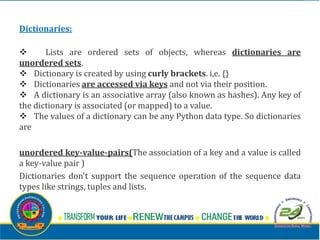
Dictionaries:
v Lists are ordered sets of objects, whereas dictionaries are
unordered sets.
v Dictionary is created by using curly brackets. i,e. {}
v Dictionaries are accessed via keys and not via their position.
v A dictionary is an associative array (also known as hashes). Any key of
the dictionary is associated (or mapped) to a value.
v The values of a dictionary can be any Python data type. So dictionaries
are
unordered key-value-pairs(The association of a key and a value is called
a key-value pair )
Dictionaries don't support the sequence operation of the sequence data
types like strings, tuples and lists.
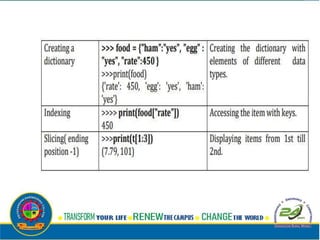
If you try to access a key which doesn't exist,
you will get an error message:
>>> words = {"house" : "Haus", "cat":"Katze"}
>>> words["car"]
Traceback (most recent call last):
File "<stdin>", line 1, in <module>
KeyError: 'car'
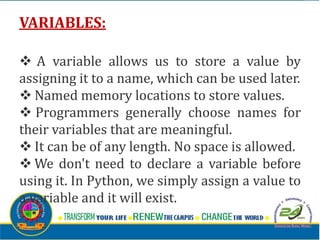
VARIABLES:
v A variable allows us to store a value by
assigning it to a name, which can be used later.
v Named memory locations to store values.
v Programmers generally choose names for
their variables that are meaningful.
v It can be of any length. No space is allowed.
v We don't need to declare a variable before
using it. In Python, we simply assign a value to
a variable and it will exist.
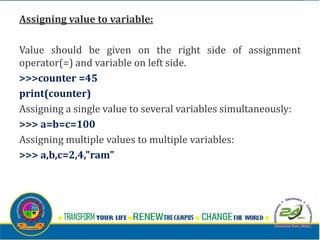
Assigning value to variable:
Value should be given on the right side of assignment
operator(=) and variable on left side.
>>>counter =45
print(counter)
Assigning a single value to several variables simultaneously:
>>> a=b=c=100
Assigning multiple values to multiple variables:
>>> a,b,c=2,4,"ram"
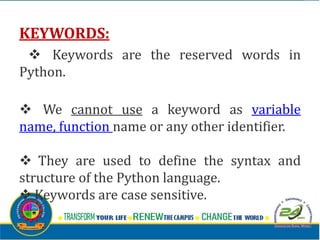
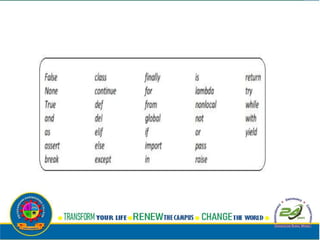
KEYWORDS:
v Keywords are the reserved words in
Python.
v We cannot use a keyword as variable
name, function name or any other identifier.
v They are used to define the syntax and
structure of the Python language.
v Keywords are case sensitive.
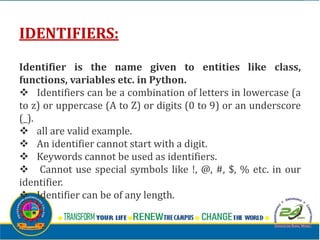
IDENTIFIERS:
Identifier is the name given to entities like class,
functions, variables etc. in Python.
v Identifiers can be a combination of letters in lowercase (a
to z) or uppercase (A to Z) or digits (0 to 9) or an underscore
(_).
v all are valid example.
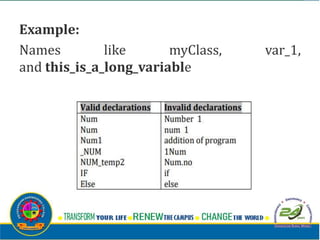
v An identifier cannot start with a digit.
v Keywords cannot be used as identifiers.
v Cannot use special symbols like !, @, #, $, % etc. in our
identifier.
v Identifier can be of any length.
Example:
Names like myClass, var_1,
and this_is_a_long_variable
 STATEMENTS AND EXPRESSIONS:
 Statements:
 -Instructions that a Python interpreter can executes are
called statements.
 -A statement is a unit of code like creating a variable or
displaying a value.
 >>> n = 17
 >>> print(n)
 Here, The first line is an assignment statement that gives a
value to n.
 The second line is a print statement that displays the value
of n.

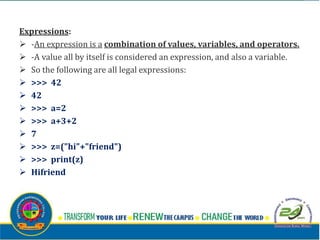
Expressions:
 -An expression is a combination of values, variables, and operators.
 -A value all by itself is considered an expression, and also a variable.
 So the following are all legal expressions:
 >>> 42
 42
 >>> a=2
 >>> a+3+2
 7
 >>> z=("hi"+"friend")
 >>> print(z)
 Hifriend
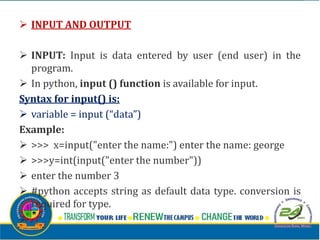
 INPUT AND OUTPUT
 INPUT: Input is data entered by user (end user) in the
program.
 In python, input () function is available for input.
Syntax for input() is:
 variable = input (“data”)
Example:
 >>> x=input("enter the name:") enter the name: george
 >>>y=int(input("enter the number"))
 enter the number 3
 #python accepts string as default data type. conversion is
required for type.

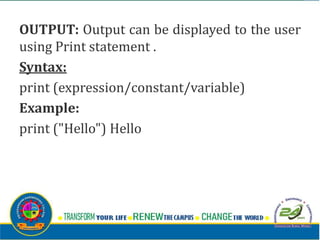
OUTPUT: Output can be displayed to the user
using Print statement .
Syntax:
print (expression/constant/variable)
Example:
print ("Hello") Hello
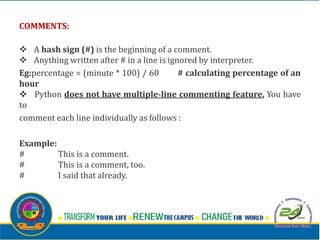
COMMENTS:
v A hash sign (#) is the beginning of a comment.
v Anything written after # in a line is ignored by interpreter.
Eg:percentage = (minute * 100) / 60 # calculating percentage of an
hour
v Python does not have multiple-line commenting feature. You have
to
comment each line individually as follows :
Example:
# This is a comment.
# This is a comment, too.
# I said that already.
LINES AND INDENTATION:
v Most of the programming languages like C,
C++, Java use braces { } to define a block of
code. But, python uses indentation.
v Blocks of code are denoted by line
indentation.
v It is a space given to the block of codes for
class and function definitions or flow control.
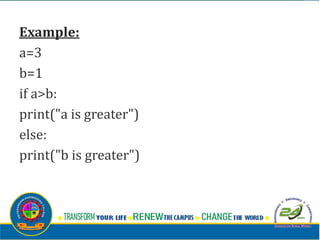
Example:
a=3
b=1
if a>b:
print("a is greater")
else:
print("b is greater")
QUOTATION IN PYTHON:
Python accepts single ('), double (") and triple (''' or """)
quotes to denote string literals.
Anything that is represented using quotations are considered
as string.
v single quotes (' ') Eg, 'This a string in single quotes'
v double quotes (" ") Eg, "'This a string in double quotes'"
v triple quotes(""" """) Eg, This is a paragraph. It is made
up of multiple lines and sentences."""
TUPLE ASSIGNMENT
v An assignment to all of the elements in a tuple using a
single assignment statement.
v Python has a very powerful tuple assignment feature
that allows a tuple of variables on the left of an assignment to
be assigned values from a tuple on the right of the
assignment.
v The left side is a tuple of variables; the right side is a tuple
of values.
•v Each value is assigned to its respective
variable.
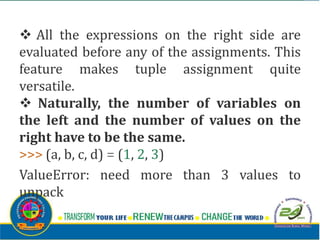
v All the expressions on the right side are
evaluated before any of the assignments. This
feature makes tuple assignment quite
versatile.
v Naturally, the number of variables on
the left and the number of values on the
right have to be the same.
>>> (a, b, c, d) = (1, 2, 3)
ValueError: need more than 3 values to
unpack
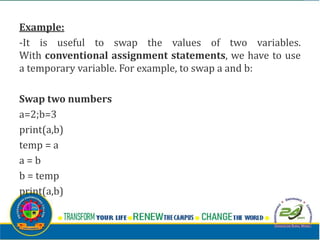
Example:
-It is useful to swap the values of two variables.
With conventional assignment statements, we have to use
a temporary variable. For example, to swap a and b:
Swap two numbers
a=2;b=3
print(a,b)
temp = a
a = b
b = temp
print(a,b)
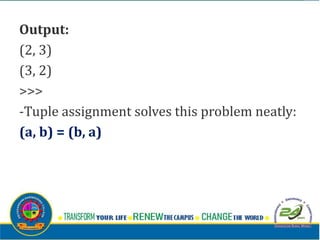
Output:
(2, 3)
(3, 2)
>>>
-Tuple assignment solves this problem neatly:
(a, b) = (b, a)
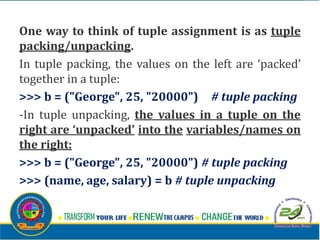
One way to think of tuple assignment is as tuple
packing/unpacking.
In tuple packing, the values on the left are ‘packed’
together in a tuple:
>>> b = ("George", 25, "20000") # tuple packing
-In tuple unpacking, the values in a tuple on the
right are ‘unpacked’ into the variables/names on
the right:
>>> b = ("George", 25, "20000") # tuple packing
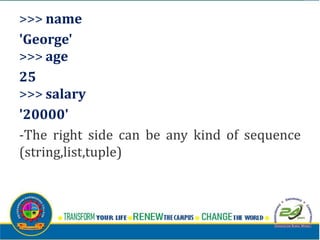
>>> (name, age, salary) = b # tuple unpacking
>>> name
'George'
>>> age
25
>>> salary
'20000'
-The right side can be any kind of sequence
(string,list,tuple)
Example:
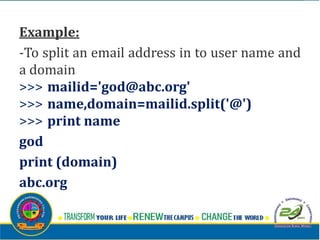
-To split an email address in to user name and
a domain
>>> mailid='god@abc.org'
>>> name,domain=mailid.split('@')
>>> print name
god
print (domain)
abc.org
OPERATORS:
v Operators are the constructs which
can manipulate the value of operands.
v Consider the expression 4 + 5 =
9. Here, 4 and 5 are called
operands and + is called operator
Types of Operators:
-Python language supports the following
types of operators
 Arithmetic Operators
 Comparison (Relational) Operators
 Assignment Operators
 Logical Operators
 Bitwise Operators
 Membership Operators
 Identity Operators
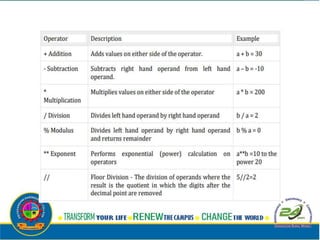
Arithmetic operators:
• They are used to perform mathematical
operations like addition, subtraction,
multiplication etc. Assume, a=10 and b=5
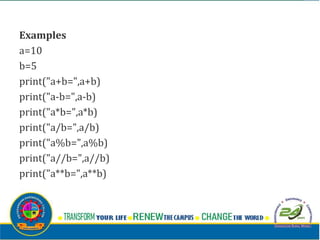
Examples
a=10
b=5
print("a+b=",a+b)
print("a-b=",a-b)
print("a*b=",a*b)
print("a/b=",a/b)
print("a%b=",a%b)
print("a//b=",a//b)
print("a**b=",a**b)
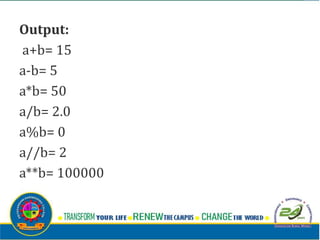
Output:
a+b= 15
a-b= 5
a*b= 50
a/b= 2.0
a%b= 0
a//b= 2
a**b= 100000
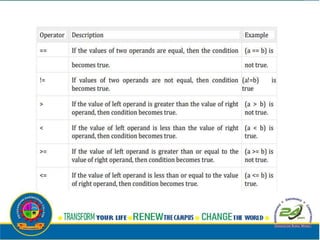
Comparison (Relational) Operators:
 Comparison operators are used to
compare values.
 It either returns True or False according to
the condition. Assume, a=10 and b=5
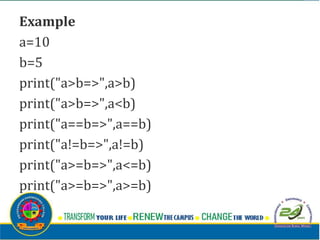
Example
a=10
b=5
print("a>b=>",a>b)
print("a>b=>",a<b)
print("a==b=>",a==b)
print("a!=b=>",a!=b)
print("a>=b=>",a<=b)
print("a>=b=>",a>=b)
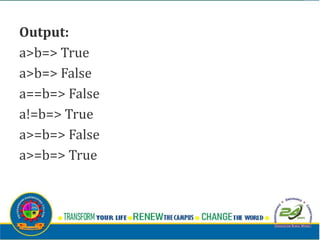
Output:
a>b=> True
a>b=> False
a==b=> False
a!=b=> True
a>=b=> False
a>=b=> True
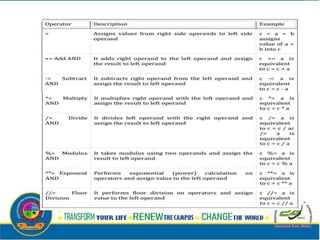
Assignment Operators:
• -Assignment operators are used in Python
to assign values to variables.
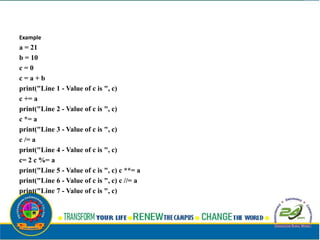
Example
a = 21
b = 10
c = 0
c = a + b
print("Line 1 - Value of c is ", c)
c += a
print("Line 2 - Value of c is ", c)
c *= a
print("Line 3 - Value of c is ", c)
c /= a
print("Line 4 - Value of c is ", c)
c= 2 c %= a
print("Line 5 - Value of c is ", c) c **= a
print("Line 6 - Value of c is ", c) c //= a
print("Line 7 - Value of c is ", c)
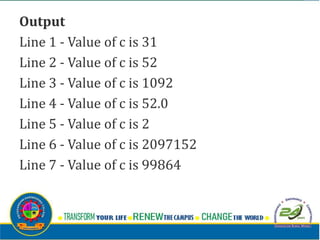
Output
Line 1 - Value of c is 31
Line 2 - Value of c is 52
Line 3 - Value of c is 1092
Line 4 - Value of c is 52.0
Line 5 - Value of c is 2
Line 6 - Value of c is 2097152
Line 7 - Value of c is 99864
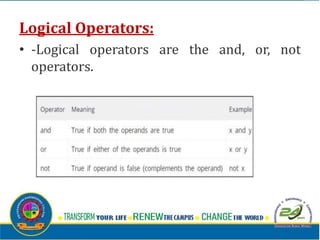
Logical Operators:
• -Logical operators are the and, or, not
operators.
Example
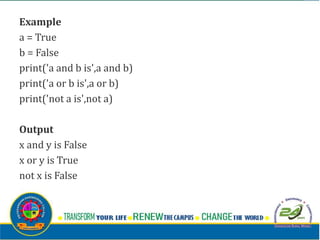
a = True
b = False
print('a and b is',a and b)
print('a or b is',a or b)
print('not a is',not a)
Output
x and y is False
x or y is True
not x is False
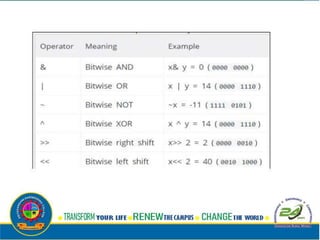
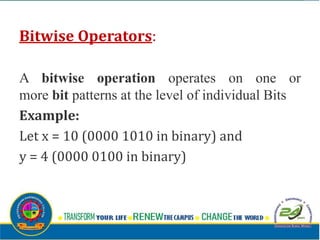
Bitwise Operators:
A bitwise operation operates on one or
more bit patterns at the level of individual Bits
Example:
Let x = 10 (0000 1010 in binary) and
y = 4 (0000 0100 in binary)
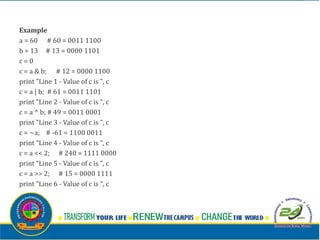
Example
a = 60 # 60 = 0011 1100
b = 13 # 13 = 0000 1101
c = 0
c = a & b; # 12 = 0000 1100
print "Line 1 - Value of c is ", c
c = a | b; # 61 = 0011 1101
print "Line 2 - Value of c is ", c
c = a ^ b; # 49 = 0011 0001
print "Line 3 - Value of c is ", c
c = ~a; # -61 = 1100 0011
print "Line 4 - Value of c is ", c
c = a << 2; # 240 = 1111 0000
print "Line 5 - Value of c is ", c
c = a >> 2; # 15 = 0000 1111
print "Line 6 - Value of c is ", c
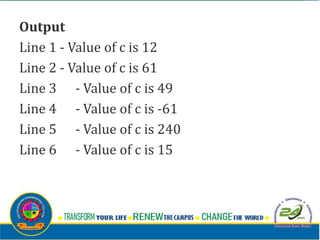
Output
Line 1 - Value of c is 12
Line 2 - Value of c is 61
Line 3 - Value of c is 49
Line 4 - Value of c is -61
Line 5 - Value of c is 240
Line 6 - Value of c is 15
Membership Operators:
v Evaluates to find a value or a variable is in
the specified sequence of string, list, tuple,
dictionary or not.
v Let, x=[5,3,6,4,1]. To check particular item
in list or not, in and not in operators are
used.
Example:
x=[5,3,6,4,1]
>>> 5 in x
True
>>> 5 not in x
False
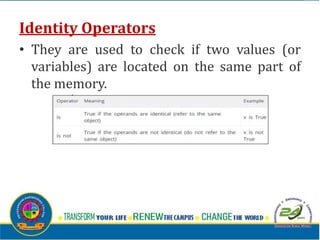
Identity Operators
• They are used to check if two values (or
variables) are located on the same part of
the memory.
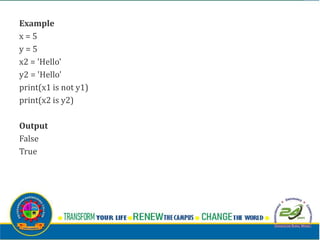
Example
x = 5
y = 5
x2 = 'Hello'
y2 = 'Hello'
print(x1 is not y1)
print(x2 is y2)
Output
False
True
OPERATOR PRECEDENCE:
• When an expression contains more than
one operator, the order of
evaluation depends on the order of
operations.
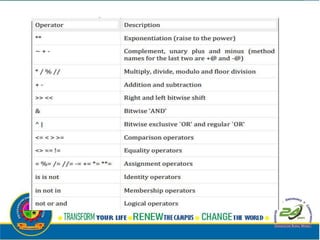
-For mathematical operators, Python follows mathematical
convention.
-The acronym PEMDAS (Parentheses, Exponentiation,
Multiplication, Division, Addition, Subtraction) is a useful way
to remember the rules:
v Parentheses have the highest precedence and can be
used to force an expression to evaluate in the order you want.
Since expressions in parentheses are evaluated first, 2 * (3-
1)is 4, and (1+1)**(5-2) is 8.
v You can also use parentheses to make an expression
easier to read, as in (minute * 100) / 60, even if it doesn’t
change the result.
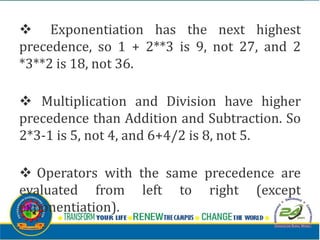
v Exponentiation has the next highest
precedence, so 1 + 2**3 is 9, not 27, and 2
*3**2 is 18, not 36.
v Multiplication and Division have higher
precedence than Addition and Subtraction. So
2*3-1 is 5, not 4, and 6+4/2 is 8, not 5.
v Operators with the same precedence are
evaluated from left to right (except
exponentiation).
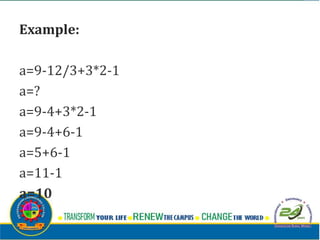
Example:
a=9-12/3+3*2-1
a=?
a=9-4+3*2-1
a=9-4+6-1
a=5+6-1
a=11-1
a=10
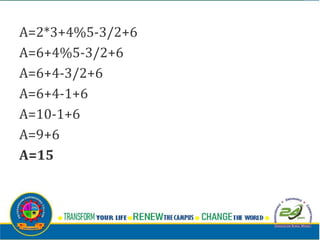
A=2*3+4%5-3/2+6
A=6+4%5-3/2+6
A=6+4-3/2+6
A=6+4-1+6
A=10-1+6
A=9+6
A=15
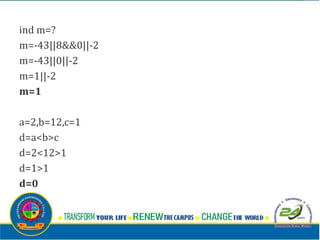
ind m=?
m=-43||8&&0||-2
m=-43||0||-2
m=1||-2
m=1
a=2,b=12,c=1
d=a<b>c
d=2<12>1
d=1>1
d=0
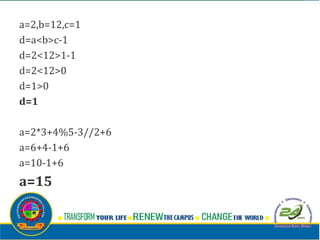
a=2,b=12,c=1
d=a<b>c-1
d=2<12>1-1
d=2<12>0
d=1>0
d=1
a=2*3+4%5-3//2+6
a=6+4-1+6
a=10-1+6
a=15
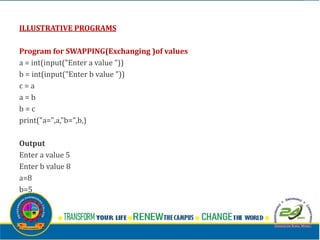
ILLUSTRATIVE PROGRAMS
Program for SWAPPING(Exchanging )of values
a = int(input("Enter a value "))
b = int(input("Enter b value "))
c = a
a = b
b = c
print("a=",a,"b=",b,)
Output
Enter a value 5
Enter b value 8
a=8
b=5
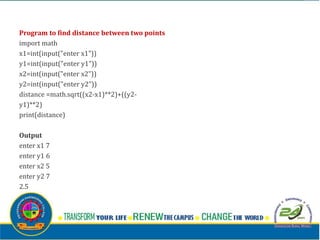
Program to find distance between two points
import math
x1=int(input("enter x1"))
y1=int(input("enter y1"))
x2=int(input("enter x2"))
y2=int(input("enter y2"))
distance =math.sqrt((x2-x1)**2)+((y2-
y1)**2)
print(distance)
Output
enter x1 7
enter y1 6
enter x2 5
enter y2 7
2.5
Program to circulate n numbers
a=list(input("enter the list"))
print(a)
for i in range(1,len(a),1):
print(a[i:]+a[:i])
Output:
enter the list '1234'
['1', '2', '3', '4']
['2', '3', '4', '1']
['3', '4', '1', '2']
['4', '1', '2', '3']

Unit 2 python

  • 1.
    GE3151 – PROBLEMSOLVING AND PYTHON PROGRAMMING G.PRAVEENA ASP/CSE
  • 2.
    UNIT II DATA,EXPRESSIONS, STATEMENTS Python interpreter and interactive mode; values and types: int, float, boolean, string, and list; variables, expressions, statements, tuple assignment, precedence of operators, comments; Illustrative programs: exchange the values of two variables, circulate the values of n variables, distance between two points.
  • 3.
    INTRODUCTION TO PYTHON: Pythonis a general-purpose interpreted, interactive, object-oriented, and high- level programming language. It was created by Guido van Rossum during 1985- 1990. Python got its name from “Monty Python’s flying circus”. Python was released in the year 2000.
  • 4.
    v Python isinterpreted: Python is processed at runtime by the interpreter. You do not need to compile your program before executing it. v Python is Interactive: You can actually sit at a Python prompt and interact with the interpreter directly to write your programs.
  • 5.
    Python is Object-Oriented:Python supports Object-Oriented style or technique of programming that encapsulates code within objects. v Python is a Beginner's Language: Python is a great language for the beginner- level programmers and supports the development of a wide range of applications.
  • 6.
    Python Features: v Easy-to-learn:Python is clearly defined and easily readable. The structure of the program is very simple. It uses few keywords. v Easy-to-maintain: Python's source code is fairly easy-to- maintain. v Portable: Python can run on a wide variety of hardware platforms and has the same interface on all platforms. v Interpreted: Python is processed at runtime by the interpreter. So, there is no need to compile a program before executing it. You can simply run the program.
  • 7.
    Extensible: Programmers canembed python within their C,C++,Java script ,ActiveX, etc. v Free and Open Source: Anyone can freely distribute it, read the source code, and edit it. v High Level Language: When writing programs, programmers concentrate on solutions of the current problem, no need to worry about the low level details. v Scalable: Python provides a better structure and support for large programs than shell scripting.
  • 8.
    Applications v Bit Torrentfile sharing v Google search engine, Youtube v Intel, Cisco, HP, IBM v i–Robot v NASA v Facebook, Drop box
  • 9.
    Python interpreter: Interpreter: Toexecute a program in a high- level language by translating it one line at a time. Compiler: To translate a program written in a high-level language into a low-level language all at once, in preparation for later execution.
  • 11.
    MODES OF PYTHONINTERPRETER: Python Interpreter is a program that reads and executes Python code. It uses 2 modes of Execution. 1. Interactive mode 2. Script mode
  • 12.
    1. Interactive mode: vInteractive Mode, as the name suggests, allows us to interact with OS. v When we type Python statement, interpreter displays the result(s) immediately. Advantages: v Python, in interactive mode, is good enough to learn, experiment or explore. v Working in interactive mode is convenient for beginners and for testing small pieces of code.
  • 13.
    Drawback: v We cannotsave the statements and have to retype all the statements once again to re-run them. In interactive mode, you type Python programs and the interpreter displays the result: >>> 1 + 1 2 The chevron, >>>, is the prompt the interpreter uses to indicate that it is ready for you to enter code. If you type 1 + 1, the interpreter replies 2. >>> print ('Hello, World!') Hello, World!
  • 15.
    2. Script mode: vIn script mode, we type python program in a file and then use interpreter to execute the content of the file. v Scripts can be saved to disk for future use. Python scripts have the extension .py, meaning that the filename ends with .py
  • 17.
    Integrated Development LearningEnvironment (IDLE): v Is a graphical user interface which is completely written in Python. v It is bundled with the default implementation of the python language and also comes with optional part of the Python packaging. Features of IDLE: Multi-window text editor with syntax highlighting. v Auto completion with smart indentation. Python shell to display output with syntax highlighting.
  • 18.
    VALUES AND DATATYPES Value: Value can be any letter ,number or string. Eg, Values are 2, 42.0, and 'Hello, World!'. (These values belong to different datatypes.) Data type: • Every value in Python has a data type. • It is a set of values, and the allowable operations on those values.
  • 20.
    Numbers: Number data typestores Numerical Values. This data type is immutable [i.e. values/items cannot be changed]. Python supports integers, floating point numbers and complex numbers. They are defined as,
  • 22.
    Sequence:  A sequenceis an ordered collection of items, indexed by positive integers.  It is a combination of mutable (value can be changed) and immutable (values cannot be changed) data types.  There are three types of sequence data type available in Python, they are 1. Strings 2. Lists 3. Tuples
  • 23.
    • Strings  AString in Python consists of a series or sequence of characters - letters, numbers, and special characters.  Strings are marked by quotes:  single quotes (' ') Eg, 'This a string in single quotes'  double quotes (" ") Eg, "'This a string in double quotes'"  triple quotes(""" """) Eg, This is a paragraph. It is made up of multiple lines and sentences."""  Individual character in a string is accessed using a subscript (index).  Characters can be accessed using indexing and slicing operations • Strings are immutable i.e. the contents of the string cannot be changed after it is created.
  • 24.
    Indexing: Positive indexing helpsin accessing the string from the beginning · Negative subscript helps in accessing the string from the end. · Subscript 0 or –ve n(where n is length of the string) displays the first element. Example: A[0] or A[-5] will display “H” · Subscript 1 or –ve (n-1) displays the second element. Example: A[1] or A[-4] will display “E”
  • 25.
    Operations on string: i.Indexing ii. Slicing iii. Concatenation iv. Repetitions v. Member ship
  • 27.
    2. Lists v Listis an ordered sequence of items. Values in the list are called elements / items. v It can be written as a list of comma- separated items (values) between square brackets[ ]. v Items in the lists can be of different data types.
  • 28.
  • 30.
    3. Tuple: v Atuple is same as list, except that the set of elements is enclosed in parentheses instead of square brackets. v A tuple is an immutable list. i.e. once a tuple has been created, you can't add elements to a tuple or remove elements from the tuple. v Benefit of Tuple: v Tuples are faster than lists. v If the user wants to protect the data from accidental changes, tuple can be used. v Tuples can be used as keys in dictionaries, while lists can't.
  • 31.
  • 32.
    Altering the tupledata type leads to error. Following error occurs when user tries to do. >>> t[0]="a" Trace back (most recent call last): File "<stdin>", line 1, in <module> Type Error: 'tuple' object does not support item assignment
  • 33.
    Mapping -This data typeis unordered and mutable. -Dictionaries fall under Mappings.
  • 34.
    Dictionaries: v Lists areordered sets of objects, whereas dictionaries are unordered sets. v Dictionary is created by using curly brackets. i,e. {} v Dictionaries are accessed via keys and not via their position. v A dictionary is an associative array (also known as hashes). Any key of the dictionary is associated (or mapped) to a value. v The values of a dictionary can be any Python data type. So dictionaries are unordered key-value-pairs(The association of a key and a value is called a key-value pair ) Dictionaries don't support the sequence operation of the sequence data types like strings, tuples and lists.
  • 36.
    If you tryto access a key which doesn't exist, you will get an error message: >>> words = {"house" : "Haus", "cat":"Katze"} >>> words["car"] Traceback (most recent call last): File "<stdin>", line 1, in <module> KeyError: 'car'
  • 38.
    VARIABLES: v A variableallows us to store a value by assigning it to a name, which can be used later. v Named memory locations to store values. v Programmers generally choose names for their variables that are meaningful. v It can be of any length. No space is allowed. v We don't need to declare a variable before using it. In Python, we simply assign a value to a variable and it will exist.
  • 39.
    Assigning value tovariable: Value should be given on the right side of assignment operator(=) and variable on left side. >>>counter =45 print(counter) Assigning a single value to several variables simultaneously: >>> a=b=c=100 Assigning multiple values to multiple variables: >>> a,b,c=2,4,"ram"
  • 40.
    KEYWORDS: v Keywords arethe reserved words in Python. v We cannot use a keyword as variable name, function name or any other identifier. v They are used to define the syntax and structure of the Python language. v Keywords are case sensitive.
  • 42.
    IDENTIFIERS: Identifier is thename given to entities like class, functions, variables etc. in Python. v Identifiers can be a combination of letters in lowercase (a to z) or uppercase (A to Z) or digits (0 to 9) or an underscore (_). v all are valid example. v An identifier cannot start with a digit. v Keywords cannot be used as identifiers. v Cannot use special symbols like !, @, #, $, % etc. in our identifier. v Identifier can be of any length.
  • 43.
    Example: Names like myClass,var_1, and this_is_a_long_variable
  • 44.
     STATEMENTS ANDEXPRESSIONS:  Statements:  -Instructions that a Python interpreter can executes are called statements.  -A statement is a unit of code like creating a variable or displaying a value.  >>> n = 17  >>> print(n)  Here, The first line is an assignment statement that gives a value to n.  The second line is a print statement that displays the value of n. 
  • 45.
    Expressions:  -An expressionis a combination of values, variables, and operators.  -A value all by itself is considered an expression, and also a variable.  So the following are all legal expressions:  >>> 42  42  >>> a=2  >>> a+3+2  7  >>> z=("hi"+"friend")  >>> print(z)  Hifriend
  • 46.
     INPUT ANDOUTPUT  INPUT: Input is data entered by user (end user) in the program.  In python, input () function is available for input. Syntax for input() is:  variable = input (“data”) Example:  >>> x=input("enter the name:") enter the name: george  >>>y=int(input("enter the number"))  enter the number 3  #python accepts string as default data type. conversion is required for type. 
  • 47.
    OUTPUT: Output canbe displayed to the user using Print statement . Syntax: print (expression/constant/variable) Example: print ("Hello") Hello
  • 48.
    COMMENTS: v A hashsign (#) is the beginning of a comment. v Anything written after # in a line is ignored by interpreter. Eg:percentage = (minute * 100) / 60 # calculating percentage of an hour v Python does not have multiple-line commenting feature. You have to comment each line individually as follows : Example: # This is a comment. # This is a comment, too. # I said that already.
  • 49.
    LINES AND INDENTATION: vMost of the programming languages like C, C++, Java use braces { } to define a block of code. But, python uses indentation. v Blocks of code are denoted by line indentation. v It is a space given to the block of codes for class and function definitions or flow control.
  • 50.
    Example: a=3 b=1 if a>b: print("a isgreater") else: print("b is greater")
  • 51.
    QUOTATION IN PYTHON: Pythonaccepts single ('), double (") and triple (''' or """) quotes to denote string literals. Anything that is represented using quotations are considered as string. v single quotes (' ') Eg, 'This a string in single quotes' v double quotes (" ") Eg, "'This a string in double quotes'" v triple quotes(""" """) Eg, This is a paragraph. It is made up of multiple lines and sentences."""
  • 52.
    TUPLE ASSIGNMENT v Anassignment to all of the elements in a tuple using a single assignment statement. v Python has a very powerful tuple assignment feature that allows a tuple of variables on the left of an assignment to be assigned values from a tuple on the right of the assignment. v The left side is a tuple of variables; the right side is a tuple of values. •v Each value is assigned to its respective variable.
  • 53.
    v All theexpressions on the right side are evaluated before any of the assignments. This feature makes tuple assignment quite versatile. v Naturally, the number of variables on the left and the number of values on the right have to be the same. >>> (a, b, c, d) = (1, 2, 3) ValueError: need more than 3 values to unpack
  • 54.
    Example: -It is usefulto swap the values of two variables. With conventional assignment statements, we have to use a temporary variable. For example, to swap a and b: Swap two numbers a=2;b=3 print(a,b) temp = a a = b b = temp print(a,b)
  • 55.
    Output: (2, 3) (3, 2) >>> -Tupleassignment solves this problem neatly: (a, b) = (b, a)
  • 56.
    One way tothink of tuple assignment is as tuple packing/unpacking. In tuple packing, the values on the left are ‘packed’ together in a tuple: >>> b = ("George", 25, "20000") # tuple packing -In tuple unpacking, the values in a tuple on the right are ‘unpacked’ into the variables/names on the right: >>> b = ("George", 25, "20000") # tuple packing >>> (name, age, salary) = b # tuple unpacking
  • 57.
    >>> name 'George' >>> age 25 >>>salary '20000' -The right side can be any kind of sequence (string,list,tuple)
  • 58.
    Example: -To split anemail address in to user name and a domain >>> mailid='god@abc.org' >>> name,domain=mailid.split('@') >>> print name god print (domain) abc.org
  • 59.
    OPERATORS: v Operators arethe constructs which can manipulate the value of operands. v Consider the expression 4 + 5 = 9. Here, 4 and 5 are called operands and + is called operator
  • 60.
    Types of Operators: -Pythonlanguage supports the following types of operators  Arithmetic Operators  Comparison (Relational) Operators  Assignment Operators  Logical Operators  Bitwise Operators  Membership Operators  Identity Operators
  • 61.
    Arithmetic operators: • Theyare used to perform mathematical operations like addition, subtraction, multiplication etc. Assume, a=10 and b=5
  • 63.
  • 64.
    Output: a+b= 15 a-b= 5 a*b=50 a/b= 2.0 a%b= 0 a//b= 2 a**b= 100000
  • 65.
    Comparison (Relational) Operators: Comparison operators are used to compare values.  It either returns True or False according to the condition. Assume, a=10 and b=5
  • 67.
  • 68.
    Output: a>b=> True a>b=> False a==b=>False a!=b=> True a>=b=> False a>=b=> True
  • 69.
    Assignment Operators: • -Assignmentoperators are used in Python to assign values to variables.
  • 71.
    Example a = 21 b= 10 c = 0 c = a + b print("Line 1 - Value of c is ", c) c += a print("Line 2 - Value of c is ", c) c *= a print("Line 3 - Value of c is ", c) c /= a print("Line 4 - Value of c is ", c) c= 2 c %= a print("Line 5 - Value of c is ", c) c **= a print("Line 6 - Value of c is ", c) c //= a print("Line 7 - Value of c is ", c)
  • 72.
    Output Line 1 -Value of c is 31 Line 2 - Value of c is 52 Line 3 - Value of c is 1092 Line 4 - Value of c is 52.0 Line 5 - Value of c is 2 Line 6 - Value of c is 2097152 Line 7 - Value of c is 99864
  • 73.
    Logical Operators: • -Logicaloperators are the and, or, not operators.
  • 74.
    Example a = True b= False print('a and b is',a and b) print('a or b is',a or b) print('not a is',not a) Output x and y is False x or y is True not x is False
  • 75.
    Bitwise Operators: A bitwiseoperation operates on one or more bit patterns at the level of individual Bits Example: Let x = 10 (0000 1010 in binary) and y = 4 (0000 0100 in binary)
  • 77.
    Example a = 60# 60 = 0011 1100 b = 13 # 13 = 0000 1101 c = 0 c = a & b; # 12 = 0000 1100 print "Line 1 - Value of c is ", c c = a | b; # 61 = 0011 1101 print "Line 2 - Value of c is ", c c = a ^ b; # 49 = 0011 0001 print "Line 3 - Value of c is ", c c = ~a; # -61 = 1100 0011 print "Line 4 - Value of c is ", c c = a << 2; # 240 = 1111 0000 print "Line 5 - Value of c is ", c c = a >> 2; # 15 = 0000 1111 print "Line 6 - Value of c is ", c
  • 78.
    Output Line 1 -Value of c is 12 Line 2 - Value of c is 61 Line 3 - Value of c is 49 Line 4 - Value of c is -61 Line 5 - Value of c is 240 Line 6 - Value of c is 15
  • 79.
    Membership Operators: v Evaluatesto find a value or a variable is in the specified sequence of string, list, tuple, dictionary or not. v Let, x=[5,3,6,4,1]. To check particular item in list or not, in and not in operators are used.
  • 80.
    Example: x=[5,3,6,4,1] >>> 5 inx True >>> 5 not in x False
  • 81.
    Identity Operators • Theyare used to check if two values (or variables) are located on the same part of the memory.
  • 82.
    Example x = 5 y= 5 x2 = 'Hello' y2 = 'Hello' print(x1 is not y1) print(x2 is y2) Output False True
  • 83.
    OPERATOR PRECEDENCE: • Whenan expression contains more than one operator, the order of evaluation depends on the order of operations.
  • 85.
    -For mathematical operators,Python follows mathematical convention. -The acronym PEMDAS (Parentheses, Exponentiation, Multiplication, Division, Addition, Subtraction) is a useful way to remember the rules: v Parentheses have the highest precedence and can be used to force an expression to evaluate in the order you want. Since expressions in parentheses are evaluated first, 2 * (3- 1)is 4, and (1+1)**(5-2) is 8. v You can also use parentheses to make an expression easier to read, as in (minute * 100) / 60, even if it doesn’t change the result.
  • 86.
    v Exponentiation hasthe next highest precedence, so 1 + 2**3 is 9, not 27, and 2 *3**2 is 18, not 36. v Multiplication and Division have higher precedence than Addition and Subtraction. So 2*3-1 is 5, not 4, and 6+4/2 is 8, not 5. v Operators with the same precedence are evaluated from left to right (except exponentiation).
  • 87.
  • 88.
  • 89.
  • 90.
  • 91.
    ILLUSTRATIVE PROGRAMS Program forSWAPPING(Exchanging )of values a = int(input("Enter a value ")) b = int(input("Enter b value ")) c = a a = b b = c print("a=",a,"b=",b,) Output Enter a value 5 Enter b value 8 a=8 b=5
  • 92.
    Program to finddistance between two points import math x1=int(input("enter x1")) y1=int(input("enter y1")) x2=int(input("enter x2")) y2=int(input("enter y2")) distance =math.sqrt((x2-x1)**2)+((y2- y1)**2) print(distance) Output enter x1 7 enter y1 6 enter x2 5 enter y2 7 2.5
  • 93.
    Program to circulaten numbers a=list(input("enter the list")) print(a) for i in range(1,len(a),1): print(a[i:]+a[:i]) Output: enter the list '1234' ['1', '2', '3', '4'] ['2', '3', '4', '1'] ['3', '4', '1', '2'] ['4', '1', '2', '3']