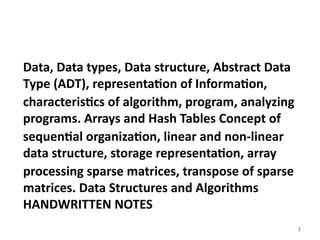
Unit 01 Introduction to Data Structure ( DSA).pptx
1.
Subject : DataStructures and Algorithms
Subject Code : MCAC102
Class : MCA-FY
By
Asst. Prof. Arjun Gunjal
YASHODEEP KNOWLEDGE HUB,
CHH. SAMBHAJI NAGAR
1
2.
2
Data, Data types,Data structure, Abstract Data
Type (ADT), representation of Information,
characteristics of algorithm, program, analyzing
programs. Arrays and Hash Tables Concept of
sequential organization, linear and non-linear
data structure, storage representation, array
processing sparse matrices, transpose of sparse
matrices. Data Structures and Algorithms
HANDWRITTEN NOTES
4
INDEX
Introduction
Data
Data types
Data structure
Abstract Data Type (ADT)
Representation of Information,
Characteristics of algorithm,
Program,
Analyzing programs.
Arrays and Hash Tables Concept of sequential organization,
Linear and non-linear data structure
Storage representation
Array processing sparse matrices, transpose of sparse matrices.
5.
5
Introduction
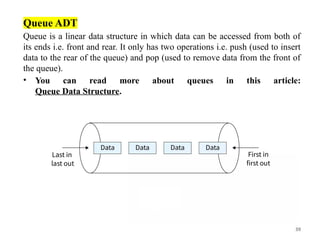
Data Structuresis about how data can be stored in different structures.
Algorithms is about how to solve different problems, often by searching through and
manipulating data structures.
Theory about Data Structures and Algorithms (DSA) helps us to use large amounts of data
to solve problems efficiently.
What are Data Structures?
DSA stands for Data Structures and Algorithms. Data structures manage how data is stored
and accessed. Algorithms focus on processing this data. Examples of data structures are
Array, Linked List, Tree and Heap, and examples of algorithms are Binary Search, Quick
Sort and Merge Sort.
Why to Learn DSA?
• Foundation for almost every software like GPS, Search Engines, AI ChatBots, Gaming
Apps, Databases, Web Applications, etc
• Top Companies like Google, Microsoft, Amazon, Apple, Meta and many other heavily
focus on DSA in interviews.
• Learning DSA boosts your problem-solving abilities and make you a stronger
programmer.
6.
6
Data
What isData
Data is the raw form of information, a collection of facts, figures, symbols or
observations that represent details about events, objects or phenomena. By itself, data
may appear meaningless, but when organized, processed and interpreted, it transforms
into valuable insights that support decision-making, problem-solving and innovation.
Importance of Data
• Decision-making and insights: Organizations use data to make better decisions.
Raw data becomes useful when transformed into insights with the help of
analytics.
• AI/ML and Innovation: Data is the fuel for artificial intelligence and machine
learning. More and higher-quality data means better training, more accurate
predictions.
• Digital transformation: The rise of Big Data has enabled new capabilities i.e
from real-time analytics to personalized services.
7.
7
Data types
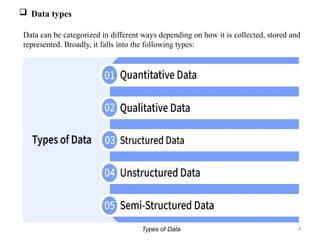
Datacan be categorized in different ways depending on how it is collected, stored and
represented. Broadly, it falls into the following types:
Types of Data
8.
8
1. Quantitative Data
Quantitativedata is information that can be measured, counted and expressed in
numerical form. It provides objective values that can be analyzed statistically to
identify patterns, trends and relationships.
• Represents numbers and measurable values.
• Can be divided into: Discrete data (Whole numbers) and Continuous data (Values
on a scale).
• Widely used in research, finance, engineering and business analytics.
Example: Age of people, number of customers visiting a store, temperature readings,
sales revenue.
2. Qualitative Data
Qualitative data is descriptive, non-numeric information that explains qualities,
characteristics or categories rather than quantities. It helps understand opinions,
experiences and meanings behind behaviors.
• Focuses on qualities, attributes and categories rather than numbers.
• Often collected through surveys, interviews or observations.
• Useful for understanding opinions, motivations and behaviors.
Example: Customer feedback (“satisfied”, “unsatisfied”), product colors, interview
transcripts, social media comments.
9.
9
3. Structured Data
Structureddata is information organized into a predefined format (rows and columns) that
makes it easily searchable and manageable by traditional databases.
• Stored in relational databases or spreadsheets.
• Easy to process with SQL and other tools.
• Best suited for tasks requiring accuracy and consistency.
Example: Bank transactions, employee records, product inventories.
4. Unstructured Data
• Unstructured data is raw information that does not follow a predefined structure or
format making it harder to organize and analyze with conventional tools.
• Accounts for over 80% of data generated globally.
• Requires advanced tools (AI, NLP, computer vision) to extract insights.
• Common in social media, multimedia and IoT applications.
Example: Emails, images, videos, voice recordings, PDF documents.
10.
10
• 5. Semi-StructuredData
• Semi-structured data combines aspects of structured and unstructured data. It does
not reside in traditional tables but still contains tags or markers that provide a
loose structure.
• Provides a balance between flexibility and structure.
• Easier to analyze than unstructured data, but less rigid than structured data.
• Often used in web applications, IoT devices and log systems.
• Example: JSON files, XML documents, NoSQL databases, sensor logs.
Big Data
• When datasets grow in size, complexity and speed, traditional methods don’t
suffice. Big Data refers to datasets that are too large, too varied or too fast to be
handled by traditional data processing tools.
12
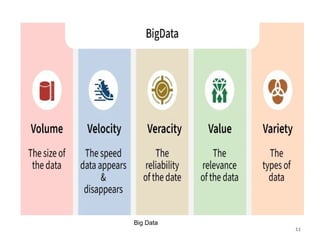
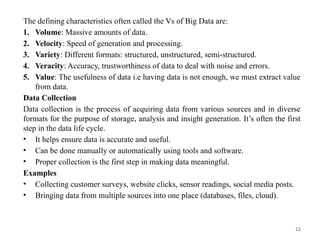
The defining characteristicsoften called the Vs of Big Data are:
1. Volume: Massive amounts of data.
2. Velocity: Speed of generation and processing.
3. Variety: Different formats: structured, unstructured, semi-structured.
4. Veracity: Accuracy, trustworthiness of data to deal with noise and errors.
5. Value: The usefulness of data i.e having data is not enough, we must extract value
from data.
Data Collection
Data collection is the process of acquiring data from various sources and in diverse
formats for the purpose of storage, analysis and insight generation. It’s often the first
step in the data life cycle.
• It helps ensure data is accurate and useful.
• Can be done manually or automatically using tools and software.
• Proper collection is the first step in making data meaningful.
Examples
• Collecting customer surveys, website clicks, sensor readings, social media posts.
• Bringing data from multiple sources into one place (databases, files, cloud).
13.
13
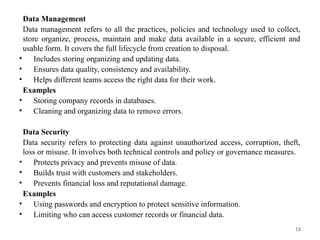
Data Management
Data managementrefers to all the practices, policies and technology used to collect,
store organize, process, maintain and make data available in a secure, efficient and
usable form. It covers the full lifecycle from creation to disposal.
• Includes storing organizing and updating data.
• Ensures data quality, consistency and availability.
• Helps different teams access the right data for their work.
Examples
• Storing company records in databases.
• Cleaning and organizing data to remove errors.
Data Security
Data security refers to protecting data against unauthorized access, corruption, theft,
loss or misuse. It involves both technical controls and policy or governance measures.
• Protects privacy and prevents misuse of data.
• Builds trust with customers and stakeholders.
• Prevents financial loss and reputational damage.
Examples
• Using passwords and encryption to protect sensitive information.
• Limiting who can access customer records or financial data.
15
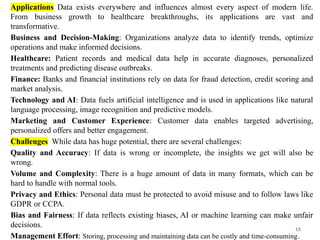
Applications Data existseverywhere and influences almost every aspect of modern life.
From business growth to healthcare breakthroughs, its applications are vast and
transformative.
Business and Decision-Making: Organizations analyze data to identify trends, optimize
operations and make informed decisions.
Healthcare: Patient records and medical data help in accurate diagnoses, personalized
treatments and predicting disease outbreaks.
Finance: Banks and financial institutions rely on data for fraud detection, credit scoring and
market analysis.
Technology and AI: Data fuels artificial intelligence and is used in applications like natural
language processing, image recognition and predictive models.
Marketing and Customer Experience: Customer data enables targeted advertising,
personalized offers and better engagement.
Challenges While data has huge potential, there are several challenges:
Quality and Accuracy: If data is wrong or incomplete, the insights we get will also be
wrong.
Volume and Complexity: There is a huge amount of data in many formats, which can be
hard to handle with normal tools.
Privacy and Ethics: Personal data must be protected to avoid misuse and to follow laws like
GDPR or CCPA.
Bias and Fairness: If data reflects existing biases, AI or machine learning can make unfair
decisions.
Management Effort: Storing, processing and maintaining data can be costly and time-consuming.
16.
16
Data structure
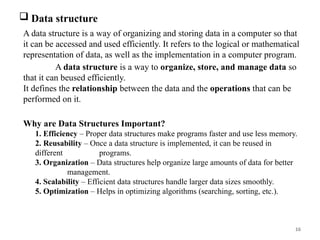
Adata structure is a way of organizing and storing data in a computer so that
it can be accessed and used efficiently. It refers to the logical or mathematical
representation of data, as well as the implementation in a computer program.
A data structure is a way to organize, store, and manage data so
that it can beused efficiently.
It defines the relationship between the data and the operations that can be
performed on it.
Why are Data Structures Important?
1. Efficiency – Proper data structures make programs faster and use less memory.
2. Reusability – Once a data structure is implemented, it can be reused in
different programs.
3. Organization – Data structures help organize large amounts of data for better
management.
4. Scalability – Efficient data structures handle larger data sizes smoothly.
5. Optimization – Helps in optimizing algorithms (searching, sorting, etc.).
18
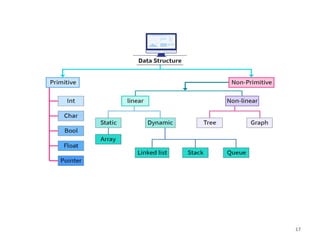
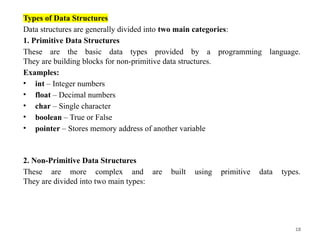
Types of DataStructures
Data structures are generally divided into two main categories:
1. Primitive Data Structures
These are the basic data types provided by a programming language.
They are building blocks for non-primitive data structures.
Examples:
• int – Integer numbers
• float – Decimal numbers
• char – Single character
• boolean – True or False
• pointer – Stores memory address of another variable
2. Non-Primitive Data Structures
These are more complex and are built using primitive data types.
They are divided into two main types:
19.
19
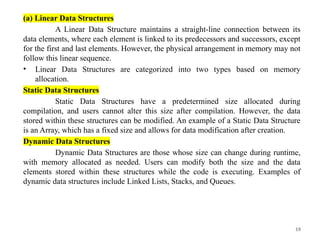
(a) Linear DataStructures
A Linear Data Structure maintains a straight-line connection between its
data elements, where each element is linked to its predecessors and successors, except
for the first and last elements. However, the physical arrangement in memory may not
follow this linear sequence.
• Linear Data Structures are categorized into two types based on memory
allocation.
Static Data Structures
Static Data Structures have a predetermined size allocated during
compilation, and users cannot alter this size after compilation. However, the data
stored within these structures can be modified. An example of a Static Data Structure
is an Array, which has a fixed size and allows for data modification after creation.
Dynamic Data Structures
Dynamic Data Structures are those whose size can change during runtime,
with memory allocated as needed. Users can modify both the size and the data
elements stored within these structures while the code is executing. Examples of
dynamic data structures include Linked Lists, Stacks, and Queues.
20.
20
Types of LinearData Structures
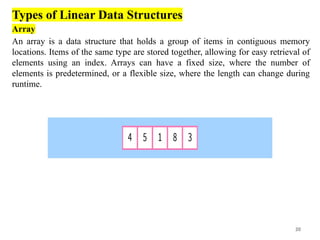
Array
An array is a data structure that holds a group of items in contiguous memory
locations. Items of the same type are stored together, allowing for easy retrieval of
elements using an index. Arrays can have a fixed size, where the number of
elements is predetermined, or a flexible size, where the length can change during
runtime.
21.
21
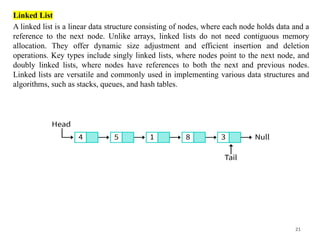
Linked List
A linkedlist is a linear data structure consisting of nodes, where each node holds data and a
reference to the next node. Unlike arrays, linked lists do not need contiguous memory
allocation. They offer dynamic size adjustment and efficient insertion and deletion
operations. Key types include singly linked lists, where nodes point to the next node, and
doubly linked lists, where nodes have references to both the next and previous nodes.
Linked lists are versatile and commonly used in implementing various data structures and
algorithms, such as stacks, queues, and hash tables.
22.
22
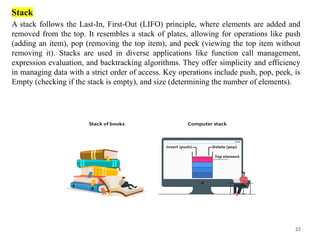
Stack
A stack followsthe Last-In, First-Out (LIFO) principle, where elements are added and
removed from the top. It resembles a stack of plates, allowing for operations like push
(adding an item), pop (removing the top item), and peek (viewing the top item without
removing it). Stacks are used in diverse applications like function call management,
expression evaluation, and backtracking algorithms. They offer simplicity and efficiency
in managing data with a strict order of access. Key operations include push, pop, peek, is
Empty (checking if the stack is empty), and size (determining the number of elements).
23.
23
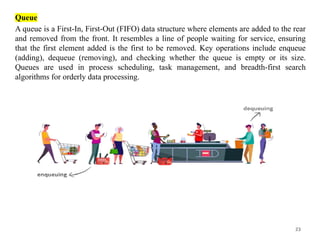
Queue
A queue isa First-In, First-Out (FIFO) data structure where elements are added to the rear
and removed from the front. It resembles a line of people waiting for service, ensuring
that the first element added is the first to be removed. Key operations include enqueue
(adding), dequeue (removing), and checking whether the queue is empty or its size.
Queues are used in process scheduling, task management, and breadth-first search
algorithms for orderly data processing.
24.
24
Examples:
Structure Description Example
Array
Collectionof elements of
same type stored in
contiguous memory.
arr = [10, 20, 30]
Linked List
A sequence of nodes
where each node
contains data and a
pointer to the next node.
10 → 20 → 30 → NULL
Stack
Follows LIFO (Last In,
First Out) principle.
Undo feature in editors
Queue
Follows FIFO (First In,
First Out) principle.
Printer queue
25.
25
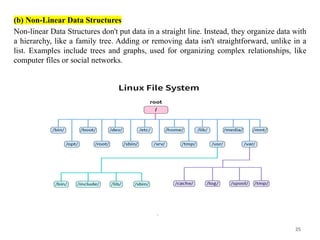
(b) Non-Linear DataStructures
Non-linear Data Structures don't put data in a straight line. Instead, they organize data with
a hierarchy, like a family tree. Adding or removing data isn't straightforward, unlike in a
list. Examples include trees and graphs, used for organizing complex relationships, like
computer files or social networks.
26.
26
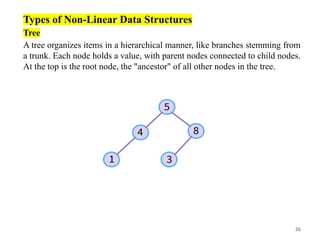
Types of Non-LinearData Structures
Tree
A tree organizes items in a hierarchical manner, like branches stemming from
a trunk. Each node holds a value, with parent nodes connected to child nodes.
At the top is the root node, the "ancestor" of all other nodes in the tree.
27.
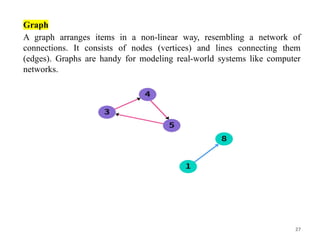
27
Graph
A graph arrangesitems in a non-linear way, resembling a network of
connections. It consists of nodes (vertices) and lines connecting them
(edges). Graphs are handy for modeling real-world systems like computer
networks.
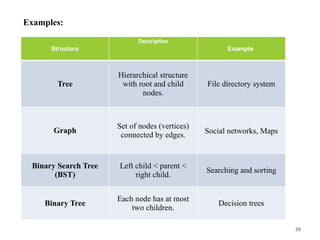
28.
28
Examples:
Structure
Description
Example
Tree
Hierarchical structure
with rootand child
nodes.
File directory system
Graph
Set of nodes (vertices)
connected by edges. Social networks, Maps
Binary Search Tree
(BST)
Left child < parent <
right child.
Searching and sorting
Binary Tree
Each node has at most
two children.
Decision trees
29.
29
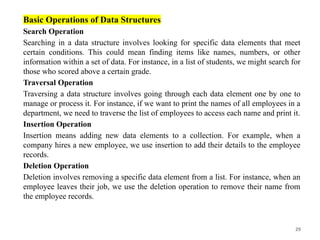
Basic Operations ofData Structures
Search Operation
Searching in a data structure involves looking for specific data elements that meet
certain conditions. This could mean finding items like names, numbers, or other
information within a set of data. For instance, in a list of students, we might search for
those who scored above a certain grade.
Traversal Operation
Traversing a data structure involves going through each data element one by one to
manage or process it. For instance, if we want to print the names of all employees in a
department, we need to traverse the list of employees to access each name and print it.
Insertion Operation
Insertion means adding new data elements to a collection. For example, when a
company hires a new employee, we use insertion to add their details to the employee
records.
Deletion Operation
Deletion involves removing a specific data element from a list. For instance, when an
employee leaves their job, we use the deletion operation to remove their name from
the employee records.
30.
30
Update Operation
The Updateoperation enables us to modify existing data within the data
structure. By specifying conditions, similar to the Selection operation, we can
update specific data elements as needed. For example, we might use the
Update operation to change the salary of an employee based on their
performance review.
Sorting Operation
Sorting involves arranging data elements in either ascending or descending
order, depending on the application's requirements. For example, we might
sort the names of employees in a department alphabetically or determine the
top performers of the month by arranging employee performance scores in
descending order and extracting details from the top three.
Merge Operation
Merge involves combining data elements from two sorted lists to create a
single sorted list. This process ensures that the resulting list maintains the
sorted order of the original lists.
31.
31
Applications of DataStructures:
Data structures serve critical roles across diverse computer programs and applications:
1. Databases:
Efficient organization and storage of data in databases facilitate seamless retrieval and
manipulation operations.
2. Operating Systems: Data structures manage system resources like memory and files,
essential for effective operating system design and implementation.
3. Computer Graphics: Representing geometric shapes and graphical elements relies
on data structures, contributing to the visual rendering in computer graphics
applications.
4. Artificial Intelligence: Data structures are instrumental in representing knowledge
and information, supporting the development of intelligent systems.
5. Web Development: Structuring data for websites, managing user information,
sessions, and handling requests are vital tasks facilitated by data structures.
6. Networking: Data structures manage network protocols, routing tables, and packet
data, enabling efficient communication between devices.
7. Embedded Systems: In embedded systems, data structures organize sensor data,
control hardware components, and manage system resources efficiently.
8. Compiler Design: Data structures play a crucial role in parsing, analyzing, and
optimizing source code during compilation processes.
32.
32
Advantages of DataStructures:
• The use of data structures provides several advantages, including:
• Efficiency: Data structures allow for efficient storage and retrieval of data,
which is important in applications where performance is critical.
• Flexibility: Data structures provide a flexible way to organize and store data,
allowing for easy modification and manipulation.
• Reusability: Data structures can be used in multiple programs and
applications, reducing the need for redundant code.
• Maintainability: Well-designed data structures can make programs easier to
understand, modify, and maintain over time.
33.
33
Abstract DataType (ADT)
An Abstract Data Type (ADT) is a conceptual model that defines a set
of operations and behaviors for a data structure, without specifying how these
operations are implemented or how data is organized in memory. The definition
of ADT only mentions what operations are to be performed but not how these
operations will be implemented. It does not specify how data will be organized
in memory and what algorithms will be used for implementing the operations.
It is called "abstract" because it provides an implementation-independent view.
The process of providing only the essentials and hiding the details is known as
abstraction.
A data type defines the type of data structure. A data type can be
categorized into a primitive data type (for example integer, float, double etc.) or
an abstract data type (for example list, stack, queue etc.). In this article, we will
discuss about Abstract Data Types (ADT).
34.
34
What is AbstractData Type in Data Structure?
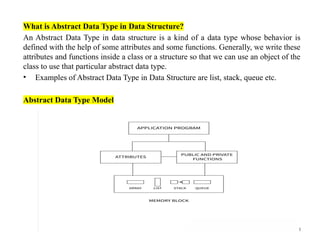
An Abstract Data Type in data structure is a kind of a data type whose behavior is
defined with the help of some attributes and some functions. Generally, we write these
attributes and functions inside a class or a structure so that we can use an object of the
class to use that particular abstract data type.
• Examples of Abstract Data Type in Data Structure are list, stack, queue etc.
Abstract Data Type Model
35.
35
List ADT
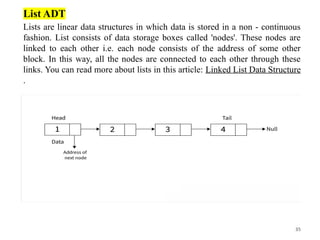
Lists arelinear data structures in which data is stored in a non - continuous
fashion. List consists of data storage boxes called 'nodes'. These nodes are
linked to each other i.e. each node consists of the address of some other
block. In this way, all the nodes are connected to each other through these
links. You can read more about lists in this article: Linked List Data Structure
.
36.
36
Operations:
The List ADTneed to store the required data in the sequence and should
have the following operations:
• get(): Return an element from the list at any given position.
• insert(): Insert an element at any position in the list.
• remove(): Remove the first occurrence of any element from a non-empty list.
• removeAt(): Remove the element at a specified location from a non-empty list.
• replace(): Replace an element at any position with another element.
• size(): Return the number of elements in the list.
• isEmpty(): Return true if the list is empty; otherwise, return false.
• isFull(): Return true if the list is full, otherwise, return false. Only applicable in
fixed-size implementations (e.g., array-based lists).
37.
37
Stack ADT
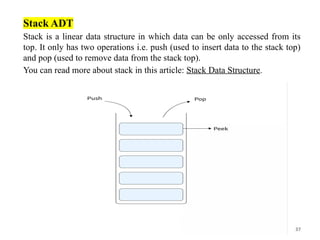
Stack isa linear data structure in which data can be only accessed from its
top. It only has two operations i.e. push (used to insert data to the stack top)
and pop (used to remove data from the stack top).
You can read more about stack in this article: Stack Data Structure.
38.
38
Operations:
In Stack ADT,the order of insertion and deletion should be according to
the FILO or LIFO Principle. Elements are inserted and removed from the same
end, called the top of the stack. It should also support the following operations:
• push(): Insert an element at one end of the stack called the top.
• pop(): Remove and return the element at the top of the stack, if it is not empty.
• peek(): Return the element at the top of the stack without removing it, if the
stack is not empty.
• size(): Return the number of elements in the stack.
• isEmpty(): Return true if the stack is empty; otherwise, return false.
• isFull(): Return true if the stack is full; otherwise, return false. Only relevant
for fixed-capacity stacks (e.g., array-based).
39.
39
Queue ADT
Queue isa linear data structure in which data can be accessed from both of
its ends i.e. front and rear. It only has two operations i.e. push (used to insert
data to the rear of the queue) and pop (used to remove data from the front of
the queue).
• You can read more about queues in this article:
Queue Data Structure.
40.
40
Operations:
The Queue ADTfollows a design similar to the Stack ADT, but the
order of insertion and deletion changes to FIFO. Elements are inserted at one
end (called the rear) and removed from the other end (called the front). It
should support the following operations:
• enqueue(): Insert an element at the end of the queue.
• dequeue(): Remove and return the first element of the queue, if the queue
is not empty.
• peek(): Return the element of the queue without removing it, if the queue
is not empty.
• size(): Return the number of elements in the queue.
• isEmpty(): Return true if the queue is empty; otherwise, return false.
41.
41
Features of ADT
Abstractdata types (ADTs) are a way of encapsulating data and operations on that data
into a single unit. Some of the key features of ADTs include:
Abstraction: The user does not need to know the implementation of the data structure
only essentials are provided.
Better Conceptualization: ADT gives us a better conceptualization of the real world.
Robust: The program is robust and has the ability to catch errors.
Encapsulation: ADTs hide the internal details of the data and provide a public
interface for users to interact with the data. This allows for easier maintenance and
modification of the data structure.
Data Abstraction: ADTs provide a level of abstraction from the implementation
details of the data. Users only need to know the operations that can be performed on
the data, not how those operations are implemented.
Data Structure Independence: ADTs can be implemented using different data
structures, such as arrays or linked lists, without affecting the functionality of the ADT.
Information Hiding: ADTs can protect the integrity of the data by allowing access
only to authorized users and operations. This helps prevent errors and misuse of the
data.
Modularity: ADTs can be combined with other ADTs to form larger, more complex
data structures. This allows for greater flexibility and modularity in programming.
42.
42
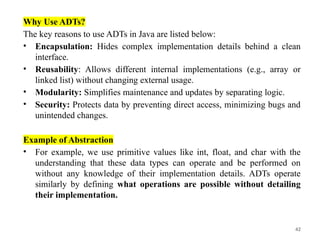
Why Use ADTs?
Thekey reasons to use ADTs in Java are listed below:
• Encapsulation: Hides complex implementation details behind a clean
interface.
• Reusability: Allows different internal implementations (e.g., array or
linked list) without changing external usage.
• Modularity: Simplifies maintenance and updates by separating logic.
• Security: Protects data by preventing direct access, minimizing bugs and
unintended changes.
Example of Abstraction
• For example, we use primitive values like int, float, and char with the
understanding that these data types can operate and be performed on
without any knowledge of their implementation details. ADTs operate
similarly by defining what operations are possible without detailing
their implementation.
43.
43
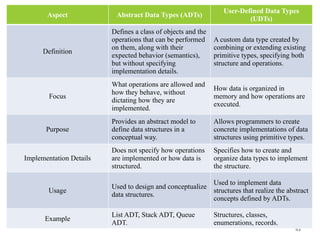
Aspect Abstract DataTypes (ADTs)
User-Defined Data Types
(UDTs)
Definition
Defines a class of objects and the
operations that can be performed
on them, along with their
expected behavior (semantics),
but without specifying
implementation details.
A custom data type created by
combining or extending existing
primitive types, specifying both
structure and operations.
Focus
What operations are allowed and
how they behave, without
dictating how they are
implemented.
How data is organized in
memory and how operations are
executed.
Purpose
Provides an abstract model to
define data structures in a
conceptual way.
Allows programmers to create
concrete implementations of data
structures using primitive types.
Implementation Details
Does not specify how operations
are implemented or how data is
structured.
Specifies how to create and
organize data types to implement
the structure.
Usage
Used to design and conceptualize
data structures.
Used to implement data
structures that realize the abstract
concepts defined by ADTs.
Example
List ADT, Stack ADT, Queue
ADT.
Structures, classes,
enumerations, records.

![24
Examples:
Structure Description Example
Array
Collection of elements of
same type stored in
contiguous memory.
arr = [10, 20, 30]
Linked List
A sequence of nodes
where each node
contains data and a
pointer to the next node.
10 → 20 → 30 → NULL
Stack
Follows LIFO (Last In,
First Out) principle.
Undo feature in editors
Queue
Follows FIFO (First In,
First Out) principle.
Printer queue](https://image.slidesharecdn.com/unit01introductiontodatastructuredsa-260123085048-d1082a48/85/Unit-01-Introduction-to-Data-Structure-DSA-pptx-24-320.jpg)



![Chapter 2 - Intro to Data Sciences[2].pptx](https://cdn.slidesharecdn.com/ss_thumbnails/chapter2-introtodatasciences2-230326001432-ec8e4032-thumbnail.jpg?width=640&height=640&fit=bounds)


