The UiPath word mark, logos, and robots are registered trademarks owned by UiPath, Inc. and its affiliates.
UiPath (R) is a registered trademark in the United States and several countries across the globe. See TMEP 906. ©2024 UiPath. All rights reserved.
2
Mason Turvey
RPA Operational Excellence
Technical Account Manager
WonderBotz
Jeffrey Silva
Sr RPA Developer (Certified)
Associate Project Manager |
UiPath MVP
Team slide – Session 5
Week 3
Session 5 –
● Email Automation – Jeffrey Silva
● Excel Automation – Mason Turvey
Email Automation
5
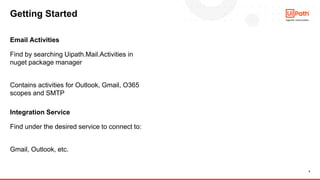
Find by searching Uipath.Mail.Activities in
nuget package manager
Contains activities for Outlook, Gmail, O365
scopes and SMTP
Email Activities
Getting Started
Find under the desired service to connect to:
Gmail, Outlook, etc.
Integration Service
6
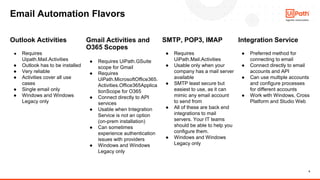
Outlook Activities
● Requires
Uipath.Mail.Activities
● Outlook has to be installed
● Very reliable
● Activities cover all use
cases
● Single email only
● Windows and Windows
Legacy only
Gmail Activities and
O365 Scopes
● Requires UiPath.GSuite
scope for Gmail
● Requires
UiPath.MicrosoftOffice365.
Activities.Office365Applica
tionScope for O365
● Connect directly to API
services
● Usable when Integration
Service is not an option
(on-prem installation)
● Can sometimes
experience authentication
issues with providers
● Windows and Windows
Legacy only
SMTP, POP3, IMAP
● Requires
UiPath.Mail.Activities
● Usable only when your
company has a mail server
available
● SMTP least secure but
easiest to use, as it can
mimic any email account
to send from
● All of these are back end
integrations to mail
servers. Your IT teams
should be able to help you
configure them.
● Windows and Windows
Legacy only
Integration Service
● Preferred method for
connecting to email
● Connect directly to email
accounts and API
● Can use multiple accounts
and configure processes
for different accounts
● Work with Windows, Cross
Platform and Studio Web
Email Automation Flavors
DEMO TIME
Let’s setup Email Automation
Excel Automation
9
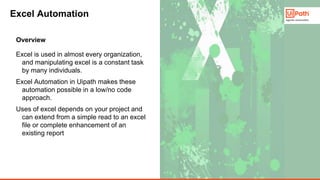
Excel is used in almost every organization,
and manipulating excel is a constant task
by many individuals.
Excel Automation in Uipath makes these
automation possible in a low/no code
approach.
Uses of excel depends on your project and
can extend from a simple read to an excel
file or complete enhancement of an
existing report
Overview
Excel Automation
10
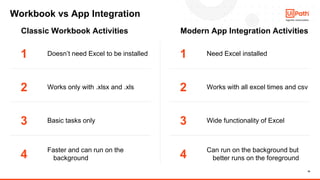
Workbook vs App Integration
1
2
3
4
Doesn’t need Excel to be installed
Works only with .xlsx and .xls
Basic tasks only
Faster and can run on the
background
Need Excel installed
Works with all excel times and csv
Wide functionality of Excel
Can run on the background but
better runs on the foreground
1
2
3
4
Classic Workbook Activities Modern App Integration Activities
DEMO TIME
Let’s setup Excel Automation
12
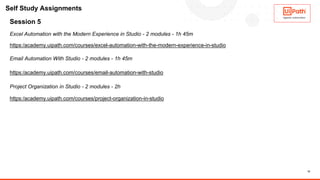
Session 5
Excel Automation with the Modern Experience in Studio - 2 modules - 1h 45m
https:/academy.uipath.com/courses/excel-automation-with-the-modern-experience-in-studio
Email Automation With Studio - 2 modules - 1h 45m
https:/academy.uipath.com/courses/email-automation-with-studio
Project Organization in Studio - 2 modules - 2h
https:/academy.uipath.com/courses/project-organization-in-studio
Self Study Assignments
Q&A

UiPath Automation Developer Associate Training Series 2026 - Session 5

  • 1.
    The UiPath wordmark, logos, and robots are registered trademarks owned by UiPath, Inc. and its affiliates. UiPath (R) is a registered trademark in the United States and several countries across the globe. See TMEP 906. ©2024 UiPath. All rights reserved.
  • 2.
    2 Mason Turvey RPA OperationalExcellence Technical Account Manager WonderBotz Jeffrey Silva Sr RPA Developer (Certified) Associate Project Manager | UiPath MVP Team slide – Session 5
  • 3.
    Week 3 Session 5– ● Email Automation – Jeffrey Silva ● Excel Automation – Mason Turvey
  • 4.
  • 5.
    5 Find by searchingUipath.Mail.Activities in nuget package manager Contains activities for Outlook, Gmail, O365 scopes and SMTP Email Activities Getting Started Find under the desired service to connect to: Gmail, Outlook, etc. Integration Service
  • 6.
    6 Outlook Activities ● Requires Uipath.Mail.Activities ●Outlook has to be installed ● Very reliable ● Activities cover all use cases ● Single email only ● Windows and Windows Legacy only Gmail Activities and O365 Scopes ● Requires UiPath.GSuite scope for Gmail ● Requires UiPath.MicrosoftOffice365. Activities.Office365Applica tionScope for O365 ● Connect directly to API services ● Usable when Integration Service is not an option (on-prem installation) ● Can sometimes experience authentication issues with providers ● Windows and Windows Legacy only SMTP, POP3, IMAP ● Requires UiPath.Mail.Activities ● Usable only when your company has a mail server available ● SMTP least secure but easiest to use, as it can mimic any email account to send from ● All of these are back end integrations to mail servers. Your IT teams should be able to help you configure them. ● Windows and Windows Legacy only Integration Service ● Preferred method for connecting to email ● Connect directly to email accounts and API ● Can use multiple accounts and configure processes for different accounts ● Work with Windows, Cross Platform and Studio Web Email Automation Flavors
  • 7.
    DEMO TIME Let’s setupEmail Automation
  • 8.
  • 9.
    9 Excel is usedin almost every organization, and manipulating excel is a constant task by many individuals. Excel Automation in Uipath makes these automation possible in a low/no code approach. Uses of excel depends on your project and can extend from a simple read to an excel file or complete enhancement of an existing report Overview Excel Automation
  • 10.
    10 Workbook vs AppIntegration 1 2 3 4 Doesn’t need Excel to be installed Works only with .xlsx and .xls Basic tasks only Faster and can run on the background Need Excel installed Works with all excel times and csv Wide functionality of Excel Can run on the background but better runs on the foreground 1 2 3 4 Classic Workbook Activities Modern App Integration Activities
  • 11.
    DEMO TIME Let’s setupExcel Automation
  • 12.
    12 Session 5 Excel Automationwith the Modern Experience in Studio - 2 modules - 1h 45m https:/academy.uipath.com/courses/excel-automation-with-the-modern-experience-in-studio Email Automation With Studio - 2 modules - 1h 45m https:/academy.uipath.com/courses/email-automation-with-studio Project Organization in Studio - 2 modules - 2h https:/academy.uipath.com/courses/project-organization-in-studio Self Study Assignments
  • 13.