TypeScript Vs. ES6
www.lifemichael.com
All logos, trademarks and brand names used in this presentation belong to their respective owners. Haim Michael and Life
Michael are independent and not related, affiliated or connected with any of these respective owners or their technologies.
LifeMichael.com
AngularJS Meetup Zurich
© 2015 Haim Michael 20150807
Life Michael Introduction
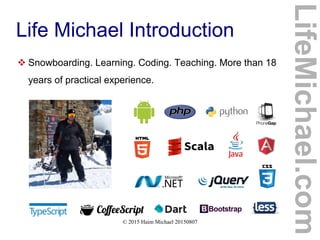
 Snowboarding. Learning. Coding. Teaching. More than 18
years of practical experience.
LifeMichael.com
© 2015 Haim Michael 20150807
Life Michael Introduction
 Professional Certifications
Zend Certified Engineer in PHP
Certified Java Professional
Certified Java EE Web Component Developer
OMG Certified UML Professional
 MBA (cum laude) from Tel-Aviv University
Information Systems Management
LifeMichael.com
© 2015 Haim Michael 20150807
Life Michael Introduction
 Huge professional practical experience in software
development both for the server side (Java EE) and for
mobile telephones.
http://blog.lifemichael.com
Mainly During The Years 2001-2007
LifeMichael.com
© 2015 Haim Michael 20150807
Life Michael Introduction
 Delivering academic advanced courses in computer
science.
 Delivering professional courses in software development
companies world wide.
LifeMichael.com
© 2015 Haim Michael 20150807
Life Michael Introduction
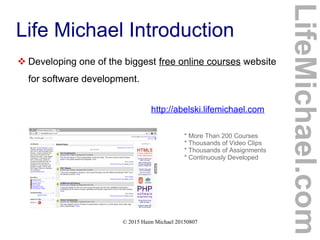
 Developing one of the biggest free online courses website
for software development.
http://abelski.lifemichael.com
* More Than 200 Courses
* Thousands of Video Clips
* Thousands of Assignments
* Continuously Developed
LifeMichael.com
© 2015 Haim Michael 20150807
Life Michael Introduction
 Popular channel of professional video clips on YouTube.
http://www.youtube.com/lifemichael
* More Than 3 Million Views
* More Than 3000 Video Clips
* More Than 100 Playlists
* More Than 3000 Subscribers
LifeMichael.com
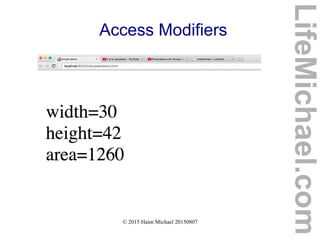
© 2015 Haim Michael 20150807
Life Michael Introduction
 Maintaining free professional communities on Facebook,
Linkedin and Google+ for continuous professional update!
http://www.lifemichael.com/en/communities
LifeMichael.com
© 2015 Haim Michael 20150807
Life Michael Introduction
 I enjoy sharing my knowledge and experience. Teaching
is my passion.
http://speakerpedia.com/speakers/life-michael
http://lanyrd.com/profile/lifemichael
Speakerpedia
LifeMichael.com
© 2015 Haim Michael 20150807
Table of Content
 Introduction
 Types
 Classes
 Inheritance
 Generics
 Interfaces
LifeMichael.com
 Enums
 Exceptions
 Decorators
 ES6 and ES7
 Conclusions
© 2015 Haim Michael 20150807
Introduction
LifeMichael.com
© 2015 Haim Michael 20150807
History
 The TypeScript programming language was developed by
Microsoft. It is an open source programming language.
 The code we write in TypeScript is compiled into
JavaScript, so we can basically use TypeScript wherever
we use JavaScript.
http://www.typescriptlang.org
LifeMichael.com
© 2015 Haim Michael 20150807
Superset of JavaScript
 TypeScript is a superset of JavaScript. It includes the
entire JavaScript programming language together with
additional capabilities.
 In general, nearly every code we can write in JavaScript
can be included in code we write in TypeScript.
LifeMichael.com
© 2015 Haim Michael 20150807
Typed Superset
 TypeScript adds the capability to code with types.
TypeScript allows us to define new classes and new
interfaces.
 TypeScript allows us to specify the type of each and
every variable and is even capable of interfering the type
by itself.
 TypeScript allows us to use JavaScript as if it was a
strictly type programming language.
LifeMichael.com
© 2015 Haim Michael 20150807
Large Applications
 TypeScript provides us with the required capabilities in
order to develop large scale applications using
JavaScript.
LifeMichael.com
© 2015 Haim Michael 20150807
Clean JavaScript
 Compiling TypeScript into JavaScript we get a clean
simple ES3 compliant code we can run in any web
browser, in any node.js environment or in any other ES3
compliant environment.
LifeMichael.com
© 2015 Haim Michael 20150807
Available IDEs
 The recommended IDEs include PHPStorm, WebStorm
and Visual Studio.
 The WebStorm IDE was developed specifically for
developing the client side (FED). The PHPStorm IDE
was developed specifically for PHP. The PHPStorm IDE
includes the WebStorm IDE. Therefore, the same
guidelines that apply for WebStorm should apply for
PHPStorm.
LifeMichael.com
© 2015 Haim Michael 20150807
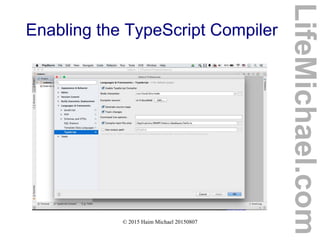
Enabling the TypeScript Compiler
 In order to develop code in TypeScript using the
PHPStorm or the WebStorm IDE we should first access
the Default Preferences setting window, enable the
TypeSciprt compiler, specifying the node interpreter and
specify the main file we want to compile.
LifeMichael.com
© 2015 Haim Michael 20150807
Enabling the TypeScript Compiler
LifeMichael.com
© 2015 Haim Michael 20150807
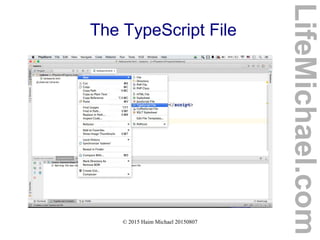
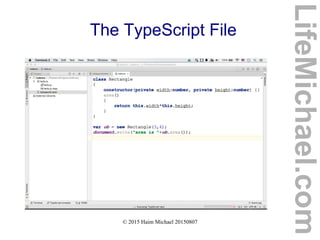
The TypeScript File
 We write our code in TypeScript in a file with the ts
extension.
LifeMichael.com
© 2015 Haim Michael 20150807
The TypeScript File
LifeMichael.com
© 2015 Haim Michael 20150807
The TypeScript File
LifeMichael.com
© 2015 Haim Michael 20150807
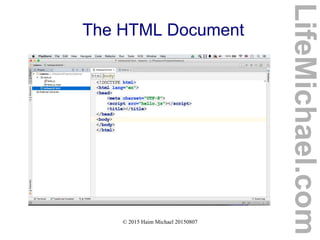
The HTML Document
 We should develop HTML5 document that includes a
script element that refers a file with the 'js' extension. Its
name should be the same as the name of the TypeScript
file. The only difference should be the extension. The
extension should be 'js' instead of 'ts'.
LifeMichael.com
© 2015 Haim Michael 20150807
The HTML Document
LifeMichael.com
© 2015 Haim Michael 20150807
Changes in Code
 We can mark the track changes checkbox and changes
in our code will immediately initiate the compiler.
LifeMichael.com
© 2015 Haim Michael 20150807
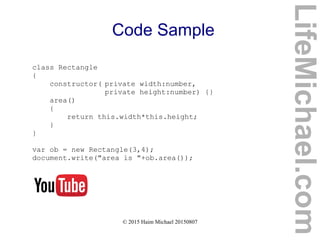
Code Sample
class Rectangle
{
constructor( private width:number,
private height:number) {}
area()
{
return this.width*this.height;
}
}
var ob = new Rectangle(3,4);
document.write("area is "+ob.area());
LifeMichael.com
© 2015 Haim Michael 20150807
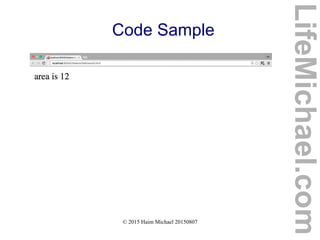
Code Sample
LifeMichael.com
© 2015 Haim Michael 20150807
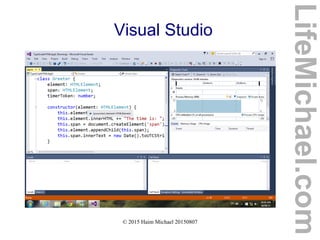
Visual Studio
 Visual Studio support for TypeScript is immediate . We
don't need to set or configure anything.
LifeMichael.com
© 2015 Haim Michael 20150807
Visual Studio
LifeMichael.com
© 2015 Haim Michael 20150807
JavaScript Supported
 Writing code in TypeScript we can use the very same
JavaScript we already know. Apart of few cases there
shouldn't be any problem doing so.
LifeMichael.com
© 2013 Haim Michael
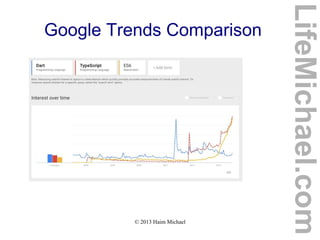
Google Trends Comparison
LifeMichael.com
© 2015 Haim Michael 20150807
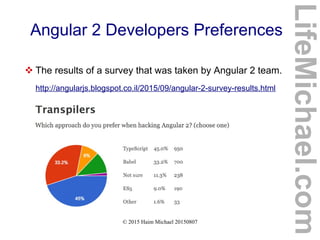
Angular 2 Developers Preferences
LifeMichael.com
 The results of a survey that was taken by Angular 2 team.
http://angularjs.blogspot.co.il/2015/09/angular-2-survey-results.html
© 2015 Haim Michael 20150807
Types
LifeMichael.com
© 2015 Haim Michael 20150807
Type Annotation
 The type annotation we can add to a variable we define
should come after the variable identified and should be
preceded by a colon.
LifeMichael.com
© 2015 Haim Michael 20150807
Type Annotation
var id:number = 123123;
var name:string = "mosh";
var tall:boolean = true;
var dosomething:(a:number,b:number)=>number = function(a:number,b:number)
{
return a+b;
}
var names:string[] = ['dave','taly','anat'];
LifeMichael.com
© 2015 Haim Michael 20150807
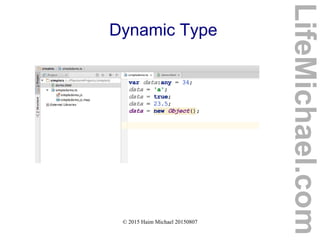
Dynamic Type
 TypeScript is optionally statically typed programming
language. The types are checked in order to prevent
assignment of invalid values in term of their types. We
can optionally change the variable into a dynamic one.
LifeMichael.com
© 2015 Haim Michael 20150807
Dynamic Type
LifeMichael.com
© 2015 Haim Michael 20150807
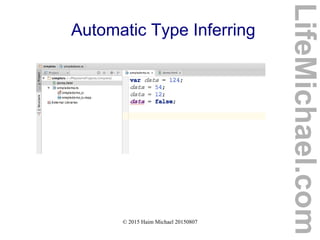
Automatic Type Inferring
 When assigning a variable, that was just created, with a
value, the TypeScript execution environment
automatically identifies the type and from that moment
on the type of that variable is unchanged.
LifeMichael.com
© 2015 Haim Michael 20150807
Automatic Type Inferring
LifeMichael.com
© 2015 Haim Michael 20150807
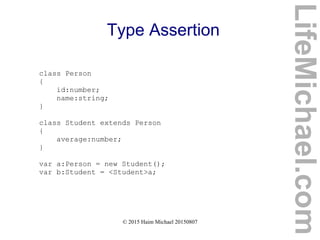
Type Assertion
 When the assignment we try to complete fails due to
typing problem we can override the compiler by forcing a
type assertion.
LifeMichael.com
© 2015 Haim Michael 20150807
Type Assertion
class Person
{
id:number;
name:string;
}
class Student extends Person
{
average:number;
}
var a:Person = new Student();
var b:Student = <Student>a;
LifeMichael.com
© 2015 Haim Michael 20150807
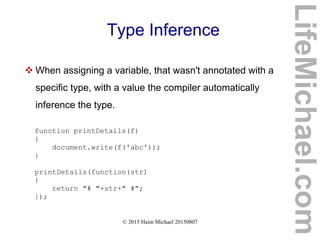
Type Inference
 When assigning a variable, that wasn't annotated with a
specific type, with a value the compiler automatically
inference the type.
function printDetails(f)
{
document.write(f('abc'));
}
printDetails(function(str)
{
return "# "+str+" #";
});
LifeMichael.com
© 2015 Haim Michael 20150807
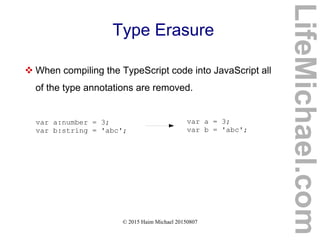
Type Erasure
 When compiling the TypeScript code into JavaScript all
of the type annotations are removed.
var a:number = 3;
var b:string = 'abc';
var a = 3;
var b = 'abc';
LifeMichael.com
© 2015 Haim Michael 20150807
Classes
LifeMichael.com
© 2015 Haim Michael 20150807
Introduction
 TypeScript supports many of the object oriented
programming features we know from other
programming languages.
LifeMichael.com
© 2015 Haim Michael 20150807
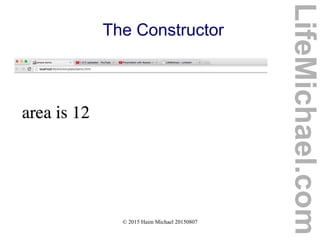
The Constructor
 When we define a new class it automatically has a
constructor. The default one. We can define a new
constructor. When doing so, the default one will be
deleted.
LifeMichael.com
© 2015 Haim Michael 20150807
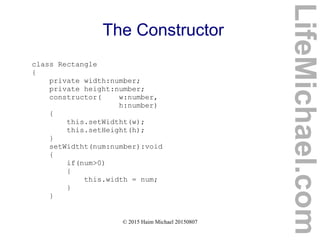
The Constructor
class Rectangle
{
private width:number;
private height:number;
constructor( w:number,
h:number)
{
this.setWidtht(w);
this.setHeight(h);
}
setWidtht(num:number):void
{
if(num>0)
{
this.width = num;
}
}
LifeMichael.com
© 2015 Haim Michael 20150807
The Constructor
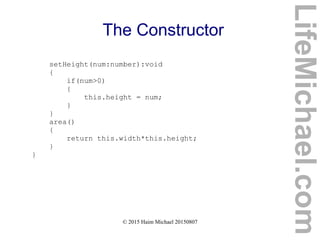
setHeight(num:number):void
{
if(num>0)
{
this.height = num;
}
}
area()
{
return this.width*this.height;
}
}
LifeMichael.com
© 2015 Haim Michael 20150807
The Constructor
var rectangles:Array<Rectangle> =
new Array<Rectangle>();
rectangles[0] = new Rectangle(3,4);
rectangles[1] = new Rectangle(5,7);
rectangles[2] = new Rectangle(8,2);
rectangles[3] = new Rectangle(1,2);
rectangles[4] = new Rectangle(8,12);
LifeMichael.com
© 2015 Haim Michael 20150807
The Constructor
rectangles.sort((a,b)=>{
if(a.area()==b.area())
return 0;
else
{
if(a.area()>b.area())
return 1;
else if(a.area()<b.area())
return -1;
}
})
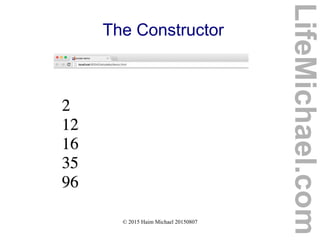
for(var k in rectangles) {
document.write("<br/>"+rectangles[k].area());
}
LifeMichael.com
© 2015 Haim Michael 20150807
The Constructor
LifeMichael.com
© 2015 Haim Michael 20150807
The Constructor
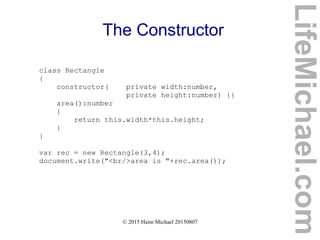
 When we define a new constructor we can specify each
one of its parameters with an access modifier and by
doing so indirectly define those parameters as instance
variables.
LifeMichael.com
© 2015 Haim Michael 20150807
The Constructor
class Rectangle
{
constructor( private width:number,
private height:number) {}
area():number
{
return this.width*this.height;
}
}
var rec = new Rectangle(3,4);
document.write("<br/>area is "+rec.area());
LifeMichael.com
© 2015 Haim Michael 20150807
The Constructor
LifeMichael.com
© 2015 Haim Michael 20150807
Access Modifiers
 The available access modifiers are private,
public and protected. The public access
modifier is the default one. If we don't specify an
access modifier then it is public.
 When we define a function or a instance variable with
the protected access modifier it will be accessible
from within the very same class in which the function
or the variable were defined as well as from within
subclasses of that class.
LifeMichael.com
© 2015 Haim Michael 20150807
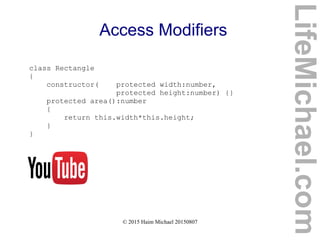
Access Modifiers
class Rectangle
{
constructor( protected width:number,
protected height:number) {}
protected area():number
{
return this.width*this.height;
}
}
LifeMichael.com
© 2015 Haim Michael 20150807
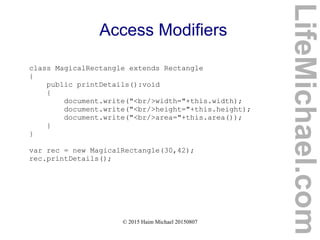
Access Modifiers
class MagicalRectangle extends Rectangle
{
public printDetails():void
{
document.write("<br/>width="+this.width);
document.write("<br/>height="+this.height);
document.write("<br/>area="+this.area());
}
}
var rec = new MagicalRectangle(30,42);
rec.printDetails();
LifeMichael.com
© 2015 Haim Michael 20150807
Access Modifiers
LifeMichael.com
© 2015 Haim Michael 20150807
Variables and Methods
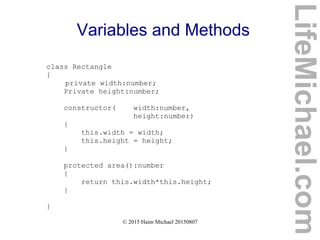
 The variables are usually declared before the
constructor. Each variable definition includes three parts.
The optional access modifier, the identifier and the type
annotation.
 The functions are declared without using the function
keyword. We can precede the function name with an
access modifier and we can append the function
declaration with the type of its returned value.
LifeMichael.com
© 2015 Haim Michael 20150807
Variables and Methods
class Rectangle
{
private width:number;
Private height:number;
constructor( width:number,
height:number)
{
this.width = width;
this.height = height;
}
protected area():number
{
return this.width*this.height;
}
}
LifeMichael.com
© 2015 Haim Michael 20150807
Static Variables and Methods
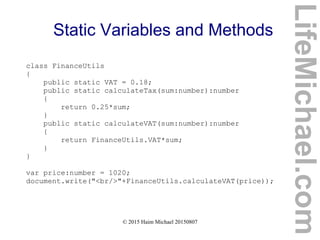
 We can define static variables and static methods by
adding the static keyword. Accessing static
variables and methods is done using the name of the
class.
LifeMichael.com
© 2015 Haim Michael 20150807
Static Variables and Methods
class FinanceUtils
{
public static VAT = 0.18;
public static calculateTax(sum:number):number
{
return 0.25*sum;
}
public static calculateVAT(sum:number):number
{
return FinanceUtils.VAT*sum;
}
}
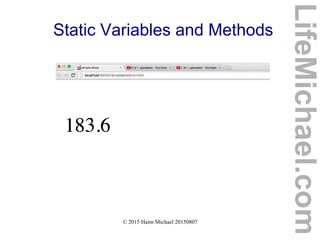
var price:number = 1020;
document.write("<br/>"+FinanceUtils.calculateVAT(price));
LifeMichael.com
© 2015 Haim Michael 20150807
Static Variables and Methods
LifeMichael.com
© 2015 Haim Michael 20150807
Inheritance
LifeMichael.com
© 2015 Haim Michael 20150807
Introduction
 Using the extends keyword we can define a class that
extends another class.
 Every method and every variable are inherited.
TypeScript doesn't support different types of inheritance.
LifeMichael.com
© 2015 Haim Michael 20150807
Inheritance Meaning
 Each and every variable that exists in objects
instantiated from the base class will be in each and
every object instantiated from the new class.
 Each and every method we can invoke on objects
instantiated from the base class will be available for
invocation on each and every object instantiated from
the new class.
LifeMichael.com
© 2015 Haim Michael 20150807
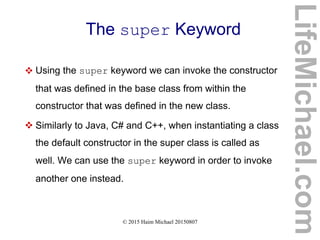
The super Keyword
 Using the super keyword we can invoke the constructor
that was defined in the base class from within the
constructor that was defined in the new class.
 Similarly to Java, C# and C++, when instantiating a class
the default constructor in the super class is called as
well. We can use the super keyword in order to invoke
another one instead.
LifeMichael.com
© 2015 Haim Michael 20150807
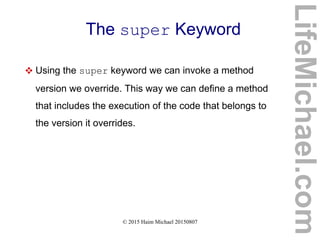
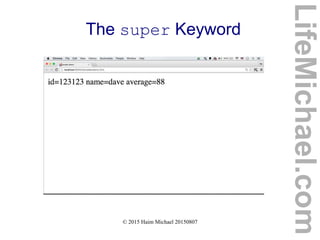
The super Keyword
 Using the super keyword we can invoke a method
version we override. This way we can define a method
that includes the execution of the code that belongs to
the version it overrides.
LifeMichael.com
© 2015 Haim Michael 20150807
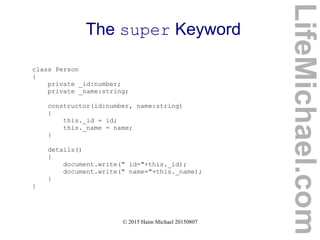
The super Keyword
class Person
{
private _id:number;
private _name:string;
constructor(id:number, name:string)
{
this._id = id;
this._name = name;
}
details()
{
document.write(" id="+this._id);
document.write(" name="+this._name);
}
}
LifeMichael.com
© 2015 Haim Michael 20150807
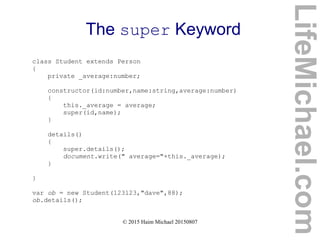
The super Keyword
class Student extends Person
{
private _average:number;
constructor(id:number,name:string,average:number)
{
this._average = average;
super(id,name);
}
details()
{
super.details();
document.write(" average="+this._average);
}
}
var ob = new Student(123123,"dave",88);
ob.details();
LifeMichael.com
© 2015 Haim Michael 20150807
The super Keyword
LifeMichael.com
© 2015 Haim Michael 20150807
Generics
LifeMichael.com
© 2015 Haim Michael 20150807
Introduction
 Using generics we can define functions and classes
that will be reused in order to work with various
different types.
LifeMichael.com
© 2015 Haim Michael 20150807
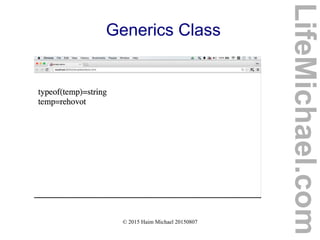
Generics Class
 Whenever we instantiate a generic class we should
specify the missing type(s) in order to get a new object
specifically with the type(s) we specified.
LifeMichael.com
© 2015 Haim Michael 20150807
Generics Class
class MyStack<T>
{
private index:number = 0;
private vec:T[];
constructor(size:number)
{
this.vec = new Array<T>(size);
}
push(ob:T):void
{
this.vec[this.index] = ob;
this.index++;
}
pop():T
{
this.index--;
return this.vec[this.index];
}
}
LifeMichael.com
© 2015 Haim Michael 20150807
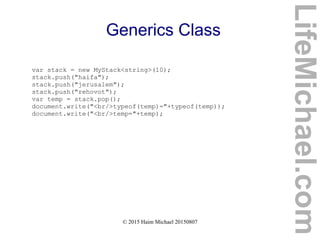
Generics Class
var stack = new MyStack<string>(10);
stack.push("haifa");
stack.push("jerusalem");
stack.push("rehovot");
var temp = stack.pop();
document.write("<br/>typeof(temp)="+typeof(temp));
document.write("<br/>temp="+temp);
LifeMichael.com
© 2015 Haim Michael 20150807
Generics Class
LifeMichael.com
© 2015 Haim Michael 20150807
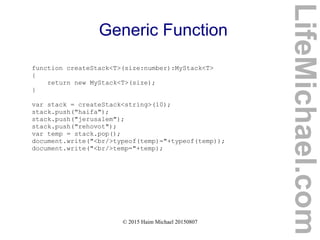
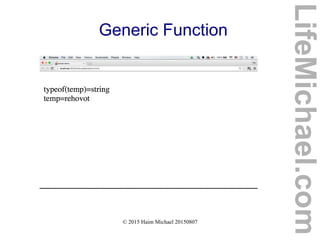
Generic Function
 Whenever we call a generic function we should specify
the missing type(s).
LifeMichael.com
© 2015 Haim Michael 20150807
Generic Function
class MyStack<T>
{
private index:number = 0;
private vec:T[];
constructor(size:number)
{
this.vec = new Array<T>(size);
}
push(ob:T):void
{
this.vec[this.index] = ob;
this.index++;
}
pop():T
{
this.index--;
return this.vec[this.index];
}
}
LifeMichael.com
© 2015 Haim Michael 20150807
Generic Function
function createStack<T>(size:number):MyStack<T>
{
return new MyStack<T>(size);
}
var stack = createStack<string>(10);
stack.push("haifa");
stack.push("jerusalem");
stack.push("rehovot");
var temp = stack.pop();
document.write("<br/>typeof(temp)="+typeof(temp));
document.write("<br/>temp="+temp);
LifeMichael.com
© 2015 Haim Michael 20150807
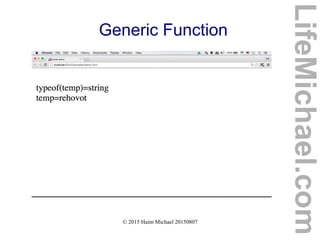
Generic Function
LifeMichael.com
© 2015 Haim Michael 20150807
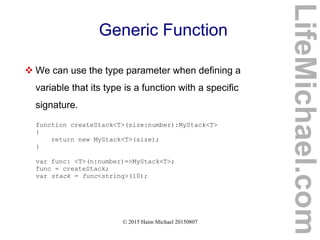
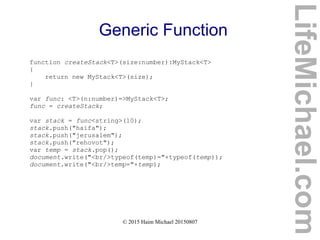
Generic Function
 We can use the type parameter when defining a
variable that its type is a function with a specific
signature.
function createStack<T>(size:number):MyStack<T>
{
return new MyStack<T>(size);
}
var func: <T>(n:number)=>MyStack<T>;
func = createStack;
var stack = func<string>(10);
LifeMichael.com
© 2015 Haim Michael 20150807
Generic Function
class MyStack<T>
{
private index:number = 0;
private vec:T[];
constructor(size:number)
{
this.vec = new Array<T>(size);
}
push(ob:T):void
{
this.vec[this.index] = ob;
this.index++;
}
pop():T
{
this.index--;
return this.vec[this.index];
}
}
LifeMichael.com
© 2015 Haim Michael 20150807
Generic Function
function createStack<T>(size:number):MyStack<T>
{
return new MyStack<T>(size);
}
var func: <T>(n:number)=>MyStack<T>;
func = createStack;
var stack = func<string>(10);
stack.push("haifa");
stack.push("jerusalem");
stack.push("rehovot");
var temp = stack.pop();
document.write("<br/>typeof(temp)="+typeof(temp));
document.write("<br/>temp="+temp);
LifeMichael.com
© 2015 Haim Michael 20150807
Generic Function
LifeMichael.com
© 2015 Haim Michael 20150807
Generic Constraints
 When using the parameter type we can specify
constraints in order to limit the range of possible types.
function calculateAverage<T extends Student>
(students:Array<T>):number
{
var sum:number = 0;
for(var i:number=0; i<students.length; i++)
{
sum += students[i].average();
}
var result = sum / students.length;
return result;
}
LifeMichael.com
© 2015 Haim Michael 20150807
Generic Constraints
function calculateAverage<T extends Student>
(students:Array<T>):number
{
var sum:number = 0;
for(var i:number=0; i<students.length; i++)
{
sum += students[i].average();
}
var result = sum / students.length;
return result;
}
LifeMichael.com
© 2015 Haim Michael 20150807
Generic Constraints
class Student
{
private _average:number;
private _id:number;
private _name:string;
constructor(id:number,name:string,average:number)
{
this._average = average;
this._id = id;
this._name = name;
}
average():number
{
return this._average;
}
}
var students = [new Student(123123,"dave",88),
new Student(234343,"ronen",92),
new Student(34234,"yael",82)];
var avg = calculateAverage(students);
document.write("average is "+avg);
LifeMichael.com
© 2015 Haim Michael 20150807
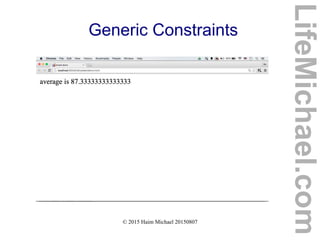
Generic Constraints
LifeMichael.com
© 2015 Haim Michael 20150807
Interfaces
LifeMichael.com
© 2015 Haim Michael 20150807
Introduction
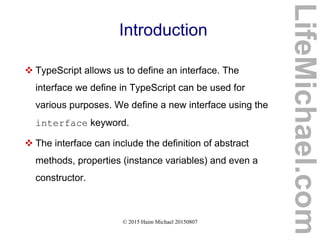
 TypeScript allows us to define an interface. The
interface we define in TypeScript can be used for
various purposes. We define a new interface using the
interface keyword.
 The interface can include the definition of abstract
methods, properties (instance variables) and even a
constructor.
LifeMichael.com
© 2015 Haim Michael 20150807
Abstract Type
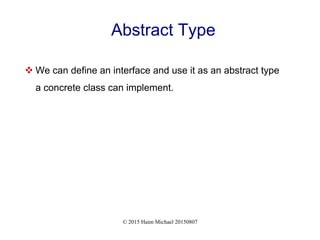
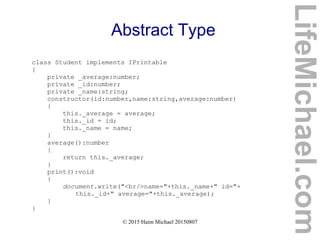
 We can define an interface and use it as an abstract type
a concrete class can implement.
© 2015 Haim Michael 20150807
Abstract Type
interface IPrintable
{
print():void;
}
function printObjects<T extends Iprintable>
(students:Array<T>):void
{
for(var i:number=0; i<students.length; i++)
{
students[i].print();
}
}
LifeMichael.com
© 2015 Haim Michael 20150807
Abstract Type
class Student implements IPrintable
{
private _average:number;
private _id:number;
private _name:string;
constructor(id:number,name:string,average:number)
{
this._average = average;
this._id = id;
this._name = name;
}
average():number
{
return this._average;
}
print():void
{
document.write("<br/>name="+this._name+" id="+
this._id+" average="+this._average);
}
}
LifeMichael.com
© 2015 Haim Michael 20150807
Abstract Type
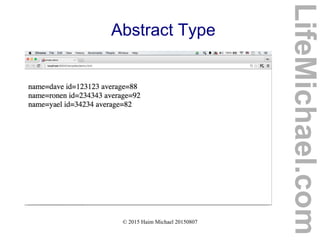
var students = [ new Student(123123,"dave",88),
new Student(234343,"ronen",92),
new Student(34234,"yael",82)];
printObjects(students);
LifeMichael.com
© 2015 Haim Michael 20150807
Abstract Type
LifeMichael.com
© 2015 Haim Michael 20150807
Structure Definition
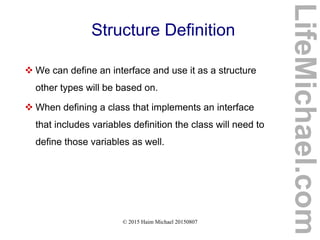
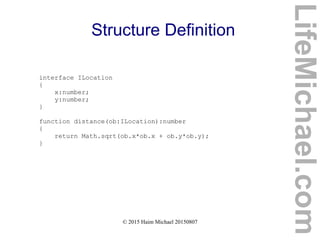
 We can define an interface and use it as a structure
other types will be based on.
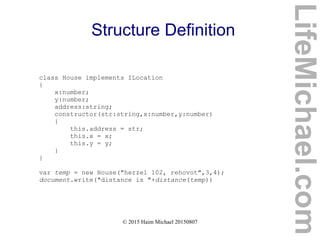
 When defining a class that implements an interface
that includes variables definition the class will need to
define those variables as well.
LifeMichael.com
© 2015 Haim Michael 20150807
Structure Definition
interface ILocation
{
x:number;
y:number;
}
function distance(ob:ILocation):number
{
return Math.sqrt(ob.x*ob.x + ob.y*ob.y);
}
LifeMichael.com
© 2015 Haim Michael 20150807
Structure Definition
class House implements ILocation
{
x:number;
y:number;
address:string;
constructor(str:string,x:number,y:number)
{
this.address = str;
this.x = x;
this.y = y;
}
}
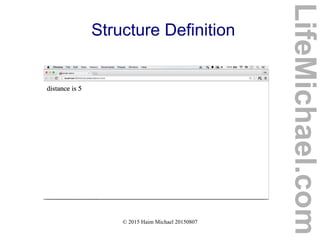
var temp = new House("herzel 102, rehovot",3,4);
document.write("distance is "+distance(temp))
LifeMichael.com
© 2015 Haim Michael 20150807
Structure Definition
LifeMichael.com
© 2015 Haim Michael 20150807
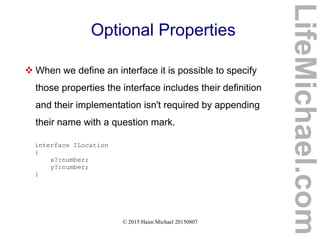
Optional Properties
 When we define an interface it is possible to specify
those properties the interface includes their definition
and their implementation isn't required by appending
their name with a question mark.
interface ILocation
{
x?:number;
y?:number;
}
LifeMichael.com
© 2015 Haim Michael 20150807
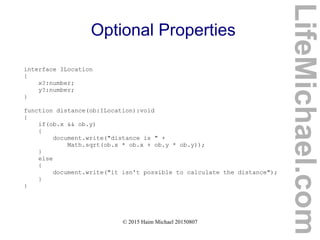
Optional Properties
interface ILocation
{
x?:number;
y?:number;
}
function distance(ob:ILocation):void
{
if(ob.x && ob.y)
{
document.write("distance is " +
Math.sqrt(ob.x * ob.x + ob.y * ob.y));
}
else
{
document.write("it isn't possible to calculate the distance");
}
}
LifeMichael.com
© 2015 Haim Michael 20150807
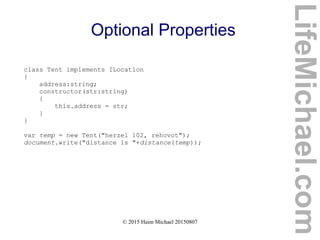
Optional Properties
class Tent implements ILocation
{
address:string;
constructor(str:string)
{
this.address = str;
}
}
var temp = new Tent("herzel 102, rehovot");
document.write("distance is "+distance(temp));
LifeMichael.com
© 2015 Haim Michael 20150807
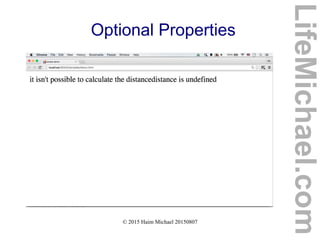
Optional Properties
LifeMichael.com
© 2015 Haim Michael 20150807
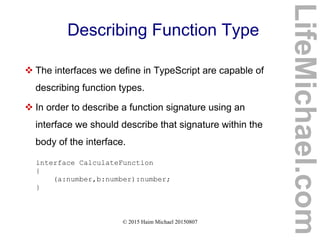
Describing Function Type
 The interfaces we define in TypeScript are capable of
describing function types.
 In order to describe a function signature using an
interface we should describe that signature within the
body of the interface.
interface CalculateFunction
{
(a:number,b:number):number;
}
LifeMichael.com
© 2015 Haim Michael 20150807
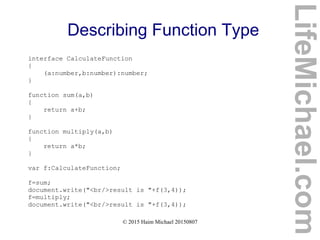
Describing Function Type
interface CalculateFunction
{
(a:number,b:number):number;
}
function sum(a,b)
{
return a+b;
}
function multiply(a,b)
{
return a*b;
}
var f:CalculateFunction;
f=sum;
document.write("<br/>result is "+f(3,4));
f=multiply;
document.write("<br/>result is "+f(3,4));
LifeMichael.com
© 2015 Haim Michael 20150807
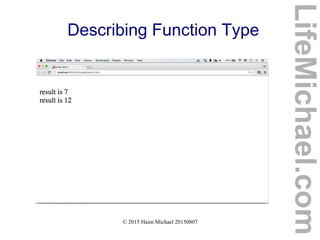
Describing Function Type
LifeMichael.com
© 2015 Haim Michael 20150807
Describing Array Types
 We can define an interface in order to describe an array
type in our program.
LifeMichael.com
© 2015 Haim Michael 20150807
Describing Array Types
interface RectanglesArray
{
[index: number]: Rectangle;
length:number;
}
class Rectangle
{
width:number;
height:number;
constructor(w:number, h:number)
{
this.width = w;
this.height = h;
}
area():number
{
return this.width*this.height;
}
}
LifeMichael.com
© 2015 Haim Michael 20150807
Describing Array Types
function calc(vec:RectanglesArray):number
{
var sum:number = 0;
for (var i = 0; i < vec.length; i++)
{
sum+= vec[i].area();
}
return sum;
}
var vec:RectanglesArray;
vec = [new Rectangle(3,4), new Rectangle(5,4), new
Rectangle(4,2)];
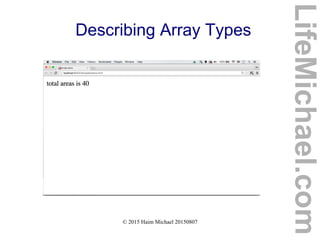
document.write("total areas is "+calc(vec));
LifeMichael.com
© 2015 Haim Michael 20150807
Describing Array Types
LifeMichael.com
© 2015 Haim Michael 20150807
Interfaces Inheritance
 We can define an interface that extends other
interfaces. Unlike classes inheritance, an interface can
extend multiple other interface.
LifeMichael.com
© 2015 Haim Michael 20150807
Interfaces Inheritance
interface IPrintable
{
print():void
}
interface ICompareable
{
compare(other:any)
}
interface IPoint
{
x:number;
y:number;
}
interface Bird extends IPoint,ICompareable,IPrintable {}
LifeMichael.com
© 2015 Haim Michael 20150807
Enum
LifeMichael.com
© 2015 Haim Michael 20150807
Introduction
 As with many other programming languages, TypeScript
allows us to create a new enum type, as a way for giving
more friendly names to sets of numeric values.
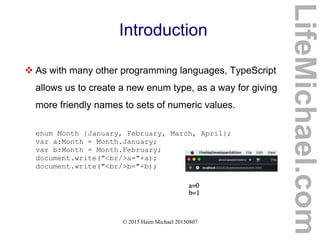
enum Month {January, February, March, April};
var a:Month = Month.January;
var b:Month = Month.February;
document.write("<br/>a="+a);
document.write("<br/>b="+b);
LifeMichael.com
© 2015 Haim Michael 20150807
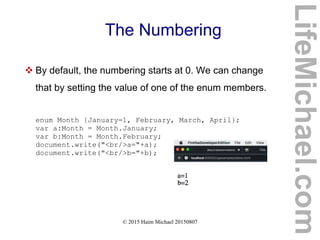
The Numbering
 By default, the numbering starts at 0. We can change
that by setting the value of one of the enum members.
enum Month {January=1, February, March, April};
var a:Month = Month.January;
var b:Month = Month.February;
document.write("<br/>a="+a);
document.write("<br/>b="+b);
LifeMichael.com
© 2015 Haim Michael 20150807
The Corresponding Name
 When having a numeric value we can get its
corresponding name in a specific enum by treating the
enum as an array.
enum Month {January=1, February, March, April};
var a:Month = Month.January;
var b:Month = Month.February;
var str:string = Month[3];
document.write(str);
LifeMichael.com
© 2015 Haim Michael 20150807
Exceptions
LifeMichael.com
© 2015 Haim Michael 20150807
Introduction
 When the code in JavaScript encounters an exception
the details will be printed to the console. They won't be
shown in the web browser.
 We can handle those exceptions using the try & catch
statement.
LifeMichael.com
© 2015 Haim Michael 20150807
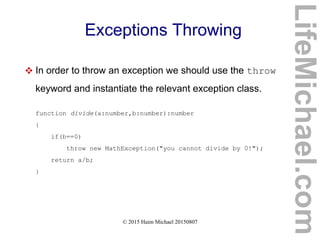
Exceptions Throwing
 In order to throw an exception we should use the throw
keyword and instantiate the relevant exception class.
function divide(a:number,b:number):number
{
if(b==0)
throw new MathException("you cannot divide by 0!");
return a/b;
}
LifeMichael.com
© 2015 Haim Michael 20150807
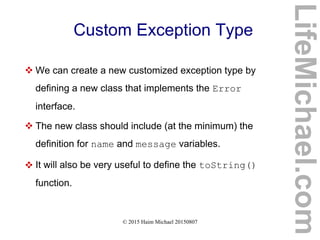
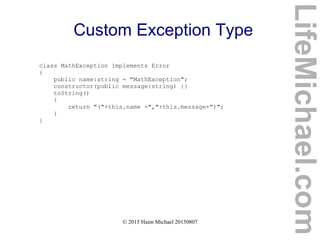
Custom Exception Type
 We can create a new customized exception type by
defining a new class that implements the Error
interface.
 The new class should include (at the minimum) the
definition for name and message variables.
 It will also be very useful to define the toString()
function.
LifeMichael.com
© 2015 Haim Michael 20150807
Custom Exception Type
class MathException implements Error
{
public name:string = "MathException";
constructor(public message:string) {}
toString()
{
return "("+this.name +","+this.message+")";
}
}
LifeMichael.com
© 2015 Haim Michael 20150807
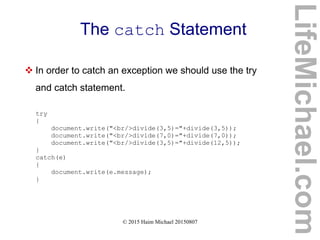
The catch Statement
 In order to catch an exception we should use the try
and catch statement.
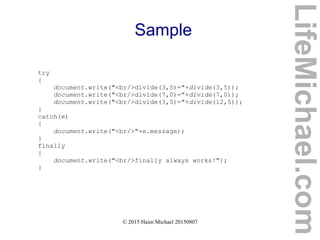
try
{
document.write("<br/>divide(3,5)="+divide(3,5));
document.write("<br/>divide(7,0)="+divide(7,0));
document.write("<br/>divide(3,5)="+divide(12,5));
}
catch(e)
{
document.write(e.message);
}
LifeMichael.com
© 2015 Haim Michael 20150807
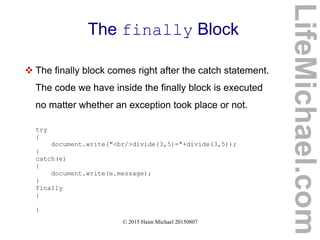
The finally Block
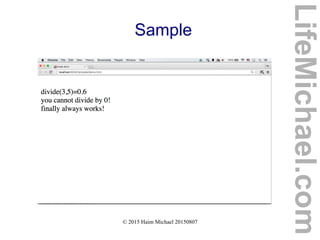
 The finally block comes right after the catch statement.
The code we have inside the finally block is executed
no matter whether an exception took place or not.
try
{
document.write("<br/>divide(3,5)="+divide(3,5));
}
catch(e)
{
document.write(e.message);
}
finally
{
}
LifeMichael.com
© 2015 Haim Michael 20150807
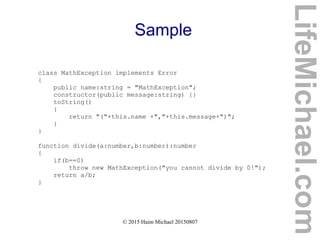
Sample
class MathException implements Error
{
public name:string = "MathException";
constructor(public message:string) {}
toString()
{
return "("+this.name +","+this.message+")";
}
}
function divide(a:number,b:number):number
{
if(b==0)
throw new MathException("you cannot divide by 0!");
return a/b;
}
LifeMichael.com
© 2015 Haim Michael 20150807
Sample
try
{
document.write("<br/>divide(3,5)="+divide(3,5));
document.write("<br/>divide(7,0)="+divide(7,0));
document.write("<br/>divide(3,5)="+divide(12,5));
}
catch(e)
{
document.write("<br/>"+e.message);
}
finally
{
document.write("<br/>finally always works!");
}
LifeMichael.com
© 2015 Haim Michael 20150807
Sample
LifeMichael.com
© 2015 Haim Michael 20150807
Decorators
LifeMichael.com
© 2015 Haim Michael 20150807
Decorators Development
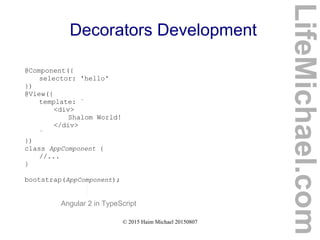
 We can develop our own decorators (also known as
annotations in Java and as attributes in C#).
 The use of decorators when using Angular 2 simplifies the
development process and contributes to the code clarity.
LifeMichael.com
© 2015 Haim Michael 20150807
Decorators Development
LifeMichael.com
function AppComponent() {}
AppComponent.annotations = [
new angular.ComponentAnnotation({
selector: 'my-application'
}),
new angular.ViewAnnotation({
template: '<h1>Hello Friends:)</h1>'
})
];
document.addEventListener('DOMContentLoaded', function() {
angular.bootstrap(AppComponent);
});
Angular 2 in ES5
© 2015 Haim Michael 20150807
Decorators Development
LifeMichael.com
Angular 2 in TypeScript
@Component({
selector: 'hello'
})
@View({
template: `
<div>
Shalom World!
</div>
`
})
class AppComponent {
//...
}
bootstrap(AppComponent);
© 2015 Haim Michael 20150807
ES6 and ES7
LifeMichael.com
© 2015 Haim Michael 20150807
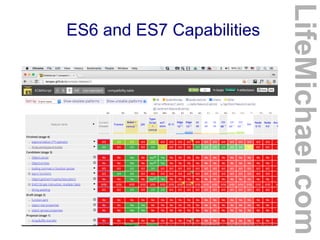
ES6 and ES7 Capabilities
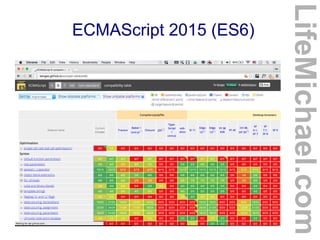
 TypeScript transpiler already support most of ES6 and ES7
capabilities, allowing us to take advantage of them in a fairly
simple way.
http://kangax.github.io/compat-table/es7/
LifeMichael.com
© 2015 Haim Michael 20150807
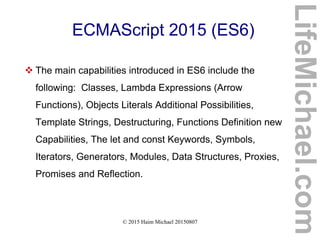
ECMAScript 2015 (ES6)
 The main capabilities introduced in ES6 include the
following: Classes, Lambda Expressions (Arrow
Functions), Objects Literals Additional Possibilities,
Template Strings, Destructuring, Functions Definition new
Capabilities, The let and const Keywords, Symbols,
Iterators, Generators, Modules, Data Structures, Proxies,
Promises and Reflection.
LifeMichael.com
© 2015 Haim Michael 20150807
ECMAScript 2015 (ES6)
LifeMichael.com
© 2015 Haim Michael 20150807
ECMAScript 2016 (ES7)
 ES7 is currently under development. So far there are very
few features that were already finalized.
LifeMichael.com
© 2015 Haim Michael 20150807
ES6 and ES7 Capabilities
LifeMichael.com
© 2015 Haim Michael 20150807
Conclusion
LifeMichael.com
© 2013 Haim Michael
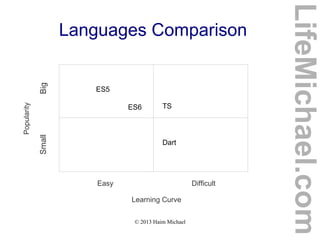
Languages Comparison
LifeMichael.com
Easy Difficult
Learning Curve
Popularity
SmallBig
Dart
TS
ES5
ES6
© 2013 Haim Michael
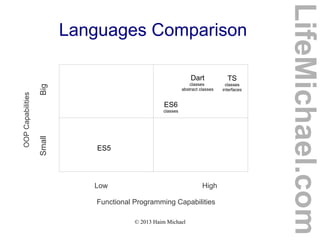
Languages Comparison
LifeMichael.com
Low High
Functional Programming Capabilities
OOPCapabilities
SmallBig
Dart
classes
abstract classes
TS
classes
interfaces
ES5
ES6
classes
© 2013 Haim Michael
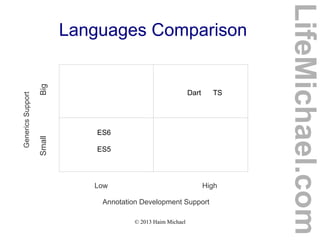
Languages Comparison
LifeMichael.com
Low High
Annotation Development Support
GenericsSupport
SmallBig
Dart TS
ES5
ES6
© 2013 Haim Michael
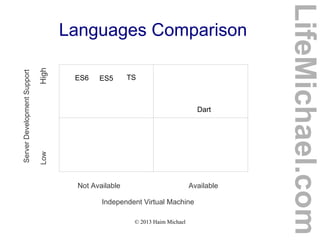
Languages Comparison
LifeMichael.com
Not Available Available
Independent Virtual Machine
ServerDevelopmentSupport
LowHigh
Dart
TSES5ES6
© 2013 Haim Michael 20150815
Questions & Answers
Thanks for Attending My Talk!
If you liked it, please write me some feedback
at speakerpedia.com/speakers/life-michael
LifeMichael.com

Typescript vas ES6

  • 1.
    TypeScript Vs. ES6 www.lifemichael.com Alllogos, trademarks and brand names used in this presentation belong to their respective owners. Haim Michael and Life Michael are independent and not related, affiliated or connected with any of these respective owners or their technologies. LifeMichael.com AngularJS Meetup Zurich
  • 2.
    © 2015 HaimMichael 20150807 Life Michael Introduction  Snowboarding. Learning. Coding. Teaching. More than 18 years of practical experience. LifeMichael.com
  • 3.
    © 2015 HaimMichael 20150807 Life Michael Introduction  Professional Certifications Zend Certified Engineer in PHP Certified Java Professional Certified Java EE Web Component Developer OMG Certified UML Professional  MBA (cum laude) from Tel-Aviv University Information Systems Management LifeMichael.com
  • 4.
    © 2015 HaimMichael 20150807 Life Michael Introduction  Huge professional practical experience in software development both for the server side (Java EE) and for mobile telephones. http://blog.lifemichael.com Mainly During The Years 2001-2007 LifeMichael.com
  • 5.
    © 2015 HaimMichael 20150807 Life Michael Introduction  Delivering academic advanced courses in computer science.  Delivering professional courses in software development companies world wide. LifeMichael.com
  • 6.
    © 2015 HaimMichael 20150807 Life Michael Introduction  Developing one of the biggest free online courses website for software development. http://abelski.lifemichael.com * More Than 200 Courses * Thousands of Video Clips * Thousands of Assignments * Continuously Developed LifeMichael.com
  • 7.
    © 2015 HaimMichael 20150807 Life Michael Introduction  Popular channel of professional video clips on YouTube. http://www.youtube.com/lifemichael * More Than 3 Million Views * More Than 3000 Video Clips * More Than 100 Playlists * More Than 3000 Subscribers LifeMichael.com
  • 8.
    © 2015 HaimMichael 20150807 Life Michael Introduction  Maintaining free professional communities on Facebook, Linkedin and Google+ for continuous professional update! http://www.lifemichael.com/en/communities LifeMichael.com
  • 9.
    © 2015 HaimMichael 20150807 Life Michael Introduction  I enjoy sharing my knowledge and experience. Teaching is my passion. http://speakerpedia.com/speakers/life-michael http://lanyrd.com/profile/lifemichael Speakerpedia LifeMichael.com
  • 10.
    © 2015 HaimMichael 20150807 Table of Content  Introduction  Types  Classes  Inheritance  Generics  Interfaces LifeMichael.com  Enums  Exceptions  Decorators  ES6 and ES7  Conclusions
  • 11.
    © 2015 HaimMichael 20150807 Introduction LifeMichael.com
  • 12.
    © 2015 HaimMichael 20150807 History  The TypeScript programming language was developed by Microsoft. It is an open source programming language.  The code we write in TypeScript is compiled into JavaScript, so we can basically use TypeScript wherever we use JavaScript. http://www.typescriptlang.org LifeMichael.com
  • 13.
    © 2015 HaimMichael 20150807 Superset of JavaScript  TypeScript is a superset of JavaScript. It includes the entire JavaScript programming language together with additional capabilities.  In general, nearly every code we can write in JavaScript can be included in code we write in TypeScript. LifeMichael.com
  • 14.
    © 2015 HaimMichael 20150807 Typed Superset  TypeScript adds the capability to code with types. TypeScript allows us to define new classes and new interfaces.  TypeScript allows us to specify the type of each and every variable and is even capable of interfering the type by itself.  TypeScript allows us to use JavaScript as if it was a strictly type programming language. LifeMichael.com
  • 15.
    © 2015 HaimMichael 20150807 Large Applications  TypeScript provides us with the required capabilities in order to develop large scale applications using JavaScript. LifeMichael.com
  • 16.
    © 2015 HaimMichael 20150807 Clean JavaScript  Compiling TypeScript into JavaScript we get a clean simple ES3 compliant code we can run in any web browser, in any node.js environment or in any other ES3 compliant environment. LifeMichael.com
  • 17.
    © 2015 HaimMichael 20150807 Available IDEs  The recommended IDEs include PHPStorm, WebStorm and Visual Studio.  The WebStorm IDE was developed specifically for developing the client side (FED). The PHPStorm IDE was developed specifically for PHP. The PHPStorm IDE includes the WebStorm IDE. Therefore, the same guidelines that apply for WebStorm should apply for PHPStorm. LifeMichael.com
  • 18.
    © 2015 HaimMichael 20150807 Enabling the TypeScript Compiler  In order to develop code in TypeScript using the PHPStorm or the WebStorm IDE we should first access the Default Preferences setting window, enable the TypeSciprt compiler, specifying the node interpreter and specify the main file we want to compile. LifeMichael.com
  • 19.
    © 2015 HaimMichael 20150807 Enabling the TypeScript Compiler LifeMichael.com
  • 20.
    © 2015 HaimMichael 20150807 The TypeScript File  We write our code in TypeScript in a file with the ts extension. LifeMichael.com
  • 21.
    © 2015 HaimMichael 20150807 The TypeScript File LifeMichael.com
  • 22.
    © 2015 HaimMichael 20150807 The TypeScript File LifeMichael.com
  • 23.
    © 2015 HaimMichael 20150807 The HTML Document  We should develop HTML5 document that includes a script element that refers a file with the 'js' extension. Its name should be the same as the name of the TypeScript file. The only difference should be the extension. The extension should be 'js' instead of 'ts'. LifeMichael.com
  • 24.
    © 2015 HaimMichael 20150807 The HTML Document LifeMichael.com
  • 25.
    © 2015 HaimMichael 20150807 Changes in Code  We can mark the track changes checkbox and changes in our code will immediately initiate the compiler. LifeMichael.com
  • 26.
    © 2015 HaimMichael 20150807 Code Sample class Rectangle { constructor( private width:number, private height:number) {} area() { return this.width*this.height; } } var ob = new Rectangle(3,4); document.write("area is "+ob.area()); LifeMichael.com
  • 27.
    © 2015 HaimMichael 20150807 Code Sample LifeMichael.com
  • 28.
    © 2015 HaimMichael 20150807 Visual Studio  Visual Studio support for TypeScript is immediate . We don't need to set or configure anything. LifeMichael.com
  • 29.
    © 2015 HaimMichael 20150807 Visual Studio LifeMichael.com
  • 30.
    © 2015 HaimMichael 20150807 JavaScript Supported  Writing code in TypeScript we can use the very same JavaScript we already know. Apart of few cases there shouldn't be any problem doing so. LifeMichael.com
  • 31.
    © 2013 HaimMichael Google Trends Comparison LifeMichael.com
  • 32.
    © 2015 HaimMichael 20150807 Angular 2 Developers Preferences LifeMichael.com  The results of a survey that was taken by Angular 2 team. http://angularjs.blogspot.co.il/2015/09/angular-2-survey-results.html
  • 33.
    © 2015 HaimMichael 20150807 Types LifeMichael.com
  • 34.
    © 2015 HaimMichael 20150807 Type Annotation  The type annotation we can add to a variable we define should come after the variable identified and should be preceded by a colon. LifeMichael.com
  • 35.
    © 2015 HaimMichael 20150807 Type Annotation var id:number = 123123; var name:string = "mosh"; var tall:boolean = true; var dosomething:(a:number,b:number)=>number = function(a:number,b:number) { return a+b; } var names:string[] = ['dave','taly','anat']; LifeMichael.com
  • 36.
    © 2015 HaimMichael 20150807 Dynamic Type  TypeScript is optionally statically typed programming language. The types are checked in order to prevent assignment of invalid values in term of their types. We can optionally change the variable into a dynamic one. LifeMichael.com
  • 37.
    © 2015 HaimMichael 20150807 Dynamic Type LifeMichael.com
  • 38.
    © 2015 HaimMichael 20150807 Automatic Type Inferring  When assigning a variable, that was just created, with a value, the TypeScript execution environment automatically identifies the type and from that moment on the type of that variable is unchanged. LifeMichael.com
  • 39.
    © 2015 HaimMichael 20150807 Automatic Type Inferring LifeMichael.com
  • 40.
    © 2015 HaimMichael 20150807 Type Assertion  When the assignment we try to complete fails due to typing problem we can override the compiler by forcing a type assertion. LifeMichael.com
  • 41.
    © 2015 HaimMichael 20150807 Type Assertion class Person { id:number; name:string; } class Student extends Person { average:number; } var a:Person = new Student(); var b:Student = <Student>a; LifeMichael.com
  • 42.
    © 2015 HaimMichael 20150807 Type Inference  When assigning a variable, that wasn't annotated with a specific type, with a value the compiler automatically inference the type. function printDetails(f) { document.write(f('abc')); } printDetails(function(str) { return "# "+str+" #"; }); LifeMichael.com
  • 43.
    © 2015 HaimMichael 20150807 Type Erasure  When compiling the TypeScript code into JavaScript all of the type annotations are removed. var a:number = 3; var b:string = 'abc'; var a = 3; var b = 'abc'; LifeMichael.com
  • 44.
    © 2015 HaimMichael 20150807 Classes LifeMichael.com
  • 45.
    © 2015 HaimMichael 20150807 Introduction  TypeScript supports many of the object oriented programming features we know from other programming languages. LifeMichael.com
  • 46.
    © 2015 HaimMichael 20150807 The Constructor  When we define a new class it automatically has a constructor. The default one. We can define a new constructor. When doing so, the default one will be deleted. LifeMichael.com
  • 47.
    © 2015 HaimMichael 20150807 The Constructor class Rectangle { private width:number; private height:number; constructor( w:number, h:number) { this.setWidtht(w); this.setHeight(h); } setWidtht(num:number):void { if(num>0) { this.width = num; } } LifeMichael.com
  • 48.
    © 2015 HaimMichael 20150807 The Constructor setHeight(num:number):void { if(num>0) { this.height = num; } } area() { return this.width*this.height; } } LifeMichael.com
  • 49.
    © 2015 HaimMichael 20150807 The Constructor var rectangles:Array<Rectangle> = new Array<Rectangle>(); rectangles[0] = new Rectangle(3,4); rectangles[1] = new Rectangle(5,7); rectangles[2] = new Rectangle(8,2); rectangles[3] = new Rectangle(1,2); rectangles[4] = new Rectangle(8,12); LifeMichael.com
  • 50.
    © 2015 HaimMichael 20150807 The Constructor rectangles.sort((a,b)=>{ if(a.area()==b.area()) return 0; else { if(a.area()>b.area()) return 1; else if(a.area()<b.area()) return -1; } }) for(var k in rectangles) { document.write("<br/>"+rectangles[k].area()); } LifeMichael.com
  • 51.
    © 2015 HaimMichael 20150807 The Constructor LifeMichael.com
  • 52.
    © 2015 HaimMichael 20150807 The Constructor  When we define a new constructor we can specify each one of its parameters with an access modifier and by doing so indirectly define those parameters as instance variables. LifeMichael.com
  • 53.
    © 2015 HaimMichael 20150807 The Constructor class Rectangle { constructor( private width:number, private height:number) {} area():number { return this.width*this.height; } } var rec = new Rectangle(3,4); document.write("<br/>area is "+rec.area()); LifeMichael.com
  • 54.
    © 2015 HaimMichael 20150807 The Constructor LifeMichael.com
  • 55.
    © 2015 HaimMichael 20150807 Access Modifiers  The available access modifiers are private, public and protected. The public access modifier is the default one. If we don't specify an access modifier then it is public.  When we define a function or a instance variable with the protected access modifier it will be accessible from within the very same class in which the function or the variable were defined as well as from within subclasses of that class. LifeMichael.com
  • 56.
    © 2015 HaimMichael 20150807 Access Modifiers class Rectangle { constructor( protected width:number, protected height:number) {} protected area():number { return this.width*this.height; } } LifeMichael.com
  • 57.
    © 2015 HaimMichael 20150807 Access Modifiers class MagicalRectangle extends Rectangle { public printDetails():void { document.write("<br/>width="+this.width); document.write("<br/>height="+this.height); document.write("<br/>area="+this.area()); } } var rec = new MagicalRectangle(30,42); rec.printDetails(); LifeMichael.com
  • 58.
    © 2015 HaimMichael 20150807 Access Modifiers LifeMichael.com
  • 59.
    © 2015 HaimMichael 20150807 Variables and Methods  The variables are usually declared before the constructor. Each variable definition includes three parts. The optional access modifier, the identifier and the type annotation.  The functions are declared without using the function keyword. We can precede the function name with an access modifier and we can append the function declaration with the type of its returned value. LifeMichael.com
  • 60.
    © 2015 HaimMichael 20150807 Variables and Methods class Rectangle { private width:number; Private height:number; constructor( width:number, height:number) { this.width = width; this.height = height; } protected area():number { return this.width*this.height; } } LifeMichael.com
  • 61.
    © 2015 HaimMichael 20150807 Static Variables and Methods  We can define static variables and static methods by adding the static keyword. Accessing static variables and methods is done using the name of the class. LifeMichael.com
  • 62.
    © 2015 HaimMichael 20150807 Static Variables and Methods class FinanceUtils { public static VAT = 0.18; public static calculateTax(sum:number):number { return 0.25*sum; } public static calculateVAT(sum:number):number { return FinanceUtils.VAT*sum; } } var price:number = 1020; document.write("<br/>"+FinanceUtils.calculateVAT(price)); LifeMichael.com
  • 63.
    © 2015 HaimMichael 20150807 Static Variables and Methods LifeMichael.com
  • 64.
    © 2015 HaimMichael 20150807 Inheritance LifeMichael.com
  • 65.
    © 2015 HaimMichael 20150807 Introduction  Using the extends keyword we can define a class that extends another class.  Every method and every variable are inherited. TypeScript doesn't support different types of inheritance. LifeMichael.com
  • 66.
    © 2015 HaimMichael 20150807 Inheritance Meaning  Each and every variable that exists in objects instantiated from the base class will be in each and every object instantiated from the new class.  Each and every method we can invoke on objects instantiated from the base class will be available for invocation on each and every object instantiated from the new class. LifeMichael.com
  • 67.
    © 2015 HaimMichael 20150807 The super Keyword  Using the super keyword we can invoke the constructor that was defined in the base class from within the constructor that was defined in the new class.  Similarly to Java, C# and C++, when instantiating a class the default constructor in the super class is called as well. We can use the super keyword in order to invoke another one instead. LifeMichael.com
  • 68.
    © 2015 HaimMichael 20150807 The super Keyword  Using the super keyword we can invoke a method version we override. This way we can define a method that includes the execution of the code that belongs to the version it overrides. LifeMichael.com
  • 69.
    © 2015 HaimMichael 20150807 The super Keyword class Person { private _id:number; private _name:string; constructor(id:number, name:string) { this._id = id; this._name = name; } details() { document.write(" id="+this._id); document.write(" name="+this._name); } } LifeMichael.com
  • 70.
    © 2015 HaimMichael 20150807 The super Keyword class Student extends Person { private _average:number; constructor(id:number,name:string,average:number) { this._average = average; super(id,name); } details() { super.details(); document.write(" average="+this._average); } } var ob = new Student(123123,"dave",88); ob.details(); LifeMichael.com
  • 71.
    © 2015 HaimMichael 20150807 The super Keyword LifeMichael.com
  • 72.
    © 2015 HaimMichael 20150807 Generics LifeMichael.com
  • 73.
    © 2015 HaimMichael 20150807 Introduction  Using generics we can define functions and classes that will be reused in order to work with various different types. LifeMichael.com
  • 74.
    © 2015 HaimMichael 20150807 Generics Class  Whenever we instantiate a generic class we should specify the missing type(s) in order to get a new object specifically with the type(s) we specified. LifeMichael.com
  • 75.
    © 2015 HaimMichael 20150807 Generics Class class MyStack<T> { private index:number = 0; private vec:T[]; constructor(size:number) { this.vec = new Array<T>(size); } push(ob:T):void { this.vec[this.index] = ob; this.index++; } pop():T { this.index--; return this.vec[this.index]; } } LifeMichael.com
  • 76.
    © 2015 HaimMichael 20150807 Generics Class var stack = new MyStack<string>(10); stack.push("haifa"); stack.push("jerusalem"); stack.push("rehovot"); var temp = stack.pop(); document.write("<br/>typeof(temp)="+typeof(temp)); document.write("<br/>temp="+temp); LifeMichael.com
  • 77.
    © 2015 HaimMichael 20150807 Generics Class LifeMichael.com
  • 78.
    © 2015 HaimMichael 20150807 Generic Function  Whenever we call a generic function we should specify the missing type(s). LifeMichael.com
  • 79.
    © 2015 HaimMichael 20150807 Generic Function class MyStack<T> { private index:number = 0; private vec:T[]; constructor(size:number) { this.vec = new Array<T>(size); } push(ob:T):void { this.vec[this.index] = ob; this.index++; } pop():T { this.index--; return this.vec[this.index]; } } LifeMichael.com
  • 80.
    © 2015 HaimMichael 20150807 Generic Function function createStack<T>(size:number):MyStack<T> { return new MyStack<T>(size); } var stack = createStack<string>(10); stack.push("haifa"); stack.push("jerusalem"); stack.push("rehovot"); var temp = stack.pop(); document.write("<br/>typeof(temp)="+typeof(temp)); document.write("<br/>temp="+temp); LifeMichael.com
  • 81.
    © 2015 HaimMichael 20150807 Generic Function LifeMichael.com
  • 82.
    © 2015 HaimMichael 20150807 Generic Function  We can use the type parameter when defining a variable that its type is a function with a specific signature. function createStack<T>(size:number):MyStack<T> { return new MyStack<T>(size); } var func: <T>(n:number)=>MyStack<T>; func = createStack; var stack = func<string>(10); LifeMichael.com
  • 83.
    © 2015 HaimMichael 20150807 Generic Function class MyStack<T> { private index:number = 0; private vec:T[]; constructor(size:number) { this.vec = new Array<T>(size); } push(ob:T):void { this.vec[this.index] = ob; this.index++; } pop():T { this.index--; return this.vec[this.index]; } } LifeMichael.com
  • 84.
    © 2015 HaimMichael 20150807 Generic Function function createStack<T>(size:number):MyStack<T> { return new MyStack<T>(size); } var func: <T>(n:number)=>MyStack<T>; func = createStack; var stack = func<string>(10); stack.push("haifa"); stack.push("jerusalem"); stack.push("rehovot"); var temp = stack.pop(); document.write("<br/>typeof(temp)="+typeof(temp)); document.write("<br/>temp="+temp); LifeMichael.com
  • 85.
    © 2015 HaimMichael 20150807 Generic Function LifeMichael.com
  • 86.
    © 2015 HaimMichael 20150807 Generic Constraints  When using the parameter type we can specify constraints in order to limit the range of possible types. function calculateAverage<T extends Student> (students:Array<T>):number { var sum:number = 0; for(var i:number=0; i<students.length; i++) { sum += students[i].average(); } var result = sum / students.length; return result; } LifeMichael.com
  • 87.
    © 2015 HaimMichael 20150807 Generic Constraints function calculateAverage<T extends Student> (students:Array<T>):number { var sum:number = 0; for(var i:number=0; i<students.length; i++) { sum += students[i].average(); } var result = sum / students.length; return result; } LifeMichael.com
  • 88.
    © 2015 HaimMichael 20150807 Generic Constraints class Student { private _average:number; private _id:number; private _name:string; constructor(id:number,name:string,average:number) { this._average = average; this._id = id; this._name = name; } average():number { return this._average; } } var students = [new Student(123123,"dave",88), new Student(234343,"ronen",92), new Student(34234,"yael",82)]; var avg = calculateAverage(students); document.write("average is "+avg); LifeMichael.com
  • 89.
    © 2015 HaimMichael 20150807 Generic Constraints LifeMichael.com
  • 90.
    © 2015 HaimMichael 20150807 Interfaces LifeMichael.com
  • 91.
    © 2015 HaimMichael 20150807 Introduction  TypeScript allows us to define an interface. The interface we define in TypeScript can be used for various purposes. We define a new interface using the interface keyword.  The interface can include the definition of abstract methods, properties (instance variables) and even a constructor. LifeMichael.com
  • 92.
    © 2015 HaimMichael 20150807 Abstract Type  We can define an interface and use it as an abstract type a concrete class can implement.
  • 93.
    © 2015 HaimMichael 20150807 Abstract Type interface IPrintable { print():void; } function printObjects<T extends Iprintable> (students:Array<T>):void { for(var i:number=0; i<students.length; i++) { students[i].print(); } } LifeMichael.com
  • 94.
    © 2015 HaimMichael 20150807 Abstract Type class Student implements IPrintable { private _average:number; private _id:number; private _name:string; constructor(id:number,name:string,average:number) { this._average = average; this._id = id; this._name = name; } average():number { return this._average; } print():void { document.write("<br/>name="+this._name+" id="+ this._id+" average="+this._average); } } LifeMichael.com
  • 95.
    © 2015 HaimMichael 20150807 Abstract Type var students = [ new Student(123123,"dave",88), new Student(234343,"ronen",92), new Student(34234,"yael",82)]; printObjects(students); LifeMichael.com
  • 96.
    © 2015 HaimMichael 20150807 Abstract Type LifeMichael.com
  • 97.
    © 2015 HaimMichael 20150807 Structure Definition  We can define an interface and use it as a structure other types will be based on.  When defining a class that implements an interface that includes variables definition the class will need to define those variables as well. LifeMichael.com
  • 98.
    © 2015 HaimMichael 20150807 Structure Definition interface ILocation { x:number; y:number; } function distance(ob:ILocation):number { return Math.sqrt(ob.x*ob.x + ob.y*ob.y); } LifeMichael.com
  • 99.
    © 2015 HaimMichael 20150807 Structure Definition class House implements ILocation { x:number; y:number; address:string; constructor(str:string,x:number,y:number) { this.address = str; this.x = x; this.y = y; } } var temp = new House("herzel 102, rehovot",3,4); document.write("distance is "+distance(temp)) LifeMichael.com
  • 100.
    © 2015 HaimMichael 20150807 Structure Definition LifeMichael.com
  • 101.
    © 2015 HaimMichael 20150807 Optional Properties  When we define an interface it is possible to specify those properties the interface includes their definition and their implementation isn't required by appending their name with a question mark. interface ILocation { x?:number; y?:number; } LifeMichael.com
  • 102.
    © 2015 HaimMichael 20150807 Optional Properties interface ILocation { x?:number; y?:number; } function distance(ob:ILocation):void { if(ob.x && ob.y) { document.write("distance is " + Math.sqrt(ob.x * ob.x + ob.y * ob.y)); } else { document.write("it isn't possible to calculate the distance"); } } LifeMichael.com
  • 103.
    © 2015 HaimMichael 20150807 Optional Properties class Tent implements ILocation { address:string; constructor(str:string) { this.address = str; } } var temp = new Tent("herzel 102, rehovot"); document.write("distance is "+distance(temp)); LifeMichael.com
  • 104.
    © 2015 HaimMichael 20150807 Optional Properties LifeMichael.com
  • 105.
    © 2015 HaimMichael 20150807 Describing Function Type  The interfaces we define in TypeScript are capable of describing function types.  In order to describe a function signature using an interface we should describe that signature within the body of the interface. interface CalculateFunction { (a:number,b:number):number; } LifeMichael.com
  • 106.
    © 2015 HaimMichael 20150807 Describing Function Type interface CalculateFunction { (a:number,b:number):number; } function sum(a,b) { return a+b; } function multiply(a,b) { return a*b; } var f:CalculateFunction; f=sum; document.write("<br/>result is "+f(3,4)); f=multiply; document.write("<br/>result is "+f(3,4)); LifeMichael.com
  • 107.
    © 2015 HaimMichael 20150807 Describing Function Type LifeMichael.com
  • 108.
    © 2015 HaimMichael 20150807 Describing Array Types  We can define an interface in order to describe an array type in our program. LifeMichael.com
  • 109.
    © 2015 HaimMichael 20150807 Describing Array Types interface RectanglesArray { [index: number]: Rectangle; length:number; } class Rectangle { width:number; height:number; constructor(w:number, h:number) { this.width = w; this.height = h; } area():number { return this.width*this.height; } } LifeMichael.com
  • 110.
    © 2015 HaimMichael 20150807 Describing Array Types function calc(vec:RectanglesArray):number { var sum:number = 0; for (var i = 0; i < vec.length; i++) { sum+= vec[i].area(); } return sum; } var vec:RectanglesArray; vec = [new Rectangle(3,4), new Rectangle(5,4), new Rectangle(4,2)]; document.write("total areas is "+calc(vec)); LifeMichael.com
  • 111.
    © 2015 HaimMichael 20150807 Describing Array Types LifeMichael.com
  • 112.
    © 2015 HaimMichael 20150807 Interfaces Inheritance  We can define an interface that extends other interfaces. Unlike classes inheritance, an interface can extend multiple other interface. LifeMichael.com
  • 113.
    © 2015 HaimMichael 20150807 Interfaces Inheritance interface IPrintable { print():void } interface ICompareable { compare(other:any) } interface IPoint { x:number; y:number; } interface Bird extends IPoint,ICompareable,IPrintable {} LifeMichael.com
  • 114.
    © 2015 HaimMichael 20150807 Enum LifeMichael.com
  • 115.
    © 2015 HaimMichael 20150807 Introduction  As with many other programming languages, TypeScript allows us to create a new enum type, as a way for giving more friendly names to sets of numeric values. enum Month {January, February, March, April}; var a:Month = Month.January; var b:Month = Month.February; document.write("<br/>a="+a); document.write("<br/>b="+b); LifeMichael.com
  • 116.
    © 2015 HaimMichael 20150807 The Numbering  By default, the numbering starts at 0. We can change that by setting the value of one of the enum members. enum Month {January=1, February, March, April}; var a:Month = Month.January; var b:Month = Month.February; document.write("<br/>a="+a); document.write("<br/>b="+b); LifeMichael.com
  • 117.
    © 2015 HaimMichael 20150807 The Corresponding Name  When having a numeric value we can get its corresponding name in a specific enum by treating the enum as an array. enum Month {January=1, February, March, April}; var a:Month = Month.January; var b:Month = Month.February; var str:string = Month[3]; document.write(str); LifeMichael.com
  • 118.
    © 2015 HaimMichael 20150807 Exceptions LifeMichael.com
  • 119.
    © 2015 HaimMichael 20150807 Introduction  When the code in JavaScript encounters an exception the details will be printed to the console. They won't be shown in the web browser.  We can handle those exceptions using the try & catch statement. LifeMichael.com
  • 120.
    © 2015 HaimMichael 20150807 Exceptions Throwing  In order to throw an exception we should use the throw keyword and instantiate the relevant exception class. function divide(a:number,b:number):number { if(b==0) throw new MathException("you cannot divide by 0!"); return a/b; } LifeMichael.com
  • 121.
    © 2015 HaimMichael 20150807 Custom Exception Type  We can create a new customized exception type by defining a new class that implements the Error interface.  The new class should include (at the minimum) the definition for name and message variables.  It will also be very useful to define the toString() function. LifeMichael.com
  • 122.
    © 2015 HaimMichael 20150807 Custom Exception Type class MathException implements Error { public name:string = "MathException"; constructor(public message:string) {} toString() { return "("+this.name +","+this.message+")"; } } LifeMichael.com
  • 123.
    © 2015 HaimMichael 20150807 The catch Statement  In order to catch an exception we should use the try and catch statement. try { document.write("<br/>divide(3,5)="+divide(3,5)); document.write("<br/>divide(7,0)="+divide(7,0)); document.write("<br/>divide(3,5)="+divide(12,5)); } catch(e) { document.write(e.message); } LifeMichael.com
  • 124.
    © 2015 HaimMichael 20150807 The finally Block  The finally block comes right after the catch statement. The code we have inside the finally block is executed no matter whether an exception took place or not. try { document.write("<br/>divide(3,5)="+divide(3,5)); } catch(e) { document.write(e.message); } finally { } LifeMichael.com
  • 125.
    © 2015 HaimMichael 20150807 Sample class MathException implements Error { public name:string = "MathException"; constructor(public message:string) {} toString() { return "("+this.name +","+this.message+")"; } } function divide(a:number,b:number):number { if(b==0) throw new MathException("you cannot divide by 0!"); return a/b; } LifeMichael.com
  • 126.
    © 2015 HaimMichael 20150807 Sample try { document.write("<br/>divide(3,5)="+divide(3,5)); document.write("<br/>divide(7,0)="+divide(7,0)); document.write("<br/>divide(3,5)="+divide(12,5)); } catch(e) { document.write("<br/>"+e.message); } finally { document.write("<br/>finally always works!"); } LifeMichael.com
  • 127.
    © 2015 HaimMichael 20150807 Sample LifeMichael.com
  • 128.
    © 2015 HaimMichael 20150807 Decorators LifeMichael.com
  • 129.
    © 2015 HaimMichael 20150807 Decorators Development  We can develop our own decorators (also known as annotations in Java and as attributes in C#).  The use of decorators when using Angular 2 simplifies the development process and contributes to the code clarity. LifeMichael.com
  • 130.
    © 2015 HaimMichael 20150807 Decorators Development LifeMichael.com function AppComponent() {} AppComponent.annotations = [ new angular.ComponentAnnotation({ selector: 'my-application' }), new angular.ViewAnnotation({ template: '<h1>Hello Friends:)</h1>' }) ]; document.addEventListener('DOMContentLoaded', function() { angular.bootstrap(AppComponent); }); Angular 2 in ES5
  • 131.
    © 2015 HaimMichael 20150807 Decorators Development LifeMichael.com Angular 2 in TypeScript @Component({ selector: 'hello' }) @View({ template: ` <div> Shalom World! </div> ` }) class AppComponent { //... } bootstrap(AppComponent);
  • 132.
    © 2015 HaimMichael 20150807 ES6 and ES7 LifeMichael.com
  • 133.
    © 2015 HaimMichael 20150807 ES6 and ES7 Capabilities  TypeScript transpiler already support most of ES6 and ES7 capabilities, allowing us to take advantage of them in a fairly simple way. http://kangax.github.io/compat-table/es7/ LifeMichael.com
  • 134.
    © 2015 HaimMichael 20150807 ECMAScript 2015 (ES6)  The main capabilities introduced in ES6 include the following: Classes, Lambda Expressions (Arrow Functions), Objects Literals Additional Possibilities, Template Strings, Destructuring, Functions Definition new Capabilities, The let and const Keywords, Symbols, Iterators, Generators, Modules, Data Structures, Proxies, Promises and Reflection. LifeMichael.com
  • 135.
    © 2015 HaimMichael 20150807 ECMAScript 2015 (ES6) LifeMichael.com
  • 136.
    © 2015 HaimMichael 20150807 ECMAScript 2016 (ES7)  ES7 is currently under development. So far there are very few features that were already finalized. LifeMichael.com
  • 137.
    © 2015 HaimMichael 20150807 ES6 and ES7 Capabilities LifeMichael.com
  • 138.
    © 2015 HaimMichael 20150807 Conclusion LifeMichael.com
  • 139.
    © 2013 HaimMichael Languages Comparison LifeMichael.com Easy Difficult Learning Curve Popularity SmallBig Dart TS ES5 ES6
  • 140.
    © 2013 HaimMichael Languages Comparison LifeMichael.com Low High Functional Programming Capabilities OOPCapabilities SmallBig Dart classes abstract classes TS classes interfaces ES5 ES6 classes
  • 141.
    © 2013 HaimMichael Languages Comparison LifeMichael.com Low High Annotation Development Support GenericsSupport SmallBig Dart TS ES5 ES6
  • 142.
    © 2013 HaimMichael Languages Comparison LifeMichael.com Not Available Available Independent Virtual Machine ServerDevelopmentSupport LowHigh Dart TSES5ES6
  • 143.
    © 2013 HaimMichael 20150815 Questions & Answers Thanks for Attending My Talk! If you liked it, please write me some feedback at speakerpedia.com/speakers/life-michael LifeMichael.com