AngularJS 2.x Seminar
www.lifemichael.com
All logos, trademarks and brand names used in this presentation belong to their
respective owners. Haim Michael and Life Michael are independent and not related,
affiliated or connected with any of these respective owners or their technologies.
LifeMichael.com
Life Michael Introduction
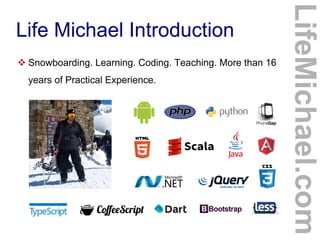
 Snowboarding. Learning. Coding. Teaching. More than 16
years of Practical Experience.
LifeMichael.com
Life Michael Introduction
 Professional Certifications
Zend Certified Engineer in PHP
Certified Java Professional
Certified Java EE Web Component Developer
OMG Certified UML Professional
 MBA (cum laude) from Tel-Aviv University
Information Systems Management
LifeMichael.com
Life Michael Introduction
 Huge Professional Practical Experience in Software
Development both for the Server Side (Java EE) and for
mobile telephones.
http://blog.lifemichael.com
Mainly During The Years 2001-2007
LifeMichael.com
Life Michael Introduction
 Delivering Academic Advanced Courses in Computer
Science.
 Delivering Professional Courses in Software Development
Companies World Wide.
LifeMichael.com
Life Michael Introduction
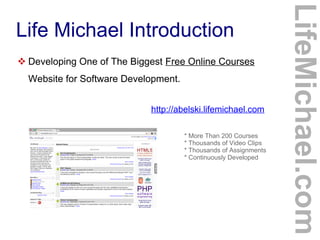
 Developing One of The Biggest Free Online Courses
Website for Software Development.
http://abelski.lifemichael.com
* More Than 200 Courses
* Thousands of Video Clips
* Thousands of Assignments
* Continuously Developed
LifeMichael.com
Life Michael Introduction
 Developing Online Free Tutorials + Videos in Hebrew for
Various Programming Languages.
http://books.lifemichael.com
LifeMichael.com
Life Michael Introduction
 Delivering Advanced Professional Courses
in Cooperation with Holon Institute of Technology.
28 Weeks. Attractive cost of 6800 shekels.
http://hit.lifemichael.com
http://tinyurl.com/lifemichaelhitcourses
HTML5 Cross Platform Mobile Applications Starts on February 25th
, 2016
Android Java Applications Development Starts on March 3rd
, 2016
Software Engineering in PHP Starts on June 15th
, 2016
LifeMichael.com
Life Michael Introduction
 Popular Channel of Professional Video Clips on YouTube.
http://www.youtube.com/lifemichael
* More Than 3 Million Views
* More Than 3000 Video Clips
* More Than 30 Playlists
* More Than 3000 Subscribers
LifeMichael.com
Life Michael Introduction
 Maintaining Free Professional Communities on Facebook,
Linkedin and Google+ for Continuous Professional Update!
http://www.lifemichael.com/en/communities
LifeMichael.com
Life Michael Introduction
 I Enjoy Sharing My Knowledge and Experience. Teaching is
my Passion.
http://speakerpedia.com/speakers/life-michael
http://lanyrd.com/profile/lifemichael
Speakerpedia
LifeMichael.com
© 2013 Haim Michael
Introduction
LifeMichael.com
© 2013 Haim Michael
History
 Angular is a framework for developing mobile and
desktop client side applications. The first version (1.x)
was developed in 2009. Google plays an important role
in its development. The second version (2.x) is already
available for developers preview in beta version.
 The second version is kind of a new framework. Angular
was rewritten from scratch. Apart of the same name
there is nearly nothing in common.
LifeMichael.com
© 2013 Haim Michael
The Web Convergence
LifeMichael.com
 The hybrid application model simplifies the convergence
of the web and the world of apps.
 The more we move forward with this convergence the
more complex the code we write in JavaScript is.
 The angular framework assists us when dealing with
complex code in JavaScript.
www.qt.io phonegap.com
© 2013 Haim Michael
Capabilities
 The Angular framework provides us with various essential
features such as mobile gestures, animations, filtering,
routing, data binding, support for internationalization and
many more.
LifeMichael.com
© 2013 Haim Michael
Easy Learning Curve
 AngularJS 1.x is well known for its easy learning curve.
Unlike many other JavaScript libraries the need for having
in-depth understanding in JavaScript is not required.
 The case with AngularJS 2.x is not clear. Will we use
TypeScript? Do we must become familiar with ECMA6?
LifeMichael.com
© 2013 Haim Michael
AngularJS 2
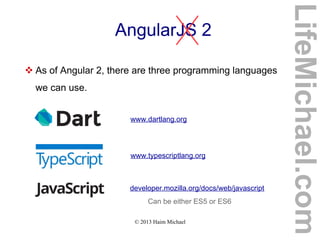
 As of Angular 2, there are three programming languages
we can use.
www.dartlang.org
www.typescriptlang.org
developer.mozilla.org/docs/web/javascript
Can be either ES5 or ES6
LifeMichael.com
© 2013 Haim Michael
TypeScript (1/4)
 TypeScript is a programming language that was
developed by Microsoft.
 The code we write in TypeScript is compiled into
JavaScript. TypeScript is an open source programming
language.
www.typescriptlang.org
LifeMichael.com
© 2013 Haim Michael
TypeScript (2/4)
 TypeScript is a superset of JavaScript. It includes the
entire JavaScript programming language together with
additional capabilities.
 In general, nearly every code we can write in JavaScript
can be included in code we write in TypeScript.
LifeMichael.com
© 2013 Haim Michael
TypeScript (3/4)
 TypeScript adds the capability to code with types. It
allows us to define new classes and new interfaces.
 TypeScript allows us to specify the type of each and
every variable and is even capable of interfering the type
by itself.
 TypeScript allows us to use JavaScript as if it was a
strictly type programming language.
LifeMichael.com
© 2013 Haim Michael
TypeScript (4/4)
 Compiling TypeScript into JavaScript we can get a clean
simple ES3 compliant code we can run in any web
browser, in any node.js environment or in any other ES3
compliant environment.
LifeMichael.com
© 2013 Haim Michael
Dart (1/3)
 Dart is an open source class based, object oriented,
optionally typed programming language that allows us to
develop browser based one page web applications and
server side applications.
www.dartlang.org
LifeMichael.com
© 2013 Haim Michael
Dart (2/3)
 The syntax seems friendly both to those who are used to
JavaScript and to those who are used to JavaPHPC#.
 We can execute the code either by using a Dart VM or by
compiling it into JavaScript.
LifeMichael.com
© 2013 Haim Michael
Dart (3/3)
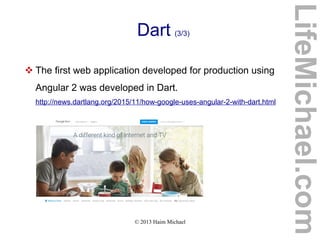
 The first web application developed for production using
Angular 2 was developed in Dart.
http://news.dartlang.org/2015/11/how-google-uses-angular-2-with-dart.html
LifeMichael.com
© 2013 Haim Michael
What is The Preferred Language?
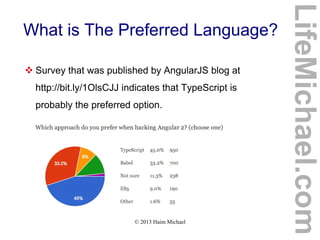
 Survey that was published by AngularJS blog at
http://bit.ly/1OlsCJJ indicates that TypeScript is
probably the preferred option.
LifeMichael.com
© 2013 Haim Michael
What is The Preferred Editor?
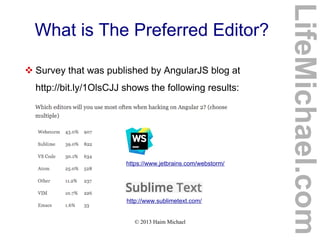
 Survey that was published by AngularJS blog at
http://bit.ly/1OlsCJJ shows the following results:
https://www.jetbrains.com/webstorm/
http://www.sublimetext.com/
LifeMichael.com
© 2013 Haim Michael
Angular 2 for Dart
 AngularDart is the AngularJS version in Dart. Google
bases the development of AngularJS on TypeScript
working closely with Microsoft. Doing so assists with the
compiling of code developed using Angular Dart into
JavaScript.
LifeMichael.com
© 2013 Haim Michael
Angular 2 Performance
 Angular 2 is significantly faster comparing with Angular 1.
The ultrafast change detection and view caching allows a
smother virtual scrolling and a smoother view transitions.
The server side pre-rendering allows a faster initial loads.
The offline compilation allows a faster startup.
LifeMichael.com
© 2013 Haim Michael
Expressive Code
 The easy-to-write syntax reduces the complexity of the
source code and contributes to its expressiveness. The
structured rich templates are readable and simple to
understand.
LifeMichael.com
© 2013 Haim Michael
Cross Platform
 The Angular 2 frameworks targets all platforms. Whether
it is a desktop application, web application or a mobile
application.
LifeMichael.com
© 2013 Haim Michael
Seamless Upgrade from Angular 1
 Using the ngUpgrade APIs it is possible to mix in
Angular 2 components into your Angular 1 application.
https://angular.io/docs/ts/latest/guide/upgrade.html
LifeMichael.com
© 2013 Haim Michael
Flexible Development
 We are free to choose which programming language to
use. In addition to providing full support for ES5, ES6,
TypeScript and Dart, Angular 2 can work with other
programming languages that compile to JavaScript.
www.scala-
js.org
coffeescript.org jsweet.orgcoffeescript.org
LifeMichael.com
© 2013 Haim Michael
Flexible Development
livescript.net github.com/ich/caffei
ne
github.com/TrigenSoftw
are/ColaScript
github.com/iode-
lang/Iode
kotlinlang.org duoco.de
LifeMichael.com
© 2013 Haim Michael
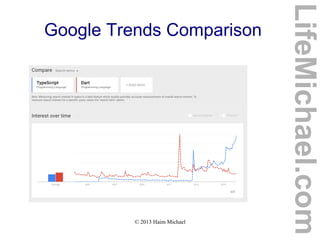
Google Trends Comparison
LifeMichael.com
© 2013 Haim Michael
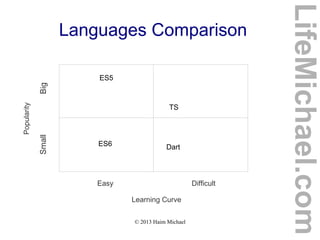
Languages Comparison
LifeMichael.com
Easy Difficult
Learning Curve
Popularity
SmallBig
Dart
TS
ES5
ES6
© 2013 Haim Michael
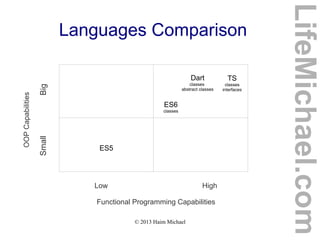
Languages Comparison
LifeMichael.com
Low High
Functional Programming Capabilities
OOPCapabilities
SmallBig
Dart
classes
abstract classes
TS
classes
interfaces
ES5
ES6
classes
© 2013 Haim Michael
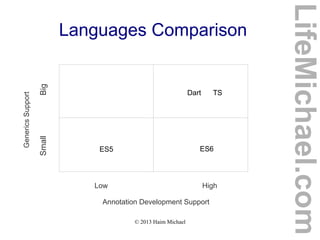
Languages Comparison
LifeMichael.com
Low High
Annotation Development Support
GenericsSupport
SmallBig
Dart TS
ES5 ES6
© 2013 Haim Michael
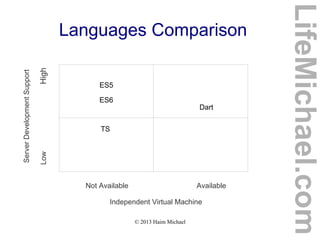
Languages Comparison
LifeMichael.com
Not Available Available
Independent Virtual Machine
ServerDevelopmentSupport
LowHigh
Dart
TS
ES5
ES6
© 2013 Haim Michael
Comprehensive Routing
 We can map URL paths to specific components of the
application. Angular 2 supports routing and adds new
capabilities.
 Angular 2 supports card stack navigation, animated
transitions and lazy loading for mobile telephones.
LifeMichael.com
© 2013 Haim Michael
Dependency Injection
 The Angular 2 framework comes with a powerful and yet
a simple to use dependency injection.
 We can maintain modular applications without writing
tedious glue code.
LifeMichael.com
© 2013 Haim Michael
Legacy Browsers Support
 In addition to having full support for the latest versions of
Chrome, Edge, Firefox, Safari and IE, Angular 2 supports
older browsers including IE9+ and Android 4.1+.
LifeMichael.com
© 2013 Haim Michael
Animations
 Angular 2 provides us with capabilities to create
animations, including low level ones. Angular 2 allows us
to handle changes to animations in response to user
events.
LifeMichael.com
© 2013 Haim Michael
Internationalization & Accessibility
 Angular 2 provides us with the capabilities to promote
accessibility through screen readers and assistive
devices.
 Angular 2 includes a mechanisms that assists us with
developing a web application that automatically displays
the right language according to the geographic
location of the user.
LifeMichael.com
© 2013 Haim Michael
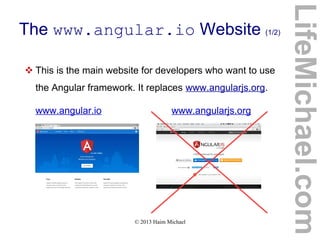
The www.angular.io Website (1/2)
 This is the main website for developers who want to use
the Angular framework. It replaces www.angularjs.org.
www.angular.io www.angularjs.org
LifeMichael.com
© 2013 Haim Michael
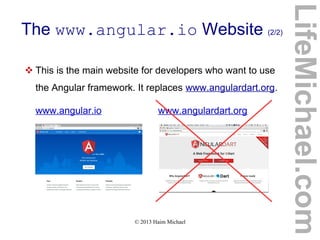
The www.angular.io Website (2/2)
 This is the main website for developers who want to use
the Angular framework. It replaces www.angulardart.org.
www.angular.io www.angulardart.org
LifeMichael.com
© 2013 Haim Michael
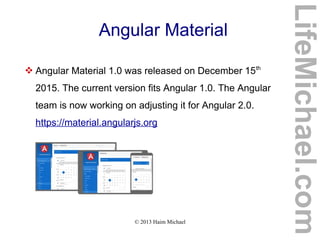
Angular Material
 Angular Material 1.0 was released on December 15th
2015. The current version fits Angular 1.0. The Angular
team is now working on adjusting it for Angular 2.0.
https://material.angularjs.org
LifeMichael.com
© 2013 Haim Michael
The Polymer Project
 The Polymer framework allows us to use interoperable
beautiful and fast web components as well as to develop
new ones.
https://www.polymer-project.org
 We can use the Polymer components together with
Angular.
 The Dart version for Polymer is available at
https://www.dartlang.org/polymer-old
LifeMichael.com
© 2013 Haim Michael, lifemichael.com
Jump Start in ES5
LifeMichael.com
© 2013 Haim Michael, lifemichael.com
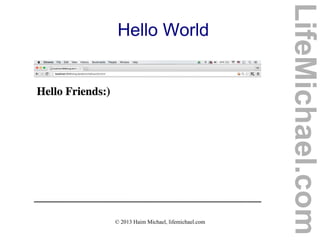
Hello World
 The simplest way to start would be writing code in
JavaScript ES5 while adding script elements that refer
the Angular2 JS file online.
 As of AngularJS 2 we can either write our code in
JavaScript ES5 or JavaScript ES6 or TypeScript or Dart.
LifeMichael.com
© 2013 Haim Michael, lifemichael.com
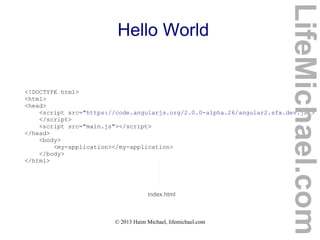
Hello World
<!DOCTYPE html>
<html>
<head>
<script src="https://code.angularjs.org/2.0.0-alpha.26/angular2.sfx.dev.js">
</script>
<script src="main.js"></script>
</head>
<body>
<my-application></my-application>
</body>
</html>
index.html
LifeMichael.com
© 2013 Haim Michael, lifemichael.com
Hello World
function AppComponent() {}
AppComponent.annotations = [
new angular.ComponentAnnotation({
selector: 'my-application'
}),
new angular.ViewAnnotation({
template: '<h1>Hello Friends:)</h1>'
})
];
document.addEventListener('DOMContentLoaded', function() {
angular.bootstrap(AppComponent);
});
main.js
LifeMichael.com
© 2013 Haim Michael, lifemichael.com
Hello World
LifeMichael.com
© 2013 Haim Michael, lifemichael.com
The root Component
 Each and every angular application is structured as a
tree of components. The root component is the top
level container for the rest of the application.
 The root component doesn't have to be named with the
AppComponent name. We can choose any name we
want.
LifeMichael.com
© 2013 Haim Michael, lifemichael.com
The root Component
 The root component is responsible for specifying the
location inside the index.html file where the application
will be rendered.
 The root element can be named with any name we want.
In the last sample the root element was the my-
application element.
LifeMichael.com
© 2013 Haim Michael, lifemichael.com
The root Component
 The root component loads the initial template for the
application. The template can be responsible for loading
other components, such as menu bars, views, forms etc.
LifeMichael.com
© 2013 Haim Michael, lifemichael.com
Annotations
 When referring the annotations property the component
has we can assign it with an array of objects that each
and every one of them serve as annotation that provides
information about the component.
 When writing our application using TypeScript we will
identify each and every annotation by the '@' character.
 The ComponentAnnotation object describes the
component.
LifeMichael.com
© 2013 Haim Michael, lifemichael.com
The ComponentAnnotation Object
 The ComponentAnnotation object describes the object.
It defines the HTML tag the component will be rendered to.
The value of the selector property should be a CSS
valid selector.
LifeMichael.com
© 2013 Haim Michael, lifemichael.com
The ViewAnnotation Object
 The ViewAnnotation object defines the HTML that
represents the component. The HTML can be either an
inline template or an external one.
 In order to specify an external HTML we should use the
templateUrl property instead of template, and assign
it with a string, that is the path to the HTML file.
LifeMichael.com
© 2013 Haim Michael 20150815
Displaying Data in ES5
LifeMichael.com
© 2013 Haim Michael 20150815
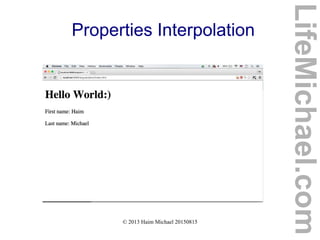
Properties Interpolation
 The simplest way for binding variables in JavaScript with
specific texts in a template we develop is through
interpolation while specifying the names of those variables
inside.
LifeMichael.com
© 2013 Haim Michael 20150815
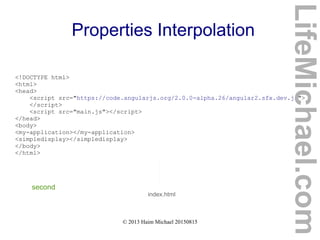
Properties Interpolation
<!DOCTYPE html>
<html>
<head>
<script src="https://code.angularjs.org/2.0.0-alpha.26/angular2.sfx.dev.js">
</script>
<script src="main.js"></script>
</head>
<body>
<my-application></my-application>
<simpledisplay></simpledisplay>
</body>
</html>
index.html
second
LifeMichael.com
© 2013 Haim Michael 20150815
Properties Interpolation
function AppComponent() {}
AppComponent.annotations = [
new angular.ComponentAnnotation({
selector: 'my-application'
}),
new angular.ViewAnnotation({
template: '<h1>Hello World:)</h1>'
})
];
main.js
LifeMichael.com
© 2013 Haim Michael 20150815
Properties Interpolation
function DisplayComponent() {
this.firstName = "Haim";
this.lastName = "Michael";
}
DisplayComponent.annotations = [
new angular.ComponentAnnotation({
selector: "simpledisplay"
}),
new angular.ViewAnnotation({
template:
<p>First name: {{ firstName }}</p><p>Last name: {{ lastName }}</p>'
})
];
document.addEventListener('DOMContentLoaded', function() {
angular.bootstrap(AppComponent);
angular.bootstrap(DisplayComponent);
});
LifeMichael.com
© 2013 Haim Michael 20150815
Properties Interpolation
LifeMichael.com
© 2013 Haim Michael 20150815
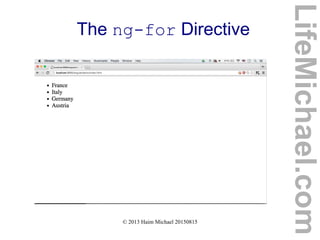
The ng-for Directive
 Using the ng-for directive in our template we can iterate
values we have in array.
LifeMichael.com
© 2013 Haim Michael 20150815
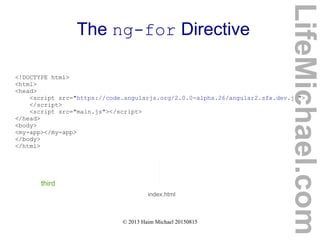
The ng-for Directive
<!DOCTYPE html>
<html>
<head>
<script src="https://code.angularjs.org/2.0.0-alpha.26/angular2.sfx.dev.js">
</script>
<script src="main.js"></script>
</head>
<body>
<my-app></my-app>
</body>
</html>
index.html
third
LifeMichael.com
© 2013 Haim Michael 20150815
The ng-for Directive
main.js
function AppComponent() {
this.countries = ['France','Italy','Germany','Austria'];
}
AppComponent.annotations = [
new angular.ComponentAnnotation({
selector: 'my-app'
}),
new angular.ViewAnnotation({
directives: [angular.NgFor],
template:
'<ul>' +
'<li *ng-for="#country of countries">' + '{{ country }}' +
'</li>' +
'</ul>'
})
];
document.addEventListener('DOMContentLoaded', function() {
angular.bootstrap(AppComponent);
});
LifeMichael.com
© 2013 Haim Michael 20150815
The ng-for Directive
LifeMichael.com
© 2013 Haim Michael 20150815
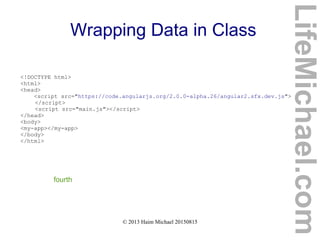
Wrapping Data in Class
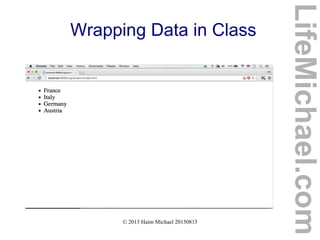
 We can wrap the data in a separated class, and then inject
that class into the component function.
LifeMichael.com
© 2013 Haim Michael 20150815
Wrapping Data in Class
<!DOCTYPE html>
<html>
<head>
<script src="https://code.angularjs.org/2.0.0-alpha.26/angular2.sfx.dev.js">
</script>
<script src="main.js"></script>
</head>
<body>
<my-app></my-app>
</body>
</html>
fourth
LifeMichael.com
© 2013 Haim Michael 20150815
Wrapping Data in Class
function AppComponent(data) {
this.countries = data.countries;
}
function CountriesService() {
this.countries = ['France','Italy','Germany','Austria'];
}
AppComponent.annotations = [
new angular.ComponentAnnotation({
selector: 'my-app',
appInjector: [CountriesService]
}),
new angular.ViewAnnotation({
directives: [angular.NgFor],
template:
'<ul>' +
'<li *ng-for="#country of countries">' +
'{{ country }}' +
'</li>' +
'</ul>'
})
];
AppComponent.parameters = [[CountriesService]];
document.addEventListener('DOMContentLoaded', function() {
angular.bootstrap(AppComponent);
});
LifeMichael.com
© 2013 Haim Michael 20150815
Wrapping Data in Class
LifeMichael.com
© 2013 Haim Michael 20150815
The ng-if Directive
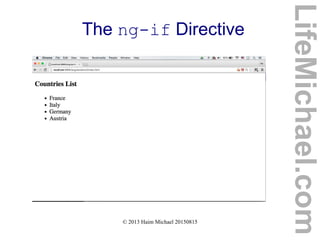
 This directive can allow us to write code that will add or
remove elements from the DOM based on whether
the expression we provide is true or false.
 In order to use this directive we should specify it in the
list of directives.
LifeMichael.com
© 2013 Haim Michael 20150815
The ng-if Directive
<!DOCTYPE html>
<html>
<head>
<script src="https://code.angularjs.org/2.0.0-alpha.26/angular2.sfx.dev.js">
</script>
<script src="main.js"></script>
</head>
<body>
<my-app></my-app>
</body>
</html>
Fifth
LifeMichael.com
© 2013 Haim Michael 20150815
The ng-if Directive
function AppComponent(data)
{
this.countries = data.countries;
}
function CountriesService() {
this.countries = ['France','Italy','Germany','Austria'];
}
AppComponent.annotations = [
new angular.ComponentAnnotation({
selector: 'my-app',
appInjector: [CountriesService]
}),
new angular.ViewAnnotation({
directives: [angular.NgFor,angular.NgIf],
template:
'<h3 *ng-if="countries.length>1">Countries List</h3>' +
'<ul>' +
'<li *ng-for="#country of countries">' +
'{{ country }}' +
'</li>' +
'</ul>'
})
];
LifeMichael.com
© 2013 Haim Michael 20150815
The ng-if Directive
AppComponent.parameters = [[CountriesService]];
document.addEventListener('DOMContentLoaded', function() {
angular.bootstrap(AppComponent);
});
LifeMichael.com
© 2013 Haim Michael 20150815
The ng-if Directive
LifeMichael.com
© 2013 Haim Michael 20150815
Components Development in ES5
LifeMichael.com
© 2013 Haim Michael 20150815
Introduction
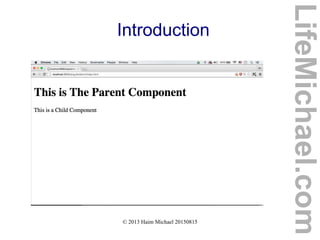
 Each and every Angular application is a tree of
components nested within each other.
 We can add child components by using them inside the
parent component's template.
LifeMichael.com
© 2013 Haim Michael 20150815
Introduction
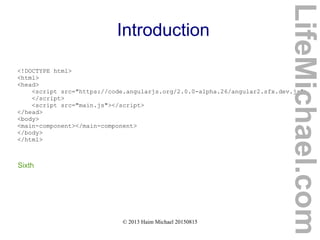
<!DOCTYPE html>
<html>
<head>
<script src="https://code.angularjs.org/2.0.0-alpha.26/angular2.sfx.dev.js">
</script>
<script src="main.js"></script>
</head>
<body>
<main-component></main-component>
</body>
</html>
Sixth
LifeMichael.com
© 2013 Haim Michael 20150815
Introduction
function ChildComponent() {
this.message = "This is a Child Component";
}
ChildComponent.annotations = [
new angular.ComponentAnnotation({
selector: "child-component"
}),
new angular.ViewAnnotation({
template: '<p> {{ message }} </p>'
})
];
LifeMichael.com
© 2013 Haim Michael 20150815
Introduction
function ParentComponent() {
this.msg = "This is The Parent Component";
}
ParentComponent.annotations = [
new angular.ComponentAnnotation({
selector: "main-component"
}),
new angular.ViewAnnotation({
template: '<h1>{{msg}}</h1>' +
'<child-component></child-component>'
})
];
document.addEventListener('DOMContentLoaded', function(){
angular.bootstrap(ParentComponent);
angular.bootstrap(ChildComponent);
});
LifeMichael.com
© 2013 Haim Michael 20150815
Introduction
LifeMichael.com
© 2013 Haim Michael 20150815
User Input in ES5
LifeMichael.com
© 2013 Haim Michael 20150815
Introduction
 When using AngularJS, the same well known DOM
events take place.
LifeMichael.com
© 2013 Haim Michael 20150815
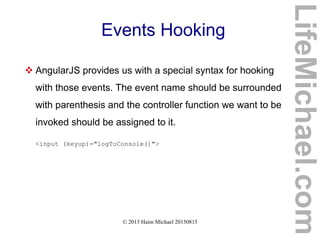
Events Hooking
 AngularJS provides us with a special syntax for hooking
with those events. The event name should be surrounded
with parenthesis and the controller function we want to be
invoked should be assigned to it.
<input (keyup)="logToConsole()">
LifeMichael.com
© 2013 Haim Michael 20150815
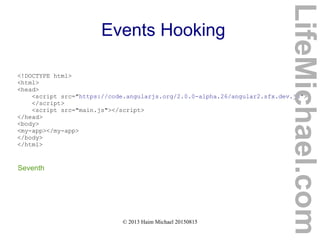
Events Hooking
<!DOCTYPE html>
<html>
<head>
<script src="https://code.angularjs.org/2.0.0-alpha.26/angular2.sfx.dev.js">
</script>
<script src="main.js"></script>
</head>
<body>
<my-app></my-app>
</body>
</html>
Seventh
LifeMichael.com
© 2013 Haim Michael 20150815
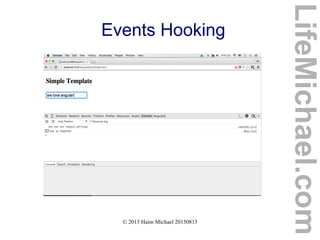
Events Hooking
function AppComponent() {
this.logToConsole = function() {
console.log("key up happened");
};
}
AppComponent.annotations = [
new angular.ComponentAnnotation({
selector: 'my-app'
}),
new angular.ViewAnnotation({
template:
'<h3>Simple Template</h3>' +
'<input (keyup)="logToConsole()">'
})
];
document.addEventListener('DOMContentLoaded', function() {
angular.bootstrap(AppComponent);
});
LifeMichael.com
© 2013 Haim Michael 20150815
Events Hooking
LifeMichael.com
© 2013 Haim Michael 20150815
Local Variables
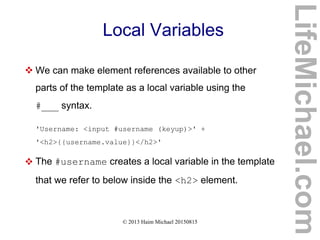
 We can make element references available to other
parts of the template as a local variable using the
#___ syntax.
'Username: <input #username (keyup)>' +
'<h2>{{username.value}}</h2>'
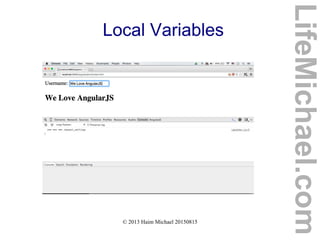
 The #username creates a local variable in the template
that we refer to below inside the <h2> element.
LifeMichael.com
© 2013 Haim Michael 20150815
Local Variables
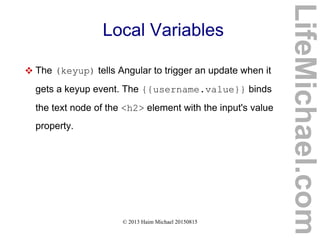
 The (keyup) tells Angular to trigger an update when it
gets a keyup event. The {{username.value}} binds
the text node of the <h2> element with the input's value
property.
LifeMichael.com
© 2013 Haim Michael 20150815
Local Variables
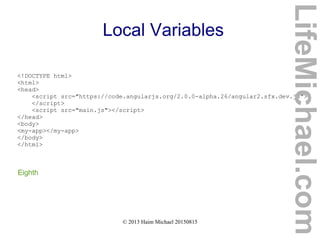
<!DOCTYPE html>
<html>
<head>
<script src="https://code.angularjs.org/2.0.0-alpha.26/angular2.sfx.dev.js">
</script>
<script src="main.js"></script>
</head>
<body>
<my-app></my-app>
</body>
</html>
Eighth
LifeMichael.com
© 2013 Haim Michael 20150815
Local Variables
function AppComponent() {
}
AppComponent.annotations = [
new angular.ComponentAnnotation({
selector: 'my-app'
}),
new angular.ViewAnnotation({
template:
'Username: <input #username (keyup)>' +
'<h2>{{username.value}}</h2>'
})
];
document.addEventListener('DOMContentLoaded', function() {
angular.bootstrap(AppComponent);
});
LifeMichael.com
© 2013 Haim Michael 20150815
Local Variables
LifeMichael.com
© 2013 Haim Michael 20150815
Controller Function
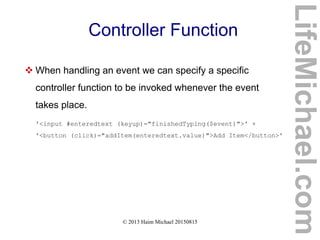
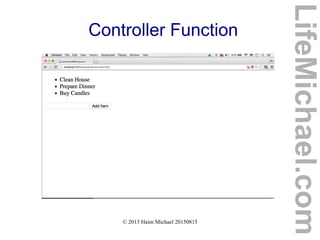
 When handling an event we can specify a specific
controller function to be invoked whenever the event
takes place.
'<input #enteredtext (keyup)="finishedTyping($event)">' +
'<button (click)="addItem(enteredtext.value)">Add Item</button>'
LifeMichael.com
© 2013 Haim Michael 20150815
Controller Function
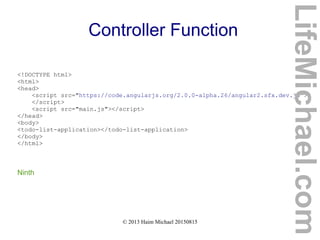
<!DOCTYPE html>
<html>
<head>
<script src="https://code.angularjs.org/2.0.0-alpha.26/angular2.sfx.dev.js">
</script>
<script src="main.js"></script>
</head>
<body>
<todo-list-application></todo-list-application>
</body>
</html>
Ninth
LifeMichael.com
© 2013 Haim Michael 20150815
Controller Function
function TodoListController() {
this.items = ["Clean House", "Prepare Dinner", "Buy Candles"];
this.addItem = function(item) {
this.items.push(item);
};
this.finishedTyping = function($event) {
if($event.which === 13) {
this.addItem($event.target.value);
}
}
}
LifeMichael.com
© 2013 Haim Michael 20150815
Controller Function
TodoListController.annotations = [
new angular.ComponentAnnotation({
selector: "todo-list-application"
}),
new angular.ViewAnnotation({
template:
'<ul>' +
'<li *ng-for="#item of items">' +
'{{ item }}' +
'</li>' +
'</ul>' +
'<input #enteredtext (keyup)="finishedTyping($event)">' +
'<button (click)="addItem(enteredtext.value)">Add Item</button>',
directives: [angular.NgFor, angular.NgIf]
})
];
document.addEventListener("DOMContentLoaded", function() {
angular.bootstrap(TodoListController);
});
LifeMichael.com
© 2013 Haim Michael 20150815
Controller Function
LifeMichael.com
© 2013 Haim Michael 20150815
Hello World in TS
LifeMichael.com
© 2013 Haim Michael 20150815
Installing TypeScript Compiler
 The first step would be installing the typescript compiler on
your desktop. In order to install it you first need to install
the node.js framework. Once node.js is installed you will
be able to use the npm utility.
 If you still don't have node.js installed on your computer
just browse at www.nodejs.org and install it.
LifeMichael.com
© 2013 Haim Michael 20150815
Installing TypeScript Compiler
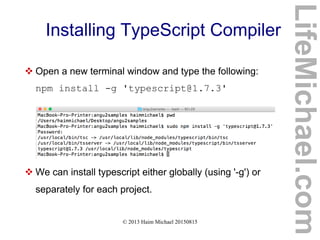
 Open a new terminal window and type the following:
npm install -g 'typescript@1.7.3'
 We can install typescript either globally (using '-g') or
separately for each project.
LifeMichael.com
© 2013 Haim Michael 20150815
The package.json File
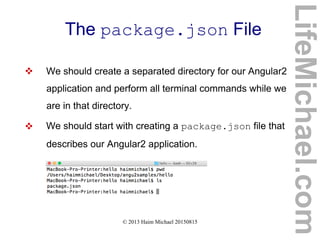
 We should create a separated directory for our Angular2
application and perform all terminal commands while we
are in that directory.
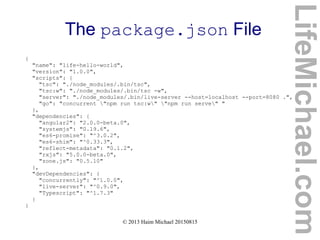
 We should start with creating a package.json file that
describes our Angular2 application.
LifeMichael.com
© 2013 Haim Michael 20150815
The package.json File
{
"name": "life-hello-world",
"version": "1.0.0",
"scripts": {
"tsc": "./node_modules/.bin/tsc",
"tsc:w": "./node_modules/.bin/tsc -w",
"server": "./node_modules/.bin/live-server --host=localhost --port=8080 .",
"go": "concurrent "npm run tsc:w" "npm run serve" "
},
"dependencies": {
"angular2": "2.0.0-beta.0",
"systemjs": "0.19.6",
"es6-promise": "^3.0.2",
"es6-shim": "^0.33.3",
"reflect-metadata": "0.1.2",
"rxjs": "5.0.0-beta.0",
"zone.js": "0.5.10"
},
"devDependencies": {
"concurrently": "^1.0.0",
"live-server": "^0.9.0",
"Typescript": "^1.7.3"
}
}
LifeMichael.com
© 2013 Haim Michael 20150815
Angular2 Dependencies
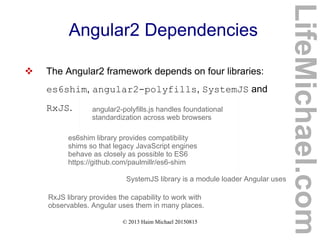
 The Angular2 framework depends on four libraries:
es6shim, angular2-polyfills, SystemJS and
RxJS.
es6shim library provides compatibility
shims so that legacy JavaScript engines
behave as closely as possible to ES6
https://github.com/paulmillr/es6-shim
angular2-polyfills.js handles foundational
standardization across web browsers
SystemJS library is a module loader Angular uses
RxJS library provides the capability to work with
observables. Angular uses them in many places.
LifeMichael.com
© 2013 Haim Michael 20150815
The live-server Package
 The live-server is a simple development http-server we
can use for running our Angular web application.
https://www.npmjs.com/package/live-server
LifeMichael.com
© 2013 Haim Michael 20150815
The concurrently Package
 The concurrently package allows us to concurrently
execute different commands.
https://www.npmjs.com/package/concurrently
LifeMichael.com
© 2013 Haim Michael 20150815
Using CSS
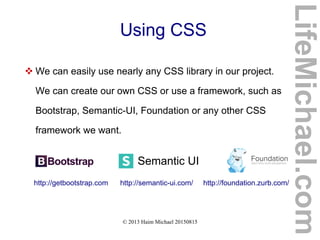
 We can easily use nearly any CSS library in our project.
We can create our own CSS or use a framework, such as
Bootstrap, Semantic-UI, Foundation or any other CSS
framework we want.
Semantic UI
http://getbootstrap.com http://semantic-ui.com/ http://foundation.zurb.com/
LifeMichael.com
© 2013 Haim Michael 20150815
The npm install Command
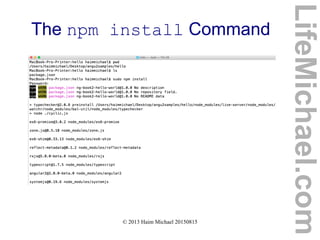
 We should now execute the npm install command in
the terminal. The current directory should be the one in
which we saved the package.json file.
LifeMichael.com
© 2013 Haim Michael 20150815
The npm install Command
LifeMichael.com
© 2013 Haim Michael 20150815
The npm install Command
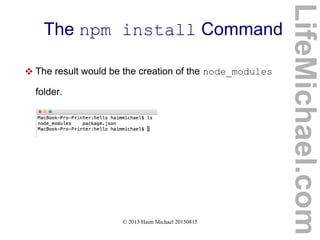
 The result would be the creation of the node_modules
folder.
LifeMichael.com
© 2013 Haim Michael 20150815
The package.json File
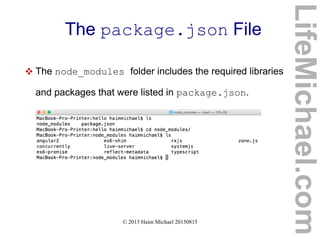
 The node_modules folder includes the required libraries
and packages that were listed in package.json.
LifeMichael.com
© 2013 Haim Michael 20150815
The app.ts File
 We should now write our code in Type Script for using the
Angular framework. Files that include code in TypeScrip
should be named with the ts extension.
 You are free to name the files with whatever name you
want as long as the extension is ts. Let's name our file
app.ts.
LifeMichael.com
© 2013 Haim Michael 20150815
The app.ts File
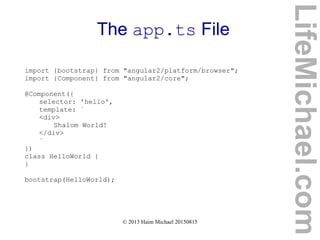
import {bootstrap} from "angular2/platform/browser";
import {Component} from "angular2/core";
@Component({
selector: 'hello',
template: `
<div>
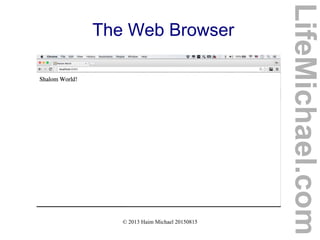
Shalom World!
</div>
`
})
class HelloWorld {
}
bootstrap(HelloWorld);
LifeMichael.com
© 2013 Haim Michael 20150815
The app.ts File
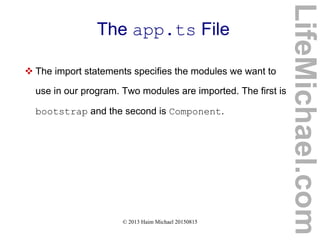
 The import statements specifies the modules we want to
use in our program. Two modules are imported. The first is
bootstrap and the second is Component.
LifeMichael.com
© 2013 Haim Michael 20150815
Creating Component
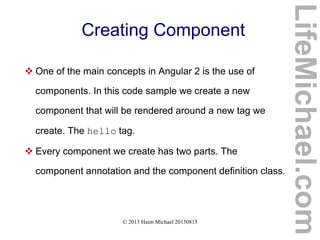
 One of the main concepts in Angular 2 is the use of
components. In this code sample we create a new
component that will be rendered around a new tag we
create. The hello tag.
 Every component we create has two parts. The
component annotation and the component definition class.
LifeMichael.com
© 2013 Haim Michael 20150815
The Template
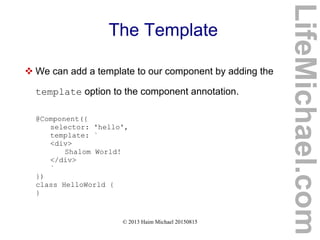
 We can add a template to our component by adding the
template option to the component annotation.
@Component({
selector: 'hello',
template: `
<div>
Shalom World!
</div>
`
})
class HelloWorld {
}
LifeMichael.com
© 2013 Haim Michael 20150815
Bootstraping
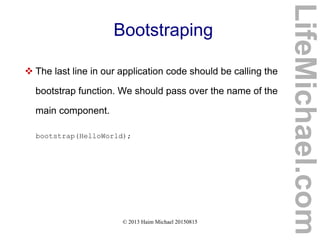
 The last line in our application code should be calling the
bootstrap function. We should pass over the name of the
main component.
bootstrap(HelloWorld);
LifeMichael.com
© 2013 Haim Michael 20150815
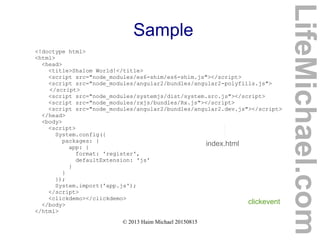
The HTML File
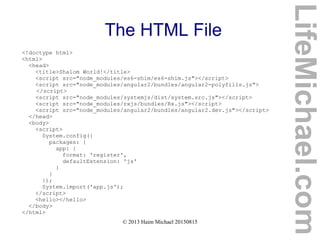
<!doctype html>
<html>
<head>
<title>Shalom World!</title>
<script src="node_modules/es6-shim/es6-shim.js"></script>
<script src="node_modules/angular2/bundles/angular2-polyfills.js">
</script>
<script src="node_modules/systemjs/dist/system.src.js"></script>
<script src="node_modules/rxjs/bundles/Rx.js"></script>
<script src="node_modules/angular2/bundles/angular2.dev.js"></script>
</head>
<body>
<script>
System.config({
packages: {
app: {
format: 'register',
defaultExtension: 'js'
}
}
});
System.import('app.js');
</script>
<hello></hello>
</body>
</html>
LifeMichael.com
© 2013 Haim Michael 20150815
The HTML File
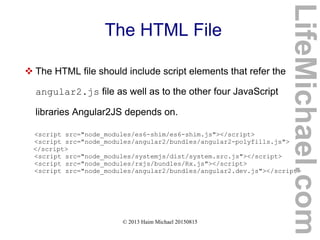
 The HTML file should include script elements that refer the
angular2.js file as well as to the other four JavaScript
libraries Angular2JS depends on.
<script src="node_modules/es6-shim/es6-shim.js"></script>
<script src="node_modules/angular2/bundles/angular2-polyfills.js">
</script>
<script src="node_modules/systemjs/dist/system.src.js"></script>
<script src="node_modules/rxjs/bundles/Rx.js"></script>
<script src="node_modules/angular2/bundles/angular2.dev.js"></script>
LifeMichael.com
© 2013 Haim Michael 20150815
The HTML File
 We can add CSS files to our project and update the HTML
file to refer them.
LifeMichael.com
© 2013 Haim Michael 20150815
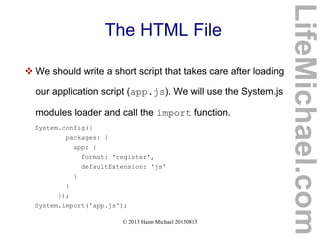
The HTML File
 We should write a short script that takes care after loading
our application script (app.js). We will use the System.js
modules loader and call the import function.
System.config({
packages: {
app: {
format: 'register',
defaultExtension: 'js'
}
}
});
System.import('app.js');
LifeMichael.com
© 2013 Haim Michael 20150815
Compiling app.ts File
 In order to compile our code in TypeScript ('app.ts') to
JavaScript, and get the app.js file, we should first create
the tsconfig.json file that configures the TypeScript
transpiler.
LifeMichael.com
© 2013 Haim Michael 20150815
Compiling tsconfig.json File
LifeMichael.com
{
"compilerOptions": {
"target": "ES5",
"module": "system",
"moduleResolution": "node",
"sourceMap": true,
"emitDecoratorMetadata": true,
"experimentalDecorators": true,
"removeComments": false,
"noImplicitAny": false
},
"exclude": [
"node_modules"
]
}
tsconfig.json
© 2013 Haim Michael 20150815
Compiling tsconfig.json File
LifeMichael.com
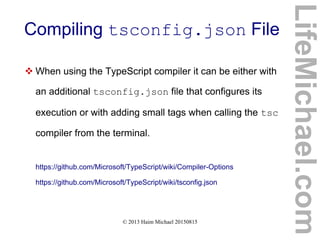
 When using the TypeScript compiler it can be either with
an additional tsconfig.json file that configures its
execution or with adding small tags when calling the tsc
compiler from the terminal.
https://github.com/Microsoft/TypeScript/wiki/Compiler-Options
https://github.com/Microsoft/TypeScript/wiki/tsconfig.json
© 2013 Haim Michael 20150815
Compiling app.ts File
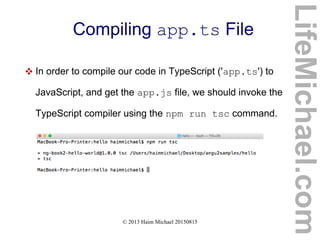
 In order to compile our code in TypeScript ('app.ts') to
JavaScript, and get the app.js file, we should invoke the
TypeScript compiler using the npm run tsc command.
LifeMichael.com
© 2013 Haim Michael 20150815
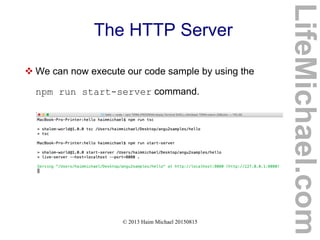
The HTTP Server
 We can now execute our code sample by using the
npm run start-server command.
LifeMichael.com
© 2013 Haim Michael 20150815
The Web Browser
LifeMichael.com
© 2013 Haim Michael 20150815
Component Data in TS
LifeMichael.com
© 2013 Haim Michael 20150815
Data
 We can add new instance variables to the class we define.
This way the object that will be instantiated from that class
will include these variables.
LifeMichael.com
© 2013 Haim Michael 20150815
The Constructor
 In TypeScript, the class we define can include a
constructor. We can use the constructor for adding new
instance variables.
LifeMichael.com
© 2013 Haim Michael 20150815
Template Variables
 We can use the values those new added variables hold in
our template. We just need to place the variables within
brackets.
LifeMichael.com
© 2013 Haim Michael 20150815
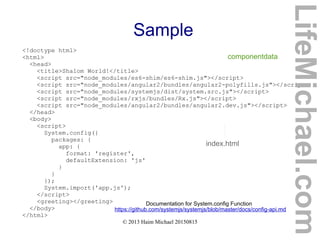
Sample
componentdata
<!doctype html>
<html>
<head>
<title>Shalom World!</title>
<script src="node_modules/es6-shim/es6-shim.js"></script>
<script src="node_modules/angular2/bundles/angular2-polyfills.js"></script>
<script src="node_modules/systemjs/dist/system.src.js"></script>
<script src="node_modules/rxjs/bundles/Rx.js"></script>
<script src="node_modules/angular2/bundles/angular2.dev.js"></script>
</head>
<body>
<script>
System.config({
packages: {
app: {
format: 'register',
defaultExtension: 'js'
}
}
});
System.import('app.js');
</script>
<greeting></greeting>
</body>
</html>
index.html
https://github.com/systemjs/systemjs/blob/master/docs/config-api.md
Documentation for System.config Function
LifeMichael.com
© 2013 Haim Michael 20150815
Sample
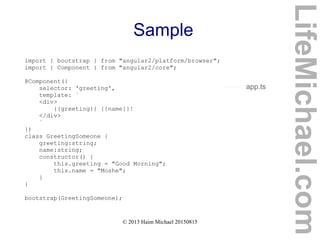
import { bootstrap } from "angular2/platform/browser";
import { Component } from "angular2/core";
@Component({
selector: 'greeting',
template: `
<div>
{{greeting}} {{name}}!
</div>
`
})
class GreetingSomeone {
greeting:string;
name:string;
constructor() {
this.greeting = "Good Morning";
this.name = "Moshe";
}
}
bootstrap(GreetingSomeone);
app.ts
LifeMichael.com
© 2013 Haim Michael 20150815
Sample
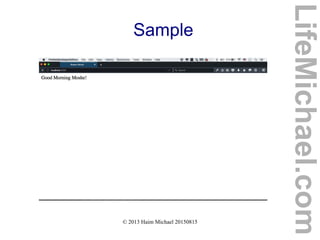
LifeMichael.com
© 2013 Haim Michael 20150815
Arrays
 When having a class with a variable that holds the
reference for an array we can use the *ngFor directive for
iterating the array values and each iteration have the value
in focus be assigned to a new variable that belongs to the
template scope.
 The new variable that belongs to the template scope will
be prefixed with #.
LifeMichael.com
© 2013 Haim Michael 20150815
Sample
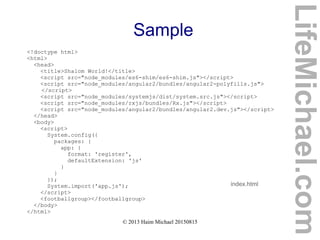
<!doctype html>
<html>
<head>
<title>Shalom World!</title>
<script src="node_modules/es6-shim/es6-shim.js"></script>
<script src="node_modules/angular2/bundles/angular2-polyfills.js">
</script>
<script src="node_modules/systemjs/dist/system.src.js"></script>
<script src="node_modules/rxjs/bundles/Rx.js"></script>
<script src="node_modules/angular2/bundles/angular2.dev.js"></script>
</head>
<body>
<script>
System.config({
packages: {
app: {
format: 'register',
defaultExtension: 'js'
}
}
});
System.import('app.js');
</script>
<footballgroup></footballgroup>
</body>
</html>
index.html
LifeMichael.com
© 2013 Haim Michael 20150815
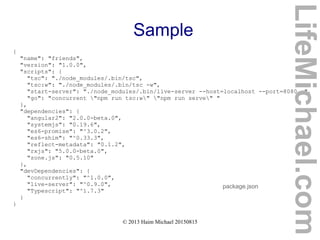
Sample
{
"name": "friends",
"version": "1.0.0",
"scripts": {
"tsc": "./node_modules/.bin/tsc",
"tsc:w": "./node_modules/.bin/tsc -w",
"start-server": "./node_modules/.bin/live-server --host=localhost --port=8080 .",
"go": "concurrent "npm run tsc:w" "npm run serve" "
},
"dependencies": {
"angular2": "2.0.0-beta.0",
"systemjs": "0.19.6",
"es6-promise": "^3.0.2",
"es6-shim": "^0.33.3",
"reflect-metadata": "0.1.2",
"rxjs": "5.0.0-beta.0",
"zone.js": "0.5.10"
},
"devDependencies": {
"concurrently": "^1.0.0",
"live-server": "^0.9.0",
"Typescript": "^1.7.3"
}
}
package.json
LifeMichael.com
© 2013 Haim Michael 20150815
Sample
import { bootstrap } from "angular2/platform/browser";
import { Component } from "angular2/core";
@Component({
selector: 'footballgroup',
template: `
<div>
<h2>{{groupName}}</h2>
<ul>
<li *ngFor="#player of players">{{player}}</li>
</ul>
</div>
`
})
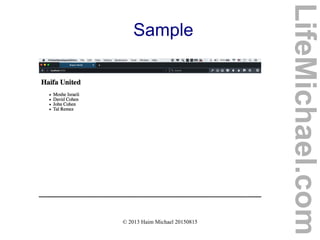
class GreetingSomeone {
groupName:string;
players:string[];
constructor() {
this.groupName = "Haifa United";
this.players = ['Moshe Israeli','David Cohen','John Cohen','Tal Remez'];
}
}
bootstrap(GreetingSomeone);
app.ts
LifeMichael.com
© 2013 Haim Michael 20150815
Sample
LifeMichael.com
© 2013 Haim Michael 20150815
Events Handling in TS
LifeMichael.com
© 2013 Haim Michael 20150815
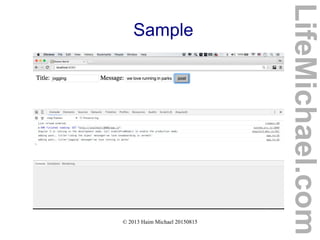
Binding Input to Values
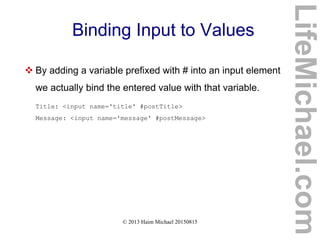
 By adding a variable prefixed with # into an input element
we actually bind the entered value with that variable.
Title: <input name='title' #postTitle>
Message: <input name='message' #postMessage>
LifeMichael.com
© 2013 Haim Michael 20150815
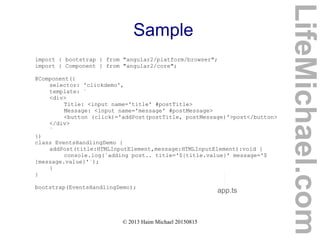
The (click) Attribute
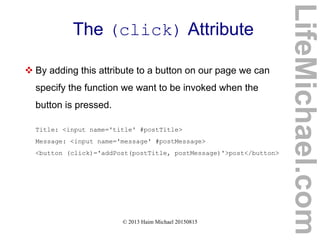
 By adding this attribute to a button on our page we can
specify the function we want to be invoked when the
button is pressed.
Title: <input name='title' #postTitle>
Message: <input name='message' #postMessage>
<button (click)='addPost(postTitle, postMessage)'>post</button>
LifeMichael.com
© 2013 Haim Michael 20150815
Sample
<!doctype html>
<html>
<head>
<title>Shalom World!</title>
<script src="node_modules/es6-shim/es6-shim.js"></script>
<script src="node_modules/angular2/bundles/angular2-polyfills.js">
</script>
<script src="node_modules/systemjs/dist/system.src.js"></script>
<script src="node_modules/rxjs/bundles/Rx.js"></script>
<script src="node_modules/angular2/bundles/angular2.dev.js"></script>
</head>
<body>
<script>
System.config({
packages: {
app: {
format: 'register',
defaultExtension: 'js'
}
}
});
System.import('app.js');
</script>
<clickdemo></clickdemo>
</body>
</html>
index.html
clickevent
LifeMichael.com
© 2013 Haim Michael 20150815
Sample
import { bootstrap } from "angular2/platform/browser";
import { Component } from "angular2/core";
@Component({
selector: 'clickdemo',
template: `
<div>
Title: <input name='title' #postTitle>
Message: <input name='message' #postMessage>
<button (click)='addPost(postTitle, postMessage)'>post</button>
</div>
`
})
class EventsHandlingDemo {
addPost(title:HTMLInputElement,message:HTMLInputElement):void {
console.log(`adding post.. title='${title.value}' message='$
{message.value}'`);
}
}
bootstrap(EventsHandlingDemo);
app.ts
LifeMichael.com
© 2013 Haim Michael 20150815
Sample
LifeMichael.com
© 2013 Haim Michael 20150815
The directives Property
 In order to connect our component with another
component (one to many) we should use the directives
property.
LifeMichael.com
© 2013 Haim Michael 20150815
The directives Property
@Component({
selector: 'movieslist',
directives: [MovieComponent],
template: `
<form>
<h3>Add a Movie</h3>
...
</form>
<div>
<single-movie
*ngFor="#moviesingle of sortedMovies()"
[movieee]="moviesingle">
</single-movie>
</div>
`
})
class MoviesList {
movies: Movie[];
constructor() {
...
}
}
LifeMichael.com
© 2013 Haim Michael 20150815
The directives Property
@Component({
selector: 'single-movie',
inputs: ['movieee'],
template: `
<div>
<span>{{ movieee.points }} Points</span>
<span>{{ movieee.title }}</span>
<span>{{ movieee.description}}</span>
<span><a href (click)="addPoint()">+</a></span>
<span><a href (click)="removePoint()">-</a></span>
</div>
`
})
class MovieComponent {
movieee: Movie;
addPoint(): boolean {
this.movieee.addPoint();
return false;
}
...
}
LifeMichael.com
© 2013 Haim Michael 20150815
The inputs Property
 If we want to reuse a component again and again, each
time with different data, we can use the inputs property
in order to specify the components' variables we would like
to assign with new values again and again.
LifeMichael.com
© 2013 Haim Michael 20150815
The inputs Property
class Movie {
title: string;
description: string;
points: number;
...
}
@Component({
selector: 'single-movie',
inputs: ['movieee'],
template: `
<div>
...
</div>
`
})
class MovieComponent {
movieee: Movie;
addPoint(): boolean {
...
}
...
}
LifeMichael.com
© 2013 Haim Michael 20150815
Sample
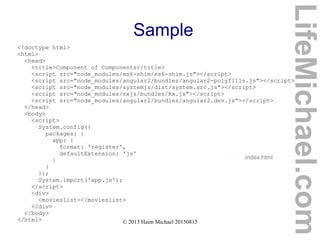
<!doctype html>
<html>
<head>
<title>Component of Components</title>
<script src="node_modules/es6-shim/es6-shim.js"></script>
<script src="node_modules/angular2/bundles/angular2-polyfills.js"></script>
<script src="node_modules/systemjs/dist/system.src.js"></script>
<script src="node_modules/rxjs/bundles/Rx.js"></script>
<script src="node_modules/angular2/bundles/angular2.dev.js"></script>
</head>
<body>
<script>
System.config({
packages: {
app: {
format: 'register',
defaultExtension: 'js'
}
}
});
System.import('app.js');
</script>
<div>
<movieslist></movieslist>
</div>
</body>
</html>
index.html
LifeMichael.com
© 2013 Haim Michael 20150815
Sample
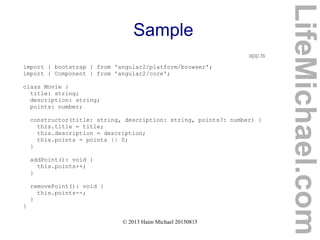
import { bootstrap } from 'angular2/platform/browser';
import { Component } from 'angular2/core';
class Movie {
title: string;
description: string;
points: number;
constructor(title: string, description: string, points?: number) {
this.title = title;
this.description = description;
this.points = points || 0;
}
addPoint(): void {
this.points++;
}
removePoint(): void {
this.points--;
}
}
app.ts
LifeMichael.com
© 2013 Haim Michael 20150815
Sample
@Component({
selector: 'single-movie',
inputs: ['movieee'],
template: `
<div>
<span>{{ movieee.points }} Points</span>
<span>{{ movieee.title }}</span>
<span>{{ movieee.description}}</span>
<span><a href (click)="addPoint()">+</a></span>
<span><a href (click)="removePoint()">-</a></span>
</div>
`
})
class MovieComponent {
movieee: Movie;
addPoint(): boolean {
this.movieee.addPoint();
return false;
}
removePoint(): boolean {
this.movieee.removePoint();
return false;
}
}
LifeMichael.com
© 2013 Haim Michael 20150815
Sample
@Component({
selector: 'movieslist',
directives: [MovieComponent],
template: `
<form>
<h3>Add a Movie</h3>
<span>
<label for="title">Title:</label>
<input name="title" #newtitle>
</span>
<span class="field">
<label for="description">Description:</label>
<input name="description" #newDescription>
</span>
<button (click)="addMovie(newtitle, newDescription)">
Add Movie
</button>
</form>
<div>
<single-movie
*ngFor="#moviesingle of sortedMovies()"
[movieee]="moviesingle">
</single-movie>
</div>
`
})
LifeMichael.com
© 2013 Haim Michael 20150815
Sample
class MoviesList {
movies: Movie[];
constructor() {
this.movies = [
new Movie('Love Story', 'Couple in love... Tragic end', 3),
new Movie('Matrix', 'Excellent Sci-Fi Movie', 5),
new Movie('Avatar', 'Great Sci-Fi Fantasy Movie', 4),
];
}
addMovie(title: HTMLInputElement, description: HTMLInputElement): void {
this.movies.push(new Movie(title.value, description.value, 0));
title.value = '';
description.value = '';
}
sortedMovies(): Movie[] {
return this.movies.sort((a: Movie, b: Movie) => b.points - a.points);
}
}
bootstrap(MoviesList);
LifeMichael.com
© 2013 Haim Michael 20150815
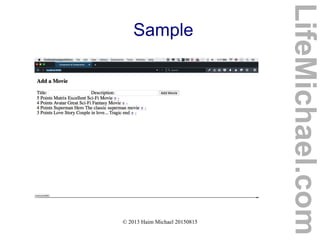
Sample
LifeMichael.com
© 2013 Haim Michael 20150815
Angular Architecture
LifeMichael.com
© 2013 Haim Michael 20150815
The Application
 The Application is a tree of component. The root of that
tree is the application itself.
 When 'booting' (also known as 'bootstrapping') the
application the web browser will render that tree.
 The components are structured in a parent/child tree.
When a component is rendered its child components are
rendered recursively.
LifeMichael.com
© 2013 Haim Michael 20150815
The Model
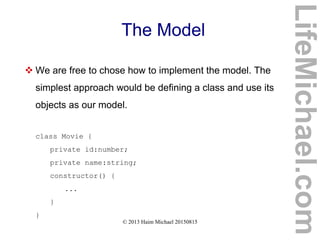
 We are free to chose how to implement the model. The
simplest approach would be defining a class and use its
objects as our model.
class Movie {
private id:number;
private name:string;
constructor() {
...
}
}
LifeMichael.com
© 2013 Haim Michael 20150815
The Component
 The components are the fundamental building block of
Angular 2 applications. The application is just the top level
component.
 Each component is composed of three parts. The
component decorator, a view and a controller.
 The decorator is the @Component annotation. It adds
meta data to the class it refers to.
LifeMichael.com
© 2013 Haim Michael 20150815
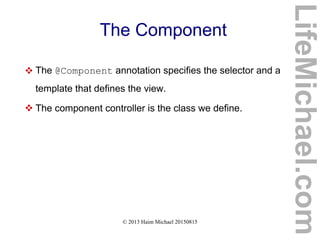
The Component
 The @Component annotation specifies the selector and a
template that defines the view.
 The component controller is the class we define.
LifeMichael.com
© 2013 Haim Michael 20150815
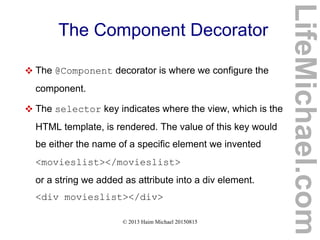
The Component Decorator
 The @Component decorator is where we configure the
component.
 The selector key indicates where the view, which is the
HTML template, is rendered. The value of this key would
be either the name of a specific element we invented
<movieslist></movieslist>
or a string we added as attribute into a div element.
<div movieslist></div>
LifeMichael.com
© 2013 Haim Michael 20150815
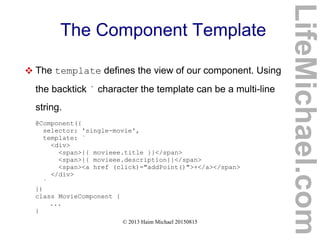
The Component Template
 The template defines the view of our component. Using
the backtick ` character the template can be a multi-line
string.
@Component({
selector: 'single-movie',
template: `
<div>
<span>{{ movieee.title }}</span>
<span>{{ movieee.description}}</span>
<span><a href (click)="addPoint()">+</a></span>
</div>
`
})
class MovieComponent {
...
}
LifeMichael.com
© 2013 Haim Michael 20150815
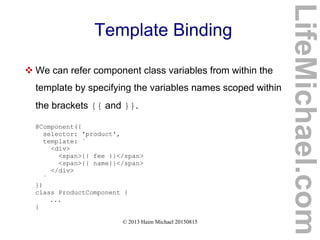
Template Binding
 We can refer component class variables from within the
template by specifying the variables names scoped within
the brackets {{ and }}.
@Component({
selector: 'product',
template: `
<div>
<span>{{ fee }}</span>
<span>{{ name}}</span>
</div>
`
})
class ProductComponent {
...
}
LifeMichael.com
© 2013 Haim Michael 20150815
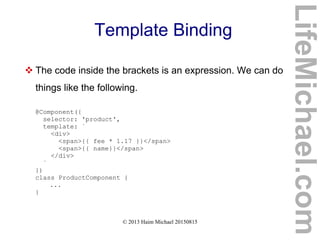
Template Binding
 The code inside the brackets is an expression. We can do
things like the following.
@Component({
selector: 'product',
template: `
<div>
<span>{{ fee * 1.17 }}</span>
<span>{{ name}}</span>
</div>
`
})
class ProductComponent {
...
}
LifeMichael.com
© 2013 Haim Michael 20150815
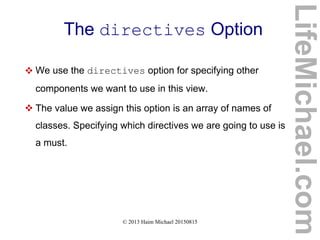
The directives Option
 We use the directives option for specifying other
components we want to use in this view.
 The value we assign this option is an array of names of
classes. Specifying which directives we are going to use is
a must.
LifeMichael.com
© 2013 Haim Michael 20150815
The directives Option
LifeMichael.com
@Component({
selector: 'movieslist',
directives: [MovieComponent],
template: `
<form>
<h3>Add a Movie</h3>
...
</form>
<div>
<single-movie
*ngFor="#moviesingle of sortedMovies()"
[movieee]="moviesingle">
</single-movie>
</div>
`
})
class MoviesList {
movies: Movie[];
constructor() {
...
}
}
© 2013 Haim Michael 20150815
Built-in Directives
LifeMichael.com
© 2013 Haim Michael 20150815
Introduction
 Angular 2 provides us with ready to use directives. These
directives are imported and available automatically.
LifeMichael.com
© 2013 Haim Michael 20150815
The NgIf Directive
 This directive is used when we want to display or hide a
specific element based on a specific condition.
<div [ngIf] = 'check()'>...</div>
LifeMichael.com
© 2013 Haim Michael 20150815
The NgSwitch Directive
 This directive is used when we need to render different
elements depends on the value of a given condition.
<div [ngSwitch]='number'>
<div *ngSwitchWhen='1'>number is one</div>
<div *ngSwitchWhen='2'>number is two</div>
<div *ngSwitchWhen='3'>number is three</div>
<div *ngSwitchDefault>Default Value</div>
</div>
LifeMichael.com
© 2013 Haim Michael 20150815
The NgStyle Directive
 Using this directive we can set a given DOM element with
CSS properties.
<div [ngStyle]='{color:red}'>
We Love Text in White!
</div>
LifeMichael.com
© 2013 Haim Michael 20150815
The NgClass Directive
 Using this directive we can set a given DOM element with
a specific CSS class.
<div [ngClass]='{ourdesign: false}'>
We Love Text in White!
</div>
LifeMichael.com
© 2013 Haim Michael 20150815
The NgFor Directive
 Using this directive a specific DOM element will be
repeated, each time with a different value taken from an
array.
Let's assume we are having an array of countries in our
component:
this.countries = ['France','Canada','Italy']
LifeMichael.com
© 2013 Haim Michael 20150815
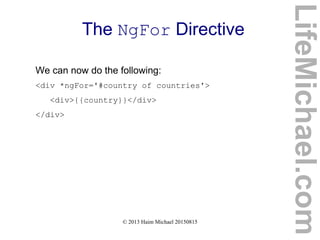
The NgFor Directive
We can now do the following:
<div *ngFor='#country of countries'>
<div>{{country}}</div>
</div>
LifeMichael.com
© 2013 Haim Michael 20150815
The NgNonBindable Directive
LifeMichael.com
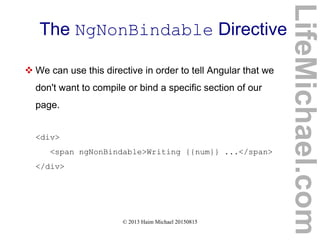
 We can use this directive in order to tell Angular that we
don't want to compile or bind a specific section of our
page.
<div>
<span ngNonBindable>Writing {{num}} ...</span>
</div>
© 2013 Haim Michael 20150815
Forms
LifeMichael.com
© 2013 Haim Michael 20150815
Introduction
 Angular 2 provides us controls that encapsulate the
inputs, validators that provide us with the ability to
validate the entered data and observers that can watch
out our form for changes and respond accordingly.
 The FormBuilder helper class assists us with
developing our form.
LifeMichael.com
© 2013 Haim Michael 20150815
HTTP
LifeMichael.com
© 2013 Haim Michael 20150815
Introduction
 Angular 2 comes with its own HTTP library. We can use
that library for calling external APIs.
 The preferred method for dealing with async code is
using observables.
 The HTTP library in Angular 2 was split into a separated
module.
LifeMichael.com
© 2013 Haim Michael 20150815
The HTTP Library
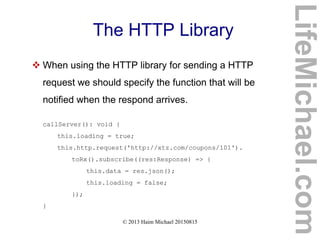
 When using the HTTP library for sending a HTTP
request we should specify the function that will be
notified when the respond arrives.
callServer(): void {
this.loading = true;
this.http.request('http://xtz.com/coupons/101').
toRx().subscribe((res:Response) => {
this.data = res.json();
this.loading = false;
});
}
LifeMichael.com
© 2013 Haim Michael 20150815
Routing
LifeMichael.com
© 2013 Haim Michael 20150815
Introduction
 Using routing we maintain separation between the
different parts of our app, easily maintain the state of
our app and protect parts of the app based on specific
rules.
LifeMichael.com
© 2013 Haim Michael 20150815
Introduction
 Using routing we maintain separation between the
different parts of our app, easily maintain the state of
our app and protect parts of the app based on specific
rules.
LifeMichael.com
© 2013 Haim Michael 20150815
The @RouteConfig Annotation
 Angular 2 provides us with the @RouteConfig
annotation that simplifies the routes definition.
@RouteConfig( [
{path: '/', name:'root', redirectTo ['/Home'],
{path: '/about', name:'About', component: AboutComponnet,
...
] )
LifeMichael.com
© 2013 Haim Michael 20150815
Questions & Answers
Thanks for Attending My Seminar!
If you liked it, please write me some feedback
at speakerpedia.com/speakers/life-michael
LifeMichael.com

Angular 2 Seminar_(December 7/12/2015)

  • 1.
    AngularJS 2.x Seminar www.lifemichael.com Alllogos, trademarks and brand names used in this presentation belong to their respective owners. Haim Michael and Life Michael are independent and not related, affiliated or connected with any of these respective owners or their technologies. LifeMichael.com
  • 2.
    Life Michael Introduction Snowboarding. Learning. Coding. Teaching. More than 16 years of Practical Experience. LifeMichael.com
  • 3.
    Life Michael Introduction Professional Certifications Zend Certified Engineer in PHP Certified Java Professional Certified Java EE Web Component Developer OMG Certified UML Professional  MBA (cum laude) from Tel-Aviv University Information Systems Management LifeMichael.com
  • 4.
    Life Michael Introduction Huge Professional Practical Experience in Software Development both for the Server Side (Java EE) and for mobile telephones. http://blog.lifemichael.com Mainly During The Years 2001-2007 LifeMichael.com
  • 5.
    Life Michael Introduction Delivering Academic Advanced Courses in Computer Science.  Delivering Professional Courses in Software Development Companies World Wide. LifeMichael.com
  • 6.
    Life Michael Introduction Developing One of The Biggest Free Online Courses Website for Software Development. http://abelski.lifemichael.com * More Than 200 Courses * Thousands of Video Clips * Thousands of Assignments * Continuously Developed LifeMichael.com
  • 7.
    Life Michael Introduction Developing Online Free Tutorials + Videos in Hebrew for Various Programming Languages. http://books.lifemichael.com LifeMichael.com
  • 8.
    Life Michael Introduction Delivering Advanced Professional Courses in Cooperation with Holon Institute of Technology. 28 Weeks. Attractive cost of 6800 shekels. http://hit.lifemichael.com http://tinyurl.com/lifemichaelhitcourses HTML5 Cross Platform Mobile Applications Starts on February 25th , 2016 Android Java Applications Development Starts on March 3rd , 2016 Software Engineering in PHP Starts on June 15th , 2016 LifeMichael.com
  • 9.
    Life Michael Introduction Popular Channel of Professional Video Clips on YouTube. http://www.youtube.com/lifemichael * More Than 3 Million Views * More Than 3000 Video Clips * More Than 30 Playlists * More Than 3000 Subscribers LifeMichael.com
  • 10.
    Life Michael Introduction Maintaining Free Professional Communities on Facebook, Linkedin and Google+ for Continuous Professional Update! http://www.lifemichael.com/en/communities LifeMichael.com
  • 11.
    Life Michael Introduction I Enjoy Sharing My Knowledge and Experience. Teaching is my Passion. http://speakerpedia.com/speakers/life-michael http://lanyrd.com/profile/lifemichael Speakerpedia LifeMichael.com
  • 12.
    © 2013 HaimMichael Introduction LifeMichael.com
  • 13.
    © 2013 HaimMichael History  Angular is a framework for developing mobile and desktop client side applications. The first version (1.x) was developed in 2009. Google plays an important role in its development. The second version (2.x) is already available for developers preview in beta version.  The second version is kind of a new framework. Angular was rewritten from scratch. Apart of the same name there is nearly nothing in common. LifeMichael.com
  • 14.
    © 2013 HaimMichael The Web Convergence LifeMichael.com  The hybrid application model simplifies the convergence of the web and the world of apps.  The more we move forward with this convergence the more complex the code we write in JavaScript is.  The angular framework assists us when dealing with complex code in JavaScript. www.qt.io phonegap.com
  • 15.
    © 2013 HaimMichael Capabilities  The Angular framework provides us with various essential features such as mobile gestures, animations, filtering, routing, data binding, support for internationalization and many more. LifeMichael.com
  • 16.
    © 2013 HaimMichael Easy Learning Curve  AngularJS 1.x is well known for its easy learning curve. Unlike many other JavaScript libraries the need for having in-depth understanding in JavaScript is not required.  The case with AngularJS 2.x is not clear. Will we use TypeScript? Do we must become familiar with ECMA6? LifeMichael.com
  • 17.
    © 2013 HaimMichael AngularJS 2  As of Angular 2, there are three programming languages we can use. www.dartlang.org www.typescriptlang.org developer.mozilla.org/docs/web/javascript Can be either ES5 or ES6 LifeMichael.com
  • 18.
    © 2013 HaimMichael TypeScript (1/4)  TypeScript is a programming language that was developed by Microsoft.  The code we write in TypeScript is compiled into JavaScript. TypeScript is an open source programming language. www.typescriptlang.org LifeMichael.com
  • 19.
    © 2013 HaimMichael TypeScript (2/4)  TypeScript is a superset of JavaScript. It includes the entire JavaScript programming language together with additional capabilities.  In general, nearly every code we can write in JavaScript can be included in code we write in TypeScript. LifeMichael.com
  • 20.
    © 2013 HaimMichael TypeScript (3/4)  TypeScript adds the capability to code with types. It allows us to define new classes and new interfaces.  TypeScript allows us to specify the type of each and every variable and is even capable of interfering the type by itself.  TypeScript allows us to use JavaScript as if it was a strictly type programming language. LifeMichael.com
  • 21.
    © 2013 HaimMichael TypeScript (4/4)  Compiling TypeScript into JavaScript we can get a clean simple ES3 compliant code we can run in any web browser, in any node.js environment or in any other ES3 compliant environment. LifeMichael.com
  • 22.
    © 2013 HaimMichael Dart (1/3)  Dart is an open source class based, object oriented, optionally typed programming language that allows us to develop browser based one page web applications and server side applications. www.dartlang.org LifeMichael.com
  • 23.
    © 2013 HaimMichael Dart (2/3)  The syntax seems friendly both to those who are used to JavaScript and to those who are used to JavaPHPC#.  We can execute the code either by using a Dart VM or by compiling it into JavaScript. LifeMichael.com
  • 24.
    © 2013 HaimMichael Dart (3/3)  The first web application developed for production using Angular 2 was developed in Dart. http://news.dartlang.org/2015/11/how-google-uses-angular-2-with-dart.html LifeMichael.com
  • 25.
    © 2013 HaimMichael What is The Preferred Language?  Survey that was published by AngularJS blog at http://bit.ly/1OlsCJJ indicates that TypeScript is probably the preferred option. LifeMichael.com
  • 26.
    © 2013 HaimMichael What is The Preferred Editor?  Survey that was published by AngularJS blog at http://bit.ly/1OlsCJJ shows the following results: https://www.jetbrains.com/webstorm/ http://www.sublimetext.com/ LifeMichael.com
  • 27.
    © 2013 HaimMichael Angular 2 for Dart  AngularDart is the AngularJS version in Dart. Google bases the development of AngularJS on TypeScript working closely with Microsoft. Doing so assists with the compiling of code developed using Angular Dart into JavaScript. LifeMichael.com
  • 28.
    © 2013 HaimMichael Angular 2 Performance  Angular 2 is significantly faster comparing with Angular 1. The ultrafast change detection and view caching allows a smother virtual scrolling and a smoother view transitions. The server side pre-rendering allows a faster initial loads. The offline compilation allows a faster startup. LifeMichael.com
  • 29.
    © 2013 HaimMichael Expressive Code  The easy-to-write syntax reduces the complexity of the source code and contributes to its expressiveness. The structured rich templates are readable and simple to understand. LifeMichael.com
  • 30.
    © 2013 HaimMichael Cross Platform  The Angular 2 frameworks targets all platforms. Whether it is a desktop application, web application or a mobile application. LifeMichael.com
  • 31.
    © 2013 HaimMichael Seamless Upgrade from Angular 1  Using the ngUpgrade APIs it is possible to mix in Angular 2 components into your Angular 1 application. https://angular.io/docs/ts/latest/guide/upgrade.html LifeMichael.com
  • 32.
    © 2013 HaimMichael Flexible Development  We are free to choose which programming language to use. In addition to providing full support for ES5, ES6, TypeScript and Dart, Angular 2 can work with other programming languages that compile to JavaScript. www.scala- js.org coffeescript.org jsweet.orgcoffeescript.org LifeMichael.com
  • 33.
    © 2013 HaimMichael Flexible Development livescript.net github.com/ich/caffei ne github.com/TrigenSoftw are/ColaScript github.com/iode- lang/Iode kotlinlang.org duoco.de LifeMichael.com
  • 34.
    © 2013 HaimMichael Google Trends Comparison LifeMichael.com
  • 35.
    © 2013 HaimMichael Languages Comparison LifeMichael.com Easy Difficult Learning Curve Popularity SmallBig Dart TS ES5 ES6
  • 36.
    © 2013 HaimMichael Languages Comparison LifeMichael.com Low High Functional Programming Capabilities OOPCapabilities SmallBig Dart classes abstract classes TS classes interfaces ES5 ES6 classes
  • 37.
    © 2013 HaimMichael Languages Comparison LifeMichael.com Low High Annotation Development Support GenericsSupport SmallBig Dart TS ES5 ES6
  • 38.
    © 2013 HaimMichael Languages Comparison LifeMichael.com Not Available Available Independent Virtual Machine ServerDevelopmentSupport LowHigh Dart TS ES5 ES6
  • 39.
    © 2013 HaimMichael Comprehensive Routing  We can map URL paths to specific components of the application. Angular 2 supports routing and adds new capabilities.  Angular 2 supports card stack navigation, animated transitions and lazy loading for mobile telephones. LifeMichael.com
  • 40.
    © 2013 HaimMichael Dependency Injection  The Angular 2 framework comes with a powerful and yet a simple to use dependency injection.  We can maintain modular applications without writing tedious glue code. LifeMichael.com
  • 41.
    © 2013 HaimMichael Legacy Browsers Support  In addition to having full support for the latest versions of Chrome, Edge, Firefox, Safari and IE, Angular 2 supports older browsers including IE9+ and Android 4.1+. LifeMichael.com
  • 42.
    © 2013 HaimMichael Animations  Angular 2 provides us with capabilities to create animations, including low level ones. Angular 2 allows us to handle changes to animations in response to user events. LifeMichael.com
  • 43.
    © 2013 HaimMichael Internationalization & Accessibility  Angular 2 provides us with the capabilities to promote accessibility through screen readers and assistive devices.  Angular 2 includes a mechanisms that assists us with developing a web application that automatically displays the right language according to the geographic location of the user. LifeMichael.com
  • 44.
    © 2013 HaimMichael The www.angular.io Website (1/2)  This is the main website for developers who want to use the Angular framework. It replaces www.angularjs.org. www.angular.io www.angularjs.org LifeMichael.com
  • 45.
    © 2013 HaimMichael The www.angular.io Website (2/2)  This is the main website for developers who want to use the Angular framework. It replaces www.angulardart.org. www.angular.io www.angulardart.org LifeMichael.com
  • 46.
    © 2013 HaimMichael Angular Material  Angular Material 1.0 was released on December 15th 2015. The current version fits Angular 1.0. The Angular team is now working on adjusting it for Angular 2.0. https://material.angularjs.org LifeMichael.com
  • 47.
    © 2013 HaimMichael The Polymer Project  The Polymer framework allows us to use interoperable beautiful and fast web components as well as to develop new ones. https://www.polymer-project.org  We can use the Polymer components together with Angular.  The Dart version for Polymer is available at https://www.dartlang.org/polymer-old LifeMichael.com
  • 48.
    © 2013 HaimMichael, lifemichael.com Jump Start in ES5 LifeMichael.com
  • 49.
    © 2013 HaimMichael, lifemichael.com Hello World  The simplest way to start would be writing code in JavaScript ES5 while adding script elements that refer the Angular2 JS file online.  As of AngularJS 2 we can either write our code in JavaScript ES5 or JavaScript ES6 or TypeScript or Dart. LifeMichael.com
  • 50.
    © 2013 HaimMichael, lifemichael.com Hello World <!DOCTYPE html> <html> <head> <script src="https://code.angularjs.org/2.0.0-alpha.26/angular2.sfx.dev.js"> </script> <script src="main.js"></script> </head> <body> <my-application></my-application> </body> </html> index.html LifeMichael.com
  • 51.
    © 2013 HaimMichael, lifemichael.com Hello World function AppComponent() {} AppComponent.annotations = [ new angular.ComponentAnnotation({ selector: 'my-application' }), new angular.ViewAnnotation({ template: '<h1>Hello Friends:)</h1>' }) ]; document.addEventListener('DOMContentLoaded', function() { angular.bootstrap(AppComponent); }); main.js LifeMichael.com
  • 52.
    © 2013 HaimMichael, lifemichael.com Hello World LifeMichael.com
  • 53.
    © 2013 HaimMichael, lifemichael.com The root Component  Each and every angular application is structured as a tree of components. The root component is the top level container for the rest of the application.  The root component doesn't have to be named with the AppComponent name. We can choose any name we want. LifeMichael.com
  • 54.
    © 2013 HaimMichael, lifemichael.com The root Component  The root component is responsible for specifying the location inside the index.html file where the application will be rendered.  The root element can be named with any name we want. In the last sample the root element was the my- application element. LifeMichael.com
  • 55.
    © 2013 HaimMichael, lifemichael.com The root Component  The root component loads the initial template for the application. The template can be responsible for loading other components, such as menu bars, views, forms etc. LifeMichael.com
  • 56.
    © 2013 HaimMichael, lifemichael.com Annotations  When referring the annotations property the component has we can assign it with an array of objects that each and every one of them serve as annotation that provides information about the component.  When writing our application using TypeScript we will identify each and every annotation by the '@' character.  The ComponentAnnotation object describes the component. LifeMichael.com
  • 57.
    © 2013 HaimMichael, lifemichael.com The ComponentAnnotation Object  The ComponentAnnotation object describes the object. It defines the HTML tag the component will be rendered to. The value of the selector property should be a CSS valid selector. LifeMichael.com
  • 58.
    © 2013 HaimMichael, lifemichael.com The ViewAnnotation Object  The ViewAnnotation object defines the HTML that represents the component. The HTML can be either an inline template or an external one.  In order to specify an external HTML we should use the templateUrl property instead of template, and assign it with a string, that is the path to the HTML file. LifeMichael.com
  • 59.
    © 2013 HaimMichael 20150815 Displaying Data in ES5 LifeMichael.com
  • 60.
    © 2013 HaimMichael 20150815 Properties Interpolation  The simplest way for binding variables in JavaScript with specific texts in a template we develop is through interpolation while specifying the names of those variables inside. LifeMichael.com
  • 61.
    © 2013 HaimMichael 20150815 Properties Interpolation <!DOCTYPE html> <html> <head> <script src="https://code.angularjs.org/2.0.0-alpha.26/angular2.sfx.dev.js"> </script> <script src="main.js"></script> </head> <body> <my-application></my-application> <simpledisplay></simpledisplay> </body> </html> index.html second LifeMichael.com
  • 62.
    © 2013 HaimMichael 20150815 Properties Interpolation function AppComponent() {} AppComponent.annotations = [ new angular.ComponentAnnotation({ selector: 'my-application' }), new angular.ViewAnnotation({ template: '<h1>Hello World:)</h1>' }) ]; main.js LifeMichael.com
  • 63.
    © 2013 HaimMichael 20150815 Properties Interpolation function DisplayComponent() { this.firstName = "Haim"; this.lastName = "Michael"; } DisplayComponent.annotations = [ new angular.ComponentAnnotation({ selector: "simpledisplay" }), new angular.ViewAnnotation({ template: <p>First name: {{ firstName }}</p><p>Last name: {{ lastName }}</p>' }) ]; document.addEventListener('DOMContentLoaded', function() { angular.bootstrap(AppComponent); angular.bootstrap(DisplayComponent); }); LifeMichael.com
  • 64.
    © 2013 HaimMichael 20150815 Properties Interpolation LifeMichael.com
  • 65.
    © 2013 HaimMichael 20150815 The ng-for Directive  Using the ng-for directive in our template we can iterate values we have in array. LifeMichael.com
  • 66.
    © 2013 HaimMichael 20150815 The ng-for Directive <!DOCTYPE html> <html> <head> <script src="https://code.angularjs.org/2.0.0-alpha.26/angular2.sfx.dev.js"> </script> <script src="main.js"></script> </head> <body> <my-app></my-app> </body> </html> index.html third LifeMichael.com
  • 67.
    © 2013 HaimMichael 20150815 The ng-for Directive main.js function AppComponent() { this.countries = ['France','Italy','Germany','Austria']; } AppComponent.annotations = [ new angular.ComponentAnnotation({ selector: 'my-app' }), new angular.ViewAnnotation({ directives: [angular.NgFor], template: '<ul>' + '<li *ng-for="#country of countries">' + '{{ country }}' + '</li>' + '</ul>' }) ]; document.addEventListener('DOMContentLoaded', function() { angular.bootstrap(AppComponent); }); LifeMichael.com
  • 68.
    © 2013 HaimMichael 20150815 The ng-for Directive LifeMichael.com
  • 69.
    © 2013 HaimMichael 20150815 Wrapping Data in Class  We can wrap the data in a separated class, and then inject that class into the component function. LifeMichael.com
  • 70.
    © 2013 HaimMichael 20150815 Wrapping Data in Class <!DOCTYPE html> <html> <head> <script src="https://code.angularjs.org/2.0.0-alpha.26/angular2.sfx.dev.js"> </script> <script src="main.js"></script> </head> <body> <my-app></my-app> </body> </html> fourth LifeMichael.com
  • 71.
    © 2013 HaimMichael 20150815 Wrapping Data in Class function AppComponent(data) { this.countries = data.countries; } function CountriesService() { this.countries = ['France','Italy','Germany','Austria']; } AppComponent.annotations = [ new angular.ComponentAnnotation({ selector: 'my-app', appInjector: [CountriesService] }), new angular.ViewAnnotation({ directives: [angular.NgFor], template: '<ul>' + '<li *ng-for="#country of countries">' + '{{ country }}' + '</li>' + '</ul>' }) ]; AppComponent.parameters = [[CountriesService]]; document.addEventListener('DOMContentLoaded', function() { angular.bootstrap(AppComponent); }); LifeMichael.com
  • 72.
    © 2013 HaimMichael 20150815 Wrapping Data in Class LifeMichael.com
  • 73.
    © 2013 HaimMichael 20150815 The ng-if Directive  This directive can allow us to write code that will add or remove elements from the DOM based on whether the expression we provide is true or false.  In order to use this directive we should specify it in the list of directives. LifeMichael.com
  • 74.
    © 2013 HaimMichael 20150815 The ng-if Directive <!DOCTYPE html> <html> <head> <script src="https://code.angularjs.org/2.0.0-alpha.26/angular2.sfx.dev.js"> </script> <script src="main.js"></script> </head> <body> <my-app></my-app> </body> </html> Fifth LifeMichael.com
  • 75.
    © 2013 HaimMichael 20150815 The ng-if Directive function AppComponent(data) { this.countries = data.countries; } function CountriesService() { this.countries = ['France','Italy','Germany','Austria']; } AppComponent.annotations = [ new angular.ComponentAnnotation({ selector: 'my-app', appInjector: [CountriesService] }), new angular.ViewAnnotation({ directives: [angular.NgFor,angular.NgIf], template: '<h3 *ng-if="countries.length>1">Countries List</h3>' + '<ul>' + '<li *ng-for="#country of countries">' + '{{ country }}' + '</li>' + '</ul>' }) ]; LifeMichael.com
  • 76.
    © 2013 HaimMichael 20150815 The ng-if Directive AppComponent.parameters = [[CountriesService]]; document.addEventListener('DOMContentLoaded', function() { angular.bootstrap(AppComponent); }); LifeMichael.com
  • 77.
    © 2013 HaimMichael 20150815 The ng-if Directive LifeMichael.com
  • 78.
    © 2013 HaimMichael 20150815 Components Development in ES5 LifeMichael.com
  • 79.
    © 2013 HaimMichael 20150815 Introduction  Each and every Angular application is a tree of components nested within each other.  We can add child components by using them inside the parent component's template. LifeMichael.com
  • 80.
    © 2013 HaimMichael 20150815 Introduction <!DOCTYPE html> <html> <head> <script src="https://code.angularjs.org/2.0.0-alpha.26/angular2.sfx.dev.js"> </script> <script src="main.js"></script> </head> <body> <main-component></main-component> </body> </html> Sixth LifeMichael.com
  • 81.
    © 2013 HaimMichael 20150815 Introduction function ChildComponent() { this.message = "This is a Child Component"; } ChildComponent.annotations = [ new angular.ComponentAnnotation({ selector: "child-component" }), new angular.ViewAnnotation({ template: '<p> {{ message }} </p>' }) ]; LifeMichael.com
  • 82.
    © 2013 HaimMichael 20150815 Introduction function ParentComponent() { this.msg = "This is The Parent Component"; } ParentComponent.annotations = [ new angular.ComponentAnnotation({ selector: "main-component" }), new angular.ViewAnnotation({ template: '<h1>{{msg}}</h1>' + '<child-component></child-component>' }) ]; document.addEventListener('DOMContentLoaded', function(){ angular.bootstrap(ParentComponent); angular.bootstrap(ChildComponent); }); LifeMichael.com
  • 83.
    © 2013 HaimMichael 20150815 Introduction LifeMichael.com
  • 84.
    © 2013 HaimMichael 20150815 User Input in ES5 LifeMichael.com
  • 85.
    © 2013 HaimMichael 20150815 Introduction  When using AngularJS, the same well known DOM events take place. LifeMichael.com
  • 86.
    © 2013 HaimMichael 20150815 Events Hooking  AngularJS provides us with a special syntax for hooking with those events. The event name should be surrounded with parenthesis and the controller function we want to be invoked should be assigned to it. <input (keyup)="logToConsole()"> LifeMichael.com
  • 87.
    © 2013 HaimMichael 20150815 Events Hooking <!DOCTYPE html> <html> <head> <script src="https://code.angularjs.org/2.0.0-alpha.26/angular2.sfx.dev.js"> </script> <script src="main.js"></script> </head> <body> <my-app></my-app> </body> </html> Seventh LifeMichael.com
  • 88.
    © 2013 HaimMichael 20150815 Events Hooking function AppComponent() { this.logToConsole = function() { console.log("key up happened"); }; } AppComponent.annotations = [ new angular.ComponentAnnotation({ selector: 'my-app' }), new angular.ViewAnnotation({ template: '<h3>Simple Template</h3>' + '<input (keyup)="logToConsole()">' }) ]; document.addEventListener('DOMContentLoaded', function() { angular.bootstrap(AppComponent); }); LifeMichael.com
  • 89.
    © 2013 HaimMichael 20150815 Events Hooking LifeMichael.com
  • 90.
    © 2013 HaimMichael 20150815 Local Variables  We can make element references available to other parts of the template as a local variable using the #___ syntax. 'Username: <input #username (keyup)>' + '<h2>{{username.value}}</h2>'  The #username creates a local variable in the template that we refer to below inside the <h2> element. LifeMichael.com
  • 91.
    © 2013 HaimMichael 20150815 Local Variables  The (keyup) tells Angular to trigger an update when it gets a keyup event. The {{username.value}} binds the text node of the <h2> element with the input's value property. LifeMichael.com
  • 92.
    © 2013 HaimMichael 20150815 Local Variables <!DOCTYPE html> <html> <head> <script src="https://code.angularjs.org/2.0.0-alpha.26/angular2.sfx.dev.js"> </script> <script src="main.js"></script> </head> <body> <my-app></my-app> </body> </html> Eighth LifeMichael.com
  • 93.
    © 2013 HaimMichael 20150815 Local Variables function AppComponent() { } AppComponent.annotations = [ new angular.ComponentAnnotation({ selector: 'my-app' }), new angular.ViewAnnotation({ template: 'Username: <input #username (keyup)>' + '<h2>{{username.value}}</h2>' }) ]; document.addEventListener('DOMContentLoaded', function() { angular.bootstrap(AppComponent); }); LifeMichael.com
  • 94.
    © 2013 HaimMichael 20150815 Local Variables LifeMichael.com
  • 95.
    © 2013 HaimMichael 20150815 Controller Function  When handling an event we can specify a specific controller function to be invoked whenever the event takes place. '<input #enteredtext (keyup)="finishedTyping($event)">' + '<button (click)="addItem(enteredtext.value)">Add Item</button>' LifeMichael.com
  • 96.
    © 2013 HaimMichael 20150815 Controller Function <!DOCTYPE html> <html> <head> <script src="https://code.angularjs.org/2.0.0-alpha.26/angular2.sfx.dev.js"> </script> <script src="main.js"></script> </head> <body> <todo-list-application></todo-list-application> </body> </html> Ninth LifeMichael.com
  • 97.
    © 2013 HaimMichael 20150815 Controller Function function TodoListController() { this.items = ["Clean House", "Prepare Dinner", "Buy Candles"]; this.addItem = function(item) { this.items.push(item); }; this.finishedTyping = function($event) { if($event.which === 13) { this.addItem($event.target.value); } } } LifeMichael.com
  • 98.
    © 2013 HaimMichael 20150815 Controller Function TodoListController.annotations = [ new angular.ComponentAnnotation({ selector: "todo-list-application" }), new angular.ViewAnnotation({ template: '<ul>' + '<li *ng-for="#item of items">' + '{{ item }}' + '</li>' + '</ul>' + '<input #enteredtext (keyup)="finishedTyping($event)">' + '<button (click)="addItem(enteredtext.value)">Add Item</button>', directives: [angular.NgFor, angular.NgIf] }) ]; document.addEventListener("DOMContentLoaded", function() { angular.bootstrap(TodoListController); }); LifeMichael.com
  • 99.
    © 2013 HaimMichael 20150815 Controller Function LifeMichael.com
  • 100.
    © 2013 HaimMichael 20150815 Hello World in TS LifeMichael.com
  • 101.
    © 2013 HaimMichael 20150815 Installing TypeScript Compiler  The first step would be installing the typescript compiler on your desktop. In order to install it you first need to install the node.js framework. Once node.js is installed you will be able to use the npm utility.  If you still don't have node.js installed on your computer just browse at www.nodejs.org and install it. LifeMichael.com
  • 102.
    © 2013 HaimMichael 20150815 Installing TypeScript Compiler  Open a new terminal window and type the following: npm install -g 'typescript@1.7.3'  We can install typescript either globally (using '-g') or separately for each project. LifeMichael.com
  • 103.
    © 2013 HaimMichael 20150815 The package.json File  We should create a separated directory for our Angular2 application and perform all terminal commands while we are in that directory.  We should start with creating a package.json file that describes our Angular2 application. LifeMichael.com
  • 104.
    © 2013 HaimMichael 20150815 The package.json File { "name": "life-hello-world", "version": "1.0.0", "scripts": { "tsc": "./node_modules/.bin/tsc", "tsc:w": "./node_modules/.bin/tsc -w", "server": "./node_modules/.bin/live-server --host=localhost --port=8080 .", "go": "concurrent "npm run tsc:w" "npm run serve" " }, "dependencies": { "angular2": "2.0.0-beta.0", "systemjs": "0.19.6", "es6-promise": "^3.0.2", "es6-shim": "^0.33.3", "reflect-metadata": "0.1.2", "rxjs": "5.0.0-beta.0", "zone.js": "0.5.10" }, "devDependencies": { "concurrently": "^1.0.0", "live-server": "^0.9.0", "Typescript": "^1.7.3" } } LifeMichael.com
  • 105.
    © 2013 HaimMichael 20150815 Angular2 Dependencies  The Angular2 framework depends on four libraries: es6shim, angular2-polyfills, SystemJS and RxJS. es6shim library provides compatibility shims so that legacy JavaScript engines behave as closely as possible to ES6 https://github.com/paulmillr/es6-shim angular2-polyfills.js handles foundational standardization across web browsers SystemJS library is a module loader Angular uses RxJS library provides the capability to work with observables. Angular uses them in many places. LifeMichael.com
  • 106.
    © 2013 HaimMichael 20150815 The live-server Package  The live-server is a simple development http-server we can use for running our Angular web application. https://www.npmjs.com/package/live-server LifeMichael.com
  • 107.
    © 2013 HaimMichael 20150815 The concurrently Package  The concurrently package allows us to concurrently execute different commands. https://www.npmjs.com/package/concurrently LifeMichael.com
  • 108.
    © 2013 HaimMichael 20150815 Using CSS  We can easily use nearly any CSS library in our project. We can create our own CSS or use a framework, such as Bootstrap, Semantic-UI, Foundation or any other CSS framework we want. Semantic UI http://getbootstrap.com http://semantic-ui.com/ http://foundation.zurb.com/ LifeMichael.com
  • 109.
    © 2013 HaimMichael 20150815 The npm install Command  We should now execute the npm install command in the terminal. The current directory should be the one in which we saved the package.json file. LifeMichael.com
  • 110.
    © 2013 HaimMichael 20150815 The npm install Command LifeMichael.com
  • 111.
    © 2013 HaimMichael 20150815 The npm install Command  The result would be the creation of the node_modules folder. LifeMichael.com
  • 112.
    © 2013 HaimMichael 20150815 The package.json File  The node_modules folder includes the required libraries and packages that were listed in package.json. LifeMichael.com
  • 113.
    © 2013 HaimMichael 20150815 The app.ts File  We should now write our code in Type Script for using the Angular framework. Files that include code in TypeScrip should be named with the ts extension.  You are free to name the files with whatever name you want as long as the extension is ts. Let's name our file app.ts. LifeMichael.com
  • 114.
    © 2013 HaimMichael 20150815 The app.ts File import {bootstrap} from "angular2/platform/browser"; import {Component} from "angular2/core"; @Component({ selector: 'hello', template: ` <div> Shalom World! </div> ` }) class HelloWorld { } bootstrap(HelloWorld); LifeMichael.com
  • 115.
    © 2013 HaimMichael 20150815 The app.ts File  The import statements specifies the modules we want to use in our program. Two modules are imported. The first is bootstrap and the second is Component. LifeMichael.com
  • 116.
    © 2013 HaimMichael 20150815 Creating Component  One of the main concepts in Angular 2 is the use of components. In this code sample we create a new component that will be rendered around a new tag we create. The hello tag.  Every component we create has two parts. The component annotation and the component definition class. LifeMichael.com
  • 117.
    © 2013 HaimMichael 20150815 The Template  We can add a template to our component by adding the template option to the component annotation. @Component({ selector: 'hello', template: ` <div> Shalom World! </div> ` }) class HelloWorld { } LifeMichael.com
  • 118.
    © 2013 HaimMichael 20150815 Bootstraping  The last line in our application code should be calling the bootstrap function. We should pass over the name of the main component. bootstrap(HelloWorld); LifeMichael.com
  • 119.
    © 2013 HaimMichael 20150815 The HTML File <!doctype html> <html> <head> <title>Shalom World!</title> <script src="node_modules/es6-shim/es6-shim.js"></script> <script src="node_modules/angular2/bundles/angular2-polyfills.js"> </script> <script src="node_modules/systemjs/dist/system.src.js"></script> <script src="node_modules/rxjs/bundles/Rx.js"></script> <script src="node_modules/angular2/bundles/angular2.dev.js"></script> </head> <body> <script> System.config({ packages: { app: { format: 'register', defaultExtension: 'js' } } }); System.import('app.js'); </script> <hello></hello> </body> </html> LifeMichael.com
  • 120.
    © 2013 HaimMichael 20150815 The HTML File  The HTML file should include script elements that refer the angular2.js file as well as to the other four JavaScript libraries Angular2JS depends on. <script src="node_modules/es6-shim/es6-shim.js"></script> <script src="node_modules/angular2/bundles/angular2-polyfills.js"> </script> <script src="node_modules/systemjs/dist/system.src.js"></script> <script src="node_modules/rxjs/bundles/Rx.js"></script> <script src="node_modules/angular2/bundles/angular2.dev.js"></script> LifeMichael.com
  • 121.
    © 2013 HaimMichael 20150815 The HTML File  We can add CSS files to our project and update the HTML file to refer them. LifeMichael.com
  • 122.
    © 2013 HaimMichael 20150815 The HTML File  We should write a short script that takes care after loading our application script (app.js). We will use the System.js modules loader and call the import function. System.config({ packages: { app: { format: 'register', defaultExtension: 'js' } } }); System.import('app.js'); LifeMichael.com
  • 123.
    © 2013 HaimMichael 20150815 Compiling app.ts File  In order to compile our code in TypeScript ('app.ts') to JavaScript, and get the app.js file, we should first create the tsconfig.json file that configures the TypeScript transpiler. LifeMichael.com
  • 124.
    © 2013 HaimMichael 20150815 Compiling tsconfig.json File LifeMichael.com { "compilerOptions": { "target": "ES5", "module": "system", "moduleResolution": "node", "sourceMap": true, "emitDecoratorMetadata": true, "experimentalDecorators": true, "removeComments": false, "noImplicitAny": false }, "exclude": [ "node_modules" ] } tsconfig.json
  • 125.
    © 2013 HaimMichael 20150815 Compiling tsconfig.json File LifeMichael.com  When using the TypeScript compiler it can be either with an additional tsconfig.json file that configures its execution or with adding small tags when calling the tsc compiler from the terminal. https://github.com/Microsoft/TypeScript/wiki/Compiler-Options https://github.com/Microsoft/TypeScript/wiki/tsconfig.json
  • 126.
    © 2013 HaimMichael 20150815 Compiling app.ts File  In order to compile our code in TypeScript ('app.ts') to JavaScript, and get the app.js file, we should invoke the TypeScript compiler using the npm run tsc command. LifeMichael.com
  • 127.
    © 2013 HaimMichael 20150815 The HTTP Server  We can now execute our code sample by using the npm run start-server command. LifeMichael.com
  • 128.
    © 2013 HaimMichael 20150815 The Web Browser LifeMichael.com
  • 129.
    © 2013 HaimMichael 20150815 Component Data in TS LifeMichael.com
  • 130.
    © 2013 HaimMichael 20150815 Data  We can add new instance variables to the class we define. This way the object that will be instantiated from that class will include these variables. LifeMichael.com
  • 131.
    © 2013 HaimMichael 20150815 The Constructor  In TypeScript, the class we define can include a constructor. We can use the constructor for adding new instance variables. LifeMichael.com
  • 132.
    © 2013 HaimMichael 20150815 Template Variables  We can use the values those new added variables hold in our template. We just need to place the variables within brackets. LifeMichael.com
  • 133.
    © 2013 HaimMichael 20150815 Sample componentdata <!doctype html> <html> <head> <title>Shalom World!</title> <script src="node_modules/es6-shim/es6-shim.js"></script> <script src="node_modules/angular2/bundles/angular2-polyfills.js"></script> <script src="node_modules/systemjs/dist/system.src.js"></script> <script src="node_modules/rxjs/bundles/Rx.js"></script> <script src="node_modules/angular2/bundles/angular2.dev.js"></script> </head> <body> <script> System.config({ packages: { app: { format: 'register', defaultExtension: 'js' } } }); System.import('app.js'); </script> <greeting></greeting> </body> </html> index.html https://github.com/systemjs/systemjs/blob/master/docs/config-api.md Documentation for System.config Function LifeMichael.com
  • 134.
    © 2013 HaimMichael 20150815 Sample import { bootstrap } from "angular2/platform/browser"; import { Component } from "angular2/core"; @Component({ selector: 'greeting', template: ` <div> {{greeting}} {{name}}! </div> ` }) class GreetingSomeone { greeting:string; name:string; constructor() { this.greeting = "Good Morning"; this.name = "Moshe"; } } bootstrap(GreetingSomeone); app.ts LifeMichael.com
  • 135.
    © 2013 HaimMichael 20150815 Sample LifeMichael.com
  • 136.
    © 2013 HaimMichael 20150815 Arrays  When having a class with a variable that holds the reference for an array we can use the *ngFor directive for iterating the array values and each iteration have the value in focus be assigned to a new variable that belongs to the template scope.  The new variable that belongs to the template scope will be prefixed with #. LifeMichael.com
  • 137.
    © 2013 HaimMichael 20150815 Sample <!doctype html> <html> <head> <title>Shalom World!</title> <script src="node_modules/es6-shim/es6-shim.js"></script> <script src="node_modules/angular2/bundles/angular2-polyfills.js"> </script> <script src="node_modules/systemjs/dist/system.src.js"></script> <script src="node_modules/rxjs/bundles/Rx.js"></script> <script src="node_modules/angular2/bundles/angular2.dev.js"></script> </head> <body> <script> System.config({ packages: { app: { format: 'register', defaultExtension: 'js' } } }); System.import('app.js'); </script> <footballgroup></footballgroup> </body> </html> index.html LifeMichael.com
  • 138.
    © 2013 HaimMichael 20150815 Sample { "name": "friends", "version": "1.0.0", "scripts": { "tsc": "./node_modules/.bin/tsc", "tsc:w": "./node_modules/.bin/tsc -w", "start-server": "./node_modules/.bin/live-server --host=localhost --port=8080 .", "go": "concurrent "npm run tsc:w" "npm run serve" " }, "dependencies": { "angular2": "2.0.0-beta.0", "systemjs": "0.19.6", "es6-promise": "^3.0.2", "es6-shim": "^0.33.3", "reflect-metadata": "0.1.2", "rxjs": "5.0.0-beta.0", "zone.js": "0.5.10" }, "devDependencies": { "concurrently": "^1.0.0", "live-server": "^0.9.0", "Typescript": "^1.7.3" } } package.json LifeMichael.com
  • 139.
    © 2013 HaimMichael 20150815 Sample import { bootstrap } from "angular2/platform/browser"; import { Component } from "angular2/core"; @Component({ selector: 'footballgroup', template: ` <div> <h2>{{groupName}}</h2> <ul> <li *ngFor="#player of players">{{player}}</li> </ul> </div> ` }) class GreetingSomeone { groupName:string; players:string[]; constructor() { this.groupName = "Haifa United"; this.players = ['Moshe Israeli','David Cohen','John Cohen','Tal Remez']; } } bootstrap(GreetingSomeone); app.ts LifeMichael.com
  • 140.
    © 2013 HaimMichael 20150815 Sample LifeMichael.com
  • 141.
    © 2013 HaimMichael 20150815 Events Handling in TS LifeMichael.com
  • 142.
    © 2013 HaimMichael 20150815 Binding Input to Values  By adding a variable prefixed with # into an input element we actually bind the entered value with that variable. Title: <input name='title' #postTitle> Message: <input name='message' #postMessage> LifeMichael.com
  • 143.
    © 2013 HaimMichael 20150815 The (click) Attribute  By adding this attribute to a button on our page we can specify the function we want to be invoked when the button is pressed. Title: <input name='title' #postTitle> Message: <input name='message' #postMessage> <button (click)='addPost(postTitle, postMessage)'>post</button> LifeMichael.com
  • 144.
    © 2013 HaimMichael 20150815 Sample <!doctype html> <html> <head> <title>Shalom World!</title> <script src="node_modules/es6-shim/es6-shim.js"></script> <script src="node_modules/angular2/bundles/angular2-polyfills.js"> </script> <script src="node_modules/systemjs/dist/system.src.js"></script> <script src="node_modules/rxjs/bundles/Rx.js"></script> <script src="node_modules/angular2/bundles/angular2.dev.js"></script> </head> <body> <script> System.config({ packages: { app: { format: 'register', defaultExtension: 'js' } } }); System.import('app.js'); </script> <clickdemo></clickdemo> </body> </html> index.html clickevent LifeMichael.com
  • 145.
    © 2013 HaimMichael 20150815 Sample import { bootstrap } from "angular2/platform/browser"; import { Component } from "angular2/core"; @Component({ selector: 'clickdemo', template: ` <div> Title: <input name='title' #postTitle> Message: <input name='message' #postMessage> <button (click)='addPost(postTitle, postMessage)'>post</button> </div> ` }) class EventsHandlingDemo { addPost(title:HTMLInputElement,message:HTMLInputElement):void { console.log(`adding post.. title='${title.value}' message='$ {message.value}'`); } } bootstrap(EventsHandlingDemo); app.ts LifeMichael.com
  • 146.
    © 2013 HaimMichael 20150815 Sample LifeMichael.com
  • 147.
    © 2013 HaimMichael 20150815 The directives Property  In order to connect our component with another component (one to many) we should use the directives property. LifeMichael.com
  • 148.
    © 2013 HaimMichael 20150815 The directives Property @Component({ selector: 'movieslist', directives: [MovieComponent], template: ` <form> <h3>Add a Movie</h3> ... </form> <div> <single-movie *ngFor="#moviesingle of sortedMovies()" [movieee]="moviesingle"> </single-movie> </div> ` }) class MoviesList { movies: Movie[]; constructor() { ... } } LifeMichael.com
  • 149.
    © 2013 HaimMichael 20150815 The directives Property @Component({ selector: 'single-movie', inputs: ['movieee'], template: ` <div> <span>{{ movieee.points }} Points</span> <span>{{ movieee.title }}</span> <span>{{ movieee.description}}</span> <span><a href (click)="addPoint()">+</a></span> <span><a href (click)="removePoint()">-</a></span> </div> ` }) class MovieComponent { movieee: Movie; addPoint(): boolean { this.movieee.addPoint(); return false; } ... } LifeMichael.com
  • 150.
    © 2013 HaimMichael 20150815 The inputs Property  If we want to reuse a component again and again, each time with different data, we can use the inputs property in order to specify the components' variables we would like to assign with new values again and again. LifeMichael.com
  • 151.
    © 2013 HaimMichael 20150815 The inputs Property class Movie { title: string; description: string; points: number; ... } @Component({ selector: 'single-movie', inputs: ['movieee'], template: ` <div> ... </div> ` }) class MovieComponent { movieee: Movie; addPoint(): boolean { ... } ... } LifeMichael.com
  • 152.
    © 2013 HaimMichael 20150815 Sample <!doctype html> <html> <head> <title>Component of Components</title> <script src="node_modules/es6-shim/es6-shim.js"></script> <script src="node_modules/angular2/bundles/angular2-polyfills.js"></script> <script src="node_modules/systemjs/dist/system.src.js"></script> <script src="node_modules/rxjs/bundles/Rx.js"></script> <script src="node_modules/angular2/bundles/angular2.dev.js"></script> </head> <body> <script> System.config({ packages: { app: { format: 'register', defaultExtension: 'js' } } }); System.import('app.js'); </script> <div> <movieslist></movieslist> </div> </body> </html> index.html LifeMichael.com
  • 153.
    © 2013 HaimMichael 20150815 Sample import { bootstrap } from 'angular2/platform/browser'; import { Component } from 'angular2/core'; class Movie { title: string; description: string; points: number; constructor(title: string, description: string, points?: number) { this.title = title; this.description = description; this.points = points || 0; } addPoint(): void { this.points++; } removePoint(): void { this.points--; } } app.ts LifeMichael.com
  • 154.
    © 2013 HaimMichael 20150815 Sample @Component({ selector: 'single-movie', inputs: ['movieee'], template: ` <div> <span>{{ movieee.points }} Points</span> <span>{{ movieee.title }}</span> <span>{{ movieee.description}}</span> <span><a href (click)="addPoint()">+</a></span> <span><a href (click)="removePoint()">-</a></span> </div> ` }) class MovieComponent { movieee: Movie; addPoint(): boolean { this.movieee.addPoint(); return false; } removePoint(): boolean { this.movieee.removePoint(); return false; } } LifeMichael.com
  • 155.
    © 2013 HaimMichael 20150815 Sample @Component({ selector: 'movieslist', directives: [MovieComponent], template: ` <form> <h3>Add a Movie</h3> <span> <label for="title">Title:</label> <input name="title" #newtitle> </span> <span class="field"> <label for="description">Description:</label> <input name="description" #newDescription> </span> <button (click)="addMovie(newtitle, newDescription)"> Add Movie </button> </form> <div> <single-movie *ngFor="#moviesingle of sortedMovies()" [movieee]="moviesingle"> </single-movie> </div> ` }) LifeMichael.com
  • 156.
    © 2013 HaimMichael 20150815 Sample class MoviesList { movies: Movie[]; constructor() { this.movies = [ new Movie('Love Story', 'Couple in love... Tragic end', 3), new Movie('Matrix', 'Excellent Sci-Fi Movie', 5), new Movie('Avatar', 'Great Sci-Fi Fantasy Movie', 4), ]; } addMovie(title: HTMLInputElement, description: HTMLInputElement): void { this.movies.push(new Movie(title.value, description.value, 0)); title.value = ''; description.value = ''; } sortedMovies(): Movie[] { return this.movies.sort((a: Movie, b: Movie) => b.points - a.points); } } bootstrap(MoviesList); LifeMichael.com
  • 157.
    © 2013 HaimMichael 20150815 Sample LifeMichael.com
  • 158.
    © 2013 HaimMichael 20150815 Angular Architecture LifeMichael.com
  • 159.
    © 2013 HaimMichael 20150815 The Application  The Application is a tree of component. The root of that tree is the application itself.  When 'booting' (also known as 'bootstrapping') the application the web browser will render that tree.  The components are structured in a parent/child tree. When a component is rendered its child components are rendered recursively. LifeMichael.com
  • 160.
    © 2013 HaimMichael 20150815 The Model  We are free to chose how to implement the model. The simplest approach would be defining a class and use its objects as our model. class Movie { private id:number; private name:string; constructor() { ... } } LifeMichael.com
  • 161.
    © 2013 HaimMichael 20150815 The Component  The components are the fundamental building block of Angular 2 applications. The application is just the top level component.  Each component is composed of three parts. The component decorator, a view and a controller.  The decorator is the @Component annotation. It adds meta data to the class it refers to. LifeMichael.com
  • 162.
    © 2013 HaimMichael 20150815 The Component  The @Component annotation specifies the selector and a template that defines the view.  The component controller is the class we define. LifeMichael.com
  • 163.
    © 2013 HaimMichael 20150815 The Component Decorator  The @Component decorator is where we configure the component.  The selector key indicates where the view, which is the HTML template, is rendered. The value of this key would be either the name of a specific element we invented <movieslist></movieslist> or a string we added as attribute into a div element. <div movieslist></div> LifeMichael.com
  • 164.
    © 2013 HaimMichael 20150815 The Component Template  The template defines the view of our component. Using the backtick ` character the template can be a multi-line string. @Component({ selector: 'single-movie', template: ` <div> <span>{{ movieee.title }}</span> <span>{{ movieee.description}}</span> <span><a href (click)="addPoint()">+</a></span> </div> ` }) class MovieComponent { ... } LifeMichael.com
  • 165.
    © 2013 HaimMichael 20150815 Template Binding  We can refer component class variables from within the template by specifying the variables names scoped within the brackets {{ and }}. @Component({ selector: 'product', template: ` <div> <span>{{ fee }}</span> <span>{{ name}}</span> </div> ` }) class ProductComponent { ... } LifeMichael.com
  • 166.
    © 2013 HaimMichael 20150815 Template Binding  The code inside the brackets is an expression. We can do things like the following. @Component({ selector: 'product', template: ` <div> <span>{{ fee * 1.17 }}</span> <span>{{ name}}</span> </div> ` }) class ProductComponent { ... } LifeMichael.com
  • 167.
    © 2013 HaimMichael 20150815 The directives Option  We use the directives option for specifying other components we want to use in this view.  The value we assign this option is an array of names of classes. Specifying which directives we are going to use is a must. LifeMichael.com
  • 168.
    © 2013 HaimMichael 20150815 The directives Option LifeMichael.com @Component({ selector: 'movieslist', directives: [MovieComponent], template: ` <form> <h3>Add a Movie</h3> ... </form> <div> <single-movie *ngFor="#moviesingle of sortedMovies()" [movieee]="moviesingle"> </single-movie> </div> ` }) class MoviesList { movies: Movie[]; constructor() { ... } }
  • 169.
    © 2013 HaimMichael 20150815 Built-in Directives LifeMichael.com
  • 170.
    © 2013 HaimMichael 20150815 Introduction  Angular 2 provides us with ready to use directives. These directives are imported and available automatically. LifeMichael.com
  • 171.
    © 2013 HaimMichael 20150815 The NgIf Directive  This directive is used when we want to display or hide a specific element based on a specific condition. <div [ngIf] = 'check()'>...</div> LifeMichael.com
  • 172.
    © 2013 HaimMichael 20150815 The NgSwitch Directive  This directive is used when we need to render different elements depends on the value of a given condition. <div [ngSwitch]='number'> <div *ngSwitchWhen='1'>number is one</div> <div *ngSwitchWhen='2'>number is two</div> <div *ngSwitchWhen='3'>number is three</div> <div *ngSwitchDefault>Default Value</div> </div> LifeMichael.com
  • 173.
    © 2013 HaimMichael 20150815 The NgStyle Directive  Using this directive we can set a given DOM element with CSS properties. <div [ngStyle]='{color:red}'> We Love Text in White! </div> LifeMichael.com
  • 174.
    © 2013 HaimMichael 20150815 The NgClass Directive  Using this directive we can set a given DOM element with a specific CSS class. <div [ngClass]='{ourdesign: false}'> We Love Text in White! </div> LifeMichael.com
  • 175.
    © 2013 HaimMichael 20150815 The NgFor Directive  Using this directive a specific DOM element will be repeated, each time with a different value taken from an array. Let's assume we are having an array of countries in our component: this.countries = ['France','Canada','Italy'] LifeMichael.com
  • 176.
    © 2013 HaimMichael 20150815 The NgFor Directive We can now do the following: <div *ngFor='#country of countries'> <div>{{country}}</div> </div> LifeMichael.com
  • 177.
    © 2013 HaimMichael 20150815 The NgNonBindable Directive LifeMichael.com  We can use this directive in order to tell Angular that we don't want to compile or bind a specific section of our page. <div> <span ngNonBindable>Writing {{num}} ...</span> </div>
  • 178.
    © 2013 HaimMichael 20150815 Forms LifeMichael.com
  • 179.
    © 2013 HaimMichael 20150815 Introduction  Angular 2 provides us controls that encapsulate the inputs, validators that provide us with the ability to validate the entered data and observers that can watch out our form for changes and respond accordingly.  The FormBuilder helper class assists us with developing our form. LifeMichael.com
  • 180.
    © 2013 HaimMichael 20150815 HTTP LifeMichael.com
  • 181.
    © 2013 HaimMichael 20150815 Introduction  Angular 2 comes with its own HTTP library. We can use that library for calling external APIs.  The preferred method for dealing with async code is using observables.  The HTTP library in Angular 2 was split into a separated module. LifeMichael.com
  • 182.
    © 2013 HaimMichael 20150815 The HTTP Library  When using the HTTP library for sending a HTTP request we should specify the function that will be notified when the respond arrives. callServer(): void { this.loading = true; this.http.request('http://xtz.com/coupons/101'). toRx().subscribe((res:Response) => { this.data = res.json(); this.loading = false; }); } LifeMichael.com
  • 183.
    © 2013 HaimMichael 20150815 Routing LifeMichael.com
  • 184.
    © 2013 HaimMichael 20150815 Introduction  Using routing we maintain separation between the different parts of our app, easily maintain the state of our app and protect parts of the app based on specific rules. LifeMichael.com
  • 185.
    © 2013 HaimMichael 20150815 Introduction  Using routing we maintain separation between the different parts of our app, easily maintain the state of our app and protect parts of the app based on specific rules. LifeMichael.com
  • 186.
    © 2013 HaimMichael 20150815 The @RouteConfig Annotation  Angular 2 provides us with the @RouteConfig annotation that simplifies the routes definition. @RouteConfig( [ {path: '/', name:'root', redirectTo ['/Home'], {path: '/about', name:'About', component: AboutComponnet, ... ] ) LifeMichael.com
  • 187.
    © 2013 HaimMichael 20150815 Questions & Answers Thanks for Attending My Seminar! If you liked it, please write me some feedback at speakerpedia.com/speakers/life-michael LifeMichael.com