

Typescript fundamentals
Christoffer Noring, Ovo Energy
chris_noring
Christoffer Noring, Ovo Energy
Google Developer Expert
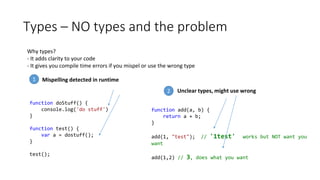
Types – NO types and the problem
Why types?
- It adds clarity to your code
- It gives you compile time errors if you mispel or use the wrong type
function doStuff() {
console.log('do stuff')
}
function test() {
var a = dostuff();
}
test();
Mispelling detected in runtime
function add(a, b) {
return a + b;
}
add(1, "test"); // '1test' works but NOT want you
want
add(1,2) // 3, does what you want
Unclear types, might use wrong
1
2
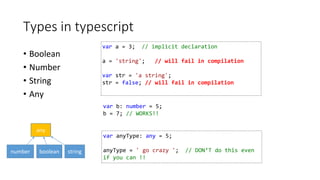
Types in typescript
• Boolean
• Number
• String
• Any
var a = 3; // implicit declaration
a = 'string'; // will fail in compilation
var str = 'a string';
str = false; // will fail in compilation
any
number boolean string
var anyType: any = 5;
anyType = ' go crazy '; // DON‘T do this even
if you can !!
var b: number = 5;
b = 7; // WORKS!!
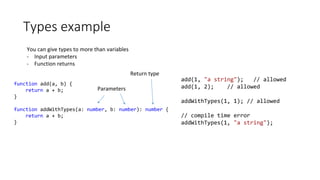
Types example
You can give types to more than variables
- Input parameters
- Function returns
function add(a, b) {
return a + b;
}
function addWithTypes(a: number, b: number): number {
return a + b;
}
add(1, "a string"); // allowed
add(1, 2); // allowed
addWithTypes(1, 1); // allowed
// compile time error
addWithTypes(1, "a string");
Parameters
Return type
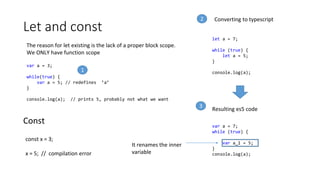
Let and const
The reason for let existing is the lack of a proper block scope.
We ONLY have function scope
var a = 3;
while(true) {
var a = 5; // redefines ’a’
}
console.log(a); // prints 5, probably not what we want
let a = 7;
while (true) {
let a = 5;
}
console.log(a);
Converting to typescript
Resulting es5 code
var a = 7;
while (true) {
var a_1 = 5;
}
console.log(a);
It renames the inner
variable
Const
const x = 3;
x = 5; // compilation error
1
2
3
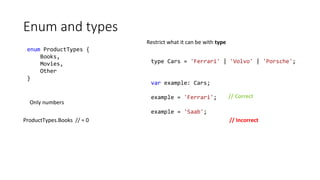
Enum and types
enum ProductTypes {
Books,
Movies,
Other
}
Only numbers
type Cars = 'Ferrari' | 'Volvo' | 'Porsche';
var example: Cars;
example = 'Ferrari';
example = 'Saab';
Restrict what it can be with type
// Correct
// IncorrectProductTypes.Books // = 0
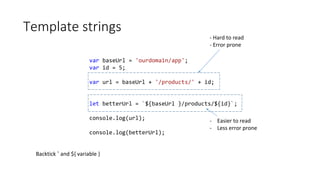
Template strings
var baseUrl = 'ourdomain/app';
var id = 5;
var url = baseUrl + '/products/' + id;
let betterUrl = `${baseUrl }/products/${id}`;
console.log(url);
console.log(betterUrl);
- Hard to read
- Error prone
- Easier to read
- Less error prone
Backtick ` and ${ variable }
Rest operator
function sum(...numbers: Array<number>) {
let amount = 0;
numbers.forEach(function (num) {
amount += num;
});
return amount;
}
sum(1, 2, 3, 4);
sum(1, 2);
An unknown number of arguments all collected in the array
numbers
function sum() {
var numbers = [];
for (var _i = 0; _i < arguments.length; _i++) {
numbers[_i - 0] = arguments[_i];
}
var amount = 0;
numbers.forEach(function (num) {
amount += num;
});
return amount;
}
sum(1, 2, 3, 4);
sum(1, 2);
Uses built in arguments, no surprise there
For Of
What problem does it solve?
Using for- in loops the keys by Object.keys rather than looping the items
var array = [1, 2, 3, 4];
for (item in array) {
console.log(item);
}
Loops out ”0”, ”1”, ”2”
var array = [1, 2, 3, 4, 5],
for( let item of array ) {
console.log(item);
}
Using for-of
var array = [1, 2, 3, 4, 5];
for (var _i = 0, array_1 = array; _i < array_1.length; _i++)
{
var item = array_1[_i];
console.log(item);
}
Converts it to a normal for-loop that DOESN’T loop keys1 2
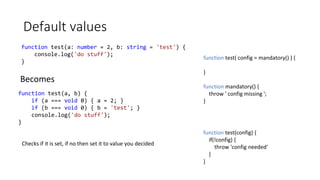
Default values
function test(a: number = 2, b: string = 'test') {
console.log('do stuff');
}
function test(a, b) {
if (a === void 0) { a = 2; }
if (b === void 0) { b = 'test'; }
console.log('do stuff');
}
Becomes
Checks if it is set, if no then set it to value you decided
function test( config = mandatory() ) {
}
function mandatory() {
throw ' config missing ';
}
function test(config) {
if(!config) {
throw 'config needed'
}
}
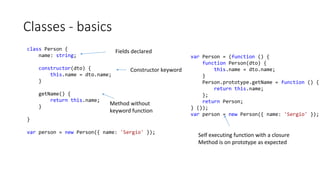
Classes - basics
class Person {
name: string;
constructor(dto) {
this.name = dto.name;
}
getName() {
return this.name;
}
}
var person = new Person({ name: 'Sergio' });
Fields declared
Constructor keyword
Method without
keyword function
var Person = (function () {
function Person(dto) {
this.name = dto.name;
}
Person.prototype.getName = function () {
return this.name;
};
return Person;
} ());
var person = new Person({ name: 'Sergio' });
Self executing function with a closure
Method is on prototype as expected
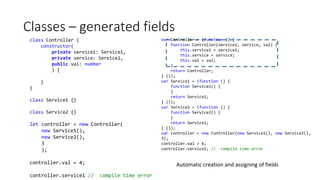
Classes – generated fields
class Controller {
constructor(
private service1: Service1,
private service: Service2,
public val: number
) {
}
}
class Service1 {}
class Service2 {}
let controller = new Controller(
new Service1(),
new Service2(),
3
);
controller.val = 4;
controller.service1 // compile time error
var Controller = (function () {
function Controller(service1, service, val) {
this.service1 = service1;
this.service = service;
this.val = val;
}
return Controller;
} ());
var Service1 = (function () {
function Service1() {
}
return Service1;
} ());
var Service2 = (function () {
function Service2() {
}
return Service2;
} ());
var controller = new Controller(new Service1(), new Service2(),
3);
controller.val = 4;
controller.service1; // compile time error
Automatic creation and assigning of fields
Classes inheritance
class Shape {
constructor(private x: number, private y: number) {
}
move(dx: number, dy: number) { }
}
class Rectangle extends Shape {
constructor(x: number, y: number) {
super(x, y);
}
move(x: number, y: number) {
// move like a rectangle
}
}
var __extends = (this && this.__extends) || function (d, b) {
for (var p in b) if (b.hasOwnProperty(p)) d[p] = b[p];
function __() { this.constructor = d; }
d.prototype = b === null ? Object.create(b) : (__.prototype =
b.prototype, new __());
};
var Shape = (function () {
function Shape(x, y) {
this.x = x;
this.y = y;
}
Shape.prototype.move = function (dx, dy) { };
return Shape;
} ());
var Rectangle = (function (_super) {
__extends(Rectangle, _super);
function Rectangle(x, y) {
_super.call(this, x, y);
}
Rectangle.prototype.move = function (x, y) {
// move like a rectangle
};
return Rectangle;
} (Shape));
- Defines an __extends method
- Rectangle’s prototype equals Shape
- Creates an instance from Shape
- All 1 st level methods in Shape are copied to Rectangle
Call base class constructor as Re
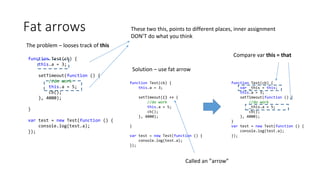
Fat arrows
The problem – looses track of this
function Test(cb) {
this.a = 3;
setTimeout(function () {
//do work
this.a = 5;
cb();
}, 4000);
}
var test = new Test(function () {
console.log(test.a);
});
These two this, points to different places, inner assignment
DON’T do what you think
Solution – use fat arrow
function Test(cb) {
this.a = 3;
setTimeout(() => {
//do work
this.a = 5;
cb();
}, 4000);
}
var test = new Test(function () {
console.log(test.a);
});
function Test(cb) {
var _this = this;
this.a = 3;
setTimeout(function () {
//do work
_this.a = 5;
cb();
}, 4000);
}
var test = new Test(function () {
console.log(test.a);
});
Compare var this = that
Called an ”arrow”
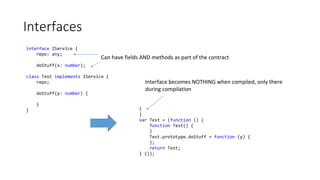
Interfaces
interface IService {
repo: any;
doStuff(x: number);
class Test implements IService {
repo;
doStuff(y: number) {
}
}
Can have fields AND methods as part of the contract
{
}
var Test = (function () {
function Test() {
}
Test.prototype.doStuff = function (y) {
};
return Test;
} ());
Interface becomes NOTHING when compiled, only there
during compilation
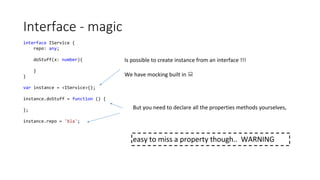
Interface - magic
interface IService {
repo: any;
doStuff(x: number){
}
}
var instance = <IService>{};
instance.doStuff = function () {
};
instance.repo = 'bla';
Is possible to create instance from an interface !!!
We have mocking built in 
But you need to declare all the properties methods yourselves,
easy to miss a property though.. WARNING
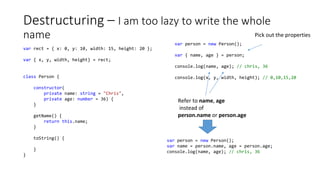
Destructuring – I am too lazy to write the whole
name
var rect = { x: 0, y: 10, width: 15, height: 20 };
var { x, y, width, height} = rect;
class Person {
constructor(
private name: string = "Chris",
private age: number = 36) {
}
getName() {
return this.name;
}
toString() {
}
}
var person = new Person();
var { name, age } = person;
console.log(name, age); // chris, 36
console.log(x, y, width, height); // 0,10,15,20
Pick out the properties
Refer to name, age
instead of
person.name or person.age
var person = new Person();
var name = person.name, age = person.age;
console.log(name, age); // chris, 36
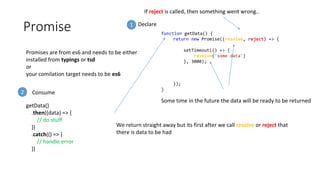
Promise
Promises are from es6 and needs to be either
installed from typings or tsd
or
your comilation target needs to be es6
function getData() {
return new Promise((resolve, reject) => {
setTimeout(() => {
resolve('some data')
}, 3000);
});
}
Some time in the future the data will be ready to be returned
We return straight away but its first after we call resolve or reject that
there is data to be had
If reject is called, then something went wrong..
getData()
.then((data) => {
// do stuff
})
.catch(() => {
// handle error
})
1
Consume2
Declare
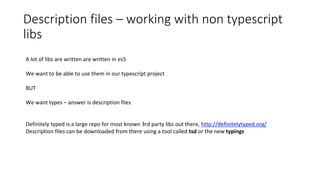
Description files – working with non typescript
libs
A lot of libs are written are written in es5
We want to be able to use them in our typescript project
BUT
We want types – answer is description files
Definitely typed is a large repo for most known 3rd party libs out there, http://definitelytyped.org/
Description files can be downloaded from there using a tool called tsd or the new typings
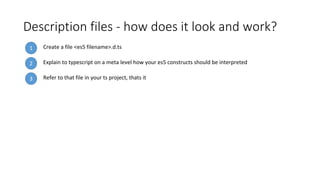
Description files - how does it look and work?
1 Create a file <es5 filename>.d.ts
3 Refer to that file in your ts project, thats it
2 Explain to typescript on a meta level how your es5 constructs should be interpreted
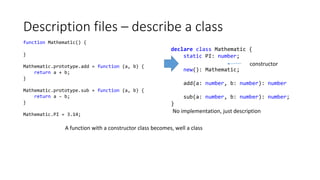
Description files – describe a class
function Mathematic() {
}
Mathematic.prototype.add = function (a, b) {
return a + b;
}
Mathematic.prototype.sub = function (a, b) {
return a - b;
}
Mathematic.PI = 3.14;
declare class Mathematic {
static PI: number;
new(): Mathematic;
add(a: number, b: number): number
sub(a: number, b: number): number;
}
A function with a constructor class becomes, well a class
No implementation, just description
constructor
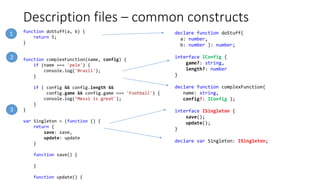
Description files – common constructs
function doStuff(a, b) {
return 5;
}
function complexFunction(name, config) {
if (name === 'pele') {
console.log('Brazil');
}
if ( config && config.length &&
config.game && config.game === 'Football') {
console.log(’Messi is great');
}
}
var Singleton = (function () {
return {
save: save,
update: update
}
function save() {
}
function update() {
declare function doStuff(
a: number,
b: number ): number;
interface IConfig {
game?: string,
length?: number
}
declare function complexFunction(
name: string,
config?: IConfig );
interface ISingleton {
save();
update();
}
declare var Singleton: ISingleton;
1
2
3
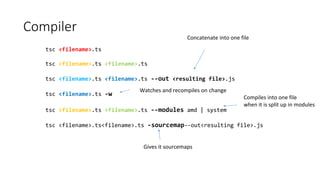
Compiler
tsc <filename>.ts
tsc <filename>.ts <filename>.ts
tsc <filename>.ts <filename>.ts --out <resulting file>.js
tsc <filename>.ts -w
tsc <filename>.ts <filename>.ts --modules amd | system
tsc <filename>.ts<filename>.ts -sourcemap--out<resulting file>.js
Concatenate into one file
Watches and recompiles on change
Compiles into one file
when it is split up in modules
Gives it sourcemaps
tsconfig.json
Instead of typing it all on the command line you can specify it all in json so commandline is only
tsc
{
"compilerOptions" : {
"outFile": "out.js",
"target": "es5",
"removeComments": true,
"sourceMap": true
},
"files": [
"code.ts",
"other.ts"
]
}
Small app, powerful commands
Concatenated output
Sourcemap
All the files to compile
Bigger projects, usually gulp/grunt
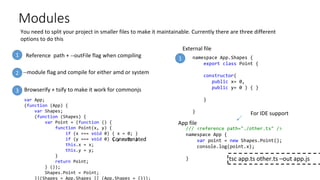
Modules
You need to split your project in smaller files to make it maintainable. Currently there are three different
options to do this
--module flag and compile for either amd or system
Browserify + tsify to make it work for commonjs
1
3
2
1
/// <reference path="./other.ts" />
namespace App {
var point = new Shapes.Point();
console.log(point.x);
}
namespace App.Shapes {
export class Point {
constructor(
public x= 0,
public y= 0 ) { }
}
}
tsc app.ts other.ts –out app.js
var App;
(function (App) {
var Shapes;
(function (Shapes) {
var Point = (function () {
function Point(x, y) {
if (x === void 0) { x = 0; }
if (y === void 0) { y = 0; }
this.x = x;
this.y = y;
}
return Point;
} ());
Shapes.Point = Point;
})(Shapes = App.Shapes || (App.Shapes = {}));
Reference path + --outFile flag when compiling
External file
App file
Concatenated
For IDE support
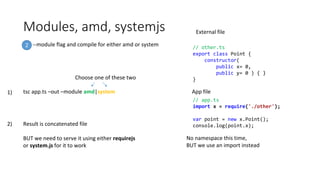
Modules, amd, systemjs
--module flag and compile for either amd or system2
tsc app.ts –out –module amd|system
Choose one of these two
// app.ts
import x = require('./other');
var point = new x.Point();
console.log(point.x);
// other.ts
export class Point {
constructor(
public x= 0,
public y= 0 ) { }
}
External file
App file
No namespace this time,
BUT we use an import instead
Result is concatenated file
BUT we need to serve it using either requirejs
or system.js for it to work
1)
2)
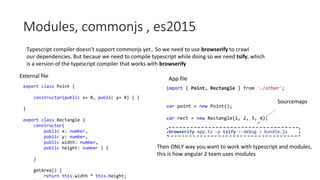
Modules, commonjs , es2015
Typescript compiler doesn’t support commonjs yet.. So we need to use browserify to crawl
our dependencies. But becaue we need to compile typescript while doing so we need tsify, which
is a version of the typescript compiler that works with browserify
export class Point {
constructor(public x= 0, public y= 0) { }
}
export class Rectangle {
constructor(
public x: number,
public y: number,
public width: number,
public height: number ) {
}
getArea() {
return this.width * this.height;
import { Point, Rectangle } from './other';
var point = new Point();
var rect = new Rectangle(1, 2, 3, 4);
browserify app.ts -p tsify --debug > bundle.js
Then ONLY way you want to work with typescript and modules,
this is how angular 2 team uses modules
External file App file
Sourcemaps
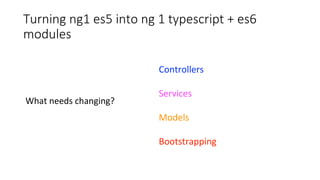
Turning ng1 es5 into ng 1 typescript + es6
modules
Controllers
Services
Models
Bootstrapping
What needs changing?
Controllers
Ctrl.$inject = ['$scope','service'];
function Controller($scope, service){
$scope.prop = service.getValue();
}
angular.module('app').controller('ctrl', Ctrl);
export class Controller {
prop:string;
static $inject = ['service'];
constructor(private service){
this.prop = service.getValue();
}
}
- From constructor function to class
- $scope disappears, $scope properties = class fields
- $inject becomes static field
Services
Service.$inject = ['$http'];
function Service {
return {
getData : getData
}
function getData(){
return $http.get('url');
}
}
angular.module('app').factory('service', Service);
export interface IService {
getData();
}
export class Service {
static $inject = ['$http'];
constructor(private $http) {
}
getData() {
return this.$http.get('url');
}
}
- From constructor function to class
- function becomes method with NO function keyword
- $inject becomes static field
- we add an interface to be clear about what class does ( optional )
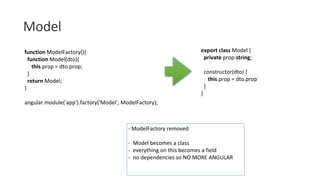
Model
function ModelFactory(){
function Model(dto){
this.prop = dto.prop;
}
return Model;
}
angular.module('app').factory('Model', ModelFactory);
export class Model {
private prop:string;
constructor(dto) {
this.prop = dto.prop
}
}
- ModelFactory removed
- Model becomes a class
- everything on this becomes a field
- no dependencies so NO MORE ANGULAR
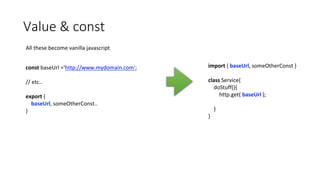
Value & const
All these become vanilla javascript
const baseUrl =‘http://www.mydomain.com';
// etc..
export {
baseUrl, someOtherConst..
}
import { baseUrl, someOtherConst }
class Service{
doStuff(){
http.get( baseUrl );
}
}
Bootstrapping
import { Service } from './service'
import { Controller } from './controller'
Service.$inject = ['$http'];
Controller.$inject = ['service'];
angular
.module('app',[])
.controller('ctrl', Ctrl)
.service('service', Service);
One file to wire up application ( could be split in
smaller files )
import all definitions
wire up application
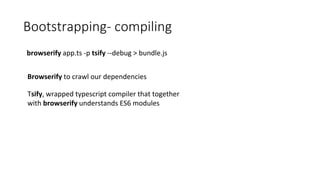
Bootstrapping- compiling
browserify app.ts -p tsify --debug > bundle.js
Browserify to crawl our dependencies
Tsify, wrapped typescript compiler that together
with browserify understands ES6 modules
Thank you

Typescript barcelona

  • 1.
  • 2.
    chris_noring Christoffer Noring, OvoEnergy Google Developer Expert
  • 3.
    Types – NOtypes and the problem Why types? - It adds clarity to your code - It gives you compile time errors if you mispel or use the wrong type function doStuff() { console.log('do stuff') } function test() { var a = dostuff(); } test(); Mispelling detected in runtime function add(a, b) { return a + b; } add(1, "test"); // '1test' works but NOT want you want add(1,2) // 3, does what you want Unclear types, might use wrong 1 2
  • 4.
    Types in typescript •Boolean • Number • String • Any var a = 3; // implicit declaration a = 'string'; // will fail in compilation var str = 'a string'; str = false; // will fail in compilation any number boolean string var anyType: any = 5; anyType = ' go crazy '; // DON‘T do this even if you can !! var b: number = 5; b = 7; // WORKS!!
  • 5.
    Types example You cangive types to more than variables - Input parameters - Function returns function add(a, b) { return a + b; } function addWithTypes(a: number, b: number): number { return a + b; } add(1, "a string"); // allowed add(1, 2); // allowed addWithTypes(1, 1); // allowed // compile time error addWithTypes(1, "a string"); Parameters Return type
  • 6.
    Let and const Thereason for let existing is the lack of a proper block scope. We ONLY have function scope var a = 3; while(true) { var a = 5; // redefines ’a’ } console.log(a); // prints 5, probably not what we want let a = 7; while (true) { let a = 5; } console.log(a); Converting to typescript Resulting es5 code var a = 7; while (true) { var a_1 = 5; } console.log(a); It renames the inner variable Const const x = 3; x = 5; // compilation error 1 2 3
  • 7.
    Enum and types enumProductTypes { Books, Movies, Other } Only numbers type Cars = 'Ferrari' | 'Volvo' | 'Porsche'; var example: Cars; example = 'Ferrari'; example = 'Saab'; Restrict what it can be with type // Correct // IncorrectProductTypes.Books // = 0
  • 8.
    Template strings var baseUrl= 'ourdomain/app'; var id = 5; var url = baseUrl + '/products/' + id; let betterUrl = `${baseUrl }/products/${id}`; console.log(url); console.log(betterUrl); - Hard to read - Error prone - Easier to read - Less error prone Backtick ` and ${ variable }
  • 9.
    Rest operator function sum(...numbers:Array<number>) { let amount = 0; numbers.forEach(function (num) { amount += num; }); return amount; } sum(1, 2, 3, 4); sum(1, 2); An unknown number of arguments all collected in the array numbers function sum() { var numbers = []; for (var _i = 0; _i < arguments.length; _i++) { numbers[_i - 0] = arguments[_i]; } var amount = 0; numbers.forEach(function (num) { amount += num; }); return amount; } sum(1, 2, 3, 4); sum(1, 2); Uses built in arguments, no surprise there
  • 10.
    For Of What problemdoes it solve? Using for- in loops the keys by Object.keys rather than looping the items var array = [1, 2, 3, 4]; for (item in array) { console.log(item); } Loops out ”0”, ”1”, ”2” var array = [1, 2, 3, 4, 5], for( let item of array ) { console.log(item); } Using for-of var array = [1, 2, 3, 4, 5]; for (var _i = 0, array_1 = array; _i < array_1.length; _i++) { var item = array_1[_i]; console.log(item); } Converts it to a normal for-loop that DOESN’T loop keys1 2
  • 11.
    Default values function test(a:number = 2, b: string = 'test') { console.log('do stuff'); } function test(a, b) { if (a === void 0) { a = 2; } if (b === void 0) { b = 'test'; } console.log('do stuff'); } Becomes Checks if it is set, if no then set it to value you decided function test( config = mandatory() ) { } function mandatory() { throw ' config missing '; } function test(config) { if(!config) { throw 'config needed' } }
  • 12.
    Classes - basics classPerson { name: string; constructor(dto) { this.name = dto.name; } getName() { return this.name; } } var person = new Person({ name: 'Sergio' }); Fields declared Constructor keyword Method without keyword function var Person = (function () { function Person(dto) { this.name = dto.name; } Person.prototype.getName = function () { return this.name; }; return Person; } ()); var person = new Person({ name: 'Sergio' }); Self executing function with a closure Method is on prototype as expected
  • 13.
    Classes – generatedfields class Controller { constructor( private service1: Service1, private service: Service2, public val: number ) { } } class Service1 {} class Service2 {} let controller = new Controller( new Service1(), new Service2(), 3 ); controller.val = 4; controller.service1 // compile time error var Controller = (function () { function Controller(service1, service, val) { this.service1 = service1; this.service = service; this.val = val; } return Controller; } ()); var Service1 = (function () { function Service1() { } return Service1; } ()); var Service2 = (function () { function Service2() { } return Service2; } ()); var controller = new Controller(new Service1(), new Service2(), 3); controller.val = 4; controller.service1; // compile time error Automatic creation and assigning of fields
  • 14.
    Classes inheritance class Shape{ constructor(private x: number, private y: number) { } move(dx: number, dy: number) { } } class Rectangle extends Shape { constructor(x: number, y: number) { super(x, y); } move(x: number, y: number) { // move like a rectangle } } var __extends = (this && this.__extends) || function (d, b) { for (var p in b) if (b.hasOwnProperty(p)) d[p] = b[p]; function __() { this.constructor = d; } d.prototype = b === null ? Object.create(b) : (__.prototype = b.prototype, new __()); }; var Shape = (function () { function Shape(x, y) { this.x = x; this.y = y; } Shape.prototype.move = function (dx, dy) { }; return Shape; } ()); var Rectangle = (function (_super) { __extends(Rectangle, _super); function Rectangle(x, y) { _super.call(this, x, y); } Rectangle.prototype.move = function (x, y) { // move like a rectangle }; return Rectangle; } (Shape)); - Defines an __extends method - Rectangle’s prototype equals Shape - Creates an instance from Shape - All 1 st level methods in Shape are copied to Rectangle Call base class constructor as Re
  • 15.
    Fat arrows The problem– looses track of this function Test(cb) { this.a = 3; setTimeout(function () { //do work this.a = 5; cb(); }, 4000); } var test = new Test(function () { console.log(test.a); }); These two this, points to different places, inner assignment DON’T do what you think Solution – use fat arrow function Test(cb) { this.a = 3; setTimeout(() => { //do work this.a = 5; cb(); }, 4000); } var test = new Test(function () { console.log(test.a); }); function Test(cb) { var _this = this; this.a = 3; setTimeout(function () { //do work _this.a = 5; cb(); }, 4000); } var test = new Test(function () { console.log(test.a); }); Compare var this = that Called an ”arrow”
  • 16.
    Interfaces interface IService { repo:any; doStuff(x: number); class Test implements IService { repo; doStuff(y: number) { } } Can have fields AND methods as part of the contract { } var Test = (function () { function Test() { } Test.prototype.doStuff = function (y) { }; return Test; } ()); Interface becomes NOTHING when compiled, only there during compilation
  • 17.
    Interface - magic interfaceIService { repo: any; doStuff(x: number){ } } var instance = <IService>{}; instance.doStuff = function () { }; instance.repo = 'bla'; Is possible to create instance from an interface !!! We have mocking built in  But you need to declare all the properties methods yourselves, easy to miss a property though.. WARNING
  • 18.
    Destructuring – Iam too lazy to write the whole name var rect = { x: 0, y: 10, width: 15, height: 20 }; var { x, y, width, height} = rect; class Person { constructor( private name: string = "Chris", private age: number = 36) { } getName() { return this.name; } toString() { } } var person = new Person(); var { name, age } = person; console.log(name, age); // chris, 36 console.log(x, y, width, height); // 0,10,15,20 Pick out the properties Refer to name, age instead of person.name or person.age var person = new Person(); var name = person.name, age = person.age; console.log(name, age); // chris, 36
  • 19.
    Promise Promises are fromes6 and needs to be either installed from typings or tsd or your comilation target needs to be es6 function getData() { return new Promise((resolve, reject) => { setTimeout(() => { resolve('some data') }, 3000); }); } Some time in the future the data will be ready to be returned We return straight away but its first after we call resolve or reject that there is data to be had If reject is called, then something went wrong.. getData() .then((data) => { // do stuff }) .catch(() => { // handle error }) 1 Consume2 Declare
  • 20.
    Description files –working with non typescript libs A lot of libs are written are written in es5 We want to be able to use them in our typescript project BUT We want types – answer is description files Definitely typed is a large repo for most known 3rd party libs out there, http://definitelytyped.org/ Description files can be downloaded from there using a tool called tsd or the new typings
  • 21.
    Description files -how does it look and work? 1 Create a file <es5 filename>.d.ts 3 Refer to that file in your ts project, thats it 2 Explain to typescript on a meta level how your es5 constructs should be interpreted
  • 22.
    Description files –describe a class function Mathematic() { } Mathematic.prototype.add = function (a, b) { return a + b; } Mathematic.prototype.sub = function (a, b) { return a - b; } Mathematic.PI = 3.14; declare class Mathematic { static PI: number; new(): Mathematic; add(a: number, b: number): number sub(a: number, b: number): number; } A function with a constructor class becomes, well a class No implementation, just description constructor
  • 23.
    Description files –common constructs function doStuff(a, b) { return 5; } function complexFunction(name, config) { if (name === 'pele') { console.log('Brazil'); } if ( config && config.length && config.game && config.game === 'Football') { console.log(’Messi is great'); } } var Singleton = (function () { return { save: save, update: update } function save() { } function update() { declare function doStuff( a: number, b: number ): number; interface IConfig { game?: string, length?: number } declare function complexFunction( name: string, config?: IConfig ); interface ISingleton { save(); update(); } declare var Singleton: ISingleton; 1 2 3
  • 24.
    Compiler tsc <filename>.ts tsc <filename>.ts<filename>.ts tsc <filename>.ts <filename>.ts --out <resulting file>.js tsc <filename>.ts -w tsc <filename>.ts <filename>.ts --modules amd | system tsc <filename>.ts<filename>.ts -sourcemap--out<resulting file>.js Concatenate into one file Watches and recompiles on change Compiles into one file when it is split up in modules Gives it sourcemaps
  • 25.
    tsconfig.json Instead of typingit all on the command line you can specify it all in json so commandline is only tsc { "compilerOptions" : { "outFile": "out.js", "target": "es5", "removeComments": true, "sourceMap": true }, "files": [ "code.ts", "other.ts" ] } Small app, powerful commands Concatenated output Sourcemap All the files to compile Bigger projects, usually gulp/grunt
  • 26.
    Modules You need tosplit your project in smaller files to make it maintainable. Currently there are three different options to do this --module flag and compile for either amd or system Browserify + tsify to make it work for commonjs 1 3 2 1 /// <reference path="./other.ts" /> namespace App { var point = new Shapes.Point(); console.log(point.x); } namespace App.Shapes { export class Point { constructor( public x= 0, public y= 0 ) { } } } tsc app.ts other.ts –out app.js var App; (function (App) { var Shapes; (function (Shapes) { var Point = (function () { function Point(x, y) { if (x === void 0) { x = 0; } if (y === void 0) { y = 0; } this.x = x; this.y = y; } return Point; } ()); Shapes.Point = Point; })(Shapes = App.Shapes || (App.Shapes = {})); Reference path + --outFile flag when compiling External file App file Concatenated For IDE support
  • 27.
    Modules, amd, systemjs --moduleflag and compile for either amd or system2 tsc app.ts –out –module amd|system Choose one of these two // app.ts import x = require('./other'); var point = new x.Point(); console.log(point.x); // other.ts export class Point { constructor( public x= 0, public y= 0 ) { } } External file App file No namespace this time, BUT we use an import instead Result is concatenated file BUT we need to serve it using either requirejs or system.js for it to work 1) 2)
  • 28.
    Modules, commonjs ,es2015 Typescript compiler doesn’t support commonjs yet.. So we need to use browserify to crawl our dependencies. But becaue we need to compile typescript while doing so we need tsify, which is a version of the typescript compiler that works with browserify export class Point { constructor(public x= 0, public y= 0) { } } export class Rectangle { constructor( public x: number, public y: number, public width: number, public height: number ) { } getArea() { return this.width * this.height; import { Point, Rectangle } from './other'; var point = new Point(); var rect = new Rectangle(1, 2, 3, 4); browserify app.ts -p tsify --debug > bundle.js Then ONLY way you want to work with typescript and modules, this is how angular 2 team uses modules External file App file Sourcemaps
  • 29.
    Turning ng1 es5into ng 1 typescript + es6 modules Controllers Services Models Bootstrapping What needs changing?
  • 30.
    Controllers Ctrl.$inject = ['$scope','service']; functionController($scope, service){ $scope.prop = service.getValue(); } angular.module('app').controller('ctrl', Ctrl); export class Controller { prop:string; static $inject = ['service']; constructor(private service){ this.prop = service.getValue(); } } - From constructor function to class - $scope disappears, $scope properties = class fields - $inject becomes static field
  • 31.
    Services Service.$inject = ['$http']; functionService { return { getData : getData } function getData(){ return $http.get('url'); } } angular.module('app').factory('service', Service); export interface IService { getData(); } export class Service { static $inject = ['$http']; constructor(private $http) { } getData() { return this.$http.get('url'); } } - From constructor function to class - function becomes method with NO function keyword - $inject becomes static field - we add an interface to be clear about what class does ( optional )
  • 32.
    Model function ModelFactory(){ function Model(dto){ this.prop= dto.prop; } return Model; } angular.module('app').factory('Model', ModelFactory); export class Model { private prop:string; constructor(dto) { this.prop = dto.prop } } - ModelFactory removed - Model becomes a class - everything on this becomes a field - no dependencies so NO MORE ANGULAR
  • 33.
    Value & const Allthese become vanilla javascript const baseUrl =‘http://www.mydomain.com'; // etc.. export { baseUrl, someOtherConst.. } import { baseUrl, someOtherConst } class Service{ doStuff(){ http.get( baseUrl ); } }
  • 34.
    Bootstrapping import { Service} from './service' import { Controller } from './controller' Service.$inject = ['$http']; Controller.$inject = ['service']; angular .module('app',[]) .controller('ctrl', Ctrl) .service('service', Service); One file to wire up application ( could be split in smaller files ) import all definitions wire up application
  • 35.
    Bootstrapping- compiling browserify app.ts-p tsify --debug > bundle.js Browserify to crawl our dependencies Tsify, wrapped typescript compiler that together with browserify understands ES6 modules
  • 36.