Svelte
Chris Noring
@chris_noring
Cloud Advocate at Microsoft
WHY
• Less cruft/ boilerplate
• It’s fast, no Virtual DOM
• No script tag, Svelte bundles stand-alone components, without including a
framework script as a dependency - Svelte is a compiler, it’s only framework
during the build process
• Svelte can therefore be used to
• Swap out individual components
• Replace an entire app, up to you
• It works with the standard rather than trying to invent it. Svelte looks and feels
like just working with HTML, CSS and JS
WHAT
• One component per file
• Styles scoped by default
• It’s just HTML, CSS, JS
• Powerful features like expressive directives. Usual suspects like
Bindings, ability to
• watch changes,
• Input props,
• Events etc.
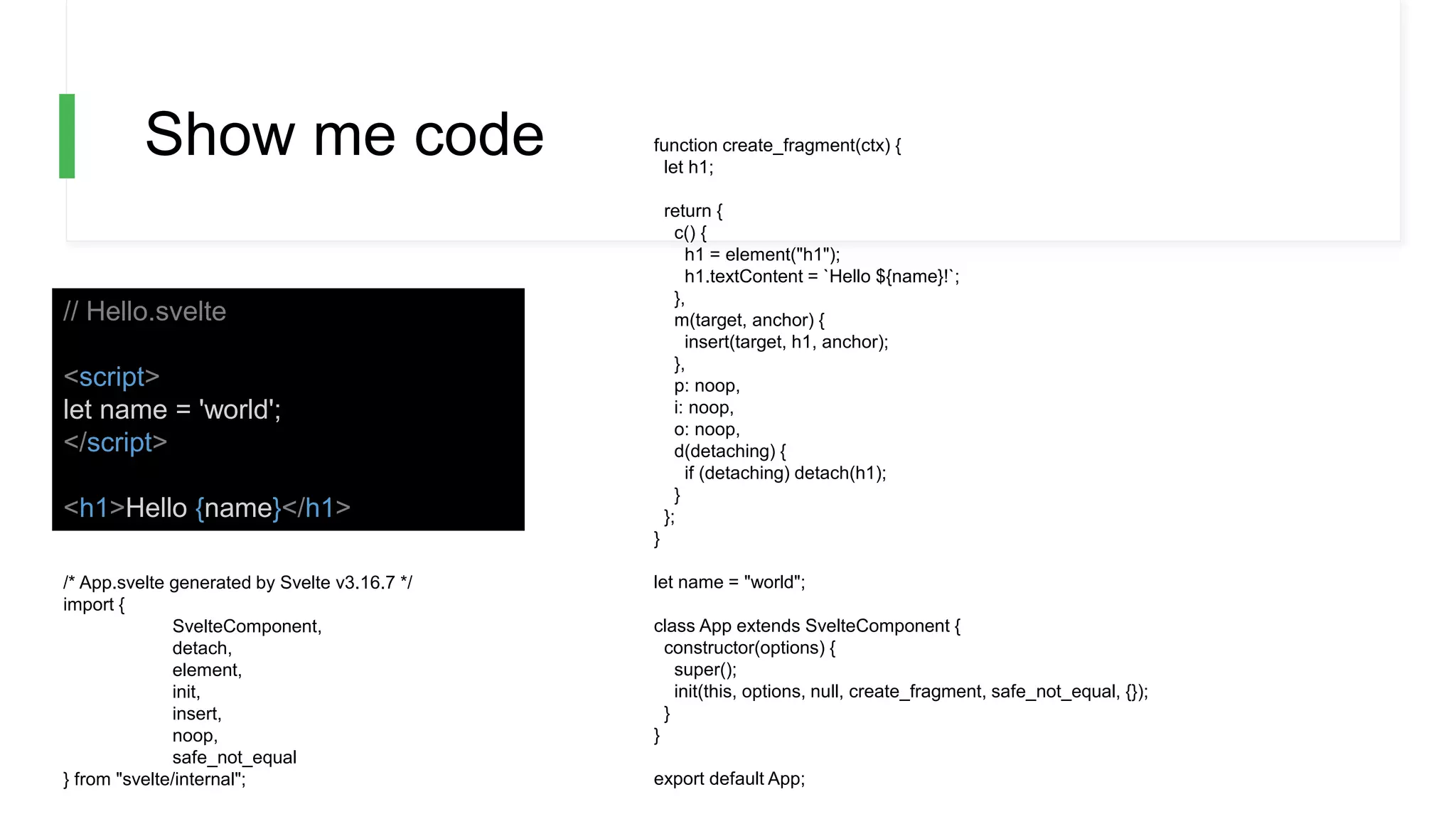
Show me code
// Hello.svelte
<script>
let name = 'world';
</script>
<h1>Hello {name}</h1>
/* App.svelte generated by Svelte v3.16.7 */
import {
SvelteComponent,
detach,
element,
init,
insert,
noop,
safe_not_equal
} from "svelte/internal";
function create_fragment(ctx) {
let h1;
return {
c() {
h1 = element("h1");
h1.textContent = `Hello ${name}!`;
},
m(target, anchor) {
insert(target, h1, anchor);
},
p: noop,
i: noop,
o: noop,
d(detaching) {
if (detaching) detach(h1);
}
};
}
let name = "world";
class App extends SvelteComponent {
constructor(options) {
super();
init(this, options, null, create_fragment, safe_not_equal, {});
}
}
export default App;
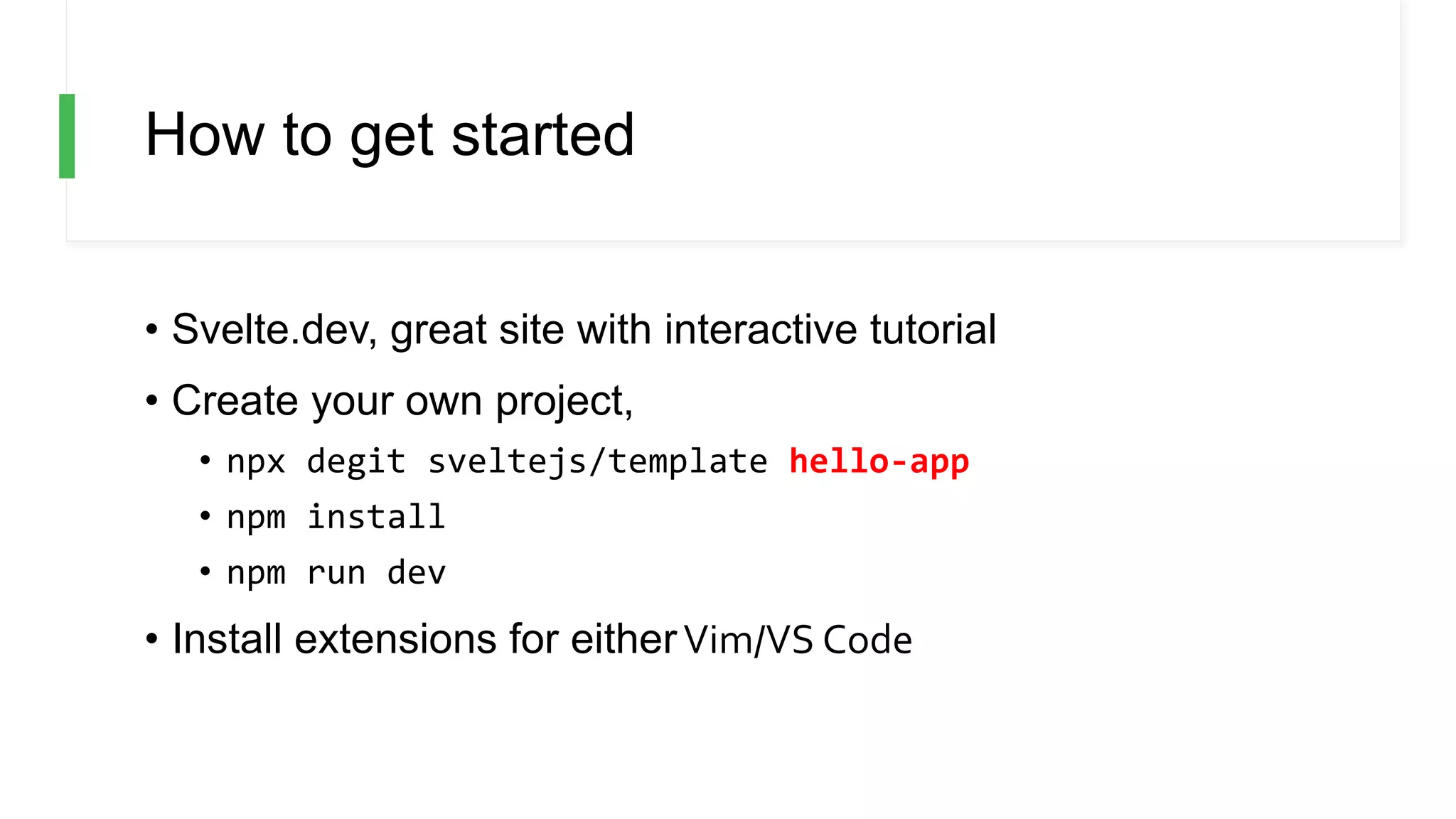
How to get started
• Svelte.dev, great site with interactive tutorial
• Create your own project,
• npx degit sveltejs/template hello-app
• npm install
• npm run dev
• Install extensions for eitherVim/VS Code
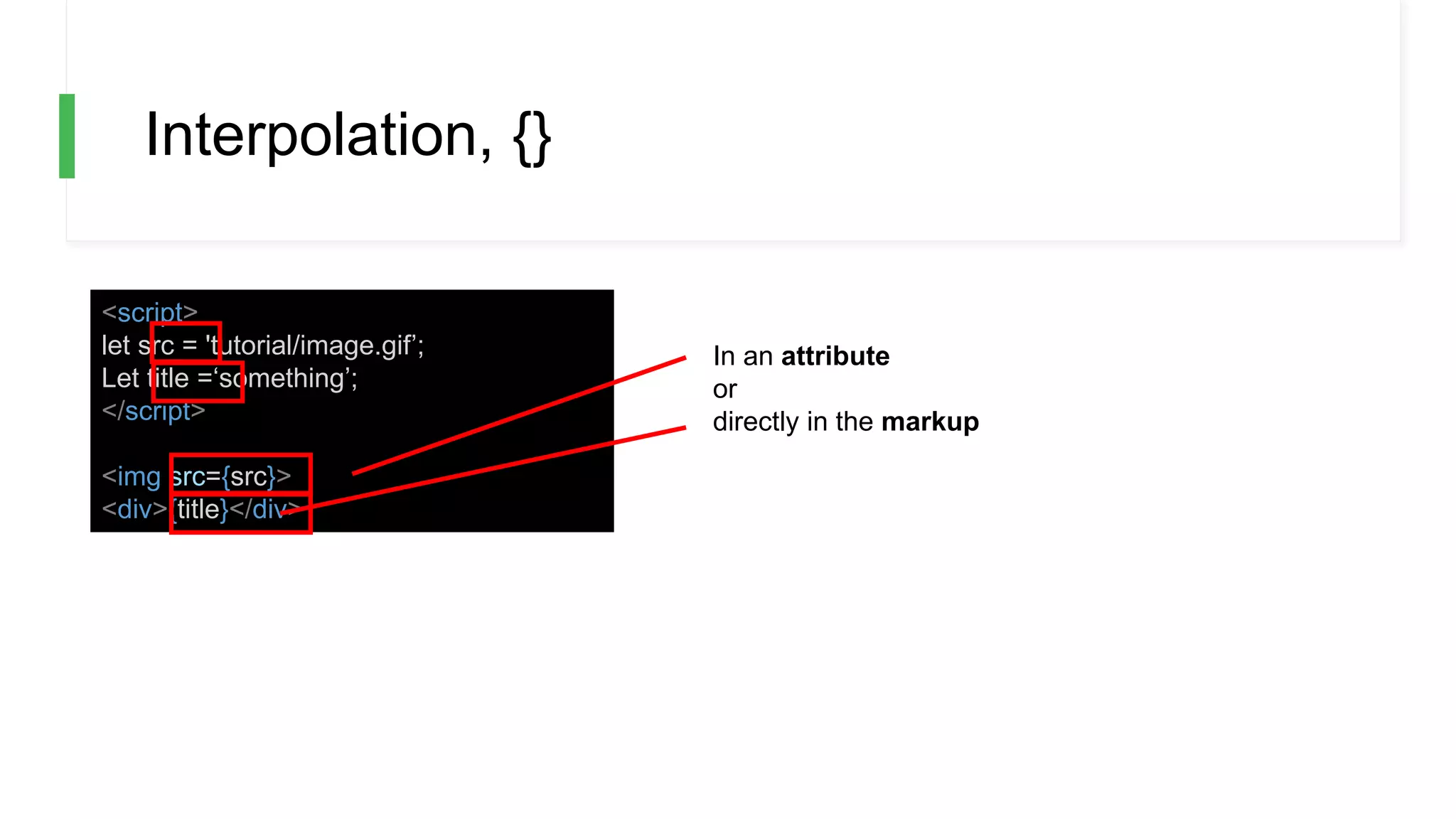
Interpolation, {}
<script>
let src = 'tutorial/image.gif’;
Let title =‘something’;
</script>
<img src={src}>
<div>{title}</div>
In an attribute
or
directly in the markup
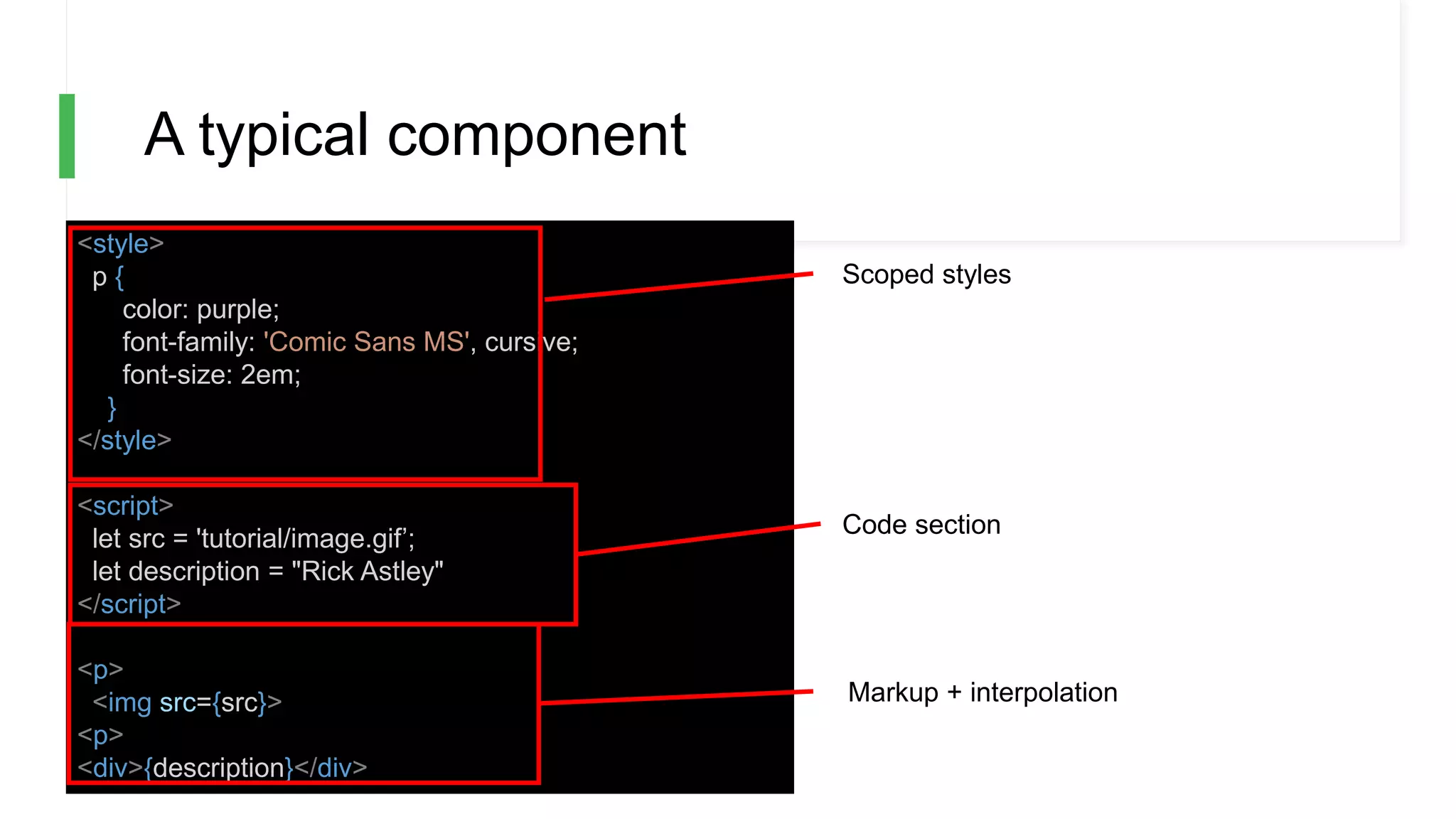
A typical component
<style>
p {
color: purple;
font-family: 'Comic Sans MS', cursive;
font-size: 2em;
}
</style>
<script>
let src = 'tutorial/image.gif’;
let description = "Rick Astley"
</script>
<p>
<img src={src}>
<p>
<div>{description}</div>
Scoped styles
Code section
Markup + interpolation
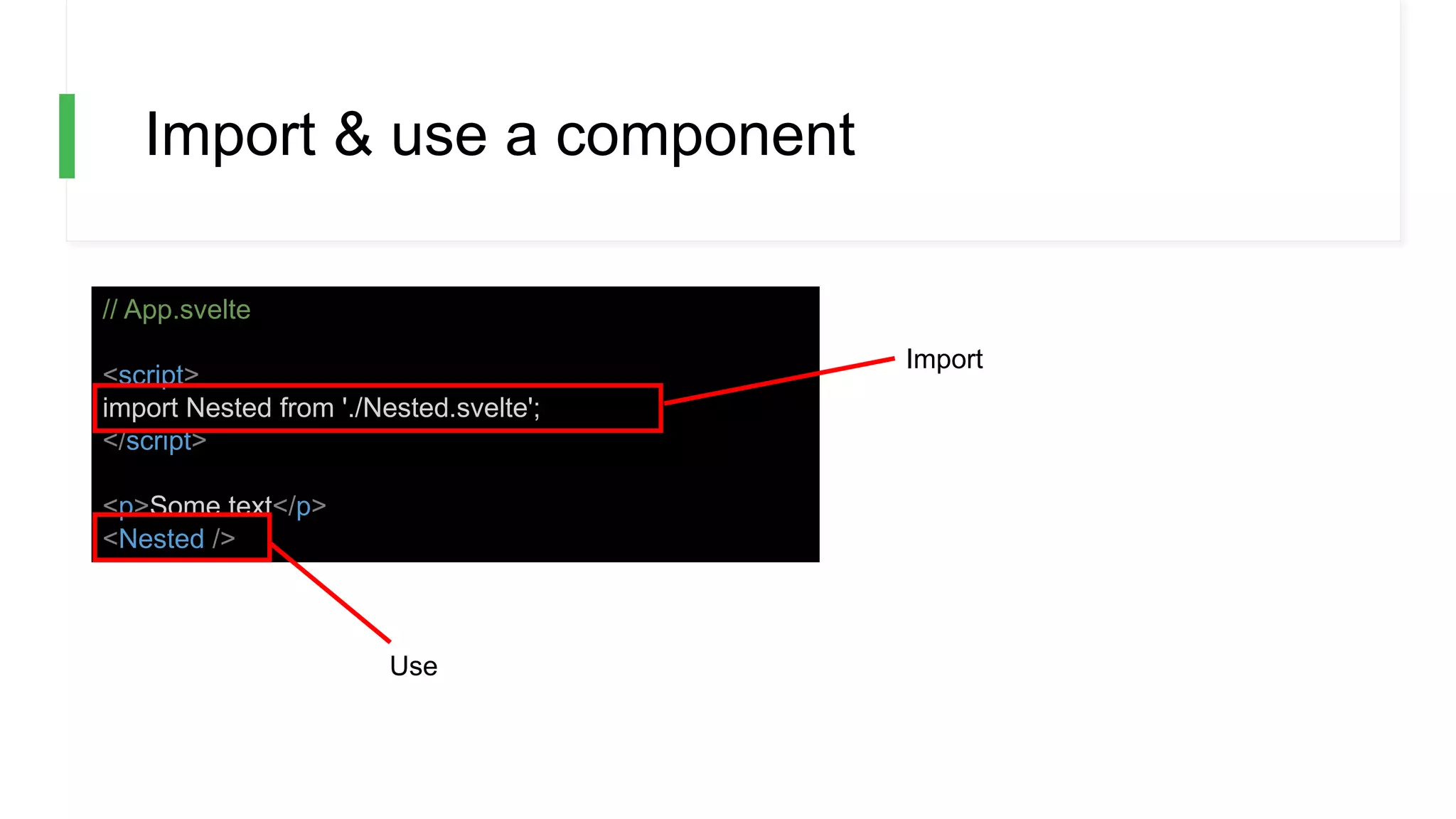
Import & use a component
// App.svelte
<script>
import Nested from './Nested.svelte';
</script>
<p>Some text</p>
<Nested />
Import
Use
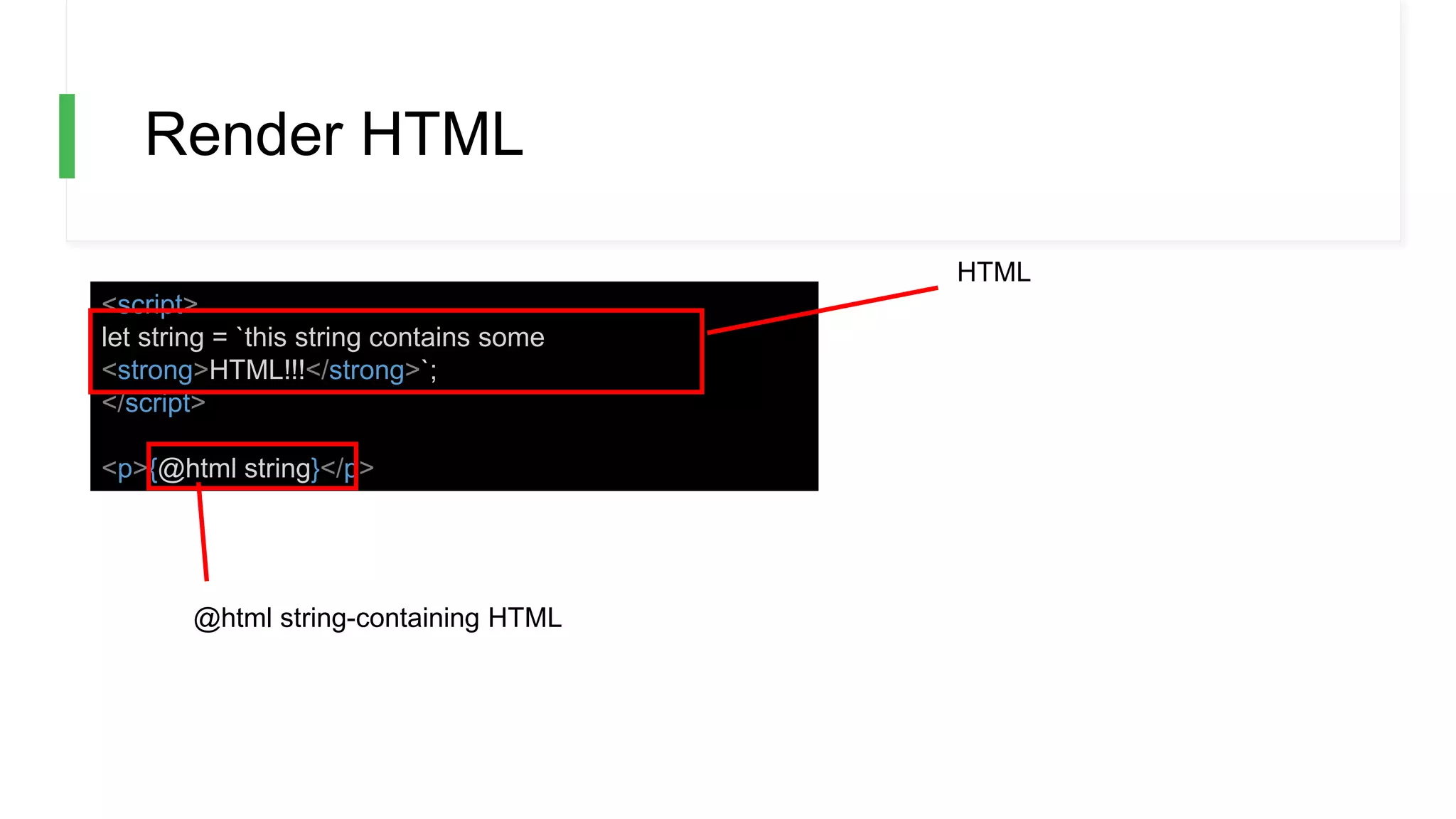
Render HTML
<script>
let string = `this string contains some
<strong>HTML!!!</strong>`;
</script>
<p>{@html string}</p>
@html string-containing HTML
HTML
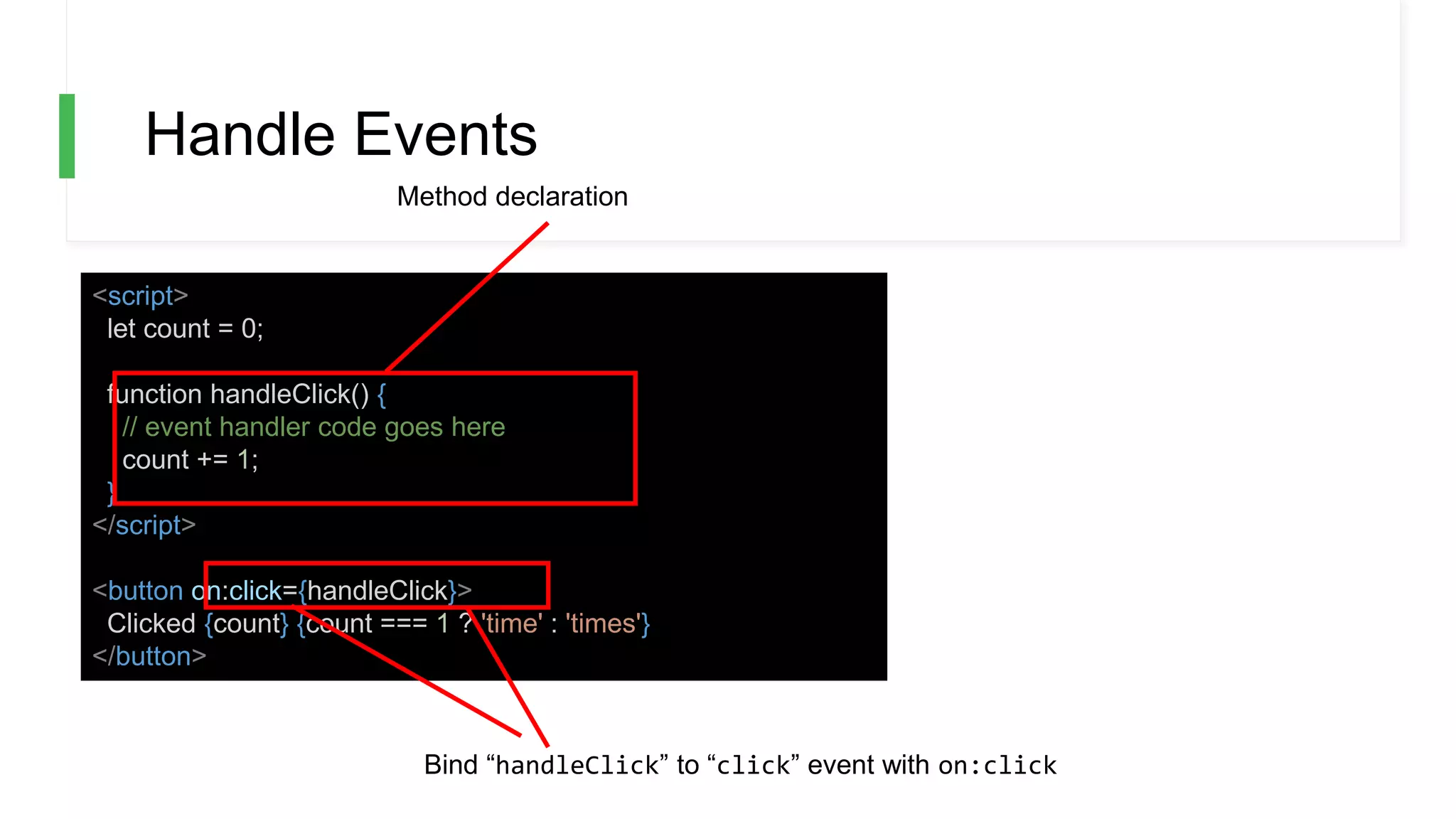
Handle Events
<script>
let count = 0;
function handleClick() {
// event handler code goes here
count += 1;
}
</script>
<button on:click={handleClick}>
Clicked {count} {count === 1 ? 'time' : 'times'}
</button>
Method declaration
Bind “handleClick” to “click” event with on:click
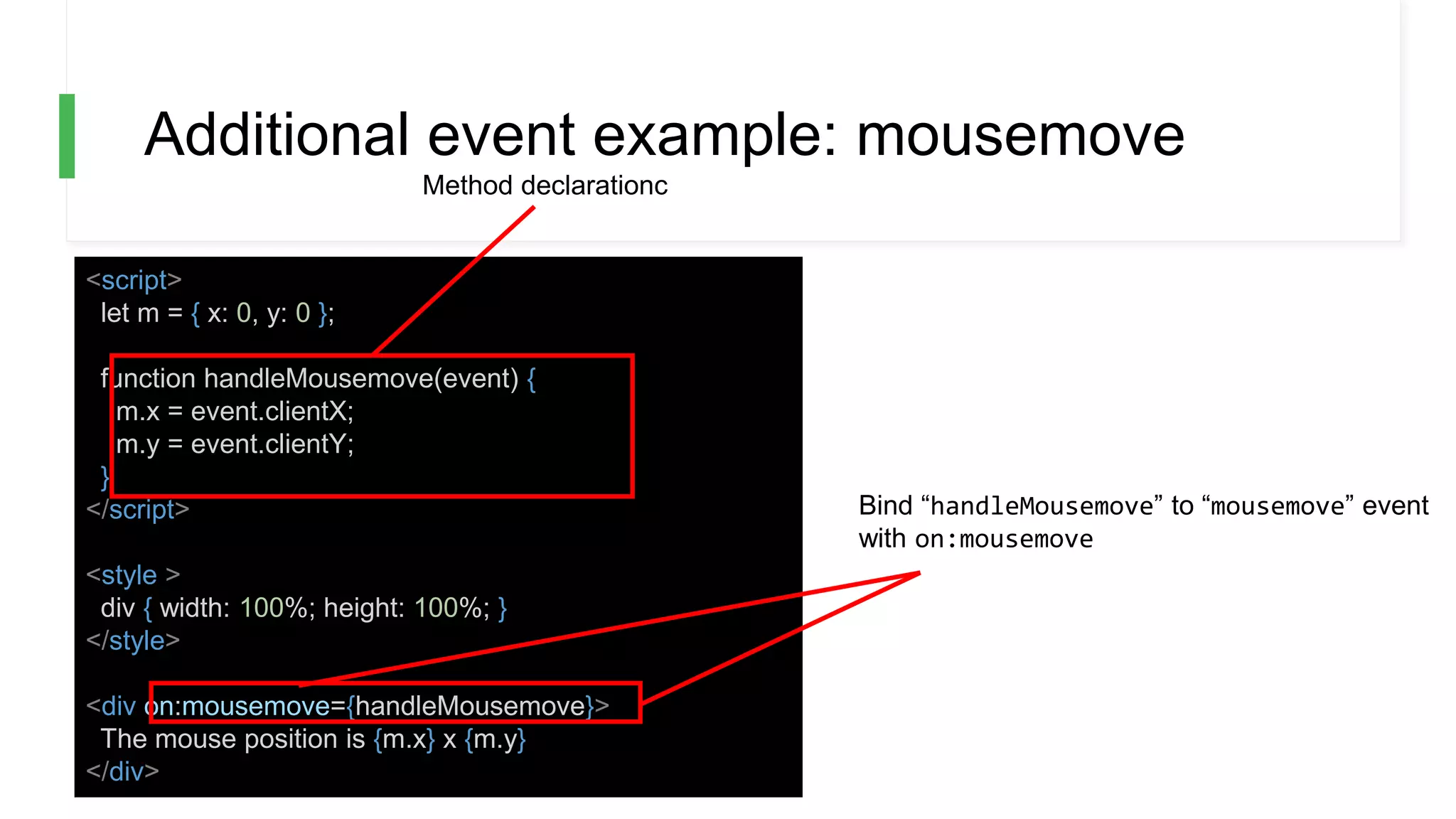
Additional event example: mousemove
<script>
let m = { x: 0, y: 0 };
function handleMousemove(event) {
m.x = event.clientX;
m.y = event.clientY;
}
</script>
<style >
div { width: 100%; height: 100%; }
</style>
<div on:mousemove={handleMousemove}>
The mouse position is {m.x} x {m.y}
</div>
Bind “handleMousemove” to “mousemove” event
with on:mousemove
Method declarationc
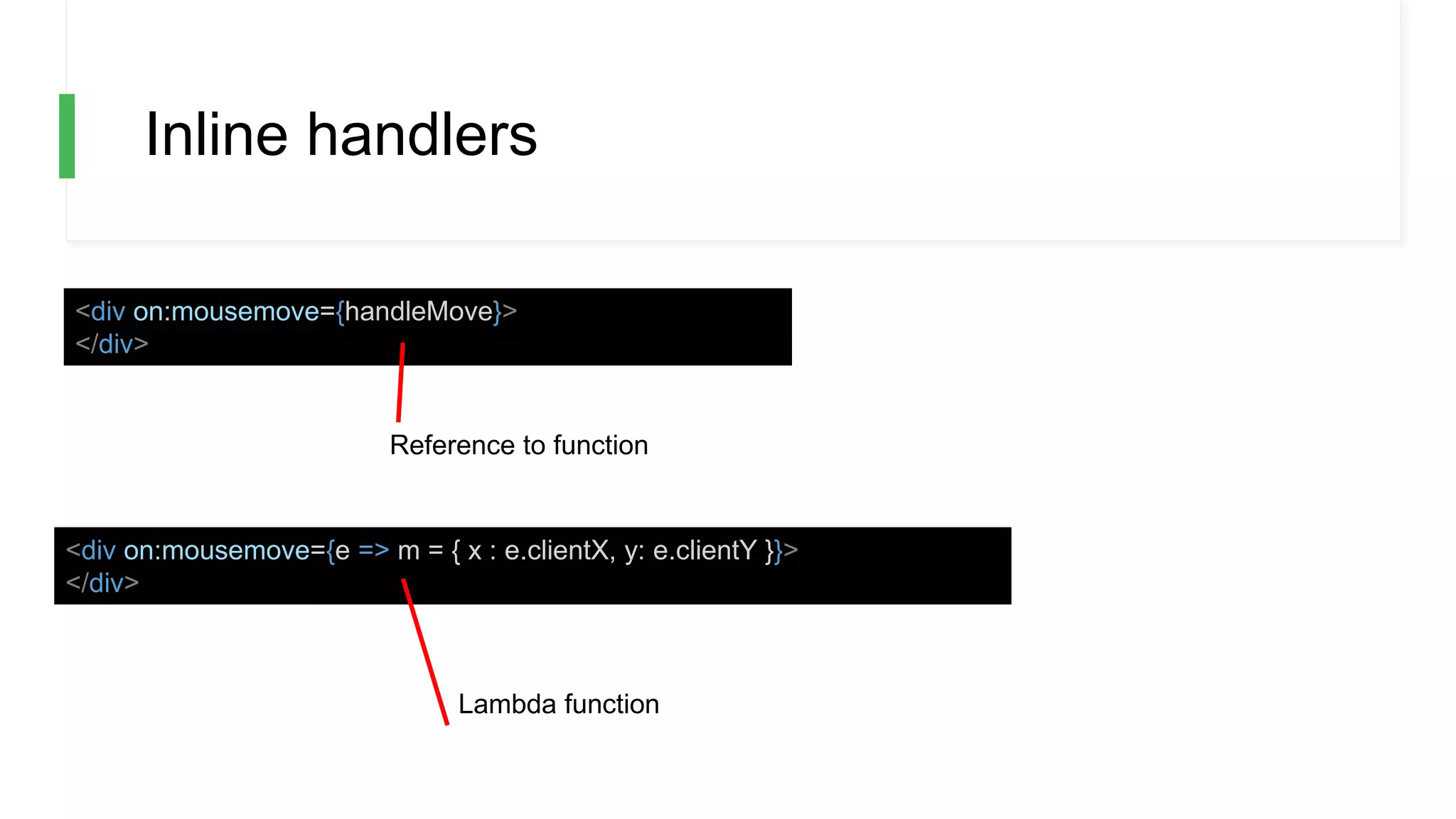
Inline handlers
<div on:mousemove={handleMove}>
</div>
<div on:mousemove={e => m = { x : e.clientX, y: e.clientY }}>
</div>
Lambda function
Reference to function
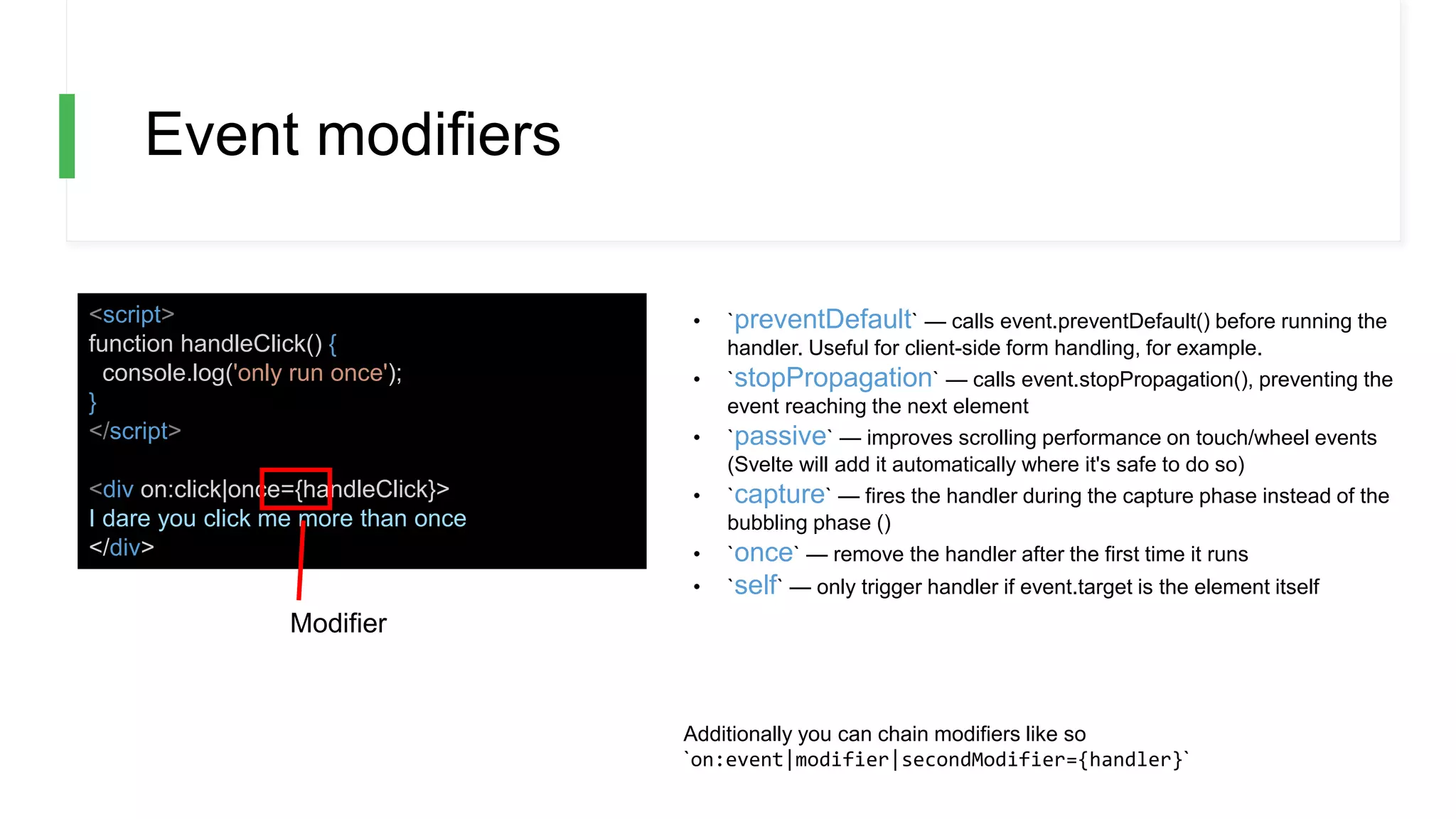
Event modifiers
<script>
function handleClick() {
console.log('only run once');
}
</script>
<div on:click|once={handleClick}>
I dare you click me more than once
</div>
• `preventDefault` — calls event.preventDefault() before running the
handler. Useful for client-side form handling, for example.
• `stopPropagation` — calls event.stopPropagation(), preventing the
event reaching the next element
• `passive` — improves scrolling performance on touch/wheel events
(Svelte will add it automatically where it's safe to do so)
• `capture` — fires the handler during the capture phase instead of the
bubbling phase ()
• `once` — remove the handler after the first time it runs
• `self` — only trigger handler if event.target is the element itself
Additionally you can chain modifiers like so
`on:event|modifier|secondModifier={handler}`
Modifier
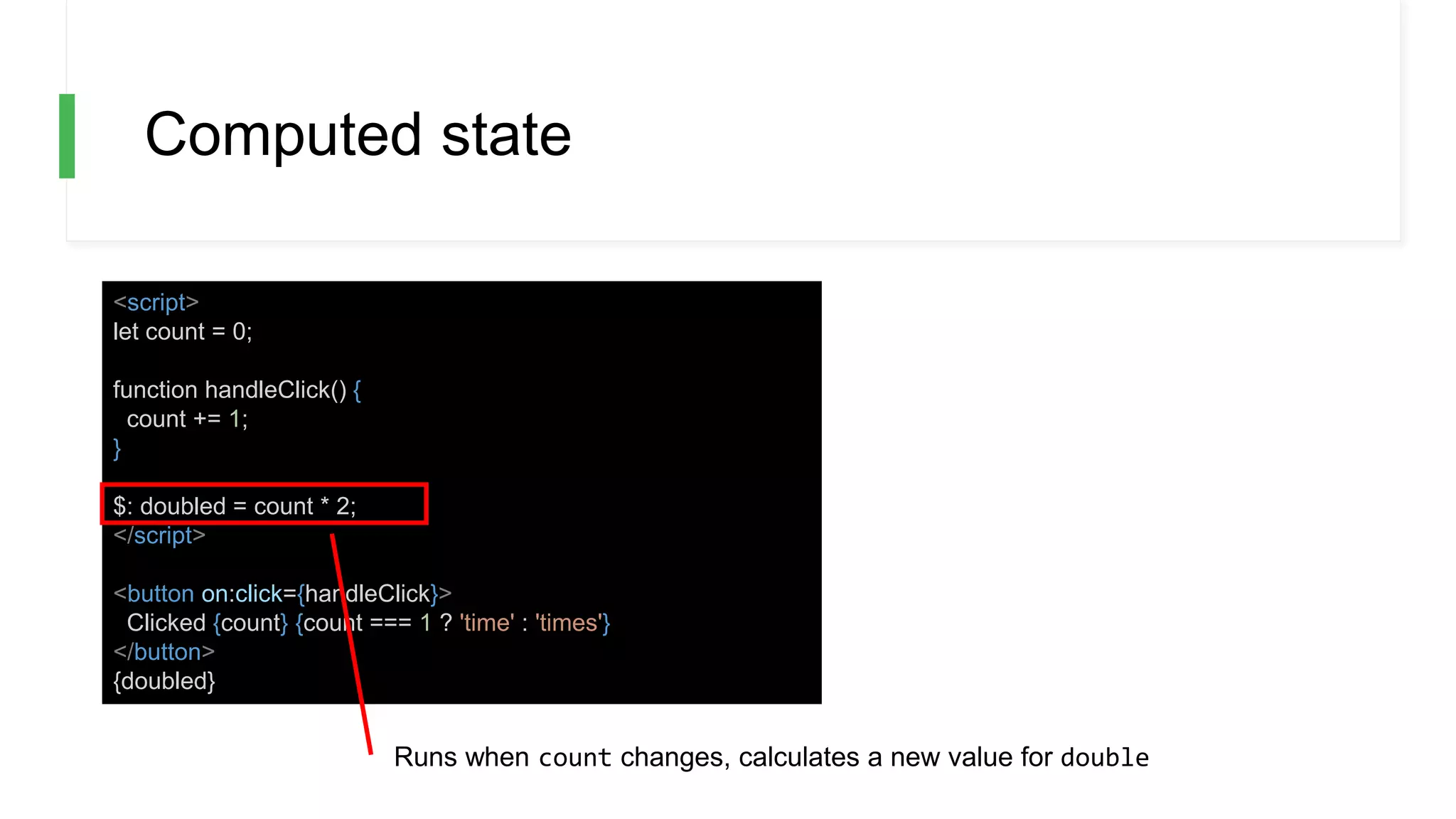
Computed state
<script>
let count = 0;
function handleClick() {
count += 1;
}
$: doubled = count * 2;
</script>
<button on:click={handleClick}>
Clicked {count} {count === 1 ? 'time' : 'times'}
</button>
{doubled}
Runs when count changes, calculates a new value for double
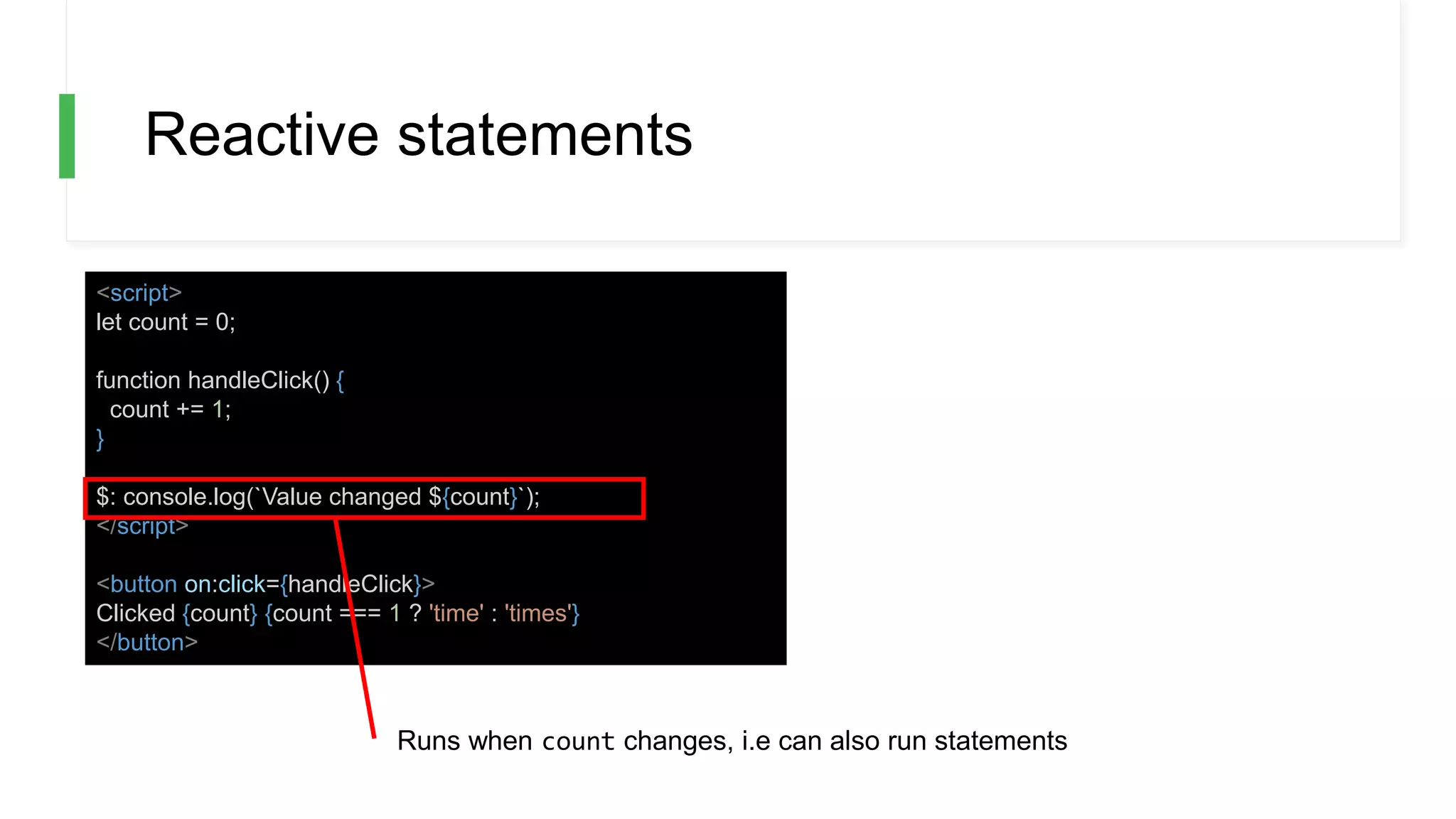
Reactive statements
<script>
let count = 0;
function handleClick() {
count += 1;
}
$: console.log(`Value changed ${count}`);
</script>
<button on:click={handleClick}>
Clicked {count} {count === 1 ? 'time' : 'times'}
</button>
Runs when count changes, i.e can also run statements
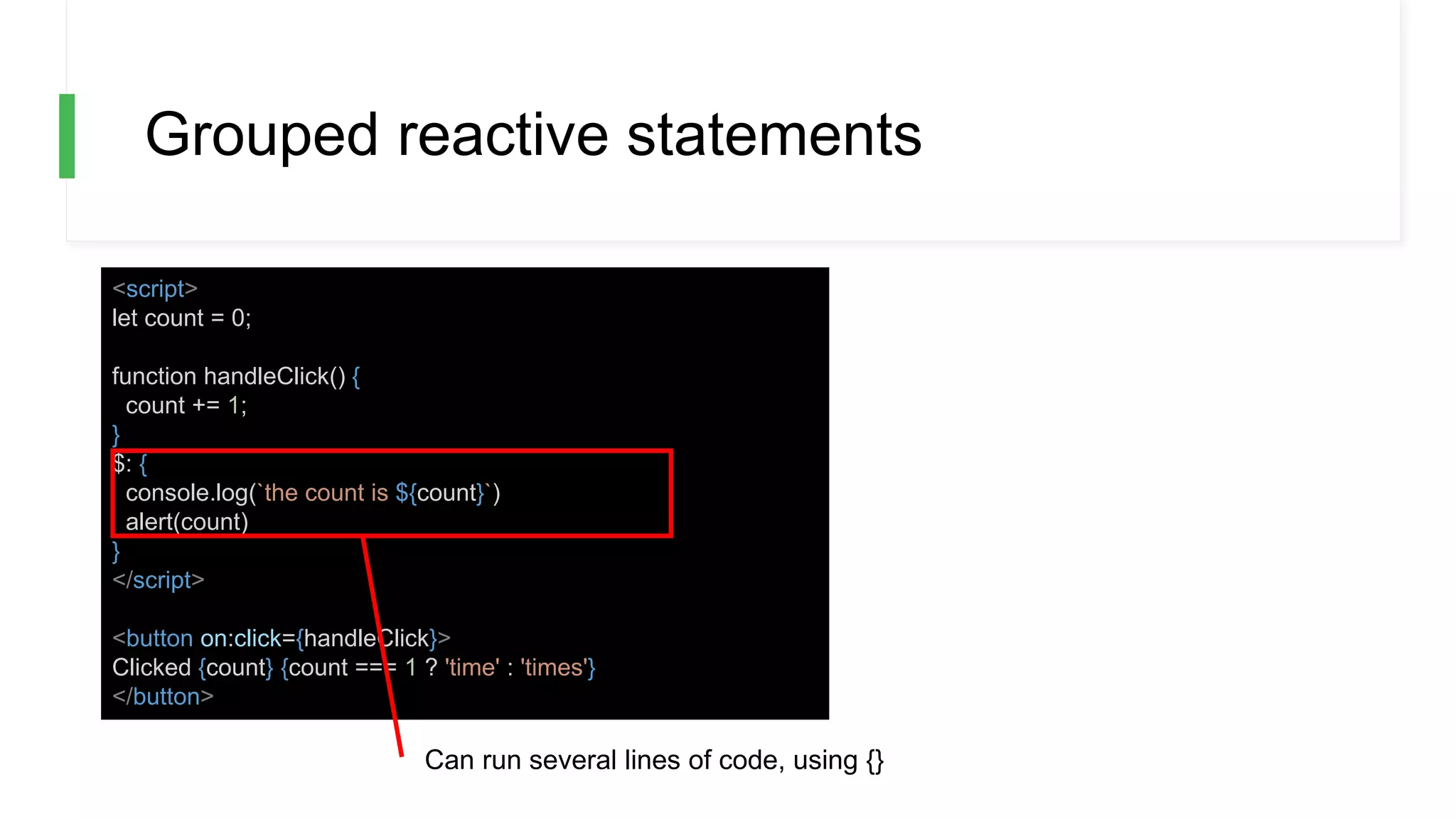
Grouped reactive statements
<script>
let count = 0;
function handleClick() {
count += 1;
}
$: {
console.log(`the count is ${count}`)
alert(count)
}
</script>
<button on:click={handleClick}>
Clicked {count} {count === 1 ? 'time' : 'times'}
</button>
Can run several lines of code, using {}
Reactivity and assignments
Svelte triggers on assignments. This means that the
following code WONT update the UI:
array.push(1)
but this will:
array = [...array, 1]
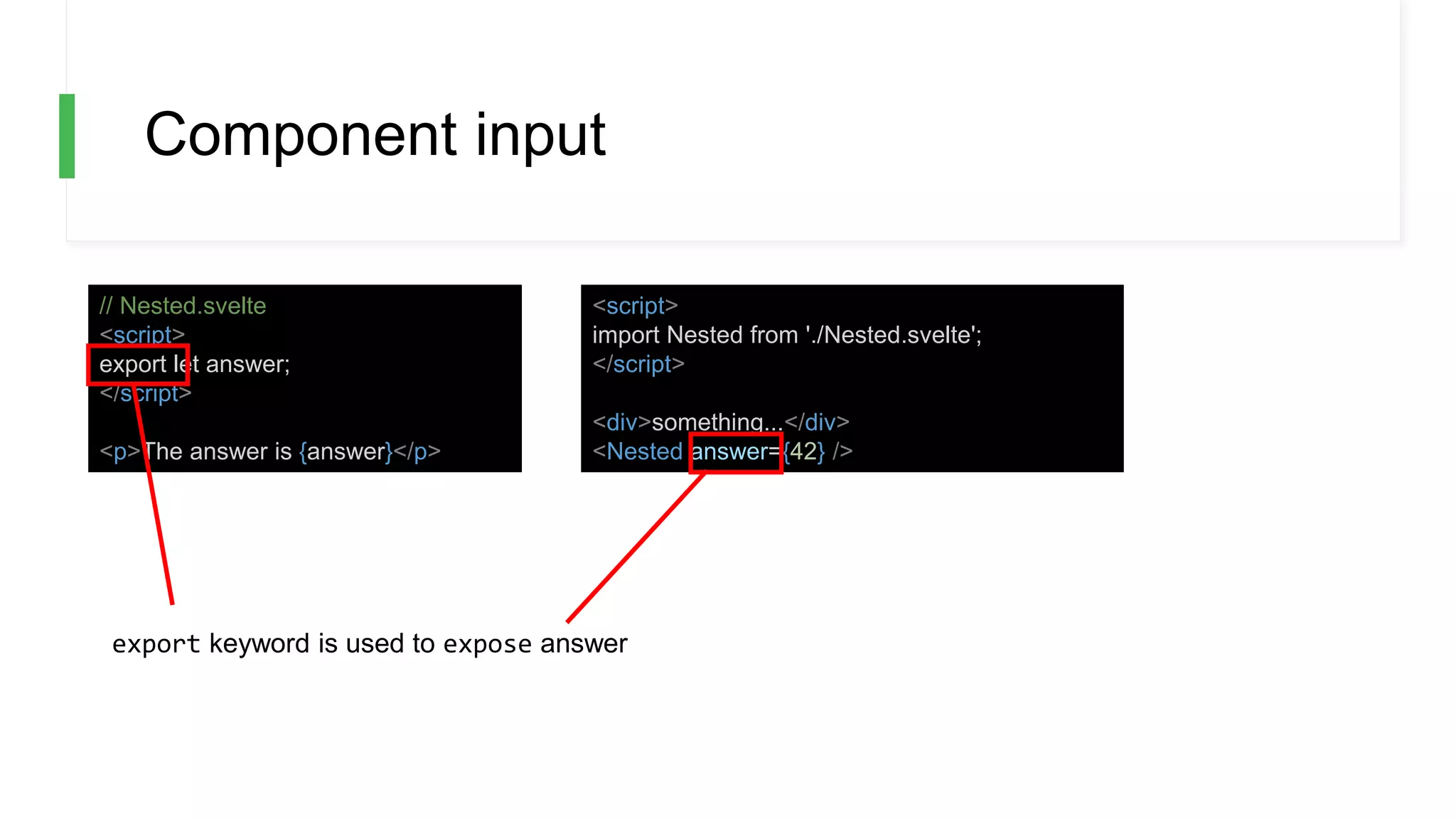
Component input
// Nested.svelte
<script>
export let answer;
</script>
<p>The answer is {answer}</p>
<script>
import Nested from './Nested.svelte';
</script>
<div>something...</div>
<Nested answer={42} />
export keyword is used to expose answer
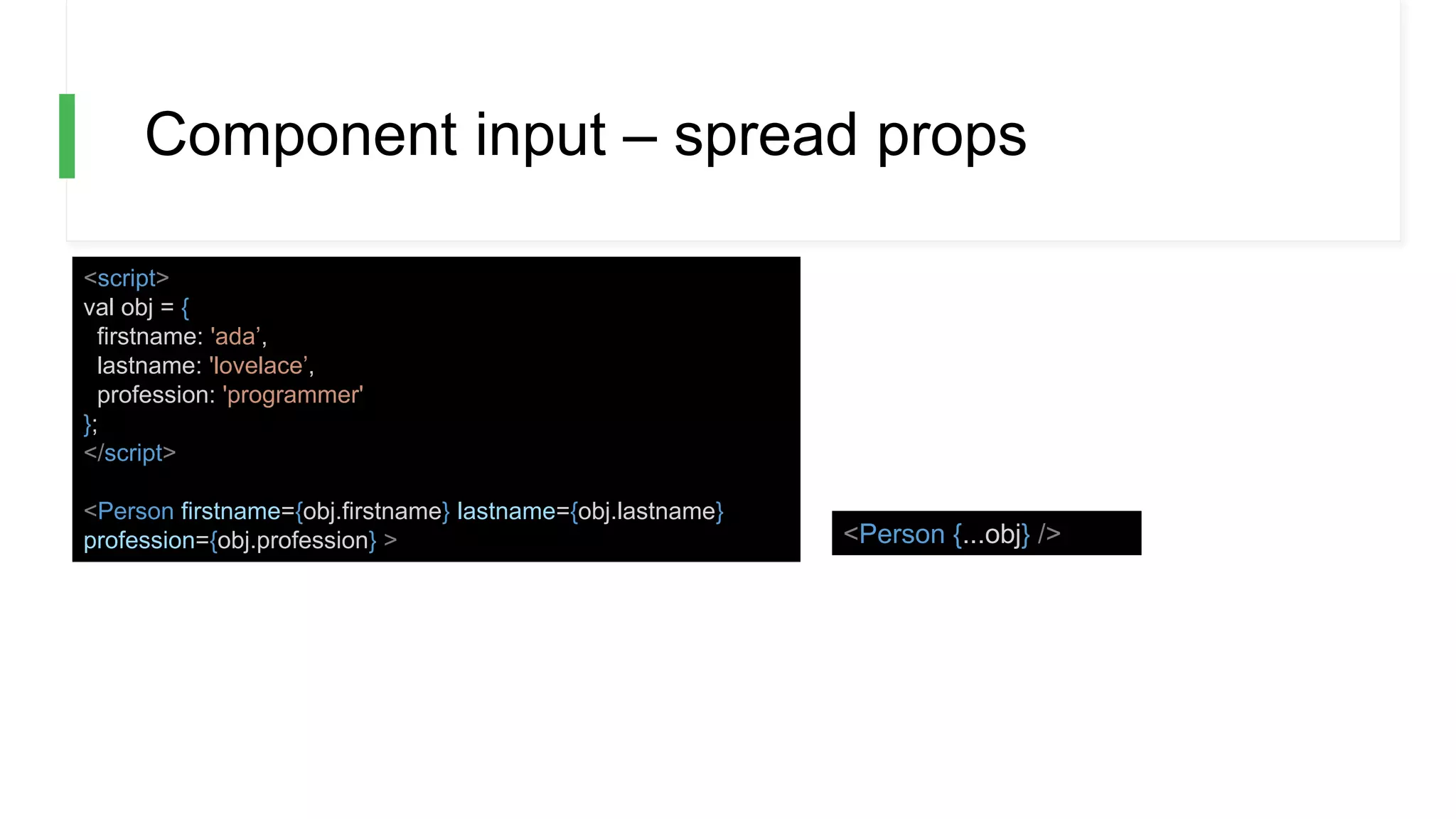
Component input – spread props
<script>
val obj = {
firstname: 'ada’,
lastname: 'lovelace’,
profession: 'programmer'
};
</script>
<Person firstname={obj.firstname} lastname={obj.lastname}
profession={obj.profession} > <Person {...obj} />
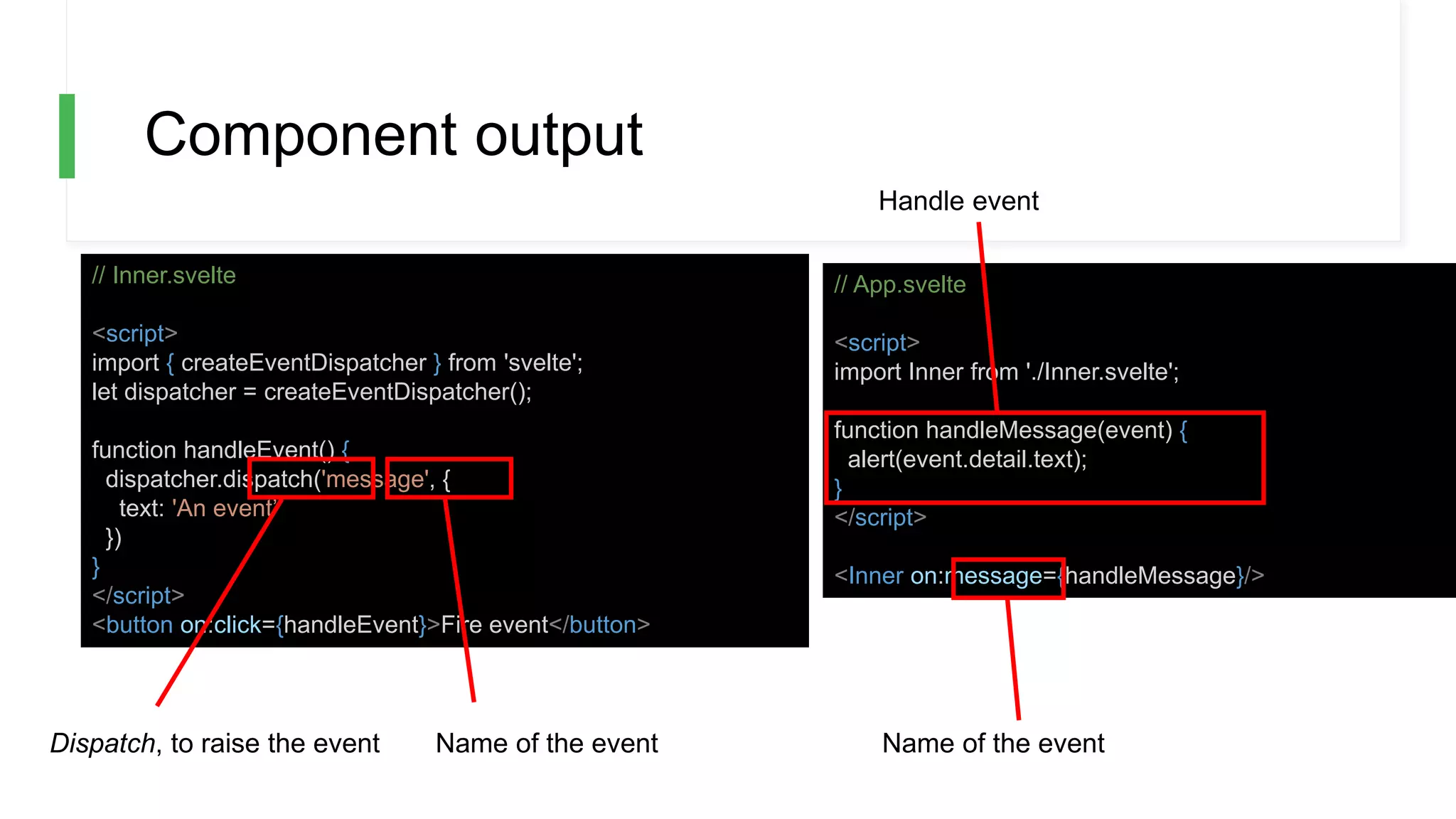
Component output
// Inner.svelte
<script>
import { createEventDispatcher } from 'svelte';
let dispatcher = createEventDispatcher();
function handleEvent() {
dispatcher.dispatch('message', {
text: 'An event’
})
}
</script>
<button on:click={handleEvent}>Fire event</button>
// App.svelte
<script>
import Inner from './Inner.svelte';
function handleMessage(event) {
alert(event.detail.text);
}
</script>
<Inner on:message={handleMessage}/>
Dispatch, to raise the event Name of the event Name of the event
Handle event
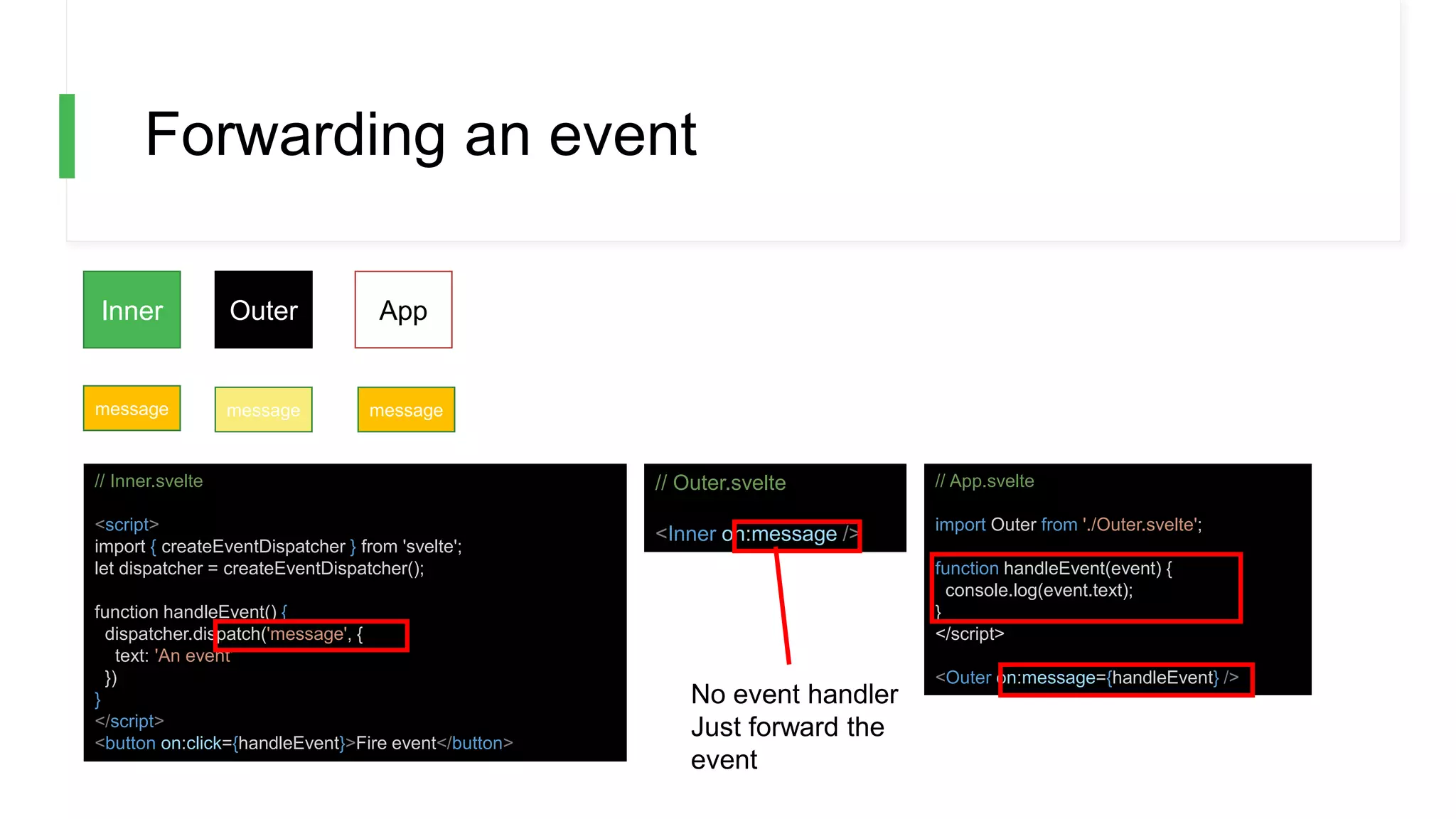
Forwarding an event
Inner Outer App
message messagemessage
// Inner.svelte
<script>
import { createEventDispatcher } from 'svelte';
let dispatcher = createEventDispatcher();
function handleEvent() {
dispatcher.dispatch('message', {
text: 'An event’
})
}
</script>
<button on:click={handleEvent}>Fire event</button>
// Outer.svelte
<Inner on:message />
// App.svelte
import Outer from './Outer.svelte';
function handleEvent(event) {
console.log(event.text);
}
</script>
<Outer on:message={handleEvent} />
No event handler
Just forward the
event
Directives
• IF ELSE, IF ELSE-IF ELSE
• FOR
• ASYNC/AWAIT
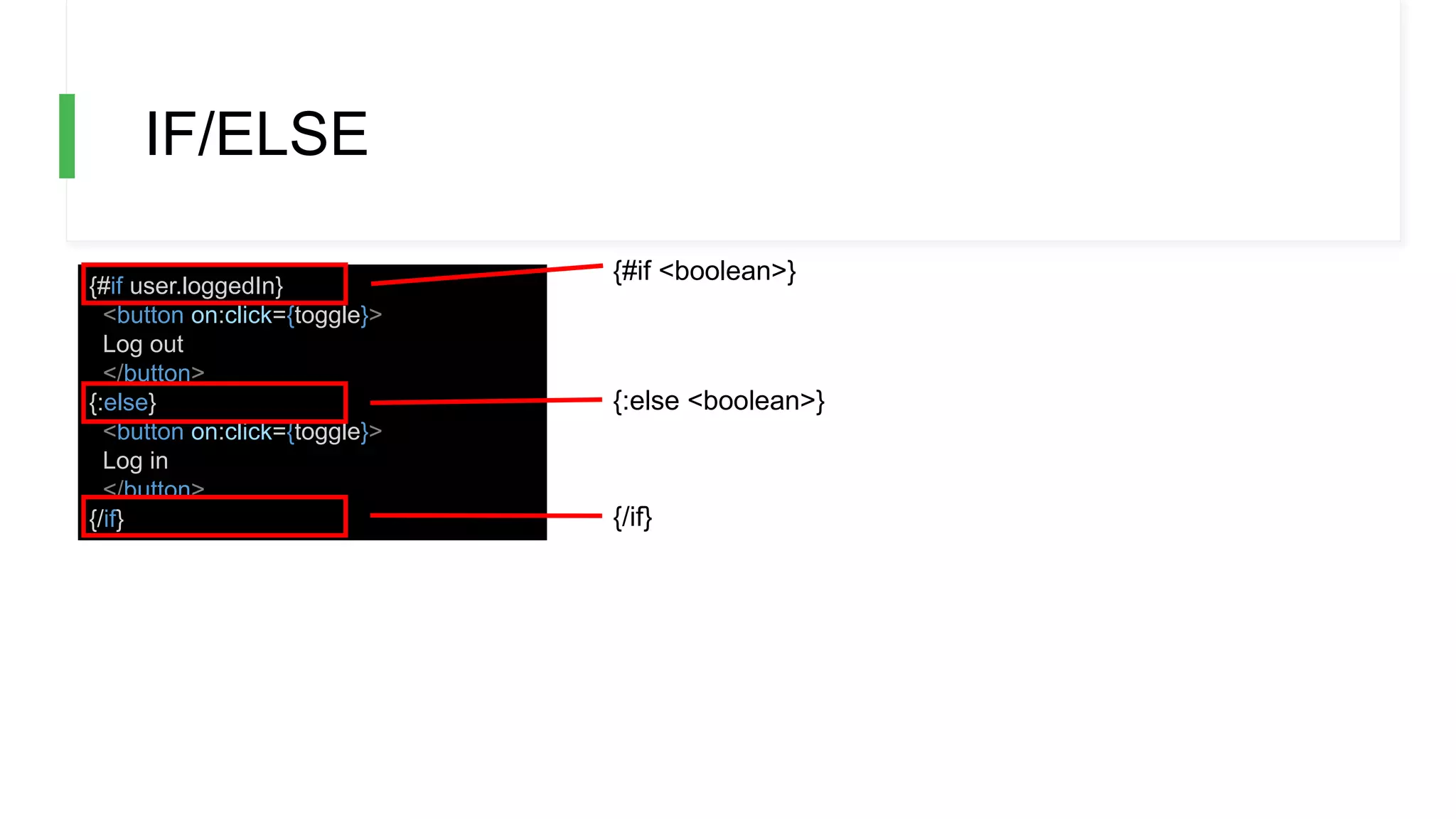
IF/ELSE
{#if user.loggedIn}
<button on:click={toggle}>
Log out
</button>
{:else}
<button on:click={toggle}>
Log in
</button>
{/if}
{#if <boolean>}
{:else <boolean>}
{/if}
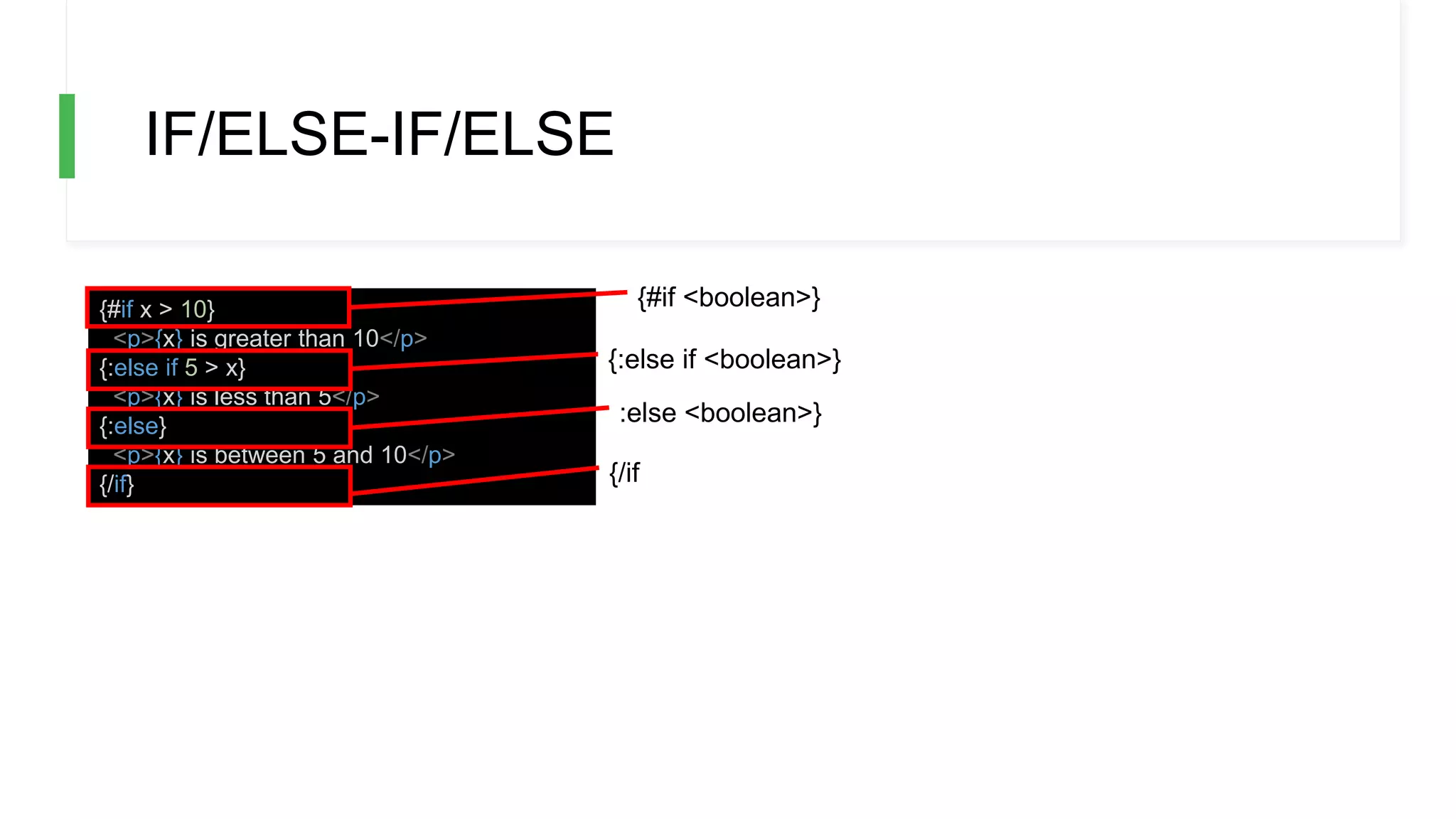
IF/ELSE-IF/ELSE
{#if x > 10}
<p>{x} is greater than 10</p>
{:else if 5 > x}
<p>{x} is less than 5</p>
{:else}
<p>{x} is between 5 and 10</p>
{/if}
{#if <boolean>}
{:else if <boolean>}
:else <boolean>}
{/if
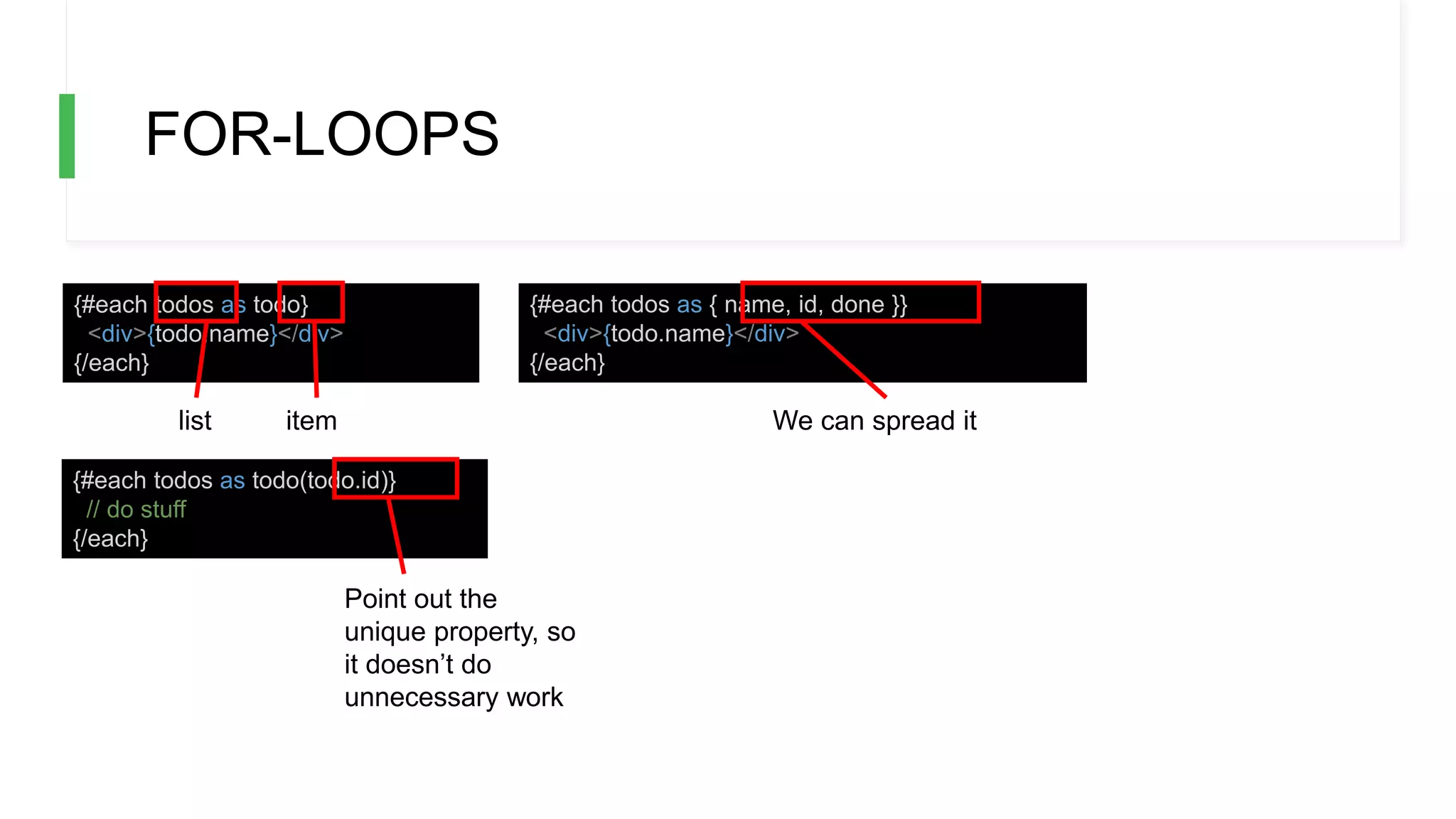
FOR-LOOPS
{#each todos as todo}
<div>{todo.name}</div>
{/each}
{#each todos as { name, id, done }}
<div>{todo.name}</div>
{/each}
{#each todos as todo(todo.id)}
// do stuff
{/each}
list item We can spread it
Point out the
unique property, so
it doesn’t do
unnecessary work
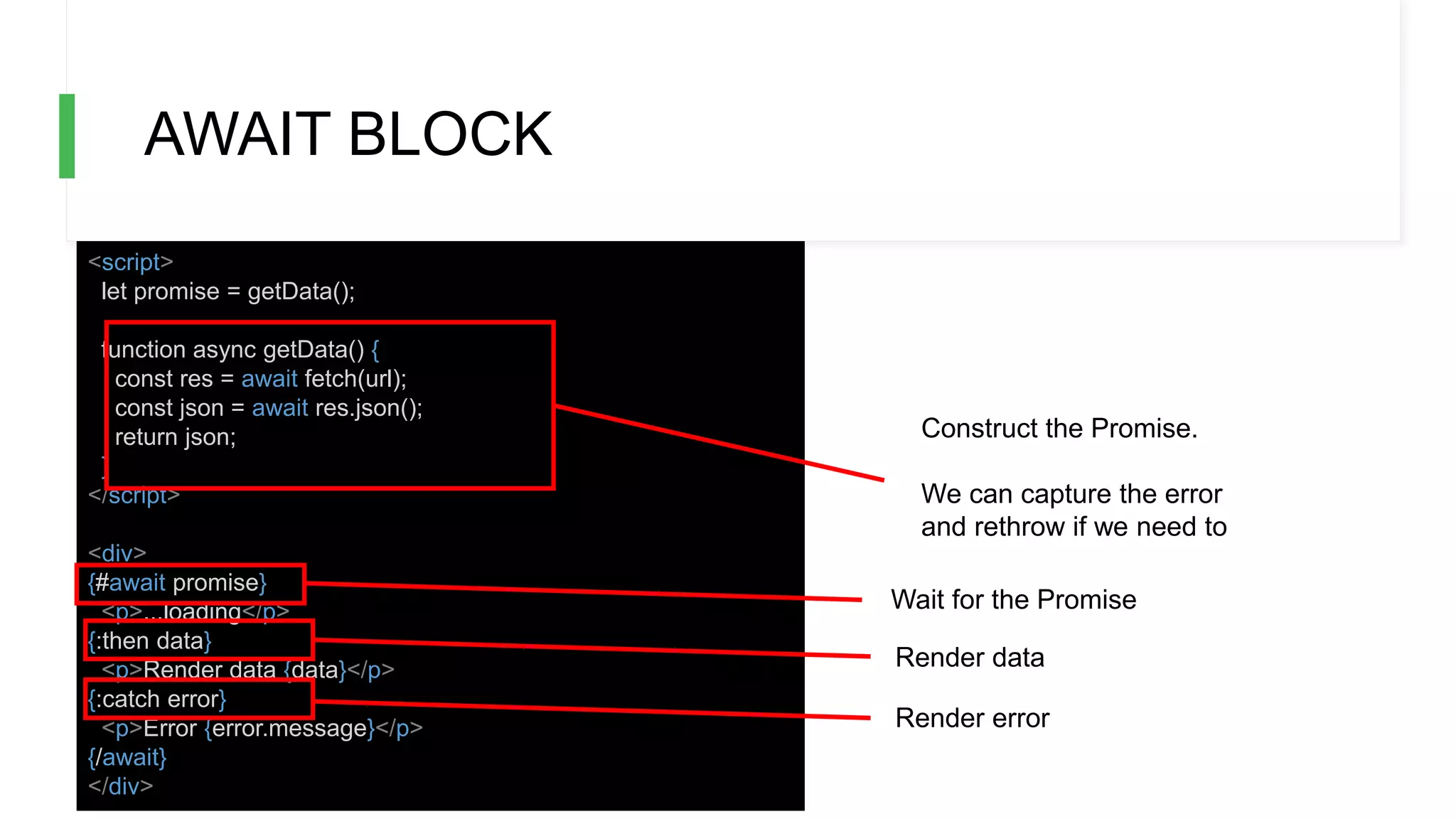
AWAIT BLOCK
<script>
let promise = getData();
function async getData() {
const res = await fetch(url);
const json = await res.json();
return json;
}
</script>
<div>
{#await promise}
<p>...loading</p>
{:then data}
<p>Render data {data}</p>
{:catch error}
<p>Error {error.message}</p>
{/await}
</div>
Construct the Promise.
We can capture the error
and rethrow if we need to
Wait for the Promise
Render data
Render error
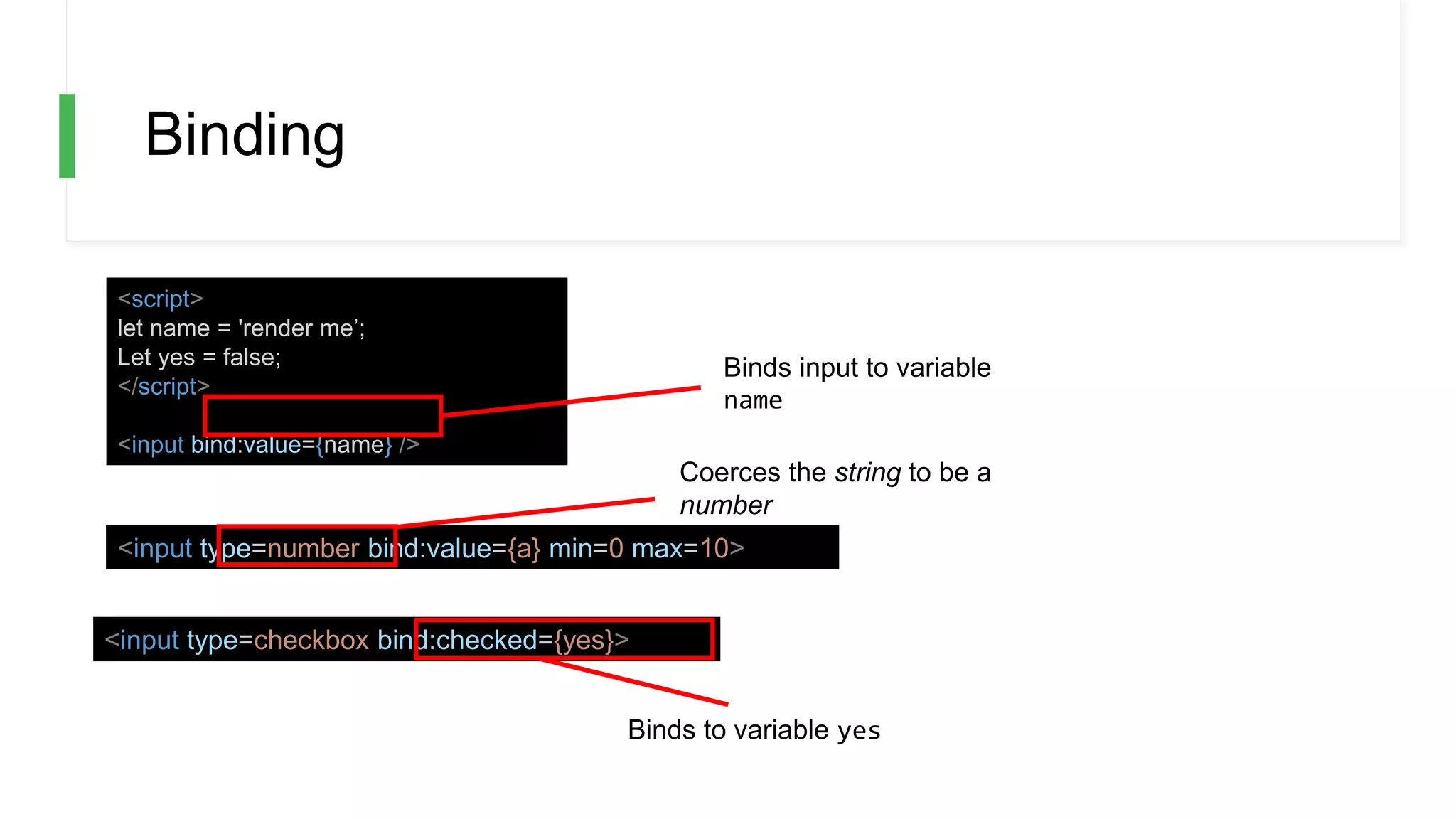
Binding
<script>
let name = 'render me’;
Let yes = false;
</script>
<input bind:value={name} />
<input type=number bind:value={a} min=0 max=10>
<input type=checkbox bind:checked={yes}>
Coerces the string to be a
number
Binds to variable yes
Binds input to variable
name
Grouped bindings
<script>
let menu = [
'Cookies and cream’,
'Mint choc chip’,
'Raspberry ripple’
];
let flavours = [];
let selectedFlavour = '';
</script>
<h2>Pick many</h2>
{#each menu as flavour}
<label>
<input type=checkbox
bind:group={flavours}
value={flavour}>
{flavour}
</label>
{/each}
<h2>Pick one</h2>
{#each menu as flavour}
<label>
<input type=radio
bind:group={selectedFlavour}
value={flavour}>
{flavour}
</label>
{/each}
<div>
Selected Flavours: {flavours}
</div>
<div>
Selected flavour: {selectedFlavour}
Checkbox binds to array
[]
Radio binds to string
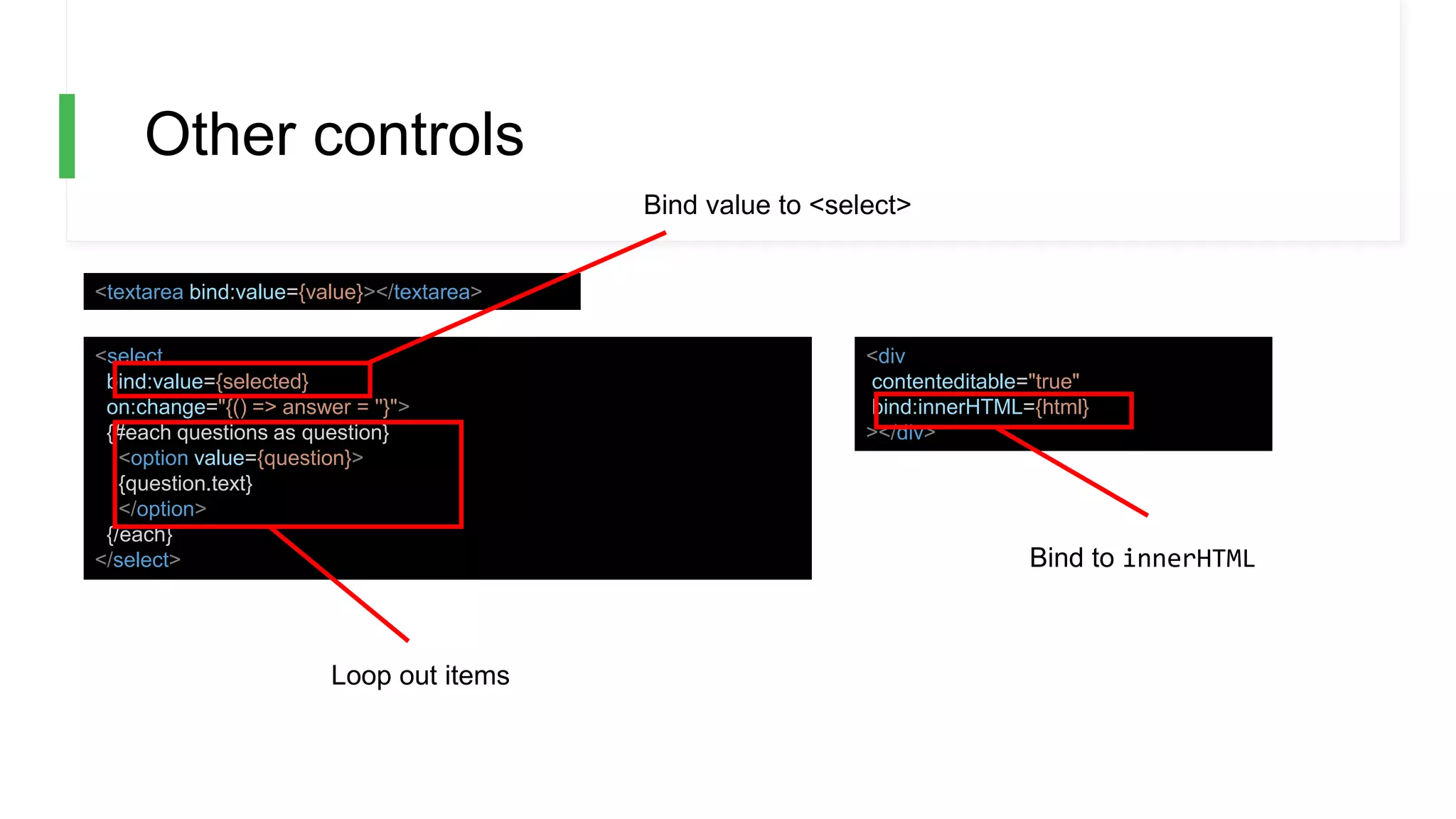
Other controls
<textarea bind:value={value}></textarea>
<select
bind:value={selected}
on:change="{() => answer = ''}">
{#each questions as question}
<option value={question}>
{question.text}
</option>
{/each}
</select>
<div
contenteditable="true"
bind:innerHTML={html}
></div>
Bind value to <select>
Bind to innerHTML
Loop out items
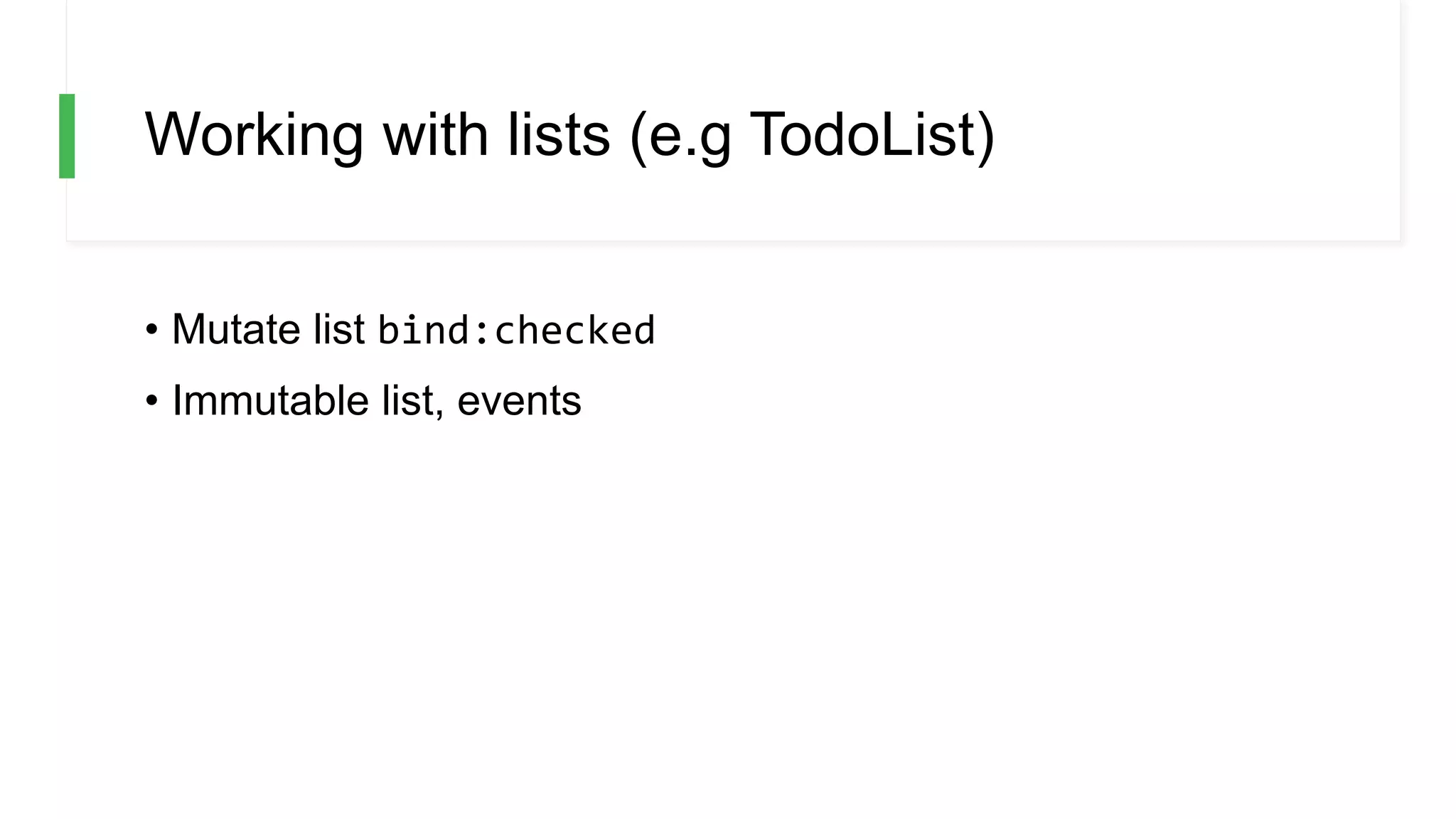
Working with lists (e.g TodoList)
• Mutate list bind:checked
• Immutable list, events
Mutating list with bind:checked
<script>
let todos = [
{ done: false, text: 'finish Svelte tutorial' },
{ done: false, text: 'build an app' },
{ done: false, text: 'world domination' }
];
function add() {
todos = todos.concat({ done: false, text: '' });
}
function clear() {
todos = todos.filter(t => !t.done);
}
$: remaining = todos.filter(t => !t.done).length;
</script>
<style>
.done {
opacity: 0.4;
}
</style>
<h1>Todos</h1>
{#each todos as todo}
<div class:done={todo.done}>
<input
type=checkbox
bind:checked={todo.done}
>
<input
placeholder="What needs to be done?"
bind:value={todo.text}
>
</div>
{/each}
<p>{remaining} remaining</p>
<button on:click={add}>Add new</button>
<button on:click={clear}>Clear completed</button>
{#each todos as todo}
<div>{todo.text} {todo.done}</div>
{/each}
Immutable list, event
<script>
let todos = [
{ done: false, text: 'finish Svelte tutorial' },
{ done: false, text: 'build an app' },
{ done: false, text: 'world domination' }
];
function add() {
todos = todos.concat({ done: false, text: '' });
}
function handleChanged(e, todo) {
console.log('changed', e.target.checked);
console.log('changed todo', todo)
}
function clear() {
todos = todos.filter(t => !t.done);
}
$: remaining = todos.filter(t => !t.done).length;
</script>
<style>
.done { opacity: 0.4; }
</style>
<h1>Todos</h1>
{#each todos as todo}
<div class:done={todo.done}>
<input
type=checkbox
on:change={(e) => handleChanged(e, todo)}
checked={todo.done}
>
<input
placeholder="What needs to be done?"
bind:value={todo.text}
>
</div>
{/each}
<p>{remaining} remaining</p>
<button on:click={add}>Add new</button>
<button on:click={clear}>Clear completed</button>
{#each todos as todo}
<div>{todo.text} {todo.done}</div>
{/each}
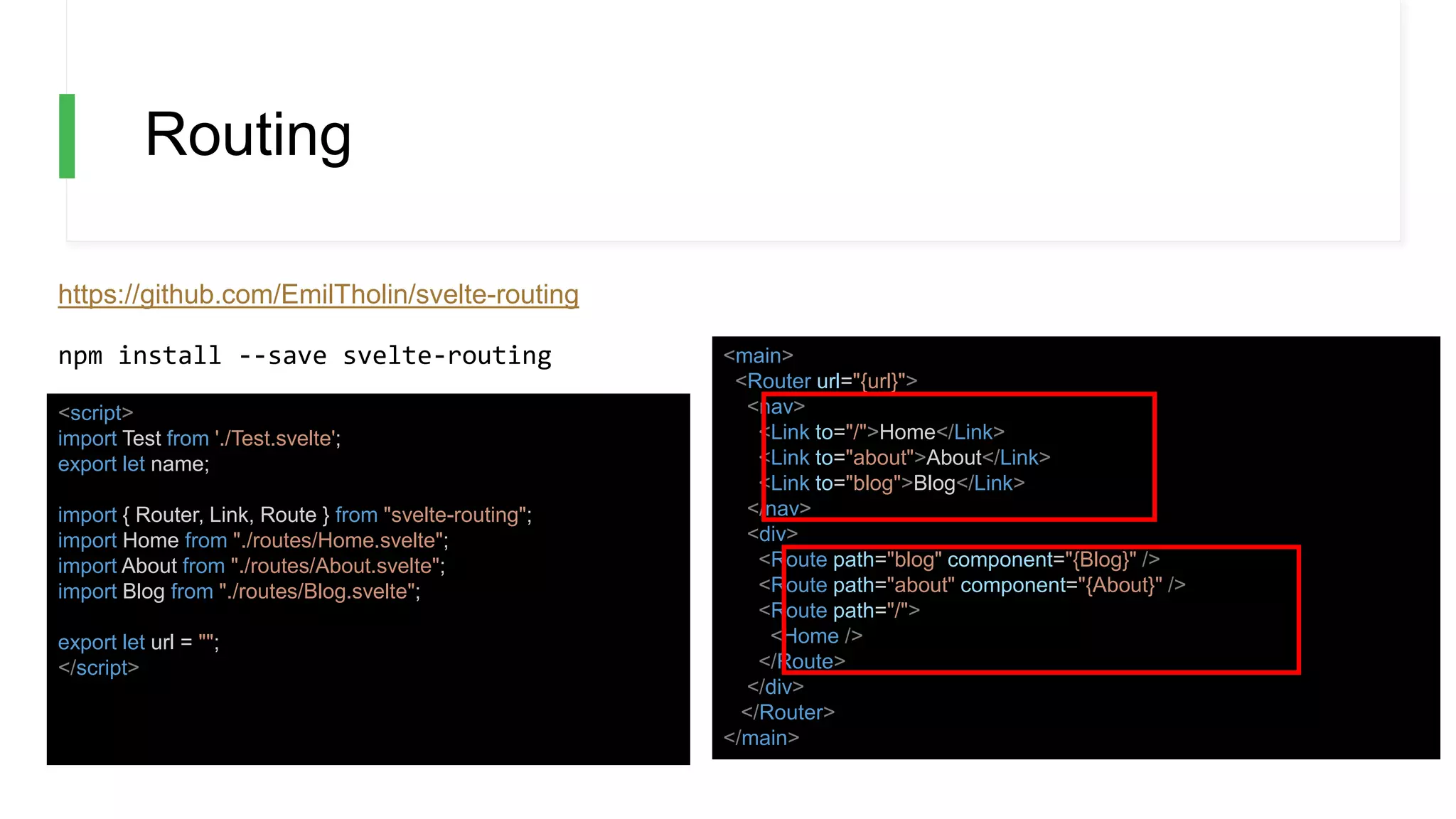
Routing
https://github.com/EmilTholin/svelte-routing
<script>
import Test from './Test.svelte';
export let name;
import { Router, Link, Route } from "svelte-routing";
import Home from "./routes/Home.svelte";
import About from "./routes/About.svelte";
import Blog from "./routes/Blog.svelte";
export let url = "";
</script>
<main>
<Router url="{url}">
<nav>
<Link to="/">Home</Link>
<Link to="about">About</Link>
<Link to="blog">Blog</Link>
</nav>
<div>
<Route path="blog" component="{Blog}" />
<Route path="about" component="{About}" />
<Route path="/">
<Home />
</Route>
</div>
</Router>
</main>
npm install --save svelte-routing
Testing - https://testing-library.com/docs/svelte-
testing-library/setup
Svelte Testing Library
npm install --save-dev @testing-library/svelte
Jest is recommended with it
npm install --save-dev jest
// package.json
{ "scripts": {
"test": "jest src",
"test:watch": "npm run test -- --watch"
}
}
npm install --save-dev svelte-jester
// package.json
{
"jest": {
"transform": { "^.+.svelte$": "svelte-jester" },
"moduleFileExtensions": ["js", "svelte”]
}
}
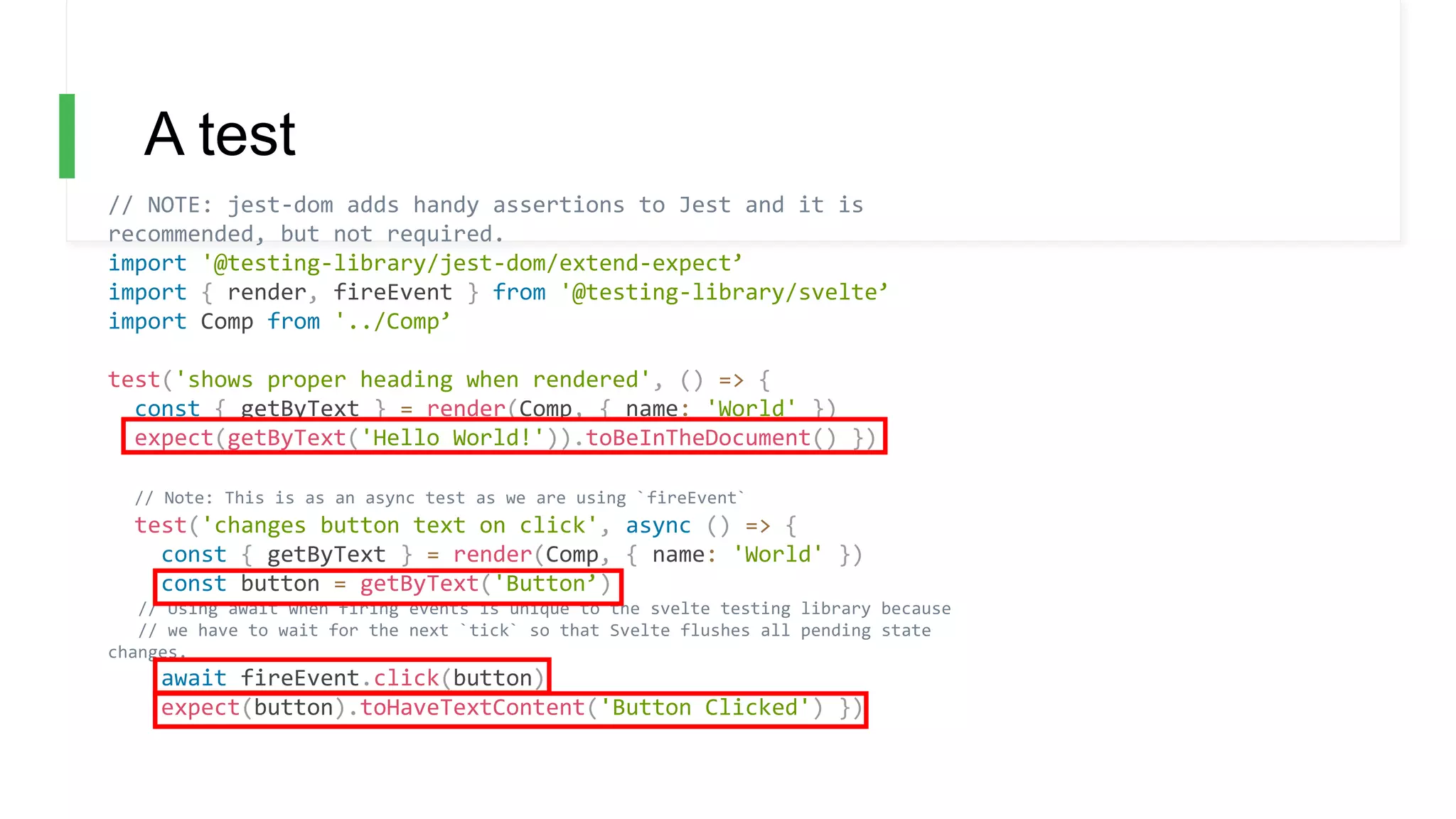
A test
// NOTE: jest-dom adds handy assertions to Jest and it is
recommended, but not required.
import '@testing-library/jest-dom/extend-expect’
import { render, fireEvent } from '@testing-library/svelte’
import Comp from '../Comp’
test('shows proper heading when rendered', () => {
const { getByText } = render(Comp, { name: 'World' })
expect(getByText('Hello World!')).toBeInTheDocument() })
// Note: This is as an async test as we are using `fireEvent`
test('changes button text on click', async () => {
const { getByText } = render(Comp, { name: 'World' })
const button = getByText('Button’)
// Using await when firing events is unique to the svelte testing library because
// we have to wait for the next `tick` so that Svelte flushes all pending state
changes.
await fireEvent.click(button)
expect(button).toHaveTextContent('Button Clicked') })
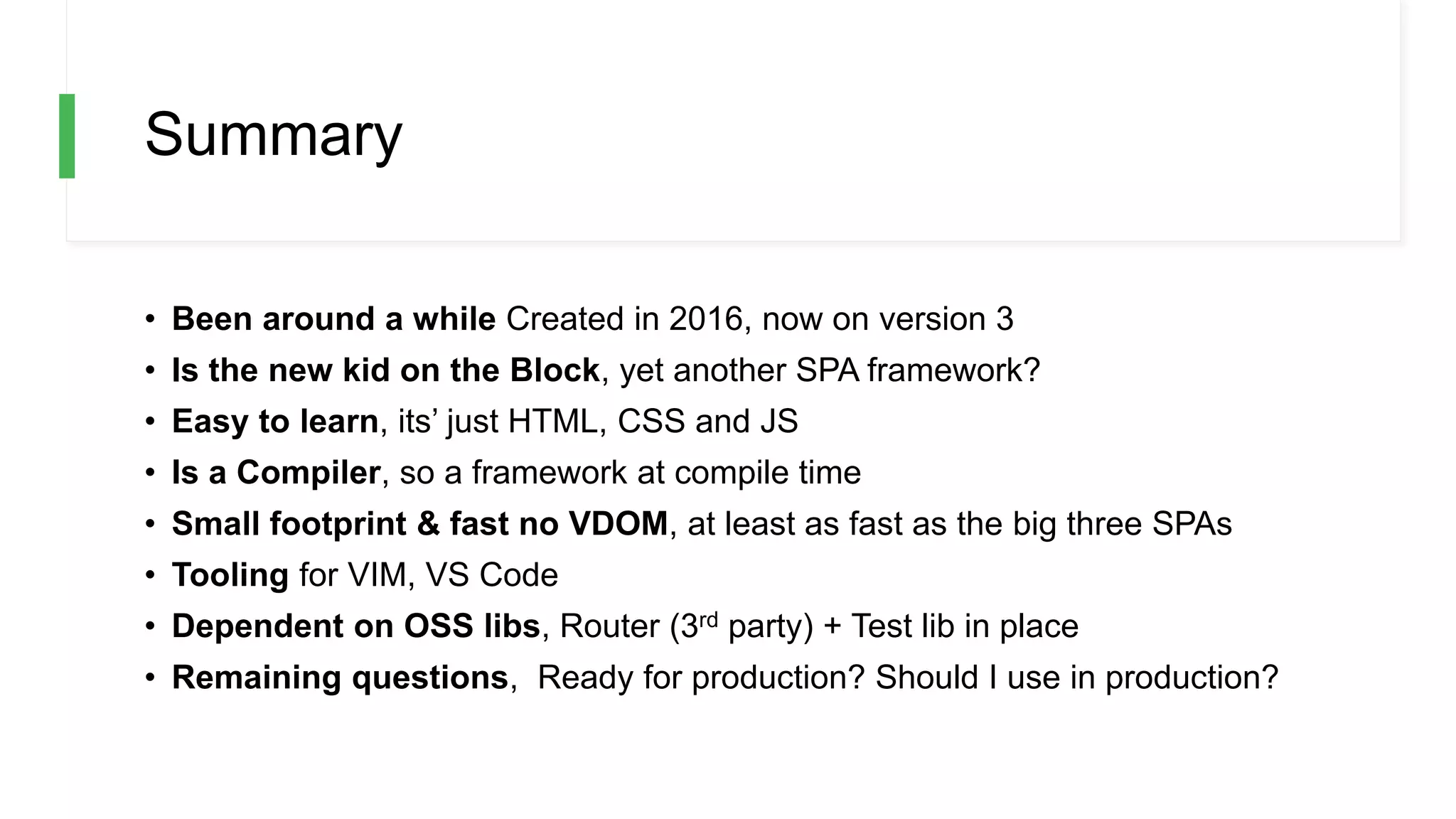
Summary
• Been around a while Created in 2016, now on version 3
• Is the new kid on the Block, yet another SPA framework?
• Easy to learn, its’ just HTML, CSS and JS
• Is a Compiler, so a framework at compile time
• Small footprint & fast no VDOM, at least as fast as the big three SPAs
• Tooling for VIM, VS Code
• Dependent on OSS libs, Router (3rd party) + Test lib in place
• Remaining questions, Ready for production? Should I use in production?

Learning Svelte

  • 1.
  • 2.
    WHY • Less cruft/boilerplate • It’s fast, no Virtual DOM • No script tag, Svelte bundles stand-alone components, without including a framework script as a dependency - Svelte is a compiler, it’s only framework during the build process • Svelte can therefore be used to • Swap out individual components • Replace an entire app, up to you • It works with the standard rather than trying to invent it. Svelte looks and feels like just working with HTML, CSS and JS
  • 3.
    WHAT • One componentper file • Styles scoped by default • It’s just HTML, CSS, JS • Powerful features like expressive directives. Usual suspects like Bindings, ability to • watch changes, • Input props, • Events etc.
  • 4.
    Show me code //Hello.svelte <script> let name = 'world'; </script> <h1>Hello {name}</h1> /* App.svelte generated by Svelte v3.16.7 */ import { SvelteComponent, detach, element, init, insert, noop, safe_not_equal } from "svelte/internal"; function create_fragment(ctx) { let h1; return { c() { h1 = element("h1"); h1.textContent = `Hello ${name}!`; }, m(target, anchor) { insert(target, h1, anchor); }, p: noop, i: noop, o: noop, d(detaching) { if (detaching) detach(h1); } }; } let name = "world"; class App extends SvelteComponent { constructor(options) { super(); init(this, options, null, create_fragment, safe_not_equal, {}); } } export default App;
  • 5.
    How to getstarted • Svelte.dev, great site with interactive tutorial • Create your own project, • npx degit sveltejs/template hello-app • npm install • npm run dev • Install extensions for eitherVim/VS Code
  • 6.
    Interpolation, {} <script> let src= 'tutorial/image.gif’; Let title =‘something’; </script> <img src={src}> <div>{title}</div> In an attribute or directly in the markup
  • 7.
    A typical component <style> p{ color: purple; font-family: 'Comic Sans MS', cursive; font-size: 2em; } </style> <script> let src = 'tutorial/image.gif’; let description = "Rick Astley" </script> <p> <img src={src}> <p> <div>{description}</div> Scoped styles Code section Markup + interpolation
  • 8.
    Import & usea component // App.svelte <script> import Nested from './Nested.svelte'; </script> <p>Some text</p> <Nested /> Import Use
  • 9.
    Render HTML <script> let string= `this string contains some <strong>HTML!!!</strong>`; </script> <p>{@html string}</p> @html string-containing HTML HTML
  • 10.
    Handle Events <script> let count= 0; function handleClick() { // event handler code goes here count += 1; } </script> <button on:click={handleClick}> Clicked {count} {count === 1 ? 'time' : 'times'} </button> Method declaration Bind “handleClick” to “click” event with on:click
  • 11.
    Additional event example:mousemove <script> let m = { x: 0, y: 0 }; function handleMousemove(event) { m.x = event.clientX; m.y = event.clientY; } </script> <style > div { width: 100%; height: 100%; } </style> <div on:mousemove={handleMousemove}> The mouse position is {m.x} x {m.y} </div> Bind “handleMousemove” to “mousemove” event with on:mousemove Method declarationc
  • 12.
    Inline handlers <div on:mousemove={handleMove}> </div> <divon:mousemove={e => m = { x : e.clientX, y: e.clientY }}> </div> Lambda function Reference to function
  • 13.
    Event modifiers <script> function handleClick(){ console.log('only run once'); } </script> <div on:click|once={handleClick}> I dare you click me more than once </div> • `preventDefault` — calls event.preventDefault() before running the handler. Useful for client-side form handling, for example. • `stopPropagation` — calls event.stopPropagation(), preventing the event reaching the next element • `passive` — improves scrolling performance on touch/wheel events (Svelte will add it automatically where it's safe to do so) • `capture` — fires the handler during the capture phase instead of the bubbling phase () • `once` — remove the handler after the first time it runs • `self` — only trigger handler if event.target is the element itself Additionally you can chain modifiers like so `on:event|modifier|secondModifier={handler}` Modifier
  • 14.
    Computed state <script> let count= 0; function handleClick() { count += 1; } $: doubled = count * 2; </script> <button on:click={handleClick}> Clicked {count} {count === 1 ? 'time' : 'times'} </button> {doubled} Runs when count changes, calculates a new value for double
  • 15.
    Reactive statements <script> let count= 0; function handleClick() { count += 1; } $: console.log(`Value changed ${count}`); </script> <button on:click={handleClick}> Clicked {count} {count === 1 ? 'time' : 'times'} </button> Runs when count changes, i.e can also run statements
  • 16.
    Grouped reactive statements <script> letcount = 0; function handleClick() { count += 1; } $: { console.log(`the count is ${count}`) alert(count) } </script> <button on:click={handleClick}> Clicked {count} {count === 1 ? 'time' : 'times'} </button> Can run several lines of code, using {}
  • 17.
    Reactivity and assignments Sveltetriggers on assignments. This means that the following code WONT update the UI: array.push(1) but this will: array = [...array, 1]
  • 18.
    Component input // Nested.svelte <script> exportlet answer; </script> <p>The answer is {answer}</p> <script> import Nested from './Nested.svelte'; </script> <div>something...</div> <Nested answer={42} /> export keyword is used to expose answer
  • 19.
    Component input –spread props <script> val obj = { firstname: 'ada’, lastname: 'lovelace’, profession: 'programmer' }; </script> <Person firstname={obj.firstname} lastname={obj.lastname} profession={obj.profession} > <Person {...obj} />
  • 20.
    Component output // Inner.svelte <script> import{ createEventDispatcher } from 'svelte'; let dispatcher = createEventDispatcher(); function handleEvent() { dispatcher.dispatch('message', { text: 'An event’ }) } </script> <button on:click={handleEvent}>Fire event</button> // App.svelte <script> import Inner from './Inner.svelte'; function handleMessage(event) { alert(event.detail.text); } </script> <Inner on:message={handleMessage}/> Dispatch, to raise the event Name of the event Name of the event Handle event
  • 21.
    Forwarding an event InnerOuter App message messagemessage // Inner.svelte <script> import { createEventDispatcher } from 'svelte'; let dispatcher = createEventDispatcher(); function handleEvent() { dispatcher.dispatch('message', { text: 'An event’ }) } </script> <button on:click={handleEvent}>Fire event</button> // Outer.svelte <Inner on:message /> // App.svelte import Outer from './Outer.svelte'; function handleEvent(event) { console.log(event.text); } </script> <Outer on:message={handleEvent} /> No event handler Just forward the event
  • 22.
    Directives • IF ELSE,IF ELSE-IF ELSE • FOR • ASYNC/AWAIT
  • 23.
    IF/ELSE {#if user.loggedIn} <button on:click={toggle}> Logout </button> {:else} <button on:click={toggle}> Log in </button> {/if} {#if <boolean>} {:else <boolean>} {/if}
  • 24.
    IF/ELSE-IF/ELSE {#if x >10} <p>{x} is greater than 10</p> {:else if 5 > x} <p>{x} is less than 5</p> {:else} <p>{x} is between 5 and 10</p> {/if} {#if <boolean>} {:else if <boolean>} :else <boolean>} {/if
  • 25.
    FOR-LOOPS {#each todos astodo} <div>{todo.name}</div> {/each} {#each todos as { name, id, done }} <div>{todo.name}</div> {/each} {#each todos as todo(todo.id)} // do stuff {/each} list item We can spread it Point out the unique property, so it doesn’t do unnecessary work
  • 26.
    AWAIT BLOCK <script> let promise= getData(); function async getData() { const res = await fetch(url); const json = await res.json(); return json; } </script> <div> {#await promise} <p>...loading</p> {:then data} <p>Render data {data}</p> {:catch error} <p>Error {error.message}</p> {/await} </div> Construct the Promise. We can capture the error and rethrow if we need to Wait for the Promise Render data Render error
  • 27.
    Binding <script> let name ='render me’; Let yes = false; </script> <input bind:value={name} /> <input type=number bind:value={a} min=0 max=10> <input type=checkbox bind:checked={yes}> Coerces the string to be a number Binds to variable yes Binds input to variable name
  • 28.
    Grouped bindings <script> let menu= [ 'Cookies and cream’, 'Mint choc chip’, 'Raspberry ripple’ ]; let flavours = []; let selectedFlavour = ''; </script> <h2>Pick many</h2> {#each menu as flavour} <label> <input type=checkbox bind:group={flavours} value={flavour}> {flavour} </label> {/each} <h2>Pick one</h2> {#each menu as flavour} <label> <input type=radio bind:group={selectedFlavour} value={flavour}> {flavour} </label> {/each} <div> Selected Flavours: {flavours} </div> <div> Selected flavour: {selectedFlavour} Checkbox binds to array [] Radio binds to string
  • 29.
    Other controls <textarea bind:value={value}></textarea> <select bind:value={selected} on:change="{()=> answer = ''}"> {#each questions as question} <option value={question}> {question.text} </option> {/each} </select> <div contenteditable="true" bind:innerHTML={html} ></div> Bind value to <select> Bind to innerHTML Loop out items
  • 30.
    Working with lists(e.g TodoList) • Mutate list bind:checked • Immutable list, events
  • 31.
    Mutating list withbind:checked <script> let todos = [ { done: false, text: 'finish Svelte tutorial' }, { done: false, text: 'build an app' }, { done: false, text: 'world domination' } ]; function add() { todos = todos.concat({ done: false, text: '' }); } function clear() { todos = todos.filter(t => !t.done); } $: remaining = todos.filter(t => !t.done).length; </script> <style> .done { opacity: 0.4; } </style> <h1>Todos</h1> {#each todos as todo} <div class:done={todo.done}> <input type=checkbox bind:checked={todo.done} > <input placeholder="What needs to be done?" bind:value={todo.text} > </div> {/each} <p>{remaining} remaining</p> <button on:click={add}>Add new</button> <button on:click={clear}>Clear completed</button> {#each todos as todo} <div>{todo.text} {todo.done}</div> {/each}
  • 32.
    Immutable list, event <script> lettodos = [ { done: false, text: 'finish Svelte tutorial' }, { done: false, text: 'build an app' }, { done: false, text: 'world domination' } ]; function add() { todos = todos.concat({ done: false, text: '' }); } function handleChanged(e, todo) { console.log('changed', e.target.checked); console.log('changed todo', todo) } function clear() { todos = todos.filter(t => !t.done); } $: remaining = todos.filter(t => !t.done).length; </script> <style> .done { opacity: 0.4; } </style> <h1>Todos</h1> {#each todos as todo} <div class:done={todo.done}> <input type=checkbox on:change={(e) => handleChanged(e, todo)} checked={todo.done} > <input placeholder="What needs to be done?" bind:value={todo.text} > </div> {/each} <p>{remaining} remaining</p> <button on:click={add}>Add new</button> <button on:click={clear}>Clear completed</button> {#each todos as todo} <div>{todo.text} {todo.done}</div> {/each}
  • 33.
    Routing https://github.com/EmilTholin/svelte-routing <script> import Test from'./Test.svelte'; export let name; import { Router, Link, Route } from "svelte-routing"; import Home from "./routes/Home.svelte"; import About from "./routes/About.svelte"; import Blog from "./routes/Blog.svelte"; export let url = ""; </script> <main> <Router url="{url}"> <nav> <Link to="/">Home</Link> <Link to="about">About</Link> <Link to="blog">Blog</Link> </nav> <div> <Route path="blog" component="{Blog}" /> <Route path="about" component="{About}" /> <Route path="/"> <Home /> </Route> </div> </Router> </main> npm install --save svelte-routing
  • 34.
    Testing - https://testing-library.com/docs/svelte- testing-library/setup SvelteTesting Library npm install --save-dev @testing-library/svelte Jest is recommended with it npm install --save-dev jest // package.json { "scripts": { "test": "jest src", "test:watch": "npm run test -- --watch" } } npm install --save-dev svelte-jester // package.json { "jest": { "transform": { "^.+.svelte$": "svelte-jester" }, "moduleFileExtensions": ["js", "svelte”] } }
  • 35.
    A test // NOTE:jest-dom adds handy assertions to Jest and it is recommended, but not required. import '@testing-library/jest-dom/extend-expect’ import { render, fireEvent } from '@testing-library/svelte’ import Comp from '../Comp’ test('shows proper heading when rendered', () => { const { getByText } = render(Comp, { name: 'World' }) expect(getByText('Hello World!')).toBeInTheDocument() }) // Note: This is as an async test as we are using `fireEvent` test('changes button text on click', async () => { const { getByText } = render(Comp, { name: 'World' }) const button = getByText('Button’) // Using await when firing events is unique to the svelte testing library because // we have to wait for the next `tick` so that Svelte flushes all pending state changes. await fireEvent.click(button) expect(button).toHaveTextContent('Button Clicked') })
  • 36.
    Summary • Been arounda while Created in 2016, now on version 3 • Is the new kid on the Block, yet another SPA framework? • Easy to learn, its’ just HTML, CSS and JS • Is a Compiler, so a framework at compile time • Small footprint & fast no VDOM, at least as fast as the big three SPAs • Tooling for VIM, VS Code • Dependent on OSS libs, Router (3rd party) + Test lib in place • Remaining questions, Ready for production? Should I use in production?

Editor's Notes

  • #6 Uses rollup to bundle up your app Found VS Code extension to not work, not sure if it’s my machine or not? (other say it works for them)
  • #7 {} single brackets
  • #8 Three distinct areas, style, script and markup, resembles Vue on that
  • #9 Simple to use
  • #10 @html tag is used to render HTML, careful though
  • #11 on:click to bind methods to events
  • #12 on:event
  • #13 Lambda/inline if you only have tiny bit of logic that needs to be written
  • #14 Modifiers, a powerful way to configure your event bindings, stop the event, one-time execution and more.
  • #15 Computed state
  • #16 Can run statements when a variable change
  • #17 {} makes it possible to run more than one line of code.
  • #18 IMPORTANT, change of reference is how it track changes
  • #19 Export, is the keyword that you need to make something public
  • #20 You can spread props so you don’t haven to mention each and everyone by name
  • #21 Dispatch, raises the event First arg is the name of the message On:<name of message> createEventDispatcher is what we use to dispatch event, pub/sub
  • #22 Inner raises event. Outer just forwards event App actually handles it No handler = forwarding, On:message, no event handler specified, it just sends the message upwards
  • #23 How to do branching logic in the template
  • #24 {#if} curly brace, square bracket ot start {:} colon for middle state {/} slash when we end it
  • #25 {#if} curly brace, square bracket ot start {:} colon for middle state and else if instead {/} slash when we end it
  • #27 Great way to define asynchronous behavior, saves a few lines of code
  • #28 bind:attribute, creates a 2-way binding
  • #29 Grouped binding is about having a list of checkbox or radio buttons Checkboxes means we can select more than one so saved as a list Radio are mutually exclusive, so it only becomes one value
  • #30 Bind:value on input as well as select For select we need to loop out the items For content editable we bind to innerHTML
  • #31 2 different approaches 1. One mutates the items in the list 2. The other relies on events, Use the one you feel ok with.
  • #32 Bind:checked, ensure the attribute on an item is chan Changed automatically
  • #33 On:change if we want to handle it by events
  • #34 NOT built in but there are many 3rd part options. I find this one to work well for me Link, is how we navigate Route is how we specify what path gets rendered by what component
  • #35 For testing it’s about Surface testing NPM install the test lib JEST is recommended Recommended to set up script tasks for running and watching tests Must set up Jest though if used Have read through the docs for best practices
  • #36 Idea is to assert that elements exist with certain content Easy to trigger events, NOTE the await keyword on firing an event