Developing Embedded
Systems with Multicore
   and Virtualization
         Samuel Panijel
  Regional Engineering Manager
         Wind River
            Q2-2011


           May 4, 2011           1
Context
• Multicore and virtualization are creating a disruption
  in the embedded industry
   – Multicore provides more processing power for less power
   – Virtualization provides partitioning on single and multicore
     silicon
• Wind River provides a broad portfolio of technology
  to assist the migration to multicore
   – Runtimes, Middleware, Virtualization and Tooling
• This presentation will focus on the use of
  virtualization
   – For single and multicore
   – Based on the Wind River Hypervisor for Embedded

   2                                     May 4, 2011
                         | © 2010 Wind River. All Rights Reserved.   2
Agenda
• Multicore and virtualization overview
    – An introduction to AMP, SMP and Virtualization
• Virtualization capabilities
• Virtualization details
    – Modes of virtualization
    – The mechanisms behind virtualization
    – Virtualizing memory, cores, devices, interrupts
    – Inter-board communication
How to design your next generation of devices
3                                  May 4, 2011
                   | © 2010 Wind River. All Rights Reserved.   3
Primary Multicore Software
                    Configurations
                “Traditional”                                                    Virtualization

                                                                                 OS         OS
                     OS
Single Core                                                                       Hypervisor
                    CPU
                                                                                      CPU


                    SMP                      Unsupervised AMP               Supervised AMP (sAMP)


                     OS                                                         OS          OS
                                                 OS             OS
Multicore
                                                                                  Supervisor
              Core 1    Core 2                 Core 1         Core 2
                                                                               Core 1     Core 2


Arbitrary combinations of these primary configurations can be used to create more
                             advanced configurations.
                OS: Could be VxWorks, Wind River Linux, or other executive or OS

  4                                             May 4, 2011
                                | © 2010 Wind River. All Rights Reserved.                           4
Symmetric Multiprocessing (SMP)
•   A lot of experience
•   Works well for parallel algorithms
•   OS performs scheduling and load balancing
•   A viable solution, depending on your needs
     – Does not always scale with many cores                           SMP


• Linux and VxWorks SMP                                                OS

                                                                  Core 1   Core 2


     5                | © 2010 Wind River. All Rights Reserved.
                                 May 4, 2011                                        5
Asymmetric Multiprocessing (AMP)
• One operating system per core
• Questions raised in regard to configuring and
  run-time
  – Who “owns” devices?
  – How is memory split?                                         Unsupervised AMP

  – How is memory protected?
                                                                   OS       OS
  – How is this configured?
                                                                  Core 1   Core 2
  – How is this built into the kernel?
• Mixed operating systems?
  6                  | © 2010 Wind River. All Rights Reserved.

                               May 4, 2011                                          6
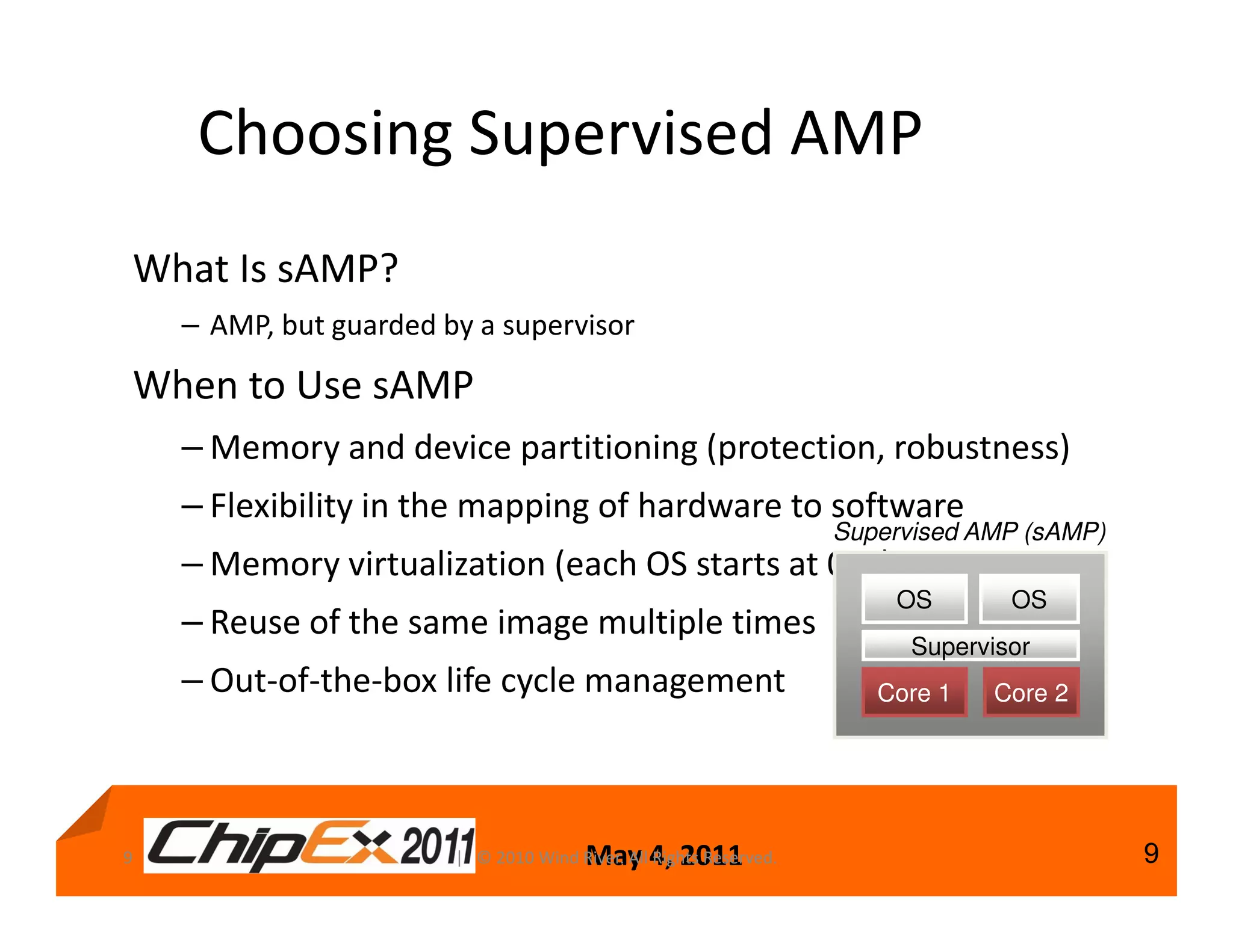
Choosing Supervised AMP
What Is sAMP?
    – AMP, but guarded by a supervisor

When to Use sAMP
    – Memory and device partitioning (protection, robustness)
    – Flexibility in the mapping of hardware to software
                                                                    Supervised AMP (sAMP)
    – Memory virtualization (each OS starts at 0x0)
                                                                        OS        OS
    – Reuse of the same image multiple times
                                                                          Supervisor
    – Out-of-the-box life cycle management                             Core 1   Core 2


9                                       May 4, 2011
                        | © 2010 Wind River. All Rights Reserved.                           9
Agenda
• Multicore and virtualization overview
  – An introduction to AMP, SMP and Virtualization
• Virtualization capabilities
• Virtualization details
  – Modes of virtualization
  – The mechanisms behind virtualization
  – Virtualizing memory, cores, devices, interrupts
  – Inter-board communication
How to design your next generation of devices
  10                 | © 2010 Wind River. All Rights Reserved.

                             May 4, 2011                         10
Virtualization
• Partitioning is a benefit of virtualization
• Virtualization partitions the hardware into virtual boards
• The virtualization layer gives the board access to
      – Virtualized processing cores (optional)
      – Virtualized memory
      – Virtualized devices and interrupts
• Virtualization can be done in a scalable fashion

Hypervisor                                             Core Virtualization                          Guest Protection

Protected Supervisor                             Core Protection              Virtual Memory and Devices        Interrupts

Supervisor                                     Resource Partitioning           Boot       Life Cycle Management Debugging


   11© 2009 Wind River. All Rights Reserved.
   |
                                                     | © 2010 Wind River. All Rights Reserved.

                                                                     May 4, 2011                                         11
An Example Virtualization Scenario
          Virtual Board 1                          Virtual Board 2                         Virtual Board 3


              Application                             Application
                                                                                               Application

              VxWorks              MIPC            Wind River Linux
                        Ethernet            IDE       Serial     Ethernet
      VCore   Memory          Timer        VCore     Memory            Timer           VCore   Memory          Timer


                                                   Configuration


                                           Wind River Hypervisor

                                                    Physical Board

        IDE        Ethernet        Timer            Serial        Memory                Core            Core


 12                                        | © 2010 Wind River. All Rights Reserved.

                                                        May 4, 2011                                                    12
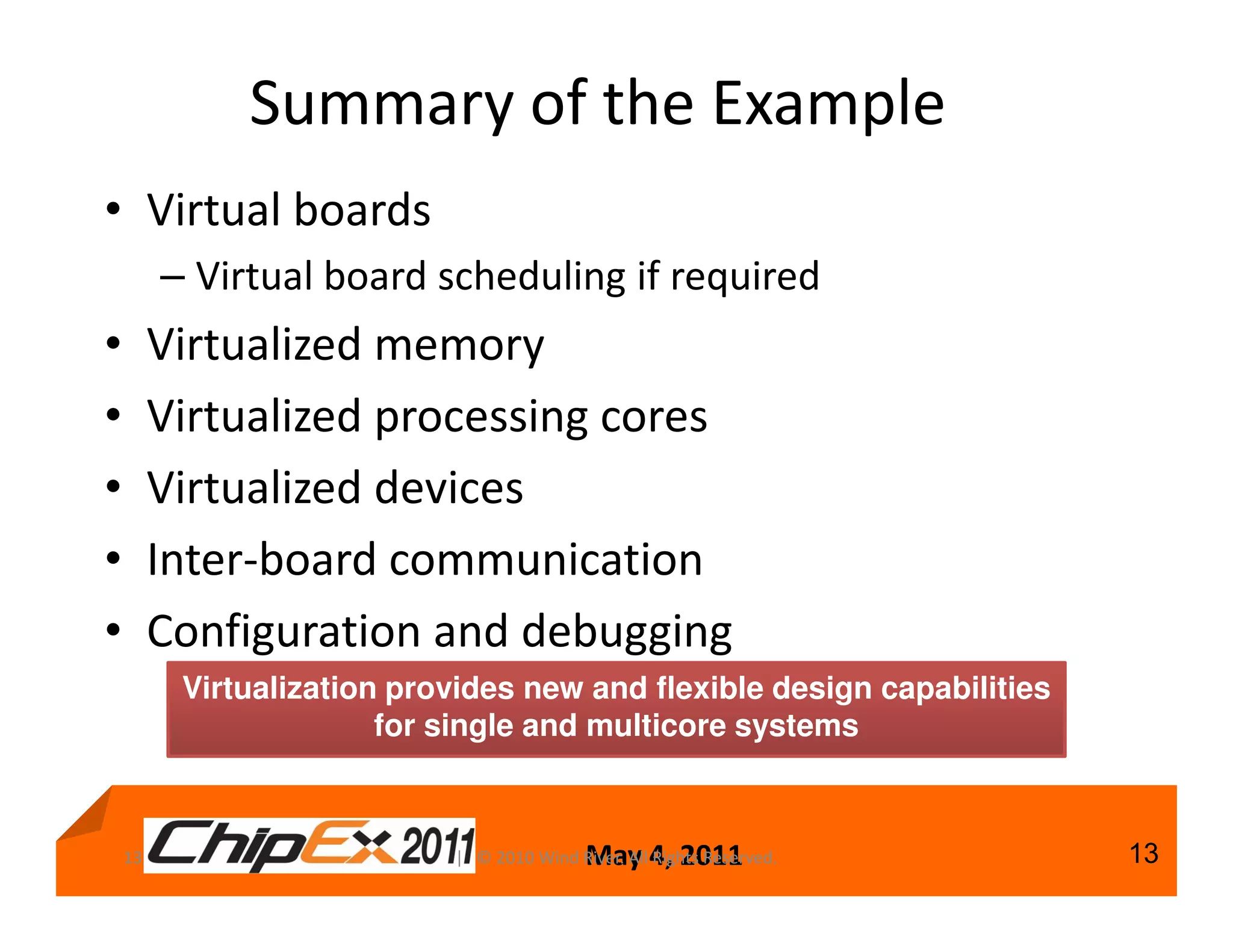
Summary of the Example
• Virtual boards
         – Virtual board scheduling if required
•        Virtualized memory
•        Virtualized processing cores
•        Virtualized devices
•        Inter-board communication
•        Configuration and debugging
          Virtualization provides new and flexible design capabilities
                        for single and multicore systems


    13                                      May 4, 2011
                            | © 2010 Wind River. All Rights Reserved.    13
Virtualization Performance
• Virtualization needs to have minimal cost
• Wind River and customer benchmarking
   – sAMP: Overall cost is less than 1%
   – Core virtualized: With significant load only a few percent,
     similar to running multiple processes
   – Some additional latency to interrupt handling
• Actual performance depends on
   – Processor, board, application
   – Multicore configuration
• The additional design capabilities and flexibility
  typically outweigh any potential overhead
   14                    | © 2010 Wind River. All Rights Reserved.

                                      May 4, 2011                    14
Agenda
• Multicore and virtualization overview
     – An introduction to AMP, SMP and Virtualization
• Virtualization capabilities
• Virtualization details
     – Modes of virtualization
     – The mechanisms behind virtualization
     – Virtualizing memory, cores, devices, interrupts
     – Inter-board communication
How to design your next generation of devices
15                                   May 4, 2011
                     | © 2010 Wind River. All Rights Reserved.   15
Virtualization Principles
The hypervisor adds an additional layer of indirection
to between the OS and the physical hardware

The hypervisor virtualizes the hardware and executes
guest operating systems. The level of virtualization can
be configured based on device needs

              Guest               Guest                         Guest


                             Hypervisor

 16                                 May 4, 2011
                    | © 2010 Wind River. All Rights Reserved.           16
Hypervisor Mechanics
• OS privilege modes
• Emulation vs. paravirtualization vs. hardware
  assist
• Different types of hypervisors
• Memory
• Devices, interrupts
• Inter board communication


17                              May 4, 2011
                | © 2010 Wind River. All Rights Reserved.   17
Privilege Modes
Operating systems work in privilege modes:
            The OS kernel itself can do anything with the
            hardware
            Device drivers are more restricted
            User applications/components are least privileged
                                                       Ring 3
                                                       Ring 2                        Least Privileged

                                                       Ring 1
                                                       Ring 0


                                                       Kernel
                                                                                                        Example based on Intel
                                                                                                        privilege rings, other
                                                                                                        processors have similar
                                                   Device Drivers                                       concepts
                                                   Device Drivers
                                                                                     Most Privileged
                                                    Applications

      Intel privilege rings source: Wikipedia


 18                                                                 May 4, 2011
                                                  | © 2010 Wind River. All Rights Reserved.                                       18
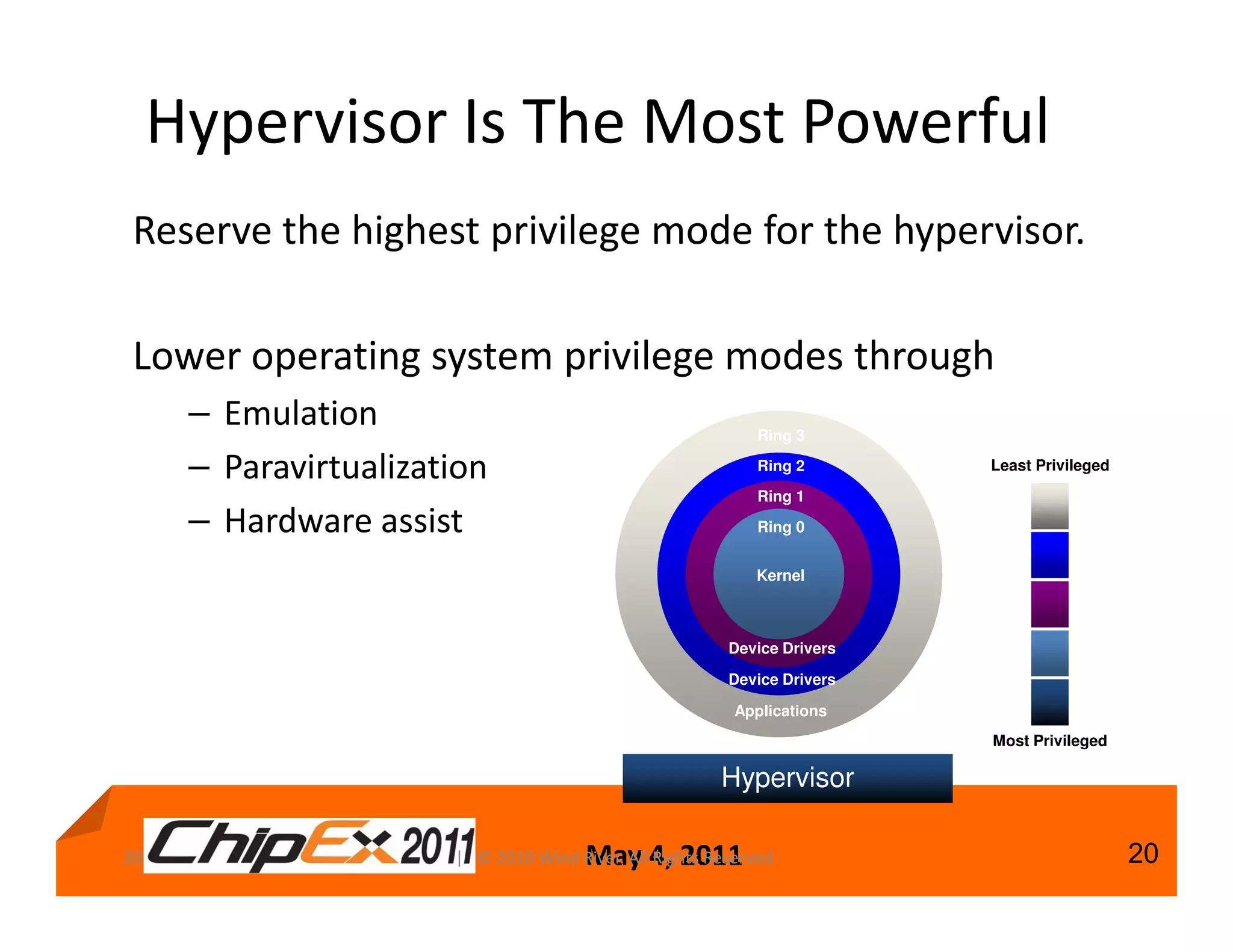
Hypervisor Is The Most Powerful
Reserve the highest privilege mode for the hypervisor.

Lower operating system privilege modes through
      – Emulation                                            Ring 3

      – Paravirtualization                                   Ring 2       Least Privileged

                                                             Ring 1
      – Hardware assist                                      Ring 0


                                                             Kernel


                                                         Device Drivers

                                                         Device Drivers

                                                          Applications
                                                                          Most Privileged

                                                        Hypervisor

20                                     May 4, 2011
                       | © 2010 Wind River. All Rights Reserved.                             20
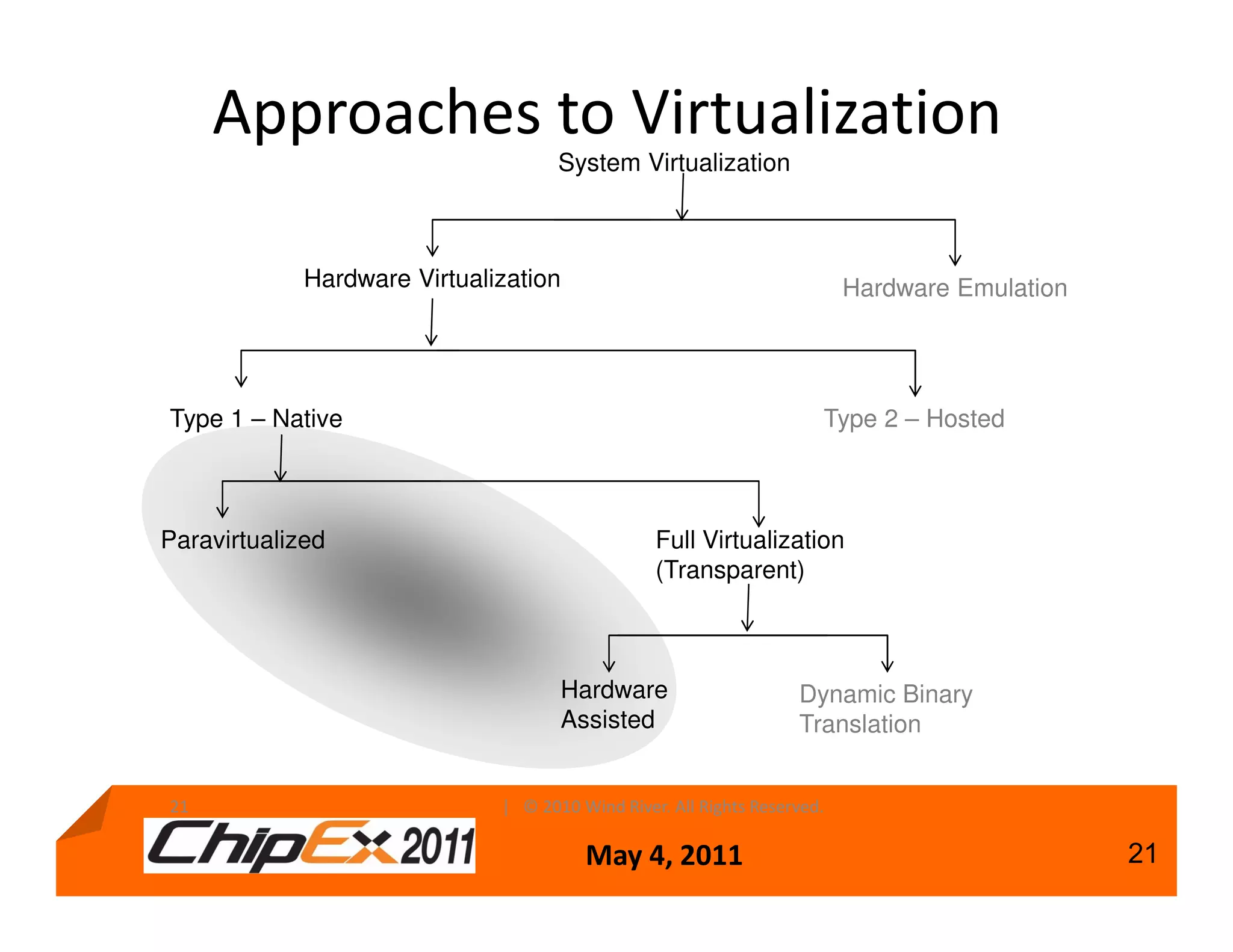
Approaches to Virtualization
                                     System Virtualization


             Hardware Virtualization                                      Hardware Emulation


Type 1 – Native                                                       Type 2 – Hosted


Paravirtualized                                  Full Virtualization
                                                 (Transparent)


                                     Hardware                      Dynamic Binary
                                     Assisted                      Translation


21                            | © 2010 Wind River. All Rights Reserved.

                                        May 4, 2011                                            21
Privilege Modes – Hardware Assist
• Privilege modes are processor specific. You cannot just “add”
  another mode. Only the silicon vendor can:
      – Freescale e500mc
      – Intel VTx
      – Virtualization-aware instruction set (aka hardware-assisted
        virtualization)
• If not available, paravirtualization will be more for the OS
  developer.

      Often the truth is in the middle: a mix of software and
      hardware assist.


 22                                          May 4, 2011
                             | © 2010 Wind River. All Rights Reserved.   22
Privilege Modes – Paravirtualization
• Modify the guest operating system, to collaborate
  with the hypervisor.
• Reduce the privilege level during design time.
• Provide a collaborative system approach.
• Use for embedded.
• Handle devices:
      – In the hypervisor (impact to hypervisor size and stability)
      – In a specially crafted guest (guest running in privilege)
      – Directly assigned to guest


 23                                       May 4, 2011
                          | © 2010 Wind River. All Rights Reserved.   23
Mixing Technologies
      Mixing of Paravirtualization and Hardware Assist
      • Use the best of both worlds for embedded
             – Paravirtualization collaboration of OS with
               hypervisor (avoid privilege code and call
               hypervisor instead)
             – Hardware assist using silicon (great for address
               translation)


        Wind River hypervisor uses a mix of paravirtualization
           and hardware assist, if the processor supports it.
                                                             24
| © 2010 Wind River. All Rights Reserved.   May 4, 2011           24
Type 1 vs. Type 2 Hypervisor
 A type 1 hypervisor runs directly on the hardware,
 managing resources, and providing services to guests
 A type 2 hypervisor is hosted in another operating
 system (the host)


                 Guest                                                  Guest
                                                                       Hypervisor
               Hypervisor                                                Host
                Type 1                                                  Type 2
     The difference between type 1 and type 2 is not as simple and useful
                                as it seems

25                                         May 4, 2011
                           | © 2010 Wind River. All Rights Reserved.                25
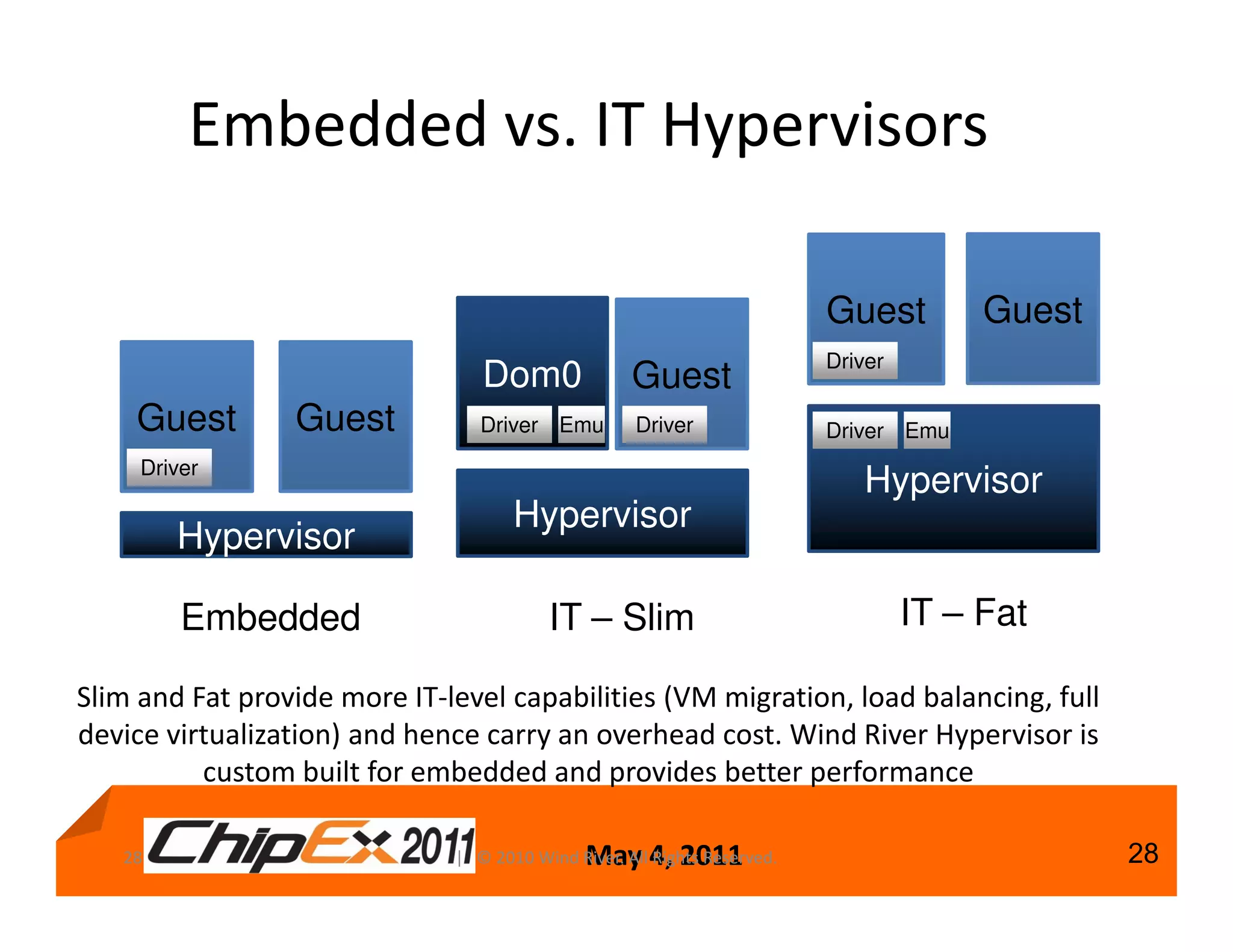
Embedded vs. IT Hypervisors

                                                                          Guest         Guest
                                                                          Driver
                                 Dom0               Guest
    Guest        Guest           Driver Emu         Driver                Driver Emu
     Driver
                                                                             Hypervisor
                                     Hypervisor
        Hypervisor

         Embedded                        IT – Slim                                 IT – Fat

Slim and Fat provide more IT-level capabilities (VM migration, load balancing, full
device virtualization) and hence carry an overhead cost. Wind River Hypervisor is
          custom built for embedded and provides better performance

   28                                         May 4, 2011
                              | © 2010 Wind River. All Rights Reserved.                         28
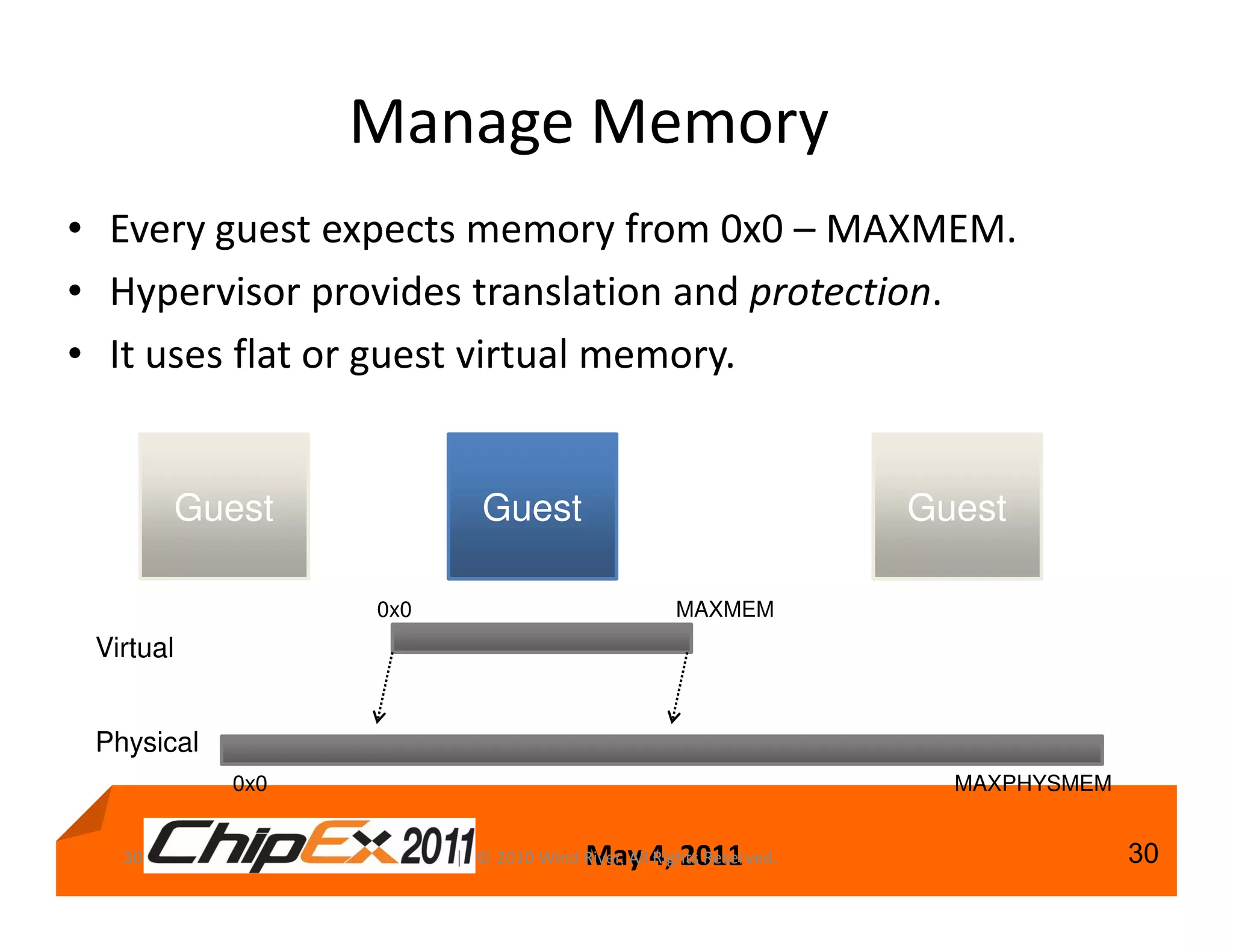
Manage Memory
• Every guest expects memory from 0x0 – MAXMEM.
• Hypervisor provides translation and protection.
• It uses flat or guest virtual memory.


           Guest            Guest                                    Guest

                   0x0                               MAXMEM
 Virtual


 Physical
             0x0                                                       MAXPHYSMEM


   30                                    May 4, 2011
                         | © 2010 Wind River. All Rights Reserved.                  30
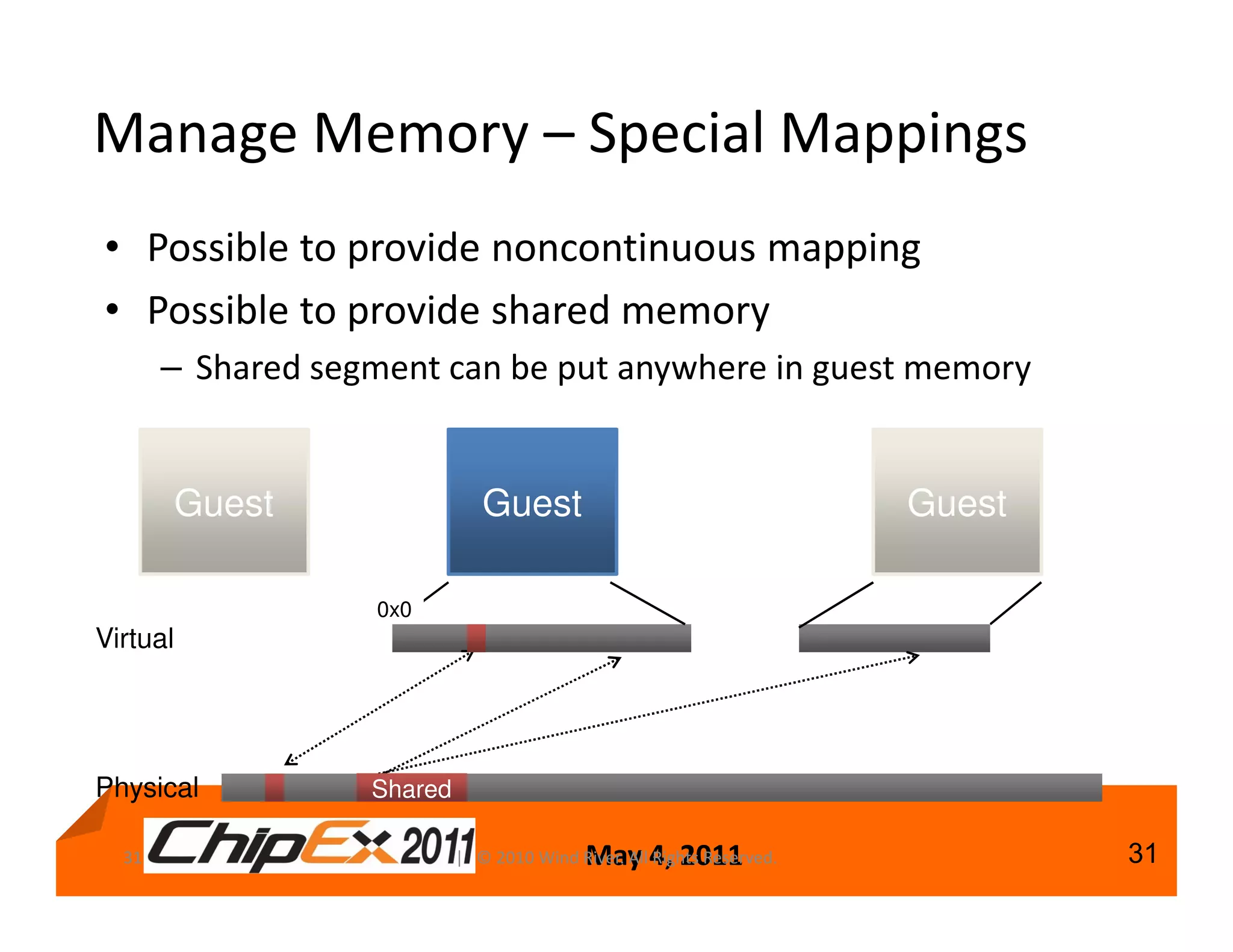
Manage Memory – Special Mappings
• Possible to provide noncontinuous mapping
• Possible to provide shared memory
       – Shared segment can be put anywhere in guest memory


          Guest                Guest                                    Guest

                   0x0
Virtual


Physical           Shared

  31                                        May 4, 2011
                            | © 2010 Wind River. All Rights Reserved.           31
Device Support
                                       Driver
                                                                                        Guest
                      Fastest, native performance
     Direct           Recommended where possible                                          Driver


                                                                      Guest             Guest
                       One owner
     Shared            Others share                                    shDev              Driver


                                                                      Guest             Guest
                       Driver in hypervisor
                     Driver
     Virtualized                                                        Stub              Stub
                        Hypervisor
                       Stubs in the guest
                                                                    Driver   Hypervisor


                       Driver in hypervisor                            Guest            Guest
                                                                                        Driver1
     Emulated          Emulation in hypervisor
                                                                       Driver1
                                                                   Driver1 Emulation
                       Regular driver in guest                          Driver2        Hypervisor


34                     | © 2010 Wind River. All Rights Reserved.

                                       May 4, 2011                                                  34
Devices Access – Virtual Interrupts
                                                                 Running
            Virtual Board                                     Virtual Board


                 Guest                                                Guest


       Virtual Interrupt Controller                     Virtual Interrupt Controller

                                                            Interrupt
                      Pending
                      Interrupt
                      Pending
                      Interrupt


                                  Wind River Hypervisor


                                                      Interrupt Controller


 38                       | © 2010 Wind River. All Rights Reserved.

                                      May 4, 2011                                      38
Core Virtualization – Schedulers
• Two different schedulers available
• Priority
   – Each virtual board has a priority
   – Highest priority board that is non-idle is on-processor
   – Boards with the same priority are scheduled round-robin
• Time slice
   – Each virtual board gets a designated time slice
   – Only single core
• Scheduler is pluggable
   – Other scheduling algorithms can be plugged into the
     hypervisor
   40                    | © 2010 Wind River. All Rights Reserved.

                                      May 4, 2011                    40
Inter-Board Communication
• Shared memory can be given to each board
  – Easy way to share large amounts of data
  – Synchronization through asynchronous messaging
     • For signaling, or using zero-copy data sending
     • MultiOS Inter Processor Communication (MIPC)
     • Asynchronous messaging promotes parallel algorithms
• MultiOS Inter Processor Communication (MIPC)
  – Fast communication for multicore and virtualization
  – Socket-like API for easy migration
  – Wind River standard API between OSes in any
     configuration
  – Uses shared memory©andWind River. All Rights Reserved.
  42                     | 2010
                                interrupts

                                May 4, 2011                  42
Services on top of MIPC
• MIPC Network Device (MND)
     – TCP/IP layered on top of MIPC
     – Slower than MIPC, but offers TCP/IP layer
• MIPC Serial Device (MSD)
     – Ability to use a single serial port with multiple
       guests
     – For terminal access, as well as printf for example
       for debugging
• MIPC File System (MFS)

43                                   May 4, 2011
                     | © 2010 Wind River. All Rights Reserved.   43
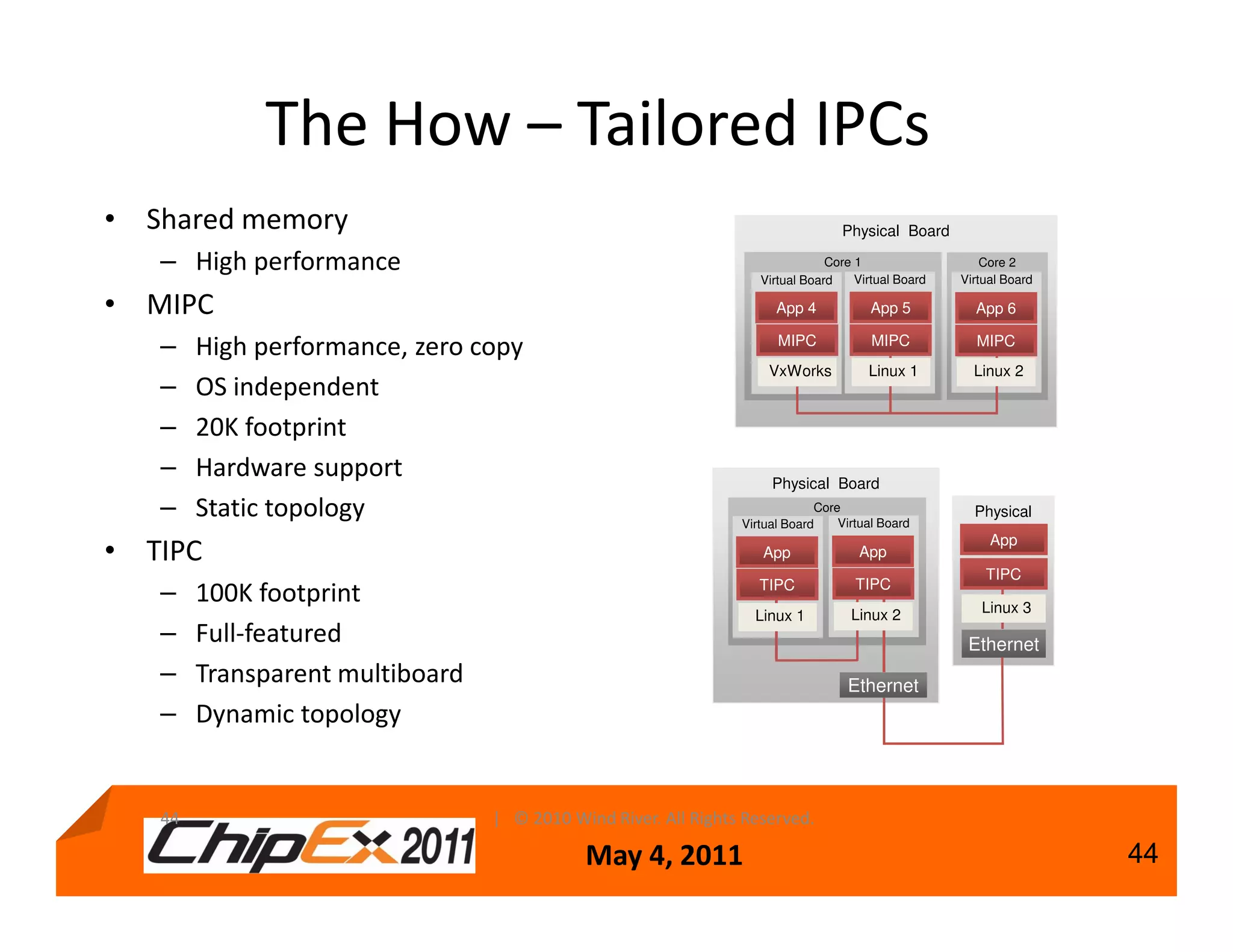
The How – Tailored IPCs
• Shared memory                                                                  Physical Board

   – High performance                                                          Core 1
                                                                                    Virtual Board
                                                                                                        Core 2
                                                                                                    Virtual Board
                                                                   Virtual Board

• MIPC                                                                App 4            App 5          App 6

   –    High performance, zero copy                                   MIPC             MIPC           MIPC
                                                                    VxWorks           Linux 1         Linux 2
   –    OS independent
   –    20K footprint
   –    Hardware support                                             Physical Board
   –    Static topology                                         Virtual Board
                                                                             Core
                                                                                 Virtual Board
                                                                                                      Physical
                                                                                                       Board
                                                                                                        App
• TIPC                                                             App              App
                                                                                                        TIPC
                                                                   TIPC             TIPC
   –    100K footprint                                                                                 Linux 3
                                                                  Linux 1          Linux 2
   –    Full-featured                                                                                Ethernet
   –    Transparent multiboard                                                    Ethernet
   –    Dynamic topology


   44                            | © 2010 Wind River. All Rights Reserved.

                                            May 4, 2011                                                             44
Building a System (Standard
         Approach)
                                     Hypervisor ELF
Boot Image                        Image (hypervisor.elf)
  (ELF format)
                                     VxWorks ELF
                                   Image (vxworks.elf)
     Linux
                  Packaging            Linux ELF
                                   Image (vmlinux.elf)
                    Tool
    VxWorks


 Image Manifest

   Hypervisor                      XML Configuration


                    May 4, 2011                            45
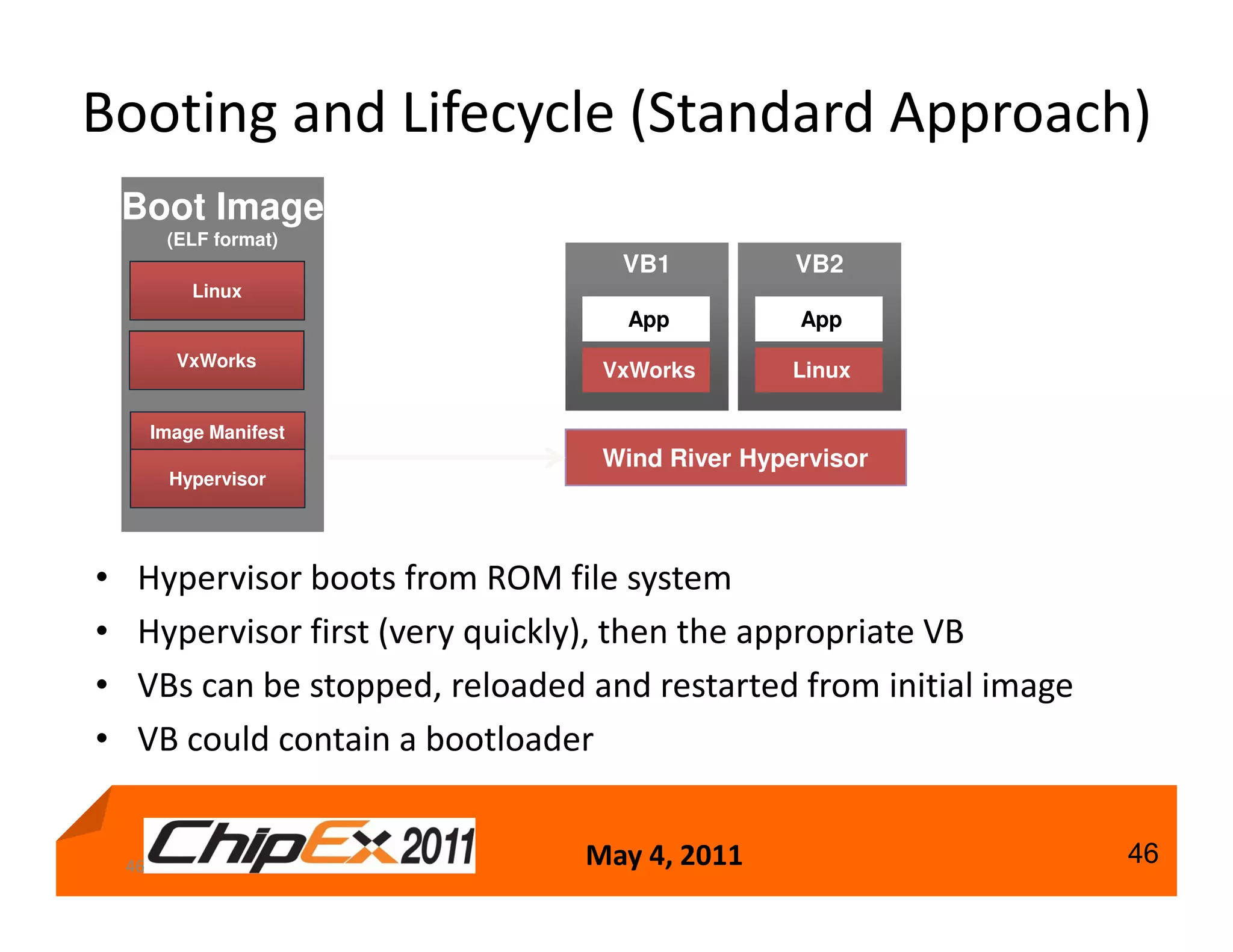
Booting and Lifecycle (Standard Approach)
    Boot Image
          (ELF format)
                                    VB1           VB2
             Linux
                                     App          App
           VxWorks
                                   VxWorks        Linux

         Image Manifest
                                   Wind River Hypervisor
          Hypervisor


•    Hypervisor boots from ROM file system
•    Hypervisor first (very quickly), then the appropriate VB
•    VBs can be stopped, reloaded and restarted from initial image
•    VB could contain a bootloader


    46                            May 4, 2011                        46
Virtualization Details – Summary
•    Modes of virtualization
•    The mechanisms behind virtualization
•    Virtualizing memory, cores, devices, interrupts
•    Inter-board communication
                  Ring 3                      Ring 3                      Ring 3
                  Ring 2                      Ring 2                      Ring 2
                  Ring 1                      Ring 1                      Ring 1
                  Ring 0                      Ring 0                      Ring 0

                  Kernel                      Kernel                      Kernel


               Device Drivers              Device Drivers              Device Drivers
               Device Drivers              Device Drivers              Device Drivers
               Applications                Applications                 Applications


                                       Hypervisor

                                Core 0                                 Core 1


47                                         May 4, 2011
                           | © 2010 Wind River. All Rights Reserved.                    47
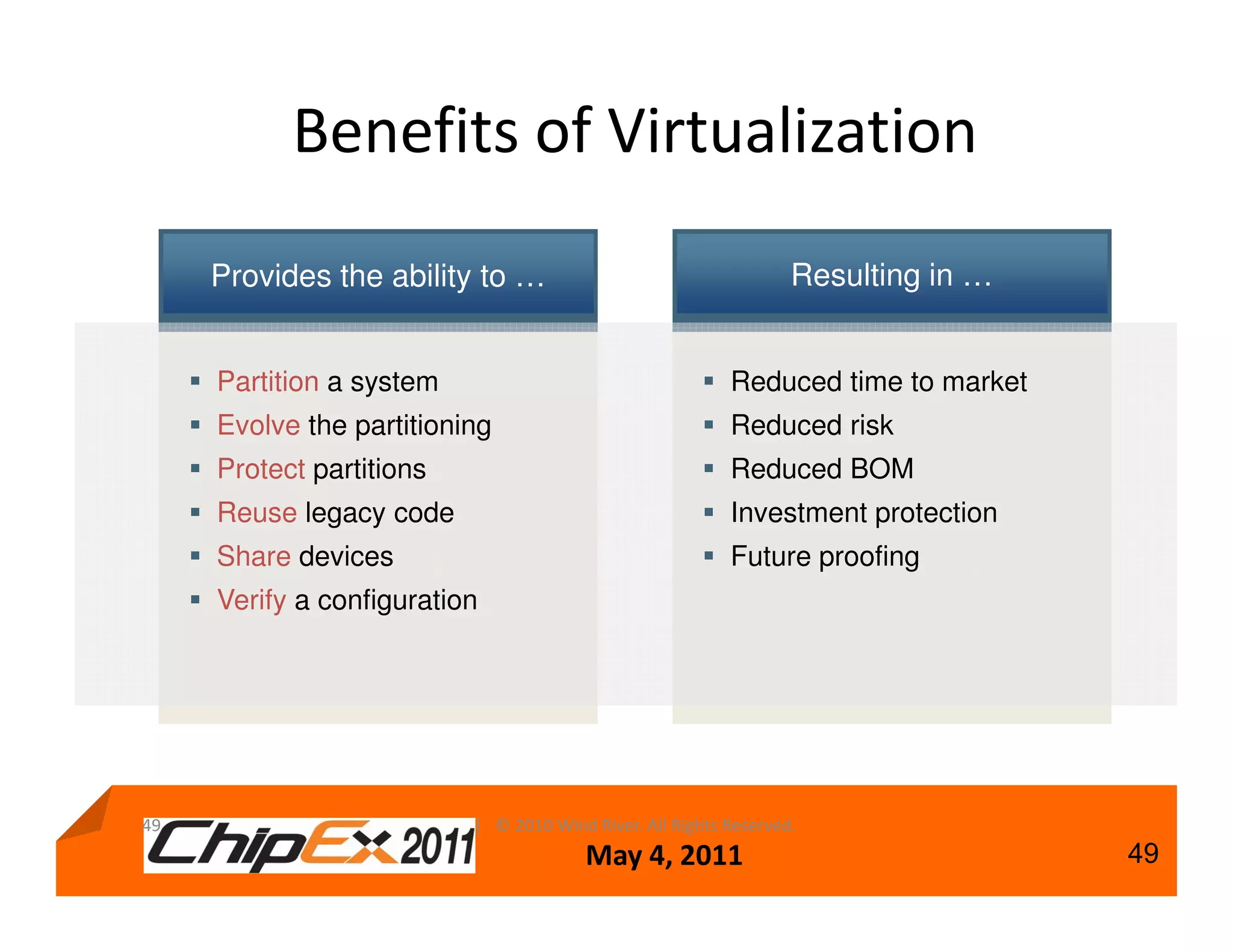
Benefits of Virtualization
     Provides the ability to …                                    Resulting in …


     Partition a system                                   Reduced time to market
     Evolve the partitioning                              Reduced risk
     Protect partitions                                   Reduced BOM
     Reuse legacy code                                    Investment protection
     Share devices                                        Future proofing
     Verify a configuration


49                        | © 2010 Wind River. All Rights Reserved.
                                        May 4, 2011                                49
Multi-Context Debugging
                      with OCD & Wind River Hypervisor
                                                                             Debug Context View
                                                                                 Visibility to
                                                                               physical cores

                                                                                 - registers
                                                                                 - bit level details
                                                                                 - memory
 Target Manager                                                                  - cache
  Multiple virtual
  boards (VBs)
running VxWorks
  in hypervised
   environment
                                                                                 Fine-grained
                                                                                  breakpoint
                                                                                 control with
                                                                                 association
                                                                                  to multiple
                                                                                   contexts


    Deep visibility and granular control to debug complex system issues:
           Examples: inter-core race lock conditions, synchronization, message passing.
                                             May 4, 2011                                        54

Track A-Shmuel Panijel, Windriver

  • 1.
    Developing Embedded Systems withMulticore and Virtualization Samuel Panijel Regional Engineering Manager Wind River Q2-2011 May 4, 2011 1
  • 2.
    Context • Multicore andvirtualization are creating a disruption in the embedded industry – Multicore provides more processing power for less power – Virtualization provides partitioning on single and multicore silicon • Wind River provides a broad portfolio of technology to assist the migration to multicore – Runtimes, Middleware, Virtualization and Tooling • This presentation will focus on the use of virtualization – For single and multicore – Based on the Wind River Hypervisor for Embedded 2 May 4, 2011 | © 2010 Wind River. All Rights Reserved. 2
  • 3.
    Agenda • Multicore andvirtualization overview – An introduction to AMP, SMP and Virtualization • Virtualization capabilities • Virtualization details – Modes of virtualization – The mechanisms behind virtualization – Virtualizing memory, cores, devices, interrupts – Inter-board communication How to design your next generation of devices 3 May 4, 2011 | © 2010 Wind River. All Rights Reserved. 3
  • 4.
    Primary Multicore Software Configurations “Traditional” Virtualization OS OS OS Single Core Hypervisor CPU CPU SMP Unsupervised AMP Supervised AMP (sAMP) OS OS OS OS OS Multicore Supervisor Core 1 Core 2 Core 1 Core 2 Core 1 Core 2 Arbitrary combinations of these primary configurations can be used to create more advanced configurations. OS: Could be VxWorks, Wind River Linux, or other executive or OS 4 May 4, 2011 | © 2010 Wind River. All Rights Reserved. 4
  • 5.
    Symmetric Multiprocessing (SMP) • A lot of experience • Works well for parallel algorithms • OS performs scheduling and load balancing • A viable solution, depending on your needs – Does not always scale with many cores SMP • Linux and VxWorks SMP OS Core 1 Core 2 5 | © 2010 Wind River. All Rights Reserved. May 4, 2011 5
  • 6.
    Asymmetric Multiprocessing (AMP) •One operating system per core • Questions raised in regard to configuring and run-time – Who “owns” devices? – How is memory split? Unsupervised AMP – How is memory protected? OS OS – How is this configured? Core 1 Core 2 – How is this built into the kernel? • Mixed operating systems? 6 | © 2010 Wind River. All Rights Reserved. May 4, 2011 6
  • 7.
    Choosing Supervised AMP WhatIs sAMP? – AMP, but guarded by a supervisor When to Use sAMP – Memory and device partitioning (protection, robustness) – Flexibility in the mapping of hardware to software Supervised AMP (sAMP) – Memory virtualization (each OS starts at 0x0) OS OS – Reuse of the same image multiple times Supervisor – Out-of-the-box life cycle management Core 1 Core 2 9 May 4, 2011 | © 2010 Wind River. All Rights Reserved. 9
  • 8.
    Agenda • Multicore andvirtualization overview – An introduction to AMP, SMP and Virtualization • Virtualization capabilities • Virtualization details – Modes of virtualization – The mechanisms behind virtualization – Virtualizing memory, cores, devices, interrupts – Inter-board communication How to design your next generation of devices 10 | © 2010 Wind River. All Rights Reserved. May 4, 2011 10
  • 9.
    Virtualization • Partitioning isa benefit of virtualization • Virtualization partitions the hardware into virtual boards • The virtualization layer gives the board access to – Virtualized processing cores (optional) – Virtualized memory – Virtualized devices and interrupts • Virtualization can be done in a scalable fashion Hypervisor Core Virtualization Guest Protection Protected Supervisor Core Protection Virtual Memory and Devices Interrupts Supervisor Resource Partitioning Boot Life Cycle Management Debugging 11© 2009 Wind River. All Rights Reserved. | | © 2010 Wind River. All Rights Reserved. May 4, 2011 11
  • 10.
    An Example VirtualizationScenario Virtual Board 1 Virtual Board 2 Virtual Board 3 Application Application Application VxWorks MIPC Wind River Linux Ethernet IDE Serial Ethernet VCore Memory Timer VCore Memory Timer VCore Memory Timer Configuration Wind River Hypervisor Physical Board IDE Ethernet Timer Serial Memory Core Core 12 | © 2010 Wind River. All Rights Reserved. May 4, 2011 12
  • 11.
    Summary of theExample • Virtual boards – Virtual board scheduling if required • Virtualized memory • Virtualized processing cores • Virtualized devices • Inter-board communication • Configuration and debugging Virtualization provides new and flexible design capabilities for single and multicore systems 13 May 4, 2011 | © 2010 Wind River. All Rights Reserved. 13
  • 12.
    Virtualization Performance • Virtualizationneeds to have minimal cost • Wind River and customer benchmarking – sAMP: Overall cost is less than 1% – Core virtualized: With significant load only a few percent, similar to running multiple processes – Some additional latency to interrupt handling • Actual performance depends on – Processor, board, application – Multicore configuration • The additional design capabilities and flexibility typically outweigh any potential overhead 14 | © 2010 Wind River. All Rights Reserved. May 4, 2011 14
  • 13.
    Agenda • Multicore andvirtualization overview – An introduction to AMP, SMP and Virtualization • Virtualization capabilities • Virtualization details – Modes of virtualization – The mechanisms behind virtualization – Virtualizing memory, cores, devices, interrupts – Inter-board communication How to design your next generation of devices 15 May 4, 2011 | © 2010 Wind River. All Rights Reserved. 15
  • 14.
    Virtualization Principles The hypervisoradds an additional layer of indirection to between the OS and the physical hardware The hypervisor virtualizes the hardware and executes guest operating systems. The level of virtualization can be configured based on device needs Guest Guest Guest Hypervisor 16 May 4, 2011 | © 2010 Wind River. All Rights Reserved. 16
  • 15.
    Hypervisor Mechanics • OSprivilege modes • Emulation vs. paravirtualization vs. hardware assist • Different types of hypervisors • Memory • Devices, interrupts • Inter board communication 17 May 4, 2011 | © 2010 Wind River. All Rights Reserved. 17
  • 16.
    Privilege Modes Operating systemswork in privilege modes: The OS kernel itself can do anything with the hardware Device drivers are more restricted User applications/components are least privileged Ring 3 Ring 2 Least Privileged Ring 1 Ring 0 Kernel Example based on Intel privilege rings, other processors have similar Device Drivers concepts Device Drivers Most Privileged Applications Intel privilege rings source: Wikipedia 18 May 4, 2011 | © 2010 Wind River. All Rights Reserved. 18
  • 17.
    Hypervisor Is TheMost Powerful Reserve the highest privilege mode for the hypervisor. Lower operating system privilege modes through – Emulation Ring 3 – Paravirtualization Ring 2 Least Privileged Ring 1 – Hardware assist Ring 0 Kernel Device Drivers Device Drivers Applications Most Privileged Hypervisor 20 May 4, 2011 | © 2010 Wind River. All Rights Reserved. 20
  • 18.
    Approaches to Virtualization System Virtualization Hardware Virtualization Hardware Emulation Type 1 – Native Type 2 – Hosted Paravirtualized Full Virtualization (Transparent) Hardware Dynamic Binary Assisted Translation 21 | © 2010 Wind River. All Rights Reserved. May 4, 2011 21
  • 19.
    Privilege Modes –Hardware Assist • Privilege modes are processor specific. You cannot just “add” another mode. Only the silicon vendor can: – Freescale e500mc – Intel VTx – Virtualization-aware instruction set (aka hardware-assisted virtualization) • If not available, paravirtualization will be more for the OS developer. Often the truth is in the middle: a mix of software and hardware assist. 22 May 4, 2011 | © 2010 Wind River. All Rights Reserved. 22
  • 20.
    Privilege Modes –Paravirtualization • Modify the guest operating system, to collaborate with the hypervisor. • Reduce the privilege level during design time. • Provide a collaborative system approach. • Use for embedded. • Handle devices: – In the hypervisor (impact to hypervisor size and stability) – In a specially crafted guest (guest running in privilege) – Directly assigned to guest 23 May 4, 2011 | © 2010 Wind River. All Rights Reserved. 23
  • 21.
    Mixing Technologies Mixing of Paravirtualization and Hardware Assist • Use the best of both worlds for embedded – Paravirtualization collaboration of OS with hypervisor (avoid privilege code and call hypervisor instead) – Hardware assist using silicon (great for address translation) Wind River hypervisor uses a mix of paravirtualization and hardware assist, if the processor supports it. 24 | © 2010 Wind River. All Rights Reserved. May 4, 2011 24
  • 22.
    Type 1 vs.Type 2 Hypervisor A type 1 hypervisor runs directly on the hardware, managing resources, and providing services to guests A type 2 hypervisor is hosted in another operating system (the host) Guest Guest Hypervisor Hypervisor Host Type 1 Type 2 The difference between type 1 and type 2 is not as simple and useful as it seems 25 May 4, 2011 | © 2010 Wind River. All Rights Reserved. 25
  • 23.
    Embedded vs. ITHypervisors Guest Guest Driver Dom0 Guest Guest Guest Driver Emu Driver Driver Emu Driver Hypervisor Hypervisor Hypervisor Embedded IT – Slim IT – Fat Slim and Fat provide more IT-level capabilities (VM migration, load balancing, full device virtualization) and hence carry an overhead cost. Wind River Hypervisor is custom built for embedded and provides better performance 28 May 4, 2011 | © 2010 Wind River. All Rights Reserved. 28
  • 24.
    Manage Memory • Everyguest expects memory from 0x0 – MAXMEM. • Hypervisor provides translation and protection. • It uses flat or guest virtual memory. Guest Guest Guest 0x0 MAXMEM Virtual Physical 0x0 MAXPHYSMEM 30 May 4, 2011 | © 2010 Wind River. All Rights Reserved. 30
  • 25.
    Manage Memory –Special Mappings • Possible to provide noncontinuous mapping • Possible to provide shared memory – Shared segment can be put anywhere in guest memory Guest Guest Guest 0x0 Virtual Physical Shared 31 May 4, 2011 | © 2010 Wind River. All Rights Reserved. 31
  • 26.
    Device Support Driver Guest Fastest, native performance Direct Recommended where possible Driver Guest Guest One owner Shared Others share shDev Driver Guest Guest Driver in hypervisor Driver Virtualized Stub Stub Hypervisor Stubs in the guest Driver Hypervisor Driver in hypervisor Guest Guest Driver1 Emulated Emulation in hypervisor Driver1 Driver1 Emulation Regular driver in guest Driver2 Hypervisor 34 | © 2010 Wind River. All Rights Reserved. May 4, 2011 34
  • 27.
    Devices Access –Virtual Interrupts Running Virtual Board Virtual Board Guest Guest Virtual Interrupt Controller Virtual Interrupt Controller Interrupt Pending Interrupt Pending Interrupt Wind River Hypervisor Interrupt Controller 38 | © 2010 Wind River. All Rights Reserved. May 4, 2011 38
  • 28.
    Core Virtualization –Schedulers • Two different schedulers available • Priority – Each virtual board has a priority – Highest priority board that is non-idle is on-processor – Boards with the same priority are scheduled round-robin • Time slice – Each virtual board gets a designated time slice – Only single core • Scheduler is pluggable – Other scheduling algorithms can be plugged into the hypervisor 40 | © 2010 Wind River. All Rights Reserved. May 4, 2011 40
  • 29.
    Inter-Board Communication • Sharedmemory can be given to each board – Easy way to share large amounts of data – Synchronization through asynchronous messaging • For signaling, or using zero-copy data sending • MultiOS Inter Processor Communication (MIPC) • Asynchronous messaging promotes parallel algorithms • MultiOS Inter Processor Communication (MIPC) – Fast communication for multicore and virtualization – Socket-like API for easy migration – Wind River standard API between OSes in any configuration – Uses shared memory©andWind River. All Rights Reserved. 42 | 2010 interrupts May 4, 2011 42
  • 30.
    Services on topof MIPC • MIPC Network Device (MND) – TCP/IP layered on top of MIPC – Slower than MIPC, but offers TCP/IP layer • MIPC Serial Device (MSD) – Ability to use a single serial port with multiple guests – For terminal access, as well as printf for example for debugging • MIPC File System (MFS) 43 May 4, 2011 | © 2010 Wind River. All Rights Reserved. 43
  • 31.
    The How –Tailored IPCs • Shared memory Physical Board – High performance Core 1 Virtual Board Core 2 Virtual Board Virtual Board • MIPC App 4 App 5 App 6 – High performance, zero copy MIPC MIPC MIPC VxWorks Linux 1 Linux 2 – OS independent – 20K footprint – Hardware support Physical Board – Static topology Virtual Board Core Virtual Board Physical Board App • TIPC App App TIPC TIPC TIPC – 100K footprint Linux 3 Linux 1 Linux 2 – Full-featured Ethernet – Transparent multiboard Ethernet – Dynamic topology 44 | © 2010 Wind River. All Rights Reserved. May 4, 2011 44
  • 32.
    Building a System(Standard Approach) Hypervisor ELF Boot Image Image (hypervisor.elf) (ELF format) VxWorks ELF Image (vxworks.elf) Linux Packaging Linux ELF Image (vmlinux.elf) Tool VxWorks Image Manifest Hypervisor XML Configuration May 4, 2011 45
  • 33.
    Booting and Lifecycle(Standard Approach) Boot Image (ELF format) VB1 VB2 Linux App App VxWorks VxWorks Linux Image Manifest Wind River Hypervisor Hypervisor • Hypervisor boots from ROM file system • Hypervisor first (very quickly), then the appropriate VB • VBs can be stopped, reloaded and restarted from initial image • VB could contain a bootloader 46 May 4, 2011 46
  • 34.
    Virtualization Details –Summary • Modes of virtualization • The mechanisms behind virtualization • Virtualizing memory, cores, devices, interrupts • Inter-board communication Ring 3 Ring 3 Ring 3 Ring 2 Ring 2 Ring 2 Ring 1 Ring 1 Ring 1 Ring 0 Ring 0 Ring 0 Kernel Kernel Kernel Device Drivers Device Drivers Device Drivers Device Drivers Device Drivers Device Drivers Applications Applications Applications Hypervisor Core 0 Core 1 47 May 4, 2011 | © 2010 Wind River. All Rights Reserved. 47
  • 35.
    Benefits of Virtualization Provides the ability to … Resulting in … Partition a system Reduced time to market Evolve the partitioning Reduced risk Protect partitions Reduced BOM Reuse legacy code Investment protection Share devices Future proofing Verify a configuration 49 | © 2010 Wind River. All Rights Reserved. May 4, 2011 49
  • 36.
    Multi-Context Debugging with OCD & Wind River Hypervisor Debug Context View Visibility to physical cores - registers - bit level details - memory Target Manager - cache Multiple virtual boards (VBs) running VxWorks in hypervised environment Fine-grained breakpoint control with association to multiple contexts Deep visibility and granular control to debug complex system issues: Examples: inter-core race lock conditions, synchronization, message passing. May 4, 2011 54