Disclaimer: This presentation is prepared by trainees of
baabtra as a part of mentoring program. This is not official
document of baabtra –Mentoring Partner
Baabtra-Mentoring Partner is the mentoring division of baabte System Technologies Pvt .
Ltd
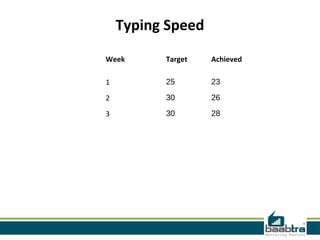
Typing Speed
Week

Target

Achieved

1

25

23

2

30

26

3

30

28
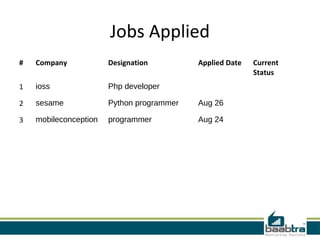
Jobs Applied
#

Company

Designation

Applied Date

1

ioss

Php developer

2

sesame

Python programmer

Aug 26

3

mobileconception

programmer

Aug 24

Current
Status
Threads in python
shafeeque
●

shafeequemonp@gmail.com

●

www.facebook.com/shafeequemonppambodan

●

twitter.com/shafeequemonp

●

in.linkedin.com/in/shafeequemonp

●

9809611325
Introduction
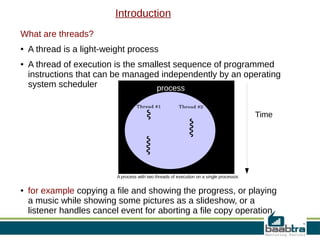
What are threads?
●

●

A thread is a light-weight process
A thread of execution is the smallest sequence of programmed
instructions that can be managed independently by an operating
system scheduler
process
Time

A process with two threads of execution on a single processor.
●

for example copying a file and showing the progress, or playing
a music while showing some pictures as a slideshow, or a
listener handles cancel event for aborting a file copy operation
●

Multithreading generally occurs by time- division multiplexing.

●

The processor switches between different threads

●

●

●

●

●

On a multiprocessor or multi-core system, threads can be truly 
concurrent, with every processor or core executing a separate thread 
simultaneously.
Many modern operating systems directly support both time-sliced and 
multiprocessor threading with a process scheduler.
The scheduler is an operating system module that selects the next 
jobs to be admitted into the system and the next process to run.
The kernel of an operating system allows programmers to manipulate 
threads via the system call interface
Multi-threading is a widespread programming and execution model 
that allows multiple threads to exist within the context of a single 
process
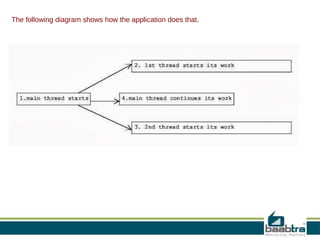
The following diagram shows how the application does that.
Python Threading:
●

●

●

A thread has a beginning, an execution sequence, and a conclusion. It has an instruction 
pointer that keeps track of where within its context it is currently running.
    it can be pre-empted (interrupted)
    It can temporarily be put on hold (also known as sleeping) while other threads are running  
   this is called yielding.

Starting a New Thread:
To spawn another thread, you need to call following method available in thread module:
thread.start_new_thread ( function, args[, kwargs] )
●

●

The method call returns immediately and the child thread starts and calls function with the 
passed list of args. When function returns, the thread terminates.
Here, args is a tuple of arguments; use an empty tuple to call function without passing any 
arguments. kwargs is an optional dictionary of keyword arguments.
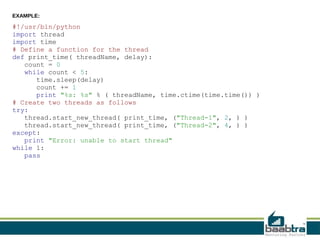
EXAMPLE:

#!/usr/bin/python
import thread
import time
# Define a function for the thread
def print_time( threadName, delay):
count = 0
while count < 5:
time.sleep(delay)
count += 1
print "%s: %s" % ( threadName, time.ctime(time.time()) )
# Create two threads as follows
try:
thread.start_new_thread( print_time, ("Thread-1", 2, ) )
thread.start_new_thread( print_time, ("Thread-2", 4, ) )
except:
print "Error: unable to start thread"
while 1:
pass
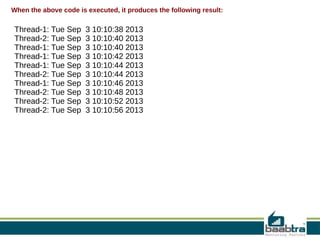
When the above code is executed, it produces the following result:

Thread-1: Tue Sep  3 10:10:38 2013
Thread-2: Tue Sep  3 10:10:40 2013
Thread-1: Tue Sep  3 10:10:40 2013
Thread-1: Tue Sep  3 10:10:42 2013
Thread-1: Tue Sep  3 10:10:44 2013
Thread-2: Tue Sep  3 10:10:44 2013
Thread-1: Tue Sep  3 10:10:46 2013
Thread-2: Tue Sep  3 10:10:48 2013
Thread-2: Tue Sep  3 10:10:52 2013
Thread-2: Tue Sep  3 10:10:56 2013
The Threading Module:
●

●

The newer threading module included with Python 2.4 provides much more 
powerful, high-level support for threads than the thread module discussed in the 
previous section.
The threading module exposes all the methods of the thread module and provides 
some additional methods:
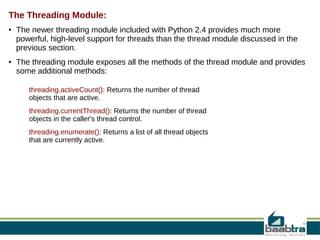
threading.activeCount(): Returns the number of thread 
objects that are active.
threading.currentThread(): Returns the number of thread 
objects in the caller's thread control.
threading.enumerate(): Returns a list of all thread objects 
that are currently active.
In addition to the methods, the threading module has the Thread class that
implements threading.
The methods provided by the Thread class are as follows:
run(): The run() method is the entry point for a thread.
start(): The start() method starts a thread by calling the run method.
join([time]): The join() waits for threads to terminate.
isAlive(): The isAlive() method checks whether a thread is still executing.
getName(): The getName() method returns the name of a thread.
setName(): The setName() method sets the name of a thread.
Creating Thread using Threading Module:
To implement a new thread using the threading module, you have to do the
following:
●

Define a new subclass of the Thread class.

●

Override the __init__(self [,args]) method to add additional arguments.

●

●

Then, override the run(self [,args]) method to implement what the thread should
do when started.

Once you have created the new Thread subclass, you can create an instance of it and
then start a new thread by invoking the start(), which will in turn call run() method.
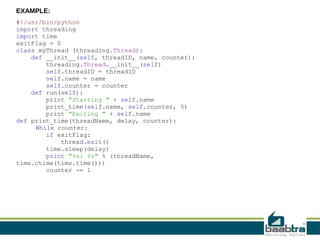
EXAMPLE:
#!/usr/bin/python
import threading
import time
exitFlag = 0
class myThread (threading.Thread):
def __init__(self, threadID, name, counter):
threading.Thread.__init__(self)
self.threadID = threadID
self.name = name
self.counter = counter
def run(self):
print "Starting " + self.name
print_time(self.name, self.counter, 5)
print "Exiting " + self.name
def print_time(threadName, delay, counter):
While counter:
if exitFlag:
thread.exit()
time.sleep(delay)
print "%s: %s" % (threadName,
time.ctime(time.time()))
counter -= 1
# Create new threads
thread1 = myThread(1, "Thread-1", 1)
thread2 = myThread(2, "Thread-2", 2)
# Start new Threads
thread1.start()
thread2.start()
print "Exiting Main Thread"
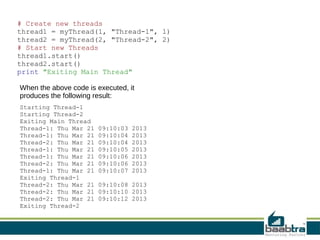
When the above code is executed, it
produces the following result:
Starting Thread-1
Starting Thread-2
Exiting Main Thread
Thread-1: Thu Mar 21
Thread-2: Thu Mar 21
Thread-1: Thu Mar 21
Thread-2: Thu Mar 21
Thread-1: Thu Mar 21
Exiting Thread-1
Thread-2: Thu Mar 21
Exiting Thread-2

09:10:03
09:10:04
09:10:04
09:10:05
09:10:06
09:10:06
09:10:07

2013
2013
2013
2013
2013
2013
2013

09:10:08 2013
09:10:10 2013
09:10:12 2013
Synchronizing Threads:
●

●

●

●

●

●

The threading module provided with Python includes a simple-toimplement locking mechanism that will allow you to synchronize threads
A new lock is created by calling the Lock() method, which returns the new
lock.
The acquire(blocking) method of the new lock object would be used to
force threads to run synchronously
The optional blocking parameter enables you to control whether the
thread will wait to acquire the lock.
If blocking is set to 0, the thread will return immediately with a 0 value if
the lock cannot be acquired and with a 1 if the lock was acquired. If
blocking is set to 1, the thread will block and wait for the lock to be
released.
The release() method of the the new lock object would be used to release
the lock when it is no longer required.
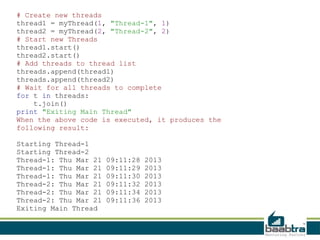
EXAMPLE:
#!/usr/bin/python
import threading
import time
class myThread (threading.Thread):
def __init__(self, threadID, name, counter):
threading.Thread.__init__(self)
self.threadID = threadID
self.name = name
self.counter = counter
def run(self):
print "Starting " + self.name
# Get lock to synchronize threads
threadLock.acquire()
print_time(self.name, self.counter, 3)
# Free lock to release next thread
threadLock.release()
def print_time(threadName, delay, counter):
while counter:
time.sleep(delay)
print "%s: %s" % (threadName,
time.ctime(time.time()))
counter -= 1
threadLock = threading.Lock()
threads = []
# Create new threads
thread1 = myThread(1, "Thread-1", 1)
thread2 = myThread(2, "Thread-2", 2)
# Start new Threads
thread1.start()
thread2.start()
# Add threads to thread list
threads.append(thread1)
threads.append(thread2)
# Wait for all threads to complete
for t in threads:
t.join()
print "Exiting Main Thread"
When the above code is executed, it produces the
following result:
Starting Thread-1
Starting Thread-2
Thread-1: Thu Mar 21
Thread-2: Thu Mar 21
Exiting Main Thread

09:11:28
09:11:29
09:11:30
09:11:32
09:11:34
09:11:36

2013
2013
2013
2013
2013
2013
If this presentation helped you, please visit our page facebook.com/baabtra and
like it.

Thanks in advance.
www.baabtra.com | www.massbaab.com |www.baabte.com
Contact Us
Emarald Mall (Big Bazar Building)
Mavoor Road, Kozhikode,
Kerala, India.
Ph: + 91 – 495 40 25 550

Start up Village
Eranakulam,
Kerala, India.
Email: info@baabtra.com

NC Complex, Near Bus Stand
Mukkam, Kozhikode,
Kerala, India.
Ph: + 91 – 495 40 25 550

Threads in python

Editor's Notes