About This Resource
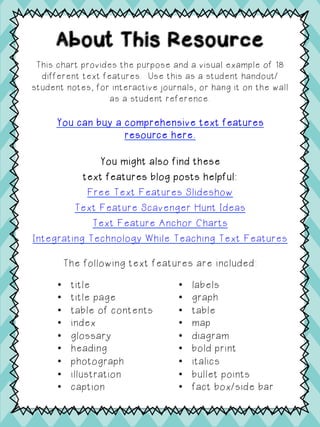
This chart provides the purpose and a visual example of 18
different text features. Use this as a student handout/
student notes, for interactive journals, or hang it on the wall
as a student reference.
You can buy a comprehensive text features
resource here.
You might also find these
text features blog posts helpful:
Free Text Features Slideshow
Text Feature Scavenger Hunt Ideas
Text Feature Anchor Charts
Integrating Technology While Teaching Text Features
The following text features are included:
•  title
•  title page
•  table of contents
•  index
•  glossary
•  heading
•  photograph
•  illustration
•  caption
•  labels
•  graph
•  table
•  map
•  diagram
•  bold print
•  italics
•  bullet points
•  fact box/side bar
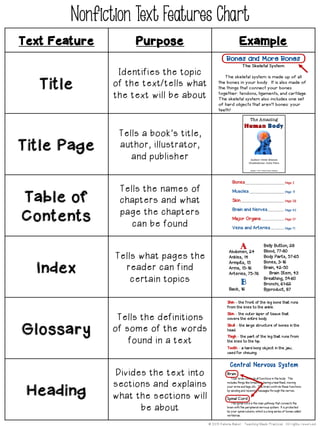
Nonfiction Text Features Chart
Text Feature Purpose Example
Title
Identifies the topic
of the text/tells what
the text will be about
Title Page
Tells a book’s title,
author, illustrator,
and publisher
Table of
Contents
Tells the names of
chapters and what
page the chapters
can be found
Index
Tells what pages the
reader can find
certain topics
Glossary
Tells the definitions
of some of the words
found in a text
Heading
Divides the text into
sections and explains
what the sections will
be about
© 2015 Kalena Baker: Teaching Made Practical. All rights reserved.
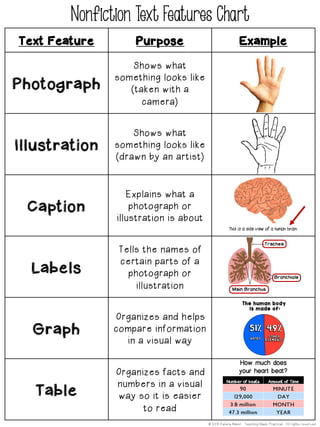
Text Feature Purpose Example
Photograph
Shows what
something looks like
(taken with a
camera)
Illustration
Shows what
something looks like
(drawn by an artist)
Caption
Explains what a
photograph or
illustration is about
Labels
Tells the names of
certain parts of a
photograph or
illustration
Graph
Organizes and helps
compare information
in a visual way
Table
Organizes facts and
numbers in a visual
way so it is easier
to read
Nonfiction Text Features Chart
© 2015 Kalena Baker: Teaching Made Practical. All rights reserved.
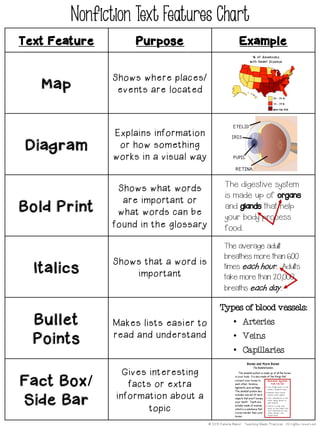
Text Feature Purpose Example
Map
Shows where places/
events are located
Diagram
Explains information
or how something
works in a visual way
Bold Print
Shows what words
are important or
what words can be
found in the glossary
Italics
Shows that a word is
important
Bullet
Points
Makes lists easier to
read and understand
Fact Box/
Side Bar
Gives interesting
facts or extra
information about a
topic
Nonfiction Text Features Chart
© 2015 Kalena Baker: Teaching Made Practical. All rights reserved.
It includes no prep
activities, reading
passages, task
cards, centers,
writing integration,
and more!
Save time planning with the complete resource:
Text Features Activities – Centers,
Posters, Reading Passages, and More.
You might also find these blog posts helpful:
•  How to Scaffold a Compare and Contrast Essay
•  Text Feature Scavenger Hunts
•  Morning Work Made Easy
•  Character Traits: Free Graphic Organizers
•  Point of View: It’s Not Just About 1st and 3rd
Acknowledgements © 2014 Kalena Baker: Teaching Made
Practical. Updated 2017. All rights
reserved.. By copyright law, the download
of this product entitles one teacher the use
of the digital and printed files for a single
classroom. Files are not to be shared or
published (including being displayed on a
website) in any way without direct
permission from the author, Kalena Baker.

Text features-chart-freebie

  • 1.
    About This Resource Thischart provides the purpose and a visual example of 18 different text features. Use this as a student handout/ student notes, for interactive journals, or hang it on the wall as a student reference. You can buy a comprehensive text features resource here. You might also find these text features blog posts helpful: Free Text Features Slideshow Text Feature Scavenger Hunt Ideas Text Feature Anchor Charts Integrating Technology While Teaching Text Features The following text features are included: •  title •  title page •  table of contents •  index •  glossary •  heading •  photograph •  illustration •  caption •  labels •  graph •  table •  map •  diagram •  bold print •  italics •  bullet points •  fact box/side bar
  • 2.
    Nonfiction Text FeaturesChart Text Feature Purpose Example Title Identifies the topic of the text/tells what the text will be about Title Page Tells a book’s title, author, illustrator, and publisher Table of Contents Tells the names of chapters and what page the chapters can be found Index Tells what pages the reader can find certain topics Glossary Tells the definitions of some of the words found in a text Heading Divides the text into sections and explains what the sections will be about © 2015 Kalena Baker: Teaching Made Practical. All rights reserved.
  • 3.
    Text Feature PurposeExample Photograph Shows what something looks like (taken with a camera) Illustration Shows what something looks like (drawn by an artist) Caption Explains what a photograph or illustration is about Labels Tells the names of certain parts of a photograph or illustration Graph Organizes and helps compare information in a visual way Table Organizes facts and numbers in a visual way so it is easier to read Nonfiction Text Features Chart © 2015 Kalena Baker: Teaching Made Practical. All rights reserved.
  • 4.
    Text Feature PurposeExample Map Shows where places/ events are located Diagram Explains information or how something works in a visual way Bold Print Shows what words are important or what words can be found in the glossary Italics Shows that a word is important Bullet Points Makes lists easier to read and understand Fact Box/ Side Bar Gives interesting facts or extra information about a topic Nonfiction Text Features Chart © 2015 Kalena Baker: Teaching Made Practical. All rights reserved.
  • 5.
    It includes noprep activities, reading passages, task cards, centers, writing integration, and more! Save time planning with the complete resource: Text Features Activities – Centers, Posters, Reading Passages, and More. You might also find these blog posts helpful: •  How to Scaffold a Compare and Contrast Essay •  Text Feature Scavenger Hunts •  Morning Work Made Easy •  Character Traits: Free Graphic Organizers •  Point of View: It’s Not Just About 1st and 3rd Acknowledgements © 2014 Kalena Baker: Teaching Made Practical. Updated 2017. All rights reserved.. By copyright law, the download of this product entitles one teacher the use of the digital and printed files for a single classroom. Files are not to be shared or published (including being displayed on a website) in any way without direct permission from the author, Kalena Baker.