2245 First Street, Suite 103 • Simi Valley, CA 93065 • 805 531 9030
6148 N. Discovery Way, Ste. 175 • Boise, ID 83713 • 208 424 1905
© 2009-2013 QualityLogic Inc.
Effective PDF Testing
Strategy
Effective PDF Testing Strategy
Page 2 of 15
Table of Contents
1. About the Author....................................................... 3
2. References ............................................................... 3
3. Introduction ............................................................. 4
4. Interoperability Testing .............................................. 4
5. Conformance Testing ................................................. 5
5.1. PDF Coverage from a Typical Application..............................6
5.2. PDF Functional Test Suite Design Goals................................8
5.3. PDF FTS Summary ............................................................9
5.4. Problems uncovered by PDF FTS in leading PDF products ..... 10
6. Use of TestJob Builder in Testing ................................11
7. Testimonials ............................................................13
8. Recommendations....................................................14
8.1. Testing Strategy for New Users......................................... 15
8.2. Testing Strategy for PDF InteropAnalyzer Users .................. 15
8.3. Testing Strategy for PDF 1.7 FTS Users.............................. 15
Effective PDF Testing Strategy
Page 3 of 15
1. About the Author
The author, Steve Kang, is currently General Manager of the Testing Products
Group at QualityLogic, Inc. and oversees all of the tools and test suites
products for the imaging and telecom industries. Before QualityLogic, Mr.
Kang served as VP of Engineering at controller/RIP development companies,
Advanced Hi-Tech and ColorBus, Inc. His technical background includes
development of high speed controllers and RIPs using customized PostScript,
PCL and PDF interpreters from Adobe, Global Graphics, Zoran and other
vendors. Mr. Kang holds a Masters degree in Computer Science from
University of Southern California and an MBA from the UCLA Anderson School.
He can be contacted at skang@qualitylogic.com or by calling (805)531-9030.
2. References
List of helpful documents for these PDF related tests are provided below
as hyperlinks. Please click on the individual link below to access the PDF
documents.
PDF 1.7 Functional Test Suite
PDF 1.7 Application Test Suite
PDF Compatibility Test Suite
PDF 1.7 InteropAnalyzer
ISO 32000 PDF Reference
Effective PDF Testing Strategy
Page 4 of 15
3. Introduction
Portable Document Format (or simply PDF) was created by Adobe Systems in
1993 as a document exchange format. Adobe’s first page description
language, PostScript, was created as a page description language for printers.
Although PostScript was a rich 2D page description language, it also included
typical programming constructs such as loops, if conditions and others that
can also cause unpredictable states across different pages. PostScript in
essence was a page dependent language where states and conditions that
occurred in previous pages can directly affect the output for subsequent
pages.
PDF was in part created to solve some of the deficiencies behind the
PostScript language. Since 1993, thanks largely to the popularity of the
Internet, PDF has become the ideal format for exchanging rich documents
between users. The initial version of PDF was essentially a simplified object
based page independent language leveraging all of the graphics primitives
supported in PostScript. In fact, Adobe’s PDF interpreters were developed by
leveraging its PostScript core engine through use of PostScript prologues to
implement the PDF features. PDF has evolved into a very rich document
format capable of supporting annotations, 3D objects, audio, and other
interactive elements. It is the most dominant document exchange format that
is used today.
QualityLogic has been committed to providing test suites for all major PDLs
including PDF. The PDF InteropAnalyzer product was QualityLogic’s 1st
PDF
testing product. In 2008, the PDF 1.7 Functional Test Suite was introduced
to provide a strict conformance test suite for the PDF language. Recently, the
PDF Compatibility Test Suite was introduced to provide a basic PDF test
suite for PDF applications and printers and the PDF Application Test Suite
(ATS) provides real world PDF files. This paper will explain how all of these
products can each play a role in an effective PDF testing strategy for your
implementation.
4. Interoperability Testing
The PDF InteropAnalyzer was created to provide our customers with a large
collection of PDF files created by various applications and producers gathered
from the Internet and generated by QualityLogic. This product includes a
searchable database application and a large collection of PDF files. The PDF
files that are included in the PDF InteropAnalyzer are meant to provide an
excellent representation of what users may actually try to produce using
popular applications and PDF creators. This type of testing is called
interoperability testing where coverage testing of typical combinations of PDF
operators produced by applications is tested against the target PDF
implementation.
Effective PDF Testing Strategy
Page 5 of 15
In 2009, we introduced two new PDF interoperability test suites:
PDF Compatibility Test Suite – This test suite contains 127 basic
compatibility test files for PDF versions 1.1 through 1.7. This product is
designed as an entry-level test for companies who need to validate
basic PDF interoperability.
PDF 1.7 Application Test Suite – This test suite evolves the
interoperability testing that was provided by PDF InteropAnalyzer
product further – over 1000 PDF files using the most current PDF
creation methods and applications including PDF/A, PDF/X, Adobe
Creative Suite 4, Macintosh and other creation methods.
5. Conformance Testing
Application based interoperability testing is certainly required and effective for
testing the typical usage scenarios that are likely to be encountered.
However, the PDF (or any other PDL) language specification is over 1000
pages and there are hundreds of different PDF operators and attributes can
be included in a perfectly valid PDF file. Nearly all of PDF creators and
applications that exist today output only a subset of the full PDF language
specification. Therefore, no matter how many different files one may produce
using various applications, the resulting PDF output files would not cover the
full breadth of the PDF language specification. Conformance to the PDF
language specification cannot be achieved by using just application produced
PDF files leaving the PDF vendor with potentially significant risk and exposure.
With so many PDF implementations out in the marketplace, leaving
this type of exposure can result in a significant competitive
disadvantage for your product – it is certain that new versions will
make use of PDF functionality that have not been used before. PDF
conformance testing is critical to producing robust PDF
implementations.
Effective PDF Testing Strategy
Page 6 of 15
5.1. PDF Coverage from a Typical Application
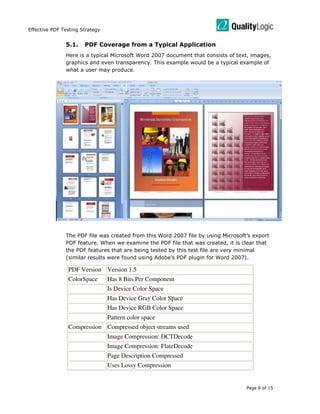
Here is a typical Microsoft Word 2007 document that consists of text, images,
graphics and even transparency. This example would be a typical example of
what a user may produce.
The PDF file was created from this Word 2007 file by using Microsoft’s export
PDF feature. When we examine the PDF file that was created, it is clear that
the PDF features that are being tested by this test file are very minimal
(similar results were found using Adobe’s PDF plugin for Word 2007).
PDF Version Version 1.5
ColorSpace Has 8 Bits Per Component
Is Device Color Space
Has Device Gray Color Space
Has Device RGB Color Space
Pattern color space
Compression Compressed object streams used
Image Compression: DCTDecode
Image Compression: FlateDecode
Page Description Compressed
Uses Lossy Compression
Effective PDF Testing Strategy
Page 7 of 15
Document Page Count
Orientation equal all pages
Size equal all pages
6-20 Page Document
Is Portrait
Is Letter Portrait
Font Has Compact Font
Font is embedded
Font is TrueType
Image Has Images
Image 1-200 dpp Resolution
Image 201-400 dpp Resolution
Set to Interpolate
Misc /XRefStm - Key search outside compressed data
Has Smooth Shading
Has Text Knockout
/MarkInfo - Key search outside compressed data
Rendering Image Rendering Intent: RelativeColorimetric
Graphic State Rendering Intent: RelativeColorimetric
Transparency Has Transparency
Has Null Transparency
Transparency Blend Mode: Normal
/Group - Key search outside compressed data
/Matte - Key search outside compressed data
Interoperability testing using application generated test files is
important but not sufficient to provide an effective testing coverage
for the target PDF printer or application. An effective testing strategy
must include conformance testing against what the target PDL
language allows.
Effective PDF Testing Strategy
Page 8 of 15
5.2. PDF Functional Test Suite Design Goals
QualityLogic has developed conformance test suites for over 25 years for all of
the major PDL’s – PostScript, PCL, PDF, XPS, OpenXPS and PPML among others.
The goal of these conformance test suites is to test each major feature that is
allowed in the PDL specification (and not any particular application). There are
typically two conformance test suites for a PDL: Functional Test Suite (FTS)
and Comprehensive Evaluation Test (CET) suite.
The PDF 1.7 Functional Test Suite was designed by PDF experts for the PDF
developers and QA teams. These test files are designed to be easily
understood with minimum number of operators to test the target feature. The
tests are developed by QualityLogic’s custom software in order to accurately
control what operator gets inserted into the target test file. The collection of
test files in the PDF 1.7 FTS product is ideal for testing conformance to the
PDF language specification. Design goals for the PDF 1.7 FTS product are:
Test each imaging PDF feature as described in the Adobe PDF 1.7
Reference Manual and ISO 32000 PDF standard.
Use minimal number of operators and attributes to test the target PDF
operator or attribute. This feature behind PDF FTS test cases provides
the user with an easy way of understanding our test case structure
and the ability to modify or expand the test.
Contains 599 individual conformance test cases (in USLetter and A4
sizes) to exercise the PDF language in a concise yet very effective drill
down testing. Because we include minimal number of operators to test
the target feature for each test, users can concentrate on testing and
debugging each particular feature sequentially and thoroughly.
Tests PDF operators and attributes from PDF v1.1 through v1.7
including basic testing of interactive and security PDF features. Please
refer to the PDF FTS Summary section for further details.
Effective PDF Testing Strategy
Page 9 of 15
5.3. PDF FTS Summary
The following table summarizes each section in the PDF FTS product
and contains the number of test cases that are included for that
particular test section. All of these tests are provided in both USLetter
and A4 paper sizes for the convenience of the customer.
TEST SECTION DESCRIPTION NUMBER OF TESTS
01 – File Header 8
02 – Catalog 26
03 – Trailer 4
04 – Cross-Reference 16
05 – Object Stream 3
06 – Page Object 28
07 – Name Dictionary 10
08 – Graphic State Operators 34
09 – Graphic State Parameters 25
10 – Path Construction Operators 8
11 – Path Painting Operators 12
12 – Clipping Path Operators 8
13 – Color Spaces 12
14 – Color Operators 22
15 – Patterns 26
16 – External Projects 3
17 – Images 26
18 – Form XObjects 17
19 – Optional Content 25
20 – Text State Operators 13
21 – Text-Positioning Operators 5
22 – Text-Showing Operators 4
23 – Fonts 9
24 - Rendering 32
25 - Transparency 27
26 – Soft-Mask 6
27 - Viewer Preferences (PDF 1.2) 17
28 - Destinations 10
29 - Document Outline 6
30 - Collections (PDF 1.7) 4
31 - Page Level Navigation 27
32 - Annotations 42
33 - Actions 19
34 - Additional Actions 21
35 - Interactive Forms 26
36 - Digital Signatures 2
37 - Measurement Properties 2
38 - Document Requirements 2
39 - Multimedia Features 7
40 - Document Interchange 5
Total 599
Effective PDF Testing Strategy
Page 10 of 15
5.4. Problems uncovered by PDF FTS in leading PDF products
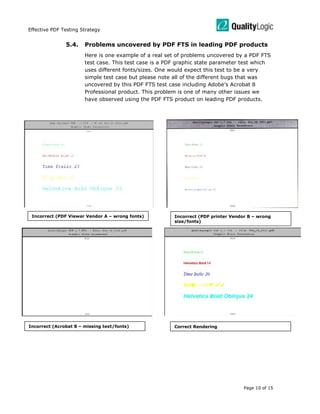
Here is one example of a real set of problems uncovered by a PDF FTS
test case. This test case is a PDF graphic state parameter test which
uses different fonts/sizes. One would expect this test to be a very
simple test case but please note all of the different bugs that was
uncovered by this PDF FTS test case including Adobe’s Acrobat 8
Professional product. This problem is one of many other issues we
have observed using the PDF FTS product on leading PDF products.
Incorrect (Acrobat 8 – missing text/fonts) Correct Rendering
Incorrect (PDF Viewer Vendor A – wrong fonts) Incorrect (PDF printer Vendor B – wrong
size/fonts)
Effective PDF Testing Strategy
Page 11 of 15
6. Use of TestJob Builder in Testing
PDF FTS provides a systematic conformance testing of the PDF
language for the PDF device under test. Complementary to the PDF
FTS product is the TestJob Builder v2.0 application that provides a
convenient way for user to search specific PDF test cases using easy to
understand PDF feature search terms. In addition, users can add their
own PDF, XPS or PCL test files “on the fly” to the TestJob Builder
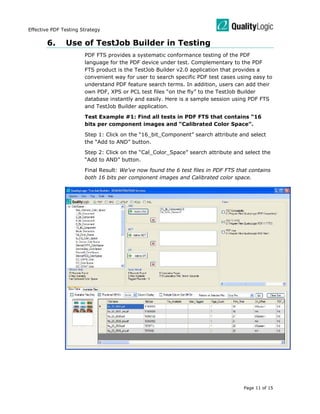
database instantly and easily. Here is a sample session using PDF FTS
and TestJob Builder application.
Test Example #1: Find all tests in PDF FTS that contains “16
bits per component images and “Calibrated Color Space”.
Step 1: Click on the “16_bit_Component” search attribute and select
the “Add to AND” button.
Step 2: Click on the “Cal_Color_Space” search attribute and select the
“Add to AND” button.
Final Result: We’ve now found the 6 test files in PDF FTS that contains
both 16 bits per component images and Calibrated color space.
Effective PDF Testing Strategy
Page 12 of 15
Test Example #2: Analyze a customer PDF file to understand
what PDF features are being tested.
Step 1: Click on “Add files” and select the customer PDF file. TestJob
Builder will dynamically analyze the selected PDF file(s).
Step 2: Select “File Statistics” and click on “Go” button to view the
analysis report of that specific PDF file.
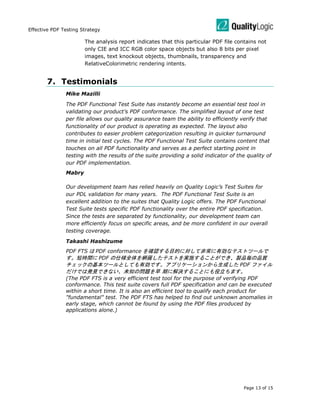
Final Result: Now, TestJob Builder has finished analysis of the selected
PDF file and generated an analysis report as shown below.
Customer File
Effective PDF Testing Strategy
Page 13 of 15
The analysis report indicates that this particular PDF file contains not
only CIE and ICC RGB color space objects but also 8 bits per pixel
images, text knockout objects, thumbnails, transparency and
RelativeColorimetric rendering intents.
7. Testimonials
Mike Mazilli
The PDF Functional Test Suite has instantly become an essential test tool in
validating our product’s PDF conformance. The simplified layout of one test
per file allows our quality assurance team the ability to efficiently verify that
functionality of our product is operating as expected. The layout also
contributes to easier problem categorization resulting in quicker turnaround
time in initial test cycles. The PDF Functional Test Suite contains content that
touches on all PDF functionality and serves as a perfect starting point in
testing with the results of the suite providing a solid indicator of the quality of
our PDF implementation.
Mabry
Our development team has relied heavily on Quality Logic’s Test Suites for
our PDL validation for many years. The PDF Functional Test Suite is an
excellent addition to the suites that Quality Logic offers. The PDF Functional
Test Suite tests specific PDF functionality over the entire PDF specification.
Since the tests are separated by functionality, our development team can
more efficiently focus on specific areas, and be more confident in our overall
testing coverage.
Takashi Hashizume
PDF FTS は PDF conformance を確認する目的に対して非常に有効なテストツールで
す。短時間に PDF の仕様全体を網羅したテストを実施することができ、製品毎の品質
チェックの基本ツールとしても有効です。アプリケーションから生成した PDF ファイル
だけでは発見できない、未知の問題を早 期に解決することにも役立ちます。
(The PDF FTS is a very efficient test tool for the purpose of verifying PDF
conformance. This test suite covers full PDF specification and can be executed
within a short time. It is also an efficient tool to qualify each product for
"fundamental" test. The PDF FTS has helped to find out unknown anomalies in
early stage, which cannot be found by using the PDF files produced by
applications alone.)
Effective PDF Testing Strategy
Page 14 of 15
8. Recommendations
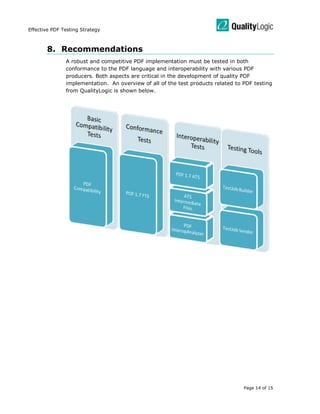
A robust and competitive PDF implementation must be tested in both
conformance to the PDF language and interoperability with various PDF
producers. Both aspects are critical in the development of quality PDF
implementation. An overview of all of the test products related to PDF testing
from QualityLogic is shown below.
Effective PDF Testing Strategy
Page 15 of 15
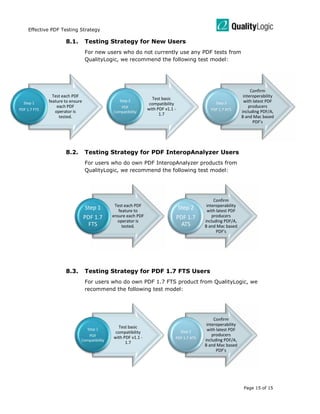
8.1. Testing Strategy for New Users
For new users who do not currently use any PDF tests from
QualityLogic, we recommend the following test model:
8.2. Testing Strategy for PDF InteropAnalyzer Users
For users who do own PDF InteropAnalyzer products from
QualityLogic, we recommend the following test model:
8.3. Testing Strategy for PDF 1.7 FTS Users
For users who do own PDF 1.7 FTS product from QualityLogic, we
recommend the following test model:
Test each PDF
feature to ensure
each PDF
operator is
tested.
Step 1
PDF 1.7 FTS
Test basic
compatibility
with PDF v1.1 -
1.7
Step 2
PDF
Compatibility
Confirm
interoperability
with latest PDF
producers
including PDF/A,
B and Mac based
PDF's
Step 3
PDF 1.7 ATS
Test each PDF
feature to
ensure each PDF
operator is
tested.
Step 1
PDF 1.7
FTS
Confirm
interoperability
with latest PDF
producers
including PDF/A,
B and Mac based
PDF's
Step 2
PDF 1.7
ATS
Test basic
compatibility
with PDF v1.1 -
1.7
Step 1
PDF
Compatibility
Confirm
interoperability
with latest PDF
producers
including PDF/A,
B and Mac based
PDF's
Step 2
PDF 1.7 ATS

testing.pdf

  • 1.
    2245 First Street,Suite 103 • Simi Valley, CA 93065 • 805 531 9030 6148 N. Discovery Way, Ste. 175 • Boise, ID 83713 • 208 424 1905 © 2009-2013 QualityLogic Inc. Effective PDF Testing Strategy
  • 2.
    Effective PDF TestingStrategy Page 2 of 15 Table of Contents 1. About the Author....................................................... 3 2. References ............................................................... 3 3. Introduction ............................................................. 4 4. Interoperability Testing .............................................. 4 5. Conformance Testing ................................................. 5 5.1. PDF Coverage from a Typical Application..............................6 5.2. PDF Functional Test Suite Design Goals................................8 5.3. PDF FTS Summary ............................................................9 5.4. Problems uncovered by PDF FTS in leading PDF products ..... 10 6. Use of TestJob Builder in Testing ................................11 7. Testimonials ............................................................13 8. Recommendations....................................................14 8.1. Testing Strategy for New Users......................................... 15 8.2. Testing Strategy for PDF InteropAnalyzer Users .................. 15 8.3. Testing Strategy for PDF 1.7 FTS Users.............................. 15
  • 3.
    Effective PDF TestingStrategy Page 3 of 15 1. About the Author The author, Steve Kang, is currently General Manager of the Testing Products Group at QualityLogic, Inc. and oversees all of the tools and test suites products for the imaging and telecom industries. Before QualityLogic, Mr. Kang served as VP of Engineering at controller/RIP development companies, Advanced Hi-Tech and ColorBus, Inc. His technical background includes development of high speed controllers and RIPs using customized PostScript, PCL and PDF interpreters from Adobe, Global Graphics, Zoran and other vendors. Mr. Kang holds a Masters degree in Computer Science from University of Southern California and an MBA from the UCLA Anderson School. He can be contacted at skang@qualitylogic.com or by calling (805)531-9030. 2. References List of helpful documents for these PDF related tests are provided below as hyperlinks. Please click on the individual link below to access the PDF documents. PDF 1.7 Functional Test Suite PDF 1.7 Application Test Suite PDF Compatibility Test Suite PDF 1.7 InteropAnalyzer ISO 32000 PDF Reference
  • 4.
    Effective PDF TestingStrategy Page 4 of 15 3. Introduction Portable Document Format (or simply PDF) was created by Adobe Systems in 1993 as a document exchange format. Adobe’s first page description language, PostScript, was created as a page description language for printers. Although PostScript was a rich 2D page description language, it also included typical programming constructs such as loops, if conditions and others that can also cause unpredictable states across different pages. PostScript in essence was a page dependent language where states and conditions that occurred in previous pages can directly affect the output for subsequent pages. PDF was in part created to solve some of the deficiencies behind the PostScript language. Since 1993, thanks largely to the popularity of the Internet, PDF has become the ideal format for exchanging rich documents between users. The initial version of PDF was essentially a simplified object based page independent language leveraging all of the graphics primitives supported in PostScript. In fact, Adobe’s PDF interpreters were developed by leveraging its PostScript core engine through use of PostScript prologues to implement the PDF features. PDF has evolved into a very rich document format capable of supporting annotations, 3D objects, audio, and other interactive elements. It is the most dominant document exchange format that is used today. QualityLogic has been committed to providing test suites for all major PDLs including PDF. The PDF InteropAnalyzer product was QualityLogic’s 1st PDF testing product. In 2008, the PDF 1.7 Functional Test Suite was introduced to provide a strict conformance test suite for the PDF language. Recently, the PDF Compatibility Test Suite was introduced to provide a basic PDF test suite for PDF applications and printers and the PDF Application Test Suite (ATS) provides real world PDF files. This paper will explain how all of these products can each play a role in an effective PDF testing strategy for your implementation. 4. Interoperability Testing The PDF InteropAnalyzer was created to provide our customers with a large collection of PDF files created by various applications and producers gathered from the Internet and generated by QualityLogic. This product includes a searchable database application and a large collection of PDF files. The PDF files that are included in the PDF InteropAnalyzer are meant to provide an excellent representation of what users may actually try to produce using popular applications and PDF creators. This type of testing is called interoperability testing where coverage testing of typical combinations of PDF operators produced by applications is tested against the target PDF implementation.
  • 5.
    Effective PDF TestingStrategy Page 5 of 15 In 2009, we introduced two new PDF interoperability test suites: PDF Compatibility Test Suite – This test suite contains 127 basic compatibility test files for PDF versions 1.1 through 1.7. This product is designed as an entry-level test for companies who need to validate basic PDF interoperability. PDF 1.7 Application Test Suite – This test suite evolves the interoperability testing that was provided by PDF InteropAnalyzer product further – over 1000 PDF files using the most current PDF creation methods and applications including PDF/A, PDF/X, Adobe Creative Suite 4, Macintosh and other creation methods. 5. Conformance Testing Application based interoperability testing is certainly required and effective for testing the typical usage scenarios that are likely to be encountered. However, the PDF (or any other PDL) language specification is over 1000 pages and there are hundreds of different PDF operators and attributes can be included in a perfectly valid PDF file. Nearly all of PDF creators and applications that exist today output only a subset of the full PDF language specification. Therefore, no matter how many different files one may produce using various applications, the resulting PDF output files would not cover the full breadth of the PDF language specification. Conformance to the PDF language specification cannot be achieved by using just application produced PDF files leaving the PDF vendor with potentially significant risk and exposure. With so many PDF implementations out in the marketplace, leaving this type of exposure can result in a significant competitive disadvantage for your product – it is certain that new versions will make use of PDF functionality that have not been used before. PDF conformance testing is critical to producing robust PDF implementations.
  • 6.
    Effective PDF TestingStrategy Page 6 of 15 5.1. PDF Coverage from a Typical Application Here is a typical Microsoft Word 2007 document that consists of text, images, graphics and even transparency. This example would be a typical example of what a user may produce. The PDF file was created from this Word 2007 file by using Microsoft’s export PDF feature. When we examine the PDF file that was created, it is clear that the PDF features that are being tested by this test file are very minimal (similar results were found using Adobe’s PDF plugin for Word 2007). PDF Version Version 1.5 ColorSpace Has 8 Bits Per Component Is Device Color Space Has Device Gray Color Space Has Device RGB Color Space Pattern color space Compression Compressed object streams used Image Compression: DCTDecode Image Compression: FlateDecode Page Description Compressed Uses Lossy Compression
  • 7.
    Effective PDF TestingStrategy Page 7 of 15 Document Page Count Orientation equal all pages Size equal all pages 6-20 Page Document Is Portrait Is Letter Portrait Font Has Compact Font Font is embedded Font is TrueType Image Has Images Image 1-200 dpp Resolution Image 201-400 dpp Resolution Set to Interpolate Misc /XRefStm - Key search outside compressed data Has Smooth Shading Has Text Knockout /MarkInfo - Key search outside compressed data Rendering Image Rendering Intent: RelativeColorimetric Graphic State Rendering Intent: RelativeColorimetric Transparency Has Transparency Has Null Transparency Transparency Blend Mode: Normal /Group - Key search outside compressed data /Matte - Key search outside compressed data Interoperability testing using application generated test files is important but not sufficient to provide an effective testing coverage for the target PDF printer or application. An effective testing strategy must include conformance testing against what the target PDL language allows.
  • 8.
    Effective PDF TestingStrategy Page 8 of 15 5.2. PDF Functional Test Suite Design Goals QualityLogic has developed conformance test suites for over 25 years for all of the major PDL’s – PostScript, PCL, PDF, XPS, OpenXPS and PPML among others. The goal of these conformance test suites is to test each major feature that is allowed in the PDL specification (and not any particular application). There are typically two conformance test suites for a PDL: Functional Test Suite (FTS) and Comprehensive Evaluation Test (CET) suite. The PDF 1.7 Functional Test Suite was designed by PDF experts for the PDF developers and QA teams. These test files are designed to be easily understood with minimum number of operators to test the target feature. The tests are developed by QualityLogic’s custom software in order to accurately control what operator gets inserted into the target test file. The collection of test files in the PDF 1.7 FTS product is ideal for testing conformance to the PDF language specification. Design goals for the PDF 1.7 FTS product are: Test each imaging PDF feature as described in the Adobe PDF 1.7 Reference Manual and ISO 32000 PDF standard. Use minimal number of operators and attributes to test the target PDF operator or attribute. This feature behind PDF FTS test cases provides the user with an easy way of understanding our test case structure and the ability to modify or expand the test. Contains 599 individual conformance test cases (in USLetter and A4 sizes) to exercise the PDF language in a concise yet very effective drill down testing. Because we include minimal number of operators to test the target feature for each test, users can concentrate on testing and debugging each particular feature sequentially and thoroughly. Tests PDF operators and attributes from PDF v1.1 through v1.7 including basic testing of interactive and security PDF features. Please refer to the PDF FTS Summary section for further details.
  • 9.
    Effective PDF TestingStrategy Page 9 of 15 5.3. PDF FTS Summary The following table summarizes each section in the PDF FTS product and contains the number of test cases that are included for that particular test section. All of these tests are provided in both USLetter and A4 paper sizes for the convenience of the customer. TEST SECTION DESCRIPTION NUMBER OF TESTS 01 – File Header 8 02 – Catalog 26 03 – Trailer 4 04 – Cross-Reference 16 05 – Object Stream 3 06 – Page Object 28 07 – Name Dictionary 10 08 – Graphic State Operators 34 09 – Graphic State Parameters 25 10 – Path Construction Operators 8 11 – Path Painting Operators 12 12 – Clipping Path Operators 8 13 – Color Spaces 12 14 – Color Operators 22 15 – Patterns 26 16 – External Projects 3 17 – Images 26 18 – Form XObjects 17 19 – Optional Content 25 20 – Text State Operators 13 21 – Text-Positioning Operators 5 22 – Text-Showing Operators 4 23 – Fonts 9 24 - Rendering 32 25 - Transparency 27 26 – Soft-Mask 6 27 - Viewer Preferences (PDF 1.2) 17 28 - Destinations 10 29 - Document Outline 6 30 - Collections (PDF 1.7) 4 31 - Page Level Navigation 27 32 - Annotations 42 33 - Actions 19 34 - Additional Actions 21 35 - Interactive Forms 26 36 - Digital Signatures 2 37 - Measurement Properties 2 38 - Document Requirements 2 39 - Multimedia Features 7 40 - Document Interchange 5 Total 599
  • 10.
    Effective PDF TestingStrategy Page 10 of 15 5.4. Problems uncovered by PDF FTS in leading PDF products Here is one example of a real set of problems uncovered by a PDF FTS test case. This test case is a PDF graphic state parameter test which uses different fonts/sizes. One would expect this test to be a very simple test case but please note all of the different bugs that was uncovered by this PDF FTS test case including Adobe’s Acrobat 8 Professional product. This problem is one of many other issues we have observed using the PDF FTS product on leading PDF products. Incorrect (Acrobat 8 – missing text/fonts) Correct Rendering Incorrect (PDF Viewer Vendor A – wrong fonts) Incorrect (PDF printer Vendor B – wrong size/fonts)
  • 11.
    Effective PDF TestingStrategy Page 11 of 15 6. Use of TestJob Builder in Testing PDF FTS provides a systematic conformance testing of the PDF language for the PDF device under test. Complementary to the PDF FTS product is the TestJob Builder v2.0 application that provides a convenient way for user to search specific PDF test cases using easy to understand PDF feature search terms. In addition, users can add their own PDF, XPS or PCL test files “on the fly” to the TestJob Builder database instantly and easily. Here is a sample session using PDF FTS and TestJob Builder application. Test Example #1: Find all tests in PDF FTS that contains “16 bits per component images and “Calibrated Color Space”. Step 1: Click on the “16_bit_Component” search attribute and select the “Add to AND” button. Step 2: Click on the “Cal_Color_Space” search attribute and select the “Add to AND” button. Final Result: We’ve now found the 6 test files in PDF FTS that contains both 16 bits per component images and Calibrated color space.
  • 12.
    Effective PDF TestingStrategy Page 12 of 15 Test Example #2: Analyze a customer PDF file to understand what PDF features are being tested. Step 1: Click on “Add files” and select the customer PDF file. TestJob Builder will dynamically analyze the selected PDF file(s). Step 2: Select “File Statistics” and click on “Go” button to view the analysis report of that specific PDF file. Final Result: Now, TestJob Builder has finished analysis of the selected PDF file and generated an analysis report as shown below. Customer File
  • 13.
    Effective PDF TestingStrategy Page 13 of 15 The analysis report indicates that this particular PDF file contains not only CIE and ICC RGB color space objects but also 8 bits per pixel images, text knockout objects, thumbnails, transparency and RelativeColorimetric rendering intents. 7. Testimonials Mike Mazilli The PDF Functional Test Suite has instantly become an essential test tool in validating our product’s PDF conformance. The simplified layout of one test per file allows our quality assurance team the ability to efficiently verify that functionality of our product is operating as expected. The layout also contributes to easier problem categorization resulting in quicker turnaround time in initial test cycles. The PDF Functional Test Suite contains content that touches on all PDF functionality and serves as a perfect starting point in testing with the results of the suite providing a solid indicator of the quality of our PDF implementation. Mabry Our development team has relied heavily on Quality Logic’s Test Suites for our PDL validation for many years. The PDF Functional Test Suite is an excellent addition to the suites that Quality Logic offers. The PDF Functional Test Suite tests specific PDF functionality over the entire PDF specification. Since the tests are separated by functionality, our development team can more efficiently focus on specific areas, and be more confident in our overall testing coverage. Takashi Hashizume PDF FTS は PDF conformance を確認する目的に対して非常に有効なテストツールで す。短時間に PDF の仕様全体を網羅したテストを実施することができ、製品毎の品質 チェックの基本ツールとしても有効です。アプリケーションから生成した PDF ファイル だけでは発見できない、未知の問題を早 期に解決することにも役立ちます。 (The PDF FTS is a very efficient test tool for the purpose of verifying PDF conformance. This test suite covers full PDF specification and can be executed within a short time. It is also an efficient tool to qualify each product for "fundamental" test. The PDF FTS has helped to find out unknown anomalies in early stage, which cannot be found by using the PDF files produced by applications alone.)
  • 14.
    Effective PDF TestingStrategy Page 14 of 15 8. Recommendations A robust and competitive PDF implementation must be tested in both conformance to the PDF language and interoperability with various PDF producers. Both aspects are critical in the development of quality PDF implementation. An overview of all of the test products related to PDF testing from QualityLogic is shown below.
  • 15.
    Effective PDF TestingStrategy Page 15 of 15 8.1. Testing Strategy for New Users For new users who do not currently use any PDF tests from QualityLogic, we recommend the following test model: 8.2. Testing Strategy for PDF InteropAnalyzer Users For users who do own PDF InteropAnalyzer products from QualityLogic, we recommend the following test model: 8.3. Testing Strategy for PDF 1.7 FTS Users For users who do own PDF 1.7 FTS product from QualityLogic, we recommend the following test model: Test each PDF feature to ensure each PDF operator is tested. Step 1 PDF 1.7 FTS Test basic compatibility with PDF v1.1 - 1.7 Step 2 PDF Compatibility Confirm interoperability with latest PDF producers including PDF/A, B and Mac based PDF's Step 3 PDF 1.7 ATS Test each PDF feature to ensure each PDF operator is tested. Step 1 PDF 1.7 FTS Confirm interoperability with latest PDF producers including PDF/A, B and Mac based PDF's Step 2 PDF 1.7 ATS Test basic compatibility with PDF v1.1 - 1.7 Step 1 PDF Compatibility Confirm interoperability with latest PDF producers including PDF/A, B and Mac based PDF's Step 2 PDF 1.7 ATS