Technological
Pitch Deck
Here is where your presentation begins
Contents of this template
Fonts To view this template correctly in PowerPoint, download and install the fonts we used
Used and alternative resources An assortment of graphic resources that are suitable for use in this presentation
Thanks slide You must keep it so that proper credits for our design are given
Colors All the colors used in this presentation
Icons and infographic resources These can be used in the template, and their size and color can be edited
Editable presentation theme You can edit the master slides easily. For more info, click here
You can delete this slide when you’re done editing the presentation
For more info:
SLIDESGO | BLOG | FAQs
You can visit our sister projects:
FREEPIK | FLATICON | STORYSET | WEPIK | VIDEVO
Table of contents
01
04
02
05
03
06
Introduction Problem & solution Market opportunity
Product demo Team & timeline Financial & metrics
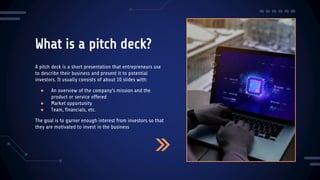
What is a pitch deck?
A pitch deck is a short presentation that entrepreneurs use
to describe their business and present it to potential
investors. It usually consists of about 10 slides with:
● An overview of the company's mission and the
product or service offered
● Market opportunity
● Team, financials, etc.
The goal is to garner enough interest from investors so that
they are motivated to invest in the business
Introduction
01
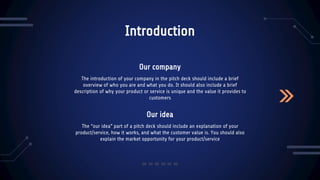
Our idea
Introduction
The “our idea” part of a pitch deck should include an explanation of your
product/service, how it works, and what the customer value is. You should also
explain the market opportunity for your product/service
The introduction of your company in the pitch deck should include a brief
overview of who you are and what you do. It should also include a brief
description of why your product or service is unique and the value it provides to
customers
Our company
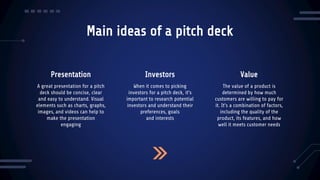
Main ideas of a pitch deck
Presentation Investors
A great presentation for a pitch
deck should be concise, clear
and easy to understand. Visual
elements such as charts, graphs,
images, and videos can help to
make the presentation
engaging
When it comes to picking
investors for a pitch deck, it's
important to research potential
investors and understand their
preferences, goals
and interests
The value of a product is
determined by how much
customers are willing to pay for
it. It's a combination of factors,
including the quality of the
product, its features, and how
well it meets customer needs
Value
Stay ahead of trends
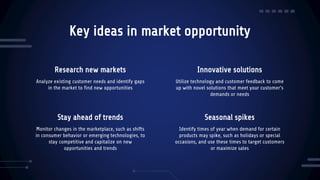
Key ideas in market opportunity
Analyze existing customer needs and identify gaps
in the market to find new opportunities
Utilize technology and customer feedback to come
up with novel solutions that meet your customer’s
demands or needs
Monitor changes in the marketplace, such as shifts
in consumer behavior or emerging technologies, to
stay competitive and capitalize on new
opportunities and trends
Identify times of year when demand for certain
products may spike, such as holidays or special
occasions, and use these times to target customers
or maximize sales
Research new markets Innovative solutions
Seasonal spikes
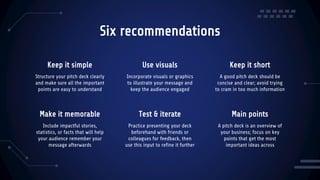
Six recommendations
Structure your pitch deck clearly
and make sure all the important
points are easy to understand
Incorporate visuals or graphics
to illustrate your message and
keep the audience engaged
Include impactful stories,
statistics, or facts that will help
your audience remember your
message afterwards
Practice presenting your deck
beforehand with friends or
colleagues for feedback, then
use this input to refine it further
Keep it simple Use visuals Keep it short
A good pitch deck should be
concise and clear; avoid trying
to cram in too much information
A pitch deck is an overview of
your business; focus on key
points that get the most
important ideas across
Make it memorable Test & iterate Main points
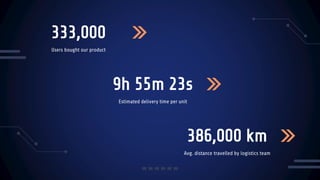
Estimated delivery time per unit
9h 55m 23s
333,000
Users bought our product
386,000 km
Avg. distance travelled by logistics team
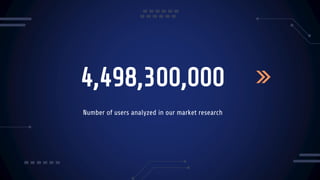
4,498,300,000
Number of users analyzed in our market research
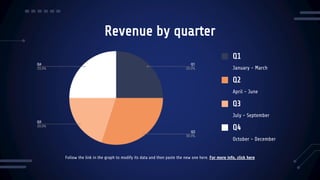
Revenue by quarter
Q4
October - December
Q3
July - September
Q2
April - June
Q1
January - March
Follow the link in the graph to modify its data and then paste the new one here. For more info, click here
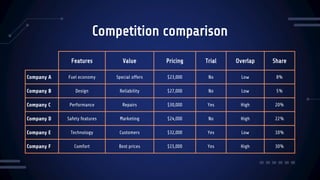
Competition comparison
Features Value Pricing Trial Overlap Share
Company A Fuel economy Special offers $23,000 No Low 8%
Company B Design Reliability $27,000 No Low 5%
Company C Performance Repairs $30,000 Yes High 20%
Company D Safety features Marketing $24,000 No High 22%
Company E Technology Customers $32,000 Yes Low 10%
Company F Comfort Best prices $15,000 Yes High 30%
Product infographic
Visuals
Price
Availability
Features
Users
Updates
Showcase the design of
your product
Share the cost and price
with investors
When is the product
expected to be ready?
What makes your
product unique?
Speak about the
target audience
Do you plan on
updating it?
01
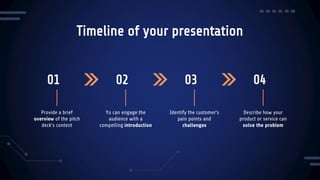
Timeline of your presentation
Provide a brief
overview of the pitch
deck's content
Yo can engage the
audience with a
compelling introduction
Identify the customer's
pain points and
challenges
Describe how your
product or service can
solve the problem
02 03 04
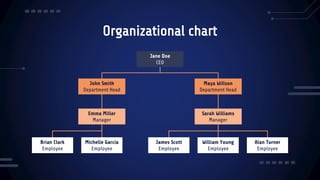
Organizational chart
Jane Doe
CEO
John Smith
Department Head
Maya Willson
Department Head
Sarah Williams
Manager
Emma Miller
Manager
William Young
Employee
James Scott
Employee
Michelle García
Employee
Brian Clark
Employee
Alan Turner
Employee
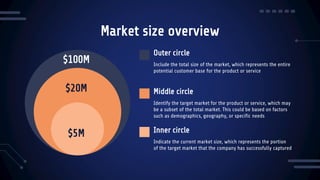
Market size overview
$100M
$20M
$5M
Outer circle
Include the total size of the market, which represents the entire
potential customer base for the product or service
Middle circle
Identify the target market for the product or service, which may
be a subset of the total market. This could be based on factors
such as demographics, geography, or specific needs
Inner circle
Indicate the current market size, which represents the portion
of the target market that the company has successfully captured
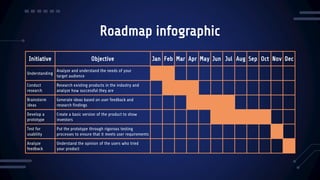
Roadmap infographic
Initiative Objective Jan Feb Mar Apr May Jun Jul Aug Sep Oct Nov Dec
Understanding
Analyze and understand the needs of your
target audience
Conduct
research
Research existing products in the industry and
analyze how successful they are
Brainstorm
ideas
Generate ideas based on user feedback and
research findings
Develop a
prototype
Create a basic version of the product to show
investors
Test for
usability
Put the prototype through rigorous testing
processes to ensure that it meets user requirements
Analyze
feedback
Understand the opinion of the users who tried
your product
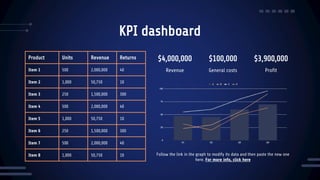
KPI dashboard
Product Units Revenue Returns
Item 1 500 2,000,000 40
Item 2 1,000 50,750 10
Item 3 250 1,500,000 300
Item 4 500 2,000,000 40
Item 5 1,000 50,750 10
Item 6 250 1,500,000 300
Item 7 500 2,000,000 40
Item 8 1,000 50,750 10
$4,000,000 $100,000 $3,900,000
Revenue General costs Profit
Follow the link in the graph to modify its data and then paste the new one
here. For more info, click here
CREDITS: This presentation template was created by Slidesgo, and includes
icons by Flaticon, and infographics & images by Freepik
Thanks!
Do you have any questions?
youremail@freepik.com
+34 654 321 432
yourwebsite.com
Please keep this slide for attribution
Alternative resources
Here’s an assortment of alternative resources whose style fits that of this template:
Photos
● People generating images using artificial intelligence on laptop I
● People generating images using artificial intelligence on laptop II
Vectors
● Gradient futuristic cyber monday vertical poster template
Resources
Did you like the resources used in this template? Get them on these websites:
Photos
● People generating images using artificial intelligence on laptop I
● People generating images using artificial intelligence on laptop II
● People generating images using artificial intelligence on laptop III
Vectors
● Technology and future landing page template
● Technology and future landing page
Instructions for use
If you have a free account, in order to use this template, you must credit Slidesgo by keeping the Thanks slide. Please
refer to the next slide to read the instructions for premium users.
As a Free user, you are allowed to:
● Modify this template.
● Use it for both personal and commercial projects.
You are not allowed to:
● Sublicense, sell or rent any of Slidesgo Content (or a modified version of Slidesgo Content).
● Distribute Slidesgo Content unless it has been expressly authorized by Slidesgo.
● Include Slidesgo Content in an online or offline database or file.
● Offer Slidesgo templates (or modified versions of Slidesgo templates) for download.
● Acquire the copyright of Slidesgo Content.
For more information about editing slides, please read our FAQs or visit our blog:
https://slidesgo.com/faqs and https://slidesgo.com/slidesgo-school
As a Premium user, you can use this template without attributing Slidesgo or keeping the "Thanks" slide.
You are allowed to:
● Modify this template.
● Use it for both personal and commercial purposes.
● Hide or delete the “Thanks” slide and the mention to Slidesgo in the credits.
● Share this template in an editable format with people who are not part of your team.
You are not allowed to:
● Sublicense, sell or rent this Slidesgo Template (or a modified version of this Slidesgo Template).
● Distribute this Slidesgo Template (or a modified version of this Slidesgo Template) or include it in a database or in
any other product or service that offers downloadable images, icons or presentations that may be subject to
distribution or resale.
● Use any of the elements that are part of this Slidesgo Template in an isolated and separated way from this
Template.
● Register any of the elements that are part of this template as a trademark or logo, or register it as a work in an
intellectual property registry or similar.
For more information about editing slides, please read our FAQs or visit our blog:
https://slidesgo.com/faqs and https://slidesgo.com/slidesgo-school
Instructions for use (premium users)
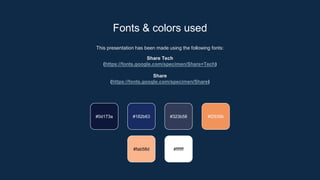
This presentation has been made using the following fonts:
Share Tech
(https://fonts.google.com/specimen/Share+Tech)
Share
(https://fonts.google.com/specimen/Share)
#0d173a #182b63 #323b58 #f2935b
#ffffff
#fab58d
Fonts & colors used
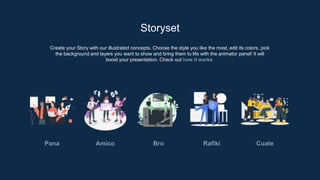
Create your Story with our illustrated concepts. Choose the style you like the most, edit its colors, pick
the background and layers you want to show and bring them to life with the animator panel! It will
boost your presentation. Check out how it works.
Storyset
Pana Amico Bro Rafiki Cuate
You can easily resize these resources without losing quality. To change the color, just ungroup the resource and click
on the object you want to change. Then, click on the paint bucket and select the color you want. Group the resource again
when you’re done. You can also look for more infographics on Slidesgo.
Use our editable graphic resources...
JANUARY FEBRUARY MARCH APRIL MAY JUNE
PHASE 1
PHASE 2
Task 1
Task 2
Task 1
Task 2
JANUARY FEBRUARY MARCH APRIL
PHASE 1
Task 1
Task 2
You can resize these icons without losing quality.
You can change the stroke and fill color; just select the icon and click on the paint bucket/pen.
In Google Slides, you can also use Flaticon’s extension, allowing you to customize and add even more icons.
...and our sets of editable icons
Educational Icons Medical Icons
Business Icons Teamwork Icons
Help & Support Icons Avatar Icons
Creative Process Icons Performing Arts Icons
Nature Icons
SEO & Marketing Icons
Technological_Pitch_Deck_by_Slidesgo.pptx

Technological_Pitch_Deck_by_Slidesgo.pptx

  • 1.
    Technological Pitch Deck Here iswhere your presentation begins
  • 2.
    Contents of thistemplate Fonts To view this template correctly in PowerPoint, download and install the fonts we used Used and alternative resources An assortment of graphic resources that are suitable for use in this presentation Thanks slide You must keep it so that proper credits for our design are given Colors All the colors used in this presentation Icons and infographic resources These can be used in the template, and their size and color can be edited Editable presentation theme You can edit the master slides easily. For more info, click here You can delete this slide when you’re done editing the presentation For more info: SLIDESGO | BLOG | FAQs You can visit our sister projects: FREEPIK | FLATICON | STORYSET | WEPIK | VIDEVO
  • 3.
    Table of contents 01 04 02 05 03 06 IntroductionProblem & solution Market opportunity Product demo Team & timeline Financial & metrics
  • 4.
    What is apitch deck? A pitch deck is a short presentation that entrepreneurs use to describe their business and present it to potential investors. It usually consists of about 10 slides with: ● An overview of the company's mission and the product or service offered ● Market opportunity ● Team, financials, etc. The goal is to garner enough interest from investors so that they are motivated to invest in the business
  • 5.
  • 6.
    Our idea Introduction The “ouridea” part of a pitch deck should include an explanation of your product/service, how it works, and what the customer value is. You should also explain the market opportunity for your product/service The introduction of your company in the pitch deck should include a brief overview of who you are and what you do. It should also include a brief description of why your product or service is unique and the value it provides to customers Our company
  • 7.
    Main ideas ofa pitch deck Presentation Investors A great presentation for a pitch deck should be concise, clear and easy to understand. Visual elements such as charts, graphs, images, and videos can help to make the presentation engaging When it comes to picking investors for a pitch deck, it's important to research potential investors and understand their preferences, goals and interests The value of a product is determined by how much customers are willing to pay for it. It's a combination of factors, including the quality of the product, its features, and how well it meets customer needs Value
  • 8.
    Stay ahead oftrends Key ideas in market opportunity Analyze existing customer needs and identify gaps in the market to find new opportunities Utilize technology and customer feedback to come up with novel solutions that meet your customer’s demands or needs Monitor changes in the marketplace, such as shifts in consumer behavior or emerging technologies, to stay competitive and capitalize on new opportunities and trends Identify times of year when demand for certain products may spike, such as holidays or special occasions, and use these times to target customers or maximize sales Research new markets Innovative solutions Seasonal spikes
  • 9.
    Six recommendations Structure yourpitch deck clearly and make sure all the important points are easy to understand Incorporate visuals or graphics to illustrate your message and keep the audience engaged Include impactful stories, statistics, or facts that will help your audience remember your message afterwards Practice presenting your deck beforehand with friends or colleagues for feedback, then use this input to refine it further Keep it simple Use visuals Keep it short A good pitch deck should be concise and clear; avoid trying to cram in too much information A pitch deck is an overview of your business; focus on key points that get the most important ideas across Make it memorable Test & iterate Main points
  • 10.
    Estimated delivery timeper unit 9h 55m 23s 333,000 Users bought our product 386,000 km Avg. distance travelled by logistics team
  • 11.
    4,498,300,000 Number of usersanalyzed in our market research
  • 12.
    Revenue by quarter Q4 October- December Q3 July - September Q2 April - June Q1 January - March Follow the link in the graph to modify its data and then paste the new one here. For more info, click here
  • 13.
    Competition comparison Features ValuePricing Trial Overlap Share Company A Fuel economy Special offers $23,000 No Low 8% Company B Design Reliability $27,000 No Low 5% Company C Performance Repairs $30,000 Yes High 20% Company D Safety features Marketing $24,000 No High 22% Company E Technology Customers $32,000 Yes Low 10% Company F Comfort Best prices $15,000 Yes High 30%
  • 14.
    Product infographic Visuals Price Availability Features Users Updates Showcase thedesign of your product Share the cost and price with investors When is the product expected to be ready? What makes your product unique? Speak about the target audience Do you plan on updating it?
  • 15.
    01 Timeline of yourpresentation Provide a brief overview of the pitch deck's content Yo can engage the audience with a compelling introduction Identify the customer's pain points and challenges Describe how your product or service can solve the problem 02 03 04
  • 16.
    Organizational chart Jane Doe CEO JohnSmith Department Head Maya Willson Department Head Sarah Williams Manager Emma Miller Manager William Young Employee James Scott Employee Michelle García Employee Brian Clark Employee Alan Turner Employee
  • 17.
    Market size overview $100M $20M $5M Outercircle Include the total size of the market, which represents the entire potential customer base for the product or service Middle circle Identify the target market for the product or service, which may be a subset of the total market. This could be based on factors such as demographics, geography, or specific needs Inner circle Indicate the current market size, which represents the portion of the target market that the company has successfully captured
  • 18.
    Roadmap infographic Initiative ObjectiveJan Feb Mar Apr May Jun Jul Aug Sep Oct Nov Dec Understanding Analyze and understand the needs of your target audience Conduct research Research existing products in the industry and analyze how successful they are Brainstorm ideas Generate ideas based on user feedback and research findings Develop a prototype Create a basic version of the product to show investors Test for usability Put the prototype through rigorous testing processes to ensure that it meets user requirements Analyze feedback Understand the opinion of the users who tried your product
  • 19.
    KPI dashboard Product UnitsRevenue Returns Item 1 500 2,000,000 40 Item 2 1,000 50,750 10 Item 3 250 1,500,000 300 Item 4 500 2,000,000 40 Item 5 1,000 50,750 10 Item 6 250 1,500,000 300 Item 7 500 2,000,000 40 Item 8 1,000 50,750 10 $4,000,000 $100,000 $3,900,000 Revenue General costs Profit Follow the link in the graph to modify its data and then paste the new one here. For more info, click here
  • 20.
    CREDITS: This presentationtemplate was created by Slidesgo, and includes icons by Flaticon, and infographics & images by Freepik Thanks! Do you have any questions? youremail@freepik.com +34 654 321 432 yourwebsite.com Please keep this slide for attribution
  • 21.
    Alternative resources Here’s anassortment of alternative resources whose style fits that of this template: Photos ● People generating images using artificial intelligence on laptop I ● People generating images using artificial intelligence on laptop II Vectors ● Gradient futuristic cyber monday vertical poster template
  • 22.
    Resources Did you likethe resources used in this template? Get them on these websites: Photos ● People generating images using artificial intelligence on laptop I ● People generating images using artificial intelligence on laptop II ● People generating images using artificial intelligence on laptop III Vectors ● Technology and future landing page template ● Technology and future landing page
  • 23.
    Instructions for use Ifyou have a free account, in order to use this template, you must credit Slidesgo by keeping the Thanks slide. Please refer to the next slide to read the instructions for premium users. As a Free user, you are allowed to: ● Modify this template. ● Use it for both personal and commercial projects. You are not allowed to: ● Sublicense, sell or rent any of Slidesgo Content (or a modified version of Slidesgo Content). ● Distribute Slidesgo Content unless it has been expressly authorized by Slidesgo. ● Include Slidesgo Content in an online or offline database or file. ● Offer Slidesgo templates (or modified versions of Slidesgo templates) for download. ● Acquire the copyright of Slidesgo Content. For more information about editing slides, please read our FAQs or visit our blog: https://slidesgo.com/faqs and https://slidesgo.com/slidesgo-school
  • 24.
    As a Premiumuser, you can use this template without attributing Slidesgo or keeping the "Thanks" slide. You are allowed to: ● Modify this template. ● Use it for both personal and commercial purposes. ● Hide or delete the “Thanks” slide and the mention to Slidesgo in the credits. ● Share this template in an editable format with people who are not part of your team. You are not allowed to: ● Sublicense, sell or rent this Slidesgo Template (or a modified version of this Slidesgo Template). ● Distribute this Slidesgo Template (or a modified version of this Slidesgo Template) or include it in a database or in any other product or service that offers downloadable images, icons or presentations that may be subject to distribution or resale. ● Use any of the elements that are part of this Slidesgo Template in an isolated and separated way from this Template. ● Register any of the elements that are part of this template as a trademark or logo, or register it as a work in an intellectual property registry or similar. For more information about editing slides, please read our FAQs or visit our blog: https://slidesgo.com/faqs and https://slidesgo.com/slidesgo-school Instructions for use (premium users)
  • 25.
    This presentation hasbeen made using the following fonts: Share Tech (https://fonts.google.com/specimen/Share+Tech) Share (https://fonts.google.com/specimen/Share) #0d173a #182b63 #323b58 #f2935b #ffffff #fab58d Fonts & colors used
  • 26.
    Create your Storywith our illustrated concepts. Choose the style you like the most, edit its colors, pick the background and layers you want to show and bring them to life with the animator panel! It will boost your presentation. Check out how it works. Storyset Pana Amico Bro Rafiki Cuate
  • 27.
    You can easilyresize these resources without losing quality. To change the color, just ungroup the resource and click on the object you want to change. Then, click on the paint bucket and select the color you want. Group the resource again when you’re done. You can also look for more infographics on Slidesgo. Use our editable graphic resources...
  • 30.
    JANUARY FEBRUARY MARCHAPRIL MAY JUNE PHASE 1 PHASE 2 Task 1 Task 2 Task 1 Task 2 JANUARY FEBRUARY MARCH APRIL PHASE 1 Task 1 Task 2
  • 33.
    You can resizethese icons without losing quality. You can change the stroke and fill color; just select the icon and click on the paint bucket/pen. In Google Slides, you can also use Flaticon’s extension, allowing you to customize and add even more icons. ...and our sets of editable icons
  • 34.
  • 35.
  • 36.
    Help & SupportIcons Avatar Icons
  • 37.
    Creative Process IconsPerforming Arts Icons
  • 38.
  • 39.