Your Digital Innovation Partner
EBS Technical Upgrade Scope
Upgrade Project Timeline (High Level)
Assessment
Iteration
(I)
Iteration
(II)
Go-Live
Post Go-
Live
Support
1 2 3 4 5
(1)
Kick-Off Go-Live
(2) (3) (4) (5)
Support
Your Digital Innovation Partner
EBS Technical Upgrade Scope
AD Online Patching (ADOP)
Your Digital Innovation Partner
EBS Technical Upgrade Scope
EBS 12.2.1 Upgrade Steps
Section 1: Prepare to Upgrade
Download and unzip all the patches to the default Patch Top location for Release 12.2
Section 2: Apply Required Database Patches and Update Database Initialization Parameters
Run EBS Technology Codelevel Checker (ETCC)
Set Database Parameter
Section 3: Apply Latest AD and TXK Delta Release Update Packs
Apply using ADOP during an adop cycle
Section 4: Apply Oracle E-Business Suite 12.2.11 Release Update Pack
Upgrade Fusion Middleware Technology Stack to 11.1.1.9 (11gR1 PS7).
Run the Middle Tier EBS Technology Codelevel Checker (MT-ETCC)
Apply Oracle E-Business Suite Release 12.2.11 Patch 31856789
Section 5: Perform Post-Update Steps
Apply Oracle E-Business Suite Release 12.2.11 Online Help
Your Digital Innovation Partner
EBS Technical Upgrade Scope
EBS 12.2.11 Upgrade Facts
Release 12.2.x customers can apply the EBS 12.2.11 RUP. EBS 12.2.11 is an online patch, so it can be applied while an
existing Release 12.2.x system is running.
12.2.11, and AD-TXK Delta 13 specifically, introduces a new EBS_SYSTEM schema that essentially replaces the current
practice of deploying objects in the SYS and SYSTEM database schemas.
EBS administration actions (such as running adop, adadmin and other utilities) will ask for the EBS_SYSTEM password
instead of the SYSTEM password. Anything previously run by the SYS or SYSTEM accounts will now be run by EBS_SYSTEM.
REF:
Oracle E-Business Suite Release 12.2.11 Readme (Doc ID 2758997.1)
https://blogs.oracle.com/ebstech/post/oracle-e-business-suite-12211-now-available
Your Digital Innovation Partner
EBS Technical Upgrade Scope
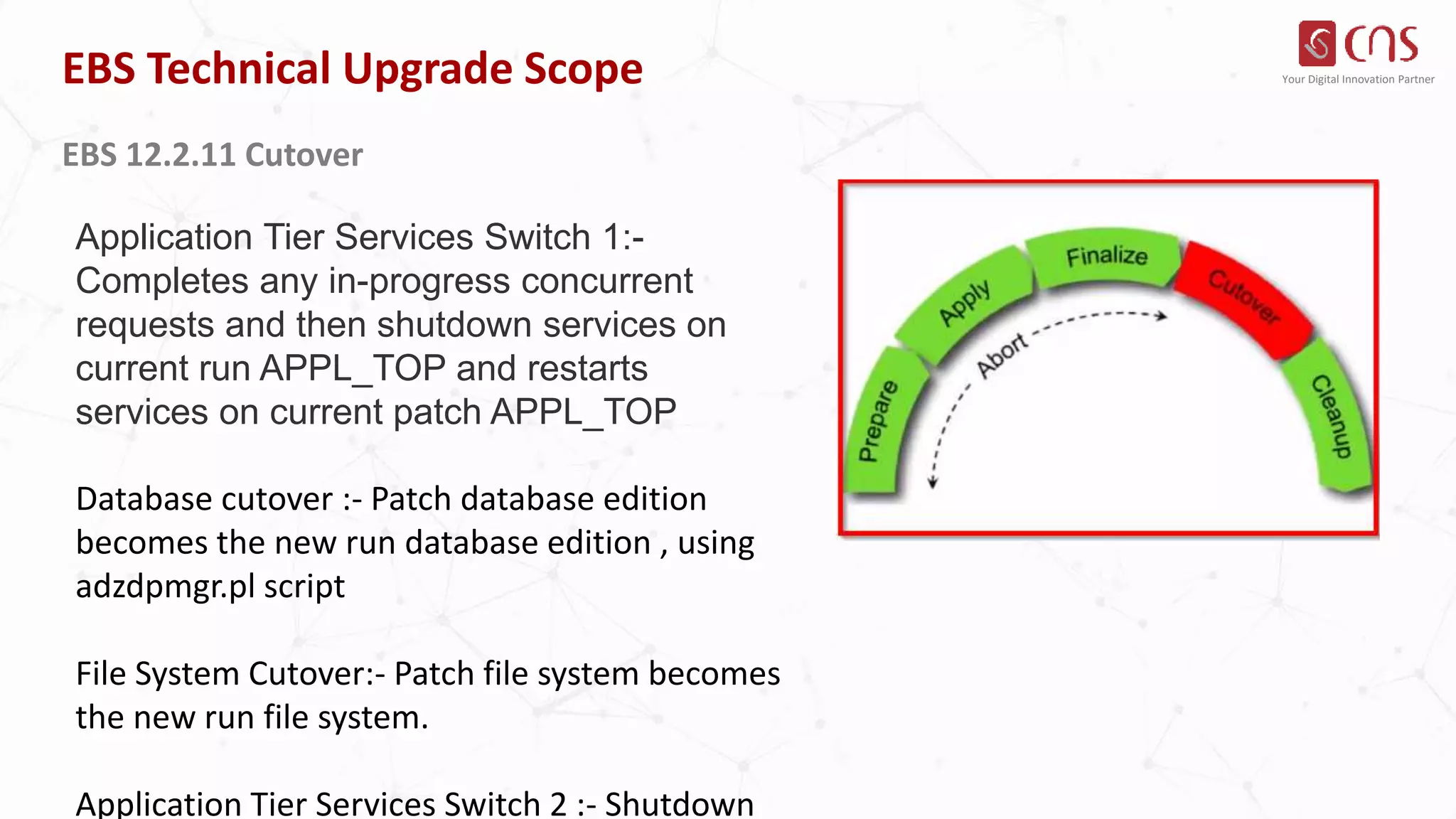
EBS 12.2.11 Cutover
Application Tier Services Switch 1:-
Completes any in-progress concurrent
requests and then shutdown services on
current run APPL_TOP and restarts
services on current patch APPL_TOP
Database cutover :- Patch database edition
becomes the new run database edition , using
adzdpmgr.pl script
File System Cutover:- Patch file system becomes
the new run file system.
Application Tier Services Switch 2 :- Shutdown
Your Digital Innovation Partner
EBS Technical Upgrade Scope
EBS 12.2.11 Cutover Failure Recovery
Full backups of Application and Database
before the cutover phase. Restore in case
troubleshooting failed.
Create Flashback restore point after enabling
DB flashback feature. Flashback DB to before
cutover in case required.
Troubleshoot the cutover failure issues till fixing
and making cutover succeed.
Your Digital Innovation Partner
EBS Technical Upgrade Scope
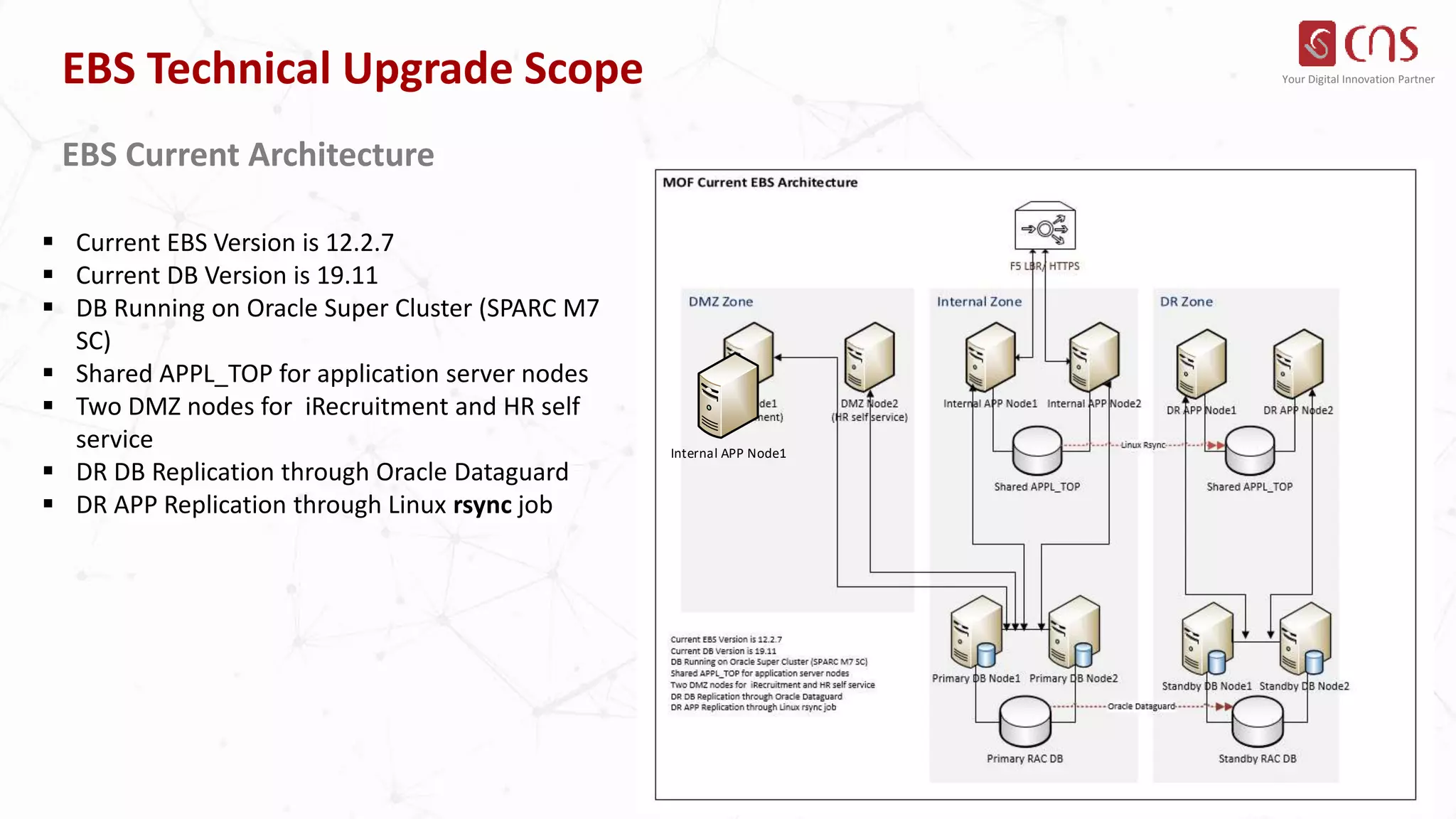
EBS Current Architecture
 Current EBS Version is 12.2.7
 Current DB Version is 19.11
 DB Running on Oracle Super Cluster (SPARC M7
SC)
 Shared APPL_TOP for application server nodes
 Two DMZ nodes for iRecruitment and HR self
service
 DR DB Replication through Oracle Dataguard
 DR APP Replication through Linux rsync job
Internal APP Node1
Your Digital Innovation Partner
EBS Technical Upgrade Scope
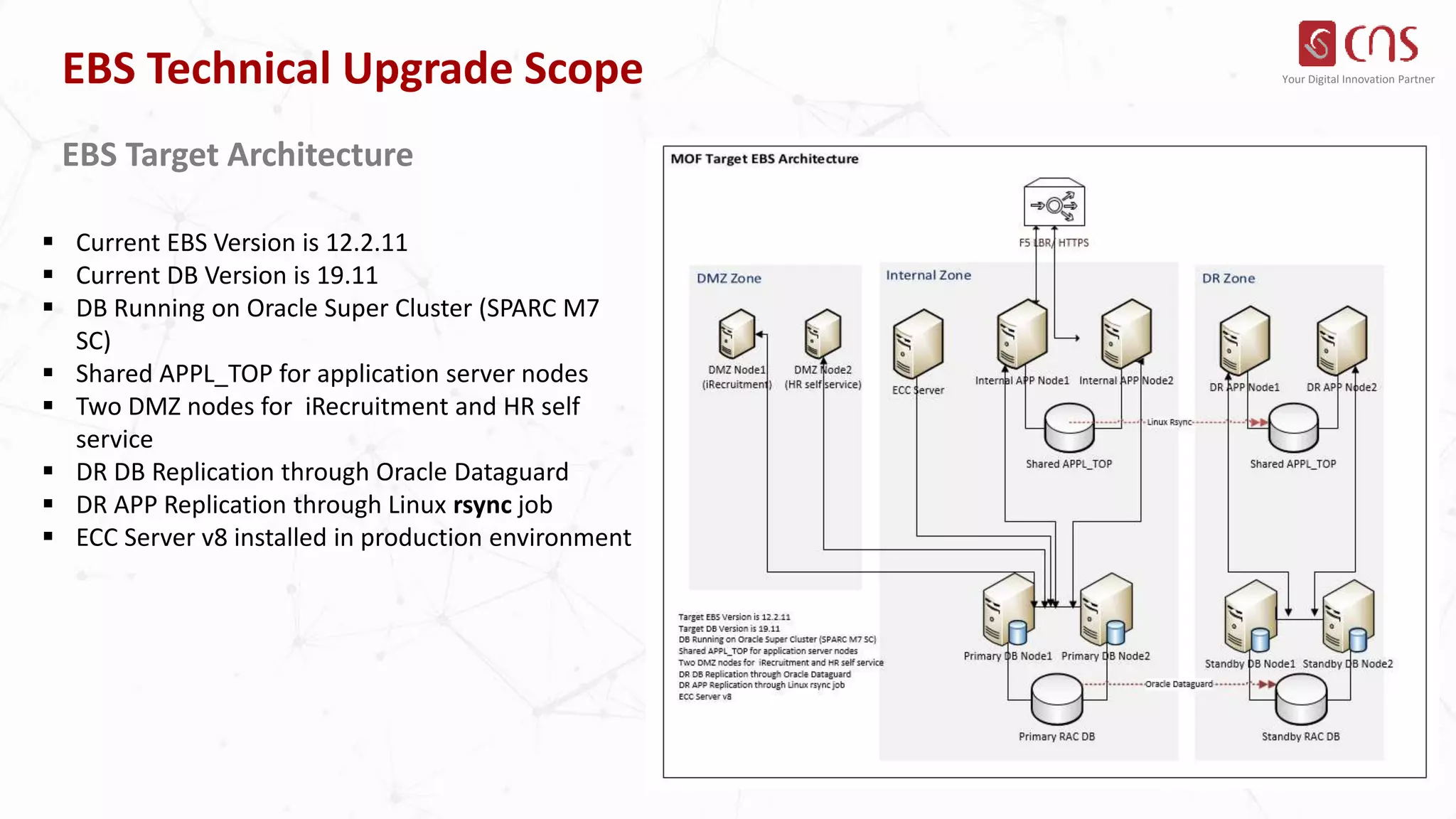
EBS Target Architecture
 Current EBS Version is 12.2.11
 Current DB Version is 19.11
 DB Running on Oracle Super Cluster (SPARC M7
SC)
 Shared APPL_TOP for application server nodes
 Two DMZ nodes for iRecruitment and HR self
service
 DR DB Replication through Oracle Dataguard
 DR APP Replication through Linux rsync job
 ECC Server v8 installed in production environment

Technical upgrade new slides.pptx

  • 1.
    Your Digital InnovationPartner EBS Technical Upgrade Scope Upgrade Project Timeline (High Level) Assessment Iteration (I) Iteration (II) Go-Live Post Go- Live Support 1 2 3 4 5 (1) Kick-Off Go-Live (2) (3) (4) (5) Support
  • 2.
    Your Digital InnovationPartner EBS Technical Upgrade Scope AD Online Patching (ADOP)
  • 3.
    Your Digital InnovationPartner EBS Technical Upgrade Scope EBS 12.2.1 Upgrade Steps Section 1: Prepare to Upgrade Download and unzip all the patches to the default Patch Top location for Release 12.2 Section 2: Apply Required Database Patches and Update Database Initialization Parameters Run EBS Technology Codelevel Checker (ETCC) Set Database Parameter Section 3: Apply Latest AD and TXK Delta Release Update Packs Apply using ADOP during an adop cycle Section 4: Apply Oracle E-Business Suite 12.2.11 Release Update Pack Upgrade Fusion Middleware Technology Stack to 11.1.1.9 (11gR1 PS7). Run the Middle Tier EBS Technology Codelevel Checker (MT-ETCC) Apply Oracle E-Business Suite Release 12.2.11 Patch 31856789 Section 5: Perform Post-Update Steps Apply Oracle E-Business Suite Release 12.2.11 Online Help
  • 4.
    Your Digital InnovationPartner EBS Technical Upgrade Scope EBS 12.2.11 Upgrade Facts Release 12.2.x customers can apply the EBS 12.2.11 RUP. EBS 12.2.11 is an online patch, so it can be applied while an existing Release 12.2.x system is running. 12.2.11, and AD-TXK Delta 13 specifically, introduces a new EBS_SYSTEM schema that essentially replaces the current practice of deploying objects in the SYS and SYSTEM database schemas. EBS administration actions (such as running adop, adadmin and other utilities) will ask for the EBS_SYSTEM password instead of the SYSTEM password. Anything previously run by the SYS or SYSTEM accounts will now be run by EBS_SYSTEM. REF: Oracle E-Business Suite Release 12.2.11 Readme (Doc ID 2758997.1) https://blogs.oracle.com/ebstech/post/oracle-e-business-suite-12211-now-available
  • 5.
    Your Digital InnovationPartner EBS Technical Upgrade Scope EBS 12.2.11 Cutover Application Tier Services Switch 1:- Completes any in-progress concurrent requests and then shutdown services on current run APPL_TOP and restarts services on current patch APPL_TOP Database cutover :- Patch database edition becomes the new run database edition , using adzdpmgr.pl script File System Cutover:- Patch file system becomes the new run file system. Application Tier Services Switch 2 :- Shutdown
  • 6.
    Your Digital InnovationPartner EBS Technical Upgrade Scope EBS 12.2.11 Cutover Failure Recovery Full backups of Application and Database before the cutover phase. Restore in case troubleshooting failed. Create Flashback restore point after enabling DB flashback feature. Flashback DB to before cutover in case required. Troubleshoot the cutover failure issues till fixing and making cutover succeed.
  • 7.
    Your Digital InnovationPartner EBS Technical Upgrade Scope EBS Current Architecture  Current EBS Version is 12.2.7  Current DB Version is 19.11  DB Running on Oracle Super Cluster (SPARC M7 SC)  Shared APPL_TOP for application server nodes  Two DMZ nodes for iRecruitment and HR self service  DR DB Replication through Oracle Dataguard  DR APP Replication through Linux rsync job Internal APP Node1
  • 8.
    Your Digital InnovationPartner EBS Technical Upgrade Scope EBS Target Architecture  Current EBS Version is 12.2.11  Current DB Version is 19.11  DB Running on Oracle Super Cluster (SPARC M7 SC)  Shared APPL_TOP for application server nodes  Two DMZ nodes for iRecruitment and HR self service  DR DB Replication through Oracle Dataguard  DR APP Replication through Linux rsync job  ECC Server v8 installed in production environment