1 
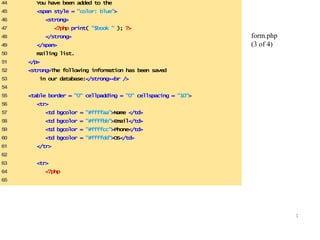
44 You have been added to the 
45 <span style = "color: blue"> 
46 <strong> 
47 <?php print( "$book " ); ?> 
48 </strong> 
49 </span> 
50 mailing list. 
51 </p> 
52 <strong>The following information has been saved 
53 in our database:</strong><br /> 
54 
55 <table border = "0" cellpadding = "0" cellspacing = "10"> 
56 <tr> 
57 <td bgcolor = "#ffffaa">Name </td> 
58 <td bgcolor = "#ffffbb">Email</td> 
59 <td bgcolor = "#ffffcc">Phone</td> 
60 <td bgcolor = "#ffffdd">OS</td> 
61 </tr> 
62 
63 <tr> 
64 <?php 
65 
form.php 
(3 of 4)
2 
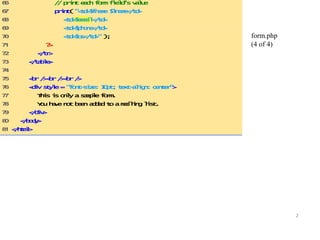
form.php 
(4 of 4) 
66 // print each form field’s value 
67 print( "<td>$fname $lname</td> 
68 <td>$email</td> 
69 <td>$phone</td> 
70 <td>$os</td>" ); 
71 ?> 
72 </tr> 
73 </table> 
74 
75 <br /><br /><br /> 
76 <div style = "font-size: 10pt; text-align: center"> 
77 This is only a sample form. 
78 You have not been added to a mailing list. 
79 </div> 
80 </body> 
81 </html>
3 
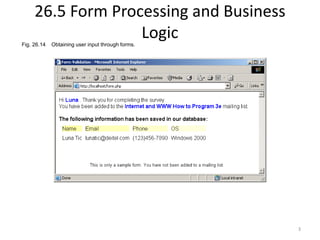
26.5 Form Processing and Business 
Logic 
Fig. 26.14 Obtaining user input through forms.
4 
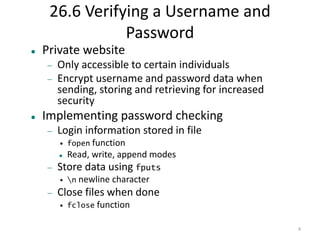
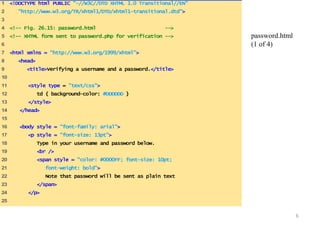
26.6 Verifying a Username and 
Password 
 Private website 
 Only accessible to certain individuals 
 Encrypt username and password data when 
sending, storing and retrieving for increased 
security 
 Implementing password checking 
 Login information stored in file 
• fopen function 
 Read, write, append modes 
 Store data using fputs 
• n newline character 
 Close files when done 
• fclose function
5 
26.6 Verifying a Username and 
Password 
 Implementing password checking, cont. 
 Trim newline character 
• chop function 
 Split string into substrings given a certain 
delimiter 
• split function 
 If username/password match list, allow access
6 
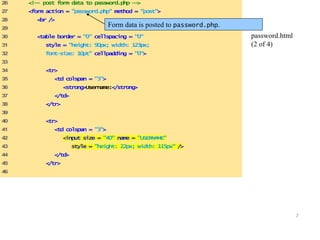
1 <!DOCTYPE html PUBLIC "-//W3C//DTD XHTML 1.0 Transitional//EN" 
2 "http://www.w3.org/TR/xhtml1/DTD/xhtml1-transitional.dtd"> 
3 
4 <!-- Fig. 26.15: password.html --> 
5 <!-- XHTML form sent to password.php for verification --> 
6 
7 <html xmlns = "http://www.w3.org/1999/xhtml"> 
8 <head> 
9 <title>Verifying a username and a password.</title> 
10 
11 <style type = "text/css"> 
12 td { background-color: #DDDDDD } 
13 </style> 
14 </head> 
15 
16 <body style = "font-family: arial"> 
17 <p style = "font-size: 13pt"> 
18 Type in your username and password below. 
19 <br /> 
20 <span style = "color: #0000FF; font-size: 10pt; 
21 font-weight: bold"> 
22 Note that password will be sent as plain text 
23 </span> 
24 </p> 
25 
password.html 
(1 of 4)
7 
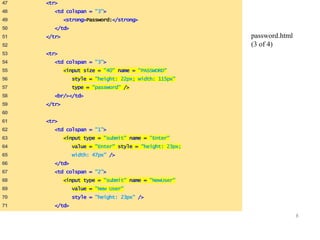
26 <!-- post form data to password.php --> 
27 <form action = "password.php" method = "post"> 
28 <br /> 
29 
30 <table border = "0" cellspacing = "0" 
31 style = "height: 90px; width: 123px; 
32 font-size: 10pt" cellpadding = "0"> 
33 
34 <tr> 
35 <td colspan = "3"> 
36 <strong>Username:</strong> 
37 </td> 
38 </tr> 
39 
40 <tr> 
41 <td colspan = "3"> 
42 <input size = "40" name = "USERNAME" 
43 style = "height: 22px; width: 115px" /> 
44 </td> 
45 </tr> 
46 
password.html 
(2 of 4) 
Form data is posted to password.php.
8 
47 <tr> 
48 <td colspan = "3"> 
49 <strong>Password:</strong> 
50 </td> 
51 </tr> 
52 
53 <tr> 
54 <td colspan = "3"> 
55 <input size = "40" name = "PASSWORD" 
56 style = "height: 22px; width: 115px" 
57 type = "password" /> 
58 <br/></td> 
59 </tr> 
60 
61 <tr> 
62 <td colspan = "1"> 
63 <input type = "submit" name = "Enter" 
64 value = "Enter" style = "height: 23px; 
65 width: 47px" /> 
66 </td> 
67 <td colspan = "2"> 
68 <input type = "submit" name = "NewUser" 
69 value = "New User" 
70 style = "height: 23px" /> 
71 </td> 
password.html 
(3 of 4)
9 
72 </tr> 
73 </table> 
74 </form> 
75 </body> 
76 </html> 
password.html 
(4 of 4)
10 
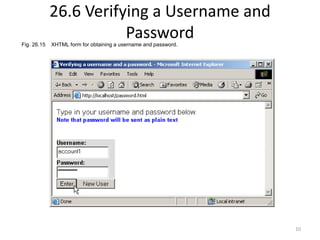
26.6 Verifying a Username and 
Password 
Fig. 26.15 XHTML form for obtaining a username and password.
11 
1 <!DOCTYPE html PUBLIC "-//W3C//DTD XHTML 1.0 Transitional//EN" 
2 "http://www.w3.org/TR/xhtml1/DTD/xhtml1-transitional.dtd"> 
3 
4 <!-- Fig. 26.16: password.php --> 
5 <!-- Searching a database for usernames and passwords. --> 
6 
7 <html xmlns = "http://www.w3.org/1999/xhtml"> 
8 <head> 
9 <?php 
10 extract( $_POST ); 
11 
12 // check if user has left USERNAME or PASSWORD field blank 
13 if ( !$USERNAME || !$PASSWORD ) { 
14 fieldsBlank(); 
15 die(); 
16 } 
17 
18 // check if the New User button was clicked 
19 if ( isset( $NewUser ) ) { 
20 
21 // open password.txt for writing using append mode 
22 if ( !( $file = fopen( "password.txt", 
23 "a" ) ) ) { 
24 
password.php 
(1 of 7) 
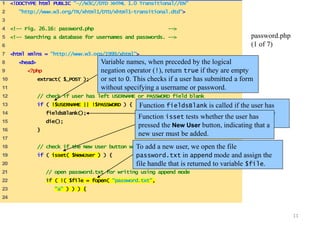
Variable names, when preceded by the logical 
negation operator (!), return true if they are empty 
or set to 0. This checks if a user has submitted a form 
without specifying a username or password. 
Function fieldsBlank is called if the user has 
submitted an incomplete form to notify the user 
that all form fields must be completed. 
Function isset tests whether the user has 
pressed the New User button, indicating that a 
new user must be added. 
To add a new user, we open the file 
password.txt in append mode and assign the 
file handle that is returned to variable $file.
12 
25 // print error message and terminate script 
26 // execution if file cannot be opened 
27 print( "<title>Error</title></head><body> 
28 Could not open password file 
29 </body></html>" ); 
30 die(); 
31 } 
32 
33 // write username and password to file and 
34 // call function userAdded 
35 fputs( $file, "$USERNAME,$PASSWORDn" ); 
36 userAdded( $USERNAME ); 
37 } 
38 else { 
39 
40 // if a new user is not being added, open file 
41 // for reading 
42 if ( !( $file = fopen( "password.txt", 
43 "r" ) ) ) { 
44 print( "<title>Error</title></head> 
45 <body>Could not open password file 
46 </body></html>" ); 
47 die(); 
48 } 
49 
password.php 
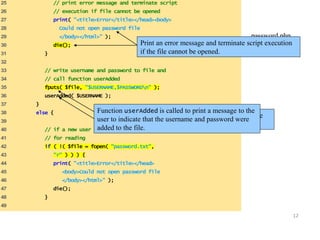
Print an error message and terminate sc(r2ip otf e 7x)ecution 
if the file cannot be opened. 
Function userAdded is called to print a message to the 
user to indicate that the username and password were 
added to the file. 
Function fputs writes the name and password to the 
text file..

Synapse india basic php development part 2

  • 1.
    1 44 Youhave been added to the 45 <span style = "color: blue"> 46 <strong> 47 <?php print( "$book " ); ?> 48 </strong> 49 </span> 50 mailing list. 51 </p> 52 <strong>The following information has been saved 53 in our database:</strong><br /> 54 55 <table border = "0" cellpadding = "0" cellspacing = "10"> 56 <tr> 57 <td bgcolor = "#ffffaa">Name </td> 58 <td bgcolor = "#ffffbb">Email</td> 59 <td bgcolor = "#ffffcc">Phone</td> 60 <td bgcolor = "#ffffdd">OS</td> 61 </tr> 62 63 <tr> 64 <?php 65 form.php (3 of 4)
  • 2.
    2 form.php (4of 4) 66 // print each form field’s value 67 print( "<td>$fname $lname</td> 68 <td>$email</td> 69 <td>$phone</td> 70 <td>$os</td>" ); 71 ?> 72 </tr> 73 </table> 74 75 <br /><br /><br /> 76 <div style = "font-size: 10pt; text-align: center"> 77 This is only a sample form. 78 You have not been added to a mailing list. 79 </div> 80 </body> 81 </html>
  • 3.
    3 26.5 FormProcessing and Business Logic Fig. 26.14 Obtaining user input through forms.
  • 4.
    4 26.6 Verifyinga Username and Password  Private website  Only accessible to certain individuals  Encrypt username and password data when sending, storing and retrieving for increased security  Implementing password checking  Login information stored in file • fopen function  Read, write, append modes  Store data using fputs • n newline character  Close files when done • fclose function
  • 5.
    5 26.6 Verifyinga Username and Password  Implementing password checking, cont.  Trim newline character • chop function  Split string into substrings given a certain delimiter • split function  If username/password match list, allow access
  • 6.
    6 1 <!DOCTYPEhtml PUBLIC "-//W3C//DTD XHTML 1.0 Transitional//EN" 2 "http://www.w3.org/TR/xhtml1/DTD/xhtml1-transitional.dtd"> 3 4 <!-- Fig. 26.15: password.html --> 5 <!-- XHTML form sent to password.php for verification --> 6 7 <html xmlns = "http://www.w3.org/1999/xhtml"> 8 <head> 9 <title>Verifying a username and a password.</title> 10 11 <style type = "text/css"> 12 td { background-color: #DDDDDD } 13 </style> 14 </head> 15 16 <body style = "font-family: arial"> 17 <p style = "font-size: 13pt"> 18 Type in your username and password below. 19 <br /> 20 <span style = "color: #0000FF; font-size: 10pt; 21 font-weight: bold"> 22 Note that password will be sent as plain text 23 </span> 24 </p> 25 password.html (1 of 4)
  • 7.
    7 26 <!--post form data to password.php --> 27 <form action = "password.php" method = "post"> 28 <br /> 29 30 <table border = "0" cellspacing = "0" 31 style = "height: 90px; width: 123px; 32 font-size: 10pt" cellpadding = "0"> 33 34 <tr> 35 <td colspan = "3"> 36 <strong>Username:</strong> 37 </td> 38 </tr> 39 40 <tr> 41 <td colspan = "3"> 42 <input size = "40" name = "USERNAME" 43 style = "height: 22px; width: 115px" /> 44 </td> 45 </tr> 46 password.html (2 of 4) Form data is posted to password.php.
  • 8.
    8 47 <tr> 48 <td colspan = "3"> 49 <strong>Password:</strong> 50 </td> 51 </tr> 52 53 <tr> 54 <td colspan = "3"> 55 <input size = "40" name = "PASSWORD" 56 style = "height: 22px; width: 115px" 57 type = "password" /> 58 <br/></td> 59 </tr> 60 61 <tr> 62 <td colspan = "1"> 63 <input type = "submit" name = "Enter" 64 value = "Enter" style = "height: 23px; 65 width: 47px" /> 66 </td> 67 <td colspan = "2"> 68 <input type = "submit" name = "NewUser" 69 value = "New User" 70 style = "height: 23px" /> 71 </td> password.html (3 of 4)
  • 9.
    9 72 </tr> 73 </table> 74 </form> 75 </body> 76 </html> password.html (4 of 4)
  • 10.
    10 26.6 Verifyinga Username and Password Fig. 26.15 XHTML form for obtaining a username and password.
  • 11.
    11 1 <!DOCTYPEhtml PUBLIC "-//W3C//DTD XHTML 1.0 Transitional//EN" 2 "http://www.w3.org/TR/xhtml1/DTD/xhtml1-transitional.dtd"> 3 4 <!-- Fig. 26.16: password.php --> 5 <!-- Searching a database for usernames and passwords. --> 6 7 <html xmlns = "http://www.w3.org/1999/xhtml"> 8 <head> 9 <?php 10 extract( $_POST ); 11 12 // check if user has left USERNAME or PASSWORD field blank 13 if ( !$USERNAME || !$PASSWORD ) { 14 fieldsBlank(); 15 die(); 16 } 17 18 // check if the New User button was clicked 19 if ( isset( $NewUser ) ) { 20 21 // open password.txt for writing using append mode 22 if ( !( $file = fopen( "password.txt", 23 "a" ) ) ) { 24 password.php (1 of 7) Variable names, when preceded by the logical negation operator (!), return true if they are empty or set to 0. This checks if a user has submitted a form without specifying a username or password. Function fieldsBlank is called if the user has submitted an incomplete form to notify the user that all form fields must be completed. Function isset tests whether the user has pressed the New User button, indicating that a new user must be added. To add a new user, we open the file password.txt in append mode and assign the file handle that is returned to variable $file.
  • 12.
    12 25 //print error message and terminate script 26 // execution if file cannot be opened 27 print( "<title>Error</title></head><body> 28 Could not open password file 29 </body></html>" ); 30 die(); 31 } 32 33 // write username and password to file and 34 // call function userAdded 35 fputs( $file, "$USERNAME,$PASSWORDn" ); 36 userAdded( $USERNAME ); 37 } 38 else { 39 40 // if a new user is not being added, open file 41 // for reading 42 if ( !( $file = fopen( "password.txt", 43 "r" ) ) ) { 44 print( "<title>Error</title></head> 45 <body>Could not open password file 46 </body></html>" ); 47 die(); 48 } 49 password.php Print an error message and terminate sc(r2ip otf e 7x)ecution if the file cannot be opened. Function userAdded is called to print a message to the user to indicate that the username and password were added to the file. Function fputs writes the name and password to the text file..