1 
Chapter 26 - PHP 
Outline 
26.1 Introduction 
26.2 PHP 
26.3 String Processing and Regular Expressions 
26.4 Viewing Client/Server Environment Variables 
26.5 Form Processing and Business Logic 
26.6 Verifying a Username and Password 
26.7 Connecting to a Database 
26.8 Cookies 
26.9 Dynamic Content in PHP 
26.10 Operator Precedence 
26.11 Web Resources
2 
Objectives 
In this chapter, you will learn: 
 To understand PHP data types, operators, 
arrays and control structures. 
 To understand string processing and regular 
expressions in PHP. 
 To construct programs that process form data. 
 To be able to read and write client data using 
cookies. 
 To construct programs that interact with 
MySQL databases.
3 
26.1 Introduction 
 PHP 
 PHP: Hypertext Preprocessor 
 Originally called “Personal Home Page Tools” 
 Popular server-side scripting technology 
 Open-source 
 Anyone may view, modify and redistribute source 
code 
 Supported freely by community 
 Platform independent
4 
26.2 PHP 
 Basic application 
 Scripting delimiters 
• <? php ?> 
 Must enclose all script code 
 Variables preceded by $ symbol 
 Case-sensitive 
 End statements with semicolon 
 Comments 
• // for single line 
• /* */ for multiline 
 Filenames end with .php by convention
5 
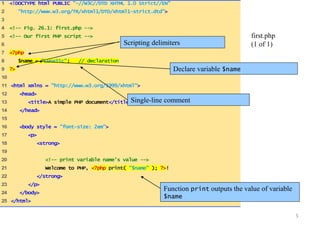
1 <!DOCTYPE html PUBLIC "-//W3C//DTD XHTML 1.0 Strict//EN" 
2 "http://www.w3.org/TR/xhtml1/DTD/xhtml1-strict.dtd"> 
3 
4 <!-- Fig. 26.1: first.php --> 
5 <!-- Our first PHP script --> 
6 
7 <?php 
8 $name = "LunaTic"; // declaration 
9 ?> 
10 
11 <html xmlns = "http://www.w3.org/1999/xhtml"> 
12 <head> 
13 <title>A simple PHP document</title> 
14 </head> 
15 
16 <body style = "font-size: 2em"> 
17 <p> 
18 <strong> 
19 
20 <!-- print variable name’s value --> 
21 Welcome to PHP, <?php print( "$name" ); ?>! 
22 </strong> 
23 </p> 
24 </body> 
25 </html> 
first.php 
(1 of 1) 
Scripting delimiters 
Declare variable $name 
Single-line comment 
Function print outputs the value of variable 
$name
6 
26.2 PHP 
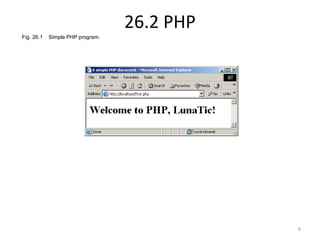
Fig. 26.1 Simple PHP program.
7 
26.2 PHP 
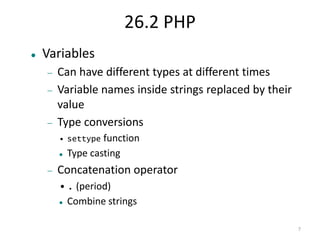
 Variables 
 Can have different types at different times 
 Variable names inside strings replaced by their 
value 
 Type conversions 
• settype function 
 Type casting 
 Concatenation operator 
•. (period) 
 Combine strings
8 
26.2 PHP 
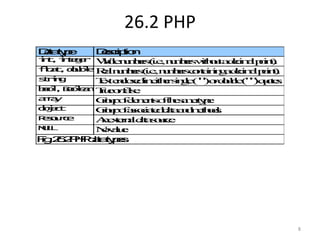
Data type Description 
int, integer Whole numbers (i.e., numbers without a decimal point). 
float, double Real numbers (i.e., numbers containing a decimal point). 
string Text enclosed in either single ('') or double ("") quotes. 
bool, Boolean True or false. 
array Group of elements of the same type. 
object Group of associated data and methods. 
Resource An external data source. 
NULL No value. 
Fig. 26.2 PHP data types.
9 
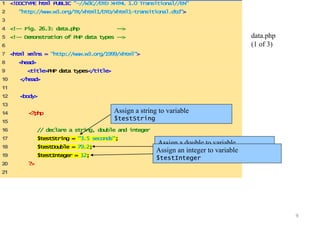
1 <!DOCTYPE html PUBLIC "-//W3C//DTD XHTML 1.0 Transitional//EN" 
2 "http://www.w3.org/TR/xhtml1/DTD/xhtml1-transitional.dtd"> 
3 
4 <!-- Fig. 26.3: data.php --> 
5 <!-- Demonstration of PHP data types --> 
6 
7 <html xmlns = "http://www.w3.org/1999/xhtml"> 
8 <head> 
9 <title>PHP data types</title> 
10 </head> 
11 
12 <body> 
13 
14 <?php 
15 
16 // declare a string, double and integer 
17 $testString = "3.5 seconds"; 
18 $testDouble = 79.2; 
19 $testInteger = 12; 
20 ?> 
21 
data.php 
(1 of 3) 
Assign a string to variable 
$testString 
Assign a double to variable 
A$stseigsnt Daonu ibnlteeger to variable 
$testInteger
10 
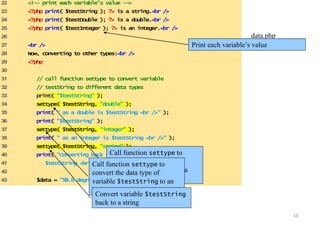
22 <!-- print each variable’s value --> 
23 <?php print( $testString ); ?> is a string.<br /> 
24 <?php print( $testDouble ); ?> is a double.<br /> 
25 <?php print( $testInteger ); ?> is an integer.<br /> 
26 
27 <br /> 
28 Now, converting to other types:<br /> 
29 <?php 
30 
31 // call function settype to convert variable 
32 // testString to different data types 
33 print( "$testString" ); 
34 settype( $testString, "double" ); 
35 print( " as a double is $testString <br />" ); 
36 print( "$testString" ); 
37 settype( $testString, "integer" ); 
38 print( " as an integer is $testString <br />" ); 
39 settype( $testString, "string" ); 
40 print( "Converting back to a string results in 
41 $testString <br /><br />" ); 
42 
43 $data = "98.6 degrees"; 
data.php 
Print each variable’s (v2a loufe 3) 
Call function settype to 
convert the data type of 
variable $testString to a 
double. 
Call function settype to 
convert the data type of 
variable $testString to an 
integer. 
Convert variable $testString 
back to a string
11 
44 
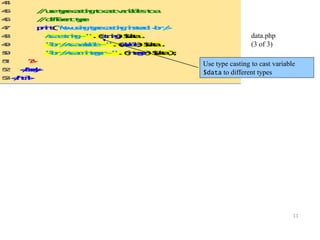
45 // use type casting to cast variables to a 
46 // different type 
47 print( "Now using type casting instead: <br /> 
48 As a string - " . (string) $data . 
49 "<br />As a double - " .(double) $data . 
50 "<br />As an integer - " . (integer) $data ); 
51 ?> 
52 </body> 
53 </html> 
data.php 
(3 of 3) 
Use type casting to cast variable 
$data to different types
12 
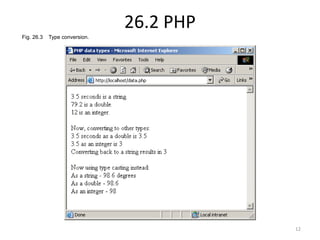
26.2 PHP 
Fig. 26.3 Type conversion.

Synapse india basic php development part 1

  • 1.
    1 Chapter 26- PHP Outline 26.1 Introduction 26.2 PHP 26.3 String Processing and Regular Expressions 26.4 Viewing Client/Server Environment Variables 26.5 Form Processing and Business Logic 26.6 Verifying a Username and Password 26.7 Connecting to a Database 26.8 Cookies 26.9 Dynamic Content in PHP 26.10 Operator Precedence 26.11 Web Resources
  • 2.
    2 Objectives Inthis chapter, you will learn:  To understand PHP data types, operators, arrays and control structures.  To understand string processing and regular expressions in PHP.  To construct programs that process form data.  To be able to read and write client data using cookies.  To construct programs that interact with MySQL databases.
  • 3.
    3 26.1 Introduction  PHP  PHP: Hypertext Preprocessor  Originally called “Personal Home Page Tools”  Popular server-side scripting technology  Open-source  Anyone may view, modify and redistribute source code  Supported freely by community  Platform independent
  • 4.
    4 26.2 PHP  Basic application  Scripting delimiters • <? php ?>  Must enclose all script code  Variables preceded by $ symbol  Case-sensitive  End statements with semicolon  Comments • // for single line • /* */ for multiline  Filenames end with .php by convention
  • 5.
    5 1 <!DOCTYPEhtml PUBLIC "-//W3C//DTD XHTML 1.0 Strict//EN" 2 "http://www.w3.org/TR/xhtml1/DTD/xhtml1-strict.dtd"> 3 4 <!-- Fig. 26.1: first.php --> 5 <!-- Our first PHP script --> 6 7 <?php 8 $name = "LunaTic"; // declaration 9 ?> 10 11 <html xmlns = "http://www.w3.org/1999/xhtml"> 12 <head> 13 <title>A simple PHP document</title> 14 </head> 15 16 <body style = "font-size: 2em"> 17 <p> 18 <strong> 19 20 <!-- print variable name’s value --> 21 Welcome to PHP, <?php print( "$name" ); ?>! 22 </strong> 23 </p> 24 </body> 25 </html> first.php (1 of 1) Scripting delimiters Declare variable $name Single-line comment Function print outputs the value of variable $name
  • 6.
    6 26.2 PHP Fig. 26.1 Simple PHP program.
  • 7.
    7 26.2 PHP  Variables  Can have different types at different times  Variable names inside strings replaced by their value  Type conversions • settype function  Type casting  Concatenation operator •. (period)  Combine strings
  • 8.
    8 26.2 PHP Data type Description int, integer Whole numbers (i.e., numbers without a decimal point). float, double Real numbers (i.e., numbers containing a decimal point). string Text enclosed in either single ('') or double ("") quotes. bool, Boolean True or false. array Group of elements of the same type. object Group of associated data and methods. Resource An external data source. NULL No value. Fig. 26.2 PHP data types.
  • 9.
    9 1 <!DOCTYPEhtml PUBLIC "-//W3C//DTD XHTML 1.0 Transitional//EN" 2 "http://www.w3.org/TR/xhtml1/DTD/xhtml1-transitional.dtd"> 3 4 <!-- Fig. 26.3: data.php --> 5 <!-- Demonstration of PHP data types --> 6 7 <html xmlns = "http://www.w3.org/1999/xhtml"> 8 <head> 9 <title>PHP data types</title> 10 </head> 11 12 <body> 13 14 <?php 15 16 // declare a string, double and integer 17 $testString = "3.5 seconds"; 18 $testDouble = 79.2; 19 $testInteger = 12; 20 ?> 21 data.php (1 of 3) Assign a string to variable $testString Assign a double to variable A$stseigsnt Daonu ibnlteeger to variable $testInteger
  • 10.
    10 22 <!--print each variable’s value --> 23 <?php print( $testString ); ?> is a string.<br /> 24 <?php print( $testDouble ); ?> is a double.<br /> 25 <?php print( $testInteger ); ?> is an integer.<br /> 26 27 <br /> 28 Now, converting to other types:<br /> 29 <?php 30 31 // call function settype to convert variable 32 // testString to different data types 33 print( "$testString" ); 34 settype( $testString, "double" ); 35 print( " as a double is $testString <br />" ); 36 print( "$testString" ); 37 settype( $testString, "integer" ); 38 print( " as an integer is $testString <br />" ); 39 settype( $testString, "string" ); 40 print( "Converting back to a string results in 41 $testString <br /><br />" ); 42 43 $data = "98.6 degrees"; data.php Print each variable’s (v2a loufe 3) Call function settype to convert the data type of variable $testString to a double. Call function settype to convert the data type of variable $testString to an integer. Convert variable $testString back to a string
  • 11.
    11 44 45// use type casting to cast variables to a 46 // different type 47 print( "Now using type casting instead: <br /> 48 As a string - " . (string) $data . 49 "<br />As a double - " .(double) $data . 50 "<br />As an integer - " . (integer) $data ); 51 ?> 52 </body> 53 </html> data.php (3 of 3) Use type casting to cast variable $data to different types
  • 12.
    12 26.2 PHP Fig. 26.3 Type conversion.