SWING & SWT
A Tale of Two Java GUI Libraries
AWT
          (ABSTRACT WINDOW TOOLKIT)
 Oldest toolkit , part of java standard API
 It includes classes like Button, TextField, and Menu

 It also provides the necessary event handling
  mechanism
 AWT controls may behave differently under different
  operating systems
For example, it might be possible to right-click on a
  button under operating system A showing a context
  menu, but impossible to do so under operating system
  B
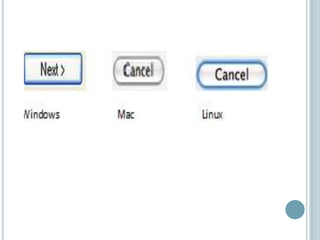
   It relies on the native GUI elements of each
    operating systems so known as“Platform
    dependent “

Example
create a Button, a native Windows button will show
  up if the application is running under windows, a
  native Mac OS button will show up if the application
  is running under Mac OS, a native Linux button will
  show up if the application is running under Linux,
  and so on.
 GUI components are drawn very quickly. This is
  knows as "native performance“
 In AWT, native code, written in a language like C or
  C++

   GUI components look natural for the users of each
    operating systems. This is knows as "native look
    and feel“

   AWT only include components that exist in ALL
    supported operating systems(least common
    denominator) so the problem came from here
SWING
o   Part of the Java standard API
o   It includes classes like JButton, JTextFiled, JMenu,
    and JTree
   Advantage
       It still relies on AWT classes for event handling
        but for rendering components it relies on the
        Java2D API to draw components from scratch

       Does not suffer from the "least common
        denominator“ because it have Swing classes
        defining how to draw Swing controls from scratch

       "platform independence“
   "Pluggable look and feel" that allows controls to
        appear with a different look and feel if desired
       Swing components follow the Model-View-
        Controller (MVC) paradigm, and thus can
        provide a much more flexible UI.
   Disadvantage

       Rendering Swing components is slower than
        rendering AWT components because they are
        drawn from scratch
       Large memory
       When a change happen to the operating system
        so it doesn’t update automatically
SWT
             (STANDARD WIDGET TOOLKIT)
   It is NOT part of the Java standard API
   Advantage
       SWT tries to combine the best of AWT and
        Swing
       There is a native component written for each
        operating system called Java Native interface
       Use less memory
       Rich set of widgets which used to make good
        looking
       Run faster
       When a change happen to the operating system
        so it update automatically
   Disadvantage
    • Also you have to build separate installers for
      every operating systems which you are to
      support.
    • Native look and Feel support
SUMMARY


   There is a big debate between Java developers
    about whether Swing or SWT is better

   So it up to you to choose the most appropriate GUI
    library (SWT or Swing ) to your application
REFERENCE :
 http://www.developer.com/java/other/article.php/217
  9061/Swing-and-SWT-A-Tale-of-Two-Java-GUI-
  Libraries.htm
 http://forum.codecall.net/lounge/37501-swt-vs-
  swing-debate.html
 http://www.ahmadsoft.org/articles/swingswt/swings
  wt.html
 http://www.javalobby.org/java/forums/t63186.html

 http://www.youtube.com/watch?v=1ND16H-ew_4
Thank you 

Swt vs swing

  • 1.
    SWING & SWT ATale of Two Java GUI Libraries
  • 2.
    AWT (ABSTRACT WINDOW TOOLKIT)  Oldest toolkit , part of java standard API  It includes classes like Button, TextField, and Menu  It also provides the necessary event handling mechanism  AWT controls may behave differently under different operating systems For example, it might be possible to right-click on a button under operating system A showing a context menu, but impossible to do so under operating system B
  • 3.
    It relies on the native GUI elements of each operating systems so known as“Platform dependent “ Example create a Button, a native Windows button will show up if the application is running under windows, a native Mac OS button will show up if the application is running under Mac OS, a native Linux button will show up if the application is running under Linux, and so on.
  • 5.
     GUI componentsare drawn very quickly. This is knows as "native performance“  In AWT, native code, written in a language like C or C++  GUI components look natural for the users of each operating systems. This is knows as "native look and feel“  AWT only include components that exist in ALL supported operating systems(least common denominator) so the problem came from here
  • 6.
    SWING o Part of the Java standard API o It includes classes like JButton, JTextFiled, JMenu, and JTree  Advantage  It still relies on AWT classes for event handling but for rendering components it relies on the Java2D API to draw components from scratch  Does not suffer from the "least common denominator“ because it have Swing classes defining how to draw Swing controls from scratch  "platform independence“
  • 7.
    "Pluggable look and feel" that allows controls to appear with a different look and feel if desired  Swing components follow the Model-View- Controller (MVC) paradigm, and thus can provide a much more flexible UI.  Disadvantage  Rendering Swing components is slower than rendering AWT components because they are drawn from scratch  Large memory  When a change happen to the operating system so it doesn’t update automatically
  • 8.
    SWT (STANDARD WIDGET TOOLKIT)  It is NOT part of the Java standard API  Advantage  SWT tries to combine the best of AWT and Swing  There is a native component written for each operating system called Java Native interface  Use less memory  Rich set of widgets which used to make good looking  Run faster  When a change happen to the operating system so it update automatically
  • 9.
    Disadvantage • Also you have to build separate installers for every operating systems which you are to support. • Native look and Feel support
  • 10.
    SUMMARY  There is a big debate between Java developers about whether Swing or SWT is better  So it up to you to choose the most appropriate GUI library (SWT or Swing ) to your application
  • 11.
    REFERENCE :  http://www.developer.com/java/other/article.php/217 9061/Swing-and-SWT-A-Tale-of-Two-Java-GUI- Libraries.htm  http://forum.codecall.net/lounge/37501-swt-vs- swing-debate.html  http://www.ahmadsoft.org/articles/swingswt/swings wt.html  http://www.javalobby.org/java/forums/t63186.html  http://www.youtube.com/watch?v=1ND16H-ew_4
  • 12.