Lecture 2 – Distributed Filesystems 922EU3870 – Cloud Computing and Mobile Platforms, Autumn 2009 2009/9/21 Ping Yeh ( 葉平 ), Google, Inc.
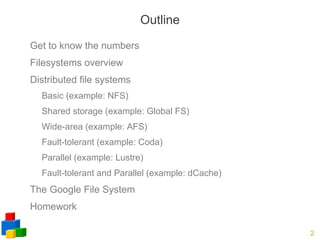
Outline Get to know the numbers
Filesystems overview
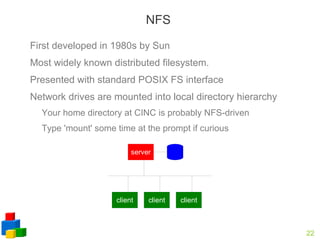
Distributed file systems Basic (example: NFS)
Shared storage (example: Global FS)
Wide-area (example: AFS)
Fault-tolerant (example: Coda)
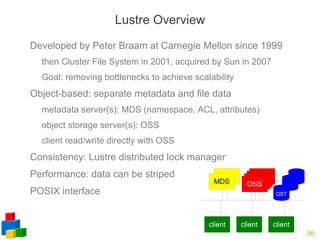
Parallel (example: Lustre)
Fault-tolerant and Parallel (example: dCache) The Google File System
Homework
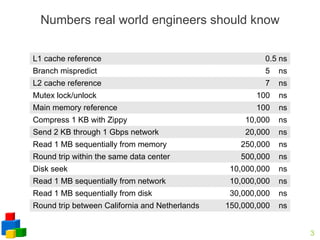
Numbers real world engineers should know L1 cache reference 0.5 ns Branch mispredict 5  ns L2 cache reference 7  ns Mutex lock/unlock 100  ns Main memory reference 100  ns Compress 1 KB with Zippy 10,000  ns Send 2 KB through 1 Gbps network 20,000  ns Read 1 MB sequentially from memory 250,000  ns Round trip within the same data center 500,000  ns Disk seek 10,000,000  ns Read 1 MB sequentially from network 10,000,000  ns Read 1 MB sequentially from disk 30,000,000  ns Round trip between California and Netherlands 150,000,000  ns
The Joys of Real Hardware Typical first year for a new cluster: ~0.5  overheating  (power down most machines in <5 mins, ~1-2 days to recover) ~1  PDU failure  (~500-1000 machines suddenly disappear, ~6 hours to come back) ~1  rack-move  (plenty of warning, ~500-1000 machines powered down, ~6 hours) ~1  network rewiring  (rolling ~5% of machines down over 2-day span) ~20  rack failures  (40-80 machines instantly disappear, 1-6 hours to get back) ~5  racks go wonky  (40-80 machines see 50% packetloss) ~8  network maintenances  (4 might cause ~30-minute random connectivity losses) ~12  router reloads  (takes out DNS and external vips for a couple minutes) ~3  router failures  (have to immediately pull traffic for an hour) ~dozens of minor  30-second blips for dns ~1000  individual machine failures ~thousands of  hard drive failures slow disks, bad memory, misconfigured machines, flaky machines,  etc.
File Systems Overview System that permanently stores data
Usually layered on top of a lower-level physical storage medium
Divided into logical units called “files” Addressable by a filename  (“foo.txt”) Files are often organized into directories Usually supports hierarchical nesting (directories)
A path is the expression that joins directories and filename to form a unique “full name” for a file. Directories may further belong to a volume
The set of valid paths form the  namespace  of the file system.
What Gets Stored User data itself is the bulk of the file system's contents
Also includes meta-data on a volume-wide and per-file basis: Volume-wide: Available space Formatting info character set ... Per-file: name owner modification date physical layout...
High-Level Organization Files are typically organized in a “tree” structure made of nested directories
One directory acts as the “root”
“links” (symlinks, shortcuts, etc) provide simple means of providing multiple access paths to one file
Other file systems can be “mounted” and dropped in as sub-hierarchies (other drives, network shares)
Typical operations on a file: create, delete, rename, open, close, read, write, append. also lock for multi-user systems.
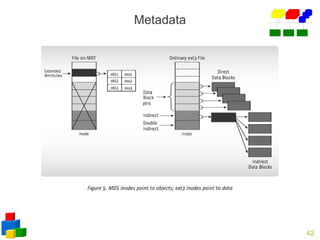
Low-Level Organization (1/2) File data and meta-data stored separately
File descriptors + meta-data stored in inodes (Un*x) Large tree or table at designated location on disk
Tells how to look up file contents Meta-data may be replicated to increase system reliability
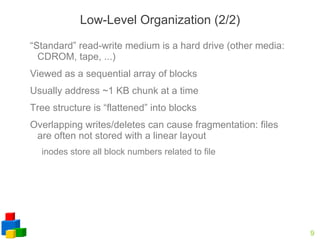
Low-Level Organization (2/2) “Standard” read-write medium is a hard drive (other media: CDROM, tape, ...)
Viewed as a sequential array of blocks
Usually address ~1 KB chunk at a time
Tree structure is “flattened” into blocks
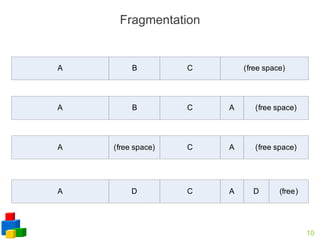
Overlapping writes/deletes can cause fragmentation: files are often not stored with a linear layout inodes store all block numbers related to file
Fragmentation
Filesystem Design Considerations Namespace: physical, logical
Consistency: what to do when more than one user reads/writes on the same file?
Security: who can do what to a file? Authentication/ACL
Reliability: can files not be damaged at power outage or other hardware failures?
Local Filesystems on Unix-like Systems Many different designs
Namespace: root directory “/”, followed by directories and files.
Consistency: “sequential consistency”, newly written data are immediately visible to open reads (if...)
Security: uid/gid, mode of files
kerberos: tickets Reliability: superblocks, journaling, snapshot more reliable filesystem on top of existing filesystem: RAID computer
Namespace Physical mapping: a directory and all of its subdirectories are stored on the same physical media. /mnt/cdrom
/mnt/disk1, /mnt/disk2, … when you have multiple disks Logical volume: a logical namespace that can contain multiple physical media or a partition of a physical media still mounted like /mnt/vol1
dynamical resizing by adding/removing disks without reboot
splitting/merging volumes as long as no data spans the split

Distributed File System

  • 1.
    Lecture 2 –Distributed Filesystems 922EU3870 – Cloud Computing and Mobile Platforms, Autumn 2009 2009/9/21 Ping Yeh ( 葉平 ), Google, Inc.
  • 2.
    Outline Get toknow the numbers
  • 3.
  • 4.
    Distributed file systemsBasic (example: NFS)
  • 5.
  • 6.
  • 7.
  • 8.
  • 9.
    Fault-tolerant and Parallel(example: dCache) The Google File System
  • 10.
  • 11.
    Numbers real worldengineers should know L1 cache reference 0.5 ns Branch mispredict 5 ns L2 cache reference 7 ns Mutex lock/unlock 100 ns Main memory reference 100 ns Compress 1 KB with Zippy 10,000 ns Send 2 KB through 1 Gbps network 20,000 ns Read 1 MB sequentially from memory 250,000 ns Round trip within the same data center 500,000 ns Disk seek 10,000,000 ns Read 1 MB sequentially from network 10,000,000 ns Read 1 MB sequentially from disk 30,000,000 ns Round trip between California and Netherlands 150,000,000 ns
  • 12.
    The Joys ofReal Hardware Typical first year for a new cluster: ~0.5 overheating (power down most machines in <5 mins, ~1-2 days to recover) ~1 PDU failure (~500-1000 machines suddenly disappear, ~6 hours to come back) ~1 rack-move (plenty of warning, ~500-1000 machines powered down, ~6 hours) ~1 network rewiring (rolling ~5% of machines down over 2-day span) ~20 rack failures (40-80 machines instantly disappear, 1-6 hours to get back) ~5 racks go wonky (40-80 machines see 50% packetloss) ~8 network maintenances (4 might cause ~30-minute random connectivity losses) ~12 router reloads (takes out DNS and external vips for a couple minutes) ~3 router failures (have to immediately pull traffic for an hour) ~dozens of minor 30-second blips for dns ~1000 individual machine failures ~thousands of hard drive failures slow disks, bad memory, misconfigured machines, flaky machines, etc.
  • 13.
    File Systems OverviewSystem that permanently stores data
  • 14.
    Usually layered ontop of a lower-level physical storage medium
  • 15.
    Divided into logicalunits called “files” Addressable by a filename (“foo.txt”) Files are often organized into directories Usually supports hierarchical nesting (directories)
  • 16.
    A path isthe expression that joins directories and filename to form a unique “full name” for a file. Directories may further belong to a volume
  • 17.
    The set ofvalid paths form the namespace of the file system.
  • 18.
    What Gets StoredUser data itself is the bulk of the file system's contents
  • 19.
    Also includes meta-dataon a volume-wide and per-file basis: Volume-wide: Available space Formatting info character set ... Per-file: name owner modification date physical layout...
  • 20.
    High-Level Organization Filesare typically organized in a “tree” structure made of nested directories
  • 21.
    One directory actsas the “root”
  • 22.
    “links” (symlinks, shortcuts,etc) provide simple means of providing multiple access paths to one file
  • 23.
    Other file systemscan be “mounted” and dropped in as sub-hierarchies (other drives, network shares)
  • 24.
    Typical operations ona file: create, delete, rename, open, close, read, write, append. also lock for multi-user systems.
  • 25.
    Low-Level Organization (1/2)File data and meta-data stored separately
  • 26.
    File descriptors +meta-data stored in inodes (Un*x) Large tree or table at designated location on disk
  • 27.
    Tells how tolook up file contents Meta-data may be replicated to increase system reliability
  • 28.
    Low-Level Organization (2/2)“Standard” read-write medium is a hard drive (other media: CDROM, tape, ...)
  • 29.
    Viewed as asequential array of blocks
  • 30.
    Usually address ~1KB chunk at a time
  • 31.
    Tree structure is“flattened” into blocks
  • 32.
    Overlapping writes/deletes cancause fragmentation: files are often not stored with a linear layout inodes store all block numbers related to file
  • 33.
  • 34.
    Filesystem Design ConsiderationsNamespace: physical, logical
  • 35.
    Consistency: what todo when more than one user reads/writes on the same file?
  • 36.
    Security: who cando what to a file? Authentication/ACL
  • 37.
    Reliability: can filesnot be damaged at power outage or other hardware failures?
  • 38.
    Local Filesystems onUnix-like Systems Many different designs
  • 39.
    Namespace: root directory“/”, followed by directories and files.
  • 40.
    Consistency: “sequential consistency”,newly written data are immediately visible to open reads (if...)
  • 41.
  • 42.
    kerberos: tickets Reliability:superblocks, journaling, snapshot more reliable filesystem on top of existing filesystem: RAID computer
  • 43.
    Namespace Physical mapping:a directory and all of its subdirectories are stored on the same physical media. /mnt/cdrom
  • 44.
    /mnt/disk1, /mnt/disk2, …when you have multiple disks Logical volume: a logical namespace that can contain multiple physical media or a partition of a physical media still mounted like /mnt/vol1
  • 45.
    dynamical resizing byadding/removing disks without reboot
  • 46.
    splitting/merging volumes aslong as no data spans the split

Editor's Notes

  • #4 memory: 1 GHz bus * 32 bit * 1B/8b = 4 GB/s 1MB / 4 GBps = 1/4 ms = 250 micro-seconds network: 1 Gbps = 100 MB/s 1MB / 100 MBps = 0.01 s = 10 ms
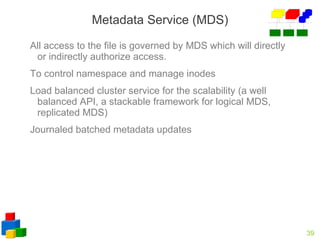
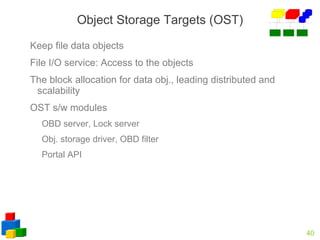
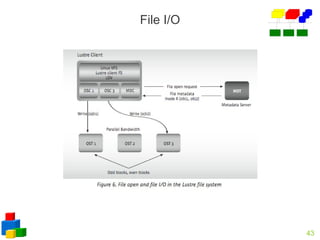
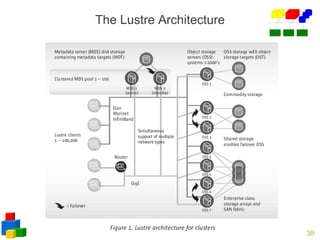
  • #41 1.NAL-Network Abstraction Layers 2.Drivers: ext2 OBD, OBD filter makes other file systems recognizable such as XFS, JFS, and Ext3 3.NIO portal API provides for interoperation with a variety of network transports through NAL 4.When a Lustre inode represents a file, the metadata merely holds reference to the file data obj. stored on the OST’s